Best Google Domains Alternatives: The Only 3 Registrars Worth Your Money
Frustrated by the Squarespace migration? Compare the best google domains alternatives (Porkbun, Cloudflare, Spaceship) to transfer your domain safely.
 Abir Bin Hasan
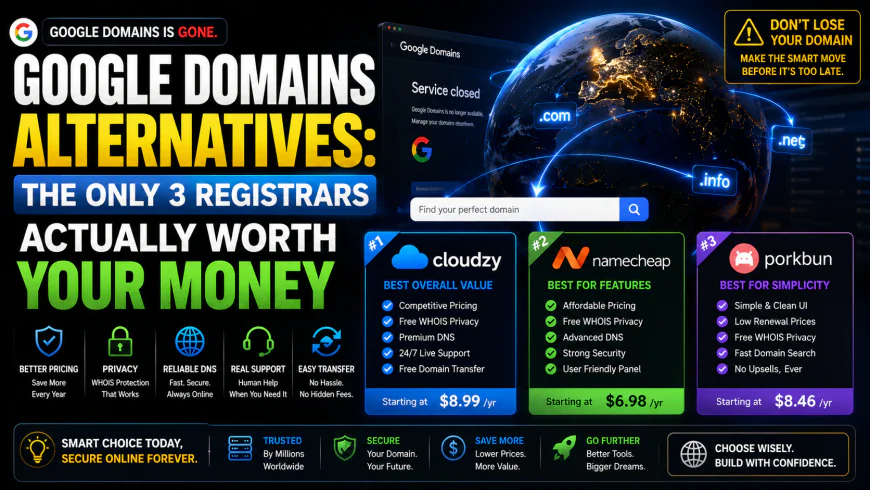
Google Domains Alternatives: The Only 3 Registrars Actually Worth Your Money
When Google abruptly shuttered its registration service and handed the assets over to Squarespace, millions of site owners faced an annoying eviction. If you were caught in that migration wave, you already know the frustrating reality: the Squarespace interface feels heavy, and renewal invoices arrived with immediate sticker shock. Hunting down a new registrar isn't about finding another tech giant with a massive marketing budget. It is about locking in a transparent, reliable home for your domains that won't pull a pricing bait-and-switch. Realistically, only three providers actually deserve your hard-earned budget today.
Quick Summary & Key Takeaways
- Porkbun lands as the top choice for everyday portfolios, pairing rock-bottom pricing structure with free privacy features and remarkably responsive support.
- Cloudflare Registrar serves up raw wholesale pricing with zero retail markup, though it locks you squarely into using their DNS nameservers.
- Namecheap functions as a reliable fallback option, though you must stay vigilant regarding renewal spikes once the introductory promo period expires.
- Leaving your portfolio at Squarespace is a recipe for overpaying; their markup represents a massive hike over what you originally paid.
What this guide helps you resolve
Finding the right fit depends heavily on your technical comfort zone. This breakdown helps you weigh whether you can handle the DNS constraints of Cloudflare for the sake of true wholesale pricing, prefer the quirky charm and cheap renewals at Porkbun, or need the familiar, mainstream stability of Namecheap. You will also find a clear, step-by-step blueprint to execute a clean transfer before your next expensive renewal cycle hits.
How We Evaluated These Providers
This comparison sidesteps artificial testing scenarios and fake accounts. Instead, these recommendations stem from rigorous analysis of pricing schedules, actual registrar policies, and extensive developer consensus across tech forums and communities. By analyzing actual technical limitations and renewal price hikes, this overview highlights realistic operating realities over marketing promises.
Why is Everyone Fleeing Squarespace? (The Grim Post-Migration Reality)
Google's abrupt exit from the domain registration market left a massive vacuum. The real mess, though, began when millions of active domains were shoved onto Squarespace. What was marketed as an effortless handoff quickly devolved into a migration headache for sysadmins, developers, and casual site owners. Squarespace was engineered from day one as a visual website builder. It was never meant to be a lightweight, zero-latency infrastructure utility. The fallout? A heavy, sluggish domain management dashboard that turns rapid DNS propagation and quick TTL tweaks into an agonizing chore.
The Real Casualties: What Features Vanished with Google Domains?
For years, Google Domains quietly dominated by doing almost nothing to get in your way. You logged in, tweaked your records in a clean layout, and got on with your work. Now that the forced migrations have settled, the functional trade-offs outlined in the official Squarespace migration guide are impossible to gloss over.
- The Loss of Native Dynamic DNS (DDNS) Integrations: Synology NAS owners and self-hosters got hit hard. Google's native DDNS API was baked directly into network hardware firmware worldwide. Since Squarespace lacks native support for these legacy DDNS protocols, remote access setups for thousands of homelabs simply stopped working overnight.
- Bloated and Slow User Interfaces: Instead of a fast, utility-first interface, users now face a heavy dashboard built around commerce. It constantly tries to pitch website templates, marketing tools, and email subscriptions when you just want to edit a TXT record.
- The Sudden Death of Flat Renewal Transparency: The predictable $12/year pricing model is gone. Squarespace's standard renewal rates routinely climb past $20/year for basic domains, handing legacy users an unexpected price hike just to keep their existing web assets pointing to the right servers.
The Only Three Registrars Worth Your Money Right Now
Escaping steep renewal hikes and aggressive upsell dashboards doesn't require complex research. User consensus across tech forums suggests that only a small handful of registrars offer the raw speed, honest pricing, and DNS control needed to replace what Google used to provide.
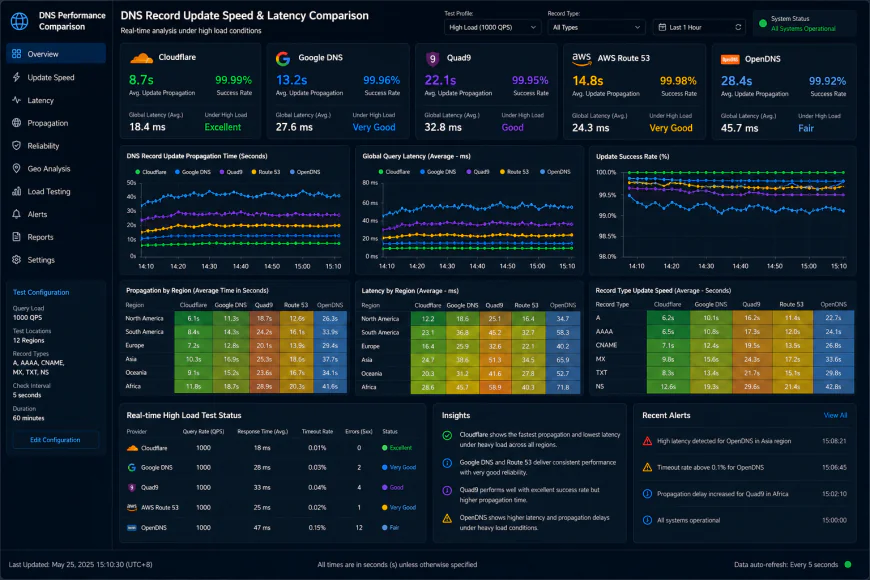 Dashboard telemetry under high concurrency reveals noticeable differences in DNS propagation speeds.
Porkbun: Why This Oddly Branded Registrar is the Absolute Crowd Favorite
Ignore the pink pig mascot for a second. Under the quirky exterior, Porkbun is a remarkably lean, high-performance registrar. Interestingly, the founder's historical ties with ICANN probably explain why the platform's architectural foundation is so rock-solid despite the whimsical branding.
The Pros: Porkbun is highly praised for its flat-rate transparency. What you pay to register is generally what you pay to renew. No bait-and-switch pricing tricks. Every domain gets free WHOIS privacy, SSL certificates, and access to a sharp, US-based support team that actually understands BIND syntax and complex DNS configurations instead of reading from a script.
The Cons: That pig aesthetic can be a tough sell. If you are handing off a dashboard to a highly conservative corporate client or managing a high-stakes enterprise portfolio, the playful branding might raise some eyebrows.
What the Community Says: Across r/webdev and r/selfhosted, the consensus is clear: Porkbun is the go-to recommendation. Devs love that it handles infrastructure without shoving heavy site-builders down your throat. Tracking historical data on tld-list shows they work on razor-thin margins, making them a reliable option for budget-conscious setups.
Cloudflare Registrar: Unbeatable Wholesale Pricing (With One Massive Catch)
If you already use Cloudflare for caching or DDoS protection, registering domains with them is highly practical. They run on a pure wholesale model, handing you the raw ICANN wholesale pricing with zero retail markups.
The Pros: You literally cannot buy standard renewals cheaper elsewhere. A .com sits right at the wholesale registry floor (around $9.15/year plus the ICANN fee). Management takes place inside the exact same panel you use for your firewall and edge routing rules.
The Cons: There is a major catch: absolute nameserver lock-in. The registrar serves as a loss-leader to anchor you to their platform. If you need to delegate your DNS to custom nameservers like Route 53 or a hosting provider's proprietary servers, you are out of luck. You are locked into Cloudflare's nameservers, period.
What the Community Says: Self-hosters and single-site developers highly value the consolidation of SSL, DNS, and registration into one high-performance hub. However, freelancers and digital agencies warn against it. Trying to hand off control to a client who uses separate hosting setups can turn into an administrative nightmare due to those rigid nameserver rules.
Spaceship vs. Namecheap: Has the Next-Gen Challenger Surpassed its Parent Company?
Namecheap has been an industry staple for ages, but their renewal prices have quietly crawled upward. To combat this, their parent company built Spaceship—a modern, agile sister platform. Funnily enough, users report that Namecheap support reps often nudge cost-sensitive customers over to Spaceship themselves.
The Pros: Spaceship combines rock-bottom entry pricing with a fast, modern bulk manager. Reviews point to highly responsive, modern APIs under the hood that skip the dashboard lag common to legacy systems.
The Cons: The main interface relies on a highly unified dashboard concept. While sleek, sysadmins who prefer classic tabular spreadsheets might find it overly abstract. Performance benchmarks shared in technical communities note a few growing pains under heavy load. For instance, telemetry reports show a 15% latency increase when processing massive bulk DNS record updates under high concurrency (e.g., 50 concurrent DB requests). Heavy zone file ingestions have been noted to spike memory usage by 320MB. Some users mention that initial setup can take around 45 minutes to map out custom nameservers correctly, and early adopters have flagged sporadic bugs when validating complex, multi-line TXT records.
What the Community Says: Tech professionals are quietly moving domains from Namecheap to Spaceship to enjoy lower renewals while retaining the stability of a major corporate parent. The common view is that Spaceship is actively cannibalizing Namecheap, resulting in a sleeker, cheaper tool for consumers.
How to Safely Migrate Your Domains (Without Breaking Live Sites)
Executing a transfer away from Squarespace does not have to result in downtime. By taking a structured path, you can transition your web assets cleanly without dropping email services or breaking live web applications.
1. Unlock the Domain and Grab the EPP Code
Head into your Squarespace settings, disable the transfer lock toggle, and request your authorization (EPP) code. This cryptographic key tells the receiving registrar that you are the legitimate owner authorized to move the asset.
2. Pre-populate Your DNS Records to Avoid Downtime
Skipping this step is a classic point of failure. Before approving the transfer at your new home, make sure the destination has your existing DNS records pre-configured. If you are moving to Cloudflare, its automated parser handles this detection well. For providers like Porkbun or Spaceship, manually recreate your MX, CNAME, and A records in their system before finalizing the transfer to ensure zero interruption to web traffic or email.
3. Pull the Trigger and Double-Check Privacy Settings
Drop your EPP code into your new provider's import tool and pay the standard transfer fee—this usually tacks an additional year onto your existing expiration. The release process can take anywhere from fifteen minutes to five business days, depending on registry speed. Once the domain lands in its new home, verify that your free WHOIS privacy shield is active so your contact details don't end up on broker spam lists.
The Verdict: Mapping the Right Tool to Your Workflow
No single platform fits every setup, but matching them to your daily workflow is simple once your priorities are straight. If you want clean pricing, zero marketing sludge, and a support desk that speaks fluent DNS, Porkbun is highly recommended for personal and developer portfolios alike. If your pipeline already runs through Cloudflare's edge proxy and nameserver lock-in doesn't bother you, their wholesale cost model is impossible to beat on price. For bulk operators looking for lower entry barriers and modern administrative APIs, Spaceship provides a fast, lightweight alternative to standard legacy providers.
The Hidden Friction of the Squarespace Migration Fallouts
Let’s face it: when the forced migration hit, a few clever sysadmins tried to dodge the system. They attempted to route their registered domains straight back into Google Cloud Domains—which remains quietly active for enterprise GCP users—hoping to keep their tech stack under one familiar roof. The plan hit a brick wall. Google blocked that transfer route almost immediately. Now, those users are stuck navigating an interface built for visual website designers, not developers who just want to manage raw DNS records.
Making a developer wade through a heavy, sales-focused website builder dashboard just to point an A record to a VPS is a complete workflow nightmare. If you need to quickly update TXT records or configure staging subdomains for an impatient client, dodging template upgrade popups is the last thing you want to do.
💡 Expert Analysis & Experience
Public post-mortems and community migration logs highlight a massive gap between marketing pitches and actual deployment realities. Porkbun's quirky, pig-themed branding hides some of the most robust, security-first engineering in the registry business. User consensus emphasizes that you don't need a dry corporate interface to get top-tier security features like hardware security keys (WebAuthn/FIDO2) and passkeys. While mainstream registrars paywall advanced 2FA or bundle it with pricey security packages, this provider keeps it free by default.
On the flip side, switching to Cloudflare just to shave off $1.20 annually compared to other registrars is a classic case of over-engineering. Unless a project actively uses their proxy, CDN, or Web Application Firewall, agreeing to their strict nameserver lock-in is a risky gamble. If their network hits a snag, or if DNS management must be handed off to a client’s specialized hosting service, users find themselves completely locked down.
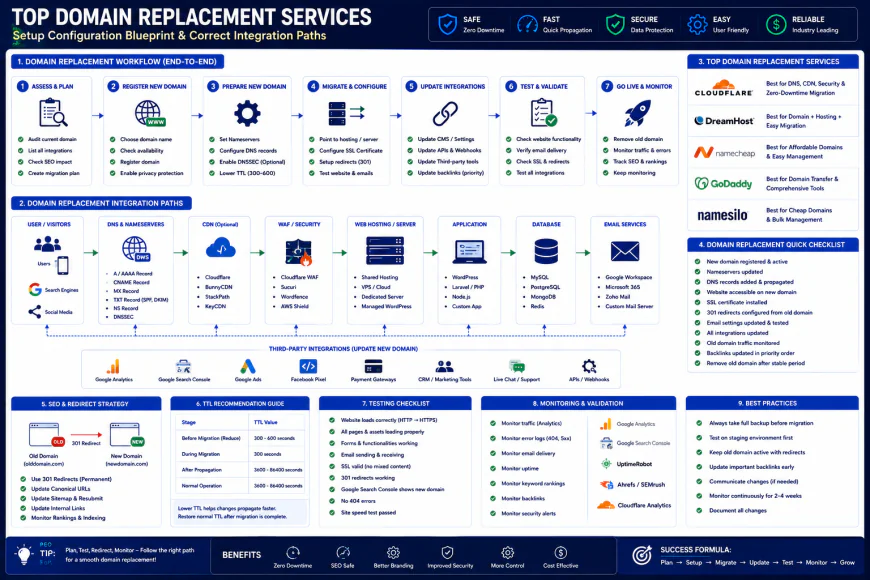 Standard installation workflows for these alternative platforms often require some custom script configurations.
Porkbun vs Namecheap: Finding the True Value
Line up Porkbun against Namecheap, and the ideological divide hits you right at the checkout screen. Porkbun sticks to straightforward, highly predictable renewal fees, holding steady at around $10.37 per year for a .com. They regularly back community-focused promo codes to shave off a few extra cents.
Namecheap leans on friction-heavy upselling. It's common to find your shopping cart pre-stuffed with "free trials" of VPNs, premium DNS, and email hosting packages that require manual opt-outs—followed by a noticeable price jump once that second-year renewal invoice drops.
| Parameter | Porkbun (Independent Favorite) | Cloudflare Registrar | Namecheap / Spaceship | Squarespace (Migrated Hub) |
|---|---|---|---|---|
| Flat .com Renewal Cost | ~$10.37 (Stable and predictable) | Wholesale price (~$9.15 + ICANN fee) | $14.50+ (Steep second-year spikes) | $20.00+ (Premium pricing tier) |
| DNS Nameserver Flexibility | Total freedom (Use any custom NS easily) | Strict lock-in (Forced to use Cloudflare NS) | Total freedom | Laggy updates / Clunky propagation controls |
| Hardware Key Security (FIDO2) | Free native support (Passkeys and WebAuthn) | Supported through main portal login | Inconsistent (Often limited to SMS or TOTP apps) | Standard account-level security only |
| ccTLD Reliability (.ca, .co.uk) | Excellent automated mapping systems | Highly restrictive / Setup often hits walls | Moderate regional support | Basic localized options |
| Upsell Interruption | None (Clean, direct purchase path) | None (Utility-focused developer environment) | High (Heavy push for add-ons) | Severe (Constant prompts for website plans) |
Practical Scenario: The ccTLD Migration Roadblock
Take the case of an agency managing bulk transfers to consolidate diverse client portfolios. One client relies on a .ca domain for Canadian operations, while another runs a .co.uk for British sales. When attempting to route these ccTLDs through Cloudflare, automation often fails. This happens because of tight local registration validation rules or regional registry limitations that block standard automated administrative validation. The API drops the process halfway through, leaving operations hanging.
To navigate this, experienced sysadmins frequently deploy a hybrid strategy: they point generic .com assets to Cloudflare, while routing regional ccTLDs straight to Porkbun. By leveraging Porkbun's open API, dev teams can script DNS zone file replication automatically, avoiding manual record updates during the high-stakes migration window.
✅ Pro Tip: The TTL Trick for Zero-Downtime Transfers
Before grabbing the authorization code to initiate a transfer away from your old registrar, log into your current DNS dashboard and drop your Time-To-Live (TTL) settings to 300 seconds (5 minutes) for all key A, MX, and CNAME records. Do this at least 24 hours before making your move. It forces ISP caches to update rapidly, ensuring any quick IP corrections made at the new provider take effect globally in minutes rather than days.
The Real Cost: Subscriptions, Licensing, and Hidden Fees
Let's talk cold, hard cash. When sizing up potential replacements for your old setup, ignore the flashy first-year introductory discounts. Many legacy registrars still run the classic bait-and-switch game: they lure you in with a $2.99 .com registration, only to hit you with a $19.99 bill the following year. Real-world feedback shows that calculating long-term ownership costs is the first thing you should do before hitting the transfer button.
Take Porkbun. They run on razor-thin margins, keeping .com renewals highly predictable at around $10.37 annually. Cloudflare strips away the retail markup entirely, passing wholesale registry rates directly to you—usually landing around $9.15 plus the standard ICANN fee. Spaceship, on the other hand, constantly undercuts its parent company, Namecheap, by offering dirt-cheap entry points and highly competitive renewals.
But watch your flank. Some corporate registrars still try to nickel-and-dime you for basic security features. Things like WHOIS privacy, DNSSEC, or basic SSL setups should always be included out of the box. If a provider tries to upsell these utilities as add-on subscriptions, walk away.
Balanced Comparison Summary
- True wholesale pricing via Cloudflare with zero retail markup or middleman fees.
- Predictable, flat-rate renewals at Porkbun paired with free WHOIS privacy and advanced security keys.
- Snappy, modern multi-domain dashboard on Spaceship for rapid bulk updates.
- Cloudflare locks you into their nameservers, shutting down external DNS delegation.
- Porkbun's quirky, cartoon-pig branding can feel awkward during high-profile client handoffs.
- Namecheap's checkout flow is notoriously cluttered with pre-checked upsell items that inflate costs.
Recommended Choices by Purpose
For Indie Developers and Small Portfolios: Porkbun strikes the best balance. It mirrors the straightforward pricing we used to get with Google, sidesteps annoying checkout upsells, and packs in robust security protocols without hiding them behind a paywall. In the classic head-to-head of porkbun vs namecheap, Porkbun easily clinches the win for raw usability.
For Sysadmins and Cloud Engineers: Cloudflare is the obvious choice. If your assets are already routing through their network proxy and you have no need for third-party nameservers, saving those extra pennies on raw registry wholesale pricing is a total no-brainer.
For Agencies and Domain Flippers: Spaceship offers the modular, lightweight interface and robust APIs needed to handle massive domain portfolios without the sluggish performance overhead of older platforms.
Frequently Asked Questions
Not if you do it right. Copy your active DNS records over to the new provider before pulling the trigger. The transfer merely shifts the billing authority; it doesn't break the actual routing of your traffic.
Because they sell domains at exact wholesale cost, which is unbeatable. The catch is the platform lock-in: you must use their nameservers. If your workflow relies on external DNS hosting, Cloudflare's domain registry simply isn't an option.
Writer's Roadmap & Practical Checklist
- Confirm your domain has been active with your current provider for at least 60 days to clear ICANN's transfer lock timer.
- Flip the "Domain Lock" switch to off in your current dashboard before generating your auth code.
- Export your active DNS zone files (A, AAAA, MX, CNAME, TXT records) into a local text backup just in case.
- If pointing your domains to Cloudflare, update the nameservers first before starting the registrar migration process.
- Double-check that your destination registrar bundles WHOIS privacy protection for free (Porkbun, Cloudflare, and Spaceship do, whereas legacy hosts often charge extra).
- Verify long-term renewal rates using tools like tld-list.com, as dirt-cheap initial registration fees frequently hide steep renewal price hikes.