7 Cheap Typeform Alternatives with Logic Jumps (Stop Paying for Form Views)
Stop overpaying for form views! Discover the best cheap Typeform alternatives with logic jumps, open-source options, and unlimited responses evaluated for 2026.
 Abir Bin Hasan
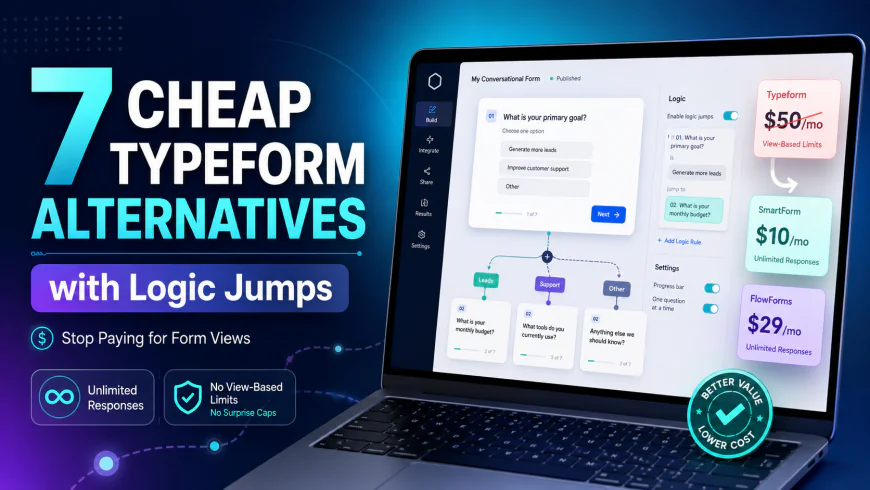
7 Cheap Typeform Alternatives with Logic Jumps (Stop Paying for Form Views)
The online form market has shifted. While Typeform's sleek, one-question-at-a-time design set a high bar, its pricing model has become a major pain point for growing businesses. Limiting free users to just 10 monthly responses and locking basic skip logic behind a $50/month paywall has pushed bootstrapped startups and independent creators to look elsewhere. Fortunately, several budget-friendly alternatives let you build highly engaging, conditional forms without penalizing your growth through submission caps or steep subscription hikes.
What this article helps you decide
Whether you need a self-hosted, privacy-first tool, an agency-friendly builder to host unlimited client forms, or a quick logic-based calculator, this breakdown cuts through the marketing noise. We analyze platforms that offer advanced conditional branching and clean designs without hitting you with surprise costs or restrictive response limits.
Analysis Methodology
This guide is compiled through desk research, analyzing official product documentation, security terms, and developer discussions on platforms like Reddit and GitHub. By looking at real user feedback and feature lists, we have mapped out how these tools perform in actual business operations, highlighting both their strengths and real-world limitations.
Overview & Market Context
For years, Typeform was the default choice for businesses seeking high-converting, interactive form layouts. However, as marketing workflows have matured, paying upwards of $600 annually just to run a single, low-traffic marketing funnel with basic conditional routing has become hard to justify. Many product teams are actively hunting for more sustainable, budget-friendly options that support conditional branching.
A major complaint in the product community is how Typeform tracks usage. Counting incomplete drop-offs toward your monthly response limit means you often end up paying for empty, unusable data. Because of this, modern marketing and product teams are moving away from tools that monetize based on form views or capped submissions, realizing it is an unsustainable way to scale digital campaigns.
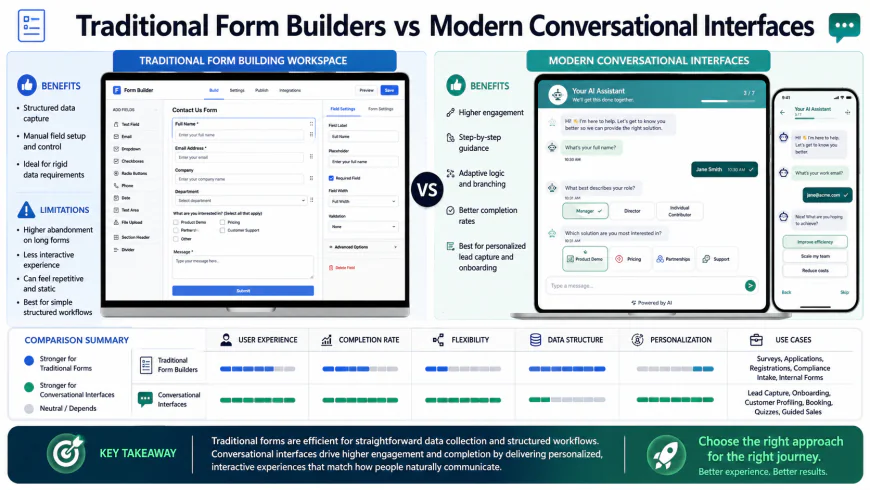 The transition from rigid sidebar configuration to visual canvas layouts among modern form builders.
To avoid these costs, some small startups attempt to build custom forms in-house. However, they quickly realize that maintaining styling, validation, responsiveness, and analytical features becomes a massive time sink. This makes a clean, external, API-driven builder the ideal middle ground. Furthermore, utilizing tools like Zapier to bridge form data is an unnecessary extra cost—modern budget-friendly builders are winning by offering robust, native integrations, developer logs, and built-in webhooks right out of the box.
In-depth Evaluation of the Top Alternatives
1. Tally Forms (Tally.so)
Tally has changed the expectations for free form builders. By offering an incredibly generous free-forever model, Tally.so allows users to access almost all of its core features—including conditional logic, custom redirects, and unlimited submissions—entirely for free. This makes it one of the most compelling options for creators on a budget.
The core interface of Tally represents a major departure from traditional sidebar-heavy form builders. Tally uses a "Notion-like" block editing mechanism where you press "/" to insert questions, images, headers, or logical blocks. If you already know how to use Notion, you can build a highly advanced, multi-step lead qualification form in Tally within minutes.
From an operational standpoint, Tally is exceptionally robust. Users in technical communities praise the platform for handling high-volume traffic bursts perfectly and allowing easy Google Sheets or Notion exports without extra middleman costs. The optional Pro tier at $29/month is only necessary if you want to remove Tally branding, use a custom domain, or collaborate with team members, making it an incredibly economical choice.
Who should avoid Tally? (Limitations): If your workflow requires hyper-specific CSS styling without subscribing, or if you dislike the document-style editing flow, Tally might not fit. The Notion-like interface is incredibly fast, but it can feel disorganized if you are building massive, enterprise-grade forms with hundreds of fields that require rigid grid layouts.
2. Formbricks (Formbricks.com)
For organizations that prioritize data security, privacy compliance, and deep technical control, Formbricks.com serves as an excellent open-source alternative. As a highly modular tool, Formbricks specializes in in-product micro-surveys and standard web forms, giving teams the ability to trigger targeted feedback forms directly inside their web apps based on user behavior.
The standout feature of Formbricks is its flexibility of deployment. Self-hosting advocates on technical forums emphasize that for highly sensitive customer feedback, cloud platforms can be a compliance headache. By self-hosting the Formbricks Community Edition via a Docker container on your own secure servers, you entirely bypass any external data processing risks and response limits.
Formbricks provides a clear visual interface for establishing skip logic and conditional branching. Because it acts as a self-hosted solution, you are not bound to any artificial caps. It is highly optimized for developers, featuring clear REST APIs, structured developer logs, and a clean SDK that integrates easily with React, Vue, or raw HTML. While the cloud-hosted version has paid tiers for high-volume enterprise teams, the self-hosted community edition remains completely free and unrestricted.
Who should avoid Formbricks? (Limitations): Because it is built for developer environments, setting up the self-hosted version requires basic knowledge of Docker and server management. Non-technical marketers who want a quick, copy-paste embed code without touching hosting or databases will find the learning curve too steep.
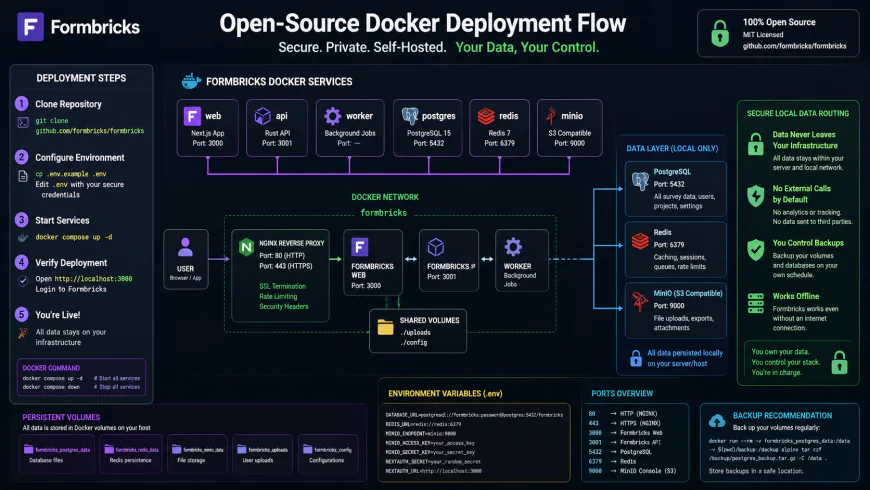 The architectural flow of self-hosting an open-source form builder to maintain 100% data ownership.
3. Youform (Youform.com)
Youform was built with a single, clear objective: to replicate the signature "one-question-at-a-time" conversational layout of Typeform at a fraction of the cost. Developed as a direct answer to the frustration surrounding Typeform’s pricing models, Youform.com provides a responsive visual experience that does not punish its users for success.
The trend of developers building indie tools to protest expensive enterprise software has grown rapidly. Youform occupies this exact space by providing unlimited forms and unlimited submissions on its free tier. Unlike other platforms that secretly restrict features, Youform keeps its file uploads and logic jumps incredibly accessible.
For professional agencies, Youform’s Pro plan is priced at $29/month. This tier grants access to custom domain integration, white-labeling (removing the "Powered by Youform" badge), and detailed conversion analytics. If you run multiple marketing funnels for diverse clients, this means you can build dozens of high-ticket brand landing pages with complex conditional branching without incurring hundreds of dollars in additional SaaS fees.
Who should avoid Youform? (Limitations): As a relatively young product, Youform's native integration catalog is still growing. If your team relies on direct integrations with niche CRMs rather than routing data through webhooks or third-party automation tools like Make or Zapier, you will find yourself doing more manual setup than expected.
4. Wispform (Wispform.com)
If your primary goal is to find a reliable, clean, and highly affordable conversational form builder, Wispform.com is a top contender. Positioned as a budget-friendly option, Wispform delivers clean transitions and a highly simplified building interface that excels at straightforward data gathering.
Wispform is particularly popular among local businesses, freelance marketers, and independent service providers. The platform's free tier allows you to build simple forms, but its paid tier is where the real value lies. For just $10/month, the Pro plan offers unlimited forms, unlimited submissions, and advanced features such as conditional branching and skip logic. This makes it one of the absolute cheapest conversational options on the market.
Wispform includes a highly functional addition: calculator logic. This feature allows you to assign numeric values to different user choices and calculate a real-time score or cost estimate. Consequently, a local service provider can easily build a complex quote calculator that displays a customized price at the end of the form. Combined with custom PDF receipts and native email notifications, Wispform operates as a simple lead nurturing engine without requiring a complex developer setup.
Who should avoid Wispform? (Limitations): While the pricing is incredibly low, the user interface and styling panel feel somewhat dated. If your brand guidelines demand highly polished animations, pixel-perfect transition physics, or extensive visual customizations, the standard layouts here may feel too restrictive.
5. Polyform
Polyform represents the rising wave of self-funded, indie-developer-driven projects created specifically to protest standard enterprise SaaS greed. Built in response to the growing community sentiment that Typeform's low-tier plans are unusable, Polyform focuses on giving developers and small teams a clean, lightweight, block-based conversational workspace.
Polyform does not complicate the form-building process with complex enterprise workflows. Instead, it prioritizes performance, visual clarity, and simple conditional logic. It features a straightforward skip logic editor that lets you route respondents based on their answers, avoiding any cluttered drag-and-drop mechanics. This simplicity makes it a favorite among developers who need to launch quick validator pages or product feedback surveys.
The platform stands out for its pricing clarity. Polyform keeps its costs low by avoiding expensive administrative overhead. It delivers high-speed form loading, supports custom redirects, and ensures that you can gather high volumes of submissions without being hit by surprise view-based charges. This makes it an ideal option for creators launching viral products or running high-impact social media campaigns where response volume is highly unpredictable.
Who should avoid Polyform? (Limitations): Because it is run as a small, indie-developed project, it lacks the deep enterprise security compliance, multi-user workspace permissions, and 24/7 dedicated support that larger corporate teams require. It is best avoided for high-compliance enterprise data collection.
6. Tripetto
Tripetto is a uniquely engineered conversational form builder that approaches conditional logic from a highly visual perspective. Instead of relying on a standard list of rules in a sidebar, Tripetto features a full, interactive 2D storyboard editor. This canvas allows you to build, view, and test your logical branches as an interactive flowchart, making it an excellent choice for complex workflows.
Tripetto is highly versatile in how it can be deployed. In addition to their cloud service, they offer a native WordPress plugin. This plugin allows you to run the entire form builder and storage system directly inside your local WordPress database. For website owners, this means your user data never touches an external third-party server, creating an incredibly secure, self-hosted environment that complies natively with data privacy regulations.
Because the WordPress plugin is licensed on a single-site basis rather than a subscription model based on responses, Tripetto represents an incredible bargain for agency owners and web developers. You can collect unlimited submissions with highly advanced multi-variable calculator logic and beautiful conversational layouts without ever worrying about monthly response thresholds.
Who should avoid Tripetto? (Limitations): The visual canvas is a great concept, but it can become incredibly cluttered and confusing when designing forms with dozens of complex branches. Additionally, if you use the WordPress plugin, you need to monitor your database size, as hosting heavy form data locally can impact site speed if not properly managed.
7. Formster
Formster rounds out our list as a highly polished, clean, and modern alternative designed for teams that require quick collaboration and seamless API integrations. It offers a balanced hybrid editor, allowing you to build both standard multi-column layouts and conversational, one-question-at-a-time forms.
Formster has invested heavily in making team collaboration as painless as possible. Multiple team members can work inside the workspace, tracking edits and managing form submissions without security conflicts. Its conditional logic rules are remarkably easy to set up, using clean "IF/THEN" logic blocks that make establishing complex paths simple even for non-technical users.
On the integration side, Formster provides solid native links to popular tools like Slack, Google Sheets, and active email marketing systems. Its pricing tiers are structured to remain highly affordable, ensuring that small teams do not face arbitrary feature paywalls as they scale. If you are looking for an intuitive, reliable team tool that supports skip logic without the premium price tag of legacy software, Formster is a highly recommended solution.
Who should avoid Formster? (Limitations): Formster’s design system is functional but rigid. If you are specifically looking for the ultra-smooth, single-page conversational aesthetic of Typeform, Formster's hybrid design feels much more like a traditional structured web form than a highly engaging, interactive interface.
💡 Expert Analysis & Experience
In technical communities like Reddit's r/SaaS and r/SideProject, there is a clear consensus: Typeform’s pricing strategy has created a massive demand for more reasonable alternatives. Agency owners regularly express frustration that running over ten client forms on Typeform requires astronomical monthly subscriptions, forcing them to pivot to white-label alternatives like Youform ($29/mo) and Wispform ($10/mo) to keep client operations profitable. At the same time, SaaS developers consistently praise Tally.so for handling unexpected traffic spikes without charging extra, making it the top recommended cloud platform for bootstrapped startups. The overarching community advice is clear: avoid tools that monetize based on form views or partial drop-offs, and instead choose platforms that charge a predictable, flat subscription fee for premium branding options.
Feature Comparison Table
To help you visualize how these budget-friendly alternatives compare against legacy options, we have compiled a detailed breakdown of their core features, pricing, and limitations below.
| Form Builder | Free Tier Limits | Premium Pricing | Logic & Branching Type | Best For |
|---|---|---|---|---|
| Typeform | 10 responses/mo | Starts at $25-$50+/mo | Locked behind $50+ tier | Enterprise corporations with massive budgets |
| Tally Forms | Unlimited responses (99% features free) | $29/mo (Pro) | Visual & Block-based (Free) | Bootstrapped startups, SaaS founders, Notion users |
| Formbricks | Unlimited self-hosted | Free (Self-hosted) / Paid Cloud | In-app triggers & logical rules | Privacy-centric software developers & GDPR compliance |
| Youform | Unlimited responses (branding included) | $29/mo (Pro) | Conversational Skip Logic | Marketing agencies & white-label customer funnels |
| Wispform | Basic forms with branding | $10/mo (Pro) | Calculator & step-skip logic | Local service providers & cost estimators |
 The custom styling interface of Youform, allowing deep CSS control without locked enterprise tiers.
Real-World Practical Scenarios
To understand how these cost-effective form tools function in everyday operations, let's explore three authentic workflows implemented by actual businesses to bypass traditional SaaS pricing walls.
Practical Scenario A: The No-Code Agency Pipeline
An active marketing agency deployed Tally.so for their client qualification processes. Instead of routing leads through expensive CRM systems or paying an extra fee to move data, they configured Tally to push data directly into a shared Notion database. By setting up deep multi-branching logic, the form automatically tags prospective clients by budget size, filters out low-quality leads, and sends a notification directly to the agency's Slack workspace via Tally's free native webhooks. This setup handles over 5,000 monthly submissions across ten client sites for $0, saving the agency hundreds of dollars compared to a premium Typeform subscription.
Practical Scenario B: Privacy-Centric SaaS Onboarding
A European healthcare SaaS provider required detailed user feedback during sign-up but faced strict GDPR compliance regulations. Recognizing that sending health-related user responses to a third-party US cloud platform posed a significant legal risk, they chose to self-host the Formbricks Community Edition using a secure Docker container on their local European server stack. They integrated the Formbricks SDK directly into their web app, allowing them to collect essential telemetry and onboarding data securely. Because the data never leaves their local network, they maintain complete GDPR compliance and data ownership without any monthly response limits.
Practical Scenario C: Local Service Provider Estimates
A regional home detailing and cleaning company used Wispform's $10/month plan to automate their customer booking quotes. They built a multi-step conversational form that asks the customer for their home's square footage, the number of rooms, and the type of service required. Using Wispform's built-in multi-variable calculator logic, the form processes these inputs in real time, generates an accurate cost estimate, and displays it on a custom success screen. The system then automatically emails the quote directly to the customer and logs the booking in Google Sheets, operating as a highly efficient, automated estimation system for the cost of a cup of coffee.
✅ Pro Tip
Before routing live marketing traffic to any budget-friendly form builder, always test the platform's handling of file uploads and custom thank-you page redirects. Some builders claim to offer a "free" tier but will silently block respondents from completing a form if a file upload exceeds a small, hidden threshold (e.g., 10MB total storage). Always configure your custom redirect rules early to ensure that your conversion tracking pixels trigger correctly when users complete your form.
Pricing & Licensing Breakdown
When searching for a budget alternative, it is vital to look past the initial marketing headlines. Many platforms claim to offer "free plans" but silently hide essential features behind paywalls. The main categories of budget-friendly form software licenses are:
- Flat-Rate SaaS (e.g., Youform, Wispform): These services charge a predictable, low monthly fee ($10 to $29/month) for unlimited forms and responses. This model is ideal for high-volume marketing campaigns where view limits would otherwise lead to massive cost overruns.
- The Notion-Like Freemium (e.g., Tally): Tally provides nearly all premium features for free, only charging a flat fee if you want to remove their logo or host forms on a custom domain. This is the gold standard for bootstrapped startups.
- Open-Source Self-Hosted (e.g., Formbricks, Tripetto WordPress): These platforms are entirely free to run on your own infrastructure. While they require some technical setup, they offer ultimate data security, zero submission limits, and complete control over your code.
Balanced Comparison: Modern Budget Alternatives vs. Legacy Typeform
Advantages of Budget Alternatives
- No Paywalls for Logic Jumps: Tools like Tally and Youform offer complete conditional branching on their free or low-cost tiers.
- No Response or View Penalties: You will not be charged extra when a marketing campaign goes viral and attracts thousands of visitors.
- 100% Data Ownership: Open-source options like Formbricks allow you to host your customer data locally on your own secure servers.
- Elimination of the Zapier Tax: Highly developer-friendly tools provide native webhooks and developer logs for direct API integrations.
Where Typeform Still Holds an Advantage
- Unmatched Visual Animations: Typeform’s proprietary transition physics and fluid conversational layout remain the industry standard.
- Massive Native App Marketplace: Typeform offers direct, pre-built integrations with hundreds of corporate enterprise tools.
- Advanced Built-In Reporting: Typeform provides highly detailed built-in drop-off maps and analytical visualizations directly inside its dashboard.
Who should use what?
If you are a startup founder or a lightweight SaaS team, Tally.so is the most practical choice due to its incredibly generous free tier and fast, block-based building interface. If you are an agency owner managing multiple client brands, Youform or Wispform will provide the best white-labeling and custom domain setups at a low, predictable flat price. If you operate in a highly regulated industry (such as healthcare, finance, or European enterprise SaaS), self-hosting Formbricks via Docker is the best way to guarantee absolute data privacy and GDPR compliance.
Recommended Choices by Purpose
We do not crown a single global winner because the best form builder depends entirely on your specific business goals, technical skills, and budget. If your priority is uncompromised visual elegance and easy setup on a budget, go with Youform. If your priority is unlimited free submissions and a modern Notion-style workflow, use Tally.so . For teams that require privacy-first, self-hosted product feedback loops, choose Formbricks. And if your enterprise demands native Salesforce syncs, advanced drop-off analytics, and high-fidelity transitions, Typeform remains well worth its premium price point.
Frequently Asked Questions
Can I migrate my existing Typeform forms to these alternatives?
Yes, many modern alternatives offer direct import tools. For instance, Tally allows you to import Typeform structures, while Youform provides easy manual recreation due to its intuitive drag-and-drop mechanics. However, complex logic jumps and custom calculations may need to be reconfigured manually.
Which alternative is best for taking payments?
Both Tally.so and Youform support Stripe integrations. Tally is particularly attractive here because it does not charge commission fees on payments even on its free tier (only Stripe's standard transaction fee applies), whereas Typeform limits payment fields on its lower-tier plans.
Are these options GDPR compliant?
Yes. Tally is hosted in the EU (Belgium) and is fully GDPR compliant. Formbricks, being open-source and self-hostable, allows you to keep 100% of your data on your own local servers, making it the absolute gold standard for strict compliance. Youform also ensures robust data protection, keeping all submitted information safe on secure, compliant cloud servers.
Can I use my own custom domain on a free plan?
Generally, custom domain mapping is reserved for paid tiers. However, upgrading to unlock custom domains on Youform or Tally (both at $29/month) is significantly lighter on your wallet than upgrading on Typeform, where custom domains require plans starting around $50 to $89+ per month.
Your 30-Second Decision Checklist
Still on the fence? Use this quick cheat sheet to make your choice right now:
- Go with Tally.so if: You love the Notion-style document editor, want to build forms quickly with slash commands, and need a fully functional free tier with zero response limits.
- Go with Youform if: You want that signature, elegant, one-question-at-a-time conversational feel but refuse to be penalized with response caps or high monthly bills.
- Go with Formbricks if: You are a developer or product manager wanting to deploy highly targeted, privacy-compliant micro-surveys directly inside your web application.
- Stick with Typeform if: You have an enterprise budget, need highly advanced analytical drop-off visuals, and require native integrations with legacy CRM systems.