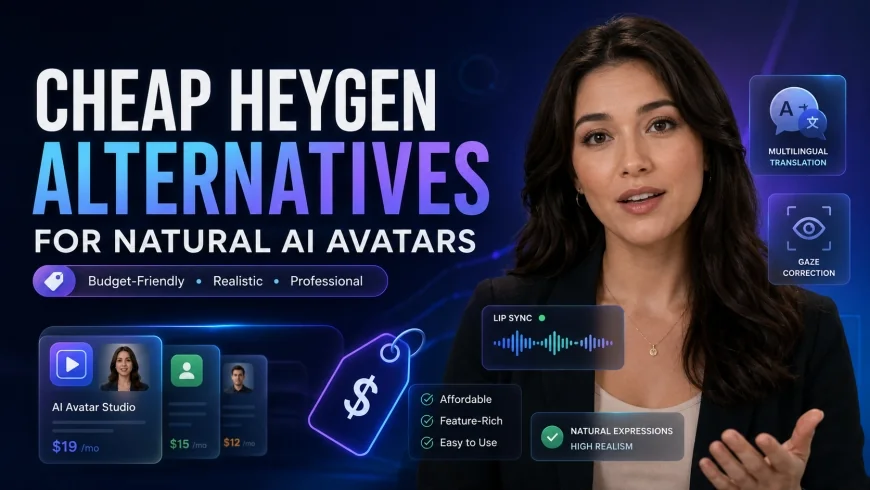
Cheap HeyGen Alternatives for Natural AI Avatars
Looking for a cheap HeyGen alternative? Discover affordable AI video presenters with natural eye contact and realistic avatars without breaking your budget.
 Abir Bin Hasan
Cheap HeyGen Alternatives for Natural AI Avatars
Building a video production pipeline on a tight budget often feels like a trade-off between high costs and stiff, robotic animations. Anyone tired of paying premium subscription fees only to get wide-eyed, lifeless presentations is likely hunting for a more affordable path. Below is a realistic look at budget-friendly tools capable of delivering expressive, natural digital presenters without the enterprise price tag.
Core Considerations
This guide is designed to help you map these low-cost options to your actual daily workflow. Whether the goal is whipping up quick social media clips, building corporate training modules on a budget, or finding a more economical alternative to high-end industry giants, this analysis covers processing speeds, realistic eye-gaze mechanics, and the licensing fine print you need to know.
Analysis Methodology
This analysis pulls from public feature documentation, official pricing schedules, commercial-use terms, and real-world workflow feedback. To keep things objective, this review synthesizes community discussions on platforms like G2 and Capterra alongside technical documentation, rather than relying on marketing hype.
The Evolution of AI Video Avatars and the Quest for Realism
The shift toward synthetic media has fundamentally changed how teams handle video creation. Producing professional talking-head videos used to mean booking studios, hiring talent, and configuring multi-point lighting. Now, deep learning models can generate a respectable talking head from a text file.
Yet, early attempts frequently landed straight in the "uncanny valley"—that unsettling feeling triggered by almost-human faces. The biggest giveaway was usually the eyes: a flat, unblinking stare that immediately broke user immersion.
Today, developers focus heavily on facial micro-expressions. Using advanced neural networks, modern engines align lip shapes with generated audio much more realistically, making these digital actors viable for internal training and product marketing. At the same time, localization has become a priority; marketing teams often need to adapt a single video into dozens of languages. Instead of hiring multiple voice actors, users can swap scripts in a few clicks.
Why Creators Seek a HeyGen Competitor
While the market leader offers polished results, its pricing structure is a massive hurdle for independent creators and small businesses. If you are rendering multiple videos a week, a credit-based system can eat through a quarterly budget surprisingly fast. Beyond the cost, entry-level plans on high-end platforms often come with rigid functional limits, such as restricting high-definition exports or hiding essential features behind paywalls.
There is also the challenge of organic human movement. Many lower-tier tools still struggle with fluid micro-expressions. A rigid, unblinking stare immediately signals to viewers that they are watching an automated script, which can hurt engagement.
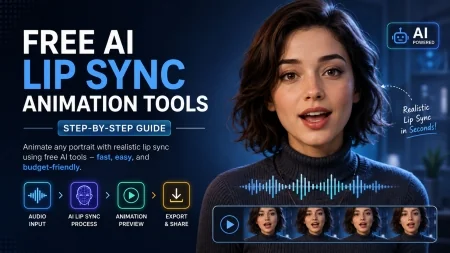
This has driven interest toward tools featuring gaze correction—technology that dynamically shifts the avatar's pupils to simulate natural reading habits rather than a static teleprompter stare.
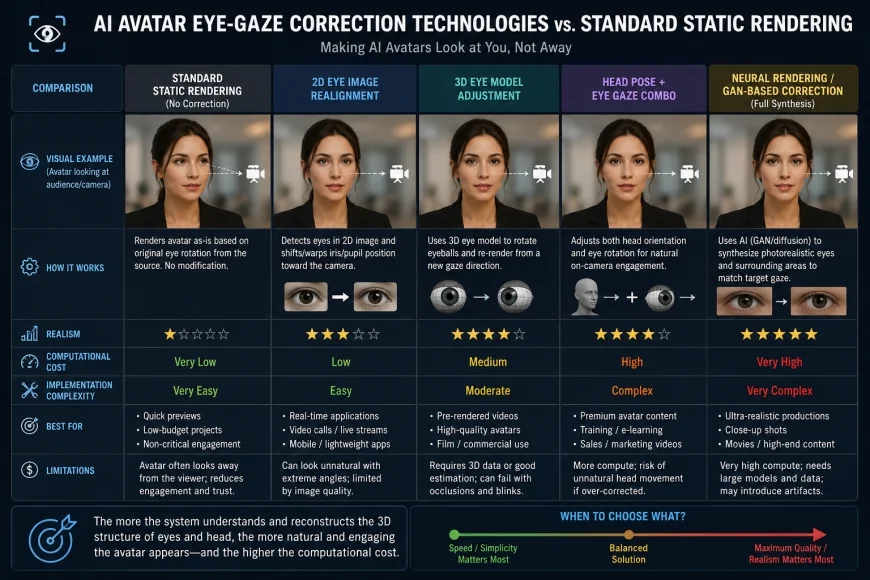 Figure 1: How advanced eye gaze correction technology dynamically adjusts pupil positions to eliminate the creepy synthetic stare.
The Budget Battleground: Sub-$30 Monthly Plans
The sub-$30 monthly tier has become highly competitive, forcing newer startups to pack advanced features into entry-level accounts. For independent marketers, this means producing decent-quality video presenters is no longer locked behind enterprise budgets. Many emerging tools offer flexible, pay-as-you-go credit systems or affordable entry-level subscriptions.
However, shopping in this price bracket requires a critical eye. Some services lower their monthly rates but quietly restrict commercial usage rights, rendering the outputs unusable for paid ads or client deliverables. Others impose heavy watermarks or limit you to a handful of basic avatars.
Finding a truly cost-effective alternative means looking past the headline price to evaluate voice naturalness, lip-sync precision, and template utility. Let's look closely at the specific budget platforms leading the market today.
In-Depth Evaluation of Cheap HeyGen Alternatives
1. Vidnoz AI: The Best Budget AI Video Presenter for Rapid Scaling
Vidnoz AI has gained traction as a highly accessible option for quick turnarounds. The platform offers a surprisingly wide selection of templates and voices without demanding a premium subscription. Its interface is built specifically for drag-and-drop layout creation.
For those testing the waters, the free tier allows for short, daily test renders without requiring a credit card, which is ideal for evaluating the lip-syncing engine before committing. This makes it simple to test its audio matching before spending any money.
However, in a typical production workflow, creators may notice slight audio-video sync drift during fast-paced scripts or complex transitions. The timing can occasionally lag, causing the voice to fall out of step with the mouth movements. To mitigate this, it is best to keep scripts measured and avoid dense, technical jargon. Additionally, the template library leans heavily toward sales outreach, which is great for cold campaigns but less flexible if you need complex, custom physical gestures.
2. Colossyan: Advanced Control with Natural Eye Gaze Correction
Colossyan positions itself primarily for educational and corporate training content, emphasizing realistic body language and natural conversational pacing. This focus makes it a solid option for teams prioritizing a polished presentation style.
Its standout feature is an active eye-gaze correction system, which dynamically adjusts pupil movement to eliminate the glassy stare common in lower-priced software. Consequently, viewers are more likely to focus on the educational content rather than the technology behind it.
Users can also select basic emotional tones, shifting a presenter from neutral to a warmer, more welcoming delivery. This level of granular control is rare for software under $30. On the downside, rendering times on the lower-tier plans can slow down significantly during peak hours. If you are working against tight deadlines, waiting for high-definition files to compile can become a bottleneck—a classic trade-off when opting for budget tiers.
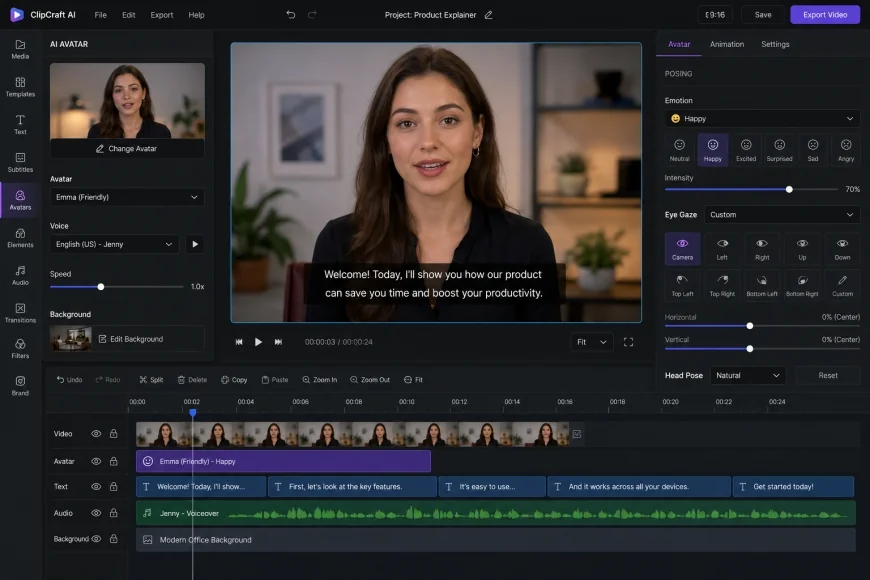 Figure 2: Fine-tuning avatar micro-expressions and eye direction settings inside a modern, affordable AI editor.
3. Elai.io: Flexible E-Learning Customization at an Affordable Rate
Elai.io focuses heavily on e-learning and slide-based video editing. It excels at turning written documents, articles, or PDFs directly into structured presentations. This workflow is highly efficient for content creators looking to repurpose existing written material.
Pricing is highly competitive, granting access to a solid lineup of presenters and a capable multi-language translation engine on their starter tiers. This makes localizing video files straightforward and cost-effective.
However, there are notable limitations: custom voice cloning is locked behind their more expensive packages. Furthermore, without dynamic slide elements or background visuals, some of their cheaper avatars can look a bit static and flat. That said, for anyone building structured training modules, its native integrations with popular Learning Management Systems (LMS) make exporting and updating content highly efficient.
4. DeepBrain AI: High-Performance Synthesia vs HeyGen Cheaper Alternative
DeepBrain AI targets conversational, news-style presentations with highly structured, neural-rendered avatars. The platform specializes in conversational setups, virtual assistants, and informational kiosks, where rendering latency must be kept to a minimum.
The platform's voice generation has a surprisingly natural inflection, making it easy on the ears during longer tutorials. The interface is clean and straightforward, keeping the learning curve low for beginners.
However, costs can escalate quickly if your project demands bespoke custom avatars or specialized studio backdrops. While the stock selection is reasonably priced, generating a high-fidelity digital twin of yourself requires a steep upfront investment. It is also worth noting that some users find the editing interface a bit rigid when attempting highly creative, non-standard layouts.
5. Pipio: The Creative-Centric Choice for Indie Marketers
Pipio targets independent marketers and creative agencies needing rapid, high-impact social media assets. It offers a diverse selection of actors across various demographics, which is a major plus for localized ad campaigns.
The workflow is simple: paste your script, pick a voice, and render. While this simplicity is excellent for quick A/B testing on social platforms, the starter plans carry strict monthly credit limits. If you produce high-volume content, you will likely run through your allowance quickly and face add-on fees.
In terms of performance, the avatars handle short, punchy marketing copy well, but longer educational scripts can trigger repetitive, looping hand gestures. To keep the final output engaging, editors will need to lean heavily on slide transitions and graphical overlays.
💡 Workflow Considerations
To get the best results from lower-cost rendering engines, script optimization is key. When processing dense, highly technical terminology, these tools can struggle with audio-sync drift. Breaking long, complex sentences into shorter phrases and opting for phonetically simpler words can dramatically improve the visual sync. Keeping scripts conversational keeps the avatar looking natural.
Platform Comparison Table
To help you weigh your options, the table below compares key features, pricing structures, and unique selling points. We have gathered data directly from user reviews on G2 AI Video Generators and software evaluation portals like Capterra to ensure practical accuracy.
| Platform | Starting Price (approx.) | Eye Gaze Quality | Primary Focus | Free Tier Available? | Key Takeaway |
|---|---|---|---|---|---|
| Vidnoz AI | $19 - $29 / month | Standard (Good) | Sales & Rapid Marketing | Yes (Daily Free Minutes) | Highly affordable, fast rendering speeds. |
| Colossyan | $28 - $35 / month | Advanced (Excellent) | Corporate Training & L&D | No (Free Trial only) | Superb eye gaze correction and custom emotions. |
| Elai.io | $23 - $30 / month | Standard (Very Good) | E-learning & Slide-to-Video | Yes (Limited minutes) | Great LMS integrations, blog-to-video tools. |
| DeepBrain AI | $24 - $30 / month | Advanced (Excellent) | Anchor Presentations | No (Free demo available) | High-fidelity conversational avatars. |
| Synthesia | See Synthesia Pricing | Premium (Excellent) | Enterprise Training | No (Limited test) | Industry gold standard, but higher price point. |
Practical Scenario
Consider a typical scenario where an independent course creator needs to produce a 10-hour training series. Traditional production might require thousands of dollars in camera gear, lighting, and editing suites. By combining a mid-tier subscription like Colossyan for core lectures with a tool like Vidnoz for shorter promotional clips, a creator can assemble the entire project in a fraction of the time for under $100, leaving more budget for distribution and marketing.
✅ Pro Tip
To minimize the uncanny valley effect on a budget, try overlaying text graphics, slides, or b-roll over the presentation. Frequently cutting between the digital face and your slides gives the viewer's eyes a natural break. This technique keeps retention high while masking any minor, repetitive gestures or stiff transitions from the AI presenter.
Addressing Technical Bottlenecks: Uncanny Valley & Eye Gaze
At its core, synthetic video technology relies on analyzing thousands of hours of real human footage to map facial muscle responses to sound. However, replicating the subtle, subconscious micro-movements of human eyes is incredibly difficult. Real eyes constantly flutter, blink irregularly, and shift focus based on emotion.
Cheaper rendering pipelines often struggle with this, resulting in a static stare that breaks immersion. Furthermore, some platforms process the face independently from the background, making the presenter look awkwardly "pasted" on. To avoid this visual mismatch, look for engines that use global illumination to match the avatar's lighting with the background environment.
Transition frames are another spot to watch: when an avatar pauses, some algorithms freeze the frame entirely, which looks highly unnatural. More advanced platforms maintain tiny, idle breathing movements during pauses to preserve the illusion.
Who Should Skip These Tools? (Key Limitations)
While these budget-friendly tools are incredibly accessible, they are not a one-size-fits-all solution. If your brand relies on high-energy, emotionally expressive storytelling—like dramatic product launches or highly personal brand messaging—you should probably avoid budget AI presenters altogether. The emotional range of these digital actors is still too narrow to convey genuine excitement, deep empathy, or subtle humor.
Additionally, keep an eye out for pricing structures: many platforms offer low introductory rates but feature steep price hikes upon renewal. Others suffer from clunky, slow user interfaces that make editing a frustrating, time-consuming process. If your team has zero patience for rendering queues and wants instant drag-and-drop customization, the learning curves and processing delays of sub-$30 platforms might not fit your fast-paced workflow.
Pricing & Licensing Breakdown: Navigating the Fine Print
Before signing up for any low-cost subscription, it is critical to look closely at the licensing terms. A common pitfall is assuming that any paid plan grants full commercial usage. Some starter tiers allow internal training videos but explicitly forbid using those assets for paid YouTube ads or client projects. Selling these videos to clients often requires upgrading to a much more expensive agency tier.
Another detail is how platforms define a "credit." On some platforms, one credit equals one minute of rendered video. On others, credits are deducted every time you hit preview, even for quick adjustments. To avoid burning through your monthly allowance, prioritize platforms that offer free, unlimited draft previews so you can check your alignment and script pacing before committing to a final render.
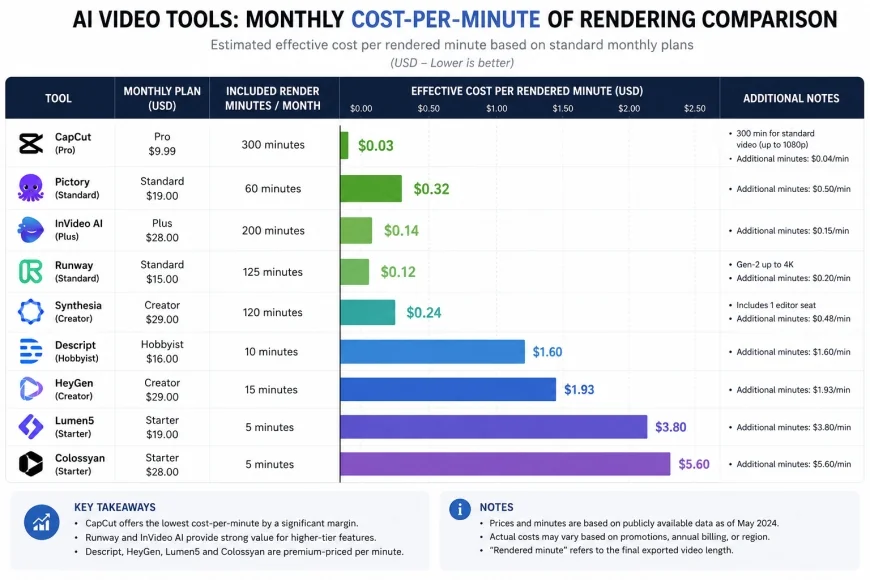 Figure 3: A cost-per-minute breakdown showing how credit structures can affect your monthly video production budget.
Balanced Comparison
- Cost Efficiency: High-quality video synthesis for a fraction of the cost of physical production.
- Simple Localization: Translate content into multiple languages quickly via text-to-speech tools.
- Zero Camera Setup: Produce decent presentations without needing to record yourself or buy expensive gear.
- Fast Updates: Revise outdated material by editing the script text rather than refilming.
- Stiff Facial Expressions: Lower-tier tools can still look unnatural or exhibit a robotic stare.
- Restrictive Free/Starter Plans: High-definition exports and custom templates are often locked behind paywalls.
- Audio-Sync Latency: Minor lag can occur between voice and lip movements during fast-paced scripts.
- Licensing Constraints: Basic tiers may forbid commercial advertising or client deliverables.
Who Should Use What?
Choosing the right tool comes down to your production goals. For social media managers running quick ad campaigns, speed and volume are key. For educators building deep tutorial courses, precise slide integration and clean screen recording matter far more.
If you are on an absolute shoestring budget, starting with a free daily tier is a low-risk way to test your audience's reaction. Once you see traction, you can upgrade to a paid tier. For training departments where retention is paramount, investing in a platform with gaze correction is well worth the minor price bump to keep the audience focused on the message.
Finally, if you are scaling localized content internationally, look for packages that prioritize multi-lingual voice cloning to maintain brand consistency across different markets.
Recommended Choices by Purpose
For High-Volume Marketing: We recommend starting with Vidnoz AI. Its daily free minutes and low starting price make it highly accessible for testing quick ideas.
For Educational & Professional Quality: Choose Colossyan. Its focus on natural eye gaze correction, custom emotions, and structured learning templates makes it highly suitable for training departments.
For Rapid E-Learning Conversions: Go with Elai.io. Its blog-to-video tools and native learning platform integrations make it a solid choice for rapid content repurposing.
Common Questions
Are free AI avatars realistic enough for business use?
While free options are great for testing, they often rely on older rendering models. This can result in stiffer animations and lower-resolution outputs. For professional brand representation, moving to a paid tier is usually necessary to unlock higher-definition assets and smoother motion.
Can I use budget platforms for commercial ads?
Yes, but you must read the licensing fine print. Many entry-level plans permit basic usage but restrict paid distribution or client delivery. Always verify the specific terms of your tier before running paid campaigns.