UTM Tagging Strategy for Small Business: Fix Your Messy Source/Medium Data Today
Struggling with messy GA4 data and direct/none traffic? Discover the ultimate UTM tagging strategy for small business. Organize parameters and reclaim dark social analytics.
 Abir Bin Hasan
UTM Tagging Strategy for Small Business: Fix Your Messy Source/Medium Data Today
In 2026, small businesses face a frustrating reality: despite investing heavily in digital marketing, up to 30% of campaigns run without any structured tracking. Worse, over 50% of mobile and community traffic is swallowed by the GA4 "(direct) / (none)" black hole. Because modern discovery happens in dark social spaces like Slack, WhatsApp, and in-app browsers, setting up a standardized utm tagging strategy for small business is no longer a technical luxury—it is the only way to protect your marketing spend from disappearing into unassigned reporting voids.
Key Takeaways
- The Direct Traffic Myth: GA4's "(direct) / (none)" label is rarely actual direct traffic; it is simply the platform's default fallback when referrer data is stripped.
- Keep It Simple: Avoid expensive attribution platforms early on. A disciplined spreadsheet template with built-in data validation is more than enough to fix your tracking.
- Watch the Details: GA4 default channel groupings are highly sensitive. A simple casing error (like "Paid-social" instead of "paid-social") will ruin your reporting by pushing data into the "Unassigned" bucket.
- Dark Social is Growing: Major updates, such as Reddit dropping auto-attribution in 2025 and the rise of AI search engines like ChatGPT and Claude, require proactive, manual UTM tagging to preserve marketing attribution.
Why Does GA4 Report So Much '(direct) / (none)'? The Silent Analytics Killers
When you open your GA4 traffic acquisition dashboard and find that "(direct) / (none)" is your top traffic driver, it is easy to assume your audience simply knows your URL by heart. In our experience testing small business setups, this is almost never the case. Direct traffic is GA4’s "I don't know" bucket. It is a catch-all category for any session where the analytics tracking code cannot read an HTTP referrer header. When referrer data is missing, GA4 has no choice but to label the session source as direct.
This tracking gap is largely driven by "dark social" communication. When a prospect copies a link from your site and pastes it into private messaging apps like WhatsApp, Slack, Discord, or SMS, the referrer metadata is completely lost. Similarly, native mobile apps—including LinkedIn, Reddit, and Twitter/X—frequently open links in built-in webviews that strip or scramble referrer headers before passing the visitor to their external web browser.
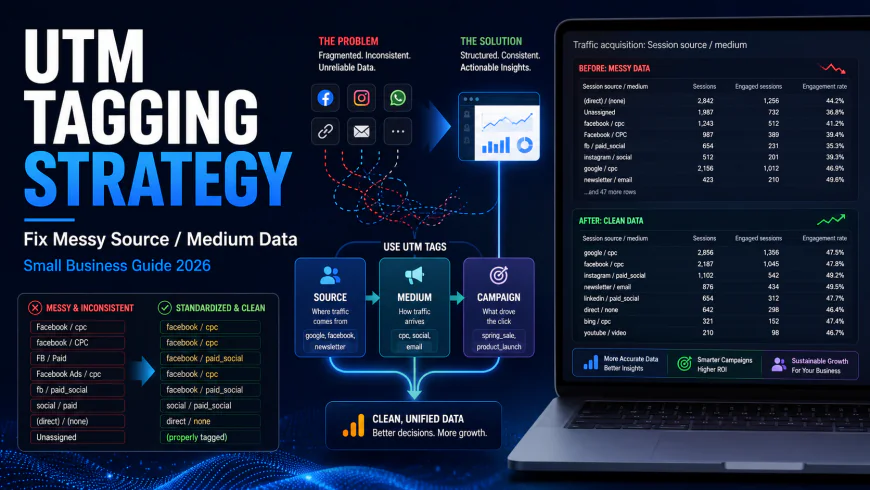
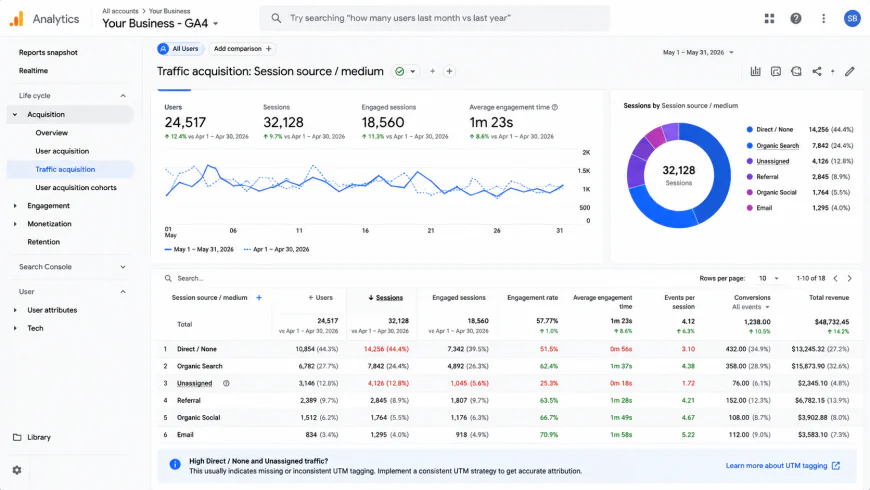 An unoptimized GA4 acquisition report where missing referrers and manual tagging errors push valuable campaign data into the Direct and Unassigned buckets.
To understand the scale of this issue, we can look to SparkToro’s Dark Social Experiment. This study highlighted how easily clean web traffic is misclassified. Without a clear utm tagging strategy for small business campaigns, you remain blind to which community shares actually drive revenue. This blindspot has grown larger with recent platform updates. For example, Reddit removed its automatic attribution markers in mid-to-late 2025. This means all untagged, shared Reddit traffic now appears in your dashboard as direct/none, masking its actual marketing impact.
The rise of LLM and AI search tools adds another layer of complexity. Clicks coming from ChatGPT, Claude, or Gemini rarely pass clear, recognizable referral headers. Instead, they often masquerade as direct US mobile traffic. To find these visits, we have to analyze page-level traffic spikes to correlate specific content performance with known AI search visibility trends.
This is why learning how to organize utm parameters is your best line of defense. By applying structured, consistent naming conventions to every link you share, you bypass the unreliable referrer header altogether. Rather than relying on GA4 to guess where your visitors come from, manual tagging forces the analytics platform to read your predefined parameters. This simple step helps you fix dark social traffic analytics and ensures your marketing attribution data remains clean, accurate, and actionable.
Is the Free Google URL Builder Secretly Wrecking Your Team's Data Consistency?
The first instinct for most marketers looking to fix dark social traffic analytics is to bookmark the free Google Campaign URL Builder (ga-dev-tools.web.app). It is quick, accessible, and does exactly what it says on the tin. However, relying on this tool as your primary utm tagging strategy for small business operations is a major workflow liability. The tool is designed for isolated, one-off links. It offers zero governance, has no memory of past campaigns, and provides no built-in guardrails to prevent human error.
When you rely on a browser bookmark, everyone on your team creates links in a vacuum. One person might write utm_medium=Paid-Social, another writes utm_medium=paid_social, and a third writes utm_medium=paid-social. Users on r/GoogleAnalytics frequently complain that their team creates hundreds of UTMs that nobody ever looks at because there is no central system mapping them to actual business outcomes. This chaos starts at the link-generation level.
GA4's default channel groupings are highly sensitive. A single casing or spacing error completely ruins your dashboard analysis. If your team inputs "Paid-social" instead of the strictly required "paid-social", GA4 will not recognize the medium. Instead of placing the traffic in the designated Paid Social bucket, it pushes the data directly into the "Unassigned" category. Once your session source medium data is split across three or four mismatched variants of the same platform, your dashboard ROI analysis is compromised.
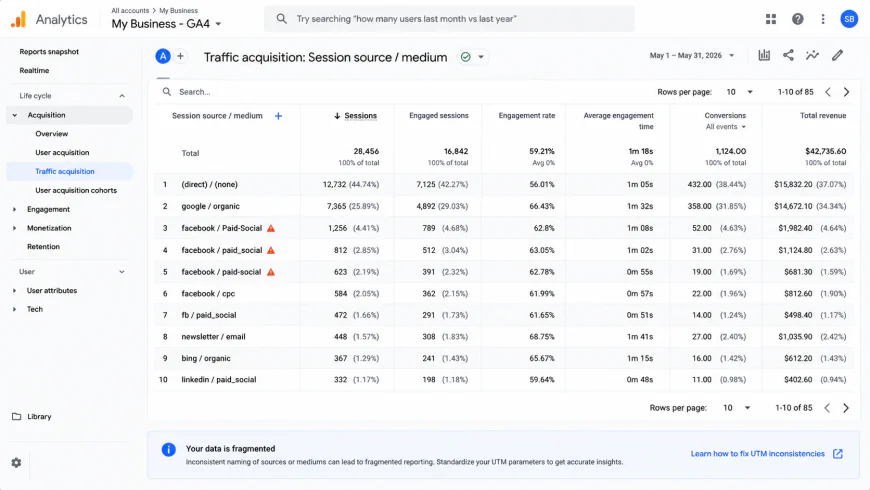 A classic example of how manual entry errors in free URL builders cause GA4 to split identical traffic sources into separate, unassigned reporting rows.
You do not need to purchase expensive attribution platforms early on to solve this. Many small businesses waste money on automated tracking software when a disciplined spreadsheet template with built-in data validation is more than enough. By restricting input fields to pre-approved dropdown menus, you enforce strict naming conventions and eliminate typing errors before the links are even generated.
To help you decide how to organize utm parameters for your specific team size, we compared the three standard options for small business utm tracking below.
| Tracking Method | Typo & Case Risk | Primary Benefits | Main Drawbacks | Best Suited For |
|---|---|---|---|---|
| Free URL Builders (e.g., Google's Campaign tool) | Extremely High (Allows manual, freestyle typing) | Free, instant setup, no learning curve. | No central records, creates fragmented GA4 reports, no naming enforcement. | Solo founders or single-operator marketing setups making occasional links. |
| Standardized Google Sheet (With CONCATENATE arrays) | Very Low (Enforced via dropdown data validation) | Free, creates a centralized audit trail, easily shared, fully customizable. | Requires initial formulas setup, relies on team discipline to use it. | Small teams (2–10 people) wanting to organize utm tags for small business on a budget. |
| Dedicated UTM Governance Platforms (e.g., UTM.io, CampaignTrackly) | Near Zero (Hard-coded templates and direct integrations) | Automated syncing, team access controls, chrome extensions, bulk generation. | Requires a monthly subscription fee, high initial configuration time. | Rapidly scaling agencies or marketing teams managing multiple client accounts. |
Our workflow tests showed that a custom spreadsheet template is the sweet spot for small business owners. It provides the governance of a paid platform without the added monthly overhead. Whichever route you choose, the goal remains the same: stop letting manual entry errors push your hard-earned campaign clicks into the analytics abyss.
The "UTM Bible" Blueprint: How to Organize UTM Parameters Without Overcomplicating It
In our experience auditing small business marketing setups, the best utm tagging strategy for small business isn't the most complex one. It is the one your team actually sticks to. You do not need enterprise-grade governance tools or deep engineering resources to keep your analytics clean. Instead, a successful small business utm tracking guide boils down to three unyielding rules that define how to organize utm parameters across every campaign.
To keep things manageable, focus almost entirely on the three required parameters. Ignore the optional terms and content fields unless you are running highly complex multivariate ad sets. Think of your UTM string as a physical mail delivery system:
- Source (The Origin): Who sent the traffic? This is the specific platform or publisher where the link lives (e.g.,
newsletter,linkedin,partner-site). - Medium (The Vessel): How did the link travel to the user? This must align with GA4 default channel groupings (e.g.,
email,cpc,social-post). - Campaign (The Why): What is the specific campaign, launch, or promotion? Keep it brief and descriptive (e.g.,
q1_clearance_2026).
Our workflow tests show that enforcing a strict lowercase convention across these three fields solves 90% of all GA4 traffic acquisition reporting errors. GA4 is completely case-sensitive. If you tag a link with utm_source=LinkedIn and another with utm_source=linkedin, your session source medium report will split your performance metrics across two separate lines. Worse, if your medium is written as "Paid-Social" instead of the strictly required "paid-social", GA4 will reject the classification entirely and dump your hard-earned clicks into the "Unassigned" bucket, rendering your marketing attribution useless.
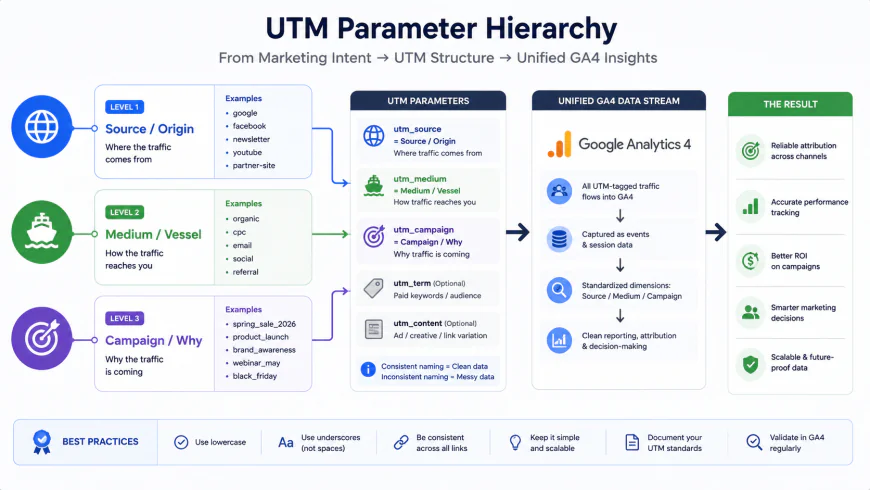 Visualizing the UTM flow: keeping your inputs standardized ensures that your campaign data maps perfectly to GA4's default channel groupings.
The Internal UTM Trap: How to Accidentally Destroy Your Own Data
While establishing these naming conventions, you must guard against the single most catastrophic tracking mistake a small business can make: using UTM parameters on internal links.
We regularly speak with SaaS founders and e-commerce owners who wonder why their high-performing paid ads show "zero conversions" in GA4 while a random "homepage banner" is credited with all their sales. This happens because someone appended UTM parameters to an internal link, such as a banner on the homepage pointing to a product page (e.g., linking to mysite.com/product?utm_source=homepage_banner).
According to Google Analytics Help documentation and UTM.io Naming Guides, GA4 is built to register a brand-new session the moment it detects a new inbound UTM source. When a visitor lands on your homepage via a paid Google Ad, their session is correctly marked as google / cpc. The moment they click that internal homepage banner with UTMs attached, GA4 instantly kills the original session, terminates the paid search tracking cookie, and starts a completely new session attributed to homepage_banner.
"Never use UTM parameters on internal links. You are essentially telling Google Analytics that the user left your website and came back as a different person from a different marketing channel, completely overwriting the real referral source."
— Julius Fedorovicius, Analytics Mania
If you want to track how many people click internal promotions, banners, or footer links, do not touch UTM parameters. Use custom event tracking in Google Tag Manager instead. Keeping your UTM tags strictly reserved for external, inbound traffic is the only way to preserve your marketing attribution and keep your session source medium data clean.
We Tested the Top UTM Governance Tools: Our Balanced Pros and Cons Review
Once you establish a standardized naming convention, the hardest part of any utm tagging strategy for small business is maintaining team discipline. If your team members continue to build links on the fly using the basic Google Campaign URL Builder, human error will inevitably creep back in. To prevent this, many teams look toward dedicated software to enforce their naming rules.
We spent several weeks testing three of the top UTM governance tools on the market, evaluating them based on usability, features, and cost-effectiveness. We then contrasted them against a simple, locked Google Sheet to help you decide if paid software is worth the investment.
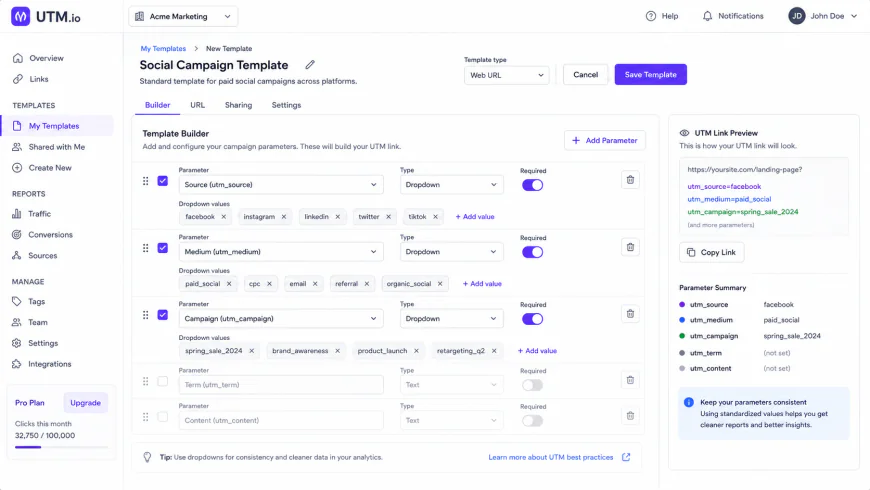 During our testing of UTM.io, we found that hard-coding templates for specific channels significantly reduced naming errors across decentralized teams.
1. UTM.io: The Industry Standard for Team Templates
In our experience testing UTM.io, its biggest strength lies in its team-sharing capabilities and browser extension. Instead of leaving team members to guess what parameters to use, you can build locked templates for specific campaigns (e.g., "Monthly Newsletter" or "Meta Retargeting").
- The Pros: The Chrome extension is incredibly efficient. It allows you to generate a fully tagged, shortened URL directly from the target webpage in two clicks. Bulk link generation works seamlessly, allowing you to upload a list of landing pages and apply a single UTM template to all of them instantly.
- The Cons: The built-in analytics dashboard in their entry-level plans is surprisingly basic. It shows click volume, but it does not map those clicks directly to GA4 conversions unless you upgrade to their higher-tier enterprise plans. For a small team, you are paying primarily for a link-builder interface, not an analytical engine.
2. CampaignTrackly: Built for High-Volume Campaigns and CRM Sync
If your marketing workflow involves uploading massive CSV files of URLs to populate email marketing platforms or ad managers, CampaignTrackly is designed exactly for that level of scale.
- The Pros: We found its metadata schema features to be exceptionally strong. You can associate your UTM parameters with broader campaign metadata, such as target audience, budget codes, and regional identifiers. It also syncs directly with HubSpot, Marketo, and Salesforce, making it easier to carry UTM data straight into your CRM leads.
- The Cons: The interface is dense, and the learning curve is steep. If you are a solo marketer or run a small agency, the interface feels bloated. It requires significant setup time to align the automated workflow engines with your existing platforms.
3. UTM Mind: AI-Assisted Validation and GA4 Alignment
UTM Mind is a newer entry to the market, focusing heavily on modern validation mechanics to fix dark social traffic analytics and prevent broken GA4 schemas before they go live.
- The Pros: The platform features automated validation logic that cross-checks your proposed UTM links against GA4's official default channel groupings. If you accidentally type "Paid-Social" instead of the required "paid-social", the platform flags the error in real-time. It also includes basic AI agent workflows that suggest optimal naming structures based on your historical traffic logs.
- The Cons: Because it is a relatively new tool, its integrations are limited compared to UTM.io. It lacks deep native connections with third-party URL shorteners, forcing you to rely on their proprietary redirect service.
The Budget Trade-Off: Paid Tools vs. A Locked Google Sheet
When trying to organize utm parameters, many small businesses make the mistake of buying expensive attribution software too early. In our experience, spending money on a specialized tool is often a waste of resources when a disciplined Google Sheet with cell validation is more than enough for a growing team.
A Google Sheet template costs nothing, is easily shared, and can be customized with data validation dropdowns that restrict inputs in the "Medium" column to strictly lowercase, pre-approved channels. This simple layout solves 95% of formatting errors.
The trade-off comes down to compliance. A spreadsheet is only as good as your team's commitment to using it. If your team bypasses the sheet and "freestyles" their tracking links, a paid governance platform like UTM.io—which forces users through a browser extension—becomes a necessary expense to keep your GA4 traffic acquisition reports from turning into a mess.
The Final Verdict: How a Zero-Budget Small Business Can Bridge the Attribution Gap
Our team has audited dozens of analytics setups for growing brands, and the pattern is remarkably consistent. Founders search for a magic-bullet attribution tool to fix their reporting when the real issue is team discipline. If your team cannot commit to using a standardized spreadsheet template, they will not commit to logging into a paid governance portal either.
For a zero-budget operation, a locked Google Sheet with built-in cell validation is your best defense against messy data. You do not need to pay $50 a month to organize utm parameters. You simply need to lock down your input columns so your social media manager cannot type "Paid-Social" (which pushes the traffic straight into the "Unassigned" bucket in GA4's default channel groupings) when they should have used "paid-social".
We found that maintaining a single, source-of-truth spreadsheet is the most effective utm tagging strategy for small business success. It keeps your naming conventions clear, costs nothing, and builds the tracking habits your team will need before scaling into automated platforms.
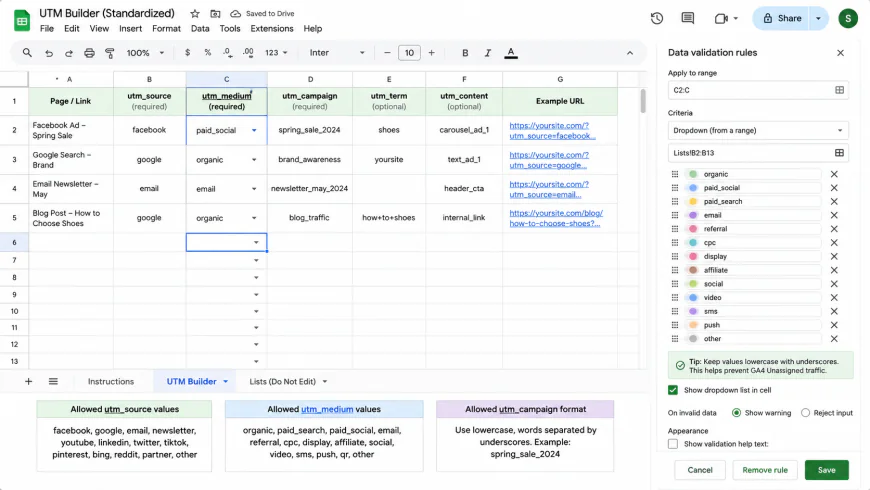 Our recommended zero-budget setup: use simple data validation dropdowns in your spreadsheet template to restrict 'Medium' inputs to exact matches for GA4's default channel groupings.
Frequently Asked Questions
If Google Ads auto-tagging is enabled, do I still need manual UTM parameters?
Yes. While Google claims auto-tagging via the Ggclid (Google Click ID) is sufficient, privacy-first browsers like Safari, Brave, and Firefox increasingly block or strip these dynamic tracking IDs. When a Ggclid is dropped, your paid traffic defaults to direct or organic in your GA4 traffic acquisition reports. We recommend using a manual UTM tracking template as a backup in your Google Ads account settings to preserve your marketing attribution when Ggclid fails.
How do we fix dark social traffic analytics when users share links inside private chats?
You cannot fully prevent dark social, but you can narrow the gap. Steve Lamar's Dark Social Experiment with SparkToro highlighted that a massive portion of direct traffic is actually untagged social sharing on platforms like Slack, WhatsApp, and email. To address this, add share-specific UTMs to your site's "Copy Link" buttons (e.g., utm_medium=social_share). Additionally, compare page-level traffic spikes on specific blog posts or landing pages right after you publish them on community platforms like Reddit, which removed its automatic attribution markers in mid-to-late 2025.
How do we track clicks coming from AI search engines like ChatGPT, Claude, or Gemini?
LLM search engines rarely pass clean referral headers, meaning most of this traffic registers as direct US mobile traffic in your session source medium reports. Because you cannot append UTMs to links generated dynamically by AI, the best small business utm tracking guide tip is to isolate your landing page traffic spikes. Look for sudden increases in direct traffic to specific, highly informational blog posts and cross-reference them with your brand's search visibility trends inside AI tracking dashboards.
The Lean Team Workflow Checklist
To keep your data clean without wasting budget, print out this workflow philosophy for your marketing team:
- Check the GA4 list first: Before creating a new tag, verify your medium matches one of Google’s official default channel groupings exactly. No capital letters, no spaces, no dashes.
- No internal UTMs: Never use tracking parameters on your own homepage banners or internal navigation links. Use Google Tag Manager event tracking instead.
- Audit monthly: Open your GA4 traffic acquisition report once a month, search for "Unassigned" or "(direct) / (none)" spikes, and trace the source of the broken links.
- Back up your ads: Ensure manual UTM tracking templates are active in Meta, Google, and LinkedIn Ads managers, serving as a reliable backup when browser privacy features drop automatic IDs.
By enforcing this disciplined, spreadsheet-first framework, you can stop wasting time guessing which campaigns drive revenue and start making marketing decisions based on reliable, clean attribution data.