B2B Lead Generation Automation Software: Top Tools That Actually Convert in 2026
Looking for B2B lead generation automation software that actually converts? We compare Apollo, Clay, and more based on real user trials, pricing, and deliverability.
 Abir Bin Hasan
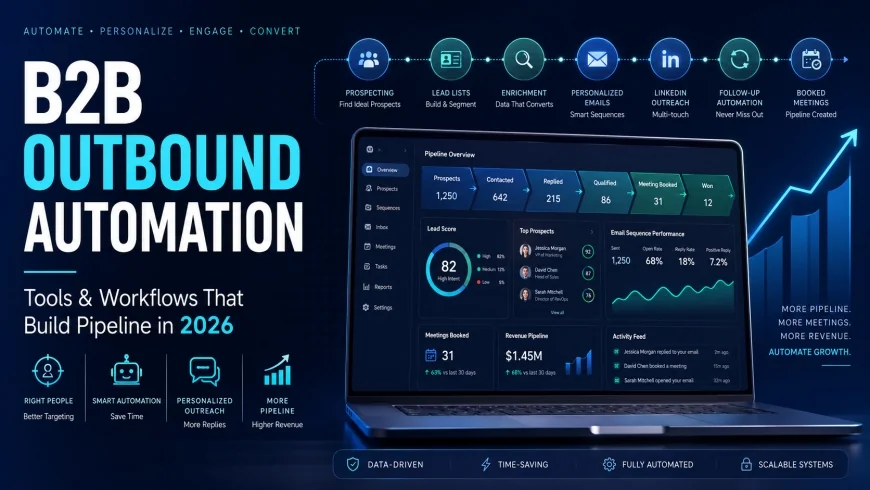
B2B Outbound Automation: The Tools and Workflows That Actually Build Pipeline in 2026
Cold outbound is in the middle of a massive structural shift. With corporate email databases decaying by nearly 30% every year, blasting thousands of generic emails just doesn’t work anymore. If you want to get on a prospect's calendar today, you have to ditch the old-school "spray and pray" platforms. Instead, modern teams are moving toward multi-source data validation and isolated sending infrastructure designed strictly to keep domains out of the spam folder.
What this article helps you decide
Finding the right sales automation stack isn't about chasing a mythical all-in-one platform. It's about matching your exact go-to-market motion with the right combo of data providers and sending tools. This guide breaks down the market's heavy hitters to help you figure out if your pipeline needs a high-capacity scraper, a dynamic enrichment engine, or isolated cold email infrastructure.
Analysis Methodology
This comparison is compiled from deep-dive desk research, including technical documentation, API limitations, service agreements, and real operational feedback from growth marketers and RevOps leads in technical forums. The focus here is on dry, practical realities—like API throttles and actual deliverability hurdles—rather than high-level marketing promises.
Overview & Market Context: The Death of the "All-in-One" System
For years, sales teams relied on single-platform solutions. These legacy systems promised a unified workspace to find prospects, verify addresses, build sequences, and hit send. But today's strict email authentication rules and aggressive spam filters have completely broken that approach. Running massive prospecting searches and executing cold outreach inside the same shared-IP tool is an easy way to get your primary domains blacklisted.
While vendor marketing materials focus on database size, the real bottleneck is keeping your messages out of the spam folder. Today's most resilient workflows treat prospecting software as modular ecosystems. By separating the process into three distinct phases—discovery, multi-provider enrichment, and dedicated outreach—you protect your domain authority while maintaining decent reply rates.
Google and Microsoft have essentially forced this modular split. Bulk, un-personalized templates get filtered out almost instantly. Consequently, successful outbound has shifted from pure volume to highly targeted, custom-tailored outreach. Modern tools have to function as flexible integration hubs rather than just static directories of outdated corporate contacts.
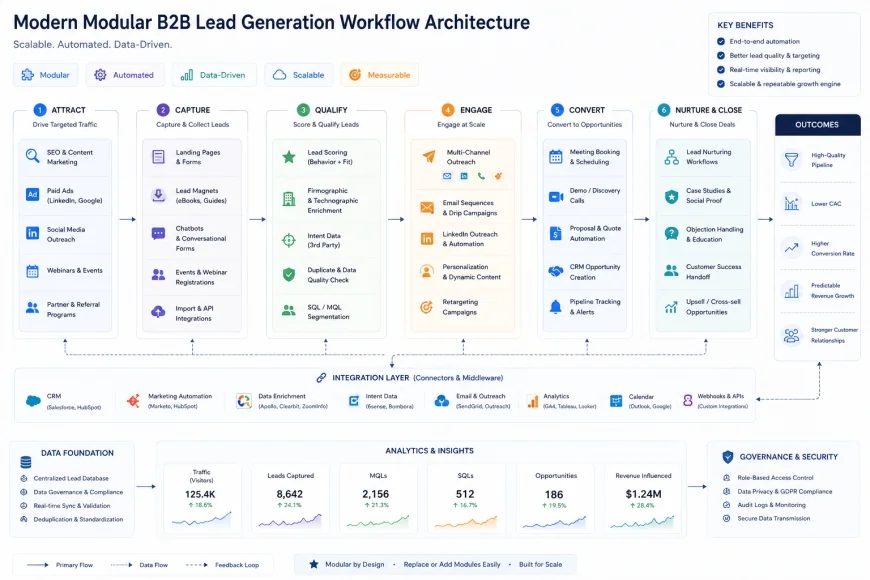 The transition from legacy all-in-one systems to modern modular pipeline configurations that protect domain authority.
In-Depth Evaluation of the Leading Software Engines
1. Apollo.io: The High-Volume Data & Sequencing Hub
Apollo.io is arguably the most common starting point for modern outbound. With a massive database of over 275 million contacts, it functions as an all-purpose search engine for sales teams. The search filtering is its strongest asset, allowing you to narrow down target lists by specific technographics, funding rounds, location, and department hiring trends.
However, running your actual email sequences directly through Apollo’s built-in mailer is highly discouraged by deliverability professionals. It lacks native multi-inbox rotation, meaning if you scale your volume too high, you risk burning your sending domains. Who should avoid it: If you are running high-volume, automated cold campaigns, do not rely on Apollo’s native sending servers. Instead, use Apollo purely as a list-building engine, export the data, and run it through a dedicated external verifier before sending.
While the entry tier is cheap and even includes a limited free plan, the "unlimited" database access advertised on higher tiers comes with a catch. Apollo enforces daily and monthly export limits behind the scenes to protect its data from bulk scraping. If you need to export tens of thousands of leads quickly for a major campaign, these caps can easily stall your workflow.
2. ZoomInfo: Enterprise-Grade Depth with Heavy Friction
When it comes to raw data depth at the enterprise level, ZoomInfo is still the dominant force. Its proprietary crawler tracks corporate org charts, tech stacks, and real-time buying signals. If your sales reps are targeting mid-market or Fortune 500 accounts, the direct dials and mapping of internal reporting structures are incredibly detailed.
But for most teams, the barriers to entry are massive. Who should avoid ZoomInfo: If you are a startup, small agency, or bootstrapped business, ZoomInfo is almost certainly a bad fit. The company relies on multi-year contracts that frequently require five-figure upfront payments, and their renewal terms are notoriously rigid, with heavy pricing jumps. The platform's interface is also incredibly dense, often requiring a dedicated RevOps specialist just to configure proper mapping with Salesforce or HubSpot.
It's also worth noting that no database is immune to data decay. In fast-moving industries like tech and startups, people change roles rapidly. Relying solely on ZoomInfo's data without running the exported lists through a secondary verification pass will still result in high bounce rates that can damage your email sender score.
 ZoomInfo offers unmatched organizational chart depth and direct dials but carries high annual commitments.
3. Clay: The Programmatic Enrichment Engine
Clay has completely changed how growth teams think about data enrichment. It isn't a single database; it's an orchestrator that connects to over 50 different data providers. Using a "waterfall" model, Clay queries multiple databases sequentially—checking Apollo, Hunter, Dropcontact, and Findymail in order—until it finds and verifies a working corporate email address.
This setup allows for incredibly creative outbound flows. You can scrape a LinkedIn profile, check the company’s open job board for specific software skills, use an AI integration to draft a custom pitch based on those requirements, and verify the email address all in one spreadsheet-like UI. This hyper-personalization makes it a favorite for agencies and high-growth teams that need highly targeted campaigns.
Who should avoid Clay: If you want a simple plug-and-play tool, avoid Clay. The learning curve is steep, and setting up advanced workflows requires a level of logical thinking akin to basic programming. It is also remarkably easy to burn through credits. Since every enrichment step, email lookup, and AI prompt costs credits, a $149/month starter plan can easily morph into an $800+ monthly bill during heavy prospecting runs.
4. Instantly.ai: High-Performance Deliverability & Multi-Inbox Scale
Instantly.ai approaches the outbound equation from the delivery end. It doesn't have an internal database of contacts; it's built purely to handle automated email distribution at scale. Its standout feature is its "unlimited inboxes" model. Instead of sending hundreds of emails from one account, Instantly lets you connect dozens of secondary sending domains and rotational mailboxes without charging per-seat fees.
This multi-inbox setup allows you to distribute your daily volume safely (e.g., keeping it to 25 or 30 emails per inbox per day). The platform also features automated warming sequences to mimic human sending patterns and maintain domain health. For teams executing cold campaigns, it has become a staple of the modern stack.
The billing structure is straightforward, with flat monthly rates based on active leads and warmups. This predictability makes it highly cost-effective for agencies. Who should avoid it: If your sales motion depends on heavy CRM synchronization, multichannel social touchpoints, or complex inbound lead routing, Instantly will feel too bare-bones. It is a specialized cold outreach tool, meaning you still have to bring your own clean, pre-verified lists from other sources.
💡 Expert Analysis & Experience
Operational discussions on platforms like r/coldemail and r/SaaS reveal a clear gap between software marketing and real-world results. Users frequently warn that massive legacy databases are plagued by stale contact data. On r/LeadGeneration, operators report that even lists marked as "verified" inside database platforms can yield bounce rates of 5% to 10%—and up to 28% in highly competitive, fast-moving spaces like B2B SaaS.
To combat this, experienced growth teams treat databases purely as starting points. A common strategy shared among operators involves pulling raw names, running them through specialized third-party cleaners, and routing them to specialized multi-inbox senders. This approach reportedly drops bounce rates from an unsustainable 18% down to under 2%. Conversely, popular multi-channel platforms like Lemlist are frequently noted as becoming prohibitively expensive once you scale up the number of active sending domains and team seats.
| Platform | Primary Strength | Database Accuracy | Sending Capabilities | Learning Curve | Typical Monthly Cost |
|---|---|---|---|---|---|
| Apollo.io | Bulk Data Sourcing & Basic Sequences | Moderate (needs third-party verification) | Basic (not ideal for cold scale) | Low to Moderate | $49 - $119+ per user |
| ZoomInfo | Deep Enterprise Data & Org Charts | High (Enterprise-grade) | Basic CRM syncs | High (requires admin setup) | Custom annual contracts ($10k+) |
| Clay | Waterfall Enrichment & Programmatic Customization | Exceptional (Multi-source verification) | None (Integrates with senders) | Very High | $149 - $800+ (credit dependent) |
| Instantly.ai | Multi-Inbox Cold Email Delivery | N/A (Requires imported data) | Excellent (Unlimited mailboxes) | Low | $37 - $97 flat rate |
Real-World Practical Scenarios & Native Workflows
Because no single tool owns the entire pipeline seamlessly, successful teams build workflows that chain different platforms together. For a step-by-step breakdown of how these components connect under real operating conditions, you can read our setup guide on how to use B2B lead generation automation software.
Scenario: The Three -Part "Triple-Play" Pipeline
Imagine a B2B service agency targeting 500 key decision-makers at mid-market retail brands. To protect their core domain and maximize response rates, they ditch the single-tool approach for a modular system:
- Step 1: List Extraction: They use Apollo's Chrome extension or search filters to extract 500 LinkedIn profiles matching their exact target persona.
- Step 2: Database Export: They export this raw search as a CSV and upload it straight into Clay.
- Step 3: The Waterfall Verification: Within Clay, a multi-source waterfall enrichment run queries Apollo, Hunter, and Findymail sequentially to find and verify the most accurate personal business emails.
- Step 4: Hyper-Personalization: Clay's built-in AI assistant scans each contact’s LinkedIn bio and company website to generate a customized, highly relevant icebreaker.
- Step 5: Seamless Handoff: Using webhooks or a native integration, Clay pushes these enriched leads and their custom icebreakers directly into Instantly.ai.
- Step 6: Smart Delivery: Instantly routes the emails through 10 distinct, warmed-up secondary domains, keeping the volume low (25-30 emails per inbox per day) to ensure perfect deliverability.
Another highly effective strategy focuses on buying signals—like open job postings—to catch companies right when they are expanding and need external help.
Scenario: The "Hiring Intent" Hack
A specialized growth agency only wants to pitch to companies that are actively looking for marketing leadership. Instead of cold-emailing blindly, they automate their research:
- Step 1: Scrape Job Listings: They use a scraper like PhantomBuster to pull active LinkedIn job postings for "Head of Growth" or "VP of Marketing" on a daily basis.
- Step 2: Feed the Machine: The daily search results are fed directly into a Google Sheet synced with Clay.
- Step 3: Tech Stack Check: Clay uses its built-in integrations (like BuiltWith) to analyze each company’s domain, verifying if they use specific tracking codes, CRMs, or analytics software.
- Step 4: Find the Decision-Maker: Clay finds the specific hiring manager or VP, pulls their verified email address, and drafts an intro referencing their open role.
- Step 5: Quick Human Pass: The agency's sales rep does a 10-minute manual review in their sheet to ensure the AI-drafted text sounds natural, then clicks "Approve" to send the leads directly to their cold outreach system.
💡 Pro Tip: The Golden Rule of Domain Protection
Never, under any circumstances, send cold outbound campaigns from your primary corporate domain. If you get flagged for spam, your team won't even be able to send internal emails to each other. Instead, buy 3 to 5 lookalike domains (e.g., trycompany.com or getcompany.com). Configure your SPF, DKIM, and DMARC settings immediately, and set up a custom tracking domain inside your email tool to protect your sender reputation.
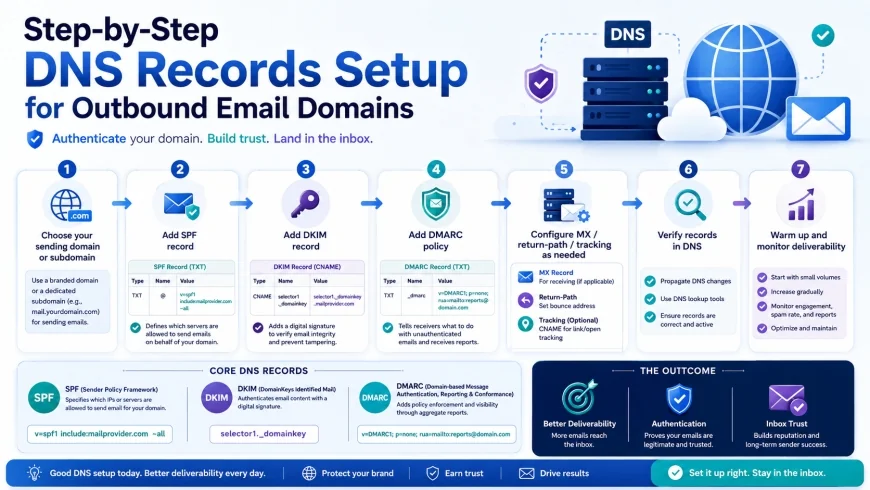 A clean configuration of SPF, DKIM, and DMARC records within a registrar is essential to avoid spam filters.
Pricing & Licensing: Watch Out for Hidden Costs
It is easy to fall for low introductory prices, but the real cost of sales automation tools depends heavily on credit consumption, export limitations, and seat fees.
Take Clay's $149/month starter plan, for instance. It sounds incredibly cheap for what it offers. However, because Clay runs on a credit system, a single lead can easily eat up 5 to 8 credits if you are running a multi-source waterfall search, verifying the email, and using AI to write a custom intro. If you process 2,000 leads a month, you will burn through your credits in a week and find yourself forced to upgrade to the $349 or $800+ monthly tiers.
On the enterprise end, legacy databases like ZoomInfo demand massive upfront annual contracts (often starting well over $10k) with no monthly options or easy cancellation. While this works for established enterprise teams with clear budgets, it is a cash-flow killer for startups and lean agencies. Always factor in secondary expenses like list verification tools, domain registration, and mailbox warmup tools when calculating your total software spend.
A Balanced Look at the Two Main Approaches
Database-First Platforms (Apollo, ZoomInfo)
- Instant access to massive, searchable directories.
- Advanced filters targeting niche search queries, headcounts, and industries.
- Speeds up the initial prospecting phase.
Enrichment & Delivery Toolchains (Clay, Instantly)
- Unmatched email deliverability and sender domain safety.
- AI-powered, dynamic personalization that spikes response rates.
- Highly scalable without risking your primary domain.
Database-First Platforms (Apollo, ZoomInfo)
- Stale data is a constant challenge as people change jobs.
- Sending high-volume cold emails natively risks your sender health.
- Rigid contract lock-ins or strict export caps.
Enrichment & Delivery Toolchains (Clay, Instantly)
- Requires managing multiple tools (a modular stack) instead of just one.
- Steep learning curve to master complex logic and workflows.
- Monthly costs can fluctuate wildly depending on credit usage.
Who Should Use What? Choosing Your Outbound Stack
Your ultimate sales stack depends on your daily workflow, the size of your sales operations team, and your total monthly budget. Here is a realistic look at how different teams should allocate their software spend:
- Bootstrapped Startups & Small Agencies: When every dollar counts, you want to keep your stack lean. The smartest route is using Apollo.io’s entry-level plans strictly to export targeted prospect lists. Run those lists through an affordable verification tool, and drop them into Instantly.ai for cold delivery. This setup gives you maximum pipeline leverage for minimal capital.
- High-Growth Startups & Outreach Agencies: If you are selling into competitive spaces where generic outreach falls flat, you need personalization to stand out. Your ideal stack pairs LinkedIn Sales Navigator or Apollo with Clay’s automated waterfall enrichment. Use Clay’s AI integrations to write contextual icebreakers, then push those leads to Instantly or Smartlead to manage rotational, multi-inbox delivery.
- Enterprise Sales Teams: For established sales departments chasing high-value enterprise accounts, ZoomInfo integrated directly with Salesforce, HubSpot, or Microsoft Dynamics is still the gold standard. The depth of their organizational charts and mobile direct dials justifies the high annual commitment for large, structured sales divisions.
The Verdict: Recommended Platforms for Specific Needs
There is no magic, single-tool solution for B2B pipeline growth. The best platform depends entirely on your primary bottleneck:
- For affordable database access and list-building: Go with Apollo.io. Its sheer size and user-friendly interface make it the most accessible starting point.
- For deep organizational charts and enterprise direct dials: Choose ZoomInfo. If you have the budget and target large accounts, their intelligence data remains unmatched.
- For dynamic, multi-source enrichment and AI messaging: Use Clay. It is the absolute best engine for building complex, programmatic lead lists that actually get open rates.
- For deliverability-safe, multi-inbox cold emailing: Choose Instantly.ai. It is built to scale cold outreach safely without burning your domain reputation.
Frequently Asked Questions
Why are all-in-one sales tools losing their effectiveness?
Most all-in-one platforms try to do too many things at once. Because they attempt to manage massive contact databases, email verification, and bulk email sequences under one roof, they fail to keep up with modern spam filters. Attempting to scrape data and send high-volume cold emails from the same platform frequently flags your domains and lands your emails straight in the spam folder.
What exactly is "waterfall data enrichment"?
Waterfall enrichment is an automated search strategy that runs a lead's name and company through multiple contact databases in a specific order (e.g., searching Apollo first, then Hunter, then Findymail, etc.). The tool only charges you or stops searching once it finds a fully verified email. This method dramatically improves your lead match rates and ensures you aren't relying on a single, outdated database.
How do I prevent my cold outreach from going to spam?
First, never send outreach campaigns from your primary business domain. Set up secondary, lookalike domains specifically for outbound emails. Make sure you configure your DNS records properly with SPF, DKIM, and DMARC. Additionally, keep your daily email volume low (around 30 to 50 emails per inbox), use custom tracking domains, and run every list through a verification tool before launching.
Can I fully automate my prospecting with AI?
AI tools can handle the heavy lifting of researching accounts and drafting personalized intro lines, but they are not hands-off systems. You still need a human eye to verify data quality, monitor overall deliverability, replace blocked domains, and refine your messaging based on what actually drives conversions.
Are these automated lead generation platforms GDPR and CAN-SPAM compliant?
Most modern platforms offer compliance filters, such as scanning for opt-out lists and distinguishing business emails from personal ones. However, compliance ultimately rests on your shoulders. To protect your business, target only professional B2B addresses, keep your offers highly relevant to the recipient's business, and always include a clear, instant way for contacts to opt out of future emails.
Your Quick Launch Checklist
- Always run your database-sourced lists through a dedicated verification step (using tools like NeverBounce, Findymail, or Clay's verification steps) to keep your bounce rates safely below 3%.
- Cap your cold outreach at 30 to 50 emails per inbox each day to avoid getting flagged by Google and Microsoft spam algorithms.
- Implement a multi-inbox rotational infrastructure (using systems like Instantly or Smartlead) rather than blasting high-volume sequences from your company’s main domain.
- Utilize programmatic waterfall enrichment tools like Clay to cross-reference data sources, giving you the most accurate, up-to-date contact info possible.
- A/B test your subject lines constantly and personalize body copy using specific prospect data points instead of sending generic, one-size-fits-all email templates.