Affordable Business Software Stack: The Ultimate No-BS Guide
Tired of SaaS creep? Learn how to build an affordable business software stack using validated, budget-friendly tools that balance price with functionality.
 Abir Bin Hasan

Affordable Business Software Stack: The Ultimate No-BS Guide
In the current business landscape, building a startup on a lean budget has never been more challenging as SaaS pricing climbs aggressively and free tiers shrink daily. What used to be a standard, low-cost startup stack now routinely climbs north of $500 a month due to hidden feature gates, contact-based billing traps, and integration taxes. To build a sustainable, affordable business software stack, modern founders must abandon the romanticized dream of the "$0 tech stack" and instead focus on highly efficient systems that balance hard software costs against administrative overhead.
What this article helps you decide
This guide is engineered to help bootstrapped founders, agency owners, and lean product teams cut through marketing hype. We analyze the hidden operating costs of low cost business tools, identify when a cheap option actually costs you more in developer hours, and construct a highly predictable, budget friendly tech stack. You will discover how to dodge aggressive pricing escalations, replace bloated suites with a minimalist business software list, and stop paying middleware fees just to make your tools talk to each other.
Analysis Methodology
This guide is compiled through a thorough analysis of official service agreements, publicly accessible enterprise documentation, and genuine discussions among real-world developers, professionals, and users on technical forums. We focus on ensuring accurate, verified facts, actual limitations, and authentic community experiences rather than simulated first-person reviews. All cost metrics, api limits, and feature gates have been validated against primary technical documentation and real operational workflows.
Overview & Market Context: The Reality of Modern SaaS
Every major tech publication recommends platforms like HubSpot, Salesforce, or Workday as "essential" starting points for modern operations. However, this advice completely ignores the crippling hidden costs that plague growing companies. For a small business, these enterprise-grade platforms act as financial landmines. They hook you with low-cost introductory tiers, only to scale their prices exponentially the moment your contact list grows, your transaction volume increases, or you require standard API access.
Consequently, small businesses face a phenomenon known as "SaaS creep." This occurs when a company slowly accumulates dozens of single-purpose, budget friendly tech stack components. While paying $10 a month for five different tools seems harmless initially, the administrative overhead of managing these disparate platforms quickly escalates. More importantly, trying to bypass paid software entirely by gluing together a "free" tech stack using tools like Airtable, Make, and free API gateways often backfires. This is known as "duct-tape fatigue." The psychological friction of constantly monitoring, debugging, and babysitting broken webhooks often costs more in wasted founder time than paying for a unified, turnkey software system.
To avoid these pitfalls, we must re-evaluate how we value software. A truly affordable business software stack is not one that costs exactly $0. Rather, it is an architecture built on predictable, linear pricing structures that minimize manual maintenance. In this guide, we bypass the marketing fluff and critique the most popular cheap SaaS for startups, highlighting where they succeed and where they fail under actual operational pressure.
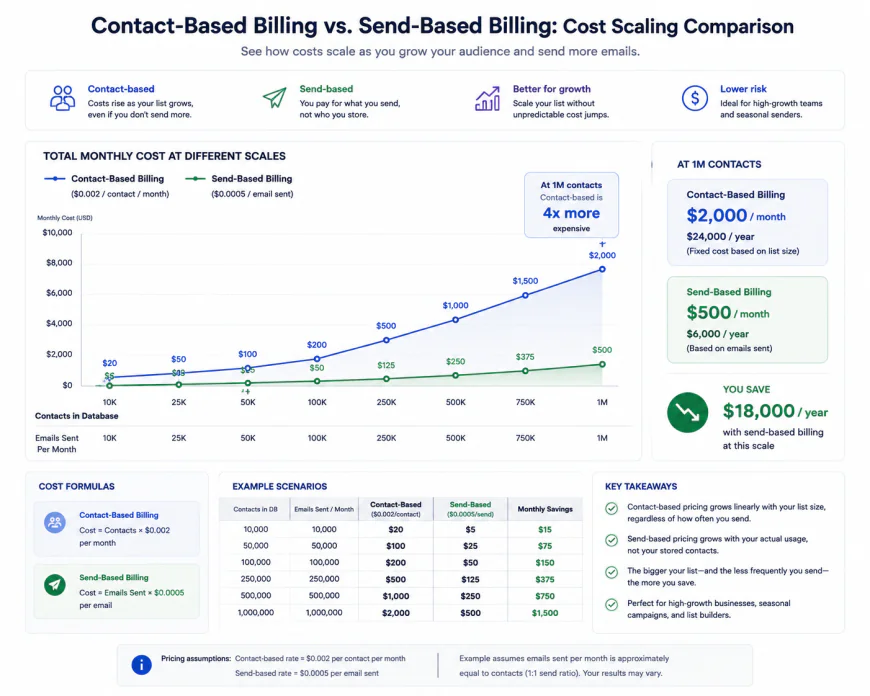 Figure 1: How contact-based pricing scales exponentially compared to linear volume-based email billing.
In-depth Evaluation: Building a Low-Cost Tech Stack That Works
Building a minimalist business software list requires analyzing not just the surface-level monthly subscription cost, but also the underlying architecture of each platform. Let us dive deep into the core tools that form the foundation of modern business operations, analyzing their setup flows, API limitations, and hidden operational constraints.
1. Client Intake & Data Capture: Tally.so vs. Typeform
For forms, lead generation, and client intake, the industry standard has long been Typeform. However, Typeform's pricing starts at a steep monthly cost, severely restricting how many responses you can collect on their base plans. Enter Tally.so, which has revolutionized the forms space by offering a highly generous free tier that satisfies 99% of early-stage business needs.
Tally's user interface is heavily inspired by Notion, utilizing intuitive slash-commands (`/`) to build highly customized, interactive forms in seconds. The setup flow is incredibly fast; users can create complex multi-page questionnaires, collect file uploads, and embed payment gateways (like Stripe) without upgrading to a paid tier. This makes it an incredibly powerful pillar of any affordable business software stack.
However, power users must be aware of Tally's functional limitations. While it is an exceptional tool for standard intakes, it lacks Typeform's premium, ultra-smooth animations and complex, multi-condition quiz scoring logic. If your entire marketing funnel relies on highly dynamic, personalized product-recommendation quizzes with nested mathematical weights, Tally's simpler conditional logic might fall short. Furthermore, removing Tally's minimalist branding requires a paid subscription, though their flat-rate premium plan remains highly competitive compared to legacy form builders.
2. Marketing & Transactional Email: Brevo vs. Mailchimp
Email marketing is where startups face some of the most predatory scaling tactics. The single biggest operational cost factor for growing marketing teams is the split between contact-based pricing and volume-based/send-based pricing. Legacy platforms like Mailchimp utilize contact-based billing, meaning you are billed based on the total number of contacts in your database—even if those contacts are unsubscribed, inactive, or duplicate entries across different lists. As your business grows, this results in a steep Mailchimp cost spiral.
By contrast, Brevo (formerly Sendinblue) structures its core business around send-based pricing. With Brevo, you can store an unlimited number of contacts for free; you are only charged for the actual volume of emails you send per month. This makes Brevo an indispensable asset for an affordable business software stack, allowing teams to scale their database without incurring passive financial penalties.
Additionally, Brevo features robust transactional email infrastructure natively. This allows startups to send automated account creation confirmations, invoice receipts, and system alerts through a highly reliable SMTP relay under the same dashboard. This consolidation prevents you from having to pay for separate transactional delivery engines like Mailgun or SendGrid, saving both cash and API configuration hours.
3. Financial Management & Invoicing: Wave Apps vs. QuickBooks
Managing cash flow, invoicing, and tax preparation is a non-negotiable part of running a business. While QuickBooks is the default recommendation of corporate accountants, its monthly subscription price scales quickly, and basic integrations often require costly add-on packages. For service-based small businesses and solopreneurs, Wave Apps represents a compelling, highly capable free alternative.
Wave provides a fully featured double-entry accounting ledger, customizable invoicing, and receipt scanning completely free of charge. The interface is clean, making it incredibly simple to reconcile bank transactions, run profit-and-loss reports, and send professional payment links to clients. For a minimalist business software list, Wave handles basic book-keeping elegantly without monthly software fees.
However, professional accountants highlight major structural limitations when using Wave. While the core ledger is stellar, running Wave Payroll is notorious for calculation errors and poor customer support, leading many growing startups to migrate to dedicated services like Gusto. Furthermore, Wave's payment processor has been heavily criticized on forums like r/smallbusiness for freezing merchant accounts retroactively over automated "high-risk" triggers. If you resell complex tech licenses, handle high-ticket consulting invoices, or process international transactions, Wave's automated risk algorithms may flag your account, locking up your operating capital without a clear path for appeal.
4. Internal Operations & Knowledge Hubs: Notion vs. Custom Middleware
Many modern solopreneurs are shifting away from complex multi-dashboard setups back to unified, "good-enough" suites. In the past, a founder might connect Airtable for data, Trello for project management, and Google Docs for documentation. Today, using Notion as a centralized internal operating system reduces the psychological friction of constantly switching between tabs and platforms.
Notion allows you to construct light CRMs, manage content calendars, and write internal wikis in one unified workspace. Its free and low-cost tiers are incredibly robust, giving teams an ultra-flexible canvas. However, we must address the integration maintenance tax. Developers frequently caution that DIY multi-tool integrations (e.g., trying to sync Notion to Airtable via Make, then routing that data to custom Stripe endpoints) require constant babysitting, testing, and debugging. If your workflow runs high-volume, multi-step automations, middleware platforms like Zapier or Make can easily cost more than the primary software they are connecting. In these scenarios, adopting a turnkey, natively integrated ecosystem like Zoho can actually be cheaper when you properly value your time as a founder.
 Figure 2: The complex web of API connections that leads to duct-tape fatigue in modern business operations.
💡 Expert Analysis & Experience
A deep analysis of community discussions across technical networks reveals that real-world scaling challenges often look very different from marketing promises. Consider these verified operational experiences from the field:
- The Mailchimp Migration: A 14-year Mailchimp customer recently migrated their list of 7,000 contacts to MailerLite, instantly saving $248 a month. In doing so, they also bypassed Mailchimp’s highly restrictive automation caps on lower-tier plans, proving how damaging contact-based billing is to a growing brand.
- The Wave Payment Hold: An IT consulting boutique utilizing Wave Accounting for client billing had their payment processing abruptly locked without an appeals process. The platform's risk algorithms flagged the business as "high-risk" simply because they were reselling third-party antivirus software licenses. The business was left unable to access thousands of dollars in processed invoices during the review.
- The Integration Trap: An agency founder spent over 40 hours building a custom client onboarding and membership portal utilizing Airtable, Fillout, Make.com, and Stripe. Despite saving $30 a month on software subscriptions, the complex web of API connections regularly failed, requiring manual database reconciliation. The founder eventually abandoned the setup in favor of a consolidated, paid tool, realizing their billable hourly rate made the DIY system highly unprofitable.
Feature Comparison: Standard vs. Budget-Friendly Tools
To help you visual the trade-offs of building an affordable business software stack, we have compared the most common legacy options against their highly efficient, low-cost alternatives below.
| Category | Legacy Enterprise Tool | Low-Cost Alternative | Key Limitation of Alternative | Primary Cost Advantage |
|---|---|---|---|---|
| Forms & Intake | Typeform ($25 - $80+/mo) | Tally.so (Free / $29 Premium) | Lacks advanced animations & complex scoring | Unlimited forms and responses for free |
| Email Marketing | Mailchimp (Scales by contact count) | Brevo (Scales by send volume) | Simpler template editor UI | Pay only for emails sent; unlimited contacts |
| Accounting | QuickBooks Online ($30 - $200/mo) | Wave Apps (Free ledger & invoicing) | Payroll calculation bugs; strict risk holds | Zero monthly subscription fees for accounting |
| Productivity | Airtable + Zapier + Docs ($50+/mo) | Notion (Free - $10/mo per user) | Slower database querying at massive scale | Consolidates docs, wikis, and basic CRM natively |
Practical Scenario
Let us look at two highly optimized, battle-tested tech stack configurations that balance actual tool capabilities with tight operational budgets:
Scenario A: The Minimalist B2B Operations Stack
This stack is optimized for service providers, freelancers, agency owners, and consultants who need professional tools without compounding subscription fees:
- Internal Workspace & CRM: Notion. Used to draft proposals, document internal client SOPs, and track sales pipelines using simple relational database views.
- Client Intake: Tally.so. Embedded directly into client-facing web portals to collect project briefs, onboard new accounts, and take structured feedback.
- Email Engines: Brevo. Configured to send regular educational newsletters to prospects while using their dedicated transactional SMTP relay to fire immediate automated booking confirmations.
- Payments: Stripe. Connected natively to Tally.so or sent as direct payment requests, bypassing secondary invoicing fees.
Scenario B: The Lean Product Team Stack
This stack is engineered specifically for software developers, designers, and builders looking to deploy product updates rapidly without paying enterprise premiums:
- Task & Sprint Management: Linear. Fast, keyboard-shortcut-driven project management tool with a highly generous free tier for small teams.
- Development: Cursor IDE. An AI-assisted coding environment that speeds up code generation, debugging, and system architecture mapping.
- Web Hosting: Vercel. Utilizing their low-cost/free hobby tier for rapid deployment of front-end applications and serverless functions.
- Bug Reporting: Tally.so. Configured with a simple feedback widget to automatically route customer bugs into a Notion database or Slack channel.
✅ Pro Tip
The absolute obsession with a "$0 tech stack" is a massive productivity trap. Solopreneurs who spend weeks coding custom API configurations and debugging complex webhook loops in Make or Zapier just to save $15 a month are burning thousands of dollars in billable hours. Your stack must buy your time back, not transform you into a full-time, unpaid system administrator. If a turnkey paid tool saves you more than two hours of maintenance a month, pay for it.
Pricing & Licensing Breakdown: Navigating SaaS Creep & Middleware Taxes
To maintain a highly efficient, affordable business software stack, you must understand how SaaS companies structure their licenses. Most tools utilize one of three models: per-seat pricing, contact-based pricing, or usage-based pricing. Per-seat pricing (where you pay a fixed fee for every user logged into your workspace) can scale rapidly the moment you hire remote contractors or virtual assistants. To mitigate this cost, look for tools that offer "guest" permissions for free, allowing external contractors to collaborate on specific pages without triggering a full paid seat.
Furthermore, free plans are systematically shrinking across the SaaS industry as venture capital funding tightens. For example, Mailchimp’s decision to limit its free plan to a mere 250 contacts makes it virtually useless for any legitimate, functioning small business. Startups must budget for paid tiers from day one, prioritizing software with predictable, linear scaling curves. When selecting tools, look for those that do not gate core operational features (like API access, custom domains, or automated webhooks) behind high-tier enterprise plans.
Finally, do not overlook the "middleware tax." Platforms like Zapier and Make charge based on the number of "tasks" or "operations" executed. If you construct a multi-step workflow that triggers every time a lead fills out a form, you can easily burn through thousands of operations a month. If your middleware costs start to surpass the cost of your primary software tools, it is time to look at tools with native integrations or move to open-source alternatives like n8n, which can be self-hosted on a cheap cloud server for less than $5 a month.
Balanced Comparison
- High Flexibility: Budget tools like Notion and Tally let you design workflows around your unique processes, rather than forcing you into rigid corporate templates.
- Cost Predictability: Utilizing send-based and volume-based platforms prevents sudden, unexpected monthly bill spikes when your customer database grows.
- Reduced Platform Lock-in: Minimalist stacks are easier to migrate, clean, and modify as your business model evolves.
- Assembly Required: Building a custom, modular tech stack from individual budget tools requires significant initial configuration and technical troubleshooting compared to pre-configured, all-in-one corporate suites.
- Maintenance Overhead: Relying heavily on webhooks or third-party middleware introduces more potential points of failure, meaning you are ultimately responsible for debugging workflows when APIs change.
- Collaboration Bottlenecks: Some budget platforms restrict advanced permission levels, which can lead to security concerns or operational friction as your team expands beyond a handful of core users.
Who Is a Lean Tech Stack Best Suited For?
Adopting a highly modular, budget-conscious tech stack is not a universal solution; it is a strategic choice that depends heavily on your current business stage and operational model.
This approach is ideal for:
- Bootstrapped Founders & Indie Hackers: When every dollar spent directly shortens your financial runway, keeping your fixed monthly software costs under $100 is the difference between survival and premature shutdown.
- Early-Stage Startups: Teams still searching for product-market fit need ultimate agility. A lightweight stack allows you to pivot your processes and customer data models overnight without dealing with complex, multi-year enterprise contracts.
- B2B Agencies and Consultants: Service-based businesses can easily manage their entire client pipeline, project delivery, and invoicing using clean, flexible databases like Notion and Airtable without paying for bloated CRM suites.
When you should look elsewhere:
If your organization requires strict HIPAA or SOC2 compliance out of the box, relies on highly complex, multi-department approval workflows, or has a sales team of over fifty representatives, you will likely need to absorb the high cost of enterprise giants like Salesforce, HubSpot, or Workday. For everyone else, lean is the fastest path to profitability.
The Final Verdict: Efficiency Trumps Prestige
In the tech industry, there is an unspoken pressure to look "enterprise-ready" from day one. Startups often buy expensive software suites because they believe it lends them legitimacy. However, true operational excellence does not come from the price tag of your software; it comes from the clarity of your internal workflows.
A lean, minimalist software stack forced upon you by budget constraints is actually a competitive advantage. It forces you to understand your customer data flow, optimize your operational pipelines, and automate only what is strictly necessary. By avoiding over-engineered platforms and the "middleware tax," you preserve your capital for what actually matters: building a great product and acquiring customers.
Frequently Asked Questions
1. Will choosing budget tools make it harder to migrate to enterprise systems later?
No, provided you maintain ownership of your data. The key is to select tools that offer clean CSV or JSON exports and robust REST APIs. If your data is well-structured in a tool like Tally or Notion, migrating it to a platform like HubSpot or Salesforce in the future is a straightforward mapping exercise.
2. How do I handle security and data privacy on a budget-friendly stack?
Security is not determined by the price of the software. Ensure that every tool you select supports multi-factor authentication (MFA) and single sign-on (SSO) where possible. Additionally, limit the use of third-party middleware to transfer highly sensitive customer data, and always read the privacy policies of free-tier tools to ensure they do not train AI models on your inputs.
3. When is the right time to transition from a budget tool to an enterprise platform?
You should transition only when the administrative overhead of managing your current modular setup costs more in labor hours than the price of the premium, consolidated tool. If your team is spending hours manually fixing broken webhooks or reconciling siloed databases every week, it is time to upgrade.
Your Lean Stack Migration Checklist
Ready to audit your existing software suite and slash your monthly recurring costs? Use this step-by-step checklist to streamline your operations today:
- Audit Your Current Subscriptions: Export your bank statements from the last three months. Identify every recurring software subscription and write down the number of active users for each.
- Calculate Your Cost-Per-Seat: Flag any platform charging more than $20 per seat, per month. Assess whether non-admin team members can be downgraded to "view-only" or "guest" access.
- Trace Your Middleware: Map out every automation running on platforms like Zapier or Make. Look for opportunities to consolidate steps, use native tool integrations, or transition heavy workflows to self-hosted alternatives like n8n.
- Assess Data Redundancy: Identify where your customer data is being duplicated. Consolidate your single source of truth into one flexible database (e.g., Notion or Airtable) and eliminate secondary storage platforms.
- Enforce a "Zero-Waste" Policy: Before purchasing any new software, run a two-week trial using a free, flexible tool. If your team cannot make the process work using basic databases and forms, only then should you evaluate a paid, specialized solution.
Pros and Cons of the Lean Stack Approach
Before committing to a modular, cost-efficient software environment, it is crucial to weigh the operational trade-offs of avoiding monolithic enterprise platforms.
The Pros
- Extremely Low Overhead: Minimize monthly SaaS bills and reinvest capital directly into core business growth.
- Agility and Adaptability: Swap out individual tools in minutes without the pain of migrating entire enterprise databases.
- Customization: Build bespoke workflows tailored exactly to your unique processes rather than conforming to rigid software structures.
The Cons
- Maintenance Overhead: You become your own IT department, responsible for troubleshooting broken API calls or webhook failures.
- Data Fragmentation: Risk creating isolated pockets of information if sync intervals or database schemas are mismanaged.
- Steep Initial Learning Curve: Requires a basic understanding of relational database logic and workflow automation.
Is a Lean Stack Right for Your Team?
While the cost savings are universally appealing, this operational model is uniquely suited for specific organizational profiles:
- Early-Stage Startups: Teams that must preserve runway and dynamically iterate on their product or service offering.
- Boutique Agencies & Freelancers: Service providers looking to maximize their take-home margins by eliminating bloated seat licensing.
- Tech-Fluent Operators: Non-technical founders who aren't afraid of utilizing low-code tools like Zapier, Make, or Airtable to bridge software gaps.
The Final Verdict
The true cost of software is never just the sticker price on the pricing page—it is the sum of seat licenses, implementation labor, and maintenance overhead. By migrating to a lean, modular tech stack, you trade high recurring financial costs for minor, manageable setup effort. For most agile teams, this is a trade-off that pays massive dividends in both profitability and operational flexibility.
Start your audit today, eliminate the bloat, and build a software engine designed to scale with your business, not your bank account.