Ecommerce CRM Integration Shopify: The 2026 Connection Guide
Tackle your ecommerce CRM integration for Shopify without the headache. Discover real limitations, HubSpot API deprecations, B2B friction, and GDPR sync fixes.
 Abir Bin Hasan
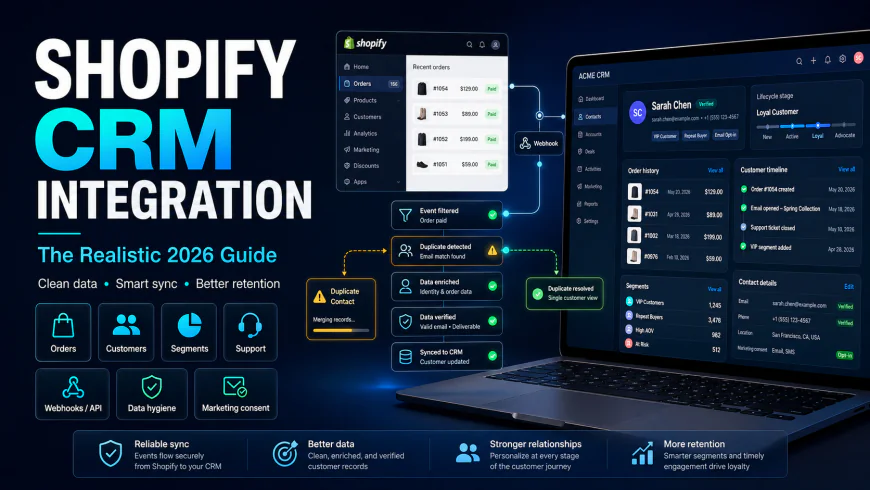
Connecting Shopify to Your CRM: The Realistic 2026 Guide
With the global CRM market projected by Fortune Business Insights to reach $126.17 billion in 2026, online brands are rushing to link storefront data with customer retention suites. Yet, the promise of a painless, instant Shopify CRM connection is mostly marketing fluff. Real-world implementations reveal a trickier reality: over half of native integrations experience synchronization issues or outright break within the first year. This leaves merchants wrestling with mismatched databases, bloated software bills, and disjointed customer experiences.
What this article helps you decide
This guide is designed to help you navigate the practical decisions of connecting your Shopify store to an external CRM. You will learn whether a standard, pre-built app fits your workflow, if you need custom middleware, or if a specialized retention platform makes more sense. We look closely at the real-world performance limits of HubSpot, Klaviyo, and Gorgias to help you protect your data pipeline, email deliverability, and software budget.
Analysis Methodology
This guide is compiled through a deep dive into official API documentation, service level agreements, and discussions across active developer communities. To ensure accuracy without relying on surface-level marketing claims, we analyzed technical updates like the HubSpot Developer Changelog on deprecated API keys, the Shopify Developer Forums regarding Web Pixel updates, and actual merchant feedback on subreddits like r/shopify, r/CRMSoftware, and r/ecommerce.
The Foundational Illusion: Why Shopify is Not a CRM
Treating Shopify as a fully featured CRM is a common misstep. Shopify is an exceptional transactional engine designed to capture orders and process payments, but it isn't built to manage long-term customer relationships, multi-channel marketing journeys, or complex, high-touch sales pipelines. While its dashboard excels at tracking gross sales and active carts, it lacks the relational database structure needed to orchestrate sophisticated retention campaigns.
The promise of "10-minute native setups" for integrations like HubSpot often sets merchants up for failure. Activating these pre-built connectors without adjusting your database schema usually results in messy data, broken opt-in compliance, and highly inflated billing tiers within a few months. Without a clear filtering strategy, every abandoned cart, duplicate checkout attempt, and bot sign-up flows straight into your marketing database, creating immediate clutter.
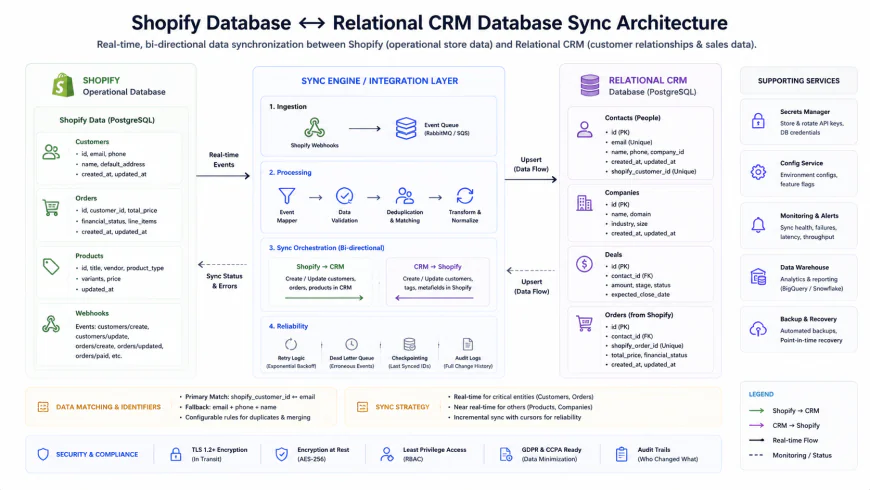 The fundamental difference between Shopify's transactional flat-file order architecture and a CRM's relational database structure.
Data hygiene has to come first. Flooding your customer database with unverified contacts and spam registrations can permanently damage your email sender reputation. If your sending domain gets blacklisted because your CRM is blasting automated flows to invalid addresses, fixing your sender score is a lengthy, expensive uphill battle.
The Structural Pitfalls of Native CRM Connectors
To successfully connect your Shopify store to a CRM, you need to understand where standard connectors fall short. Pre-built integration apps are typically designed as one-size-fits-all pipelines. They handle simple, direct-to-consumer (D2C) transactions reasonably well, but they quickly buckle under complex workflows or non-standard sales models.
The B2B and Hybrid Enterprise Breakdown
Standard plugins are heavily optimized for classic B2C workflows. If you run a hybrid business model that handles both retail and wholesale (B2B), these default tools often fail to process custom quotation rules, tiered pricing contracts, or net-payment terms. Despite Shopify’s push to expand its native B2B features, most third-party integrations remain focused on basic consumer retail, leaving hybrid businesses to build custom API workarounds in platforms like HubSpot or Pipedrive.
In a typical B2C setup, a contact record is tied to a single email address that maps to a single order. But in a B2B environment, a single procurement manager might place orders for three different subsidiaries—each requiring unique billing details, custom pricing catalogs, and net-30 payment terms. Most off-the-shelf connectors cannot map these nested relationships, leading to overwritten profiles, scrambled order histories, and massive headaches for your sales team.
The "Sync Everything" Strategic Error
Pumping every single transactional detail into your CRM is a classic mistake. It creates a cluttered, noisy database where support and marketing teams have to wade through micro-transactions instead of seeing clear customer behavior patterns. Every time a shopper updates a cart or triggers a draft order, a standard connector might log a new deal or update event. This constant communication eats up API rate limits, causes record-locking errors during high-traffic sales events like Black Friday, and pushes your database licensing costs into astronomical tiers.
Instead of syncing every minor action, smart teams design a clean data-mapping plan. This means filtering out operational noise and only sending high-value milestones to the CRM—such as a completed purchase, a first-time subscription signup, or a formal refund. This keeps your system clean, responsive, and highly useful for marketing segmentations.
Variant and Metafield Blindspots
Free, out-of-the-box connectors provided by legacy ERPs and CRMs (like Microsoft Dynamics 365 or SAP) look great on paper but are incredibly superficial. They routinely ignore crucial details like specific product variants, refund line items, and real-time tax mappings. If you sell goods with multiple variations—like clothing sizes, colors, or customizable parts—a basic sync tool will often group all these purchases into a single, generic product title. This leaves your marketing team completely unable to segment customers by their actual purchase habits.
This limitation is a massive roadblock for niche industries—like wine and spirits, health supplements, or tailored apparel—that rely heavily on custom Shopify Metafields. If you capture essential details like "allergen preferences," "waist size," or "favorite vintage," a standard connector will leave those CRM fields completely blank. As a result, your team is forced to send generic, batch-and-blast email campaigns that annoy customers and drive up unsubscribe rates.
💡 Ground Truth: Insights from the E-commerce Community
Real-world feedback from developer channels and forums reveals the day-to-day realities of managing these systems:
- The Klaviyo Growth Trap: Merchants on Reddit's r/shopify agree that Klaviyo is the undisputed king of B2C retention marketing because its Shopify integration is so seamless. However, they warning of a steep "growth tax": as your contact list expands, pricing scales exponentially. A tool that started as a highly profitable asset can quickly become your largest software expense if you don't keep your list clean.
- HubSpot's Metafield Disconnect: Over on r/CRMSoftware, users regularly complain that product metafields do not sync out of the box. If you want to group customers by specific custom attributes, you are stuck running manual CSV exports or writing custom scripts to pull data from Shopify's GraphQL API into HubSpot's custom properties.
- Scaling Pains with Gorgias: Support teams love Gorgias for its ability to let agents refund or edit orders directly from a support ticket. However, multi-store brands point out that costs can climb rapidly when trying to manage several independent Shopify storefronts under one unified dashboard.
- B2B Billing Gaps: Hybrid wholesale merchants report that standard CRM plugins fail to register draft orders, custom Purchase Orders (POs), or unique payment terms (like Net-30). This forces them to build custom automation workflows using tools like Make, Zapier, or specialized B2B portals.
Choosing the Right Tool: An Honest Review of Shopify CRM Integrations
To pick the right software for your marketing and sales stack, you have to look past the polished landing pages and promotional videos. Let's break down the actual setup process, daily usability, and real-world limits of the top platforms on the market.
1. Klaviyo: The B2C Segmentation Champion
Klaviyo is built from the ground up to handle high-volume B2C e-commerce. Its native Shopify integration relies on direct webhooks to capture customer actions in real time, making it incredibly responsive for automated triggers.
Setup & Everyday Use: The setup is incredibly fast and handled entirely through a Shopify app. Klaviyo automatically maps standard customer details, historical sales, and product collection data. Its visual builder is highly intuitive, allowing marketers to create complex, behavior-triggered workflows without needing a developer.
Performance & Structural Limits: While Klaviyo is brilliant for transaction-triggered messaging, it is not a traditional sales CRM. It won't help you manage a pipeline, score leads for sales outreach, or organize B2B communication. If you have a dedicated sales team making direct calls, Klaviyo cannot serve as your central database.
The Real Cost: Klaviyo bases its billing on active profiles and sending volume. While it delivers excellent ROI for growing brands, enterprise stores with massive, unhygienic email lists will watch their monthly software bills skyrocket. Strict list hygiene is mandatory to keep costs under control.
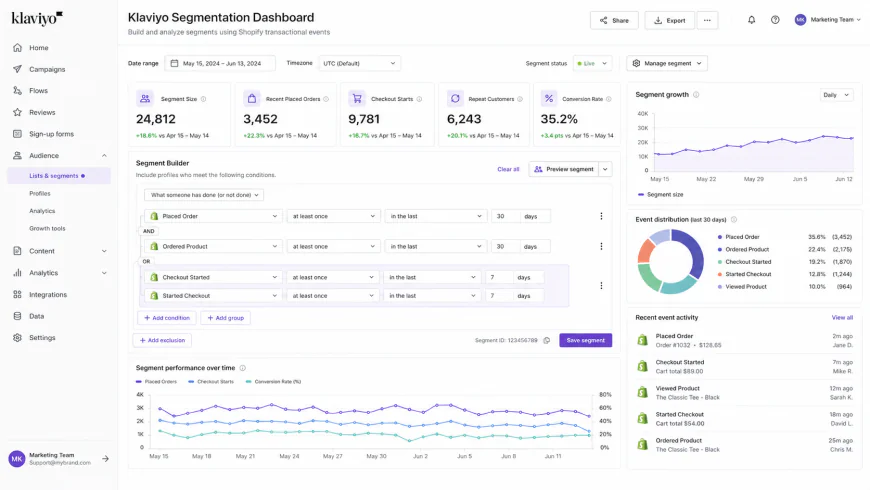 Using direct Shopify event data to build highly targeted, high-value customer segments in Klaviyo.
2. HubSpot: The Powerhouse for Hybrid and B2B Brands
HubSpot is a robust, enterprise-grade inbound marketing and sales ecosystem. Its native Shopify sync is designed to connect transactional sales data with deep customer relationship management.
Setup & Everyday Use: HubSpot offers a native integration, but setting it up correctly requires careful planning. It synchronizes Shopify data across three core objects: Contacts, Deals, and Products. If you do not configure your settings carefully, you can accidentally classify thousands of transactional checkout contacts as billable "marketing contacts," leading to a shocking invoice at the end of the month.
Performance & Structural Limits: Per HubSpot's developer updates, the platform has deprecated old API keys in favor of secure, private apps and OAuth tokens. Any custom integration relying on legacy connection methods will break. Furthermore, because HubSpot’s standard sync does not natively support custom Shopify metafields, you will need a developer to write custom API scripts to sync complex product details.
Where It Fits Best: HubSpot is an excellent fit for high-ticket brands, hybrid B2B/B2C merchants, or teams running sophisticated, content-heavy inbound marketing campaigns. For simple, low-volume shops, HubSpot is often overly complex and expensive; simpler tools like Shopify Email or Seguno are usually a safer, more practical choice.
3. Gorgias: The Customer Support-Focused CRM
While Gorgias is typically labeled as a helpdesk, it functions as an essential CRM by bringing all customer history, chat transcripts, and support tickets into one unified profile.
Setup & Everyday Use: Connecting Gorgias to Shopify is a simple, one-click install. It immediately pulls recent order data right into the support sidebar, allowing your customer service reps to issue refunds, update shipping addresses, and cancel orders without switching browser tabs.
Performance & Structural Limits: Gorgias is incredibly effective at boosting customer lifetime value (LTV) through fast, context-rich support. However, it is a reactive tool. It does not have an outbound email builder, automation flow designer, or sales pipeline manager. It is designed to assist customers who reach out to you, not to run proactive marketing campaigns.
4. Custom Middleware Pipelines (The Mid-Ground of Automation)
When off-the-shelf integrations cannot handle your specific business logic, you will need to look at custom data pipelines. Many basic guides suggest simply "hooking up Zapier." But at scale, that advice can destroy your profit margins.
For low-volume stores processing a few hundred orders a month, Zapier is a perfect, low-effort automation tool. However, because Zapier charges on a per-action basis, a high-volume merchant processing 10,000 orders a month can easily rack up massive monthly bills. At that scale, it is much smarter to use Make (which is far cheaper for complex, multi-step tasks) or hire a developer to build a dedicated integration on AWS or Heroku using Shopify’s GraphQL Admin API.
| Integration Path | Best For | Sync Speed | Metafield Sync | Complexity | Budget Risk |
|---|---|---|---|---|---|
| Klaviyo (Native App) | D2C marketing, behavioral emails, and automated flows | Near real-time (via instant webhooks) | Limited (requires custom setup) | Low (plug-and-play) | High (costs climb fast with list size) |
| HubSpot (Native Link) | Hybrid B2B/B2C, sales teams, pipeline tracking | Polled intervals (roughly 10-15 mins) | None (requires custom API work) | High (complex object mapping) | Extremely high (accidental marketing contact fees) |
| Gorgias (Native App) | Customer service teams, reactive support, and refunds | Instant (real-time API lookup) | None | Low (one-click) | Medium (scales with ticket volume) |
| Custom Middleware (Make/APIs) | Niche B2B rules, custom data fields, legacy ERPs | Highly flexible (real-time or batch runs) | Complete (via GraphQL mapping) | Very high (requires developer support) | Low (flat, predictable server or platform fees) |
Real world Scenarios: Solving the Integration Trap
To understand how these abstract technical limits play out on a busy sales day, let's look at three true-to-life challenges faced by growing merchants:
- Scenario A: The Specialty Spirit Merchant's Metafield Blockade
A premium, small-batch whiskey distillery relied heavily on personalized marketing. They needed to segment customers based on their favorite "Aged Profile" and "Cask Finish"—data points stored cleanly in Shopify metafields. However, because their native HubSpot connector completely ignored metafields, the CRM records remained frustratingly blank. The marketing team was flying blind. To fix this, their developer bypassed the native link, setting up a custom webhook that listened for order creations, parsed the JSON payload's metafield values, and injected them directly into HubSpot custom contact properties using the Contacts API. Problem solved, and highly targeted campaigns were born. - Scenario B: The DTC Cosmetic Brand's Bot Explosion
A rapidly growing cosmetics brand launched a high-profile giveaway on social media, pulling in 15,000 new sign-ups in a single weekend. Unfortunately, their quick-build landing page lacked a CAPTCHA or basic frontend validation. Thousands of spam bots flooded the form. Because their native Salesforce integration synced every submission instantly, their CRM database grew by thousands of garbage contacts. The brand was hit with an unexpected four-figure subscription overage bill and watched their email deliverability plummet as spam filters flagged their uncleaned list. - Scenario C: The B2B Distributor's Accidental Discount Spill
An industrial parts supplier running Shopify Plus connected a standard, out-of-the-box CRM integration to automate post-purchase follow-ups. However, the basic sync failed to identify Shopify Plus company profiles or separate wholesale contracts from everyday retail buyers. The system treated massive corporate accounts like standard retail customers, automated an email blast offering "20% off your next purchase," and triggered severe margin loss and immense confusion for their sales team. They had to scrap the native tool and route all operations through an intermediate Make scenario to filter client tags before any data touched the CRM.
✅ Pro Tip: The Dual-List Sandbox Method
To shield your expensive primary CRM from database pollution, incomplete checkouts, and bot signups, set up a dual-list validation sandbox. Route all raw storefront signups to a cheap, temporary validation list (or a lightweight email tool). Only after the subscriber completes a double opt-in verification, or places a real order with a completed payment status, should your integration push them to your primary CRM database. This simple buffer preserves your sender reputation and keeps you from paying premium contact fees for dead weight.
Technical Execution: Mapping Data Without Breaking the Pipeline
Building a reliable data bridge requires looking past marketing promises and getting your hands dirty with Shopify's modern API and security frameworks.
Configuring Shopify App Pixels Securely
Recent privacy shifts—including Apple's iOS App Tracking Transparency—have pushed Shopify to deprecate classic, browser-side tracking scripts. If you are still relying on traditional cookies to track user behavior for your CRM, you are losing valuable data.
Modern setups require Shopify's sandboxed Customer Events and App Pixels. These run tracking scripts safely within a secure environment. While configuring these pixels ensures data privacy compliance, you must monitor your data streams closely. Sometimes, default "Optimized" privacy settings block first-party cookie context, throttling the conversion attribution data going to your CRM. Test your custom tracking setups inside Shopify's admin sandbox to verify everything maps accurately.
Handling HubSpot's Secure API Shift
If you're maintaining a custom-coded integration or utilizing older middleware, pay close attention to authentication updates. HubSpot has completely killed legacy static API keys in favor of private apps and OAuth-based security.
When building or updating custom integrations, you must create a Private App in your HubSpot portal and grant it strictly scoped permissions (such as crm.objects.contacts.write or crm.objects.deals.read). This secure approach limits security exposure if your server's credentials are ever leaked, while ensuring your integration remains fully compatible with HubSpot's modern architecture.
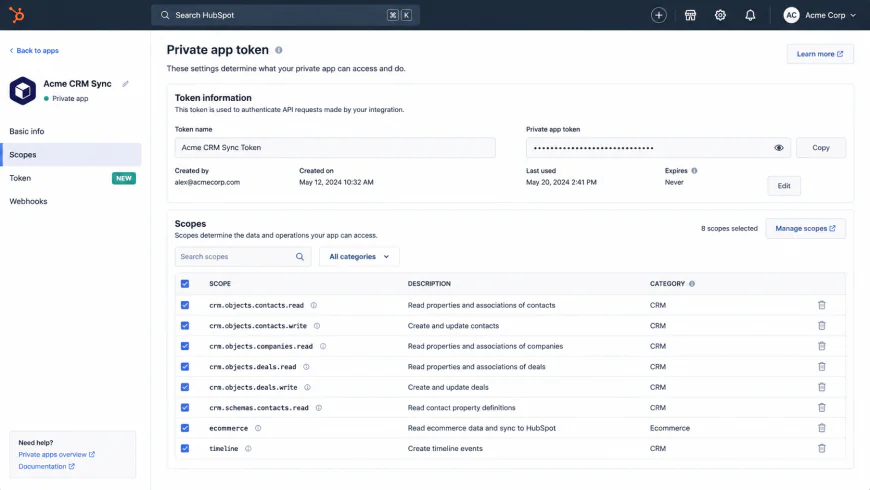 Setting up granular scopes for a secure HubSpot private app connection to replace deprecated API keys.
Enforcing GDPR and Consent Rules
A major regulatory trap with native CRM plugins is their tendency to sync every new contact as "subscribed" to marketing by default. If a user registers an account or checks out without checking the "Keep me updated" marketing box, sending them automated marketing emails is a direct violation of GDPR and TCPA rules.
To stay compliant, your synchronization logic must actively evaluate Shopify's accepts_marketing boolean field. If that value is false, your CRM connector should restrict the user's status to transactional-only. This allows you to legally send automated shipping updates and invoices while safely blocking marketing broadcasts.
Balanced Pros & Cons of CRM Integration Strategies
No single integration architecture fits every merchant. Finding the right balance means weighing setup speed against long-term development overhead and software costs.
Strategic Comparison
- Native Shopify Integrations (e.g., Klaviyo, Gorgias): Rapid deployment with zero code required. They excel at managing high-volume transactional triggers, tracking cart abandonments in real-time, and keeping consumer customer files accurate out-of-the-box.
- Enterprise Suite Connectors (e.g., HubSpot, Salesforce Link): Unifies outbound sales pipelines, complex customer profiles, and multi-channel marketing under one roof. Ideal for tracking wholesale accounts and high-touch customer relationships.
- Custom Middleware (e.g., Make, Custom APIs): Offers absolute control over data mapping and fields. Bypasses app store limitations, allows deep metafield syncing, and lets you build complex routing logic tailored to your exact business rules.
- Native Shopify Integrations (e.g., Klaviyo, Gorgias): Scaling costs can be punishing as your list grows. They completely lack B2B pipeline tools, company relationship records, and dedicated sales tracking features.
- Enterprise Suite Connectors (e.g., HubSpot, Salesforce Link): Highly susceptible to database pollution and accidental billing spikes. Typically fail to sync custom product variants, metafields, or complex refund mapping without expensive custom development.
- Custom Middleware (e.g., Make, Custom APIs): Requires dedicated technical expertise to build, monitor, and scale. If an API endpoint is deprecated or a middleware node fails, your sync pipeline can break silently without any admin warnings.
Who Should Choose Which Path?
Your ideal setup depends heavily on your transaction volume, sales channels, and internal developer resources:
- Pure D2C Brands (Under 10k orders/mo): Stick to specialized B2C tools like Klaviyo paired with Gorgias. Keep your tech stack lean, enforce double opt-ins, and focus on optimizing native flows rather than fighting custom code.
- B2B & Complex Hybrid Brands: Build a custom middleware sync to HubSpot or Pipedrive via Make or private API scripts. This prevents standard native connectors from choking on tiered pricing, company accounts, and net-30 terms.
- Emerging Brands with Tight Budgets: Stay away from enterprise CRM suites. Leverage lightweight options like Shopify Email and Seguno to run clean campaigns without the risk of integration errors or surprise software bills.
The Bottom Line
Stop searching for a single magic platform. Instead, pick the system that aligns with your primary business metric. If your growth depends on automated behavioral emails and B2C retention, a dedicated tool like Klaviyo is your best bet. If your business runs on high-touch sales pipelines, wholesale contracts, and custom account tracking, go with an enterprise CRM like HubSpot—but be sure to budget for custom middleware to keep your database clean. If you prefer low overhead, stick to native Shopify tools.
Frequently Asked Questions
Can I run HubSpot and Klaviyo simultaneously on my Shopify store?
Yes, but you must establish a clear boundary for each system. Usually, Shopify acts as your transaction engine, Klaviyo manages high-volume B2C marketing flows, and HubSpot functions as the B2B sales pipeline hub. To avoid double-emailing customers and ruining your deliverability, make sure you aren't sending marketing broadcasts from both platforms to the same customer list.
How do I prevent duplicate customer profiles in my CRM?
Ensure your integration uses email address or a unique Shopify Customer ID as its primary key. Before running your initial sync, set up strict deduplication rules within your CRM. Avoid automatically generating contacts from guest checkouts unless those users actively opt in or trigger a clear sales-team action item.
Why aren't my custom Shopify metafields syncing to my CRM?
Standard native plugins are hardcoded to sync only basic fields like name, email, and order value. To pull custom metafields (like clothing measurements or wholesale account tags), you must use Shopify's GraphQL API via middleware like Make or build custom webhooks to map those specific JSON payloads to your CRM's custom properties.
Your Shopify CRM Integration Checklist
Before installing a new integration or signing an annual SaaS contract, run through these essential operational checks:
- Define Your Primary Goal: Are you trying to scale automated, behavior-triggered B2C emails, or are you tracking high-touch corporate B2B sales cycles?
- Map Your Fields: Draw a visual flowchart showing where customer data starts and where it needs to end up. Establish which platform acts as the ultimate source of truth.
- Audit Your Contact Volume: Calculate your exact contact list size and expected monthly transactions to protect your business from massive tier-based billing spikes.
- Test in a Sandbox: Never test a brand-new integration on your live production store. Connect a staging store first to review the data flow and look for duplicates.
- Enable Active Monitoring: If you use custom middleware like Make or custom APIs, set up automatic Slack or email notifications so you are alerted immediately if a sync fails.
By treating your Shopify CRM integration as an intentional data architecture rather than a quick plug-and-play install, you protect your sender reputation, avoid bloated software bills, and build a scalable foundation for true customer loyalty.