Easy Real Estate CRM Software Reviews: Best Simple Tools
Read our easy real estate crm software reviews. Compare simple real estate agent CRMs like Follow Up Boss and Wise Agent to cut complexity and close more deals.
 Abir Bin Hasan
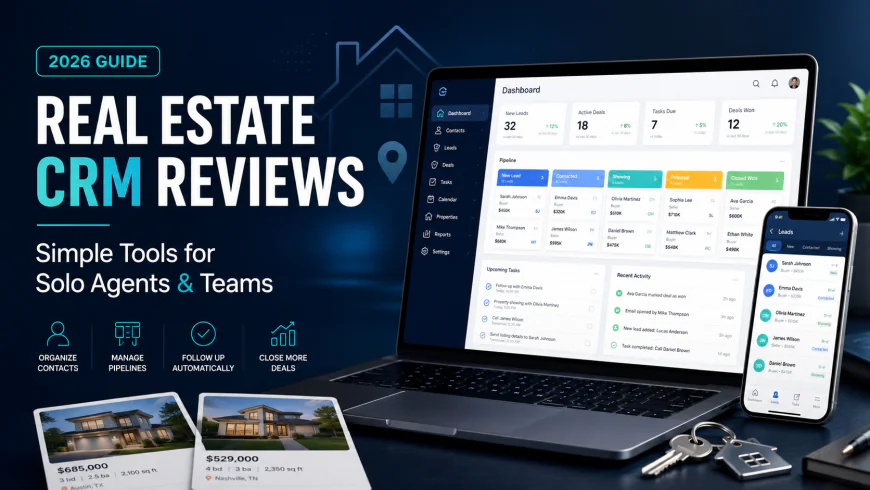
Real Estate CRM Reviews: Finding the Best Simple Database Tools for Solo Agents and Teams
Many real estate agents are dealing with serious software fatigue. Instead of closing deals, they spend half their day wrestling with bloated databases. That's why finding uncluttered database systems has become a priority for modern realtors who want to spend less time clicking buttons and more time talking to buyers and sellers.
What this article helps you decide
This guide cuts through the marketing noise to help you select an intuitive contact manager that fits your actual daily routine. Whether you are a solo agent drowning in admin work, a small team that needs clean pipeline visibility, or a broker trying to avoid expensive platforms that drag down your machine, we break down the practical options. This analysis compares user feedback, real-world integration limits, and pricing structures so you can choose a system that you will actually keep open on your desktop.
Analysis Methodology
This evaluation relies on a systematic review of public API documentation, software service agreements, and firsthand user discussions across communities like Reddit’s r/RealEstateTechnology and r/CRM. Rather than relying on curated vendor demos, this analysis looks closely at actual API limitations, MLS data sync speeds, mobile performance during field operations, and real-world customer support response times. The goal is to highlight concrete system boundaries, data migration risks, and pricing structures.
Overview & Market Context: The Real Estate CRM Fatigue
The real estate industry is experiencing a quiet rebellion against overly complex software. For years, major brokerages pushed massive corporate solutions like Salesforce or Microsoft Dynamics 365 onto their agents. These systems were marketed as all-in-one machines capable of running every single corner of an agent's business. In practice, however, systems built for massive corporations require expensive custom setup, extensive training, and hours of manual input—making them entirely impractical for independent agents or small teams. The administrative overhead quickly feels like a second job, keeping agents glued to their screens instead of hosting open houses or negotiating contracts.
Compounding this frustration is how fast lead generation has changed. Leads no longer just land in an email inbox. Today's agents manage a chaotic flow of incoming inquiries from WhatsApp, local landing pages, Facebook Lead Ads, Zillow, and Realtor.com. Managing these client channels shouldn't require a degree in database administration. Yet, many generalist tools struggle to centralize these sources without messy external setups. In fact, many active agents report that a simple, well-organized spreadsheet works better than a complex database if the software requires more than five minutes of daily maintenance to keep updated.
 Active real estate agents need fast, mobile-friendly screens that work on-the-go rather than heavy, desktop-only software.
Furthermore, the real estate software landscape has been highly volatile. Acquisitions by massive tech conglomerates often lead to "product abandonment," where active development slows to a crawl and customer support is stripped back. This pattern has played out with several popular tools over the last decade. When independent systems are bought out, original developers are often let go, pricing models shift, and feature updates stagnate. This trend has left many agents searching for independent, nimble, and straightforward tools that prioritize daily usability over shareholder reports.
In-Depth Evaluation: The Leading Simple CRMs Reviewed
To find the most practical options for solo agents and small teams, we evaluated the top platforms based on setup times, visual pipeline clarity, smart list organization, and customer support responsiveness.
1. Follow Up Boss: The Benchmark for Simple Workflows
Follow Up Boss (FUB) is widely regarded as the benchmark for straightforward design in real estate tech. It does not attempt to be an all-in-one website builder, document processor, and accounting suite. Instead, it focuses on one primary job: tracking leads and organizing follow-ups. The interface is built for quick action, showing you your active pipeline without burying important details inside deep sub-menus.
The core strength here is client organization. Instead of forcing you to manually tag and sort every contact, the system uses dynamic "smart lists." These lists automatically filter and bubble up contacts based on actual behavior—such as when a client last replied to an email, dialed your virtual number, or has gone untouched for more than two weeks. This significantly reduces the mental energy needed to decide who to contact each morning.
However, the platform has clear drawbacks. For new agents working with tight cash flow, the starting cost of roughly $49 to $69 per user, per month is a noticeable monthly commitment. Additionally, because its built-in features are streamlined, the tool relies heavily on integrations for complex marketing. If you want to design visual email newsletters or elaborate multi-channel drip campaigns, you will need to pay for and connect an external marketing tool like Mailchimp or ActiveCampaign.
2. Wise Agent: The Practical, Budget-Friendly Alternative
While Follow Up Boss targets premium simplicity, Wise Agent functions as a highly practical, budget-conscious option. The platform has built a loyal user base by sticking to a flat-rate pricing model (typically between $32 and $49 per month for up to five users). In an industry where software costs scale aggressively with every new seat, this flat-fee model is rare and highly advantageous for partnerships or small offices.
Beyond basic contact management, Wise Agent includes a functional transaction tracker. This allows agents to monitor closing milestones, upload contract documents, and set reminders for critical escrow dates (such as home inspections or title commitments). Additionally, the company is known for maintaining human support. While many software companies have replaced customer service agents with unhelpful AI chat boxes, Wise Agent still offers live phone support.
The main trade-off with Wise Agent is its design. The interface looks highly dated, reminiscent of web applications from ten years ago. While it remains highly functional and reliable, agents who prefer sleek, modern interfaces may find the visual layout clunky and uninspiring. However, for those who value predictable monthly bills and phone support over modern aesthetics, it remains an excellent choice.
3. LionDesk: A Cautionary Case of Corporate Mergers
LionDesk was once an industry favorite for independent agents. Known for its integrated video texting, automated drip campaigns, and highly competitive pricing, it was a go-to tool for agents seeking a simple way to manage their contacts. The built-in dialer and distribution systems made it highly efficient for agents focusing on outbound prospecting.
However, after being acquired by a major real estate software roll-up company, user feedback shifted. Discussions across tech forums show that many agents who transitioned away from LionDesk felt support response times slipped and active development stalled. This represents the classic risk of "product abandonment" that can happen after corporate buyouts.
While LionDesk is still functional and used by legacy offices, new agents should proceed with caution. The risk of dealing with slow bug fixes, outdated MLS setups, and delayed customer support can easily negate the savings from its lower price tag.
4. HubSpot & Zoho: The Generalist Database Challenge
It is often tempting for solo agents or commercial brokers to consider generalist CRM platforms like HubSpot or Zoho. On paper, their free tiers look incredibly attractive. HubSpot, for instance, offers a highly polished interface, excellent mobile apps, and highly customizable deal boards. For commercial real estate (CRE) brokers dealing with complex, long-term B2B deals, HubSpot is often an ideal solution.
However, for typical residential agents, these generalist systems quickly become administrative headaches. HubSpot and Zoho have no native understanding of residential properties. They do not understand property statuses, lockbox codes, showing feedback, or MLS numbers. To make them work for home sales, you must spend hours building custom fields, mapping API connections, and trying to patch in local listing data.
Furthermore, building property-specific follow-ups on HubSpot's free or cheaper plans is highly restricted. Once you upgrade your plan to unlock the workflow tools required for automation, prices climb rapidly, transforming a "free" tool into a major monthly expense.
💡 Real-World Workflow Considerations
Conversations across specialized forums like Reddit's r/CRM make one point clear: a database only works if it doesn't get in your way. Experienced agents emphasize that dynamic smart lists are critical for day-to-day survival. By automatically bubbling up contacts based on actual days elapsed since the last phone call or email, agents can ditch the daily chore of manual database sorting.
Conversely, users leaving corporate-acquired systems often highlight that losing active support is a major liability. If your contact manager freezes while you are trying to write an offer on a tight deadline, waiting days for an email reply can cost you a commission. This is why many agents tolerate Wise Agent's dated screens—having a real person answer the phone is a critical safety net when transactions are active.
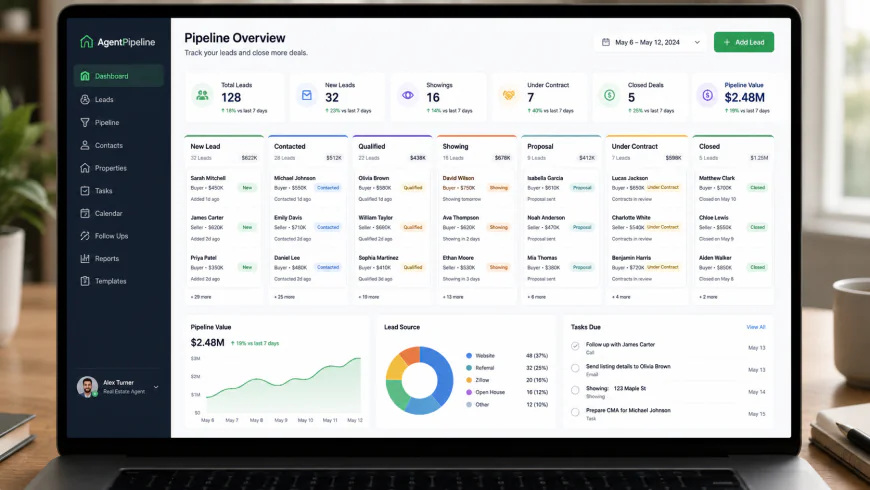 An uncluttered pipeline dashboard helps agents track active contracts without clicking through confusing sub-menus.
Feature Comparison: Real Estate CRMs Side-by-Side
The table below compares the core features of these platforms. This comparison focuses on real usability factors rather than generic feature lists to help you evaluate simple CRM options for your practice.
| CRM Platform | Pricing Structure | Primary Simplicity Focus | Live Phone Support? | MLS Integration Limits | Best Fit For |
|---|---|---|---|---|---|
| Follow Up Boss | Per-User ($49 - $69+/mo) | Automated Smart Lists & Quick Lead Routing | Yes (Fast & reliable) | Very clean via open API & Zapier | Solo agents & teams prioritizing lead response speed |
| Wise Agent | Flat-Rate ($32 - $49/mo) | Transaction Steps & Basic Marketing | Yes (Highly rated phone support) | Basic portal and IDX feed parsing | Budget-conscious solo agents & small offices |
| LionDesk | Per-User ($39 - $99+/mo) | Video SMS & Outbound Dialer | Limited / Ticket-based | Requires manual setups or third-party bridges | Legacy users; hard to recommend for new setups |
| HubSpot (General) | Freemium / Scales Aggressively | B2B Sales Pipelines & Email Sync | Paid tiers only (No phone on cheap plans) | High friction; requires custom development | Commercial brokers (CRE) managing corporate clients |
Practical Comparison: Lead Routing Friction
To understand how this impacts daily business, consider how two different setups handle the exact same daily scenario with 50 active buyer leads.
Agent A uses Follow Up Boss. An inquiry from a local Facebook ad comes in at 8:00 PM. The direct integration captures the details immediately, sending a push notification to the agent's phone. With a single tap, the agent sends a pre-formatted, personalized text. The system automatically places this lead into their "Hot Follow-Up" smart list. If the prospect doesn't reply within 48 hours, the contact bubbles back up to the top of the agent's task list. This workflow requires less than a minute of manual management.
Agent B uses HubSpot (un-customized). The same lead comes in. Because HubSpot does not natively format real estate lead alerts without premium add-ons, the details sit as a standard email alert in the agent's inbox. The agent has to copy the name and number, open the mobile app, create a new contact, manually build fields for "budget" and "neighborhood," and write a calendar reminder to call them back. The manual process takes roughly ten minutes. After a week of managing leads this way, Agent B stops logging new prospects entirely, falling back on paper notes.
✅ The Five-Minute Usability Test
Before committing to any system, run a quick trial. If a tool requires you to spend more than five minutes of manual typing to document a single phone conversation, you will likely stop using it within a month. Look for tools that offer background syncing for your emails and text messages. The software should quietly track your client interactions while you work, rather than forcing you to write manual call notes after every dial.
Crucial Limitations & System Warnings
No software is perfect, and choosing a system without understanding its limitations can lead to serious headaches down the road. Before committing to a specific database, consider these common structural hurdles:
- Data Lock-In Risk: Some tools make it remarkably difficult to export your data if you decide to leave. You might find that your past communication histories, property notes, and custom tags do not export cleanly into a standard CSV, requiring tedious manual cleanups.
- The Mobile Offline Trap: Several modern, visual CRM apps rely heavily on constant high-speed data. If you are showing homes in rural areas or basements with poor cellular reception, the app may freeze, preventing you from looking up lockbox codes or client names.
- Hidden Renewal Price Hikes: Look closely at the terms of service. Some tools offer massive first-year discounts but jump up to standard pricing on renewal, sometimes doubling your monthly overhead without adding new features.
Pricing & Licensing Breakdown
Calculating the true cost of a system requires looking past the headline price. Many options seem affordable at first, but charge extra for critical integrations, text message credits, or additional users.
With Follow Up Boss, the entry plan starting at roughly $49 to $69/user/month includes their mobile app, call tracking, and smart lists. Because the system is built with a clean layout, you generally won't need to pay a consultant to set it up. However, if your business depends on automatic power dialers, you will need to upgrade to their premium tiers or pay for a third-party dialer integration.
With Wise Agent, the flat pricing structure is highly transparent. For under $50 per month, a small team of up to five users can share calendars, log interactions, and coordinate transactions. This makes it an incredibly low-risk option for new agents. For an independent look at how these systems compare, you can review the G2 comparison of Follow Up Boss vs. Wise Agent.
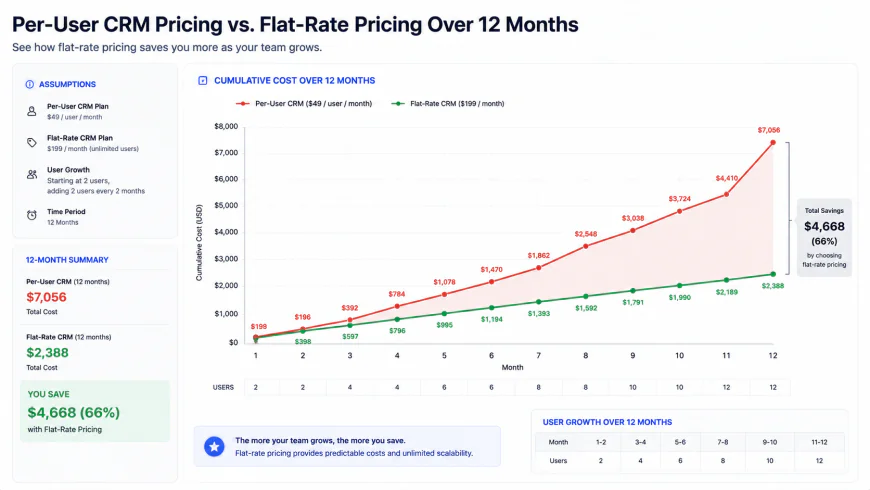 A comparison showing how flat-rate pricing models can save small real estate teams thousands of dollars in software overhead over a year.
Conversely, platforms like LionDesk have historically locked certain features—like video texting quotas or internal dialers—behind add-on packages. If you are comparing these options, you can read community reviews on Capterra's matchup of Follow Up Boss vs. LionDesk. It is always wise to map out your expected lead volume and communication channels to estimate your actual annual software spend.
Balanced Comparison: Strengths & Weaknesses
Platform Advantages
- Follow Up Boss: Highly responsive mobile app, automated smart lists, and reliable API routing that minimizes manual copy-pasting.
- Wise Agent: Highly predictable flat-rate pricing for small groups combined with reliable, live phone support.
- HubSpot (CRE): Clean design, comprehensive pipeline analytics, and excellent business-to-business pipeline customization for commercial brokers.
Platform Limitations
- Follow Up Boss: Per-user pricing can scale up quickly as you add support staff or team members.
- Wise Agent: The screen layouts and graphics feel significantly dated compared to modern software standards.
- LionDesk: Slower development cycles and delayed support times following acquisition by a larger holding company.
- Generalist CRMs (HubSpot/Zoho): Do not include native property details or transaction tracking, requiring significant manual customization.
Who should use what?
To help simplify your final choice, we have matched the options to common business setups:
- The Solo Agent Seeking Simple Setup: Choose Wise Agent. The flat pricing keeps your overhead predictable, and their phone support is excellent if you need help importing your contacts.
- The Fast-Paced Lead Generator: Choose Follow Up Boss. The fast mobile application and automatic smart lists ensure that hot leads never fall through the cracks during busy days.
- The Commercial Broker (CRE): Choose HubSpot. Because commercial deals depend on corporate relationships rather than MLS updates, HubSpot's B2B pipelines and deep email tracking fit this business model perfectly.
The Verdict
There is no single best option because different real estate practices have different operational needs. If your primary goal is keeping costs predictable while maintaining access to phone support, Wise Agent is a highly logical choice. If your focus is maximizing speed and reducing administrative friction, Follow Up Boss remains the industry favorite for contact management, provided its per-user pricing fits your margins. Avoid general business CRMs unless you focus strictly on commercial commercial transactions, and be cautious of older tools that have lost their independence to corporate roll-ups.
Frequently Asked Questions
What are MLS integration limits, and why are they important?
Most basic contact tools do not pull live listings directly from your MLS. Instead, they rely on basic consumer web searches. This limitation means if a client saves a home on your personal site, there may be a lag before it shows up in your database, or you might have to input the details manually. High-quality real estate setups offer direct integrations that connect your contact notes to your buyer's active property searches.
Can I run my business from Google Sheets?
Yes. If a complex database takes you more than five minutes of manual input a day, a clean spreadsheet is often more reliable. However, spreadsheets cannot send automated follow-up texts, alert you when a prospect opens an email, or notify you when a warm lead visits your website.
Is live phone support actually necessary?
Yes. Real estate deals do not limit themselves to standard business hours. If your database experiences an issue while you are preparing an offer on a Saturday afternoon, waiting 48 hours for an email ticket to be resolved can put your transaction at risk. Having access to a live support representative is a major asset for working agents.
Is LionDesk still a viable choice for independent agents?
While LionDesk maintains a solid user base, its corporate acquisition has led to slower software updates and longer customer support wait times. For new setups, looking at independently owned options like Follow Up Boss or Wise Agent often helps you avoid long-term system stagnation.
Practical Checklist for Your Final Decision
Before entering your billing details, ensure you can answer "Yes" to these key operational questions:
- Does the system sync your incoming emails and text messages without requiring extra third-party software?
- Can you set up automatic lists to instantly filter your contacts based on your last touchpoint?
- Does the provider offer reliable live support during weekend hours when negotiations are active?
- Is the mobile app fast enough to pull up client details on the road with limited cellular service?
- Can you easily import your existing contact database without losing past client notes or historical records?