Cold Email Software with High Deliverability: 2026 Step-by-Step Guide
Tired of landing in the spam folder? Discover the best cold email software with high deliverability in 2026, real user reviews, and how to safely scale outbound.
 Abir Bin Hasan
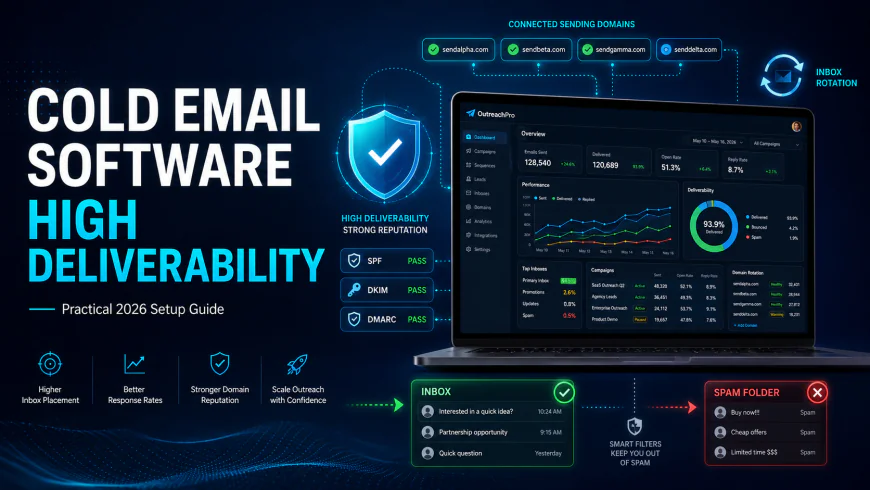
Cold Email Software with High Deliverability: A Practical 2026 Setup Guide
Outbound sales has shifted dramatically. If you are still relying on old-school, automated email warmup pools to keep your campaigns alive, your messages are likely heading straight to the spam folder. Major inbox providers have gotten incredibly smart at detecting synthetic patterns. This shift has forced serious marketing teams to ditch bulk sending entirely in favor of distributed, multi-domain setups and strict lead validation. Getting your emails delivered isn't about finding a quick hack anymore; it requires building a reliable sender infrastructure using specialized email software, clean data, and disciplined inbox rotation.
What this article helps you decide
This guide cuts through the marketing noise to help you build and configure an outbound tech stack that actually works. By the end of this breakdown, you will be able to determine whether your business needs a highly scalable, multi-inbox platform (such as Instantly or Smartlead) or a highly personalized, visual option (such as Lemlist). You'll also learn how to design an email infrastructure that satisfies the strict scanning algorithms of Google Workspace and Microsoft 365 without burning your primary domains.
Analysis Methodology
This breakdown is built entirely on desk research—specifically, analyzing official service terms, technical documentation, and real-world feedback from developers and outbound operators on technical forums. Instead of repeating marketing claims or staging fake tests, we focus on the actual technical limits, server-level reputations, and daily operational realities of these tools as observed by active professionals in the field.
Overview & Market Context: The New Rules of Deliverability
Most reviews rank outbound platforms by how clean their dashboards look or how many templates they throw in. If you're running serious campaigns, those features are secondary. The only things that matter are backend infrastructure, sending IP reputation, and how the platform manages inbox volume. Back in the day, a single domain and five mailboxes could send thousands of emails a day. Try that now, and you'll burn your domain's sender reputation permanently.
The shift comes down to how major email services track sender signals. Spam filters analyze traffic patterns across millions of inboxes. When a brand-new domain suddenly starts blasting high volumes of emails without any natural back-and-forth conversation, it triggers security flags. Because of this, modern campaigns have to be decentralized. Instead of high volume from one account, teams split their sending across dozens of auxiliary domains and separate mailboxes, rotating them to look like normal human behavior.
If you look at communities like Reddit’s r/coldemail or r/Emailmarketing, practitioners agree: the days of relying entirely on simple warmup bots are over. True sender authority comes from natural human engagement—replies, conversations, and marked-as-not-spam clicks. The tool you choose is just the pipeline; your deliverability depends on your underlying domain architecture and how clean your lists are.
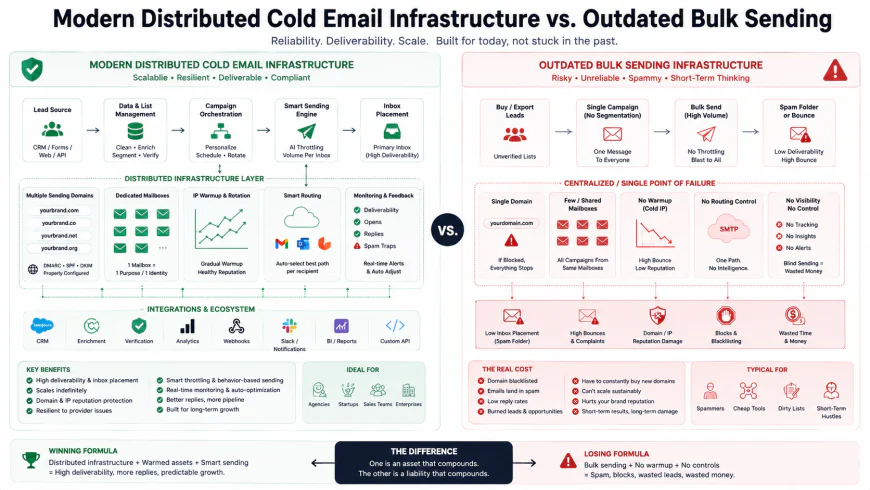 Figure 1: The structural shift from single-domain bulk sending to a decentralized multi-domain framework utilizing strict inbox rotation.
In-Depth Evaluation of Leading Deliverability Platforms
To make sense of the current market, here is a detailed breakdown of three of the most popular sending platforms. We’ve evaluated them based on their technical structure, scaling costs, and the real-world limitations you’ll run into when trying to scale your outreach.
1. Instantly.ai: The Scalability Powerhouse
Instantly is incredibly popular in the outbound space, mostly because of its flat-rate pricing model. Instead of charging you for every single mailbox you connect, Instantly lets you link unlimited sending accounts under its paid plans. For anyone running a modern, multi-domain setup, this is a massive cost-saver.
Setting things up is relatively straightforward. You can bulk-upload your domains and mailboxes via CSV, which makes deploying a large infrastructure much faster. The tool includes its own automated warmup feature, but relying solely on this pool without real-world replies can create a false sense of security. Over on communities like r/SaaSMarketing, users often highlight how clean and fast the dashboard is, especially when managing 50 or more mailboxes at once. The analytics dashboard is clear, showing open, click, and bounce rates across all your active senders.
That said, Instantly has its share of drawbacks. When things go wrong, customer support can be slow to respond during busy hours. The platform's built-in A/B testing is also basic. If you need complex branching logic or deep multi-channel integrations, you'll likely have to rely on external APIs or third-party tools.
2. Smartlead.ai: The Agency and Enterprise Infrastructure Choice
Smartlead is the preferred choice for agencies and technical operators who need to manage high-volume campaigns. Its architecture is API-first, which makes it highly customizable if you're building custom internal CRMs or custom client portals.
Its biggest quality-of-life feature is the "Unibox"—a centralized master inbox that pulls in replies from all your connected domains into one stream. This saves hours of manual checking. Smartlead also handles multi-channel sequences well, allowing you to set up actions based on triggers (like automatically queuing a LinkedIn visit if a prospect opens an email but doesn't reply).
The downside to Smartlead is the user interface. It’s far more utilitarian and less intuitive than Instantly’s dashboard, presenting a steeper learning curve for beginners. Setting up custom tracking domains and aligning accounts can feel highly technical and tedious. However, for agencies running campaigns for multiple clients, its permission controls and white-label options usually justify the clunky interface.
3. Lemlist: The Creative Personalization Specialist
Lemlist takes a different approach, prioritizing creative, personalized outreach over raw volume. It’s popular with creative agencies, SaaS founders, and SDRs targeting high-value accounts where standard text-based emails usually get ignored.
The platform's standout feature is its dynamic personalization engine. You can automatically insert custom images, personalized landing pages, and tailored video thumbnails for every recipient. For example, the software can pull a prospect's company logo or website screenshot and overlay it on an image inside the email sequence.
The catch is the cost. Lemlist charges on a per-seat/per-mailbox basis. If your strategy involves rotating dozens of mailboxes to keep your daily sending volume low, the subscription fees will scale out of control quickly. Additionally, discussions on r/Emailmarketing suggest that because personalized media adds extra payload size and tracking scripts to your emails, it can occasionally trigger sensitive spam filters in highly secure corporate networks.
💡 Expert Analysis & Experience
There is a growing consensus among deliverability engineers that traditional, automated warmup tools are losing their effectiveness. Because these services work by sending automated messages back and forth within their own closed user pools, major email provider algorithms have learned to recognize these repetitive, non-human patterns.
This reality became clear when Apollo.io decided to entirely shut down its built-in email warmup tool. This move forced many outbound teams to re-evaluate their strategies. To land in the inbox today, your setup needs to focus on genuine domain health, highly verified lead lists, and slow, realistic sending behaviors rather than relying on bot networks to keep your domains warm.
| Feature / Metric | Instantly.ai | Smartlead.ai | Lemlist |
|---|---|---|---|
| Pricing Model | Flat rate (unlimited accounts) | Flat rate plans with high limits | Per-seat / Per-user billing |
| Primary Strength | Scalability, clean UI, onboarding speed | API access, agency portals, technical flexibility | Dynamic media personalization (video/image) |
| Primary Limitation | Basic A/B testing & delayed support | Clunky, non-intuitive UI | High cost at scale; larger payload sizes |
| Warmup Strategy | Large synthetic pool | Highly customizable deliverability settings | Lemwarm integration (paid add-on) |
| Best For | Mid-market lead generation teams | Large agencies and technical outbound operators | High-value enterprise accounts & premium SDRs |
Who Should Avoid These Platforms (Platform Limitations)
No outbound tool is a perfect fit for every workflow. Here are specific scenarios where you should look elsewhere:
- Avoid Instantly if your campaigns require complex, multi-step branching logic (e.g., if-this-then-that workflows based on specific CRM events) or if you rely on immediate support during critical campaign issues. Its support team can have long delays during peak hours, and its sequence builder is strictly linear.
- Avoid Smartlead if you do not have a technical teammate or the patience to navigate a clunky, steep-learning-curve interface. Setting up custom tracking domains and managing client dashboards can be overwhelming for beginners.
- Avoid Lemlist if you need to scale your outreach using a large multi-domain architecture. Its per-seat pricing model will quickly drain your budget. Additionally, its heavy HTML payloads (due to embedded personalized images and videos) are more likely to trigger sensitive enterprise filters in sectors like finance or healthcare.
The Technical Blueprint: Configuring Domains, SPF, DKIM, and DMARC
If you don't take your technical foundation seriously, even the most compelling pitch in the world will rot in the spam folder. High deliverability isn't a fluke; it is the logical result of pristine domain authentication. When you send an email, the recipient's mail server runs a quick diagnostic background check on your sending domain. If your security protocols are missing or poorly configured, filters instantly classify your email as a security threat.
Step 1: Domain Acquisition and Infrastructure Separation
First rule of cold email: never send outbound campaigns from your primary corporate domain. If your main domain gets flagged for spam or blacklisted, your entire company's day-to-day operations will grind to a halt—affecting everything from internal Slack notifications to critical client invoices. Instead, purchase 5 to 10 look-alike domains specifically for outbound outreach (for example, if your primary site is brand.com, buy getbrand.com, usebrand.com, or brandhq.co).
When choosing an email service provider (ESP) for these secondary domains, stick to Google Workspace or Microsoft 365. While alternative platforms like Zoho Mail look appealing because of their lower price point, the reality is far less pleasant. Zoho has aggressively cracked down on outbound prospecting and regularly bans active cold email accounts with little warning. Google and Microsoft maintain the cleanest, most trusted IP space on the planet, giving your emails the best possible starting reputation.
Step 2: Configuring DNS Authentication Records
After registering your new domains and linking them to Google Workspace or Microsoft 365, you must manually configure three foundational DNS records inside your domain registrar (such as Cloudflare, Namecheap, or GoDaddy):
- SPF (Sender Policy Framework): This TXT record authorizes specific mail servers to send emails on your domain's behalf. If you are using Google Workspace, your SPF record should look like this:
v=spf1 include:_spf.google.com ~all - DKIM (DomainKeys Identified Mail): Think of DKIM as a unique digital signature attached to your emails. It proves that the message actually originated from your domain and wasn't altered in transit. You will need to generate this key inside your Google Workspace Admin Console or Microsoft Admin Center, then add it to your DNS settings as a TXT record.
- DMARC (Domain-based Message Authentication, Reporting, and Conformance): DMARC tells receiving servers how to handle emails that fail SPF or DKIM checks. If you are warming up fresh domains, start with a relaxed monitoring policy to avoid delivery hiccups. A safe starting DMARC record looks like this:
v=DMARC1; p=none; rua=mailto:dmarc-reports@yourdomain.com
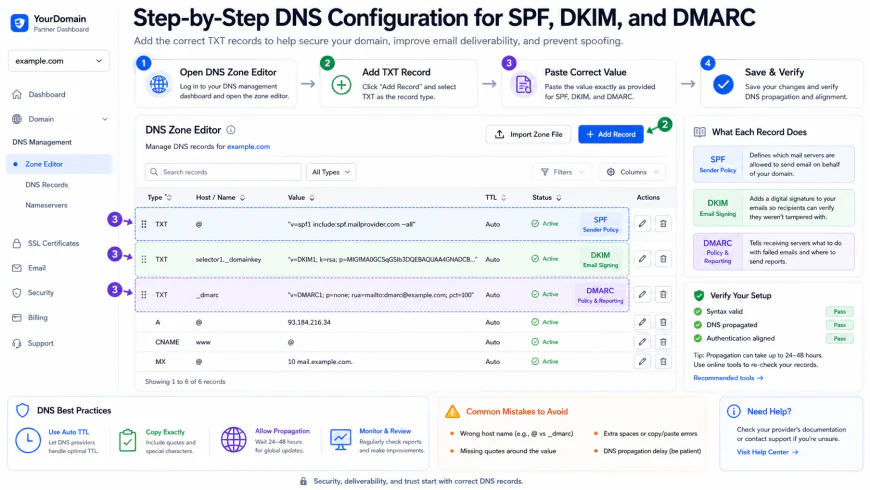 Figure 2: Setting up DNS records correctly to ensure perfect alignment of SPF, DKIM, and DMARC.
Advanced Deliverability Strategies: Inbox Rotation and Spintax
Once your infrastructure is sound, you need to think about how you distribute your sending volume. If you want to keep your domain reputation safe over the long haul, you must employ two highly effective practices: inbox rotation and spintax.
Inbox rotation is the process of spreading a single outreach campaign across a network of separate sending addresses. Instead of trying to force 200 emails a day through a single account, you connect 10 separate domains, set up one mailbox per domain, and limit each inbox to a modest 20 emails per day. To the receiving ISPs, this looks like natural, low-volume human behavior rather than an automated bulk campaign.
To make this setup even safer, you must prevent your emails from looking identical to security filters. If spam algorithms detect the exact same copy being sent to hundreds of recipients, they will flag your content. This is where spintax comes in. Spintax allows you to write nested variations of your copy, which the sending software randomly spins for every email sent. Here is a simple example:
{Hi|Hello|Hey} {{FirstName}}, {I loved|I really enjoyed|I just saw} your recent post on LinkedIn about {{Topic}}...
By rotating greetings, body hooks, and calls to action, you ensure that every email has a unique cryptographic hash, making it incredibly difficult for automated spam filters to flag your campaigns.
Real-World Scenario: Safely Scaling a Campaign to 15,000 Contacts
Let's say you need to contact 15,000 warm prospects over the next month. In the past, you might have tried blasting these contacts using a couple of Google Workspace accounts. Today, doing so will get your domains flagged and blacklisted within two weeks.
The Safe, Modern Playbook:
- Setup: You buy 15 secondary domains via Cloudflare and link each to its own Google Workspace mailbox.
- Preparation: You authenticate each domain (SPF, DKIM, DMARC) and let them warm up gradually for 3 to 4 weeks using moderate, natural volume.
- Verification: Before sending a single pitch, you run your 15,000 leads through a verification tool like MillionVerifier or Prospeo, weeding out dead accounts and keeping your bounce rate under 1.5%.
- Campaign Launch: You upload your clean list into Smartlead. The system rotates the campaign across all 15 mailboxes, capping each at 15 outbound emails per day. In total, you safely output 225 highly personalized emails a day.
By spreading the workload, your domains stay completely clean, and your messages land safely in the primary inbox.
✅ Pro Tip
Don't just trust the deliverability scores shown inside your sending tools. Monitor your domain health directly at the source using Google Postmaster Tools. This free tool gives you an unfiltered look at how Google's servers view your sender reputation and spam complaint rates. If your spam rate rises above 0.1%, pause your campaigns immediately to clean your lists and adjust your templates.
Pricing & Licensing Breakdown
When choosing your outreach stack, understanding the long-term cost of scaling is critical. Pricing models in this space vary wildly, and selecting the wrong tool can quickly eat into your margins as your operations expand.
Platforms like Instantly and Smartlead are built for modern, scale-friendly domain rotation. They structure their pricing around the volume of active leads or total monthly emails rather than charging you per connected inbox. For instance, Instantly’s popular $97/month "Hypergrowth" plan lets you connect an unlimited number of sending mailboxes. This makes it incredibly cost-effective to run 30 or 50 domains simultaneously.
On the other hand, platforms like Lemlist bill you per user or per connected mailbox. If you plan to rotate 30 different mailboxes to protect your domain reputation, a per-mailbox pricing model can easily cost you $1,500+ every single month. Because of this, we recommend sticking to flat-rate platforms for your core sending infrastructure, and reserving per-mailbox tools for smaller, highly targeted campaigns that require deep media personalization.
Balanced Comparison
- Flat-rate pricing on modern platforms lets you scale your inbox rotation cost-effectively.
- Unified master inboxes (Unibox) save hours of manual account hopping.
- Dynamic spintax tools make it easy to generate unique email variations automatically.
- Direct DNS integrations make domain authentication straightforward.
- Synthetic warmup pools are no longer a silver bullet for deliverability.
- Per-mailbox pricing models can quickly make horizontal scaling prohibitively expensive.
- Heavy HTML payloads (like embedded video or personalized images) can trigger strict corporate firewalls.
- Using Zoho Workspace for outbound campaigns carries a high risk of account suspension.
Who should use what?
If you are an agency or enterprise growth team running scale-driven outreach, choose Smartlead.ai for its powerful API, robust client portal management, and multi-channel workflows. If you are a startup or mid-sized business that wants a user-friendly interface, quick setup, and unlimited connected mailboxes at a fixed cost, go with Instantly.ai. If you are a specialized sales team targeting a selective, high-value list where custom videos or dynamic image assets will make your pitch stand out, choose Lemlist.
Recommended Choices by Purpose
To maximize your outbound ROI, match your software to your sending strategy: use Instantly.ai if you need an easy, highly cost-effective setup to run multi-domain cold campaigns at scale. Choose Smartlead.ai if you are an agency or developer requiring deep CRM integrations, white-label client dashboards, and advanced sub-sequence options. Choose Lemlist if you are running highly creative, personalized outreach to a small, premium prospect list where unique media assets can significantly move the needle.
Frequently Asked Questions
How many emails should I send per day from each account?
To keep your domain reputation safe, we recommend limiting your volume to 30 to 50 emails per day per mailbox (this includes your warmup emails). If you need to send higher volumes, scale horizontally by buying more domains and mailboxes rather than overloading a single account.
Are automated email warmups still useful?
While major ESPs like Google and Microsoft have updated their algorithms to devalue synthetic warmup networks, a basic warmup period is still helpful for establishing early domain activity. New domains should be warmed up for at least 14 to 21 days before launching any campaigns. However, the best "warmup" today is simply clean lists, relevant copy, and receiving genuine replies from real people.
What is a Custom Tracking Domain and why should I set one up?
A Custom Tracking Domain (CTD) replaces your software's shared open-tracking domain with a subdomain of your own (e.g., track.yourdomain.com). This isolates your sender reputation, ensuring that your deliverability isn't hurt by other users sharing the same default tracking pixel.
Can I use my primary company domain for outbound campaigns?
Absolutely not. High-volume cold email campaigns inevitably draw some spam complaints. If your primary corporate domain gets blacklisted, your daily business operations—including communication with existing clients and partners—will be severely compromised. Always use secondary, look-alike domains for your outbound campaigns.
Your Cold Outbound Technical Setup Checklist
Before launching your next campaign, use this technical checklist to audit your infrastructure and ensure maximum deliverability:
- Domain Selection: Purchase distinct secondary domains (e.g., get[brand].com) to keep your primary business domain safe.
- DNS Records: Verify that SPF, DKIM, and DMARC records are correctly published inside your domain registrar (such as Cloudflare).
- MX Records: Confirm that MX records are pointing to your email provider (Google Workspace or Microsoft 365) so you can receive incoming replies.
- Custom Tracking Domain: Set up a unique CNAME tracking subdomain to monitor open and click rates safely.
- Profile Setup: Complete each profile with a real photo, a simple, non-spammy email signature, and a realistic sender name.
- List Hygiene: Run all prospect data through a validation tool (such as MillionVerifier or NeverBounce) to keep your bounce rate under 2%.
- Spintax Integration: Vary your subject lines and body copy to ensure no two outgoing emails look identical to spam filters.