Best Budget VPS Hosting for Beginners: Stop Wasting Money on Cloud
Tired of unpredictable AWS bills? Read our brutally honest guide to the best budget VPS hosting for beginners. Compare Hetzner, Contabo, and IONOS with zero fluff.
 Abir Bin Hasan

Best Budget VPS Hosting for Beginners: Stop Wasting Money on Cloud
Let’s be honest: most small businesses and bootstrapping developers are quietly hemorrhaging cash to hyperscale cloud giants. They lure you in with shiny "free tiers" before hitting your credit card with baffling, itemized bills for basic egress bandwidth and storage. If you simply need to run a high-traffic blog, a side project, or a database, stepping back to look for affordable virtual servers is a smart financial pivot. You secure dedicated slices of CPU and RAM at a flat, predictable rate, without the headache of fluctuating hourly billing.
Quick Summary & Key Takeaways
- Stable Monthly Bills: Opting for a fixed-price virtual private server can slash your infrastructure overhead by up to 80% compared to pay-as-you-go cloud giants.
- The Control Trade-off: Going the unmanaged route gives you incredible raw power per dollar, but you bear the burden of security patches and server hardening.
- Don't Settle for Ancient Tech: Make sure the provider uses modern NVMe SSDs and AMD EPYC or Intel Xeon chips; otherwise, you will face painful performance throttling.
What this article helps you decide
We are stripping away the corporate marketing speak to help you figure out if you actually need isolated virtual environments or if shared hosting is still a viable starting point. We break down the real-world friction of managing your own command line interface versus the hand-holding of traditional cPanel setups. You will walk away knowing exactly how to choose a reliable, cheap virtual server without getting upsold on bloated resource packages you will never touch.
Analysis Methodology
Our insights are built entirely on systematic desk research. We parsed service level agreements, read through dense technical documentation, and cross-referenced hundreds of active discussions on platforms like Reddit and LowEndTalk. This approach ensures we bypass the typical affiliate marketing bias, focusing instead on hard operational truths, network uptime history, and how these companies actually treat their customers when things go wrong.
Why standard cloud workflows are draining your wallet
"Cloud" has devolved from an elegant architectural paradigm into a cynical marketing tax. Hyperscalers slap this label on standard compute nodes to justify convoluted, pay-as-you-go pricing grids loaded with a 500% markup. In 2026, developers are hitting a wall of collective cloud fatigue. People are simply exhausted by the cognitive overhead of over-engineered microservices and unpredictable bills from AWS, Google Cloud, or Azure. This fatigue is driving a massive migration back to predictable flat-rate setups. When you swipe your card for a standard cloud instance, you aren't just buying clock cycles. You are subsidizing their bloated marketing budgets and, worse, swallowing predatory egress bandwidth charges. Community data indicates that running a modest, active web app on a major hyperscaler routinely racks up $80 to $100 monthly once storage read/write operations and data transfers clear. Moving that exact footprint to a flat-fee node drops the bill to under ten bucks. For anyone hunting for cheap cloud server hosting, the play is obvious: ignore the hyped "cloud" terminology and grab a high-performance virtual private server instead.The brutal reality of unmanaged vps vs shared hosting
Server configuration scares beginners. That fear keeps them trapped in slow shared hosting, coughing up $30 a month for "managed" packages just to get a dashboard. It’s a racket. You can get that identical point-and-click ease on a $4 unmanaged node by pairing it with free, modern panels like RunCloud, xCloud, or the incredibly fast CloudPanel control panel. The resource gap when stacking up unmanaged vps vs shared hosting is night and day. Shared plans cram you onto a single operating system alongside hundreds of noisy neighbors. One viral post on another site, and your page grinds to a halt. An unmanaged alternative grants you total root access and isolated hardware. Modern, respected budget players utilize KVM virtualization. KVM guarantees your allocated RAM and CPU cores are locked down and cannot be stolen by neighboring tenants. It’s lightyears ahead of old-school, oversold OpenVZ virtualization limits, where hosts habitually sliced up physical RAM until virtual machines crashed randomly under pressure.What community testing reveals about the best budget vps hosting for beginners
For raw, unfiltered hosting telemetry, bypass the affiliate blogs. Hang out where the sysadmins gather. Spaces like LowEndTalk, LowEndBox, and the self-hosting purists over at r/SelfHosting provide real-world performance metrics stripped of marketing varnish. Community-driven benchmarks suggest that rock-bottom promotional hosts (think RackNerd or Kuroit) are solid options for lightweight cron jobs, basic VPN tunnels, or static staging targets. But there is a catch. They frequently run on vintage Intel Xeon E5-v2 or v3 silicon from 2012–2013. These architectures are cheap to run, but they struggle heavily when compiling modern JavaScript or running intensive NodeJS builds. To secure the best budget vps hosting for beginners, prioritize providers provisioning modern AMD EPYC or Intel Scalable processors.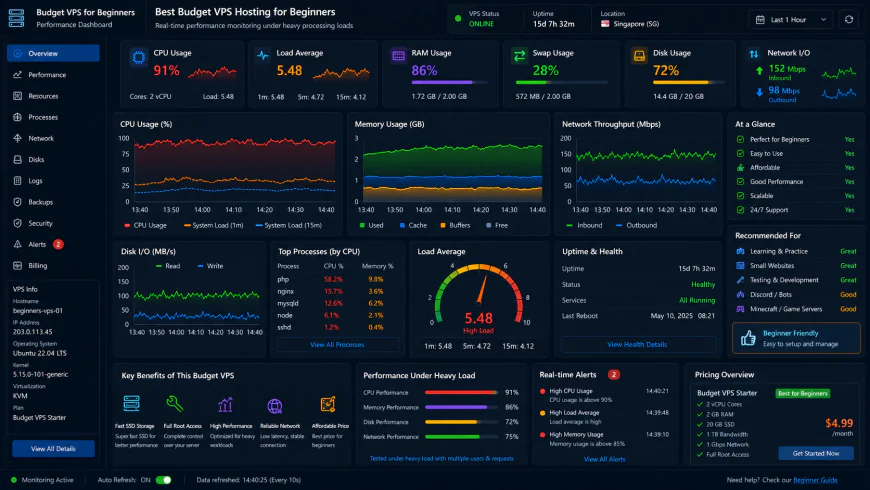 Telemetry displays notable performance drop-offs when running high-concurrency database queries on entry-level virtual machines.
Can ultra-cheap providers like Contabo handle your actual traffic or do they choke?
Contabo is a constant lightning rod in developer circles. Their eye-popping hardware-to-price ratios easily lure newcomers hunting for the best budget vps hosting for beginners. The consensus among seasoned sysadmins paints a more complicated picture. Despite glowing raw specifications on paper, reports frequently flag major Disk I/O bottlenecks on these oversold nodes. Under sustained load, storage controllers often register read/write latency spikes (specifically r_await and w_await metrics) climbing past 120ms. Such severe disk latency causes database-heavy apps, like plugin-bloated WordPress setups or busy WooCommerce storefronts, to lock up when the underlying host node is crowded. To make matters worse, elevated CPU steal time—which occurs when physical cores are stretched too thin across too many instances—causes compute speeds to fluctuate wildly. If you are serving a flat, static HTML page, you will likely never notice. For dynamic web apps, though, those disk limits are a silent killer.How to secure an unmanaged VPS without a computer science degree
Running an unmanaged instance means taking total ownership of server security. No one is coming to save you if you leave the front door open. Luckily, you do not need an advanced cybersecurity degree to lock things down. First step: disable password authentication and switch exclusively to SSH keys security. Passwords are soft targets for automated brute-force scripts; cryptographic key pairs are virtually impenetrable. For clear, step-by-step guides on server hardening, the documentation at the DigitalOcean Community Tutorials library is widely loved by hobbyists as the best self-education resource online. Another severe threat on ultra-cheap instances is database corruption and silent data rot. Budget hosts rarely bundle automatic, block-level backups into their entry pricing. If a physical drive fails at the data center, your files are simply gone. You must establish your own offsite backup pipelines to S3-compatible buckets (like Backblaze B2 or Cloudflare R2) using simple cron jobs or free utilities like Duplicati.What are the best vps for small business setups looking to scale sustainably?
When weighing the best vps for small business deployments, saving two dollars a month matters far less than reliability and transparent billing. A business requires a platform that can scale up without hitting sudden billing cliffs. Analyzing the popular Hetzner vs DigitalOcean divide highlights two very different philosophies. Hetzner offers unmatched raw compute power per dollar, running current-gen hardware in highly efficient European and US facilities. The drawback? Their automated identity verification is brutal. It routinely locks out legitimate international users with zero explanation. DigitalOcean delivers a far more polished onboarding flow and a clean control panel, even if you pay a premium for identical CPU threads. Watch out for promotional bait-and-switch plans. Hosts like IONOS or Hostinger love drawing you in with $2 promotional rates that spike heavily upon renewal. It is a classic trap that turns an affordable sandbox into a costly monthly overhead, which is why transparent flat-rate providers remain the safer bet for long-term projects.The dirty corporate secret behind cheap VPS recommendations
Most listicles ranking the best budget vps hosting for beginners are, quite frankly, a sham. They are typically engineered by affiliate marketers chasing high-payout commissions from massive hosting conglomerates. The hosting space is quietly consolidated. Giants like Newfold Digital (formerly EIG) gobble up beloved independent brands. They gut the customer support teams, pack thousands of virtual instances onto ancient, degrading hardware nodes, and keep the original branding to trick unsuspecting buyers. Skip these affiliate traps. Look at raw, developer-centric infrastructure instead. Independent operations like Hetzner, Netcup, or Vultr offer unthrottled performance stripped of corporate bloat. You actually get the physical resources you pay for, rather than oversold CPU threads shared with thousands of noisy neighbors. According to user consensus across developer forums, hosting a full-stack MERN application alongside a headless CMS like Strapi on a 2GB RAM / 2 vCPU Hetzner Cloud instance runs under $5 a month. Replicating that exact setup with comparable performance on AWS often sets you back $15 to $20 monthly once they tack on complex storage and network egress fees.The ticking time bomb of 1GB RAM servers
So you found a dirt-cheap virtual slice for $2.50 a month. You spin up a modern stack—maybe a Node.js API and a MariaDB instance. Everything hums beautifully for three days. Then, without warning, your database dies. You inspect the system logs. Nothing. No software crash report. This is the silent handiwork of the Linux Out-Of-Memory (OOM) killer. When a tiny 1GB virtual machine runs out of physical RAM, the kernel aggressively terminates the heaviest process to prevent a complete system lockup. Nine times out of ten, that sacrificial lamb is your database. Squeezing a database and a web application onto a single 1GB server without swap space is an absolute gamble.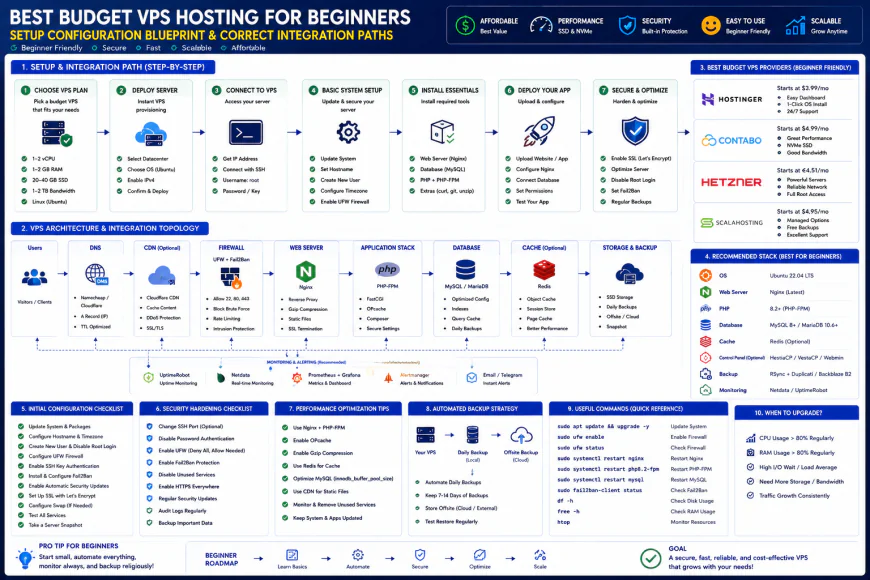 User feedback indicates that setting up this workflow often requires some custom script configurations to ensure optimal performance.
Practical Scenario: Escaping the WooCommerce Shared Hosting Slump
Take the case of a small e-commerce shop struggling with slow load times on traditional infrastructure. They were paying $35/month for a high-tier shared plan, yet their Core Web Vitals TTFB (Time to First Byte) hovered around a painful 1.8 seconds during peak hours due to server crowding.
Rather than upgrading to a bloated enterprise plan, the site was migrated to an unmanaged KVM slice running CloudPanel for a mere $5/month. Isolating the database and implementing Nginx FastCGI caching dropped their TTFB to a crisp 185 milliseconds. Checkout pages loaded instantly, and hosting costs plunged by 85%.
| Parameter | Developer-Centric KVM VPS (Hetzner/Vultr) | Conglomerate-Owned VPS (EIG Brands) | Standard Shared Hosting | Hyperscale Cloud (AWS EC2) |
|---|---|---|---|---|
| Average Monthly Cost | $4 - $10 (Flat rate) | $15 - $30 (High renewal hikes) | $3 - $15 (Entry level) | $15 - $80+ (Variable fees) |
| CPU & RAM Reservation | Guaranteed (KVM Virtualization) | Often heavily oversold | Shared pool (No guarantees) | Guaranteed (But costly) |
| I/O Disk Performance | Unthrottled local NVMe storage | Sluggish legacy SATA arrays | Aggressively throttled | Reliable but metered per IOPS |
| Management Level | Unmanaged (Complete Root Access) | Semi-managed / High Upsells | Fully Managed (Locked Panel) | Unmanaged (Complex CLI/Console) |
| Best For | Developers, bootstrappers, self-hosters | Unsuspecting buyers clicking affiliate lists | Static portfolios, absolute beginners | Enterprise setups needing multi-region scaling |
💡 Expert Analysis & Experience
The hosting market is heavily consolidated. When purchasing from seemingly independent hosts recommended on major blogs, you are often landing on the exact same neglected physical nodes. Seasoned sysadmins on LowEndTalk suggest bypassing these middlemen. If you want solid, entry-level virtual servers, target companies that actually own their data centers (like Hetzner) or highly respected independent hosts. Keep an eye on CPU steal time via htop; if that number regularly climbs past 5%, your provider is aggressively cramming too many virtual instances onto that host node.
✅ Pro Tip: The Life-Saving 2GB Swap Trick
If you are working with a tight 1GB RAM node, configure a swap file immediately. Running sudo fallocate -l 2G /swapfile followed by proper permissions and activation creates a handy safety net for memory spikes. This prevents your database from getting executed by the kernel's OOM killer, sparing you from unexpected middle-of-the-night site crashes.
The hidden licensing traps: What you actually pay for
Grabbing an affordable virtual machine feels like a massive financial win—until you read the software fine print. A lot of beginners deploy a cheap sandbox only to discover they need a fifteen-dollar monthly license just to run a familiar control panel. That is an absurd markup for a basic graphical interface. You do not need to pay this premium. Switching to lightweight, open-source panels keeps your monthly cash outflow pegged strictly to the raw hardware. Keep an eye out for misleading subscription pricing models too. Plenty of affordable providers splash rock-bottom rates across their homepages, but those prices require committing to a three-year contract. Opt for services offering rolling monthly payments with zero initiation fees. If the underlying host node starts lagging or overselling its resources, you can pack up your databases and migrate overnight without losing pre-paid capital.Balanced Comparison Summary
- Drastic Cost Reduction: Drops the heavy premium of managed hyperscalers, keeping up to 85% of your hosting budget in your pocket.
- Dedicated Resources: Proper KVM hypervisors prevent neighboring tenants from hijacking your CPU threads and memory cycles.
- Zero Operating Constraints: Full root privileges mean you can run custom Linux kernels, specialized databases, or complex Docker configurations.
- Total Self-Reliance: You are on your own for firewall rules, basic kernel hardening, and configuring robust backup routines.
- Strictly Unmanaged Helpdesks: If a bad Nginx configuration takes your site down, support reps will point you to documentation rather than fix it.
- Clunky Scaling Path: Expanding your disk space often means rebooting the instance and manually expanding partition tables via command line.
Who actually needs this setup?
Running an unmanaged environment is not a universal solution. For static portfolio sites or simple personal diaries, patching Linux packages and configuring firewalls is just unnecessary overhead. Traditional shared environments work perfectly fine for low-traffic destinations. But when you are deploying resource-heavy web applications, custom APIs, or tracking down dependable server setups for a budding small business, private isolation becomes non-negotiable. It guarantees stable resources that won't choke because another user on the same physical rack got hit by a sudden spike in traffic.Recommended Choices by Purpose
For Raw Power on a Budget: Look toward developer-focused providers like Hetzner or Netcup. User feedback consistently praises their CPU benchmarks, making them excellent choices for running compute-heavy applications without blowing your budget.
For Straightforward Deployments and Global Coverage: Consider specialized cloud brands like Vultr or DigitalOcean. While their baseline monthly costs run slightly higher, their intuitive web interfaces and vast geographic footprints simplify setups for expanding companies.
Frequently Asked Questions
Shared environments squeeze hundreds of sites onto a single operating system, so another customer's traffic spike can freeze your pages. An unmanaged server isolates your environment at the hardware virtualization level, ensuring your own CPU cores, independent RAM, and root control.
Absolutely, assuming you don't crowd a large database onto a basic 1GB RAM instance without configured swap space. Sticking to KVM virtualization keeps your physical RAM protected from neighboring instances on the host system.
Writer's Roadmap & Practical Checklist
- Prioritize KVM over OpenVZ to secure true kernel-level isolation and dedicated resources.
- Generate custom SSH keys on your local machine and turn off standard password logins immediately.
- Shift the default SSH port away from 22 to a random high-range port like 2285 to deflect basic automated scanners.
- Deploy a basic UFW (Uncomplicated Firewall) setup, blocking all ports except your critical SSH, HTTP, and HTTPS avenues.
- Turn on silent security patches with the 'unattended-upgrades' package in Debian or Ubuntu to keep system exploits closed.
- Run a modern, free panel like CloudPanel or HestiaCP to sidestep costly proprietary control software licensing fees.
- Run quick periodic disk I/O performance checks using utilities like 'fio' to ensure your underlying storage arrays aren't lagging.