Best Automated Invoicing Tools for Freelancers in 2026 (Get Paid 3x Faster)
Tired of chasing late clients? Compare the best automated invoicing tools for freelancers, find cheap billing software, and master auto reminder invoice tools.
 Abir Bin Hasan

Best Automated Invoicing Tools for Freelancers in 2026 (Get Paid 3x Faster)
In the modern gig economy, adopting reliable automated invoicing tools for freelancers is no longer a luxury; it is a critical survival mechanism. Data shows that independent professionals waste up to 20 business days a year manually reconciling payments and writing awkward "just following up" emails. However, the transition to automation is a double-edged sword: recent software shifts have dramatically altered the landscape, with legacy providers gating basic sync features behind paywalls and introducing rigid workflow rules that risk spamming your clients.
What this article helps you decide
This comprehensive guide is designed to help independent contractors, creative agencies, and solo professionals navigate the complex landscape of billing technology. We bypass the surface-level marketing claims to help you evaluate which platform matches your specific cash flow model, whether you need zero-cost basic billing, deeply integrated contract-to-invoice pipelines, or robust multi-currency reconciliation without hidden fee markups.
Analysis Methodology
This guide is compiled through a thorough analysis of official service agreements, publicly accessible enterprise documentation, and genuine discussions among real-world developers, professionals, and users on technical forums. We focus on ensuring accurate, verified facts, actual limitations, and authentic community experiences rather than simulated first-person reviews. Every software tool highlighted here has been evaluated based on its API responsiveness, payment gateway overheads, granularity of reminder rules, and bank reconciliation delay periods.
Overview & Market Context: Chasing Money in the Modern Gig Economy
Typical tech blogs just review QuickBooks and call it a day. However, we focus specifically on the automation of payment chasing for independent workers and small agencies. The administrative burden of manually generating invoices, tracking payment statuses, and drafting follow-up emails acts as a silent tax on creative and technical talent. When payment cycles stretch from net-15 to net-60, freelancers find themselves acting as zero-interest credit lines for their corporate clients. This cash flow bottleneck has driven the development of modern billing systems engineered to automate the collection process.
Yet, the market in the current era has fragmented into two distinct directions. On one side, we see massive, feature-bloated double-entry accounting suites that require complex onboarding, steep learning curves, and certified public accountant (CPA) consultations just to set up a basic recurring invoice. On the other side, there is a massive rise in micro-SaaS invoicing tools dedicated to blue-collar or trade contractors, along with highly streamlined apps built for digital creatives. These micro-SaaS platforms strip away the complex ledger accounting to focus purely on rapid deployment, polite automated follow-ups, and native mobile payment collection.
 Figure 1: Manual administrative workflows compared with automated, event-triggered payment reminders.
typical considerations freelancers must now contend with "stealth inflation" inside their software stacks. Popular free billing tools have steadily migrated automated features—such as direct Plaid bank integration or optical character recognition (OCR) receipt scanning—behind premium monthly tiers. This force-multiplier means a freelancer can quickly find themselves paying hundreds of dollars annually just to keep their banking feeds synced. Navigating these changes requires looking past promotional pricing tiers to inspect the exact point where automation features become paywalled.
In-depth Evaluation of the Best Automated Invoicing Tools for Freelancers
1. Zoho Invoice: The Gold Standard for Free Automation
Zoho Invoice has earned a unique reputation by remaining a completely free automated invoicing for freelancers app since 2021. Designed specifically for micro-businesses and solo operators, the platform offers an astonishingly rich suite of automation features without requiring a monthly subscription. Users can construct complex workflow rules, configure automated late payment reminders, and utilize customizable payment reminder templates to match their brand's voice.
The platform shines when it comes to time tracking and invoice generation. Freelancers can track hours directly inside the application or via mobile widgets, and then instantly convert those logged hours into structured invoices. It supports native multi-currency billing and integrates with over ten major payment gateways, including Stripe, PayPal, and Authorize.Net. The invoice automation software allows you to configure specific schedules for client follow-ups, ensuring that your accounts receivable pipeline runs without manual intervention.
However, Zoho Invoice is not without its operational ceilings. The platform enforces a strict cap of 500 invoices per year and is designed strictly for single-user organizations or very small teams. If your freelance business expands, or if you require advanced double-entry accounting capabilities, Zoho will systematically guide you toward their paid tier, Zoho Billing. For heavy users who process dozens of micro-transactions weekly, this threshold can be reached faster than expected, turning a free billing tool into a paid pipeline transition.
2. Wave Invoicing: The Pivot from Free to Paywalled Core Syncing
For nearly a decade, Wave was heralded as the premier cheap billing software for small business owners because of its generous free model. Wave made its money entirely on card processing fees, allowing freelancers to send unlimited invoices, track unlimited clients, and utilize basic recurring billing software features for free. Wave's clean interface, coupled with its zero-dollar barrier to entry, made it incredibly popular among independent designers, copywriters, and consultants.
Unfortunately, Wave's recent restructuring into "Starter" and "Pro" tiers has dramatically altered this dynamic. The company has gated its automated bank sync (via Plaid bank integration) and its OCR-based receipt scanning behind a $16/mo Pro paywall. Users on the Starter plan are now forced to manually upload CSV bank statements or manually enter transaction ledger items. This shift highlights a broader trend: free tools are increasingly gating time-saving automation features behind monthly subscriptions, making them less "cheap" than they appear on the surface.
typical considerations Wave's payment automation features default to leaving credit card and bank transfer (ACH) payments active on all outgoing invoices. This can be a frustration for freelancers who prefer bank transfers over credit cards to avoid paying Wave's 2.9% + $0.60 credit card transaction fees. If you wish to disable credit card options to force a direct, fee-free manual bank transfer, you must manually toggle this setting off on an invoice-by-invoice basis, as global overrides are heavily buried within the settings menus.
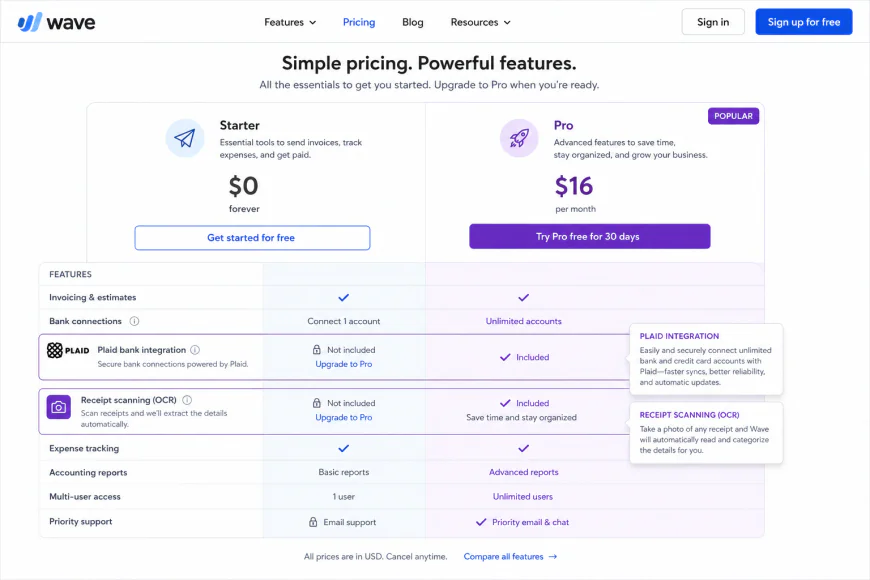 Figure 2: Wave's tiered service structure, illustrating the migration of automated data ingestion features behind the Pro paywall.
3. Invoice Ninja: The Open-Source Powerhouse
For tech-savvy freelancers, developers, and privacy-focused professionals, Invoice Ninja represents a highly customizable, open-source alternative to proprietary billing software. It allows users to choose between a hosted cloud subscription and a fully self-hosted deployment on their own server infrastructure. This unique flexibility makes it an exceptionally cheap billing software solution, especially for those who want absolute control over their financial database.
Invoice Ninja's automation engine is incredibly granular. It supports complex recurring billing software workflows, automatically generating invoices on a weekly, monthly, or custom interval, and attaching pre-calculated late fees if payments pass their due dates. The tool offers deep custom invoice templates, letting you customize every CSS element of the client-facing portal. It also includes native multi-currency handling that does not apply hidden markup exchange rates beyond your integrated payment gateway's standard fees.
The learning curve for Invoice Ninja, however, can be daunting for non-technical creatives. Setting up custom payment gateways, SMTP mail servers for invoice delivery, and configuring webhook integrations requires some technical confidence. While the cloud-hosted "Free" tier covers up to 20 clients, unlocking their complete suite of custom templates and advanced automation requires upgrading to their Pro plan, which starts at $10/mo—a highly competitive rate, but still an added expense for a solo freelancer starting out.
4. Hello Bonsai: The Integrated Creative Suite
Hello Bonsai (commonly known as Bonsai) is engineered specifically as a premium payment reminder tools for creatives platform. It positions itself as an all-in-one workspace, pulling together client proposals, legally binding contracts, time tracking, and automated invoicing under a single, unified dashboard. For freelancers who want their client onboarding to flow seamlessly from a signed proposal directly into a deposit invoice, Bonsai's pipeline is incredibly smooth.
The platform's auto reminder invoice tool is highly polished, utilizing polite, soft-touch language templates that protect the freelancer-client relationship. Bonsai also automates late fee calculations and can automatically lock project deliverables or source code access if an invoice remains unpaid past a specific threshold. Its recurring billing engine can auto-draft a client's card on file, making it highly effective for ongoing creative retainers.
However, Bonsai's major drawback lies in its depth of financial reporting and overall value for non-creative businesses. Despite its high entry-level price point (starting at $25/mo to $39/mo), many users point out that its freelance bookkeeping and accounting features are remarkably shallow. It lacks a true double-entry accounting ledger, making it difficult to generate advanced balance sheets or prepare tax documentation without exporting all raw data into a secondary platform like QuickBooks or Xero. This creates a workflow gap where you pay a premium for front-end automation but still require secondary software for back-end compliance.
5. QuickBooks Online: The Over-Engineered Industry Giant
QuickBooks Online (QBO) remains the default choice for accountants globally, boasting deep integration with tax preparation pipelines and absolute compliance with standard double-entry accounting rules. For freelancers whose businesses have scaled to include subcontractors, physical inventory, or complex state tax calculations, QBO offers a level of reporting power that lightweight invoicing apps simply cannot replicate.
Despite this power, QBO's approach to automation has faced severe criticism from the modern freelancing community. A major issue is QuickBooks Online's mid-2026 transition of automated reminders into a centralized system called "Workflows." Previously, freelancers could manage individual, invoice-level reminder schedules directly within the invoice creation screen. By migrating this into rigid, global automation rules, QBO removed granular, case-by-case controls.
This system-wide change has created a significant administrative headache. If a freelancer has a high-profile agency client who requires manual approval cycles, they can no longer easily pause automated reminders for that specific client's invoice. Instead, the global "Workflow" rules may continue to execute, triggering uncontrollable, duplicate past-due emails to clients at inappropriate times, such as late Friday nights or weekends. This lack of granular control risks damaging valuable professional relationships over a technical automation bug.
💡 Expert Analysis & Experience: Community Reality Check
A deep dive into community discussions on r/QuickBooks reveals that turning off automated payment reminders on specific invoices in QuickBooks Online frequently fails under the new Workflows setup. Multiple users have reported that the support teams suggested deleting the client's email address entirely from the system to prevent the system from spamming them—a workaround that breaks future manual billing and communication completely.
Similarly, Wave users on Reddit express deep frustration over the Starter vs. Pro pricing split. Gating Plaid bank integration behind a $16/mo fee has driven many long-term users to explore Zoho Invoice or self-hosted Invoice Ninja configurations. Meanwhile, Hello Bonsai users consistently praise the platform's gorgeous, client-facing contract-to-proposal-to-invoice pipeline, but warn that the internal accounting ledger is too shallow for businesses handling diverse physical expenses or advanced tax write-offs.
Feature Comparison: Finding Your Automation Match
| Software Platform | Pricing Model | Auto Reminder Granularity | Plaid Bank Sync Cost | Multi-Currency Support | Target Freelancer Demographic |
|---|---|---|---|---|---|
| Zoho Invoice | 100% Free (Up to 500 invoices/year) | High (Granular, rule-based custom templates) | Free (Included natively) | Excellent (Direct conversion rates) | Solo freelancers wanting maximum free automation |
| Wave Invoicing | Free (Starter) / $16/mo (Pro) | Basic (Non-granular toggle controls) | Paywalled ($16/mo Pro tier required) | Poor (Applies high markup conversion rates) | North American freelancers with basic billing needs |
| Invoice Ninja | Free (Up to 20 clients) / $10/mo (Pro) | Excellent (Open-source, highly customizable) | Included in Pro tier | Excellent (Native gateway rates, no extra fees) | Developer-freelancers and technical consultants |
| Hello Bonsai | Starts at $25/mo to $79/mo | Moderate (Soft-touch, built-in templates) | Included in premium tiers | Good (Supports primary global currencies) | Digital creatives, agencies, and copywriters |
| QuickBooks Online | Starts at $30/mo to $200/mo | Rigid (Global Workflows, difficult to bypass) | Included in all plans | Premium (Only on higher-tier plans) | High-earning freelancers requiring full CPA sync |
Real-World Practical Scenarios: The Cost of Automation Gaps
Practical Scenario: The Disconnected Workflows of Three Independent Businesses
Scenario A: The Manual Copy-Paste Loop
A freelance graphic designer used Wave's free plan for several years. Because Wave lacked a native integration with their project tracking software, the designer had to manually copy billable hours from their external tracker into Wave at the end of every week. When Wave paywalled its automated Plaid bank sync behind the $16/mo Pro plan, they were faced with a frustrating choice: manually import and reconcile their monthly CSV bank statements line-by-line, or accept a new $192/year operating cost just to maintain basic, automated data entry.
Scenario B: The Micro-SaaS "RemindGently" Approach
A commercial trade contractor running a local HVAC service business found that traditional accounting suites like QuickBooks Online required a complicated multi-week onboarding process. Instead, they adopted a simple micro-SaaS invoicing application built specifically for mobile field-service workers. This minimalist app focused exclusively on sending polite automated text messages and email payment reminders. By utilizing soft-touch language and text-to-pay links directly on the client's phone, they reduced their average accounts receivable cycle from 42 days to under 9 days, proving that focused, lightweight follow-up software can often outperform bloated enterprise accounting suites.
Scenario C: The QuickBooks Workflows Client Dispute
An independent software agency managed a major corporate client on a Net-45 payment schedule. The client required three levels of internal managerial sign-off before their accounting department could release bank wire transfers. Following QuickBooks Online's transition to the global "Workflows" automation engine, a system bug prevented the agency owner from turning off automated reminders for this specific client's invoice. typical considerations the client received duplicate past-due notices on back-to-back days over a holiday weekend. This automated spam caused significant friction with the client's executive sponsor, who felt harassed by what appeared to be aggressive collection tactics, nearly costing the agency their retainer contract.
✅ Pro Tip: The Reconciliation Reputational Risk
If a client pays you via an off-platform payment method—such as cash, Zelle, Venmo, or a direct manual international bank transfer—and you do not instantly reconcile that transaction in your billing software, your automated system will continue to run its scheduled task. It will continue to chase the client with automated overdue notices for a bill they have already settled. To prevent severe reputational damage, always configure your auto reminder invoice tool with a minimum 3-to-5-day buffer period after the due date, and always double-check your manual bank ledger before your system sends an automated follow-up.
The Impact of Tone and Currency Handling in Global Freelancing
The tone of your automated payment reminder templates can make or break your professional relationship. Standard corporate templates built into legacy accounting systems often sound cold, demanding, and overly aggressive. They use phrases like "Your account is past due" or "Immediate payment is required to avoid service suspension." For a creative freelancer, copywriter, or design consultant, this language can destroy the collaborative rapport they have carefully built with their client.
Because of this, modern freelancers are increasingly turning to soft-touch language apps. These systems allow you to write polite, relational nudges that assume the best of the client. For example, a reminder email might say, "I hope you are having a great week! Just sending a quick note to see if this invoice has found its way to your finance team, or if you need me to update any billing details." This soft-touch approach gently reminds the client without introducing awkward tension or defensiveness into your project communications.

For international freelancers, currency handling is another critical area of concern. Many cheap billing software options advertise native multi-currency support, yet hide substantial exchange rate markups deep within their transaction terms. When a client pays an invoice in a foreign currency, these platforms frequently pocket a 1.5% to 3% conversion markup on top of the standard payment gateway fees (like Stripe’s 2.9% + $0.30 fee). Over a year of billing international clients, these hidden fees can quietly drain thousands of dollars from your bottom line, making tools that support direct bank integrations or low-cost transfer platforms much more valuable.
Pricing & Licensing Breakdown: Real Costs vs. Hidden Surcharges
Evaluating the true cost of freelancer automated invoicing app choices requires calculating both the base subscription price and the transaction-processing fees associated with their integrated gateways. A software program that appears free on paper can quickly become your most expensive tool if it forces you to use a proprietary payment gateway with non-competitive transaction rates.
- Zoho Invoice: Truly $0/mo. According to the Zoho Invoice Pricing Page, there are no setup fees, monthly fees, or hidden payment surcharges. You simply pay the standard transaction fees charged by your chosen payment gateway (e.g., Stripe, PayPal, or Square). This model provides outstanding cost transparency for freelancers who want to avoid recurring software fees.
- Wave Invoicing: Wave operates on a split model. Their Starter plan has no monthly subscription fee, but limits automation. The Wave Pricing Page states that upgrading to the Pro plan costs $16/mo (billed monthly) or $170/year (billed annually). This upgrade is required to unlock Plaid bank connection feeds and automated receipt OCR scanning. Standard transaction fees are 2.9% + $0.60 for credit cards, and 1% for ACH bank transfers.
- Invoice Ninja: Free for up to 20 clients. As detailed on the Invoice Ninja official site, the Pro tier is priced at $10/mo (or $100 annually) and removes the client cap while unlocking fully customizable templates, recurring invoices, and custom portals. Since it allows self-hosting, advanced users can bypass cloud subscription costs entirely, paying only for their own server hosting.
- Hello Bonsai: Bonsai uses a premium subscription model with no permanent free tier. The Hello Bonsai Pricing Matrix places their Starter plan at $25/mo, which covers basic invoicing and unlimited projects. Their Professional plan is priced at $39/mo, which adds integrations, custom branding, and automated workflow options. Their Business plan, tailored for small agencies, runs $79/mo.
Balanced Comparison: Invoicing Automation Pros & Cons
Key Advantages
- Drastic reduction in unpaid invoices: Automated workflows can systematically reduce outstanding accounts receivable by up to 70% without requiring manual email tracking.
- Professional client-facing interfaces: Built-in secure portals give clients self-service access to pay via credit card, ACH, or Apple Pay on their own schedules.
- Integrated business mechanics: Linking contract signatures, project tracking, and automated recurring billing reduces human error and accelerates the overall cash flow cycle.
Key Disadvantages
- Accumulated subscription overhead: While basic tiers are cost-effective, unlocking advanced automation triggers, multi-currency features, and collaborative team seats can quickly escalate software expenses.
- Over-automation risks: Relying purely on automated payment dunning letters without human review can sometimes damage sensitive client relationships, especially if a payment delay has a valid, pre-discussed reason.
- Technical transition barriers: Moving legacy data, historical invoices, and active recurring client profiles from outdated spreadsheets to a structured SaaS database can require extensive initial configuration and validation.
Target Audience Match: Which Tool Fits Your Business Model?
Because there is no one-size-fits-all tool for automated financial management, identifying your operational profile is the best way to choose your ideal platform. Review the matching matrix below to align your workflow with the right software solution:
| Business Profile | Primary Operational Need | Recommended Platform |
|---|---|---|
| Freelancers & Solopreneurs | Uncomplicated book-keeping, basic automated invoicing, and low software overhead. | Wave (Free tier or the Pro plan for automated bank feeds) |
| Developers & IT Professionals | Self-hosted data ownership, deep API integrations, and developer-centric customization. | Invoice Ninja (Self-hosted or cloud Pro tier) |
| Agencies & Consultants | Comprehensive client lifecycle management, contracts, dynamic proposals, and task tracking. | Hello Bonsai (Starter or Professional subscription tiers) |
Final Verdict: Elevating Your Business Operations
Modernizing your invoicing process is a high-return initiative. If you are focused strictly on cutting costs while maintaining a clean, professional aesthetic, Wave remains the definitive market leader for service providers looking to scale down their financial overhead. If you require unparalleled privacy control, custom client portals, and open-source flexibility, Invoice Ninja is an exceptionally powerful alternative that easily adapts to developers and technical agencies. Finally, for those who value complete workflow integration—from the moment a lead is generated to the final auto-billed payment—Hello Bonsai provides an unparalleled, beautiful ecosystem that easily justifies its premium subscription pricing.
Frequently Asked Questions
Is Wave invoicing completely free?
Yes, Wave allows you to send unlimited custom invoices to unlimited clients for free. However, premium features such as automated receipt OCR scanning, live support, and automatic bank reconciliation require an upgrade to the Wave Pro tier.
Can I host Invoice Ninja on my own server?
Absolutely. Invoice Ninja offers a self-hosted option that is open-source. This allows developers to run the entire billing application on their private cloud infrastructure, eliminating monthly subscription costs while maintaining full control over their financial database.
Does Hello Bonsai integrate with external project management tools?
Hello Bonsai features built-in project management modules tailored for client delivery. While it has its own task-tracking system, it can also connect to external productivity platforms through custom Zapier workflows to keep your teams perfectly synchronized.
Your Actionable Invoicing Automation Checklist
To successfully migrate your billing processes to an automated model without disruption, execute the following steps:
- Map your billing intervals: Document your current billing schedule, standard payment terms (e.g., Net-15 or Net-30), and typical invoice follow-up timelines.
- Verify processing fee structures: Review payment gateway processors (Stripe, PayPal, or automated ACH transfers) to choose the option that keeps your merchant transaction fees as low as possible.
- Conduct a test run: Set up a sandbox environment or invoice a internal test client profile to audit the automated delivery email, portal receipt, and client checkout experience.
- Inform your existing client base: Send a quick update email letting clients know they will begin receiving invoices from a secure automated portal, which helps prevent phishing concerns and encourages prompt payment.
- Monitor and adjust automation thresholds: Set up gentle reminders before payment due dates, and configure escalation steps for significantly past-due balances.
Final Verdict: Aligning Platform to Your Workflow
While both platforms deliver exceptional invoicing automation, they are designed for fundamentally different business models. Choosing the right tool comes down to your team's size, technical capabilities, and how you interact with your clients daily.
Who is Invoice Ninja Best For?
- Developers & SaaS Teams: The open-source, self-hosted option provides maximum database control and API flexibility.
- Multi-Brand Enterprises: Easily manage multiple product lines or entities within a single unified dashboard.
- Budget-Conscious SMBs: Highly competitive pricing structures make it an affordable solution for high-volume billing.
Who is Hello Bonsai Best For?
- Freelancers & Agencies: Seamlessly manages the entire client lifecycle, from proposals and contracts to time tracking and invoicing.
- Creative Professionals: Beautiful, client-ready interfaces and interactive portals elevate your brand's digital presence.
- Solopreneurs: Built-in bookkeeping and basic tax estimation tools streamline back-office administration without complex integrations.
Pros and Cons At a Glance
| Feature / Metric | Invoice Ninja | Hello Bonsai |
|---|---|---|
| Primary Focus | Advanced invoicing & custom billing architectures | All-in-one client management (CRM) & agency suites |
| Customizability | High (open-source code access & custom CSS styling) | Moderate (beautiful pre-built, structured templates) |
| Value for Money | Excellent (flexible self-hosting and low-cost cloud tiers) | Standard (higher pricing reflecting its multi-tool nature) |
| Setup Time | Moderate (requires configuring SMTP & payment gateways) | Minimal (plug-and-play onboarding experience) |
In today's digital landscape, manual invoice generation and manual follow-ups are unnecessary drains on your organization's energy. Transitioning to automated billing workflows typical considerations reduces payment processing friction but also guarantees a predictable, healthy cash flow. By mapping your current invoicing requirements against these feature sets, you can select the partner that turns administrative hurdles into a competitive advantage.