Best AI Image Generator for Commercial Use: Honest Guide
Stop wasting money. We review the best AI image generator for commercial use options, comparing cost, licensing, and Midjourney alternatives.
 Abir Bin Hasan
Best AI Image Generator for Commercial Use: Honest Guide
Using generative assets in commercial projects without parsing the legal fine print is a massive gamble. While almost every tool promises high-impact visuals in seconds, a sudden licensing dispute can stall an entire product launch. This breakdown bypasses the marketing spin to show you how major commercial platforms actually perform under professional scrutiny.
What this article helps you decide
This guide outlines how major commercial-grade image tools align with corporate compliance, visual design pipelines, and standard production formats. The goal is to separate the platforms offering genuine legal protection from those that leave businesses vulnerable to copyright complications.
Analysis Methodology
This analysis is built on a rigorous review of public documentation, enterprise license agreements, and standard production workflows. Information has been compiled from primary legal sources, including the Adobe Firefly Generative AI Indemnification Terms, OpenAI Terms of Use, Midjourney Subscription Terms of Service, and recent guidance from the US Copyright Office regarding machine-generated assets.
The Commercial AI Art Landscape: Hype vs. Legal Reality
Selecting a commercially viable AI generation tool requires looking far beyond a polished gallery page. A reliable professional setup demands a clear understanding of copyright indemnity, licensing tiers, and export flexibility across different marketing channels.
Many online comparisons simply copy promotional copy or list every software under the sun to capture quick sign-up commissions. For actual business decisions, understanding the practical realities of prompt adherence, export caps, and exact terms of service is far more useful than reading a basic feature list.
The core issue today is that platforms frequently bury critical usage restrictions inside dense terms of service documents. A tool might generate gorgeous imagery on its landing page, but the fine print may restrict client distribution or demand an immediate, expensive upgrade to a dedicated corporate plan before the assets can be used in commercial campaigns.
Additionally, the legal framework is in a constant state of flux. Since pure machine-generated art without human intervention currently cannot be copyrighted under US law, corporate buyers must focus heavily on indemnity clauses to shield their brands from infringement claims or competitor copycats.
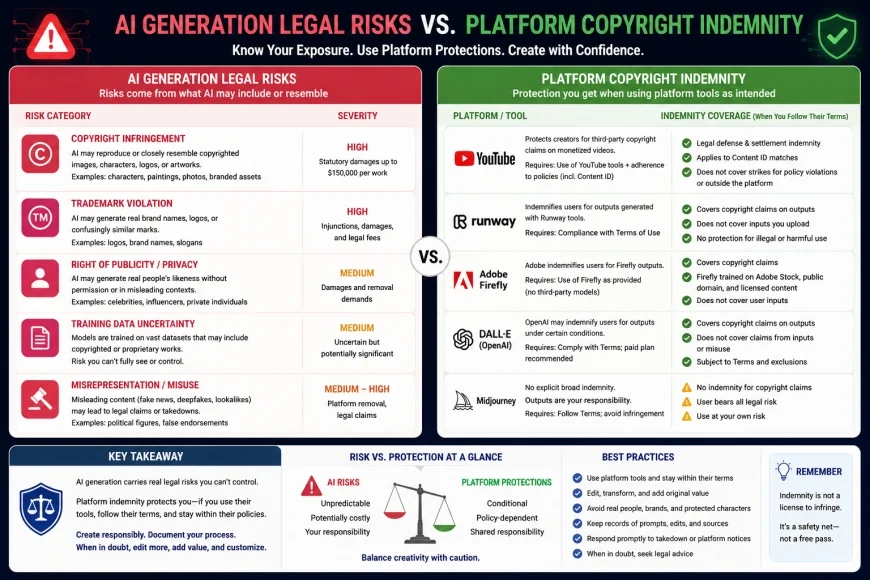 Figure 1: Legal protection tiers vary widely between major commercial image platforms.
In-Depth Evaluation of the Market Leaders
Adobe Firefly: The Gold Standard for Enterprise Legal Safety
Adobe positions Firefly as a highly stable, low-risk option for corporate environments. By training its model primarily on licensed Adobe Stock, openly licensed content, and public domain work, the company avoids the ethical and legal questions surrounding scraped web data.
For enterprise-tier accounts, Adobe offers copyright indemnification—essentially promising to step in legally if an output triggers an infringement claim, provided user guidelines were followed. This backstop is why many major brands opt for Adobe's ecosystem over open-source or less legally protected tools.
This legal peace of mind comes with a clear artistic trade-off. Because the training corpus is strictly curated, Firefly often struggles to produce stylized, gritty, or highly dramatic creative outputs. It excels at clean, corporate graphics, basic vector illustrations, and standard commercial photography, but it will feel underwhelming for highly conceptual or boundary-pushing art.
Midjourney: Artistic Masterclass with Legal Grey Areas
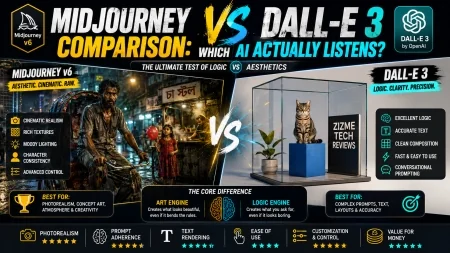
Midjourney is generally considered the benchmark for raw visual fidelity and creative style. It produces rich, cinematic, and compositionally complex outputs that rarely require heavy retouching, making it a favorite for rapid ideation, mood boards, and concept design.
However, the tool is built on a foundation of legal ambiguity. While paying subscribers technically receive commercial rights, the platform offers no legal indemnity or warranty against third-party claims. If a generated graphic closely mirrors a copyrighted work present in the training data, the legal and financial liability rests entirely with the business using it.
Operational friction is another major drawback. Accessing the system primarily through Discord is a messy workflow for corporate IT departments. Even with the introduction of a web-based alpha, team management, centralized billing, and direct creative suite integrations remain clunky compared to established design systems.
💡 Workflow Case Study
A look at practical agency workflows reveals a stark operational divide. When generating promotional assets for a consumer brand, Midjourney typically produces hyper-realistic concepts with far less prompt engineering. However, corporate compliance officers regularly veto these files due to the lack of legal indemnification. Teams are often forced to pivot to tools like Adobe Firefly, which require more detailed prompting to achieve the same visual polish but allow legal sign-off in minutes.
Recraft: The Ultimate Tool for Vectors and Brand Designers
Recraft has carved out a unique space for professional design workflows by solving a major headache: scalability. While most generators output raster images (like PNGs or JPEGs) that pixelate when resized, this platform focuses heavily on native vector generation.
Generating clean SVG icons, brand illustrations, and infinite-resolution graphics saves designers hours of manual vectorization. For branding assets that must scale from a mobile app screen to a physical billboard, this layout control is highly practical.
The interface supports setting strict color palettes and uploading style references to maintain brand consistency. It functions more like a professional design tool than a simple art generator, making it highly useful for creating functional, repeatable brand assets.
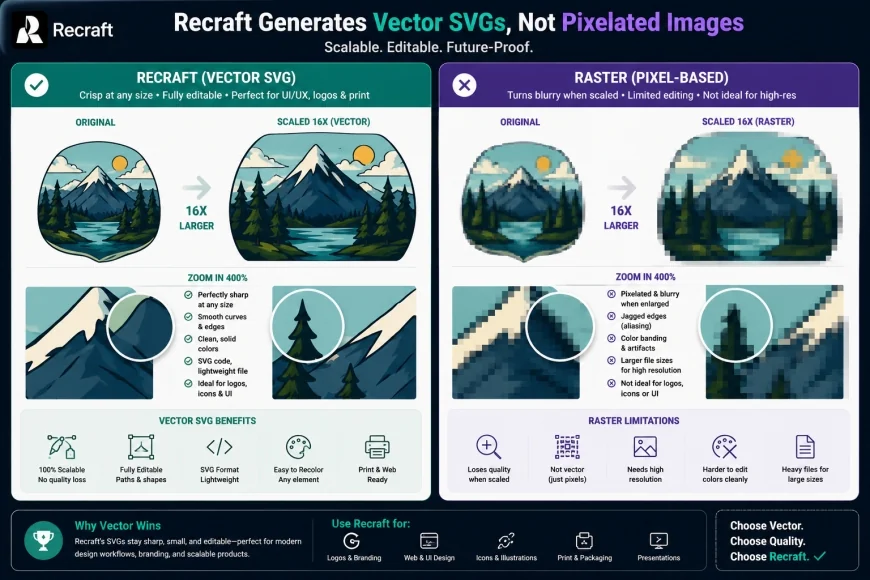 Figure 2: Vector outputs allow designers to scale logos and icons without losing edge sharpness.
OpenAI DALL-E 3: Simple, Integrated, and Fast
DALL-E 3, integrated directly within ChatGPT and Microsoft Copilot, excels at parsing complex text prompts. Thanks to its underlying language model, it handles detailed layouts, specific text rendering, and spatial descriptions better than most competitors.
In terms of licensing, the platform grants full commercial rights to paid users. This makes it an accessible, low-barrier option for general content creation, such as blog illustrations, quick presentation slides, or social media graphics.
However, the output style has a very distinct, often cartoonish aesthetic. Achieving genuine photorealism is highly challenging, and the results can look overly saturated or plastic. Additionally, standard users do not receive robust copyright indemnity, leaving small businesses with some lingering liability risks.
Who Should Avoid These Platforms: Key Pitfalls and Pricing Jumps
- Avoid Midjourney if you cannot tolerate a steep learning curve or if your corporate security policies block Discord-based workflows.
- Avoid Adobe Firefly if your project requires moody, edgy, or highly stylized artistic aesthetics; its safety-first model often outputs somewhat safe, corporate-looking imagery.
- Avoid DALL-E 3 if you need high-resolution vector files or photographic realism. It is primarily built for illustration.
- Watch for Pricing Jumps: Many platforms offer low entry prices but lock advanced rendering speeds, team collaboration tools, or vector exports behind steep renewal fees and high-tier enterprise subscriptions.
Comparative Pricing, Licensing, and Hidden Costs
When selecting a commercially viable tool, calculating the actual cost of ownership is essential. Many platforms offering free tiers restrict commercial rights to paid accounts or lock high-resolution outputs behind complex subscription upgrades.
Most pricing models are divided into credit pools, unlimited tiers with speed restrictions, or pay-as-you-go API access. For collaborative teams, seat-based licensing can quickly drive up monthly operating costs.
| Platform Name | Starting Price (Monthly) | Commercial Terms | Legal Indemnity | Key Output Formats |
|---|---|---|---|---|
| Adobe Firefly | $4.99 (Stand-alone) | Commercial rights included on all paid tiers | Yes (Enterprise accounts only) | PNG, JPEG, SVG |
| Midjourney | $10.00 | Commercial rights included on paid tiers | No | PNG, WEBP |
| Recraft | $10.00 (Pro plan) | Commercial rights included on Pro tier | No | SVG, Lottie, PNG, JPEG |
| OpenAI DALL-E 3 | $20.00 (Via ChatGPT) | Commercial rights included for all outputs | No (Limited enterprise coverage) | PNG |
As shown above, the most economical option may not carry the protections required by larger brands. While a starter tier might grant commercial usage permissions, it does not shield you from legal costs. Smaller design studios or independent creators may find the lower-cost tiers of Recraft or Midjourney highly efficient, provided they accept the accompanying legal parameters.
Understanding Legal Indemnity and Copyright Protection
Deploying machine-generated assets safely requires a solid grasp of copyright indemnity. This legal mechanism shifts the financial risk of a potential infringement lawsuit from your business back to the platform provider. Without it, you are entirely on your own if an artist claims your generated marketing asset closely mimics their protected work.
For instance, if a platform's training data leads to an output that resembles a copyrighted character, the original creator could pursue legal action. Under an enterprise-tier Adobe Firefly agreement, Adobe manages the defense, provided the designer didn't intentionally prompt the system to mimic copyrighted IP.
Registration rules present another hurdle. Because the US Copyright Office maintains that pure AI outputs lack human authorship, they cannot be registered as standalone copyrights. However, if a human designer modifies the asset, layers it with typography, or combines it into a broader layout, the finished, unified design can be protected. This makes hybrid design tools and vector packages highly practical for real-world projects.
Practical Scenario: Launching a Packaging Campaign
Consider an e-commerce brand launching a new beverage line. If the design team generates a label illustration using a raw AI output, they cannot legally register or protect that label asset. To safeguard the brand's identity, a human designer must bring the graphic into a program like Adobe Illustrator, alter the vector paths, apply custom typography, and integrate proprietary brand elements. This hybrid process builds a defensible, copyrightable asset out of a raw machine-generated base.
✅ Pro Tip: The Layering Strategy
For optimal legal safety, avoid using raw machine outputs as final, unedited logos or brand marks. Instead, use them as creative blueprints or basic layers. A human designer should then clean up the file, integrate custom typography, alter colors, and inject unique brand assets. This manual intervention not only ensures brand consistency but also establishes the level of human authorship required by copyright registration offices.
Key Risks Small Businesses Face When Generating Commercial Art
Assuming that a paid subscription automatically guarantees complete commercial safety is a common trap. In reality, small businesses often run into several structural and legal risks when using these assets:
- Unannounced License Updates: Platforms sometimes adjust their terms of service, shifting older features or legacy generation rights into different tiers without notice.
- Training Set Liabilities: Tools trained on scrapings of copyright-protected web content remain vulnerable to collective legal actions, which can cast a shadow of doubt over any assets generated by them.
- Resolution and Scalability Issues: An asset that looks acceptable on a phone screen can easily pixelate or blur when blown up for print or packaging.
- Visual Style Drift: Most standard generators struggle to maintain precise stylistic consistency across multiple assets, making it hard to build a cohesive brand identity.
To minimize these issues, creative teams should establish clear rules specifying which tools are approved for public-facing campaigns, how designers must modify raw outputs, and where original, editable files are archived.
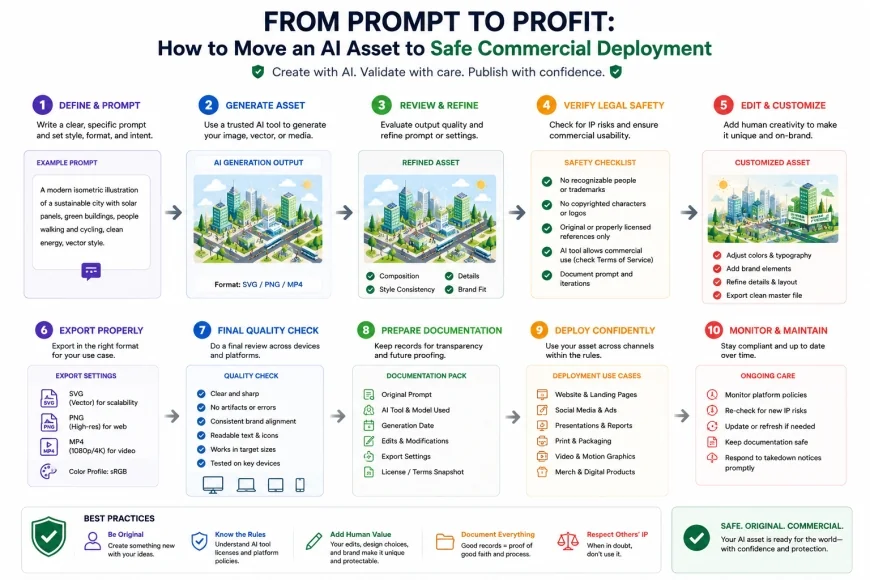 Figure 3: A secure workflow process protects businesses from copyright claims and formatting issues.
Balanced Comparison of Commercial Approaches
- Licensed Training Models (Adobe): Solid legal safety, official corporate indemnity options, and integration with established desktop design apps.
- Vector-Focused Generators (Recraft): Clean, infinitely scalable graphics, easier branding workflows, and quick icon set generation.
- High-Fidelity Generators (Midjourney): Incredible aesthetic style, rich concept development, and highly detailed visual assets.
- Unlicensed Training Models: Elevated long-term legal exposure, zero copyright registry protection, and potential brand liabilities.
- Strict Style Guidelines: Safe platforms can feel creatively rigid, occasionally outputting generic or overly corporate visuals.
- Hidden Cost Structures: Commercially sound platforms often push users toward expensive enterprise tiers to unlock actual legal indemnification.
Who should use what?
If you are an enterprise creative director managing a national brand, legal safety and workflow integration are your top priorities. In this case, Adobe Firefly is the standard choice. If you run a digital agency or small business that needs scalable icons, layouts, and vector graphics on a budget, Recraft is highly effective. For independent designers and concept artists who need cutting-edge styling and visual richness above all else, **Midjourney** remains highly compelling, provided you have a strategy to manage the lack of indemnity.
Recommended Choices by Purpose
There is no single tool that fits every commercial scenario, as different organizations carry vastly different budgets and risk tolerances. If complete legal safety is a non-negotiable requirement, Adobe Firefly remains the safest bet. If your production pipeline relies on scalable SVG design files, Recraft is incredibly functional. For teams chasing top-tier aesthetic execution who are willing to handle the legal vetting internally, Midjourney remains the creative baseline.
Frequently Asked Questions
Can I copyright an image generated by an AI platform?
No. Under current guidance from the US Copyright Office, purely AI-generated images do not contain human authorship and cannot be copyrighted. However, you can copyright the larger, original creative layout that incorporates those images if a human designer has made significant modifications or compiled them into a unique composition.
Are free AI image generators safe for commercial use?
Rarely. Many free tools quietly revoke commercial rights once you surpass a low generation threshold, locking your designs behind expensive paywalls. Additionally, free tools rarely offer copyright indemnity or verify that their models were trained on ethically sourced, cleared data.
What is copyright indemnity in generative AI?
Copyright indemnity is a legal promise from an AI platform provider to protect you and your business from legal claims. If a third party sues your business for copyright infringement over an image generated by their tool, the platform provider covers your legal costs and damages, subject to their terms of service.
Can I use Midjourney images on products I sell?
According to the Midjourney Subscription Terms of Service, you own the assets you generate, provided you are a paid subscriber. However, Midjourney provides zero legal warranties or copyright indemnity, meaning you assume all liability if a third party claims your product's design infringes on their copyright.
Which AI generator is best for creating scalable logos and icons?
Recraft is the premier choice for this specific task because it offers native vector generation. It allows you to export clean SVG files that scale infinitely without pixelation, making it perfect for brand identities, web design, and print materials.
Practical Checklist for Safe Commercial Implementation
Before launching your next marketing or product campaign, ensure your design team completes this safety checklist:
- Verify if the tool's base model is trained on licensed or public-domain data.
- Check subscription tiers; many free plans exclude commercial rights.
- Determine if the platform provides legal indemnification for copyright disputes.
- Test the tool's ability to render brand-consistent assets (e.g., vectors, specific hex codes).
- Export images in scalable formats (SVG, PNG-24) to ensure high-resolution usability.