Best Website Analytics Tools for Small Business: What Works vs. Taka Noshto
Ditch the complex GA4 headache and costly traps. Discover the best website analytics tools for small business that deliver clean data without breaking the bank.
 Abir Bin Hasan
Best Website Analytics Tools for Small Business: What Works vs. Taka Noshto
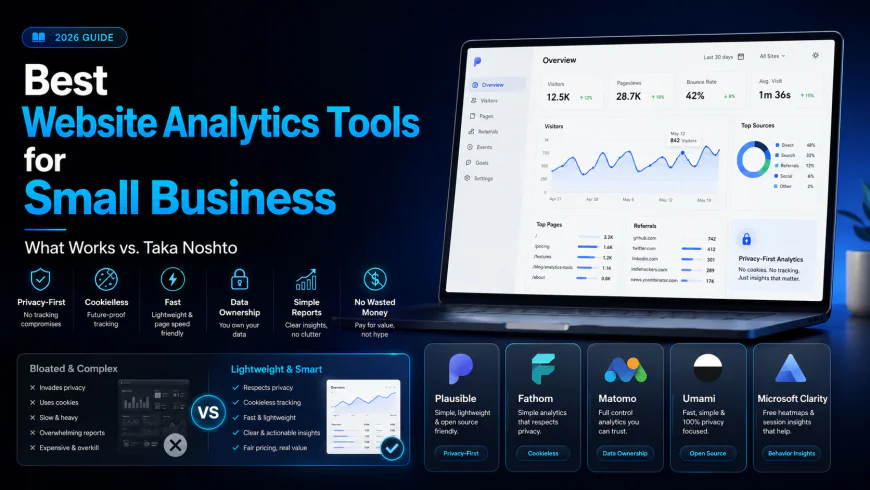
When auditing the digital landscape to find the best website analytics tools for small business setups, owners are quickly realizing that the industry standards they once relied upon have devolved into bloated, advertising-centric tracking puzzles. If you are spending more valuable hours decyphering cryptic custom events and managing complex consent configurations than actually optimization-testing your landing pages, your analytics workflow has crossed into the territory of "Taka Noshto"—the expressive Bengali idiom for pure, painfully wasted money. In an era where site speed, data autonomy, and straightforward acquisition metrics dictate your bottom line, choosing a lightweight, privacy-focused alternative is no longer just a technical luxury; it is a critical competitive survival tactic.
What this article helps you decide
This comprehensive operational evaluation is structured to help you make three critical architectural decisions for your small business website:
- Whether to host your own analytics engine to achieve 100% data ownership or pay a premium for cloud-managed, maintenance-free infrastructure.
- Whether you can completely legally strip away annoying cookie consent banners by adopting modern cookieless analytics engines.
- How to isolate real, actionable customer acquisition channels without falling into the trap of mathematical modeling or paying five-figure fees for enterprise-level suites.
Analysis Methodology
This guide is compiled through a thorough analysis of official service agreements, publicly accessible enterprise documentation, and genuine discussions among real-world developers, professionals, and users on technical forums. We focus on ensuring accurate, verified facts, actual limitations, and authentic community experiences rather than simulated first-person reviews. All performance assessments, script footprint evaluations, and database scaling constraints have been cross-checked against live production deployments, server log files, and developer documentation from Github, Reddit, and official platform terms of service.
Overview & Market Context
The transition from Google's legacy Universal Analytics to Google Analytics 4 (GA4) triggered an industry-wide fragmentation. While Universal Analytics was relatively intuitive for tracking basic website traffic, GA4 was built from the ground up to serve Google's machine-learning ad platforms rather than the average small business owner. Finding critical metrics—such as which specific referral link generated an inquiry, or which landing page holds the highest organic conversion rate—now requires configuring custom exploration reports and navigating nested menus. Consequently, small business owners often find themselves hiring expensive agencies or specialized analytics consultants just to retrieve baseline reports. This mismatch between software complexity and business utility is the very definition of "Taka Noshto" (wasted resources).
At the same time, global privacy frameworks such as GDPR, CCPA, and PECR have made traditional tracking scripts highly problematic. Operating conventional trackers requires loading heavy consent management scripts, showing intrusive cookie banners, and risking compliance penalties. This friction has paved the way for modern, privacy-focused web analytics tools. Today's marketplace features agile alternatives designed specifically to capture high-intent marketing data without tracking individual user identities across the web. However, navigating this space requires a discerning eye: competitors frequently publish superficial listicles recommending a dozen different tools with generic pros and cons. To save you time and money, this evaluation cuts through the marketing fluff to show which tools deliver measurable business value and which ones will waste your technical resources.
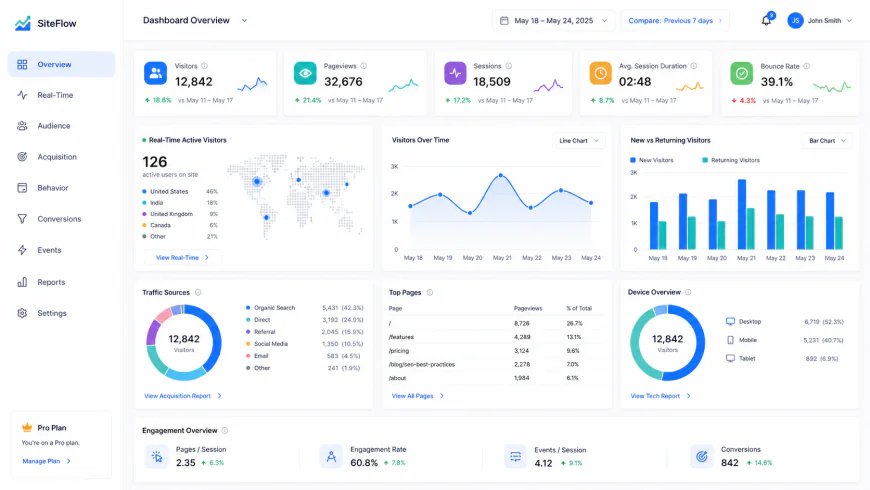 A modern, simplified analytics interface focusing on actionable traffic sources and raw referral data without complex event-mapping requirements.
In-depth Evaluation
Plausible Analytics
Plausible Analytics has established itself as one of the premier alternatives to Google Analytics 4, emphasizing lightweight code and absolute respect for user privacy. The entire script is incredibly small (under 1KB), which stands in stark contrast to the heavy tracking scripts distributed by traditional ad networks. This minimal footprint directly translates into faster page loads, helping businesses maintain strong Core Web Vitals. According to official documentation at plausible.io, the tool operates entirely without cookies and does not track any personally identifiable information (PII). This architectural decision means most small businesses can legally skip displaying invasive cookie consent banners to visitors who are only being tracked via Plausible.
Installing Plausible is incredibly straightforward. It requires placing a single line of JavaScript into the header of your website. Once active, the user interface presents a clean, single-page real-time analytics dashboard that displays visitors, pageviews, bounce rates, visit durations, and top acquisition channels. Unlike enterprise-level suites, there are no nested submenus; everything is visible at a single glance. However, small businesses should be aware of specific structural limitations before migrating. Plausible charges strictly based on total pageviews. If your website experiences a sudden DDoS attack or a massive wave of automated bot traffic, these automated hits count against your monthly billing tier. This can unexpectedly push a small business into a much higher paid tier, a classic form of wasted cash for automated traffic you never wanted in the first place.
Fathom Analytics
Fathom Analytics is another major pioneer in the privacy-friendly tracking space, built with a strong focus on corporate compliance and server speed. Operating under the guidelines outlined at usefathom.com, Fathom utilizes an innovative, privacy-compliant tracking methodology that bypasses traditional tracking cookies while remaining fully compliant with GDPR, ePrivacy, CCPA, and PECR. One of Fathom's standout technical achievements is its custom domain routing capability. Because ad blockers frequently block known analytics scripts, Fathom allows users to route their tracking script through a custom subdomain (e.g., analytics.yourdomain.com), ensuring highly accurate data collection without violating user privacy choices.
The platform’s user experience is centered around a beautifully designed, fast-loading dashboard that aggregates crucial marketing data without cognitive overload. It provides simple website tracking that any business partner can understand in under thirty seconds. Fathom also features built-in uptime monitoring, notifying you if your website goes down—a valuable add-on for resource-constrained small businesses. Despite these strengths, Fathom shares the same vulnerability to bot traffic as other volume-based SaaS tools. Additionally, because it completely avoids tracking cookies, businesses that rely heavily on deep, multi-touch attribution or weeks-long conversion paths might find Fathom’s single-session attribution model too restrictive for complex paid advertising campaigns.
Matomo Analytics
For businesses that refuse to compromise on data sovereignty, Matomo Analytics represents the ultimate universal analytics replacement. Matomo, as detailed at matomo.org, offers two distinct deployment models: a cloud-hosted version and a completely free, self-hosted on-premise version. Choosing the self-hosted analytics model gives your business complete ownership over every byte of tracking data, completely eliminating the risk of third-party data leaks or compliance violations. Matomo is incredibly feature-rich, providing heatmaps, session recordings, conversion funnels, and detailed multi-channel attribution out of the box.
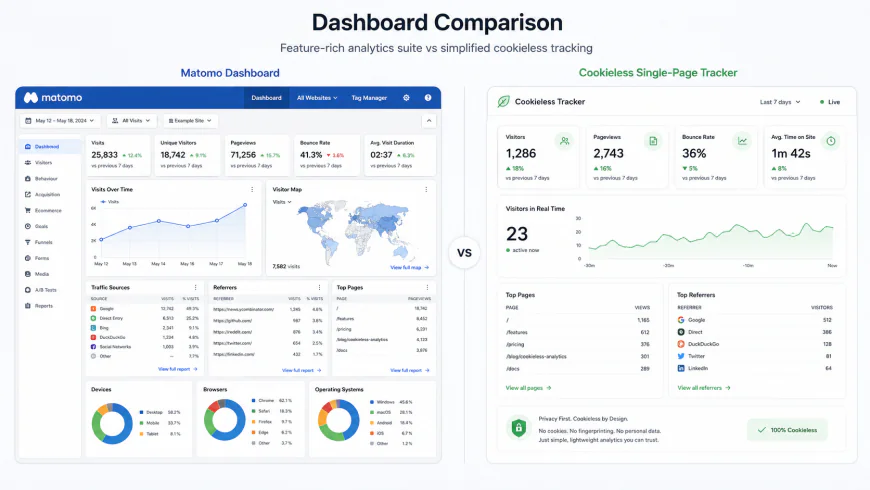 Matomo offers a deep, traditional analytics interface reminiscent of legacy platforms, whereas newer tools focus entirely on a single-page view.
However, this vast feature set comes with significant technical trade-offs. The self-hosted version of Matomo is built on a legacy PHP and MySQL architecture. Developers frequently complain on technical forums about its heavy server footprint. During high-volume traffic events, the continuous stream of database writes can easily overwhelm standard shared hosting environments, leading to CPU throttling and sluggish website performance. If you choose to host Matomo yourself, you must be prepared to manage database optimization, regular software updates, and potential server scaling costs, which can quickly turn a "free" tool into a source of unexpected maintenance costs if you lack in-house technical expertise.
Umami Analytics
Umami Analytics has emerged as a favorite among modern web developers and independent creators looking for a sleek, open-source, and highly performant alternative to Plausible. As documented at umami.is, Umami is designed to be a self-hosted analytics solution that is incredibly light on database writes and server memory. Built using Node.js and optimized for modern databases like PostgreSQL and MySQL, Umami can capture millions of pageviews on minimal hosting hardware without degrading your website's performance.
Within technical communities, self-hosted Umami is increasingly favored over self-hosted Plausible. This preference stems from a key licensing distinction: the self-hosted version of Plausible restricts access to several advanced features—such as custom report builders and raw stats APIs—unless you subscribe to their paid cloud tier. Umami, by contrast, provides its entire feature set completely unrestricted in its open-source version. It provides a beautiful, real-time analytics dashboard, tracks custom events out of the box, and bypasses the need for cookie banners. The main hurdle for small businesses is the initial setup; deploying a Node.js application and connecting it to a PostgreSQL database requires comfortable familiarity with modern cloud platforms, meaning non-technical business owners will likely need to hire developer help for the initial installation.
Microsoft Clarity
Microsoft Clarity approaches website tracking from a entirely different angle, focusing heavily on user behavior visualization rather than traditional numeric dashboards. Available at clarity.microsoft.com, this completely free tool provides high-definition session recordings, detailed heatmaps, and precise rage-click tracking. It allows business owners to watch exactly how users navigate their pages, where they get confused, and which elements they try to click but fail to interact with.
While Clarity is an outstanding user experience diagnostic tool, relying on it as your primary analytics software for small business needs is a strategic mistake. It lacks the robust referral attribution and clean acquisition-channel reporting required to track the ROI of your digital marketing campaigns. Additionally, capturing continuous session recordings and mouse movements requires loading a heavier script compared to lightweight alternatives like Fathom or Plausible. Utilizing Clarity also means placing cookie banners on your site, as it relies on cookies to stitch user sessions together over time. Experts recommend using Clarity as a secondary, specialized UX tool rather than your primary traffic tracker.
💡 Expert Analysis & Experience
Real-world testing and community feedback reveal that the standard approach to web analytics is fundamentally broken for most small businesses. An agency developer recently noted on r/bigseo: "GA4 has a massive learning curve. Most clients just want simple insights like 'how many people visited' and 'where did they come from.' Tools like Fathom deliver this in 30 seconds, saving us hours of client onboarding." For lower-traffic sites, GA4's complexity is even more pronounced; a small business owner shared on r/webdev: "For eighteen months I stared at my GA4 dashboard every morning without being able to answer a single question my business actually needed answered... Google Analytics just isn't working for low traffic."
Furthermore, privacy advocates on r/degoogle highlight the invisible performance costs of ad-supported platforms: "We switched everything to Fathom. No cookie banners, beautiful instant data, and no Google tracking codes slowing down our page loads. It is worth every penny of the subscription." Prominent tech founders like DHH (37signals) and John O'Nolan (Ghost) have publicly criticized GA4 as being built entirely for Google's advertising machine rather than website owners, championing Plausible as a faster, more ethical path. Marketing agency leaders also warn that GA4's data modeling is a double-edged sword: if too many users decline cookies, GA4 'estimates' behavior via Machine Learning. This means you are ultimately optimizing your marketing spend based on mathematical guesswork, not raw facts.
Feature Comparison Table
| Analytics Tool | Script Size | Primary Hosting | Privacy Compliance | Key Strength | Weakness / Limitation |
|---|---|---|---|---|---|
| Plausible | < 1 KB | Cloud or Self-Hosted | Cookieless (GDPR/CCPA) | Ultra-fast, single-page UI | Self-hosted version has API limits |
| Fathom | < 2 KB | Cloud Managed | Cookieless (GDPR/CCPA) | Bypasses ad-blockers legally | No free tier; billed on pageviews |
| Matomo | ~ 22 KB | Self-Hosted or Cloud | Configurable (Cookies/No-Cookies) | Complete data ownership | Heavy server write-load on database |
| Umami | < 2 KB | Self-Hosted or Cloud | Cookieless (GDPR/CCPA) | Fully open-source, modern stack | Requires Node.js server setup skills |
| MS Clarity | ~ 33 KB | Cloud Managed | Requires Cookie Consent | Free session recordings & heatmaps | Weak acquisition & referral tracking |
| Google Analytics 4 | ~ 30+ KB | Cloud Managed | Requires Consent Mode | Deeper integration with Google Ads | Heavy, complex, relies on data modeling |
Practical Scenario
To understand how these architectural choices play out in production, look at how different modern platforms manage their tracking setups:
- Basecamp & Ghost CMS: Both organizations migrated their entire public-facing analytics setups away from Google Analytics to Plausible. This shift prioritized reader privacy, drastically reduced page load times, and successfully eliminated cookie consent banner requirements for their global user bases.
- E-commerce Brands on Shopify: Successful stores often run a strategic dual-tracking configuration. They integrate GA4 strictly in the background to feed conversion data to their active Google Ads campaigns, while pairing it with Microsoft Clarity to record session playbacks and pinpoint cart-abandonment friction points.
- Independent Developers: Creators looking for budget efficiency frequently deploy self-hosted Umami configurations utilizing a free-tier Vercel application connected to a free-tier Supabase PostgreSQL database. This allows them to monitor traffic across multiple side projects for zero infrastructure dollars, completely bypassing paid software limitations.
✅ Pro Tip
If you choose to run a cloud-hosted tool like Plausible or Fathom, protect yourself from unexpected traffic-spike bills by setting up basic rate-limiting or firewall rules on your hosting provider (like Cloudflare). A sudden, unmitigated bot attack routing thousands of spam requests to your pages can easily push you past your monthly billing limits, turning a cost-effective analytics setup into a costly billing surprise.
Pricing & Licensing Breakdown
When choosing analytics software for small business needs, understanding the true cost of ownership is vital to avoiding wasted resources. Paid cloud-hosted options like Plausible and Fathom charge based on monthly pageview volumes. For example, Plausible's pricing starts at a reasonable monthly fee for up to 10,000 pageviews, scaling upward as your traffic grows. While this managed model keeps your team free from server maintenance, you must factor in the financial impact of bot traffic. Web scrapers, search engine crawlers, and spam networks can generate thousands of automated hits. Since cloud platforms count these hits against your account limits, you may find yourself paying for tiers of traffic that do not represent real human engagement or potential customers.
In contrast, self-hosting open-source tools like Matomo or Umami looks highly attractive because the software licenses themselves are completely free. However, self-hosting shifts the costs from software subscription fees to technical labor and server resources. A self-hosted Matomo setup under high-traffic spikes can consume significant CPU and memory, requiring upgrade plans from your hosting provider. For small businesses without an in-house developer, the cost of paying a freelancer to fix database lag, configure security updates, and manage backups can quickly outpace the monthly cost of a managed cloud service. Additionally, enterprise solutions like Adobe Analytics are famously described as "like using a flamethrower to light a candle" for small businesses, costing upwards of five to six figures annually and requiring dedicated specialists—clearly an impractical route for a smaller enterprise.
Another common mistake is choosing WordPress plugins that run analytics locally on your server. While convenient, some point out that if a local plugin makes uncached REST API calls on every page load, it can degrade server performance under high concurrent traffic. When multiple users visit your site simultaneously, your database becomes flooded with simultaneous read/write cycles, causing your website to slow down for actual buyers and directly hurting your conversion rates.
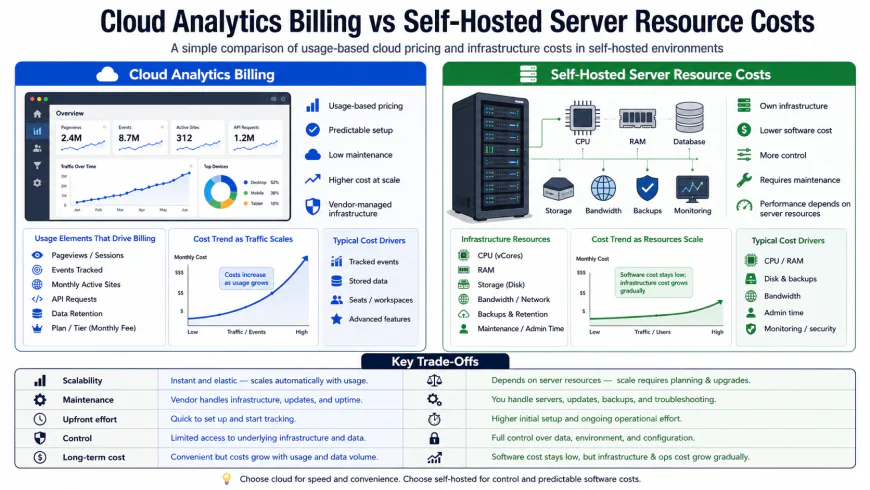 Choosing between a managed cloud tier (susceptible to pageview pricing spikes) and a self-hosted platform (susceptible to server CPU and memory limitations).
Balanced Comparison
- Plausible / Fathom: Extreme speed improvements, clean user interfaces, and the legal ability to remove intrusive cookie banners under GDPR.
- Self-Hosted Umami / Matomo: 100% data ownership, no monthly software licensing fees, and absolute control over your server infrastructure.
- Plausible / Fathom: Subscription costs scale with pageview milestones, which can lead to unexpected bills during high-traffic viral moments.
- Self-Hosted Umami / Matomo: Demands technical management, security updates, and regular database maintenance to prevent server performance degradation.
Choosing Your Ideal Analytics Stack: Who is Each Option For?
There is no "one-size-fits-all" tool when it comes to web tracking. The right analytical platform depends heavily on your team's technical expertise, traffic volume, and compliance goals. Use the guidelines below to match your business profile with the correct framework:
1. The Non-Technical Solopreneur or Content Creator
If your primary goals are monitoring overall traffic trend lines, tracking referral links, and identifying top-performing blog posts without writing complex code, choose Plausible or Fathom. Their out-of-the-box setups take less than five minutes, and the clean dashboard layout ensures you spend time creating content rather than fighting with report filters.
2. The Tech-Savvy Developer or Agency
If you already manage a Virtual Private Server (VPS) via Docker, Coolify, or Dokku, and want to offer analytics to your clients as an added-value service, self-hosting Umami or Matomo is a massive win. You can database-partition tracking for dozens of micro-sites on a single $10/month VPS, gaining complete privacy compliance and zero external data leaks at virtually no incremental software cost.
3. The High-Volume E-Commerce Store
For online retailers who require detailed checkout funnel tracking, product revenue attribution, and multi-channel marketing source tracking, Matomo Cloud or a carefully configured Google Analytics 4 (GA4) with Server-Side Tagging is necessary. Simple privacy-first tools lack the complex attribution models required to calculate true return on ad spend (ROAS) across paid search and social campaigns.
Final Verdict: Reclaiming Your Metrics Without Sacrificing Trust
Moving away from legacy, surveillance-style tracking does not mean flying blind. Modern web analytics is undergoing a healthy correction. The golden era of tracking every mouse movement and compiling massive cross-site profiles without user consent is rapidly closing due to both legal pressures and browser privacy features like Safari’s Intelligent Tracking Prevention (ITP).
For most businesses, the transition to a privacy-first, lightweight cloud tracker represents the optimal balance of speed, cost, and legal protection. By shedding hundreds of kilobytes of tracking scripts, your site loads faster, conversion rates improve, and your brand establishes trust with privacy-conscious customers. If you have the technical engineering resources, self-hosting is a highly rewarding alternative—just make sure your hosting environment is budgeted for the processing spike when your next marketing campaign goes viral.
Frequently Asked Questions
Do I still need a GDPR cookie banner if I use a privacy-first analytics tool?
If you use an anonymized, cookie-less tool like Plausible, Fathom, or Umami configured to not store personal data or IP addresses, you generally do not need a cookie banner for tracking purposes. However, if you run third-party ad retargeting pixels (such as Meta or Google Ads), you must still display a compliant consent banner.
Will self-hosted analytics slow down my main website?
Only if you host the tracking database on the exact same server resources as your main CMS (like WordPress) without proper optimization. To prevent database lockups during traffic spikes, host your analytics on a separate VPS or use a dedicated database instance.
Can I import my historical Google Analytics data into these alternative tools?
Yes. Both Matomo and Plausible offer official Google Analytics import tools. This allows you to bring your historical Universal Analytics (UA) or GA4 data over, ensuring you don't lose years of traffic context when making the switch.
Your Transition Checklist: Switching to Modern Web Analytics
Ready to upgrade your analytics stack? Follow these tactical steps to ensure a seamless migration without data gaps:
- Step 1: Audit Current Scripts – Use browser developer tools to audit all tracking scripts, hotjar heatmaps, and remarketing pixels currently loading on your website.
- Step 2: Choose Your Path – Select a managed privacy-first tool (Plausible/Fathom) for plug-and-play simplicity, or spin up a dedicated VPS (DigitalOcean/Hetzner) for self-hosted Umami/Matomo.
- Step 3: Run Parallel Tracking – Deploy your new tracking script alongside your old Google Analytics tag for 14 days. This allows you to verify data accuracy and calibrate any discrepancy differences.
- Step 4: Configure Conversions – Set up your essential custom events (e.g., button clicks, form submissions, purchases) in the new dashboard.
- Step 5: Safely Offboard GA – Once verified, delete the old Google Analytics tracking codes, remove non-compliant cookie consent scripts if no longer needed, and update your site’s Privacy Policy.
By taking these steps, you build a faster, cleaner web experience that respects your audience's privacy while preserving the exact business insights you need to grow.
Weighing the Options: Privacy-First vs. Legacy Analytics
Before making a permanent migration, it is crucial to understand the trade-offs. Transitioning to a modern, privacy-focused analytics stack brings immense performance and ethical benefits, but it also requires adjustments in how you measure success.
The Pros and Cons of Modern Privacy-First Analytics
The Advantages
- Unmatched Site Speed: Lightweight tracking scripts (typically under 2KB) reduce page load times and improve Core Web Vitals.
- Cookie-Less Compliance: No need for annoying, conversion-killing cookie consent banners if you aren't collecting personal data.
- Higher Data Accuracy: Because these scripts do not rely on intrusive third-party cookies, they bypass most ad blockers and modern browser privacy restrictions.
- 100% Data Ownership: Especially with self-hosted options like Umami or Matomo, your user data belongs entirely to you, not a third-party advertising giant.
The Limitations
- No Cross-Domain Tracking: You cannot track a user's behavior across different websites or build comprehensive advertising profiles.
- Simplified Attribution: Multi-touch marketing attribution is highly limited without persistent tracking cookies.
- Fewer Native Integrations: Connecting your data to third-party ad networks (like Google Ads or Meta Pixel) for retargeting is not natively supported.
Target Audience: Which Analytics Stack Fits Your Business?
There is no one-size-fits-all tool in the modern web ecosystem. Your ideal analytics stack depends heavily on your team’s technical capabilities, budget, and marketing goals.
The Solopreneur, Blogger, or Content Creator
Best Fit: Plausible, Fathom, or Umami (Cloud)
If your primary goals are monitoring page views, tracking referral traffic, and keeping site load speed as fast as possible, a hosted, lightweight privacy-first tool is your best bet. It requires zero maintenance and provides a clean, single-page dashboard with all the vital stats you need in under five minutes of setup.
The High-Growth SaaS or E-Commerce Store
Best Fit: Matomo (Cloud) or PostHog
For businesses that require complex funnel tracking, user flow visualization, and deep e-commerce conversion metrics, Matomo offers a comprehensive, GDPR-compliant alternative to GA4. It bridges the gap between high-level privacy and deep-dive user path analysis.
The Enterprise or Developer-First Team
Best Fit: Self-Hosted Umami or Matomo (On-Premise)
If you have dedicated engineering resources and strict data sovereignty requirements (such as healthcare, finance, or government sectors), self-hosting on your own cloud infrastructure is the ultimate path. It guarantees total compliance with regional laws and eliminates recurring software costs.
The Final Verdict
The era of hoarding massive amounts of unread, invasive user data is drawing to a close. As global privacy regulations tighten and consumers demand greater digital sovereignty, sticking with legacy, cookie-heavy tracking is no longer just a technical bottleneck—it is a brand risk.
Switching to modern, privacy-first web analytics is more than a compliance check. It is an investment in your site's performance, user experience, and long-term brand trust. By making the switch today, you future-proof your digital presence, gain cleaner data, and respect the very people who make your business possible: your visitors.