Best Small Business Workflow Automation Tools Compared
Streamline your operations with our no-BS review of the best small business workflow automation tools. Compare features, pricing, and pros to scale fast.
 Abir Bin Hasan
Best Small Business Workflow Automation Tools Compared
Running a small business often means fighting a daily battle against repetitive admin tasks. Copying customer data from a contact form to a spreadsheet, manually sending follow-up emails, and syncing inventory can quickly eat up your productive hours. Choosing the right integration setup can be the difference between structured growth and constant firefighting. This comparison cuts through the marketing fluff to look at how these automation tools perform in real-world daily setups.
What this article helps you decide
This guide is written for operations managers, business owners, and team leads who need to connect their apps without hiring a full-time developer. We look at whether you actually need a dedicated, flexible connector (an iPaaS like Zapier or Make), an all-in-one CRM suite with built-in logic (like HubSpot or ActiveCampaign), or a self-hosted developer tool. We will break down data sync speeds, visual mapping interfaces, API constraints, and how billing scales so you do not get hit with surprise subscription hikes.
Analysis Methodology
This evaluation is based on an exhaustive review of public technical documentation, API specifications, pricing changes, and verified user feedback from real workspaces. To keep things objective, we cross-referenced technical documentation with security sheets and platform updates compiled by enterprise software aggregators like Gartner, G2, and Capterra. We focused on real maintenance considerations rather than relying on promotional software claims.
Overview & Market Context
Connecting software apps used to require a dedicated IT team and a custom development budget. Today, the landscape is flooded with tools that let non-developers build bridges between different platforms. Even small operations and local services can set up systems that run in the background, handling lead capture, sending Slack notifications, and updating databases without human intervention.
According to research from Gartner, the massive interest in workspace automation stems from a basic need to reduce human error. G2 review data indicates that teams using these tools report fewer manual data-entry mistakes. However, we are also seeing a shift where smaller businesses are avoiding massive, all-in-one software suites in favor of modular, single-task tools. This lets lean teams stay agile and avoid paying for hundreds of features they will never use. At the same time, AI integrations are changing traditional trigger-and-action logic, allowing users to map out basic flows using plain language instead of manual field mapping.
But there is a catch that software companies do not like to talk about: automation does not fix bad processes. If your team's manual intake process is messy and poorly defined, automating it will only make things go wrong faster. Before investing in any tool, you have to understand how they differ structurally, how they scale, and where their limits lie.
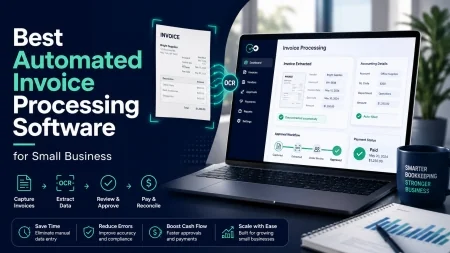
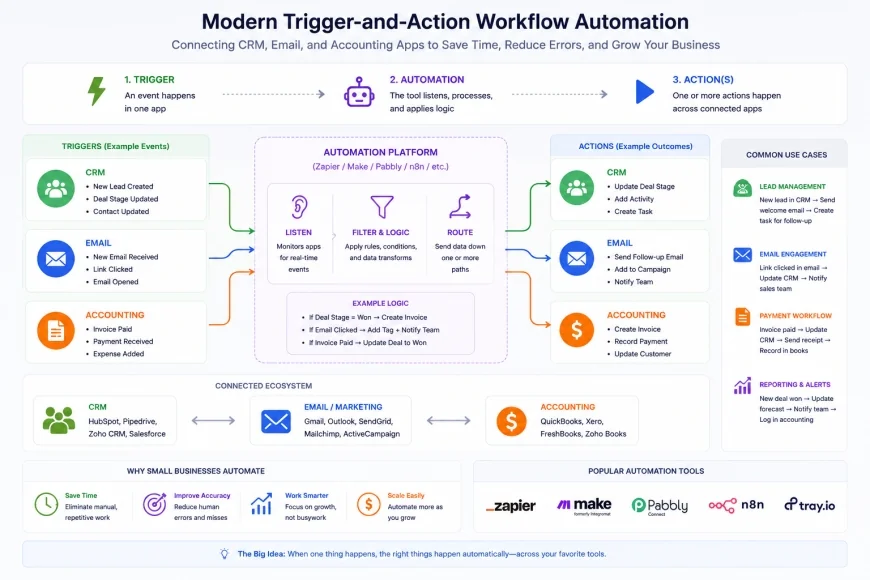 Figure 1: Trigger-and-action software frameworks act as the digital glue connecting disparate business applications.
In-Depth Evaluation of the Leading Platforms
1. Zapier: The Ubiquitous Industry Giant
Zapier is the household name in cloud integration, built on a massive library of supported applications. This is its primary selling point: if you use a niche app, Zapier is almost guaranteed to have a pre-built connection for it. Setting up a "Zap" is relatively simple, using a standard trigger-and-action structure that visually guides you from step to step.
However, the real-world performance depends heavily on your subscription tier. On cheaper plans, Zapier relies on periodic polling. Instead of running instantly, the platform checks for new data every 5 to 15 minutes. If your business relies on instant dispatch notifications or quick lead responses, this delay can be a major issue unless you pay a premium for instant webhooks.
While Zapier has added tools like conditional Paths and internal Tables, building advanced workflows still requires a logical, almost technical mindset. When you need to parse messy text, work with nested JSON data, or clean up formatted dates, the visual builder can fall short. Users often find themselves forced to write custom JavaScript or Python scripts inside a "Code by Zapier" step, which defeats the purpose of a pure no-code solution.
Who should avoid it: Teams on a tight budget with high-volume data needs should steer clear. Zapier charges per execution step, and costs can skyrocket quickly if you have multi-step processes. If you need complex data processing or real-time transfers without paying for the most expensive tiers, Zapier is often a poor financial fit.
2. Make (Formerly Integromat): The Visual Powerhouse
Make takes a completely different visual approach than Zapier. Instead of vertical lists of steps, it uses an open, interactive canvas where you connect apps like nodes on a mind map. This visual interface makes it much easier to see how data splits, branches, and merges across multiple systems. For teams that want to design complex, multi-layered paths, Make is a highly flexible alternative.
Where Make shines is its built-in data manipulation functions. It allows you to format strings, calculate dates, and manage complex arrays directly inside the mapping fields without writing actual code. But this power comes with a steep learning curve. If you do not understand technical terms like iterators, aggregators, or JSON arrays, you will likely struggle during your first few setups.
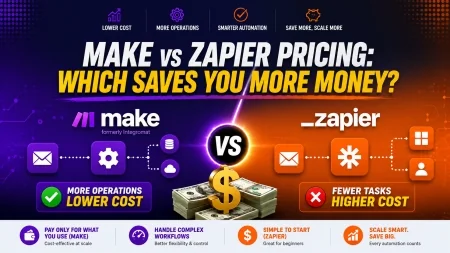
On the pricing front, Make is highly competitive. Instead of charging for every step in a run, its model is based on "Operations." This means a complex, multi-step scenario can run for a fraction of what Zapier would charge. However, there is a risk: if you do not set up proper error-handling routes, a single failed step can stop your entire workflow, causing silent data gaps until someone notices and manually restarts the scenario.
Who should avoid it: Non-technical users who want a simple, "set-it-and-forget-it" tool will likely find Make overwhelming. The interface requires you to understand how APIs structure data, and troubleshooting errors can feel like debugging code.
3. ActiveCampaign: Built-In Marketing & Sales Automation
ActiveCampaign's approach is different from general-purpose middleware tools. It is a dedicated CRM and email marketing platform with deep, built-in automation. If your primary goal is tracking leads, sending marketing emails, and managing sales pipelines, keeping this logic inside your CRM makes a lot of sense. It removes the need to maintain delicate third-party connections between your database and email tools.
The platform is excellent at responding to user behavior. If a lead visits a specific pricing page multiple times, the system can automatically adjust their deal score, assign a follow-up task to a salesperson, and send an automated personal email. Everything is handled within one interface, which makes sales and marketing alignment much easier to manage.
However, ActiveCampaign is not designed for back-office operations. If you need to sync local inventory with an e-commerce platform, generate PDFs, or update internal databases, ActiveCampaign cannot do it on its own. Most businesses end up using it alongside an external tool like Make or Zapier to handle internal administration. Additionally, over-automating your communication can quickly make your brand feel cold and robotic to customers.
Who should avoid it: Operations teams looking for an all-purpose tool to connect internal tools, logistics, or project management apps should look elsewhere. ActiveCampaign is heavily focused on marketing and sales; using it for purely operational tasks is like fitting a square peg in a round hole.
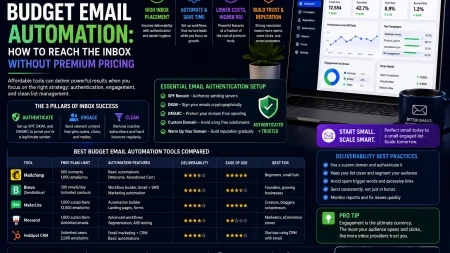
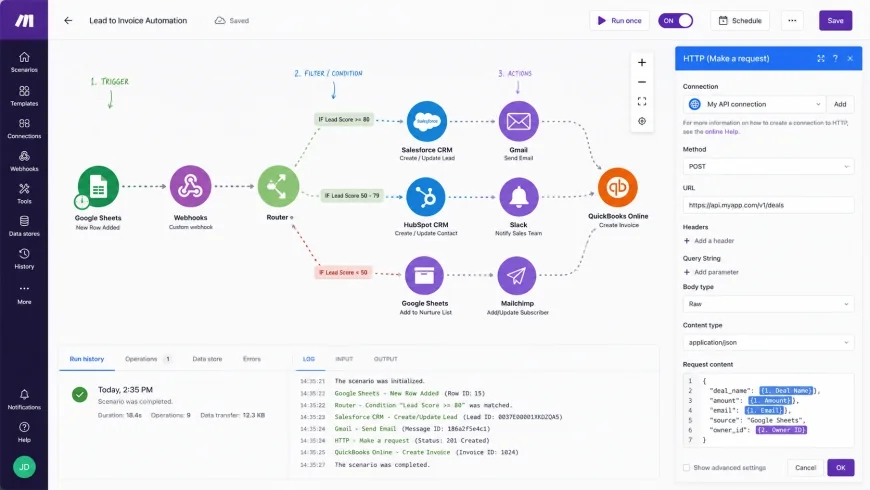 Figure 2: Visual node-based builders allow users to map complex conditional routing logic, though deep technical understanding is often still required for advanced variables.
4. HubSpot: The Enterprise-Grade CRM Suite for Scaling Teams
HubSpot is a massive player in the CRM market, known for its polished user experience and highly integrated suite of Marketing, Sales, Service, and Operations Hubs. Because everything lives under one roof, data moves between support tickets, email lists, and deal pipelines without the headache of managing external APIs or third-party webhooks.
The workflow builder inside HubSpot is incredibly smooth, supporting complex branch logic, delays, and personalization. If you subscribe to their Operations Hub, you can also write custom JavaScript snippets to clean up contact data or pull information from external databases. This is highly appealing for growing mid-sized teams that have some developer resources available.
The biggest hurdle here is cost. While HubSpot offers basic automation on its entry tiers, advanced branching logic and custom workflows require Professional or Enterprise subscriptions. These plans carry premium, enterprise-level pricing that can shock a small business. If your contact list scales, your monthly bill can quickly balloon into thousands of dollars, making it hard to justify for lean teams.
Who should avoid it: Small teams with tight budgets or highly static contact lists will find HubSpot's pricing model punishing. If you do not have the budget to commit to their high-tier Professional plans, you will find yourself locked out of the exact automation features you need.
5. n8n: The Extensible, Developer-Friendly Alternative
For businesses concerned with data privacy, security compliance, or high hosting costs, n8n is a compelling alternative to closed SaaS products. It is a node-based integration platform that you can self-host on your own servers. This self-hosted model ensures that your data never leaves your environment, which is highly valuable for companies in healthcare, finance, or legal fields navigating GDPR or HIPAA requirements.
If you do not want to manage servers, n8n also offers a managed cloud service. The visual editor is node-based, mapping out paths similarly to Make. However, n8n is built with a developer-first approach. You can write custom JavaScript or Python directly inside any step to transform data, parse API requests, or manage complex conditional logic without feeling restricted by pre-built templates.
The trade-off is the technical overhead. If you self-host, your team is fully responsible for server maintenance, scaling, updates, and backups. Additionally, while n8n has hundreds of integrations, its library of native connectors is smaller than Zapier's. If you rely on niche tools, you may need to build custom HTTP requests to connect them, which requires an understanding of REST APIs and authentication methods.
Who should avoid it: Teams without any technical resources or coding experience should avoid n8n. If terms like "self-hosting," "JSON payloads," or "API endpoints" sound like another language, managing this platform will be a constant headache.
💡 Expert Analysis & Experience
Observation: Workspace audits consistently reveal that teams tend to overestimate the simplicity of no-code systems. While connecting a basic form to a spreadsheet is straightforward, building resilient pipelines with error-handling logic is a different story. If an external API changes its data format unexpectedly, a non-technical manager can struggle to find the break, leading to critical operational delays.
Result: Organizations that map out their processes on paper and train operations staff on basic data logic see a major drop in system downtime. Starting with simple, single-purpose steps before building multi-branched architectures is generally the safest way to scale.
Comprehensive Comparison Matrix
To help you visually contrast the key operational capabilities of these platforms, we have compiled a detailed comparison matrix. This matrix focuses on the metrics that matter most to small businesses: integration density, ease of use, logic complexity, and pricing structure. The data is compiled based on active feature offerings and verified user reviews on major software directory platforms.
| Platform | Target Audience | Primary Strength | Logic Complexity Limit | Free Tier Availability | Estimated Monthly Entry Cost |
|---|---|---|---|---|---|
| Zapier | Non-technical teams needing fast setups | Massive library of 6,000+ integrations | Medium (Requires code for complex arrays) | Yes (Very limited task runs) | $20 - $50 (Billed monthly) |
| Make | Data-heavy teams, visual builders | Visual canvas & precise data control | High (Advanced native functions) | Yes (1,000 free operations/mo) | $9 - $29 (High value per step) |
| ActiveCampaign | Marketing & Sales focused teams | Deep behavioral marketing triggers | Medium-High (Within CRM scope) | No (Free trial only) | $29 - $149 (Based on contacts) |
| HubSpot | Scaling brands wanting an all-in-one suite | Unified ecosystem & polished UX | High (With Operations Hub) | Yes (Excludes workflows) | $15 - $800+ (Gated workflow tiers) |
| n8n | Technical teams, privacy-focused firms | Self-hosting & code-active flexibility | Extremely High (Developer centric) | Yes (Self-hosted community edition) | $20+ (Cloud) / $0 (Self-hosted) |
Practical Scenario: Solving the Client Intake Pipeline
In a typical service business, client onboarding is often a major administrative bottleneck. Without automation, when a prospect fills out an intake form, a team member must manually copy their contact details into a CRM, build a folder structure in Google Drive, generate a custom proposal document, and draft a scheduling email.
By using integration tools, this entire process runs in the background. The moment a prospect submits the form, the system automatically creates the CRM profile, sets up the Google Drive folder structure, drafts a templated proposal document, and sends the client a link to book a call. The team only gets involved to conduct the actual strategy call, cutting out the repetitive setup work entirely.
✅ Pro Tip: The 80% Rule of Automation
Avoid automating any process that has not been executed manually at least 50 times. Before building workflows inside an integration tool, sketch out every single logical step on a whiteboard or a document. If you cannot explain the step-by-step logic to another person, trying to program a machine to handle it will only result in infinite loops, broken connections, and corrupted data.
Pricing & Licensing Breakdown
When selecting integration software for your business, look closely at how the pricing tiers are structured. Many platforms charge based on usage metrics rather than flat monthly rates. This can lead to unpredictable billing spikes if your business has seasonal busy periods or sudden spikes in transaction volumes.
There are three main billing structures you will encounter:
- Task or Execution-Based: Software like Zapier bills you per action completed. If a workflow involves five steps and runs 100 times a month, that counts as 500 tasks. Complex, multi-step integrations can quickly burn through your monthly allowance on this model.
- Operation or Module-Based: Platforms like Make charge per module run. This is generally much more cost-effective for multi-step pathways, allowing you to design sophisticated routing logic without immediate financial penalties.
- Seat or Contact-Based: Marketing suites like ActiveCampaign and HubSpot price their plans based on seat count or the size of your contact database. This is predictable but can become expensive as your list grows, even if your actual workflow volume stays the same.
A major risk with usage-based plans is the hard cap limit. If your workflow consumes its monthly limit halfway through the month, some platforms will pause your active connections without warning. This can cause immediate disruptions—leads might go unassigned, or sales data might fail to sync with your invoicing software. It is always wise to choose a plan with some headroom or configure system notifications when you reach 80% capacity.
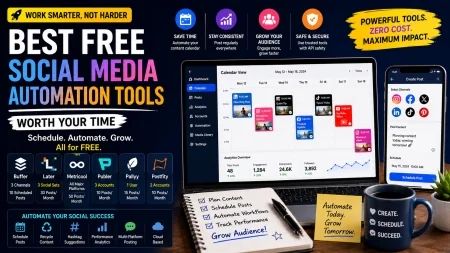
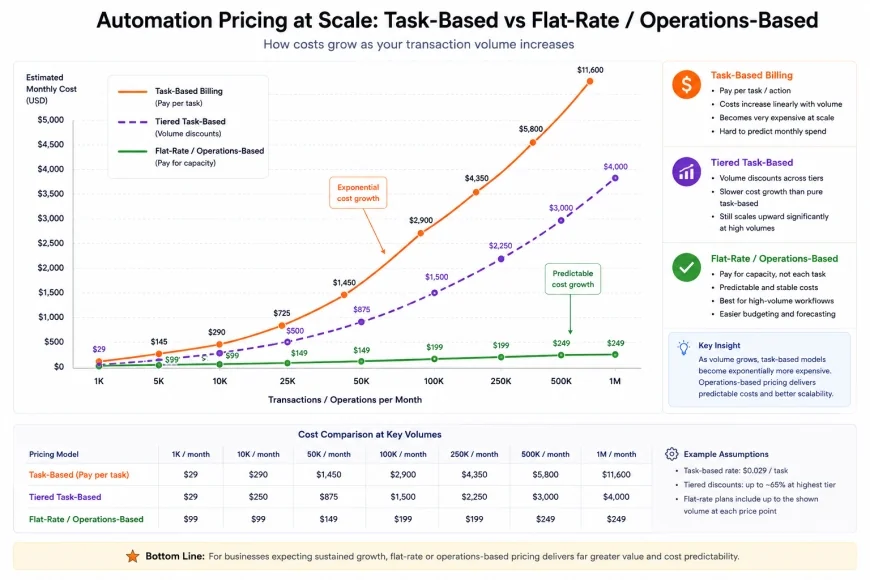 Figure 3: Understanding billing structures helps small businesses avoid unexpected cost spikes as transaction volumes scale.
Balanced Pros & Cons Comparison
Every automation platform has its unique strengths and weaknesses. Choosing the correct tool requires balancing technical capability against budget constraints and team expertise. Below is a comprehensive breakdown of the major structural trade-offs you will encounter across these tool categories.
Balanced Pros & Cons
System Strengths
- Reduced Manual Data Errors: Automating repetitive entries removes manual typos, missing fields, and copy-paste mistakes across apps.
- Faster Response Times: Leads can be tagged and tracked immediately after they interact with your website, keeping follow-ups fast.
- Focus on High-Value Tasks: Team members are freed from repetitive admin tasks, allowing them to focus on complex projects or customer service.
- Scalability Without Headcount: A well-built system can process an influx of orders or leads without immediately requiring you to hire more admin staff.
System Limitations
- Maintenance and API Drift: When external platforms change their security rules or update their API structures, your connections can break without notice.
- Logical Learning Curves: Designing advanced workflows with branching logic, variables, and data formatting requires a technical mindset.
- Loss of Personal Touch: Over-automating client communication can make your interactions feel transactional, generic, or robotic.
- Unpredictable Scaling Costs: High-volume tasks can push your account into expensive subscription tiers unexpectedly.
Who Should Use What? (Target Audience Segmentation)
Choosing the right integration tool comes down to your current business model, your budget, and the technical comfort level of your team. Matching your platform to your team’s skills is key to preventing unused, expensive software subscriptions.
The Solopreneur & Micro-Business
If you are running a small operation on your own or with a very small team, you need something that saves time without requiring code. For this setup, Zapier is usually the easiest entry point because of its massive library of pre-built templates. If you are on a tight budget and do not mind a slightly steeper initial learning curve, Make is a highly cost-effective alternative with its generous free plan.
The Growing E-Commerce & Service Brand
If your business manages complex pipelines—like coordinating shipping, booking systems, or support tickets across several apps—you need a flexible visual layout. Make is highly suited here, as its node canvas allows you to build complex multi-app pathways. For teams that have internal developer resources and prioritize data privacy, self-hosting n8n can save significant software costs while offering total control over your databases.
The Sales-Focused & Lead-Gen Agency
If your primary business driver is managing client relationships, scoring leads, and running marketing campaigns, prioritizing your CRM's native capabilities is best. ActiveCampaign offers a solid balance of marketing features and built-in sales logic. For larger organizations that need a fully integrated system across marketing, customer service, and sales pipelines, HubSpot is the gold standard, provided you have the budget to support its higher tiers.
Final Verdict: Recommended Choices by Purpose
Rather than claiming a single platform is the absolute winner, we believe in selecting tools based on your specific operational priorities. Each of these tools excels in different environments, and the best choice is the one that aligns with your technical comfort level and budget constraints.
Recommended Choices by Purpose
For Absolute Beginners: Choose Zapier if you want a massive library of ready-to-use integrations and a simple user interface that requires zero coding knowledge to launch basic automated workflows.
For Budget Efficiency & Logic Power: Choose Make if you want visual, flowchart-style mapping, advanced data processing tools, and highly competitive pricing that scales affordably as your transaction volume increases.
For Customer-Facing Sales Operations: Choose ActiveCampaign or HubSpot if your primary goal is to automate lead nurturing, CRM management, and behavioral email campaigns from a unified customer database.
For High-Volume Security & Customization: Choose n8n if you have developer resources, need to self-host to comply with privacy regulations, or want to write custom code to bypass standard visual integration limits.