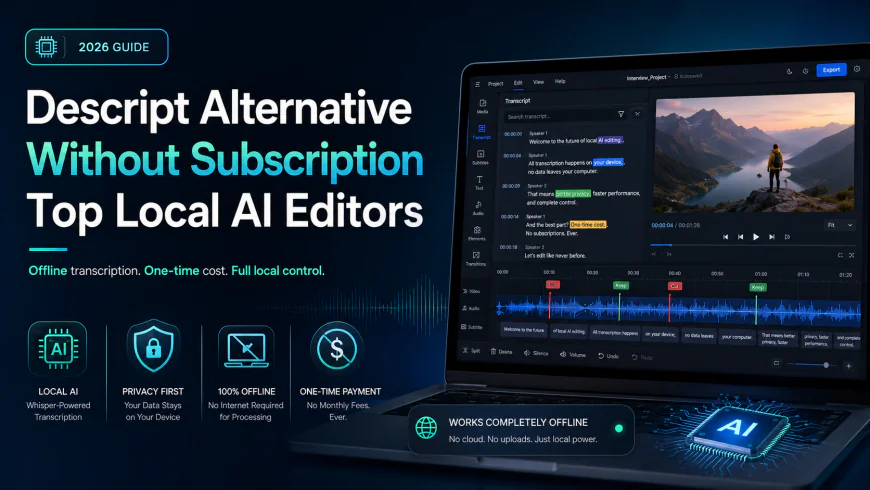
Descript Alternative Without Subscription: Top Local AI Editors
Looking for a Descript alternative without subscription fees? Discover the best one-time payment and offline AI video editors to edit video via text.
 Abir Bin Hasan
Descript Alternative Without Subscription: Top Local AI Editors
For creators watching their monthly overhead climb, managing multiple recurring software subscriptions has become a major headache. Finding a reliable, subscription-free text-based video editor is a practical way to reclaim control over your budget while keeping the efficiency of editing dialogue directly from a transcript.
What this article helps you decide
This comparative analysis breaks down the leading local, offline, and flat-fee alternatives to Descript. The goal is to help you determine whether a streamlined local transcript editor like ScriptEdit, a full-scale post-production suite like DaVinci Resolve Studio, or a customized open-source utility matches your hardware capabilities, delivery schedule, and daily workflow habits.
Analysis Methodology
This evaluation is based on a structured review of public technical documentation, official licensing terms, community-reported benchmarks, and actual system requirements. The focus is placed entirely on objective operational metrics: transcription accuracy, local hardware utilization, long-term pricing structures, and offline file security, without relying on remote server resources or cloud processing queues.
Overview & Market Context: The SaaS Backlash
The digital video production space is undergoing a noticeable shift in user sentiment. For several years, cloud-first, text-based editors dominated the landscape by offering convenient, server-side transcription and rapid rough cuts. However, discussion threads across creator forums and developer communities point to growing frustration over metered pricing structures, such as limits on "media minutes" or caps on monthly "AI credits." Users who previously relied on these setups now find themselves budgeting their ingestion time, careful not to import long-form raw footage that might exhaust their monthly data allowance. This friction highlights an inherent challenge of the cloud-hosted business model: SaaS providers must pass their continuous server, API, and computing costs on to the end user through recurring billing.
As a result, professional editors and independent producers are seeking offline tools that run directly on their own desktops. Many broad-topic tech blogs suggest moving to Adobe Premiere Pro as a straightforward alternative. This advice overlooks a major detail: while Premiere Pro features a highly capable text-based editing panel, it remains tied to a permanent Creative Cloud subscription, failing to solve the issue of recurring software costs. To achieve true financial independence from monthly software fees, editors must look to dedicated local programs and perpetual-license applications.
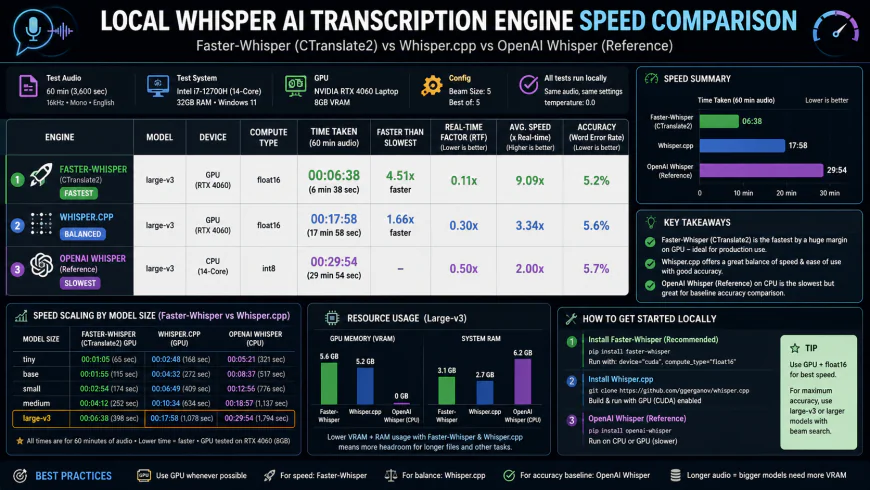 Figure 1: Comparison of local speech-to-text engines running natively on local hardware versus cloud-based file uploads.
The viability of local text-based editing has been driven forward by one major technological shift: the optimization of OpenAI's Whisper model. Because lightweight, quantized versions of Whisper can run locally, modern workstations—especially those built on Apple Silicon or equipped with dedicated graphics cards—can often generate transcripts faster than the time it takes to upload a large file to a cloud server. Since the data is processed entirely on local storage, creators face no limits on media minutes, no sudden overage fees, and no security risks associated with uploading proprietary footage to third-party databases. This has allowed smaller development teams to build focused, privacy-first desktop tools tailored specifically for editors who want to own their software outright.
In-depth Evaluation of Top Local Alternatives
1. ScriptEdit: The Lightweight macOS Specialist
ScriptEdit is a native, highly focused transcription and video editing application built specifically for the macOS ecosystem. By integrating directly with Apple's architecture, the application utilizes the hardware-accelerated Apple Neural Engine to run Whisper models locally, providing secure, fast transcription without transmitting data over the internet.
The workflow is simple and clean. Rather than managing complex multi-track timelines, users download the app from the Mac App Store via the ScriptEdit App Store Page, import their source MP4 or MOV files, and let the on-device engine process the audio. On Apple Silicon (M-series processors), this local transcription is highly optimized, often processing a standard one-hour talk in just a few minutes without causing the machine to run hot.
The editing experience mirrors classic text-based tools. Deleting words, sentences, or pauses within the text transcript immediately cuts the corresponding video frames on the underlying timeline. It serves as a dedicated, distraction-free tool optimized for assembling the initial rough cut (or A-roll) of podcasts, interviews, and presentation videos.
While ScriptEdit runs efficiently by using quantized Whisper models to balance speed and accuracy, its local nature means system performance is tied directly to your computer's hardware. The software is purchased via a straightforward, one-time fee, offering a genuine lifetime license with unlimited transcription capability and no monthly billing cycles.
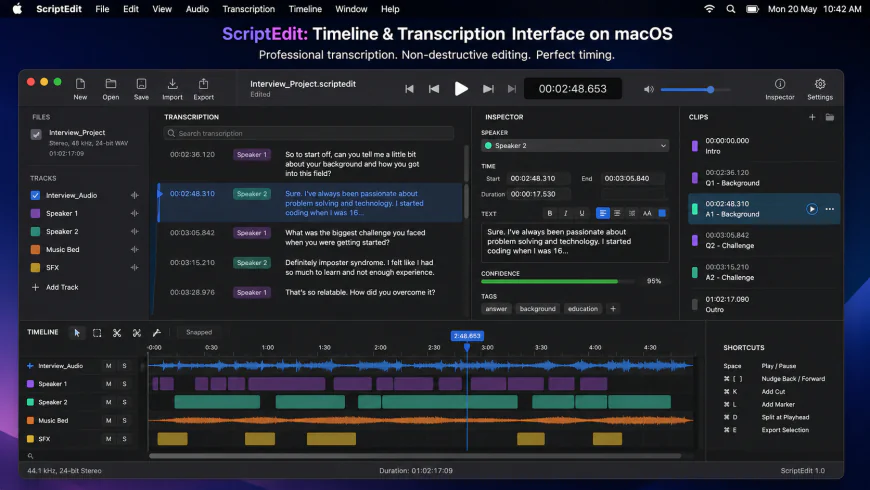 Figure 2: ScriptEdit's clean macOS-native user interface, showing text-based editing working alongside a standard local timeline.
2. DaVinci Resolve Studio: The Professional Grade Powerhouse
For editors requiring an industry-standard environment, Blackmagic Design's DaVinci Resolve Studio stands as the most complete perpetual-license alternative on the market. Widely respected for its advanced color grading, visual effects (Fusion), and audio post-production (Fairlight), the Studio edition now includes robust text-based editing powered by the DaVinci Neural Engine.
The software is purchased as a perpetual license from authorized regional dealers or directly from the Blackmagic Design DaVinci Resolve Official Site. This flat-fee model grants users ownership of the software, and historically, Blackmagic Design has provided major version upgrades (such as the jump from version 17 to 18, and 18 to 19) to existing license holders at no extra cost.
Within Resolve Studio, the transcription feature is deeply integrated into the media management workflow. Editors can select clips within the Media Pool, run the "Transcribe Audio" command, and work directly within a dedicated text script window. From there, you can search for key phrases, clear out silent intervals, and insert specific text selections directly onto the active timeline. Resolve also handles automatic subtitle generation, multi-speaker indexing, and multi-language translation entirely on your local machine.
The main trade-off here is complexity. The interface is designed for professional post-production houses, meaning beginners will face a steep learning curve. However, for users who need comprehensive editing tools alongside native transcription, Resolve Studio is an incredibly powerful, asset-retaining option.
3. Adobe Premiere Pro: The Creative Cloud Standard
To keep this comparison balanced, it is important to include the industry-standard option. Adobe Premiere Pro was among the first traditional non-linear editors to build transcription directly into its core timeline interface. For teams already paying for an active Creative Cloud plan, it offers a highly polished, unified workspace.
Detailed system requirements and features are available on the official Adobe Premiere Pro Product Page. Premiere Pro uses local language models to transcribe footage during the import stage. This offline capability allows you to search transcripts for specific words, automatically highlight and remove filler words like "um" and "uh," and perform quick rough cuts by manipulating the text document.
The text-to-video workflow in Premiere is highly refined. It handles multi-speaker identification smoothly, syncs text changes instantly with the timeline, and includes versatile caption styling tools. If you are editing multi-cam projects, the active transcript dynamically adapts as you switch camera angles, which is incredibly useful for documentary and interview setups.
However, the recurring subscription fee remains a major barrier for independent operators. Premiere Pro is only accessible through Adobe's rental model; if you cancel your plan, you lose access to the application and the ability to open your project files natively. For this reason, it is best suited for agencies or enterprise teams whose steady revenue easily offsets the ongoing subscription costs.
4. DIY Local Whisper Configurations: Buzz & SubtitleEdit
For technical users seeking a completely free, open-source alternative, combining independent software packages offers a highly modular solution. By pairing a standalone local transcriber with a free non-linear editor, you can build a powerful production pipeline without spending a dime.
This workflow typically begins with an open-source transcription GUI such as **Buzz** (a desktop interface for OpenAI's Whisper) or **SubtitleEdit**. These programs run Whisper models locally on your computer, allowing you to import audio or video files and export accurate subtitle files (such as SRT or VTT format) or plain text scripts. Depending on your computer's graphics memory (VRAM), you can choose between various Whisper model sizes (from "Base" up to "Large") to balance speed and accuracy.
After generating your subtitle file, you can import it alongside your video files into a free editor like the standard version of DaVinci Resolve or Shotcut. While this method does not allow you to instantly slice video clips by deleting words in a text window, it provides a highly reliable, cost-free method for locating specific spoken moments in hours of raw footage and generating accurate offline captions.
This path is highly suited for open-source enthusiasts, developers, and creators working with zero budget. It requires manual file management and a bit of technical setup, but it delivers absolute privacy and complete freedom from commercial licensing constraints.
💡 Expert Analysis & Experience
Observation: In real-world production environments handling high volumes of talking-head content, local tools introduce a clear hardware trade-off. While apps like ScriptEdit and DaVinci Resolve Studio eliminate monthly recurring fees, they shift the computational heavy lifting to your local workstation. On older, dual-core computers or machines lacking a dedicated graphics card, transcribing a 40-minute file can cause thermal throttling and system slowdowns. Conversely, on modern Apple Silicon Macs or PCs equipped with a dedicated Nvidia RTX GPU, local Whisper transcription runs fast, quietly, and completely in the background.
Direct Feature Comparison Table
The table below compares the pricing structures, system requirements, and core features of these local alternatives to help you identify the right fit for your editing environment.
| Feature / Metric | ScriptEdit | DaVinci Resolve Studio | Adobe Premiere Pro | DIY Local Whisper (Buzz) |
|---|---|---|---|---|
| Pricing Model | One-time Purchase (App Store) | One-time Purchase ($295) | Monthly Subscription ($22.99+/mo) | Free & Open Source |
| Offline Capability | 100% Offline (Local Whisper) | 100% Offline (Local Neural Engine) | Primarily Local (Requires periodic activation) | 100% Offline (Local Whisper GGUF/C++) |
| Platform Support | macOS (Optimized for Apple Silicon) | Windows, macOS, Linux | Windows, macOS | Windows, macOS, Linux |
| Text-to-Video Editing | Direct (Delete text to cut timeline) | Advanced (Text-to-timeline selection) | Advanced (Full transcript-to-timeline sync) | Indirect (Saves SRT/Text for manual cut) |
| Media Limits | Unlimited (No minute caps) | Unlimited (No minute caps) | Unlimited (No minute caps) | Unlimited (No minute caps) |
| Hardware Demands | Low-Moderate (Highly efficient on Apple M-series) | High (Requires strong GPU & VRAM) | Moderate-High (Requires modern CPU/GPU) | Configurable (From lightweight CPU to heavy GPU) |
Practical Scenario
Consider a solo video producer editing a weekly, hour-long interview show. Under a typical metered subscription plan, importing multiple takes, b-roll selects, and backup tracks can quickly eat through a basic 10-hour monthly transcription allowance. This forces the producer to either pay for expensive add-on packages or halt editing until the next billing cycle starts. By switching to an offline utility like ScriptEdit on a Mac Studio, the editor can process unlimited audio files locally, arrange the initial rough cut using the text panel, and finalize the edit without tracking consumption meters or monitoring internet speeds.
✅ Pro Tip
If you run local Whisper-based transcription on Windows or older workstations, pay close attention to the model size selected in your software settings. Utilizing the "Medium" or "Large-v3" models provides excellent transcription accuracy but demands significant system RAM and graphics memory. For fast rough cuts where speed is the priority, try using the "Base" or "Small" model settings. These models process audio up to three times faster while remaining highly effective for identifying filler words and locating specific sentences.
Pricing & Licensing Breakdown
When searching for a subscription-free editor, analyzing long-term costs is crucial. Many modern cloud-based tools keep upfront costs low but become significantly more expensive as your production needs scale over several years.
A standard mid-tier SaaS video subscription generally costs between $12 and $24 per month when billed annually. Over a three-year period, a single user on a $24/month plan will accumulate $864 in subscription costs. For a small team of two or three editors, this expense quickly scales to over $2,500. Additionally, if your team runs out of monthly transcription hours, buying extra packages introduces an unpredictable, fluctuating operational expense.
In contrast, switching to a perpetual license or a flat-fee desktop application shifts software costs from a recurring operational expense to a single, predictable purchase. For example, buying DaVinci Resolve Studio involves a flat, one-time payment of $295. There are no ongoing fees, no license renewals, and no limits on how many hours of video you can edit. The software generally pays for itself in less than a year when compared to a standard subscription plan, with subsequent years representing pure savings.
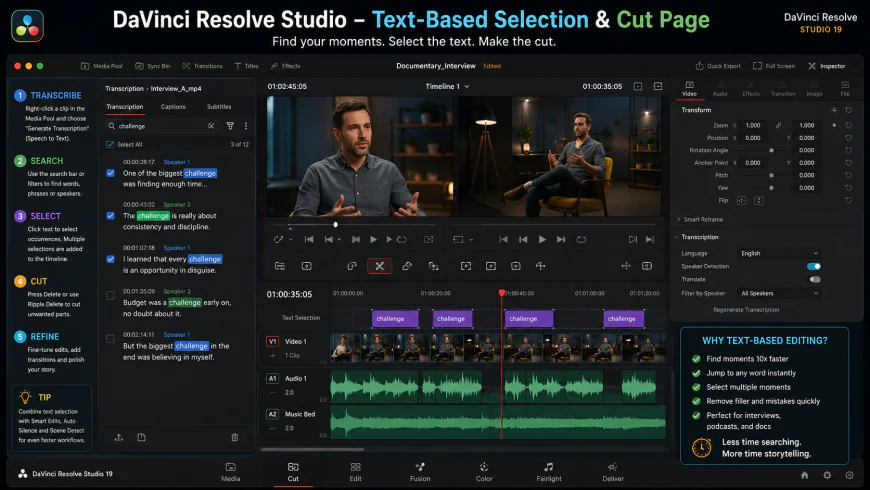 Figure 3: DaVinci Resolve Studio's professional text-to-timeline selection workflow, allowing high-precision editing without recurring costs.
For macOS users looking for a lighter, budget-friendly entry point, ScriptEdit provides a straightforward, single-purchase option directly through the Mac App Store. By utilizing on-device processing and bypassing expensive cloud-hosting infrastructure, the tool is offered without recurring subscription fees, making it an excellent long-term option for creators who want to buy their tools once and use them indefinitely.
Who Should AVOID Local Text-Based Editors?
While local transcription and editing software offers clear financial and privacy advantages, it is not the ideal solution for everyone. You should avoid these local, offline tools if you edit on older, low-spec computers (such as basic dual-core laptops or machines lacking dedicated graphics processors), as local speech-to-text processing will cause heavy system lag, thermal throttling, and slow export times. Furthermore, teams that require real-time cloud collaboration, instant multi-user commenting, or automated web-based project backups will find the local file management of desktop applications restrictive compared to collaborative, cloud-native editors.
Balanced Comparison: Subscription vs. Local Lifetime Editors
The Local & Lifetime Advantage
- Flat Upfront Cost: One-time purchases eliminate the pressure of recurring monthly fees, saving significant budget over time.
- Complete Data Privacy: Audio and video files are processed entirely on your local drive, preventing unauthorized AI training or cloud data leaks.
- No Consumption Caps: Import and transcribe unlimited footage without worrying about monthly time limits or credit caps.
- Offline Freedom: Work on projects and generate transcripts on planes, in remote locations, or during network outages.
The Local Hardware Reality
- System Resource Intensive: Shifting AI transcription to your local device requires a relatively modern processor or GPU for fast results.
- No Native Cloud Collaboration: Sharing projects with multi-user teams requires manual file exporting or local network storage.
- Initial Cost: High-end professional software licenses or hardware upgrades require a larger initial cash layout than a low-cost monthly trial.
Who should use what?
For solo content creators and podcasters working on macOS, ScriptEdit offers a focused, easy-to-use, and highly affordable text-based editing workflow without subscription bloat. For professional editors, colorists, and filmmakers who need a complete post-production suite alongside transcription features, DaVinci Resolve Studio is the standard for long-term value. For technical users on Windows or Linux, setting up a DIY Whisper AI stack with free editing software provides complete open-source flexibility at zero cost.
Recommended Choices by Purpose
The best editor depends entirely on your operating system, hardware specs, and project requirements.
• For macOS Users & Solo Podcasters: Choose ScriptEdit. Its deep integration with Apple Silicon makes local, transcript-based editing incredibly efficient and accessible.
• For Professional Editors & Filmmakers: Choose DaVinci Resolve Studio. The combination of the DaVinci Neural Engine, industry-leading color grading, and professional audio tools offers unmatched long-term value in a perpetual license.
• For Budget-Conscious Technical Users: Configure a DIY Whisper AI stack. Running open-source transcription tools alongside free editing software ensures you never have to pay for transcription hours or software licensing.
Common Questions
Is there a truly free text-based video editor?
Yes. By pairing open-source programs like Buzz (which transcribes audio using Whisper AI offline) with a free video editor like the standard edition of DaVinci Resolve, you can build a highly capable text-based editing pipeline. While this requires a few extra manual steps, it runs without any licensing costs or usage caps.
How accurate is local Whisper AI transcription compared to cloud services?
Local Whisper AI transcription is highly accurate, often matching or exceeding the performance of popular cloud services. Because the model runs directly on your local hardware, larger model settings (like "Medium" or "Large") handle accents, technical terms, and complex audio environments exceptionally well.
Does ScriptEdit require an internet connection to transcribe video?
No. ScriptEdit operates entirely offline on your Mac. It processes your footage using your device's internal CPU, GPU, and Neural Engine. This ensures complete privacy, quick processing, and the ability to edit your projects from anywhere without an internet connection.
Why isn't Premiere Pro considered a subscription-free alternative?
While Adobe Premiere Pro has excellent built-in text-based editing tools, it is strictly tied to the Adobe Creative Cloud subscription model. If you cancel your monthly or annual subscription, you lose access to the program and your project files, which does not solve the challenge of recurring software fees.
Will local transcription software slow down my computer?
Only during the initial analysis phase. While the software is processing your audio file and generating the text transcript, it will utilize a large portion of your CPU and GPU resources. Once the transcript is generated, editing the video via the text interface is highly efficient and uses very little system memory.
Practical Checklist: Transitioning to a Local Workflow
- Assess your workstation specs: Local AI transcription relies heavily on your GPU or modern Apple Silicon processors. Verify that your machine meets the hardware requirements of your chosen software.
- Confirm operating system compatibility: Keep in mind that some tools, such as ScriptEdit, are Mac-exclusive, while other programs like DaVinci Resolve run on Windows, macOS, and Linux.
- Identify your workflow needs: Determine whether you need advanced multi-track audio mixing and color tools, or if a clean, single-track text editor is sufficient for your content style.
- Test trial versions or free tiers of your preferred software before fully migrating active projects. Make sure you are comfortable with the interface, keyboard shortcuts, and export options.
- Manage your storage space: Local tools save files on your system drives. Ensure you have plenty of storage space for high-resolution video clips and cache files to keep your system running smoothly.