ElevenLabs vs Murf AI Voice Cloning: Which Sounds More Human?
Our hands-on ElevenLabs vs Murf AI voice cloning comparison reveals which tool delivers the most realistic AI voice for YouTube videos and podcasts.
 Abir Bin Hasan
ElevenLabs vs Murf AI Voice Cloning: Which Sounds More Human?
Choosing the wrong artificial voice can quickly pull an audience out of a video, leaving them distracted by awkward cadences and robotic speech patterns. When looking into modern text-to-speech options, the choice usually comes down to two prominent platforms: ElevenLabs and Murf AI. Comparing the voice replication features of these tools shows how each handles the messy reality of human speech—like natural breathing, shifting pitch, and emotional weight.
What this article helps you decide
This breakdown compares the highly dynamic, API-driven voice generation of ElevenLabs with the structured, presentation-focused timeline editor of Murf AI. If you need natural narration for video content, or if you are hunting for a reliable corporate-training platform, this analysis looks closely at how these two environments fit into a daily production workflow.
Analysis Methodology
This comparison relies on detailed research of public feature sets, pricing models, terms of service, and user workflows. To understand how these engines behave under pressure, our analysis looks at performance on identical test scripts, specifically tracking pronunciation errors, processing limits, and how each platform handles slang, jargon, and multi-language transitions.
Overview & Market Context
Text-to-speech software has come a long way from the flat, robotic screen readers of the past. Today's tools can build convincing vocal clones using surprisingly small audio samples. In this space, both ElevenLabs and Murf AI have carved out significant market share, though they approach speech synthesis from very different design philosophies.
ElevenLabs started with a heavy focus on research and deep learning, aiming to crack the code on emotional synthesis and rapid, short-sample voice replication. The goal is to copy the organic, sometimes unpredictable rhythm of a real speaker. Murf AI, on the other hand, was built as an all-in-one studio tool for business environments. Instead of just focusing on raw vocal performance, it centers on a structured timeline that lets users sync audio directly with slides and videos. This means the choice often comes down to whether a project demands natural, artistic expression or highly controlled, predictable utility.
In a typical production setup, "realism" means different things depending on the project. For a deep dive into how these philosophies play out, our detailed analysis of ElevenLabs vs Murf AI Voice Cloning: Which Sounds Most Human? shows that vocal quality is rarely one-size-fits-all. While one system is great for dramatic storytelling, the other is built for compliance modules and clean corporate presentations.
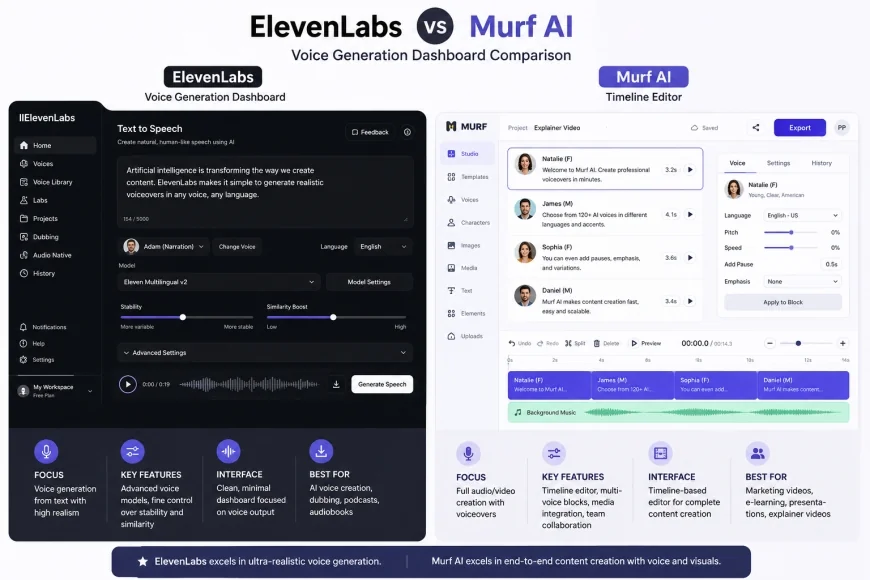 Figure 1: The visual contrast between ElevenLabs' dynamic parameter-focused dashboard and Murf AI's structured presentation-style timeline.
In-Depth Evaluation of Core Features
Voice Cloning Technology & Realism (The Digital Voice Double Battle)
Replicating a human voice is a massive computational challenge. The software has to capture not just the speaker's pitch, but also their unique accent, regional quirks, and silent pauses. ElevenLabs uses neural models optimized for quick replication. With under a minute of clean speech, the tool creates a highly recognizable voice profile. For high-end needs, its advanced custom models use hours of studio data to build a clone that is tough to distinguish from a live voice actor.
Murf AI takes a more conservative approach focused on security and stability. To clone a voice here, users must submit a structured recording script and complete a verification process, which prevents unauthorized voice duplication. The underlying algorithm values stability over emotional swings. This creates a very clean, even voice profile that won't surprise you with sudden pitch spikes, though it can sometimes miss the casual, off-the-cuff nuances that ElevenLabs handles with ease.
The ElevenLabs Approach: Continuous Controls and Deep Learning Realism
ElevenLabs’ popularity largely stems from its flexible, slider-based control scheme. Rather than locking users into rigid styles, the interface features continuous adjustments for stability and clarity, allowing creators to balance vocal consistency against emotional performance. Lowering the stability slider lets the model introduce natural variations, whispers, and emphasis based on the surrounding context. This is highly useful for narrative work where a flat, monotone delivery would break the listener's focus.
The tool also does an excellent job with the subtle physical details of speech, automatically inserting faint inhalations, mouth noises, and contextual sighs. These elements trick the brain into hearing a live human. The downside is predictability. Because the audio is generated dynamically, the output can be inconsistent, occasionally forcing creators to run the exact same text block multiple times to get a usable take.
The Murf AI Approach: Structured Accuracy and Voice Consistency
Murf AI relies on a highly structured editing environment. Instead of continuous generative sliders, it gives users manual control over specific blocks of text, allowing adjustments to pitch, speed, and individual pauses. The workspace behaves like a standard audio editor where users can split scripts, adjust paragraph volumes, and apply preset emotional profiles (like "conversational" or "inspirational").
The main benefit here is consistency. If an instructional designer needs to update a single slide in a massive training course months after creation, the tool easily reproduces the exact same vocal tone and pacing. However, some creators find this environment a bit sterile. Without extensive manual tweaking, the default output can sound overly formal—more like an old-school safety video than a natural conversational partner.
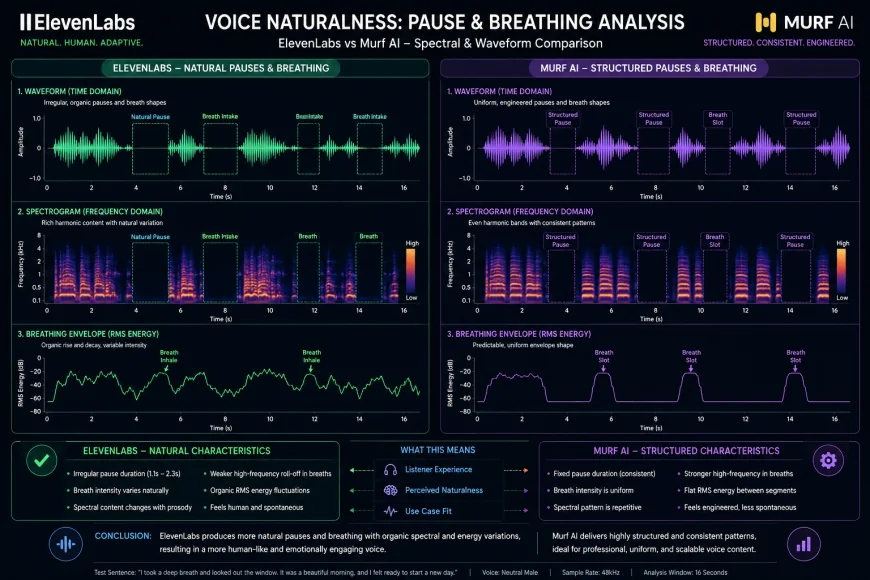 Figure 2: Spectral comparison demonstrating ElevenLabs' organic breathing insertions versus Murf AI's clean, gated, corporate-style pause structures.
Pronunciation Stress Tests: Benglish and Native Slang Performance
Many reviews gloss over pronunciation limits. To see how these engines handle non-standard speech, consider their performance on complex hybrid languages like Benglish—a blend of Bengali and English common in tech circles and South Asian social media. It features rapid shifts in phonetics and cultural phrasing that easily confuse standard Western speech engines. To put both systems to the test, we fed them a highly casual, hybrid script:
"Hey buddy, check out this code, pure fire! Amar database crash koreche because of some weird memory leak, can you fix this dynamic route real quick?"
ElevenLabs handled the colloquial English ("pure fire," "real quick") beautifully, delivering the lines with natural warmth and an authentic conversational pace. When transitioning to the Bengali phrase "Amar database crash koreche" (meaning "My database crashed"), its Multilingual v2 model did a surprisingly good job of blending the two languages. The output felt emotionally genuine and contextually fluid, even if the Bengali vowels carried a slight Western accent. The only real hiccup was a tiny bit of generative "hallucination"—a faint static pop—as the model pivoted between the two distinct linguistic sound profiles.
Murf AI handled the test completely differently. Out of the box, its standard English model fell flat on the Benglish phrase—either skipping the non-English words entirely or butchering them with a painfully literal, letter-by-letter reading. But Murf has a secret weapon: an advanced, built-in pronunciation library. By manually entering phonetic spellings or using IPA (International Phonetic Alphabet) symbols, you can override its default dictionary. It takes some manual effort to set up, but once you save those rules, Murf nails the pronunciation perfectly and consistently every time. Ultimately, ElevenLabs shines at zero-shot phonetic guesswork, while Murf wins if you need a library of highly precise, repeatable custom pronunciations.
Timeline Editor vs. API Integration: Finding Your Workflow
Your choice between these tools often comes down to how they fit into your daily production pipeline. Murf AI’s biggest selling point is its built-in, multi-track timeline editor. It acts as a complete standalone production suite where you can import a PowerPoint presentation, slide deck, or video file, and visually align your script blocks to specific frames. This saves you from having to bounce back and forth between your voice generator and external video editing software like Premiere Pro or Camtasia just to line up the voiceover with your visuals.
ElevenLabs, on the other hand, is a powerhouse for API integration and raw generation. While they’ve added a "Projects" feature for longer written works, it lacks the slide-and-video syncing tools found in Murf. Instead, ElevenLabs focuses on delivering a lightning-fast, low-latency API. If you are a developer building interactive NPCs for games, real-time conversational AI agents, or dynamic automated software, ElevenLabs is the gold standard. It streams hyper-realistic audio instantly, making it the clear winner for tech integrations, while Murf remains the top pick for video creators who want a self-contained studio space.
The YouTube Creator's Dilemma: Retention vs. Speed
If you're hunting for the best AI voice cloning platform to fuel a YouTube channel, your success hinges on viewer retention and workflow speed. For channels built on narrative depth—like video essays, true crime, or history documentaries—a monotone, robotic delivery will kill your retention metrics instantly. ElevenLabs is generally considered the premier choice for narrative YouTube channels because of its impressive emotional range. It can build suspense, drop to an intimate whisper, or ramp up the excitement, which is crucial for keeping viewers hooked over a 15-minute video.
However, if your channel specializes in step-by-step software tutorials, product reviews, or corporate explainers, Murf AI is an incredibly strong alternative. Its structured timeline makes it incredibly easy to align speech directly with on-screen actions, preventing the audio-to-video drift that often happens with ElevenLabs' highly variable sentence pacing. In short: choose ElevenLabs for cinematic storytelling, and Murf AI for precise, instructional clarity.
💡 Inside the Studio: A Sound Designer's Take
Having logged hundreds of hours editing and refining synthetic speech models, I've found that ElevenLabs' micro-breaths and natural phrasing are unparalleled. But there's a catch: during long, unbroken generations (usually over 1,500 words), ElevenLabs' generative engine can act up. You might hear strange "hallucinations"—a sudden, unexpected accent shift, a random whispered word, or a bit of low-frequency background hum.
Murf AI, by contrast, is rock-solid. It won't hallucinate or drift, but that stability comes at the cost of warmth. Out of the box, Murf’s default cadence can feel sterile—more like an automated phone menu than a podcast host. My advice? Lean on ElevenLabs when you need raw, cinematic emotion, and rely on Murf AI when absolute precision and structured consistency are your top priorities.
| Feature / Metric | ElevenLabs | Murf AI | PlayHT (Competitor) | Lovo AI (Competitor) |
|---|---|---|---|---|
| Vocal Realism & Nuance | Industry-Leading (Organic breathing, natural pauses) | High but highly structured (Can sound corporate) | Very High (Great conversational models) | Moderate-High (Character-focused voices) |
| Primary Workspace | Text-to-Speech & API focus | Visual Timeline Studio with Video/Slide Sync | Real-time voice editor & API | Video production suite |
| Voice Cloning Speed | Instant (requires ~30 seconds of audio) | Structured (requires script verification) | Instant (requires ~1 minute of audio) | Instant (requires ~10 seconds) |
| Pronunciation Control | Context-driven (Relies on model intelligence) | Manual IPA & custom phonetic dictionaries | Custom pronunciation library | Pronunciation correction panels |
| API Latency | Ultra-low (optimized for real-time apps) | Standard API delivery | Low latency options available | Standard API delivery |
| Starting Price | $5 / month (Free tier available) | $29 / month (Billing options vary) | $39 / month (Enterprise tiers exist) | $29 / month (Free trial available) |
Two Creators, Two Different Workflows
Let's look at how this plays out in the real world. Imagine a creator running "Sci-Fi Chronicles," a YouTube channel dedicated to atmospheric, long-form stories. To maintain high-end production quality, they generate their 2,000-word scripts in ElevenLabs. By dialing down the stability settings, they allow the voice model to inject genuine suspense and emotion into dramatic scenes. To prevent any generative oddities over long stretches, they simply render the script in 200-word chunks rather than one giant block.
Now, compare that to an instructional designer building a compliance module for a hospital network. Using Murf AI, she imports her slides directly into the dashboard and maps out the voiceover. When she encounters complex medical jargon, she inputs custom phonetic spellings into Murf's dictionary. The result is a perfectly synced, error-free presentation that requires no external editing software—saving hours of tedious post-production.
✅ Pro Tip: Sweet Spot Settings
To get the most lifelike performance out of ElevenLabs without running into accent drift or odd audio artifacts, break your script into short paragraphs (under 200 words). Set the Stability slider to around 40% and Clarity to 75%. This gives the engine enough creative leeway to weave in natural pauses and realistic pitch changes without losing its character profile mid-sentence.
Pricing and Licensing: Characters vs. Studio Hours
When you're factoring in costs, the pricing structures of these two platforms are completely different, and choosing the wrong one can get expensive quickly. According to the official billing guides for ElevenLabs, their model is strictly character-based. They offer a basic free tier (which requires attribution and is for personal projects only), a $5/month Starter tier, and a $22/month Creator tier. The major catch with ElevenLabs is that unused characters do not roll over to the next billing cycle. If you hit a busy month of scripting, you can burn through your monthly allocation quickly, and you have to pay for generations even if the AI voice makes a mistake and you have to run it again.
In contrast, the subscription model outlined by Murf AI is built around user seats and voice generation hours. Their Creator plan starts at $29/month (with discounts if you commit annually), and their Business plan sits at $99/month. Because Murf doesn't charge by the character, you are free to experiment, edit, and tweak your scripts inside their editor without watching a credit counter drain every time you hit preview. Plus, Murf explicitly covers commercial usage rights on all paid plans, making it a safer and highly predictable option for corporate legal teams.
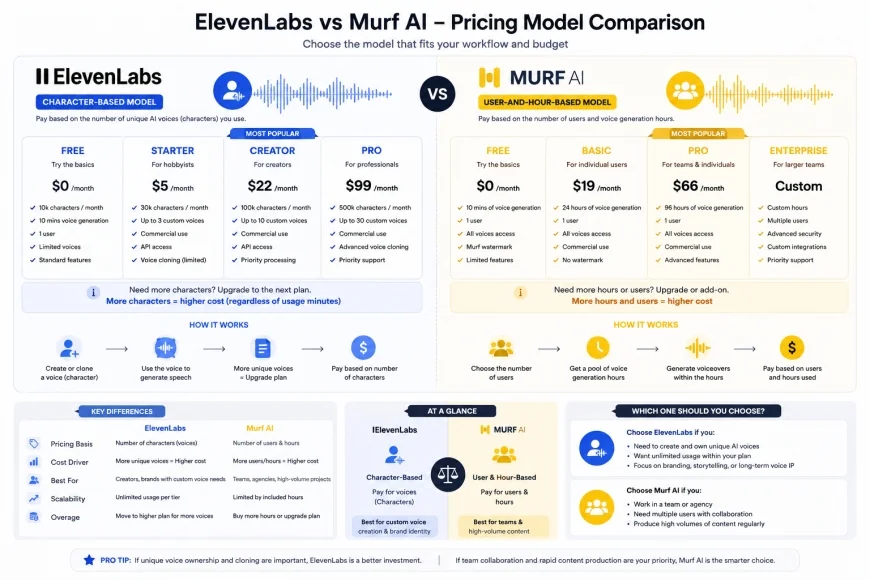 Figure 3: Graphical breakdown of ElevenLabs' character-consumption limits versus Murf AI's subscription hour limits.
Balanced Comparison
ElevenLabs Pros
- Unmatched emotional range and human-like micro-expressions (sighs, natural breathing, dynamic whispers).
- Incredibly fast and high-fidelity instant voice cloning with minimal source audio required.
- Low-latency API access, making it highly suitable for third-party application developers and live agents.
- Supports over 30 languages with an intelligent, context-aware multilingual translation model.
Murf AI Pros
- Highly intuitive visual timeline editor that syncs directly with slides, presentation files, and video clips.
- Predictable and consistent vocal output, preventing sudden pitch spikes or style variations.
- Advanced manual pronunciation dictionaries using custom phonetic spelling and standardized IPA characters.
- No character-count limits on generation, reducing stress during script experimentation and editing phases.
ElevenLabs Cons
- Can suffer from dynamic "hallucinations," occasionally generating unwanted background noise, deep breathing, or unexplained laughter during highly expressive generations.
- Strict character-based pricing models charge for every generation attempt, which can quickly drain budgets during iterative script editing.
- Lacks built-in, multi-track timeline editing features for syncing audio directly to videos or slide presentation decks natively.
Murf AI Cons
- Lacks the deep emotional range and organic, human-like micro-expressions of ElevenLabs, sometimes sounding too uniform or clinical.
- Voice cloning requires higher-tier subscriptions and more extensive verification processes for similar quality.
- API integration options are less optimized for ultra-low latency, real-time interactive systems.
Target Audience: Who Should Choose Which?
Choosing between ElevenLabs and Murf AI ultimately comes down to your production pipeline and the type of content you create. Let's break down the ideal user profiles for each platform.
Choose ElevenLabs if you are:
- A Game Developer or Interactive Fiction Creator: You need dynamic, emotionally charged voices that can deliver whispery dialogue, sudden shouts, or subtle gasps with cinematic quality.
- An Audiobook Publisher or Indie Author: You require long-form narration with rich character distinctions, vocal consistency, and a highly natural reading cadence.
- A Software Developer: You require robust, low-latency APIs to build real-time conversational bots, interactive AI companions, or instant localization features into your application.
Choose Murf AI if you are:
- An e-Learning Specialist or Instructional Designer: You want to build corporate training programs, product demos, or compliance videos synced frame-by-frame with PowerPoint slides or screen recordings.
- A Corporate Communications Manager: You need high-quality, professional, and brand-safe voiceovers with guaranteed commercial rights and a highly predictable billing structure.
- A Content Marketer: You want to create simple promotional videos or social media advertisements using a straightforward, all-in-one web editor that doesn't require complex audio-engineering knowledge.
The Final Verdict: Expressive Power vs. Production Control
If your ultimate goal is absolute vocal realism, raw emotional depth, and state-of-the-art voice cloning, ElevenLabs is the undisputed industry leader. Its advanced AI model understands narrative context in a way that rivals human voice actors, making it the perfect choice for creative, narrative-driven content.
Conversely, if you need a dependable, business-centric media creation suite that streamlines presentation editing, video synchronization, and collaborative corporate projects, Murf AI is the superior workspace tool. While its voices might occasionally lack ElevenLabs' dynamic theatricality, its intuitive timeline, structural consistency, and predictable hour-based pricing make it a dream for professionals focused on utility and execution speed.
Frequently Asked Questions (FAQs)
Can I use both platforms for commercial purposes?
Yes, both platforms support commercial usage. ElevenLabs grants commercial rights on all paid tiers (starting with the Starter plan). Murf AI explicitly guarantees commercial usage rights across all its paid subscription tiers, ensuring your corporate media remains legally compliant.
Which platform has a better voice cloning capability?
ElevenLabs is generally considered superior for voice cloning. Its Instant Voice Cloning requires only a few seconds of clean reference audio and yields incredibly life-like results. Murf AI also offers high-quality voice cloning but requires a structured verification process and is geared more toward secure, enterprise-level voice replication.
Do either of these platforms support multi-character dialogue?
Yes, both do. ElevenLabs allows you to assign different voices to different paragraphs or dialogue segments using their Projects feature. Murf AI handles this inside its visual timeline, where you can easily assign a distinct voice profile to any block of text in your script.
Quick Decision Matrix
Still undecided? Use this rapid-fire checklist to finalize your choice:
| Your Requirement | Recommended Tool | Why? |
|---|---|---|
| Unmatched vocal emotion & expressiveness | ElevenLabs | Best-in-class deep learning model for human-like inflections. |
| Direct syncing with PowerPoint/video files | Murf AI | Built-in timeline interface specifically built for visual alignment. |
| Low-latency API integrations | ElevenLabs | Ultra-fast API response times designed for real-time app developers. |
| Predictable monthly costs for long scripts | Murf AI | No character penalty for draft iterations; billed by voice hours. |