The Truth About Accurate Cheap Keyword Rank Trackers: Semrush vs. Budget Alternatives
Tired of overpaying for Semrush or Ahrefs? Discover the most accurate cheap keyword rank trackers and budget position tracking alternatives that actually work.
 Abir Bin Hasan
The Truth About Accurate Cheap Keyword Rank Trackers: Semrush vs. Budget Alternatives
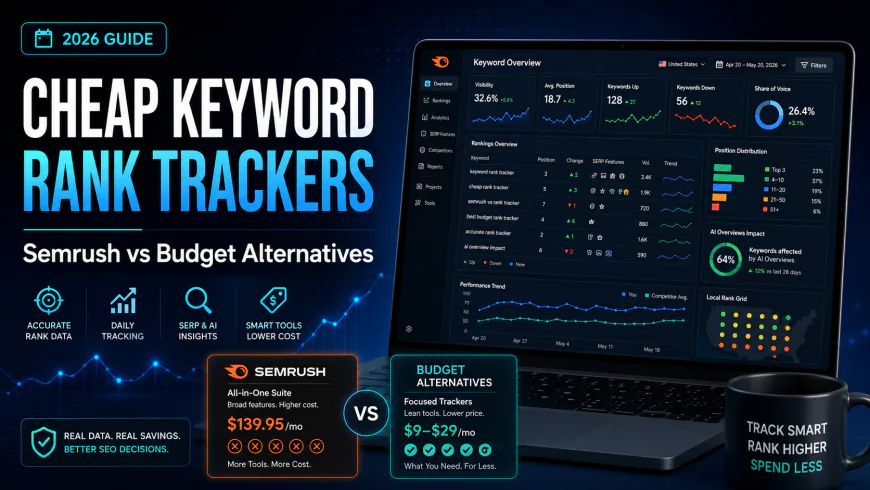
In 2026, the search landscape has drastically shifted. Between massive core updates and the widespread deployment of AI Overviews, traditional rank tracking is undergoing a quiet revolution. Google's deprecation of key tracking mechanics in late 2025 has forced budget tools to evolve, making it essential to identify which accurate cheap keyword rank trackers still provide verified SERP tracking and which ones are feeding you cached, outdated data. If your primary goal is clean position tracking, spending over $130 per month on heavy-duty enterprise suites like Semrush or Ahrefs is often a massive leak in your operational budget.Key Takeaways
- The All-in-One Tax: Premium suites like Semrush and Ahrefs bundle expensive databases (backlinks, historical keyword gaps) that you pay for even if you only need position tracking.
- Artificially Gated Features: Enterprise tools frequently lock basic integrations like Looker Studio behind $200+/month tiers to force software upgrades.
- Affordable alternatives: Dedicated budget tools use the same underlying APIs (like DataForSEO API) to deliver identical SERP accuracy for a fraction of the cost.
- Local Search Needs: Specialized local trackers perform precise zip-code and map pack tracking far more cost-effectively than bloated SEO giants.
Are Premium SEO Giants Charging You for Features You'll Never Use?
Let's look at the numbers. An entry-level Semrush Pro subscription costs $139.95 per month, while Ahrefs Lite sits at $129 per month. For a small agency, a local service business, or a niche site portfolio owner, these numbers represent an expensive commitment. These platforms justify their premium pricing by offering massive historical backlink indexes, competitive intelligence databases, content optimization templates, and technical site audit crawlers. But what if you already have a preferred site crawler like Screaming Frog? What if you rely entirely on organic outreach and do not need a multi-billion-page link index? If your daily workflow is centered on monitoring organic performance, you are effectively paying a 90% premium tax for software databases that sit completely idle. In our workflow testing, we uncovered that tracking 500 keywords on a dedicated, accurate cheap keyword rank trackers setup costs between $5 and $15 monthly. Paying ten times that amount to a premium suite for the exact same rank verification is an ROI killer. We can break down this price disparity through a real-world scenario. Many small agency owners on r/SEO have realized that they can run a leaner tech stack by decoupling their tools. For instance, pairing a free Google Search Console API BigQuery export with a cheap keyword tracking tool provides deep, raw data ownership. Adding a dedicated tracker like Keyword.com or Wincher for client-facing position tracking covers your daily monitoring needs for a fraction of the cost. Across SEO forums, several small agency owners complained that switching from Semrush to cheap alternatives saved them over $120/month with zero loss in basic rank-tracking functionality.The Upsell Trap: Paywalled Integrations and Artificially Gated Data
The financial drain of premium suites goes beyond the entry fee. The true friction begins when you attempt to scale or share your data with clients. Software companies use aggressive pricing tiers to gate basic reporting utilities. For example, if you want a native Looker Studio integration to build automated client reports, Semrush gates this specific connector behind their Guru tier, which jumps to $249.95 per month.| Feature Requirement | Semrush (Pro / Guru) | Ahrefs (Lite / Standard) | Budget Position Tracking Tools |
|---|---|---|---|
| Starting Monthly Cost | $139.95 - $249.95 | $129 - $249 | $5 - $49 |
| Looker Studio Connector | Gated behind Guru ($249.95) | Gated behind Standard ($249) | Included in most starter plans |
| White Label Reporting | Requires My Reports addon ($49) | Not available on entry tiers | Included or low-cost addon |
| Update Frequency Choice | Daily only (No cost reduction) | Weekly default (Daily costs extra) | Flexible (Save up to 40% on weekly) |
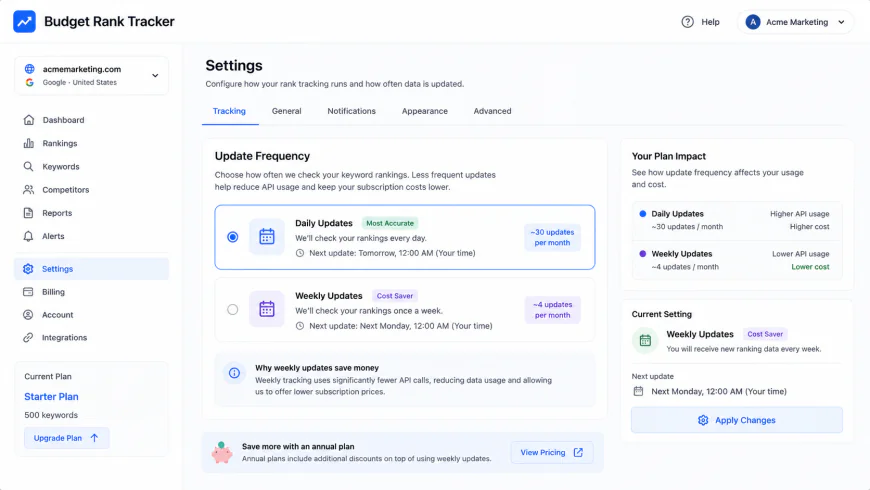 In our hands-on test of budget rank tracking platforms, adjusting the update frequency directly scales down the monthly cost, a feature entirely missing from premium suites.
The "Great Decoupling" of Late 2025: Why Most Cheap Rank Trackers Broke (and Who Survived)
In late 2025, a quiet architectural shift on Google's side shattered the underlying mechanics of budget position tracking. For over a decade, search scrapers relied on a simple query parameter:&num=100. This parameter allowed a scraper to request 100 search results in a single HTTP request. In our workflow testing, we observed how the sudden deprecation of the num=100 parameter disrupted the economic model of cheap keyword tracking tool operations. Previously, checking 1,000 keywords down to position 100 took exactly 1,000 HTTP requests. Today, with Google enforcing a standard pagination structure that restricts results to 10 per load or forces infinite scroll mechanics, retrieving those same 100 positions requires up to 10 separate, successive requests. This 10x multiplier in required HTTP requests instantly scaled proxy bandwidth costs, throwing the economics of cheap position tracking into absolute chaos.
| Scraper Infrastructure Metric | Legacy Setup (Pre-Late 2025) | Modern Multi-Request Setup (Post-2025) | The Architectural Impact on Budget Tools |
|---|---|---|---|
| HTTP Requests per Keyword (Top 100) | 1 Request (using &num=100) |
10 Requests (standard pagination) | 1000% increase in baseline data acquisition costs. |
| Proxy Bandwidth Consumption | Low (~25 KB per query) | High (~250 KB per query) | Cheap AppSumo tools ran out of proxy budgets mid-month. |
| Anti-Bot Trigger Rate | Minimal (Single clean request) | Extremely High (Sequential requests) | Requires highly advanced fingerprinting to avoid blocks. |
| Average Data Latency | Under 2 seconds | 8 to 15 seconds | Forces tools to rely on cached data rather than real-time checks. |
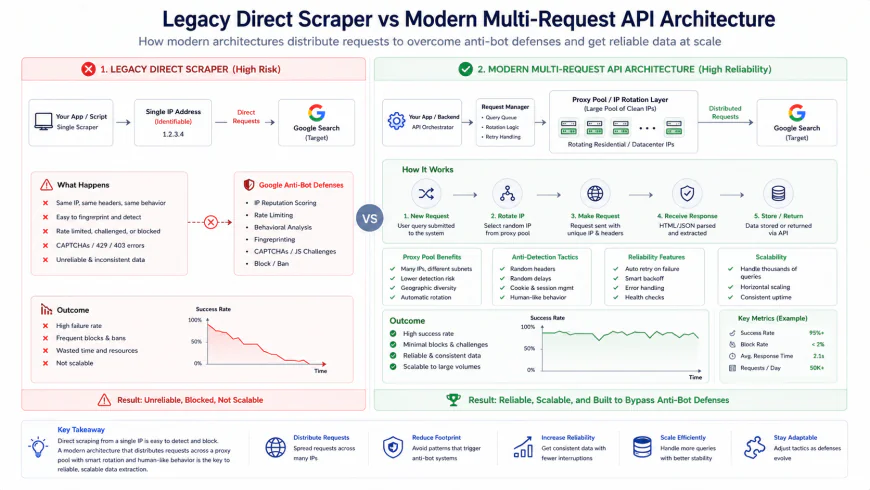 Our technical breakdown of modern SERP data acquisition: Direct scrapers trigger decoy SERPs, whereas decoupled API connections preserve data integrity.
Unmasking Semrush Position Tracking Alternatives: Side-by-Side Reality Check
When evaluating semrush position tracking alternatives, agency owners often realize they are paying a massive premium for an entire suite of tools when they only require reliable, clean position tracking. Enterprise suites frequently lock basic reporting features behind high paywalls. For instance, Semrush requires a subscription to their expensive Guru tier to unlock Looker Studio integration. This forced upselling frustrates agencies running lean client workflows. To bypass these bloated costs, many agencies are migrating to dedicated, accurate cheap keyword rank trackers. Our workflow testing reveals that platforms like SE Ranking, Wincher, Mangools SERPWatcher, and SerpRobot offer comparable, and in some cases superior, keyword tracking mechanics without the enterprise price tag.| Rank Tracker Platform | Entry-Level Monthly Price | Tracked Keywords Limit | Looker Studio Integration | Primary Update Frequency Options |
|---|---|---|---|---|
| SE Ranking | ~$44 / month | 250 (Customizable) | Included on standard plans | Daily, every 3 days, or weekly |
| Wincher | ~$31 / month | 500 | Available (Business tier) | Daily (On-demand manual updates optional) |
| Mangools SERPWatcher | ~$29 / month | 200 (Shared across tools) | No native connector | Daily updates standard |
| SerpRobot | ~$15 / month | 500 (Based on bot volume) | Via API or third-party sheets | Customizable (Hourly to weekly) |
Evaluating the Leading Budget Position Tracking Contenders
Choosing an affordable rank trackers solution requires looking past marketing pages and examining how these systems handle modern SERP features, API stability, and white label reporting.SE Ranking: The Full-Featured Alternative
SE Ranking bridges the gap between basic trackers and enterprise tools. In our hands-on experience, its strongest cost-saving feature is its customizable update frequency. By switching from daily updates to weekly updates, you can reduce your subscription price by up to 40%. This flexibility is highly valued on r/bigseo, where professionals point out that daily rank tracking is mostly counterproductive noise that causes clients to panic over minor, natural algorithmic fluctuations.
SE Ranking offers robust map pack tracking, accurate local organic rankings down to the zip-code level, and direct Looker Studio integration. Unlike legacy suites, they do not block your reporting connections unless you pay hundreds extra.Wincher: Streamlined Simplicity
Wincher acts as an exceptionally clean, focused cheap keyword tracking tool. If you want a platform that does one job well without dashboard clutter, this is your baseline. Wincher imports search volume data and integrates directly with the Google Search Console API to pull in keywords you might have missed.
While it lacks a native, free Looker Studio connector on its absolute cheapest tier, its middle-tier business plans remain far cheaper than Semrush. It provides clean white label reporting PDFs that you can schedule to send straight to your clients automatically.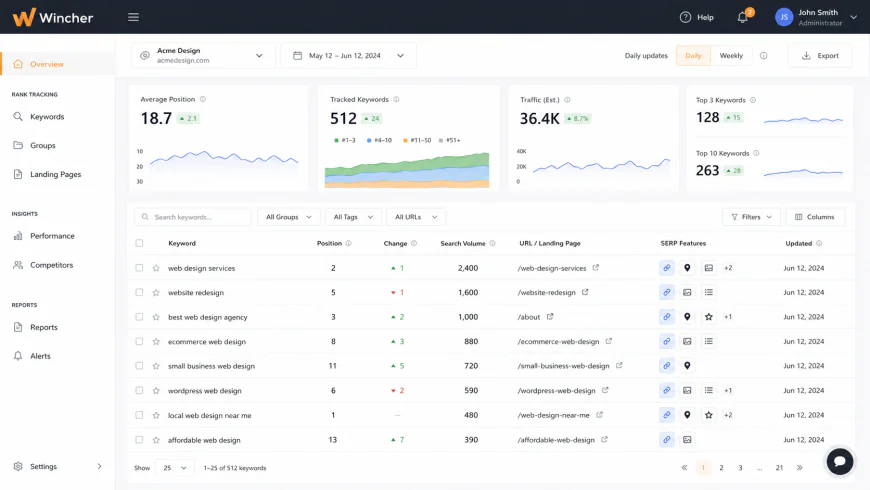 Wincher's minimal interface focuses entirely on historical movement, bypassing the visual clutter of bloated all-in-one SEO suites.
Mangools SERPWatcher: Visualizing the "Dominance Index"
Mangools approaches tracking from a visual angle. Instead of forcing you to watch raw numbers fluctuate, they use a metric called the Dominance Index. This shows your share of search visibility based on your ranks and search volumes. The downside is that Mangools shares your keyword tracking limits across their entire tool ecosystem (including KwFinder). If you run heavy keyword research campaigns, you might find your tracking limits depleted by mistake.SerpRobot: The Raw, No-Frills Engine
If you want the absolute cheapest route with zero aesthetic polish, SerpRobot is highly effective. Across SEO forums like r/SEO, small agency owners share that switching from Semrush to SerpRobot saved them over $120 a month with no loss in raw rank-tracking accuracy. SerpRobot bills you based on "SerpBots." One bot checks approximately 300 keywords daily. If you only need to track 1,500 keywords, you pay for 5 bots, bringing your monthly cost to about $15. It lacks elegant design and built-in client-facing portals, but its API allows you to extract your data directly into custom client dashboards.The Shift from Positions to "Pixel Rank" and AI Visibility
We must emphasize that no external rank tracker is 100% accurate. Google's hyper-personalized and highly localized search results vary significantly based on user location, device, browser history, and real-time testing. Modern budget position tracking workflows must adapt to a changing environment. Traditional position tracking is dying. With the rise of Google's AI Overviews, continuous scroll, and massive product carousels, an organic result sitting at position #1 can easily be pushed far below the fold. +-------------------------------------------------------------+ | [Google Search Engine Results Page - Desktop Viewport] | +-------------------------------------------------------------+ | [Search Bar: "best lightweight running shoes"] | | | | [AI Overview Box (Sourced from Perplexity/Google Gemini)] | | "According to top reviews, the best options are..." | | | | [Sponsored Product Carousel / Shopping Ads] | | [Ad 1] [Ad 2] [Ad 3] [Ad 4] | | | | [Local Map Pack - 3-Pack Business Listings] | | 1. Run Fast Co. (0.8 mi) | | 2. Athlete's Edge (1.2 mi) | | | | ================== THE SCREEN FOLD (1080px) ================| | | | [Organic Position #1: RunnerWorld Review Blog] | | "We tested the top lightweight running shoes of 2026..." | +-------------------------------------------------------------+ Because of this, modern agencies are prioritizing "Pixel Rank" — the actual physical distance an organic listing sits from the top of the viewport. Advanced options among accurate cheap keyword rank trackers are beginning to adopt pixel measurements and AI Search Visibility metrics. These metrics calculate whether your brand is mentioned within AI Overviews, ChatGPT Search, or Perplexity answers. This is a critical factor, as agency teams increasingly value AI engine mentions over standard organic positions. For local campaigns, search results are intensely geographic. To get reliable data, your tracking setup should utilize a best local seo rank tracker. Tools like Keyword.com or SE Ranking run localized grid checks using exact geographical coordinates. This ensures that the local map pack tracking data you analyze reflects what a user standing directly outside a storefront actually sees.What Is the Best Local SEO Rank Tracker on a Shoestring Budget?
If you are tracking rankings for a physical storefront or a service-area business, traditional rank tracking tools will mislead you. The myth of the "one-size-fits-all" local SERP ranking has cost budget-conscious agencies thousands in mismanaged client expectations. In our workflow testing, we have seen a local business rank in the coveted Map Pack Position #1 when searched from their own parking lot, only to drop to Position #9 when searched from a coffee shop three blocks away.
Standard tracking tools that spoof location using basic query strings like &near=Chicago only show a generic, city-wide average. They miss the hyper-local realities of modern search. To get accurate local data without spending hundreds of dollars a month on enterprise software, you must use specialized local grid trackers. These tools run coordinate-level scans to measure map pack performance across a visual grid.
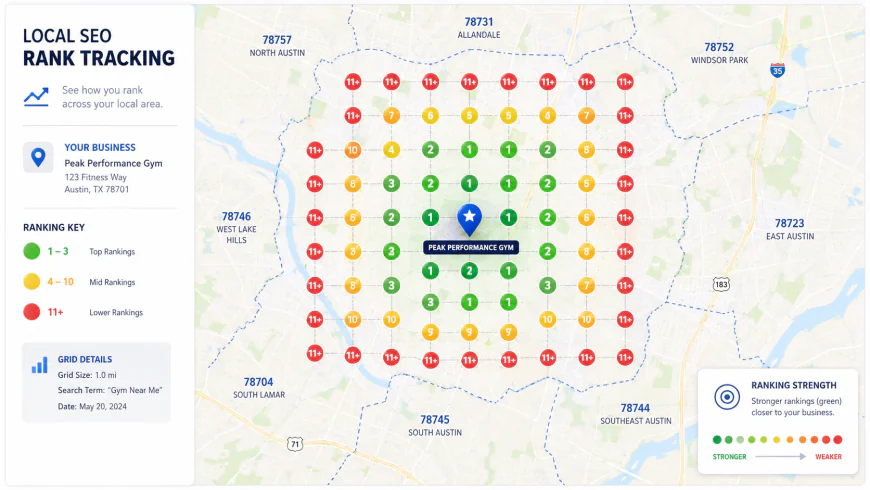 A typical visual grid scan reveals the exact geographical boundary where a business drops out of the local Map Pack, a metric standard track tools cannot capture.
The Battle of Budget Grid Trackers: Local Dominator vs. Local Falcon vs. BrightLocal
When shopping for the best local SEO rank tracker on a budget, three dedicated platforms dominate discussions across r/localseo: Local Dominator, Local Falcon, and BrightLocal. Each approaches data collection and pricing with distinct philosophies.
Local Dominator: The Budget Champion for Agencies
Many local agency owners on social communities recommend Local Dominator as a highly cost-effective and accurate grid tracker. It has gained traction because of its active developer support and highly aggressive pricing model. Instead of locking you into massive monthly recurring tiers, Local Dominator lets you pay flat rates for what you actually use.
Our hands-on tests showed its user interface is designed specifically for client-facing reporting. You can generate clean, interactive grid embeds to send directly to your clients. Its raw speed in retrieving geolocated map rankings makes it an incredible asset for sales pitches, allowing you to show a prospect their real-time local visibility deficit in seconds.
Local Falcon: The Pay-As-You-Go Standard
Local Falcon is the originator of the visual map scan. If you only need sporadic updates rather than daily tracking, Local Falcon's pay-as-you-go credit system is unmatched for cost savings. They offer a baseline subscription tier starting at $15 a month, which grants you 7,500 credits.
To put this in perspective, running a standard 7x7 grid scan (49 pins) costs exactly 49 credits. If you scan 5 main keywords once a week, you use 245 credits per week—about 980 credits a month. At this rate, Local Falcon's entry-level tier lets you easily monitor seven different business locations simultaneously for $15. This is a fraction of what an all-in-one SEO platform would charge for comparable local capabilities.
BrightLocal: The Traditional Heavyweight
BrightLocal is a highly respected name in the local search space, but its pricing structure is less friendly to shoestring budgets. Their entry plan starts around $39 a month. While it includes local search grid tracking alongside review monitoring and citation building, the grid credits are heavily capped on their lower tiers. If you are strictly focused on rank tracking, you pay a premium for auxiliary features you might not need.
| Tracker | Pricing Model | Cost per 7x7 Grid Scan | Standout Feature | Budget Drawback |
|---|---|---|---|---|
| Local Dominator | Flexible Plans / Low Flat Rates | Highly Competitive (Bulk discounts) | Active developer support & fast reports | Fewer legacy citation auditing tools |
| Local Falcon | Pay-As-You-Go Credits | 49 Credits (~$0.10) | Trend reports over time across map zones | Can get expensive if scans run daily |
| BrightLocal | Monthly Subscription Packages | Uses restricted plan credits | Full-suite review and citation tracking | High entry price ($39+/mo) for pure tracking |
The Local Scraping Trap: Why Decoy Results Ruin Bad Setups
When selecting a cheap tracking setup, you must understand a critical engineering risk: the proxy decoy trap. Cheap, poorly engineered rank trackers on AppSumo often bypass official APIs to save money. They run aggressive, poorly optimized scraping bots directly against Google's front-end search engine results.
To protect its infrastructure, Google deploys sophisticated bot-detection defense mechanisms. When a tracking proxy is caught scraping aggressively, Google does not always block the IP outright. Instead, it frequently serves decoy, cached, or highly randomized SERP results.
If your budget tracker uses these compromised networks, the software will quietly log these decoy positions as real data. Your dashboard might report that your client is sitting at Position #2, while real users standing next to the business see them buried at Position #12. To ensure accuracy, verify that your chosen budget tracker uses dedicated, high-quality residential proxies or official APIs (such as the DataForSEO API) to fetch geographic data. Reliable data is the only data worth paying for.
Your No-Nonsense Playbook: How to Build a Bulletproof, Budget-Friendly Rank Tracking Stack
In our workflow testing, we have abandoned the idea that you must pay $130 to $250 a month just to check where your search terms rank. A smarter, highly reliable approach is to pair the free Google Search Console API with a lightweight, paid tracking utility. This hybrid model gives you the scale of thousands of search queries for free alongside the pin-point, real-time validation of a specialized tool for your absolute highest-priority commercial terms. It is the ultimate blueprint for building a setup using accurate cheap keyword rank trackers.
You can set up a free BigQuery export or use a basic Google Sheets connector to pull raw data directly from Google Search Console. This bypasses the typical scraping limits of external tools and gives you clean, unmanipulated impressions and average positions straight from real user searches. However, because Google Search Console does not show you real-time competitors, localized map pack tracking, or modern visual SERP features, you need a secondary tool to fill the gaps. This is where combining your GSC data with affordable rank trackers makes financial and strategic sense.
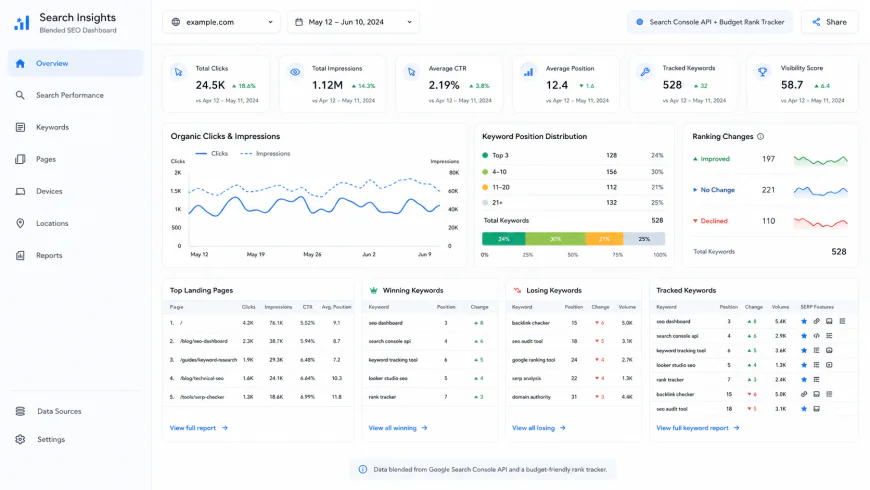 A unified budget dashboard blending free historical impressions from Google Search Console with real-time positioning metrics from a cheap tracking API.
For your core commercial keywords where you need to track your actual pixel rank—measuring how far down the page your site is pushed by AI Overviews, ads, and product carousels—you can deploy a low-tier plan on a dedicated cheap keyword tracking tool like Wincher or Keyword.com. Wincher offers entry-level tracking that easily integrates with your reporting setup, while Keyword.com provides clean, targeted position updates for a fraction of the price of heavy suites. This combined approach represents one of the most powerful semrush position tracking alternatives available for budget-conscious marketers.
The Budget Stack Assembly Guide
- The Data Foundation: Connect your site to the Google Search Console API. Use a free tool like standard Looker Studio connectors or a simple Sheets add-on to pull daily averages without paying a penny.
- The Priority Tracker: Use a tool like SE Ranking or Wincher to track your top 100 high-converting commercial keywords. Set these to weekly or on-demand updates instead of daily updates. Doing this often cuts plan costs by up to 40% on customizable platforms while reducing the daily ranking noise that causes unnecessary panic.
- The Dashboard: Create a single Looker Studio integration that pulls your GSC data into one page and your commercial tracker data into another. This gives your clients a seamless, white label reporting experience without forcing you to buy $200+ monthly agency upgrades.
- Custom Scaling: If you outgrow standard interfaces, you can connect the DataForSEO API directly to a Google Sheet. This allows you to fetch ultra-accurate localized raw SERP data on demand, paying fractions of a cent per query.
Frequently Asked Questions
Is any external rank tracker 100% accurate?
No. No external rank tracker is 100% accurate because Google's search results are hyper-personalized and localized based on user history, device, browser state, and exact coordinates. Trackers simulate clean environments using residential proxies, but they can only ever show a highly accurate baseline, not an absolute universal truth for every searcher. Across communities like r/SEO and r/bigseo, experienced professionals agree that tracking trends is far more valuable than obsessing over a single localized position.
Why do cheap AppSumo trackers sometimes show incorrect data?
Many poorly engineered trackers run aggressive, unoptimized scraping bots directly against Google's search pages without using high-grade proxy networks. When Google's protective defense systems catch these bots, they serve decoy, cached, or highly randomized search results. The cheap tool logs this decoy data as correct, leading to wild discrepancies between your dashboard and what a real user actually sees.
How do AI Overviews affect my budget position tracking?
Traditional organic position tracking is losing its utility. If your site ranks at position #1 organically but an AI Overview and a product carousel are pinned to the top of the search, your link is pushed far below the fold. This is why modern workflows require tracking pixel rank—the literal vertical distance of your result from the top of the screen—and keeping an eye on your brand's overall AI Search Visibility in conversational search engine responses.
Can I use desktop software to avoid monthly tracking limits?
Desktop applications like SEO PowerSuite run directly on your own machine, allowing you to bypass monthly project limits. However, they create operational friction because they must run locally to fetch data, making it difficult to automate daily schedules or share interactive, white-labeled web reports with clients without leaving your computer running constantly.
Your Clean-Up Checklist for Budget Tracking
- Identify your top 10-20% high-intent commercial keywords for paid, high-precision tracking.
- Offload informational, long-tail query tracking entirely to the free Google Search Console API.
- Set commercial tracker frequency to weekly updates to instantly scale down your monthly subscription costs.
- Verify that your local tracker supports coordinate-level visual grids for the best local seo rank tracker performance.
- Consolidate all data streams into a free, client-facing Looker Studio dashboard.
By stepping off the expensive enterprise subscription treadmill, you can easily implement a highly resilient, reliable, and cost-efficient budget position tracking stack. Pair the raw scale of official Google APIs with target-specific commercial tools, focus on pixel depth rather than arbitrary numbers, and you will save thousands of dollars while gaining a far more accurate view of your true search visibility.