Best AI UI Design Generator: Why Midjourney Fails UI
Looking for the best ai ui design generator? Stop using Midjourney for web mockups. Discover dedicated AI tools for web designers with editable exports.
 Abir Bin Hasan

Why Midjourney Fails at UI Design (And What to Use Instead)
If you have spent any time looking for an automated interface layout tool, you have probably noticed a major disconnect. Many generic tutorials point you toward standard generative art engines for user interfaces. But in actual product design, flat images do not work—we need structured, modular systems that can actually be coded.
Core Considerations
This analysis breaks down why static image generation fails in a modern product workflow, looks at the leading layout utilities on the market, and evaluates how their output fares in terms of layout structure, code semantics, and developer handoff.
Analysis Methodology
This analysis relies on detailed desk research, examining official documentation, platform features, pricing structures, and real developer workflows. Instead of repeating marketing hype, we look closely at how these programs actually perform when you try to export assets or hand them off to engineers.
The Midjourney Illusion: Why Flat JPEGs Stall Professional Workflows
Many design blogs still push Midjourney as a shortcut for mockups. It makes for great eye-candy, but a flat image is practically useless for a developer. We look at why this happens and explore modern design systems that generate actual, editable Figma layers.
At first glance, generative image platforms appear to produce magnificent web layouts, application interfaces, and mobile dashboards. However, these assets are nothing more than non-interactive, flattened pixel grids that lack structural context, scaling rules, or component hierarchies.
When a product team attempts to utilize these static images as blueprints, they quickly run into a productivity wall. Translating a rasterized graphic into a working prototype requires reproducing the entire layout from scratch inside a modern editor.
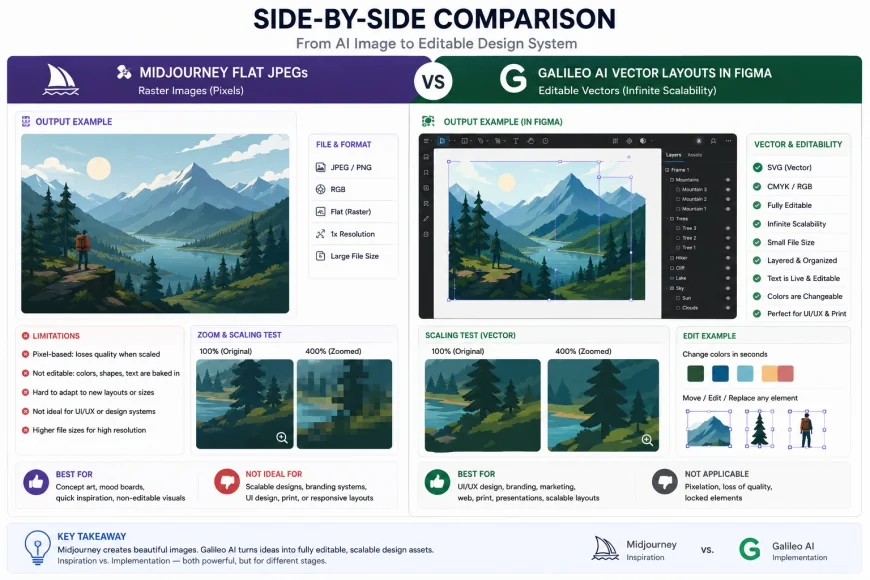 Figure 1: The stark contrast between non-interactive raster outputs and true, layer-structured vectors that preserve modern layout paradigms.
It’s double-handling at its worst. Rather than speeding up the timeline, flat image mockups often add days of clean-up work. Plus, art models do not understand basic design patterns. They regularly hallucinate bizarre navigation paths, illogical margins, or text that is completely illegible.
To establish a sustainable workflow, teams require software trained specifically on user interfaces. Specialized platforms understand margins, paddings, responsive grids, and typography tokens, bridging the gap between design and engineering.
Overview & Market Context: The Shift to Semantic UI Systems
The layout design space is moving incredibly fast. Standard workflows where you draw every button and input field by hand are slowly giving way to systems that generate initial UI concepts automatically.
Designers moving away from static art platforms often refer to the Stop Using Midjourney: Best AI UI Design Generator for Mockups guide to understand how dedicated layout utilities outclass general image models.
In a modern development cycle, a pretty picture is no longer the ultimate goal. The real value lies in structural consistency, component reuse, and clean code paths. With Figma rolling out its own native AI capabilities, third-party software can no longer get away with just generating flat graphics.
This technological pressure is beneficial for professional teams. It filters out gimmicky tools and forces the development of systems that export production-ready vector assets and structural front-end layouts rather than raw canvas pixels.
Consequently, the search for a reliable AI layout generator has shifted from simple aesthetics to structural fidelity. Today, we prioritize tools that integrate into complex developer environments without introducing legacy code debt.
In-Depth Evaluation of the Leading AI UI Design Generators
1. Galileo AI: Polished, Editable Figma Layers
Galileo AI has emerged as a strong contender in this space by converting natural language descriptions into layered Figma files. By utilizing models trained specifically on user interfaces, it outputs precise structural layouts rather than abstract graphics.
According to the Galileo AI (usegalileo.ai) official features guide, the platform is optimized to produce designs with real copy, appropriate icons, and semantic vector shapes. This eliminates the placeholder text problem common in early mockups.
 Figure 2: Prompting mobile dashboard concepts in Galileo AI, displaying structural layouts and production-ready vector groups.
Unlike art generators, this platform outputs an actual Figma canvas. Every button, input field, card, and hero container remains a vector shape that designers can style, scale, and reorganize easily.
However, the platform is not without its creative limits. Most layout generators tend to default to a highly clean, but slightly sterile "SaaS-generic" look. If you do not actively inject custom branding systems into generated layouts, the final screens can look highly repetitive.
Despite this default aesthetic bias, Galileo remains one of the fastest ways to generate UI from text prompt inputs. It drastically shortens the initial wireframing and prototyping phases for agency teams.
2. Relume: Component-First Site Architecture and Wireframes
For designers who believe that user experience starts with clean information architecture, Relume is an essential utility. It approaches UI from a component-first perspective, utilizing a massive library of Figma-native structures.
Referencing the Relume (relume.io) sitemap and wireframe component documentation, the platform builds responsive layouts based on pre-vetted design components. It generates layout architecture rather than abstract art.
Users begin by entering an overarching product idea, and Relume constructs a comprehensive, interactive sitemap. This interactive outline maps out the user flow, which is then populated with detailed UI block wireframes.
A common pattern among agency teams is a multi-step workflow: they use Relume's structural wireframes to speed up content modeling and user flow validation, and then feed those specific wireframe blocks into Galileo AI for thematic visual layer generation.
This deliberate workflow keeps the layout grounded in real UX architecture. It prevents the visual clutter that often occurs when designers leap straight to high-fidelity mockups without checking information density.
Furthermore, Relume's tight integration with Figma and Webflow makes it a highly functional bridge for frontend developers. It ensures that any wireframing structures used in the early stages map directly to production containers.
3. v0 by Vercel: Direct React and Tailwind Generation
When the priority is building real interfaces for immediate web deployment, Vercel’s v0.dev is a highly effective asset. It is a developer-centric tool that processes text and image prompts directly into React code.
According to the Vercel official documentation for v0.dev, the system uses a combination of modern frameworks and popular UI libraries, such as shadcn/ui and Tailwind CSS, to render components dynamically in real-time.
Instead of outputting a design canvas file, v0 presents developers with functional front-end components. Designers and engineers can prompt changes, such as modifying a contact form, and receive the refined code instantly.
However, engineering leads warn against unchecked code generation. Relying too heavily on automated frontend code without a robust quality assurance workflow can lead to severe DOM bloat and non-semantic HTML structures.
To avoid these pitfalls, developers must actively audit the generated files, review CSS selectors, and clean up nested elements. This ensures the output remains fast, accessible, and compliant with modern web standards.
Despite the need for post-generation audits, v0 remains an unparalleled option for developers wanting to bypass initial styling phases and quickly spin up responsive web components in a live environment.
4. Figma AI & Canvas Updates: Native System Upgrades
Figma’s native platform enhancements represent a major shift for teams using third-party tools. By embedding intelligence directly into the design canvas, Figma seeks to make external generative software less necessary.
The Figma AI and Canvas updates documentation highlights features such as automatic layer naming, instant component state generation, and copywriting helpers. These tools assist designers directly inside their daily workspace.
Because these features operate on existing vector systems, they completely bypass the conversion headaches of third-party platforms. They respect existing Figma constraints, local styles, and active design tokens.
As these native options mature, they emerge as formidable alternatives to external plugins. Designers do not have to export and import assets between disparate web platforms to create editable vector layouts.
However, the native tools are currently optimized for modifying and expanding existing projects. For greenfield ideation, specialized external UI tools still maintain an edge in speed and creative variance.
💡 Expert Analysis & Experience
From a systems-design perspective, the most valuable tool isn't the one that draws the prettiest screens. It is the one that respects your design tokens. If a layout generator forces you to manually replace dozens of hardcoded color hexes and absolute font sizes to match your corporate system, it will likely slow you down. Look for systems that export clean CSS variables over those that output rigid, hardcoded hex values.
Limitations and Hurdles: Who Should Skip These Tools?
While the prospect of generating layouts with a prompt sounds incredible, these platforms are not a magic fix for every team. If your company uses a highly custom, strict design system with proprietary component libraries, these tools will often introduce more manual cleanup work than they save. They do not know your specific component rules, meaning designers must spend hours replacing generated boxes with native symbols.
Furthermore, keep an eye on the hidden costs. Many of these tools operate on SaaS subscription tiers that scale sharply once you transition from solo exploration to collaborative team plans. Platforms that seem affordable at $15 a month can easily balloon into hundreds of dollars on renewal, especially when adding enterprise seat licensing. If your team lacks a solid grasp of auto-layout mechanics in Figma, you will also hit a steep learning curve; fixing a messy, semi-automated frame can be far more frustrating than building it cleanly from scratch.
Feature Comparison: Midjourney vs. Professional AI UI Generators
To make an informed decision for your project, it is helpful to look at how these tools perform on a feature-by-feature basis. The table below details the strengths, weaknesses, and key outputs of each platform.
| Platform / Tool | Primary Output Format | Figma Integration Status | Code Export Capabilities | Best Suited For |
|---|---|---|---|---|
| Midjourney | Raster Image (PNG / JPG) | None (Static Canvas Image) | None (Requires full recoding) | Creative moodboards & illustration assets |
| Galileo AI | Editable Vector Layers | Excellent (Native plugin export) | Basic React / Tailwind code previews | Rapid, high-fidelity visual exploration |
| Relume | Structural Figma Components | Excellent (Direct copy & paste library) | Webflow native structural sync | Information architecture & content structure |
| v0 by Vercel | React / TypeScript / Tailwind Code | Manual translation (Code to visual) | Excellent (Production-ready web components) | Developer-centric layout engineering |
| Figma AI | Canvas Native Vector Layouts | Native Platform Feature | Excellent via Figma Dev Mode | In-canvas workflow speed & component scaling |
Practical Scenario
In practical use, Galileo AI outputs often require manual overrides to make them viable for client presentations. For instance, when tasked with creating a landing page for a boutique fintech firm, Galileo produced a highly clean layout, but used standard generic SaaS typography and rounded corners that resembled a template. The design team had to manually swap the font families to editorial serifs, adjust the color palette tokens to matching corporate tones, and fix auto-layout nesting structures to ensure the design scaled beautifully across mobile screens.
✅ Pro Tip
Never paste a raw AI-generated component directly into your primary production file. Instead, create a dedicated "AI Sandbox" page in your Figma file. Use this space to run your plugins, audit layer hierarchies, apply auto-layout, and map elements to your local style library before moving them to your main design system page.
Pricing & Licensing Breakdown
Understanding the financial and legal parameters of these utilities is essential before integrating them into a professional agency or corporate design department.
According to the official pricing structures of each platform, we can break down the financial investment and commercial usage models as follows:
- Galileo AI: Operates on a token-based subscription model. Free tiers allow for introductory exploration, while professional tiers provide access to high-fidelity Figma exports and private generation modes. All designs created on premium tiers belong exclusively to the user.
- Relume: Provides a robust free plan with limited sitemaps and components. Premium plans unlock extensive sitemap structures, custom component libraries, and direct integrations with Webflow. Use of the generated components is fully cleared for commercial enterprise client projects.
- v0 by Vercel: Offers a generous free tier with credit allowances. Team and enterprise tiers provide private generation options, shared workspaces, and higher system rate limits. Output code is licensed under permissive open-source standards, making it highly secure for corporate software.
- Figma AI: Access is tied to standard Figma subscription packages. Figma’s official policy states that native AI features comply with enterprise-level security protocols, ensuring your internal data models are not used to train public algorithms without explicit permission.
Balanced Comparison
Pros of Specialized AI UI Tools
- Provide editable vector nodes that preserve layout properties and responsive auto-layout behavior.
- Drastically reduce structural prototyping times by instantly drafting high-fidelity interface layouts.
- Maintain design system tokens, native variables, and customizable style sheets.
- Incorporate semantic typography, real component names, and realistic placeholder text.
Cons of Specialized AI UI Tools
- Can default to a generic "SaaS-style" aesthetic that lacks unique visual differentiation.
- Require continuous human oversight to prevent excessive nesting and non-semantic layers.
- Can produce layout design tokens that conflict with existing enterprise codebases.
- Often require paid premium tiers to unlock clean vector and code exports.
Who should use what?
If you are an agency UI/UX designer, focus your workflow on Galileo AI and Relume. This combination ensures that your client deliverables remain structurally sound and highly editable inside Figma. If you are a front-end engineer, rely on v0 by Vercel to bypass initial styling phases and quickly spin up responsive web components. If you are a brand illustrator or visual artist, keep using Midjourney, but restrict its application strictly to icons, hero illustrations, and background texture assets.
Recommended Choices by Purpose
There is no single global winner in the AI design space. For structure and planning, Relume stands as the most robust choice. For rapid visual generation inside Figma, Galileo AI is the clear leader. For production-ready frontend code, v0 by Vercel is unmatched. Avoid using Midjourney for interface mockups; instead, use it as an asset generator to populate the beautiful vector frames that your specialized UI tools construct.
Common Questions
Is there a free AI UI design generator that exports to Figma?
Yes, Galileo AI offers a limited free tier that allows users to generate designs and export them to Figma using their native plugin. Similarly, Relume offers free access to basic sitemaps and core component wireframes.
Can I convert a Midjourney UI screenshot into editable Figma layers?
No tool can perfectly convert a flat Midjourney screenshot into clean, responsive Figma layers with proper auto-layout. While some AI tools can trace images, they output messy vectors and disorganized groups that take longer to fix than building the layout from scratch.
How do Figma AI alternatives compare to the official native tools?
Official Figma features are designed to enhance your existing workspace and maintain design system standards. External alternatives like Galileo AI and Relume are better suited for initial, wide-ranging creative ideation outside your established component libraries.
Do specialized text to UI AI tools write production-ready code?
Tools like v0 by Vercel produce exceptional React and Tailwind CSS layouts that are highly usable. However, they still require a developer’s review to verify semantic HTML usage, accessibility compliance, and clean integration into the wider codebase.
Are AI-generated UI designs legally protected and commercially safe?
Using specialized design models like Galileo AI, Figma AI, or Relume is highly secure for commercial work, as they generate standard vector interfaces. Always review the updated terms of service for each tool to ensure your client data and design systems remain private.
Practical Action Checklist for Product Teams
- Stop prompting Midjourney for full page layouts; restrict its use to generating branding assets, custom icons, and 3D illustrations.
- Use Relume or Uizard to establish structure, information architecture, and low-fidelity wireframes first.
- Draft your design language via prompt in Galileo AI to output organized, editable Figma layers containing real UI components.
- For development-heavy tasks, paste mockups into v0 by Vercel to instantly translate layouts into component-based React/Tailwind code.
- Always audit AI-generated designs against accessibility standards (WCAG contrast ratios) and your target design system guidelines.