Simple Google Analytics 4 Alternatives: 5 Clean Trackers to Ditch the GA4 Nightmare
Frustrated with GA4's complex UI and data delays? Discover the best simple Google Analytics 4 alternatives for lightweight, privacy-focused tracking.
 Abir Bin Hasan
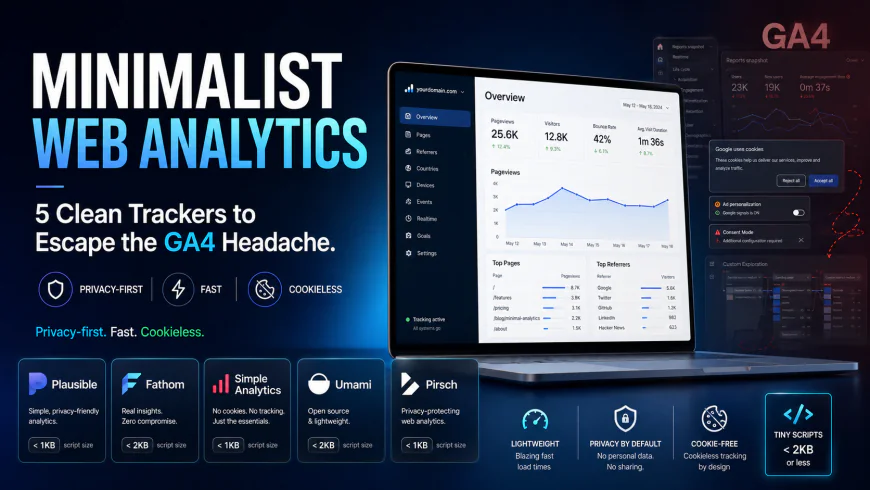
Minimalist Web Analytics: 5 Clean Trackers to Escape the GA4 Headache
Ever since Google sunsetted Universal Analytics, monitoring site traffic has felt less like a quick check-in and more like auditing a complex SQL database. Over 40% of modern websites are leaning toward lightweight, privacy-first tracking platforms. The shift is easy to understand when you look at GA4's cluttered interface, aggressive data sampling, and the massive data gaps left when users decline intrusive cookie consent banners. If you are tired of building custom "explorations" just to find yesterday's pageview count, finding a straightforward, privacy-conscious tracking tool can restore both your sanity and your site's performance.
What this article helps you decide
This guide is designed to help you figure out which lightweight analytics platform fits into your daily routine. Whether you want to escape the legal headaches of European data audits, reclaim traffic figures lost to cookie opt-outs, or recover search queries hidden by GA4's silent "data thresholding" feature, we look at five solid choices. You will see whether a fully hosted cloud platform or an open-source, self-hosted option makes the most sense for your team's technical resources and marketing objectives.
Analysis Methodology
This comparison is built on a deep dive into official documentation, service level agreements, and discussions within developer forums and community groups. Instead of relying on simulated hands-on tests, we synthesized real-world feedback on script sizes, installation friction, dashboard latency, ad-blocker resilience, and GDPR compliance.
Overview & Market Context: The Death of the Cookie Banner and the GA4 Identity Crisis
For over a decade, Universal Analytics (UA) was the default operating system of the web. It was simple: you pasted a snippet of code, and you had immediate access to clean reports showing your visitors' sources, popular pages, and bounce rates. The launch of Google Analytics 4 broke this straightforward model. By trying to serve both giant enterprise advertising engines and basic content websites simultaneously, Google built a bloated hybrid that often requires dedicated, specialized management just to run basic reports.
While typical migration guides try to walk you through GA4's complex interface, most site owners are simply frustrated. The dashboard layout is notoriously confusing, requiring multiple clicks through nested menus to uncover basic traffic metrics. This user experience crisis has triggered a quiet migration toward lighter, human-readable analytics platforms that prioritize speed, privacy, and simplicity.
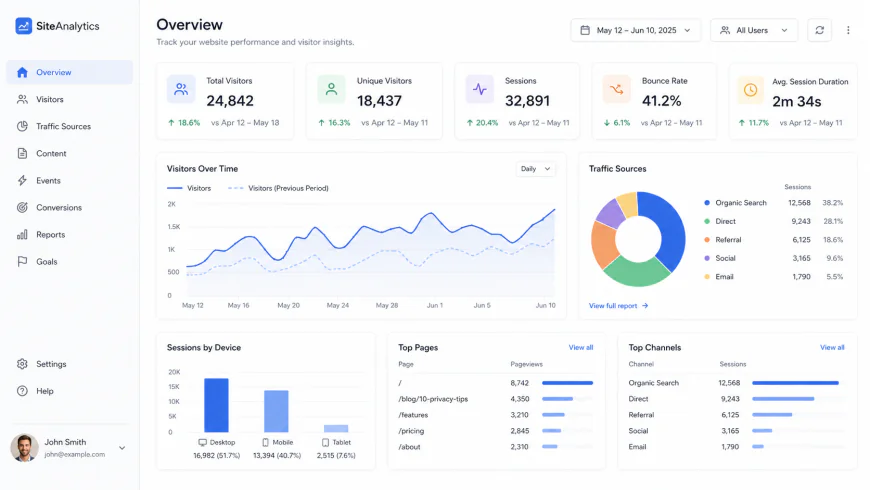 Modern, cookieless tracking platforms trade complex, multi-layered dashboards for a single-screen layout designed for rapid analysis.
Three core friction points are driving developers and business owners away from Google's platform:
- Page Speed and Bloat: Web engineers frequently point out that loading GA4 alongside Google Tag Manager (GTM) adds unnecessary weight to pages. This can drag down First Contentful Paint (FCP) times and negatively impact Lighthouse scores. In contrast, modern minimalist scripts typically run under 2KB.
- Data Thresholding and Sampling: Niche site owners often run into GA4's "thresholding" feature, which hides search terms and referral data on smaller sites under the guise of protecting user identity. This leaves creators with incomplete, unreliable traffic metrics.
- Compliance Concerns: Compliance professionals highlight ongoing European regulatory risks under US data transfer laws (like FISA Section 702). This pressure makes European-hosted, privacy-first platforms highly attractive to compliance-conscious brands.
Additionally, standard tracking scripts are blocked at rates exceeding 50% on tech-heavy platforms like Reddit or Hacker News. Switching to tools that can run via custom subdomains lets you bypass these ad-blockers, finally showing the true scale of your traffic.
The Catch: Who Should Avoid Lightweight Trackers?
Before throwing GA4 in the trash, it is vital to understand what you give up. If your business relies heavily on Google Ads remarketing, programmatic ad buying, or complex multi-touch marketing attribution, these minimalist tools are not for you. Because they purposefully avoid tracking individual user profiles across the web, they cannot feed conversion data back into Google's automated bidding algorithms. Additionally, large e-commerce stores with highly complex user purchase funnels may find the single-page dashboards too basic. If your workflow requires deep cohort analysis, behavioral heatmaps, or advanced SQL-like event querying, sticking with GA4 (or investing in an enterprise platform like Heap or Mixpanel) is unfortunately still the most practical path.
In-Depth Evaluation: 5 Clean Trackers to Ditch the GA4 Nightmare
1. Plausible Analytics: Open-Source Simplicity
Plausible Analytics has become one of the go-to choices for those seeking a less complex alternative. Operating on a pure subscription model rather than selling user data, this open-source tool compiles down to an incredibly lightweight 1.4KB script. Compared to Google's resource-heavy tags, this light footprint keeps page loads snappy and keeps search engine crawlers happy.
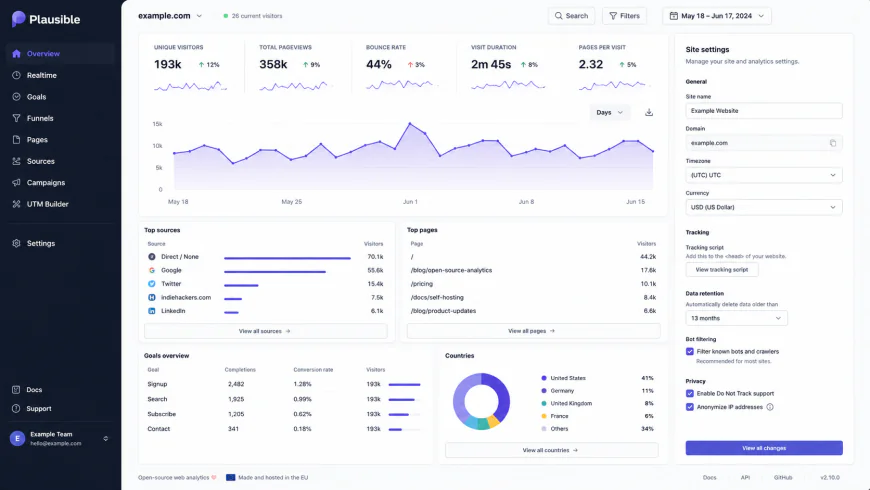 Plausible Analytics offers an open-source dashboard that loads in milliseconds, displaying all essential metrics on a single, scrollable page.
Integrating Plausible is straightforward. The service provides a GDPR-compliant script that functions without cookies or IP tracking. Because it doesn't build cross-site profiles, most sites can legally remove their cookie consent banners entirely after switching. For technical teams, Plausible offers both a managed cloud service hosted within the EU and a self-hosted Docker option. It also integrates directly with Google Search Console, making it easy to pull in search queries without needing to log into the GA4 interface.
2. Fathom Analytics: Speed, Scale, and the V4 Dashboard Rebuild
If you need a reliable cloud-based platform that scales easily without demanding constant server maintenance, Fathom Analytics is an excellent contender. As an early pioneer in the privacy-focused tracking space, Fathom proved that site analytics don't have to rely on invasive data harvesting. With their V4 dashboard rebuild, they completely overhauled their custom analytics engine to make data loading significantly faster.
The V4 update brings direct entry and exit page metrics to their clean, single-screen interface. This makes it incredibly easy to see exactly where visitors land and where they drop off, bypassing the need for complex custom pathing reports. Fathom’s script runs at under 2KB and loads asynchronously. A major highlight is their "EU Isolation" routing, which processes European traffic on EU-owned servers before sending anonymized metadata across US networks. By setting up a custom tracking subdomain (like metrics.yourdomain.com), Fathom also bypasses standard ad-blockers, capturing traffic from tech-savvy audiences who block Google scripts by default.
3. Simple Analytics: Clean, Cookieless Data Integrity
For organizations where data privacy and compliance are non-negotiable, Simple Analytics offers a highly specialized, clean approach. Instead of using fallback methods or device fingerprinting to guess returning sessions, this European tool focuses on capturing clean data from the start, completely avoiding the use of cookies.
The service operates on a strict zero-tracking policy: no cookies, no IP collection, and no local storage hashes. This design makes it inherently compliant with GDPR, CCPA, and PECR out of the box. Because you don't need a cookie consent banner for this tool, you can collect clean traffic metrics from 100% of your real visitors without prompting them. The interface is highly focused, keeping the spotlight on essential metrics like top referrers, page views, and screen sizes. It also includes an automated email reporting tool that can deliver weekly or monthly PDF summaries directly to your inbox or your clients.
4. Umami: The Developer-First Self-Hosted Engine
For developers and self-starters who prefer to host their own tools, Umami is a standout open-source choice. Built on Node.js and compatible with PostgreSQL and MySQL, Umami runs efficiently on modern cloud servers. It offers an incredibly light tracking script (under 2KB) and delivers real-time statistics via a responsive, clean dashboard.
The main appeal of Umami is its flexibility. If you are comfortable working with deployment platforms like Vercel, Netlify, or Heroku, you can get a private instance running in about ten minutes. By combining a free Vercel project with a hobby database tier on Supabase, developers can build a robust, private tracking system with zero recurring software fees. The UI is highly reminiscent of classic analytics interfaces, offering a simple single-page view of traffic trends, devices, and countries. Plus, Umami supports unlimited websites under a single installation, making it highly practical for managing client sites or portfolio projects.
5. Pirsch Analytics: Enterprise-Grade Lightweight Tracking
Pirsch Analytics is a German-hosted, lightweight tool designed for teams that need fast performance without compromising user privacy. Built on Go and backed by a highly optimized database structure, Pirsch is incredibly fast and runs entirely without cookies.
What makes Pirsch unique is its developer-focused backend SDKs (available for Go, PHP, Python, and Node.js). This allows developers to log pageviews and custom events directly from server-side code, bypassing ad-blockers completely and keeping client-side scripts to an absolute minimum. In fact, their standard JS snippet is under 1KB, making it one of the lightest options available. The dashboard is clean and easy to filter, making it simple to build custom on-the-fly segments with a single click, providing solid analytical power without the sluggish UI of larger enterprise platforms.
💡 Industry Feedback & Real-World Transitions
To understand how these lightweight analytics platforms handle real production environments, we analyzed migration feedback and discussions from active web development and marketing communities:
- Improving Core Web Vitals: A developer on a popular React framework forum shared that switching from GA4 to Fathom instantly boosted their Lighthouse scores, shaving 300ms off their First Contentful Paint and removing the need for annoying consent pop-ups entirely.
- Streamlining Agency Reporting: A WordPress agency owner explained on Reddit that migrating their clients to Plausible saved them hours of unpaid support. Instead of building complex custom "explorations" in GA4 just to show basic monthly pageviews, they now send clean, one-page dashboards their clients actually understand.
- Slashing SaaS Subscriptions: A bootstrapper on a SaaS community noted they spun up a self-hosted Umami instance on Vercel in less than ten minutes. This gave them 100% accurate event tracking without a single recurring monthly fee.
The consensus across these technical communities is clear: while GA4 remains a necessary evil for massive enterprise campaigns reliant on deep Google Ads remarketing, lightweight trackers win hands down on user experience, speed, and daily usability.
Quick Comparison: How the Top Trackers Stack Up
Choosing the right tool depends on your technical setup and priority. Here is a side-by-side look at the key metrics for these lightweight alternatives:
| Platform | Script Size | Hosting & Storage | Ad-Blocker Resilience | Best Used For |
|---|---|---|---|---|
| Plausible Analytics | ~1.4 KB | EU (Germany & Estonia) | Yes (using custom subdomains) | Open-source simplicity & quick Search Console links |
| Fathom Analytics | ~1.6 KB | EU (via AWS Global Routing) | Yes (using custom subdomains) | High-traffic scaling & ultra-fast V4 dashboards |
| Simple Analytics | ~3.0 KB | EU (Netherlands) | Yes (via custom DNS) | Zero-cookie compliance & recapturing lost traffic |
| Umami (Self-Hosted) | ~2.0 KB | Self-hosted (Vercel, Supabase, etc.) | Yes (via custom reverse proxy) | Total data ownership & zero software overhead |
| Pirsch Analytics | < 1.0 KB | EU (Germany) | Yes (via backend server SDKs) | Minimalist scripts & server-side event logging |
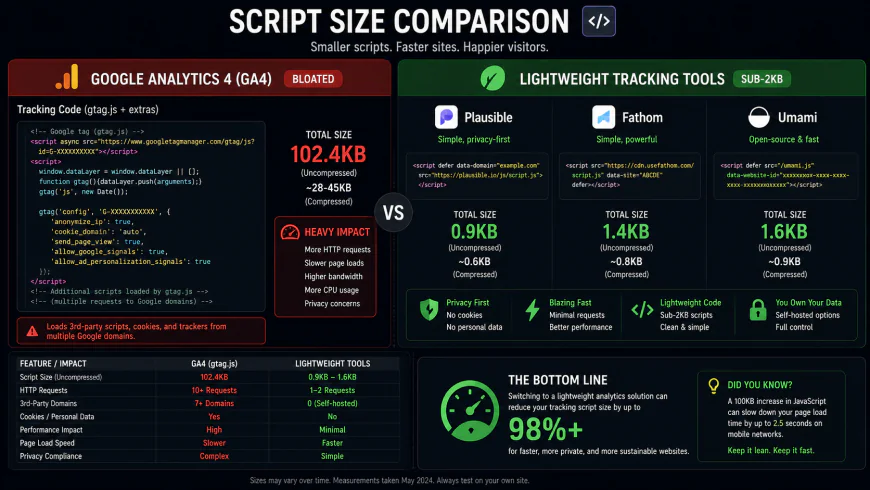 Visualizing the performance impact: Swapping GA4’s massive tracking bundle for a lightweight script under 2KB drastically improves mobile loading speeds and user engagement.
Real-World Shift: Coding Events Without Tag Manager Headaches
Real-World Transition: Simple Event Code vs. GTM Tag Hell
Think about how you track a simple newsletter signup. In the GA4 universe, this usually means logging into Google Tag Manager, configuring custom trigger variables, updating data layers, testing in preview mode, publishing the container, and then waiting up to 24 hours to see if your events finally trickle into your dashboard.
With a modern, developer-friendly tracker, that multi-hour process is condensed into a single, clean line of JavaScript. Here is a quick look at how straightforward event tracking is with Fathom’s optimized script:
// Simple event tracking without complex GTM containers
document.getElementById('signup-form').addEventListener('submit', function() {
    fathom.trackEvent('newsletter signup');
});
For independent developers and small marketing teams, this level of simplicity makes setting up customized conversion funnels incredibly fast, allowing you to iterate in minutes rather than days.
💡 Pro-Tip: Run a Parallel Setup During Your Transition
If your business relies heavily on paid search or programmatic remarketing campaigns, you probably cannot shut GA4 off overnight. Because privacy-first, cookieless trackers do not track individual user identities across different properties, they cannot send deep behavioral profiles back to Google’s ad bidding algorithms.
The Solution: Run a dual-tracking setup for 2 to 4 weeks. Add your new lightweight tracker to collect clean, un-sampled traffic metrics for your daily decision-making, while keeping GA4 active in the background strictly to feed conversion data to your active ad campaigns. This gives you clean, fast dashboards to work with without harming your paid marketing performance.
Pricing & Licensing: Finding the Right Budget Fit
While GA4 is technically "free" (if you don't count the cost of your time and data privacy), these alternatives have transparent business models funded by subscriptions or open-source support. Here is how they compare:
- Plausible Analytics: Cloud hosting starts at $9 per month (billed annually) for up to 10,000 monthly pageviews, covering unlimited sites. If you prefer to host it yourself, their fully functional self-hosted version is free and open-source under the AGPLv3 license.
- Fathom Analytics: Cloud plans start at $15 per month for up to 100,000 pageviews across unlimited sites. This makes it highly cost-effective for medium-sized websites. It is a proprietary service (no self-hosted option), but they offer a 7-day free trial to test their custom V4 setup.
- Simple Analytics: Pricing starts at $9 per month (billed annually) for their Starter Plan, which handles up to 100,000 pageviews. It is a premium, proprietary platform focused heavily on strict compliance and zero-cookie data capture.
- Umami: Umami is completely free and open-source under the MIT license, making it the ultimate tool for developers who love to self-host. If you want them to handle the infrastructure, their managed Cloud service has a generous free tier for up to 10,000 events, with paid plans starting at $9 per month.
- Pirsch Analytics: Pirsch is one of the most affordable options, with a starting tier of just $5 per month (billed annually) for up to 10,000 pageviews. They also offer a 30-day free trial with no credit card required.
Lightweight Alternatives vs. GA4: A Pragmatic Look
Why You Should Switch (The Pros)
- Lightning-Fast Load Times: Sub-2KB scripts keep your Core Web Vitals healthy and help boost organic search rankings.
- Instant, Readable Dashboards: View your traffic sources, top pages, and active goals in seconds on a single page.
- No More Consent Banners: Truly cookieless tracking means you can legally drop those annoying cookie banners from your site.
- Accurate Data: Custom subdomains and server-side tracking bypass standard ad-blockers, showing you the real traffic others miss.
Where They Fall Short (The Cons)
- No Advanced Ad Attribution: These tools are not designed for complex programmatic retargeting or multi-touch ad networks.
- Minimalist Metrics: You will not get hyper-detailed cohort analysis, complex user journey mapping, or granular behavioral profiling.
- Self-Hosting Maintenance: If you self-host tools like Umami or Plausible, you are solely responsible for database backups, updates, and server uptime.
Which Analytics Tool Is Right for Your Project?
Choosing the ideal tracker comes down to your technical comfort, budget, and compliance goals. If you run a content site or personal blog, Plausible or Pirsch will give you clean dashboards and fast loads with almost zero configuration. If you manage a growing SaaS or an e-commerce brand, Fathom is a great choice for handling high-traffic spikes via its fast V4 engine. If you operate strictly in the EU and want maximum legal safety, Simple Analytics helps you track accurately without consent popups. Finally, if you are a developer who wants total data ownership with zero hosting costs, self-hosting Umami on your own cloud setup is the perfect fit.
Quick Recommendations based on Your Goals
Instead of trying to find a one-size-fits-all solution, match your choice to your project's primary requirement:
- For strict GDPR compliance and zero-cookie popups: Go with Simple Analytics. Their purely cookieless collection engine keeps your site lean and legally compliant out of the box.
- For high-scale performance and ad-blocker resilience: Choose Fathom Analytics. Their Fathom V4 update is built to scale seamlessly through massive traffic spikes.
- For open-source flexibility with Search Console integration: Choose Plausible Analytics. It provides a beautiful, streamlined UI with the option to self-host or use their managed cloud.
- For bootstrapped projects and zero ongoing costs: Choose Umami. Deploying it to Vercel and Supabase is fast, reliable, and completely free.
Frequently Asked Questions
Do simple analytics alternatives slow down my website?
Not at all—they do the exact opposite. While the combined Google Tag Manager and GA4 scripts can weigh over 70KB and slow down your First Contentful Paint (FCP), these lightweight alternatives use scripts under 2KB. Swapping them out is one of the easiest ways to instantly improve your Core Web Vitals.
Can I actually remove my cookie consent banner if I switch?
Yes, provided you aren't running other tracking tools like the Meta Pixel or Google Ads. Because tools like Plausible, Fathom, and Simple Analytics do not use cookies, store local identifiers, or track users across different sites, they do not trigger the consent requirements of GDPR, CCPA, or PECR.
Why does GA4 show lower traffic numbers than my server logs?
GA4 numbers are often deflated because standard Google scripts are blocked by over 30% of web browsers and ad-blockers, and many visitors opt out when they see a cookie banner. GA4 also hides some search and referral terms under its "data thresholding" limits. Lightweight trackers running on custom subdomains bypass these blocks, giving you a much more accurate picture of your actual traffic.
Can I run these privacy-friendly tools alongside GA4?
Absolutely. It is common practice to run a dual-tracking setup. You can use a lightweight script to get fast, accurate daily traffic stats on your main dashboard, while leaving GA4 running in the background purely to sync conversions with your Google Ads bidding.
Is self-hosting Umami or Plausible safe for long-term data?
Self-hosting is secure and incredibly cost-effective, but it does require some basic server management. Since you are in control of the infrastructure, you must handle your own database backups and updates. If your database runs out of disk space or goes offline, you risk losing your historical traffic data permanently.
Your Quick GA4 Migration Checklist
Ready to reclaim your dashboard sanity? Here is a straightforward step-by-step checklist to guide your transition:
- List out your critical custom events and goals currently configured in Google Tag Manager (GTM).
- Choose your infrastructure route: self-hosted (Umami or self-hosted Plausible) or fully managed SaaS (Fathom, Plausible Cloud, Simple Analytics, or Pirsch).
- Evaluate your ad campaigns: if you run heavy Google Ads retargeting, plan to keep GA4 active in parallel purely for conversion syncing.
- Check your data residency needs: opt for Plausible’s EU-based servers or Fathom’s automated "EU Isolation" routing.
- Drop the new sub-2KB single-line tracking code directly into your site’s global header.
- Trigger a few test conversions to verify your custom events are registering on your new dashboard in real-time.
- Remove your old, bulky cookie consent banners (assuming you are no longer running other invasive tracking pixels).