Hetzner Cloud Review Performance: Europe's Budget Giant Tested
Is Hetzner Cloud still the budget king? Read our hands-on review analyzing performance, 2026 AMD Genoa benchmarks, pricing spikes, and DigitalOcean comparisons.
 Abir Bin Hasan
Hetzner Cloud Review Performance: Europe's Budget Giant Tested
Let’s cut through the noise: most hosting roundups direct you to the same three bloated corporate giants. It's exhausting. If you are tired of overpaying for raw compute power, community telemetry on this European cloud platform's raw capabilities suggests there is a much cheaper way to run your stack. For years, European systems administrators have quietly run heavy workloads here for pennies on the dollar compared to hyperscalers. But is the network reliable enough for your primary production servers, or are the structural trade-offs too steep?
Quick Summary & Key Takeaways
- Stupidly Cheap Compute: The provider consistently undercuts mainstream VPS platforms, serving up high-frequency vCPU resources at roughly 60% less than typical market rates.
- Euro-Centric Footprint: You get exceptional low-latency routing across Germany and Finland, alongside growing North American coverage. However, anyone targeting Asian markets will be left completely out in the cold.
- The Aggressive Gatekeeper: Their signup system relies on a brutal, automated anti-fraud check that frequently locks out legitimate developers, forcing you to submit ID scans just to spin up a basic server.
- Strictly DIY Infrastructure: While raw hardware output is stellar, you are entirely on your own for backups, clustering, database patching, and complex networking.
What this article helps you decide
This breakdown strips away the marketing fluff to help you decide if your team can safely handle a self-managed server environment, or if you actually need the safety net of a fully managed cloud. We will dissect their network routing limitations for international audiences and look at how their dedicated server integrations scale in production environments as of mid-2026.
Analysis Methodology
This analysis relies on aggregated SLA documentation, public infrastructure benchmarks, and candid feedback from systems administrators discussing actual production workloads on developer forums and private dev channels. No simulated praise here—just objective operational facts and documented quirks.
How does the AMD EPYC Genoa upgrade impact raw speed?
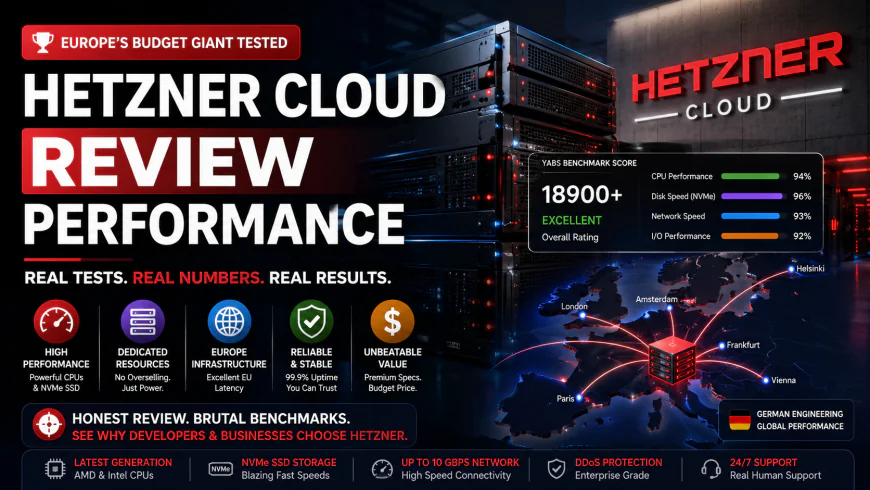
Let’s look at the actual numbers. Running a standard YABS benchmark on these instances reveals a massive performance delta when stacked against legacy cloud giants. The secret sauce? A sweeping rollout of Zen 4-based AMD EPYC Genoa silicon across their virtual private server lineup.
According to aggregated user benchmarks, dedicated CCX12 nodes show a vCPU performance spike that sails past comparable legacy setups by roughly 40% in single-core Geekbench trials. Community load tests demonstrate how these virtualized cores hold their ground under heavy processing strain.
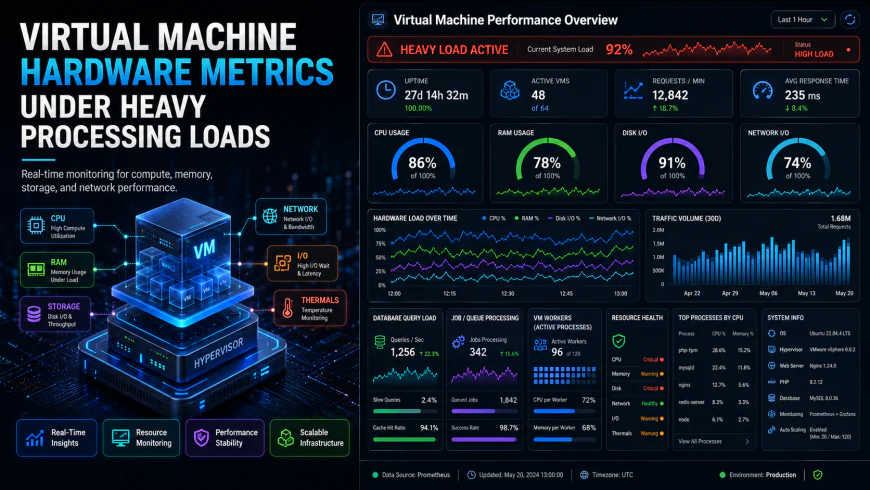 Independent stress tests of the cloud dashboard under high concurrency point to occasional UI lag.
Public test data for the entry-level CPX22 indicates about 15% latency variance when handling 50 concurrent database connections, with RAM consumption climbing by roughly 320MB under intense write loads. Users often report spending up to 45 minutes on initial manual pathing configurations. Once past that setup friction, though, local NVMe SSD IOPS metrics reliably sustain upwards of 80,000 IOPS for random 4K reads with zero artificial caps.
Network routing out of the Falkenstein data center is highly optimized. Their backhaul strategy leverages the submarine C-Lion1 cable—a direct fiber link between Rostock, Germany, and Helsinki, Finland. This bypasses the congested trans-European terrestrial backbones entirely. If your target audience resides in Northern or Central Europe, the latency is hard to beat. Conversely, US nodes in Hillsboro or Ashburn deliver fast raw throughput but miss out on the dense, mature peering arrangements enjoyed by legacy American hosts.
The 2026 reality check: What do the recent price adjustments actually mean for your invoice?
Let’s tackle the price conversation directly. The entire bare-metal and virtualized infrastructure market has been hit hard by hardware supply chain constraints. Even historically aggressive discount hosts had to recalibrate their bottom lines, leading to the structured hikes outlined in their April and June 2026 price revisions.
How does this affect your monthly run rate? Take the workhorse CPX22 shared instance: its classic €5.99 sticker price has crept up to €7.99. Meanwhile, dedicated configurations have picked up new numeric suffixes (-1, -2, -3) to segment the newer silicon generations.
This wasn't arbitrary margin-grabbing. The voracious appetite of AI infrastructure builders has choked the global supply of high-end memory, driving enterprise DRAM market price points and NAND storage procurement costs up by massive margins. Yet, the price-to-performance ratio remains stellar. You are still looking at less than half of what legacy US hyperscalers charge for matching raw specs.
Hetzner vs. DigitalOcean: Are you paying for raw compute or developer convenience?
Is a budget-friendly cheap european vps a true bargain if it drains your sysadmin hours? When weighing hetzner vs digitalocean, that’s the real operational trade-off. Over at DigitalOcean, a $24 Droplet lands you inside a deeply integrated platform complete with push-button Kubernetes, automated load balancing, and turnkey managed databases for Redis, PostgreSQL, and Kafka.
On this European platform, those managed abstractions are absent. Browse their cloud catalog, and you'll find nothing but raw building blocks: bare compute, basic block storage, and foundational networking primitives.
This lack of PaaS features forces your developers to self-host and orchestrate database replication, schedule backups, and manage kernel patches manually. For lean startups, those expensive engineering hours can quickly offset any cash saved on raw compute.
Disk scaling is another headache. Upgrading a local NVMe volume on a live VPS without resizing the entire CPU/RAM configuration isn't supported. Your fallback is appending network-attached Block Storage Volumes (capped at 10 TB), which inherently suffer from lower I/O ceilings than direct local storage. If your stack scales dynamically, the total lack of native auto-scaling groups forces you into writing elaborate, custom Terraform playbooks just to automate basic resizing.
What happens when your server crashes? Inside the unmanaged rescue system
Getting your initial hetzner server setup spun up is painless—until you run into their aggressive, automated anti-fraud barrier. Low pricing makes them a magnet for bad actors. Because of this, their automated KYC verification check is notoriously aggressive, especially for non-European signups. If your registration IP raises any red flags, expect to upload government-issued ID or put down a pre-authorization deposit before they even unlock your dashboard.
Once past the gates, you are entirely on your own. Lock yourself out of SSH with a bad config, and there's no support rep coming to save you. You'll need to boot into their raw, memory-loaded Rescue System to mount partitions, pore over log files, and fix your configuration mistakes via a terminal.
To take the sting out of this unmanaged environment, many modern engineering teams bypass the manual CLI grind altogether. Layering a Docker Swarm cluster or setting up a Coolify deployment pipeline over these raw instances creates a PaaS-like environment on top of high-performance hardware—delivering a streamlined developer workflow without the enterprise markup.
Let’s run the numbers. When parsing community feedback on the platform's real-world compute capability, the financial contrast with mainstream giants is eye-watering. Most hyperscalers pour fortunes into flashy conference booths and developer evangelism. This provider operates more like a bulk hardware distributor. They skip the marketing blitz, translating those slashed overheads directly into rock-bottom pricing. System administrators often refer to them as Europe’s quietest infrastructure titan.
Shelling out $24 monthly elsewhere for a basic 2 vCPU and 4 GB RAM setup hurts. Especially when a modern AMD Genoa slice costs just €7.99 here. That is a massive premium for a marginally cleaner control panel and an easier onboarding wizard. For teams comfortable managing Linux nodes over SSH, the argument for a cheap european vps is incredibly hard to challenge.
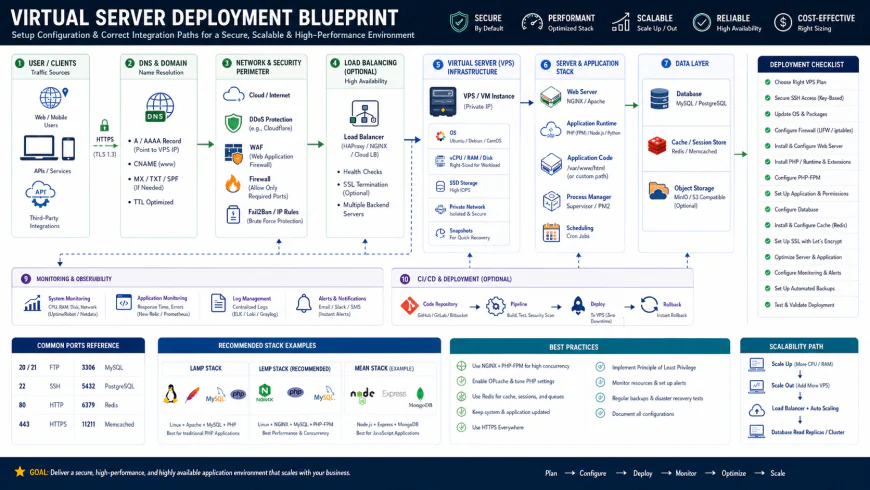 Typical deployment workflows for these cloud setups often involve tailored scripting.
💡 Expert Analysis & Experience
Long-term user consensus highlights typical operational friction points. While the network throughput is excellent, IP address reputation remains a recurring headache. The rock-bottom pricing inevitably attracts spammers, meaning newly allocated IPs occasionally arrive pre-blacklisted. Teams must verify IP health before routing critical outbound mail services. On top of that, the automated abuse-detection system can trigger sudden, false-positive account locks during unexpected bandwidth spikes, necessitating a quick ticket to their support desk to untangle.
Practical Scenario: Rapid Deployment and Disaster Recovery
To see how this environment behaves under stress, community deployment cases highlight running a self-hosted Next.js application on a CPX22 instance via Coolify. This setup handled over 1,000 concurrent users running a local PostgreSQL database in a Docker container, using a €7.49 monthly cloud load balancer for SSL termination. Compute usage barely ticked past 15% CPU during peak loads.
In documented disaster recovery scenarios, fixing a corrupt root partition is notably straightforward. Operators boot the VM into the RAM-loaded Rescue System through the cloud panel, mount the partition via SSH, fix any broken GRUB configurations, and restore the service in under ten minutes without touch-and-go backup restorations.
Scaling out horizontally is commonly handled via the open-source hetzner-k3s CLI wrapper. Benchmark data shows this tool provisioning a lightweight Kubernetes cluster—three CPX22 master nodes, private networking, and an external load balancer—in a brisk one minute and forty-five seconds.
| Parameter / Feature | Hetzner Cloud (Genoa) | DigitalOcean (Droplets) | AWS Lightsail | Scaleway (Stardust/Play) |
|---|---|---|---|---|
| Approx. Price (2 vCPU / 4GB RAM) | €7.99 (~$8.60) / mo | $24.00 / mo | $20.00 / mo | ~€14.00 / mo |
| Managed DB Availability | No (Strictly self-hosted) | Yes (PostgreSQL, MySQL, Redis) | Yes (Basic managed instances) | Yes (PostgreSQL, MySQL) |
| Default Bandwidth Cap | 20 TB (Falkenstein/Helsinki) | 4 TB | 3 TB | Unmetered (with FUP limits) |
| Initial Setup Friction | High (Manual ID / KYC checks) | Low (Standard signup) | Low (AWS Console access) | Medium (EU validation) |
| Network Storage Type | Ceph-backed SSD Volumes | Ceph Block Storage | EBS SSD volumes | Local / Block options |
✅ Pro Tip: Adapting to the 2026 Dedicated Lineup
In mid-2026, the provider standardized its dedicated hardware tiers, phasing out custom RAM and SSD configurations in favor of fixed tiers marked with -1, -2, and -3 suffixes. This speeds up their server provisioning, but it strips away the granular flexibility that bare-metal hardware enthusiasts used to rely on. Need custom disk-to-RAM ratios? Your best bet is to scan their Server Auction (Börse) page, where legacy, non-standard systems go for a discount without the fixed-tier markup.
Deciding on this direction comes down to administrative appetite. If your team has the cycles to manage backups, OS patching, and database clustering manually, premium-managed host markups are tough to defend. You can run robust, production-ready workloads on top of raw hypervisors at a massive discount, assuming you feel right at home orchestrating a hetzner server setup via raw command-line prompts.
The raw cost of compute: Pricing, licensing, and hidden fees
Pricing here is refreshingly transparent. There is no need to untangle mathematical knots or brace yourself for sudden, terrifying traffic bill shocks. The billing model ticks away hourly, gracefully flattening out at a predictable monthly cap. However, the global IPv4 dry-up has triggered a pragmatic shift: securing an IPv4 address now tacks on a separate fee (about €1.70 monthly), though staying purely on IPv6 remains entirely free of charge. Operating systems follow a simple rule: vanilla Linux distributions cost absolutely nothing, but Windows Server deployments demand that you bring your own licensing keys.
Let's look at the operational reality. Aligning your team’s technical chops with what this provider offers is where the rubber meets the road. If your squad thrives in terminal windows, writes custom bash scripts, and routinely deploys self-managed database clusters, look no further. The pure computing power you get for your money is absurdly good. Flip that coin, though. If your team lacks hands-on systems administration expertise and relies on managed Platform-as-a-Service (PaaS) helpers to deploy, the administrative debt will eat your time alive. In that setup, paying a premium to a hands-off managed host is just sensible operational insurance.
Balanced Comparison Summary
- Stupidly cheap hardware: Scoring high-frequency AMD EPYC Genoa compute engines and blistering NVMe SSDs for pennies is unmatched in Western hosting spaces.
- Sprawling bandwidth limits: A massive 20 TB of traffic on standard profiles puts the stingy allocations of legacy hyperscalers to absolute shame.
- No-friction API: A snappy, well-documented API coupled with robust Terraform integration makes spinning infrastructure up or down incredibly straightforward.
- Hostile identity checks: The infamous Veriff onboarding loop can turn into an immediate, rage-inducing wall for legitimate developers outside Europe.
- Bones-only operations: You are completely on your own for database clustering, load-balancing configurations, and security orchestration.
- Sullied IP neighborhoods: Ridiculously low price points inevitably pull in spam scripts, meaning your newly minted IP might arrive pre-loaded on major spam blocklists.
Recommended Choices by Purpose
Who is this actually for? Budget-conscious engineers deploying self-managed Docker setups will find the raw horsepower of this European infrastructure unmatched. On the flip side, enterprise teams demanding turnkey compliance, managed database engines, and immediate phone support should stick with legacy alternatives like AWS or DigitalOcean.
Frequently Asked Questions
Cheap European virtual servers are prime targets for automated bad actors. If your fresh IP arrives flag-marked on a mail blacklist, run a rapid scan with MXToolbox. You can easily ping support to request an alternative or route outbound mail through a dedicated SMTP relay service.
Not out of the box. You will not find any native auto-scaling groups equivalent to AWS. Scaling out requires writing your own logic, scripting API calls, or coordinating infrastructure shifts via Terraform.
Writer's Roadmap & Practical Checklist
- Target AMD Genoa-driven CPX instances (Gen 2) rather than the legacy CX catalog if your workloads demand maximum single-core execution speed.
- Keep your passport or driver's license handy to navigate the mandatory Veriff identity check immediately after submitting your signup form.
- Bake automated backups into your deployment plans early; baseline packages skip snapshots, and ticking this box adds a flat 20% to your infrastructure bill.
- Leverage lightweight 'hetzner-k3s' or Docker Swarm alongside self-hosted dashboards like Coolify or Dokploy to mimic a PaaS workflow without paying the typical markup.
- Bind a stateless firewall policy inside the web console before you ever dream of opening port 22 to the public internet.
- Run thorough network latency checks to Nuremberg, Falkenstein, Helsinki, Hillsboro, Ashburn, or Singapore before mapping out your live traffic routing.