How to Use B2B Lead Generation Automation Software
Discover how to set up B2B lead generation automation software to scale your pipeline, nurture prospects, and close more deals automatically.
 Abir Bin Hasan
How to Use B2B Lead Generation Automation Software
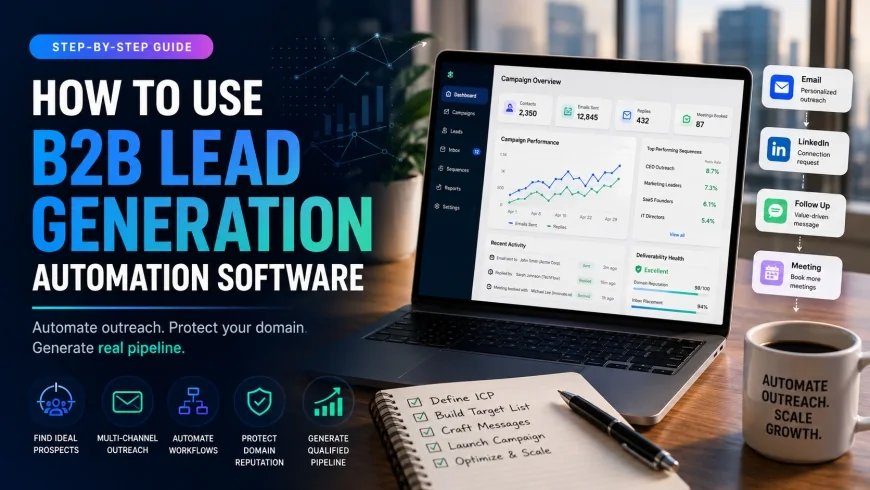
Modern outbound sales is a crowded space, and hitting your pipeline targets requires a steady, methodical approach. Deploying automated campaigns can streamline your customer acquisition process, but a poorly planned setup will ruin your company's domain authority. This guide maps out a practical, step-by-step process to scale your business outreach and generate real pipeline without risking your brand's digital reputation.
What this article helps you decide
By walking through these steps, you will determine which tools match your actual operational scale, how to configure multi-channel campaigns without triggering spam filters, and how to find the right balance between automated processes and genuine human interaction to improve your response rates.
Analysis Methodology
This guide is based on an objective evaluation of platform documentation, standard industry pricing models, and functional workflow considerations. Rather than relying on vendor claims, the focus is on real-world stability, configuration overhead, and how these software suites perform during active daily sales cycles.
Overview & Market Context: The Shift in B2B Automation
The dynamics of B2B sales have shifted dramatically. Buying static lists of email addresses and blasting them with repetitive, generic templates rarely works anymore. Buyers are more selective, spam filters are increasingly strict, and gatekeepers are highly protective of executive calendars. Industry reports, including the latest HubSpot state of marketing data, suggest that sustainable growth now depends on highly personalized, multi-channel strategies built around quality data.
Furthermore, insights from sales operations reviews by Gartner point out that teams prioritizing clean data enrichment over sheer outbound volume see much faster sales cycles. Salesforce operational surveys also confirm that productive reps spend less time on manual data entry and more time on active conversations when background routing tasks are handled systematically by their core systems.
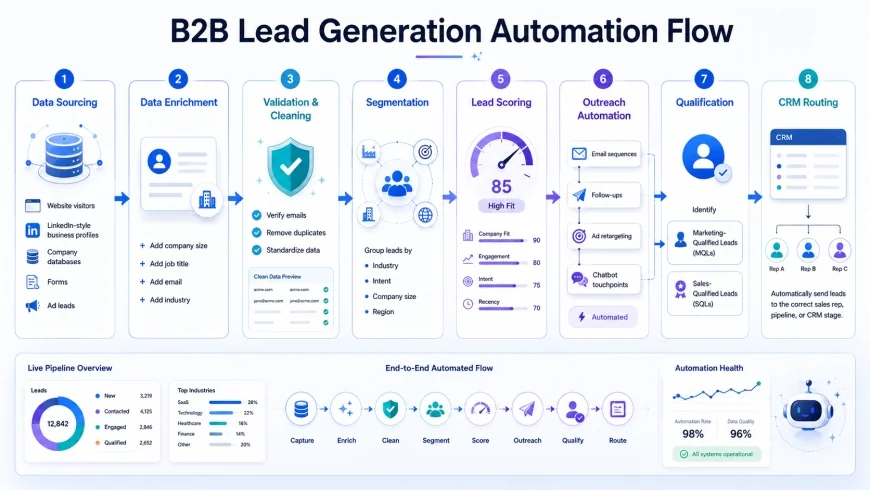 Figure 1: The architecture of a modern, multi-channel automated B2B lead generation engine.
However, treating automation as a simple volume play remains a common pitfall. Launching aggressive outbound campaigns across specialized cold email platforms without warming up your sender profiles first is a fast track to the spam folder. To make these tools work, operations teams must view automation as a tool for delivering timely, relevant context rather than simply increasing the speed of generic messages.
Step 1: Setting Up Your Technical Foundation (Domain Protection)
Before setting up your first automated sequence, you need a resilient technical foundation. Attempting to run cold campaigns from your primary corporate email domain is highly risky. If your primary domain gets flagged for spam, your everyday business communications—from client updates to internal operations—will suffer. This is why experienced operations teams prioritize domain insulation above all else.
Purchase Secondary Domains
Acquire three to five alternative domains specifically for cold outreach. If your home base is company.com, look for natural variations like getcompany.com, trycompany.com, or companylabs.com. Always redirect these secondary domains to your primary website so that prospects who look up your web address land on your official homepage.
Configure DNS Records Correctly
For every secondary domain, you must set up three standard security protocols to protect your deliverability:
- SPF (Sender Policy Framework): Declares which mail servers are authorized to send messages from your domain.
- DKIM (DomainKeys Identified Mail): Adds a cryptographic signature to verify your emails aren't being intercepted or forged.
- DMARC (Domain-based Message Authentication, Reporting, and Conformance): Directs receiving servers how to handle emails that fail SPF or DKIM checks. Start with a monitoring policy (
p=none) and move toward protection once your sender metrics look stable.
Implement Domain Warm-Up Sequences
Do not send cold messages from a brand-new domain immediately. Doing so raises instant red flags with major inbox providers. Instead, link your secondary domains to a dedicated warming tool. These platforms gradually exchange automated, realistic emails within a network of trusted inboxes, steadily establishing your sender reputation over 14 to 30 days before you launch live campaigns.
Step 2: Database Sourcing and Multi-Source Enrichment
The success of your campaign rests entirely on the quality of your target data. Drawing from a single directory often leads to outdated emails and hard bounces. Modern teams combine primary contact databases with secondary enrichment steps to keep lists pristine.
A reliable setup involves blending first-party data, intent indicators, and validated third-party contact databases. This ensures you target companies currently showing active interest in your space. The table below outlines how popular platforms handle and enrich prospect databases.
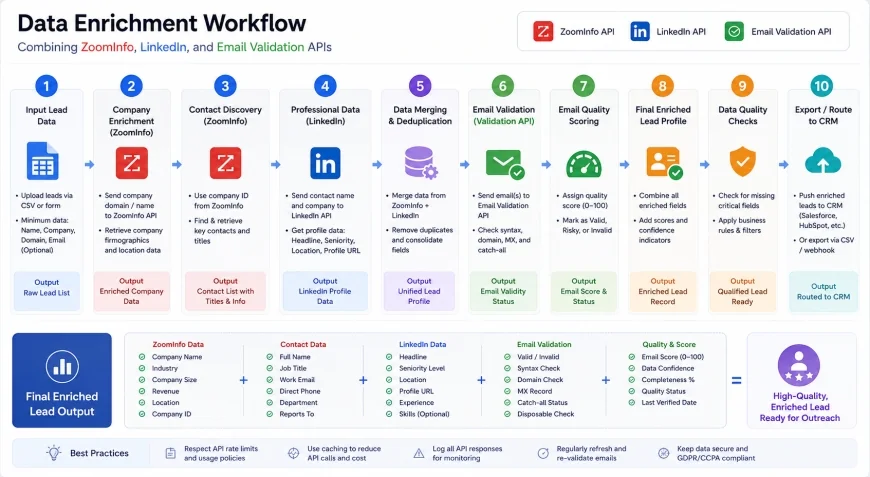 Figure 2: Visualizing the multi-stage data verification process to ensure zero email bounces.
💡 Expert Analysis & Experience
Practical experience across sales operations shows that relying on a single data export without verification leads to bounce rates exceeding 15%. Adding a dedicated validation API (like ZeroBounce or NeverBounce) to the data pipeline drops bounce rates below 2%, protecting domain health and ensuring your automation runs smoothly without constant manual cleanups.
Leveraging Intent Data for Timing
Instead of reaching out at random, use prospecting tools that track intent signals. Platforms that monitor recent executive hires, technical stack changes, or expanding departments help you reach out when a prospect is actively facing the challenge your service solves. For example, if a target accounts hires a new head of operations, they are far more likely to review their current software stack.
Step 3: Orchestrating a Multi-Channel Automation Sequence
Relying solely on one communication channel yields diminishing returns. Successful outbound operations coordinate touchpoints across LinkedIn, email, phone calls, and occasionally direct mail to create a natural, non-intrusive cadence.
A typical multi-channel sequence spreads out various actions over a 15-day window, giving the prospect time to notice your brand across different platforms.
| Day | Channel | Action Type | Objective / Goal |
|---|---|---|---|
| Day 1 | Profile View & Soft Follow | Build initial passive brand familiarity. | |
| Day 3 | Connection Request (No Pitch) | Establish first-degree connection for future messaging. | |
| Day 5 | Highly Personalized Value Email | Introduce a relevant case study or valuable industry asset. | |
| Day 8 | Direct Message (Soft Touch) | Reference the email sent on Day 5, ask a low-friction question. | |
| Day 11 | Follow-up with Resource Link | Provide additional value and invite them to an automated web event. | |
| Day 15 | Phone / Task | Manual Call Task Triggered | Sales rep calls directly if the prospect clicked links in previous emails. |
By spacing out these touchpoints, your communication feels less like an aggressive automated broadcast and more like an organic business outreach. This steady cadence keeps your brand visible without overwhelming the recipient.
Practical Scenario
In real-world setups, a software-as-a-service (SaaS) provider targeting enterprise IT executives originally launched an aggressive, single-channel email campaign. The results were disappointing: a 0.5% meeting booking rate and a flagged outbound domain within two months. Transitioning to a multi-channel sequence—starting with LinkedIn profile actions, followed by a targeted email, and culminating in a physical mailer—scaled their booking rate to 4.2% while keeping their sender reputation healthy.
Step 4: Crafting the Personalization Matrix
To make automation feel human, you must move beyond generic placeholders like {First_Name} and {Company_Name}. Buyers recognize basic template tokens instantly. Instead, build a matrix using custom variables extracted during your data enrichment stage.
Map Your Custom Attributes
When setting up your data fields, include columns for specific business insights that demonstrate you've done your homework. Effective custom variables include:
- Competitor Tech Stack: "Since your team is currently using [Competitor Tool] for your billing operations..."
- Recent Company Milestone: "Following your recent office launch in [City]..."
- Specific Job Pain Point: "Managing a distributed engineering group of [Team Size] usually introduces..."
Leverage Spintax for Email Variations
To keep email filters from identifying your messages as bulk templates, use Spintax (spinning syntax) to vary your phrasing. Spintax instructs your outbound tool to rotate greeting and body text variations for each message sent. A line configured as {Hello|Hi|Hey} {First_Name} changes the digital footprint of each email, protecting overall deliverability across your campaigns.
✅ Pro Tip
Avoid tracking pixels and link attachments in the very first touchpoint. Security firewalls aggressively scan first-time messages containing tracking codes or PDFs. Saving links and attachments for the second or third touchpoint significantly improves your chances of landing in the primary inbox.
Step 5: Implementing Lead Scoring and CRM Lead Routing
Not every engagement is a buying signal. A prospect who opens a single email requires a different approach than someone who opens a message multiple times, clicks a link, and visits your pricing page. Lead scoring rules make your sales pipeline far more efficient by surfacing high-intent prospects automatically.
Set up scoring values based on real prospect actions within your automation engine:
- Email Open: +1 point
- Email Link Click: +5 points
- LinkedIn Connection Accepted: +3 points
- Pricing Page Visit: +10 points
When a prospect's score reaches a target threshold (for example, 15 points), your platform should instantly trigger a routing rule. This automated handoff passes the high-scoring lead straight to an account executive for immediate, manual follow-up. This keeps your reps focused on prospects who are actively engaged, rather than chasing cold accounts.
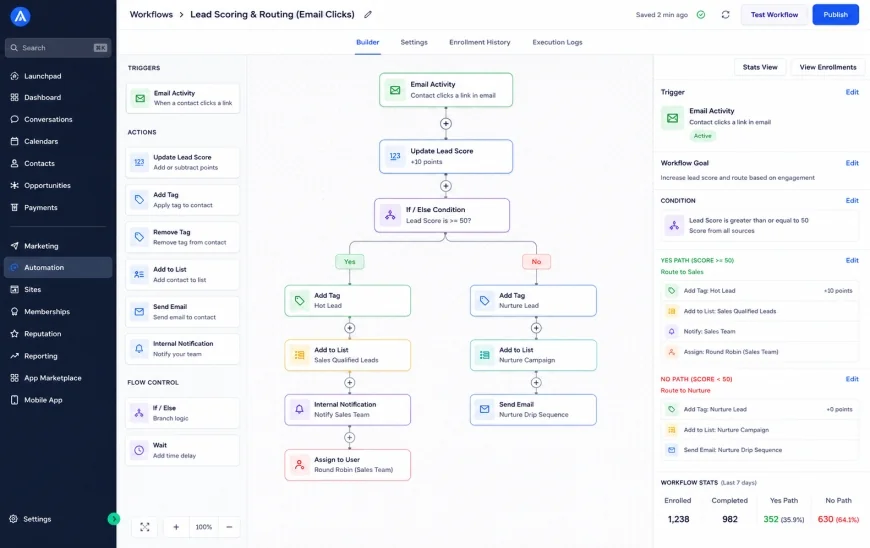 Figure 3: Setting up behavioral trigger rules within B2B marketing automation software.
Platform Comparison: Selecting the Right Automation Stack
Your choice of tools directly shapes your outbound strategy. Different software suites focus on different parts of the lead cycle, from data sourcing and verification to specialized sequencing and CRM synchronization.
| Software Platform | Primary Use Case | Key Integration Options | Notable Advantage | Potential Limitation |
|---|---|---|---|---|
| Apollo.io | Database sourcing and cold email outreach | Salesforce, HubSpot, Zapier | Massive, built-in verified database of business profiles. | Email deliverability tracking features are basic compared to specialized tools. |
| HubSpot | B2B marketing automation & inbound tracking | Native CRM, major enrichment platforms | Outstanding lead scoring and automated CRM lead routing. | Expensive entry point for smaller startups scaling outbound campaigns. |
| Clay | Deep, multi-source lead enrichment software | 150+ APIs, custom webhooks, OpenAI | Aggregates data from over 50 providers in a unified spreadsheet interface. | Requires a steeper learning curve and custom logic configuration. |
| Lemlist | Specialized cold email outreach tools | HubSpot, Pipedrive, Salesforce | Excellent automated email warm-up and deep image personalization. | Database sourcing capabilities are limited compared to dedicated platforms. |
When building your stack, favor tight integrations over a collection of disconnected apps. Ensure your data moves smoothly from your prospecting tool to your sequence engine and ultimately to your CRM database without manual export-import workarounds.
Pricing & Licensing Breakdown
Calculating the true cost of an automated outreach setup requires looking past the initial software subscription. Hidden overheads—like data verification fees, API credits, and secondary domain hosting—can accumulate quickly.
Base Software Subscription Fees
Most outbound platforms operate on a per-user, monthly billing model. Standard plans usually run between $49 and $99 per user each month. Enterprise tiers that offer advanced routing rules, deep analytics, and custom integrations can easily exceed $300 per seat. Be sure to check if key integrations are included in the base rate or require a premium add-on.
Data Enrichment and Verification Costs
Enrichment platforms typically bill on a credit usage model. Extracting verified emails, scanning tech stacks, or looking up phone numbers costs credits, which can add $0.05 to $0.15 per contact. It is highly recommended to budget for separate verification tools to ensure you are not paying premium software rates for outdated contact details.
Infrastructure and Secondary Inbox Costs
To scale outreach safely, you need unique Google Workspace or Microsoft 365 licenses for each secondary domain. Running five alternative domains with two inboxes each means paying for ten email accounts. At roughly $6 to $12 per inbox, this infrastructure adds an overhead of $60 to $120 per month, which must be factored into your baseline customer acquisition cost calculations.
Balanced Pros & Cons
System Advantages
- Scalable Efficiency: Dramatically reduces the manual hours spent finding contacts, sending emails, and tracking replies.
- Reliable Pipeline Growth: Establishes a predictable, systematic flow of touchpoints that run in the background 24/7.
- Enhanced Data Accuracy: Multi-source enrichment ensures that sales reps always have the correct job titles, company sizes, and tech stacks.
System Limitations
- Risk of Domain Spam Flags: Incorrect configuration or overly aggressive sending volumes can permanently black-flag your domains.
- Impersonal Brand Experience: Over-automation without creative manual touchpoints can make your company appear robotic or spammy.
- Complex Tech Stack Management: Connecting databases, enrichment tools, sequences, and CRMs requires dedicated operations oversight.
Who should use what?
Early-stage teams with limited budgets usually find that combined database and outbound tools like Apollo.io offer the most practical, cost-effective starting point. Mid-market companies look to integrate flexible platforms like Clay to pull data from multiple sources and run sophisticated, customized outreach campaigns. Enterprise companies typically rely on centralized systems like HubSpot to enforce compliance, manage routing across large territories, and coordinate inbound and outbound marketing efforts safely.
When to Avoid Outbound Automation
Outbound automation is not a universal fix. If your business relies on high-contract enterprise deals with a tiny total addressable market (under 500 potential accounts), automated tools will likely burn through your prospects and damage invaluable industry relationships. Furthermore, these platforms come with a steep learning curve; misconfigured routing can cause massive database cleanups, and many vendors implement steep pricing jumps upon renewal. If you do not have a dedicated operations person to monitor domain health, clean database records, and manage API keys, the manual maintenance overhead of these systems will quickly offset the time saved.
Recommended Choices by Purpose
No single tool handles every stage of the process perfectly. Build your tech stack around your team's primary objectives:
- For Maximum Data Enrichment & Accuracy: Deploy a custom workspace in Clay. The platform's ability to scrape LinkedIn, leverage AI, and pull data from dozens of APIs simultaneously makes it the premier choice for hyper-targeted segmentation.
- For Scalability & Ease of Use: Use Apollo.io. Its simple UI, unified database, and built-in sequences allow a single user to build a campaign from scratch in under an hour.
- For Compliance & Safety: Rely on the native automation features inside your enterprise CRM (such as HubSpot or Salesforce). They ensure complete compliance with data protection laws and manage secure CRM lead routing natively.
Common Questions
Can outbound automation platforms integrate with my current CRM?
Yes, most modern tools offer native integrations with leading platforms like HubSpot, Salesforce, Pipedrive, and Zoho. If a tool lacks a native link, you can connect platforms using connectors like Zapier or Make to pass contact data and behavioral signals between systems.
How do I prevent my outreach emails from landing in the spam folder?
Keep your outbound campaigns isolated on secondary domains. Configure your SPF, DKIM, and DMARC records correctly. Always warm up new domains for at least two weeks before launching campaigns, limit daily sending volumes to 50 emails per inbox, and regularly clean your lists to keep bounce rates under 2%.
What is the difference between inbound and outbound automation tools?
Inbound tools are designed to capture, grade, and nurture leads who find your company organically or via ads. Outbound platforms help you actively search for, enrich, and contact prospects who match your target profile but haven't interacted with your brand yet.
Is using LinkedIn automation tools safe for my personal account?
LinkedIn actively monitors and restricts automated profiles. To protect your account from restriction, avoid aggressive automation plugins. Focus instead on tools that work within safe daily limits, mimic natural user behavior, and help you draft personalized messages rather than bulk outreach.
Practical Checklist for Implementation
To successfully launch and scale your B2B lead generation automation program without running into technical or operational roadblocks, systematically execute the following checklist:
- Configure custom tracking domains for email outreach tools to safeguard deliverability.
- Validate all lead contact details using an automated verification system before sending campaigns.
- Draft a dynamic personalization matrix (industry, job role, unique company pain point).
- Establish clear trigger events in the software for transition from auto-nurture to high-touch, manual sales interactions.