Best Free CRM with Marketing Automation for Founders
Looking for the best free CRM with marketing automation? Scale your startup on a budget with these top-rated free automated CRM tools for founders.
 Abir Bin Hasan
Best Free CRM with Marketing Automation for Founders
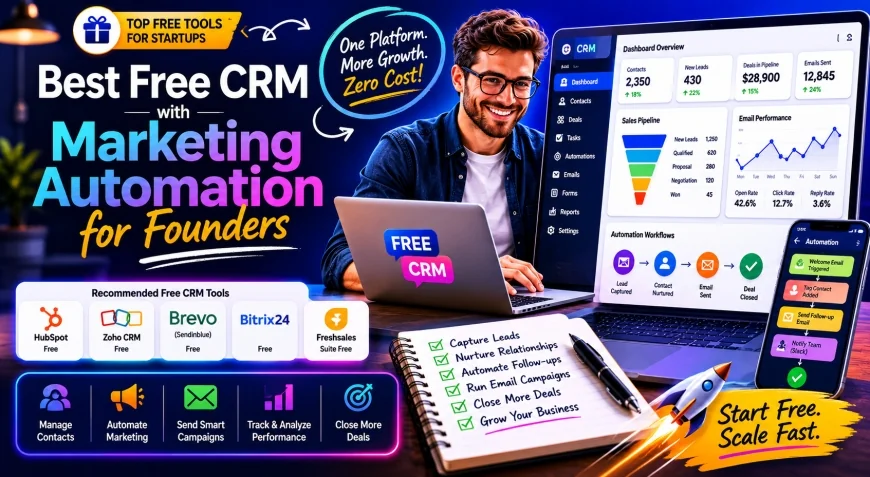
Bootstrapped founders often burn precious hours stitching together disjointed SaaS tools using fragile webhooks. Discovering the Best Free CRM with Marketing Automation for Founders can stop this operational chaos, providing a unified database that scales with your growth without draining your initial seed capital.
Core Considerations
This comprehensive analysis helps you decide which free customer relationship management platform fits your business model. We evaluate the realistic limits of free tiers, database capacities, and the complexity of available marketing automation workflows to ensure your sales pipeline never stalls.
Analysis Methodology
This guide is based on an in-depth review of publicly available platform features, official pricing information, commercial-use terms, and practical workflow considerations for professionals. We focus on grounding our analysis in primary sources and real-world application.
Overview & Market Context
The modern trend among bootstrapped founders is shifting away from complex multi-tool stacks toward single, unified databases. Previously, startups linked separate CRM databases and Mailchimp accounts through middleware like Zapier, which created expensive API integration maintenance and usage-limit fees. Managing multiple sources of truth often led to duplicate contacts, broken automated runs, and massive monthly bills.
typical considerations founders now demand a free CRM with built-in automation to keep their operations lean and clean from day one. By choosing an integrated database, you ensure that marketing interactions directly update your sales pipelines without synchronization delays. However, finding a truly capable free platform requires navigating a landscape filled with heavily restricted feature sets.
 Modern marketing automation workflows require structured planning to avoid hitting free-tier usage limits.
Unfortunately, visual workflow builders are increasingly being gatekept behind premium paywalls across the CRM software industry. This trend forces early-stage entrepreneurs to rely on simpler linear autoresponders on free tiers to execute nurture campaigns. Understanding these structural shifts helps you select a no-cost CRM with email automation that remains functional as your audience expands.
In-Depth Evaluation of Top Contenders
Selecting the Best Free CRM with Marketing Automation for Founders requires a granular examination of what each major platform actually delivers. We analyzed the top industry contenders using primary documentation to expose the exact capabilities and limitations of their free tiers.
HubSpot Free CRM
According to the HubSpot Free CRM Feature Directory, this platform offers an incredibly generous database capacity of up to one million contacts. This massive ceiling makes it highly attractive for startups needing a reliable repository for early prospect lists. The user interface is exceptionally polished, providing a world-class contact management experience that requires minimal training.
However, the marketing automation capabilities on HubSpot's free plan are intentionally kept basic to encourage premium upgrades. Founders are limited to simple, single-stage form-fill autoresponders rather than complex multi-branch marketing automation workflows. While it serves as an excellent lead nurturing software for basic email campaigns, complex branching logic is strictly restricted.
Additionally, free emails sent through HubSpot carry noticeable brand watermarks, which may detract from your startup's professional appearance. It remains a powerful option for database-heavy startups, but those needing sophisticated automated sequences will find the automation canvas highly restricted. It is best used as a foundational database that connects to external tools as your capital grows.
Zoho CRM
Based on Zoho CRM Pricing and Free Tier Documentation, their free edition accommodates up to three users, making it ideal for small co-founding teams. This tier provides essential contact management, web forms, and basic customization options to structure your early-stage deal pipelines. It stands out as a highly stable automated CRM for startups that prioritize structured database architecture.
Nevertheless, the automated workflows on Zoho's free tier are highly constrained compared to their paid enterprise plans. You can trigger basic email alerts upon contact creation, but advanced multi-channel customer journeys are unavailable. The visual blueprint editor, which simplifies complex sales sequences, is locked behind their professional subscription tiers.
For founders who already leverage the broader Zoho ecosystem, this free version provides a solid starting point. It offers clean data structures and reliable lead capture capabilities without requiring immediate financial investment. However, migrating complex logic out of Zoho later can prove highly difficult due to proprietary data formats.
EngageBay
The EngageBay Features Index reveals a platform designed specifically to challenge expensive all-in-one software suites. On its free tier, EngageBay offers a robust free email marketing CRM that includes visual sequence builders. This allows bootstrapped teams to design multi-step marketing automation workflows without paying a premium subscription fee.
The primary trade-off with EngageBay is its strict contact ceiling, which limits your database to 250 contacts and 1,000 branded emails per month. While these limits are tight, they provide a fully functional playground for validating your initial product-market fit. It serves as an excellent best automated CRM for small business validation phases before scaling.
For startups with highly targeted high-ticket sales models, this 250-contact limit may be entirely sufficient for several months. The platform provides lead scoring, landing page builders, and sequence triggers that are typically gatekept on competitor platforms. It represents a true no-cost CRM with email automation for quality-focused, low-volume sales strategies.
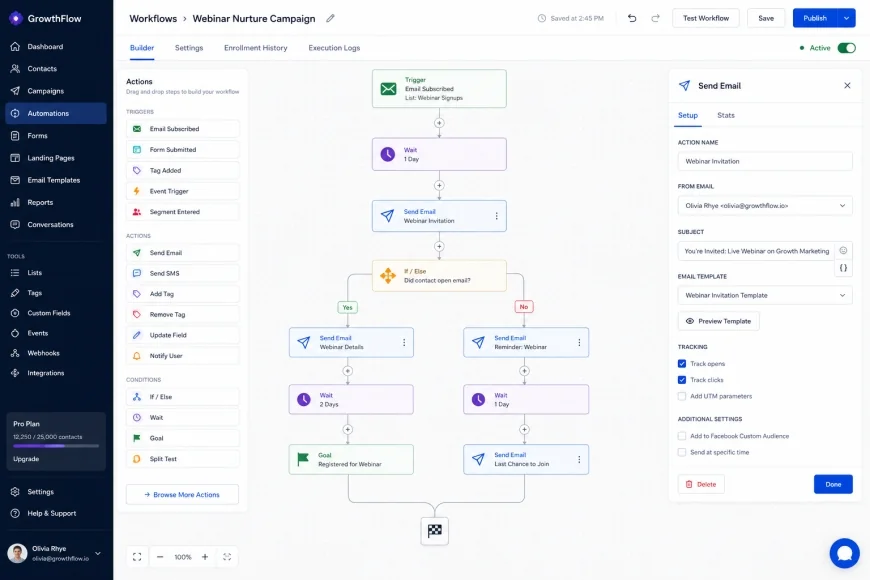 Visual workflow builders are highly valuable for mapping out automated email drips and tracking prospect engagement.
Bitrix24
Bitrix24 offers a remarkably feature-rich startup CRM free tier that supports unlimited contacts and users. The platform includes built-in telephony, project management tools, and online store builders alongside its core database features. This extensive functional footprint makes it highly appealing to founders seeking to minimize their overall software footprint.
However, the sheer complexity of Bitrix24's user interface creates a incredibly steep learning curve for busy startup teams. The system can feel cluttered, and setting up basic automated rules often requires navigating confusing configuration panels. typical considerations their free tier restricts advanced automation triggers, limiting you to basic notification schedules.
If your startup needs a collaborative workspace with basic customer management features, Bitrix24 is a strong contender. However, if your primary goal is clean, rapid marketing execution, the interface clutter may slow down your daily operations. It requires a significant time investment to master and configure effectively.
💡 Expert Analysis & Experience
Many 'free' CRM plans act as bait-and-switch models, where adding a simple sequence trigger forces you into a $50+/month premium plan. typical considerations data portability is often limited on free tiers, making it incredibly difficult to migrate your automated workflows to another tool later. Lastly, customer support is virtually non-existent for free users, meaning founders must rely entirely on community forums to troubleshoot broken automation lines.
Feature Comparison of Top Free CRMs
To help you visual the trade-offs between these platforms, we compiled their core specifications into a clear comparison table. This data is pulled from official resource directories and active pricing structures to ensure absolute accuracy.
| CRM Platform | Free Contact Limit | Monthly Email Limit | Automation Style | Target Audience Focus |
|---|---|---|---|---|
| HubSpot CRM | 1,000,000 | 2,000 | Linear Autoresponders | Inbound Teams & Large Databases |
| Zoho CRM | Contact-limited by storage | System Alerts Only | Basic Triggers | Structured B2B Sales Teams |
| EngageBay | 250 Contacts | 1,000 Emails | Visual Canvas Builder | High-Touch Niche Startups |
| Bitrix24 | Unlimited Contacts | Bulk Email Limits Apply | Linear Rules | Operational & Remote Teams |
Practical Scenario
In practical use, a bootstrapper launching a SaaS platform often builds out a multi-step welcome sequence. On a restricted free tier, they might design a beautiful path, only to find they cannot trigger emails based on user behavior without upgrading. This limitation forces them to write manual follow-ups or accept generic, unsegmented auto-blasts that yield poor conversion rates.
✅ Pro Tip
Before importing your entire contact list, always configure your domain's SPF, DKIM, and DMARC records within your DNS provider. Many free CRM platforms route emails through shared, low-reputation IP addresses, which can land your startup's emails directly in spam folders. Taking twenty minutes to authenticate your domain manually will dramatically improve your deliverability rates on any free tier.
Pricing & Licensing Breakdown
While the focus of this guide is free CRM platforms for founders, understanding the graduation path to paid tiers is vital. Many founders select a free tool only to realize the upgrade path is financially devastating once they cross basic limits. Examining these transition costs protects your startup from unexpected operational bottlenecks.
HubSpot's transition from free to paid can be particularly jarring for bootstrapped companies. While the initial Starter suite is reasonably priced, moving to the Professional tier to unlock advanced branching workflows cost hundreds of dollars monthly. This steep pricing cliff makes it essential to evaluate your long-term venture capital expectations before committing your data.
Conversely, platforms like EngageBay offer highly linear and affordable upgrade paths that scale smoothly as your database grows. Their paid tiers start at nominal rates, allowing you to unlock visual workflows for a fraction of the cost of legacy enterprise tools. Always calculate your estimated cost per contact at 1,000, 5,000, and 10,000 records to avoid platform lock-in penalties.
Balanced Comparison
- Zero upfront financial investment required to launch your marketing pipelines.
- Consolidates contact profiles, communication histories, and lead stages in one location.
- Eliminates complex API maintenance between separate bulk email tools and databases.
- Provides structured data architecture that positions your startup for future scaling.
- Visual workflow canvases are frequently locked behind expensive premium upgrades.
- Data portability is intentionally restricted, making campaign migrations highly tedious.
- No-cost accounts receive low priority or zero support during critical workflow failures.
- Strict database caps can suddenly freeze your marketing automation sequences.
Who should use what?
Your choice of the Best Free CRM with Marketing Automation for Founders should align closely with your business model. High-volume, low-touch businesses like e-commerce apps should prioritize large database limits to hold massive subscriber lists. Conversely, high-ticket consulting agencies should prioritize visual automation quality and deep contact tracking over sheer volume limits.
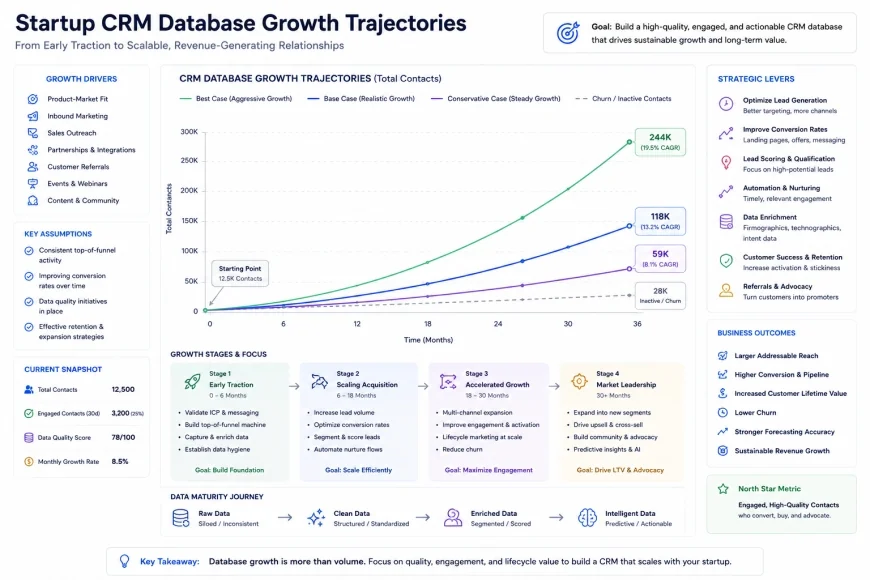 Analyzing your contact growth rate prevents your startup from hitting unexpected paywalls during active campaigns.
Recommended Choices by Purpose
For founders managing large contact volumes who require clean, reliable data storage, HubSpot Free CRM remains unmatched. If your priority is building intricate, highly personalized marketing automation workflows for a small target list, EngageBay offers superior functionality. For small teams of up to three users who need deep integration with an existing suite of business tools, Zoho CRM provides a highly stable administrative foundation.
Common Questions
Can I run professional cold outreach campaigns using a free CRM?
No, running high-volume cold outreach campaigns on free CRM platforms is highly discouraged and often violates their terms of service. Most free plans share mail servers, and spam complaints from cold outreach will quickly get your account suspended. Free tiers are designed primarily for opt-in inbound marketing, lead nurturing, and manual sales follow-ups.
What happens when I exceed the contact limit on a free CRM tier?
When you exceed your free contact limit, platforms handle the situation differently depending on their monetization model. Some tools, like EngageBay, will block you from adding new contacts or freeze your active automated email campaigns. Others may automatically prompt you to upgrade, occasionally auto-billing an on-file credit card if you previously entered payment details.
Is my data safe and exportable if I decide to switch CRM platforms later?
While you can almost always export your core contact lists to a standard CSV file, your automation metadata is rarely portable. The custom triggers, visual workflow branches, email templates, and behavioral logs you build are proprietary to that specific platform. Migrating platforms always requires rebuilding your marketing automation workflows from scratch in the new system.
Do free CRM platforms include free phone and live chat support?
Typically, no. To sustain their free business models, software companies reserve their live support teams for paying subscribers. As a free tier user, you will rely almost exclusively on self-serve help centers, community forums, and public video tutorials. If your business workflows are highly mission-critical, this lack of support represents a significant operational risk.
Can I use my custom domain email address with these free tools?
Yes, most reputable free CRMs allow and strongly encourage you to connect your custom business domain for email sending. This process requires editing your domain's DNS records to include SPF and DKIM signatures provided by the CRM vendor. Skipping this step often causes your automated emails to fail basic security checks and land in spam folders.
Practical Implementation Checklist
- Verify contact limit boundaries (e.g., HubSpot's 1,000,000 vs. EngageBay's 250 contact limits)
- Test email deliverability with a test sequence to check for provider watermarks
- Confirm the availability of trigger-based autoresponders on the free tier
- Map out your customer journey before choosing a CRM to ensure the platform supports your specific trigger points
- Check if basic reporting and dashboarding are included without premium upgrades