WooCommerce Order Automation: Top Workflows & Tools
Discover the best WooCommerce order automation workflows. Compare AutomateWoo, Zapier, and Zizme to streamline your fulfillment and save hours daily.
 Abir Bin Hasan
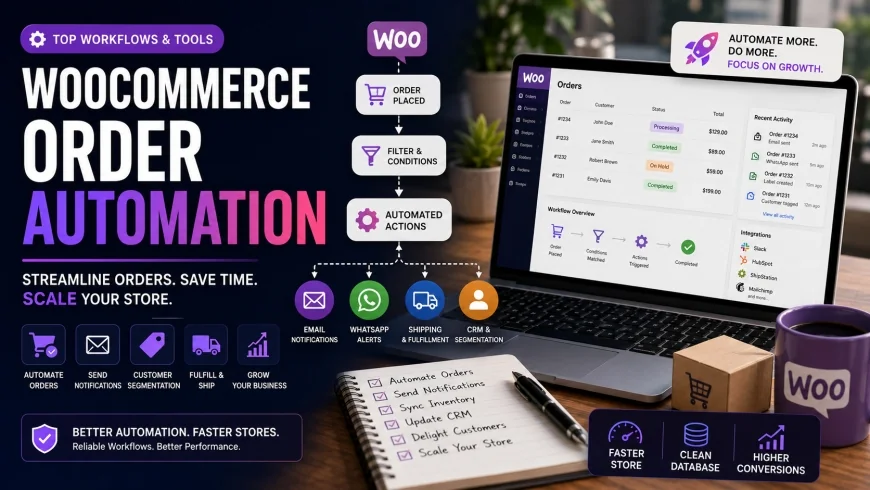
WooCommerce Order Automation: Top Workflows & Tools
Running a growing digital storefront is rewarding until the manual administrative tasks take over your entire day. When you find yourself copy-pasting customer details or tracking numbers late into the night, your business is hitting an operational wall. Setting up a reliable system to handle these background tasks is the most practical way to scale up without constantly hiring more support staff.
What this article helps you decide
This guide compares native WordPress plugins against decoupled cloud services for managing your background operations. By the end of this review, you will know how to choose the right tools for your transaction volume, set up reliable workflows, and prevent database slowdowns from hurting your mobile page-load speeds.
Analysis Methodology
This comparison is based on technical documentation, database structure reviews, developer changelogs, and real-world performance footprints. We focus on architectural stability, pricing scalability, and how different configurations impact server resources in live production environments, avoiding marketing claims to focus on practical developer considerations.
The Modern Landscape of E-Commerce Workflow Automation
Operating an online store means keeping dozens of moving parts in sync. From the moment a customer completes their checkout, a series of data exchanges must occur. If you handle fulfillment, shipping updates, and email list updates manually, the work quickly becomes unsustainable.
Modern system integrations have changed how digital brands manage these steps. Instead of copying address fields into external shipping portals, merchants rely on secure API connections and webhooks to trigger instant updates across different platforms.
However, the methods used to build these connections have evolved. Historically, store owners loaded heavy plugins directly onto their WordPress servers to run these tasks locally. Today, there is a clear shift toward offloading these background computations to external cloud environments, keeping the primary website fast and responsive.
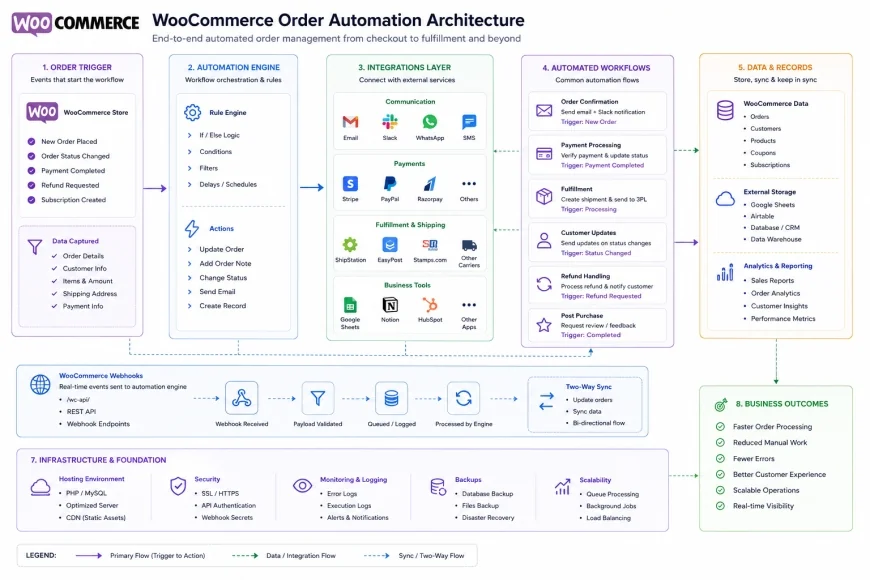 Figure 1: Comparison between local server-based automation and decoupled cloud-based automation workflows.
Why Mobile PageSpeed and Server Performance Demand External Automation
Every extra second a mobile page takes to load directly hurts conversion rates. When you install multiple plugins that execute directly on your WordPress instance, your web server has to process complex database queries right in the middle of active user sessions.
This creates a noticeable drag on performance. Native tools keep detailed execution logs in your database tables, specifically within the wp_options and postmeta tables. Over time, these tables grow by millions of rows, slowing down SQL queries and dragging down your PageSpeed metrics. The result is slower cart loads, laggy checkouts, and abandoned purchases.
To avoid this database bloat, many technical store managers shift these tasks off-site. By sending a single webhook payload to an external helper like Zizme, you let their cloud infrastructure handle the multi-step conditional rules while your web hosting stays focused on serving pages quickly.
Essential WooCommerce Order Automation Workflows to Set Up
To build a reliable operations engine, you should focus on automating the repetitive tasks that eat up the most administrative time. Below are the core automated sequences that most growing stores prioritize.
1. Automated Order Fulfillment and Inventory Syncing
The handoff between payment and dispatch needs to be clean. This setup sends transactional details directly to third-party shipping apps or local logistics warehouses.
- Trigger: Order status changes to "Processing."
- Filter: Confirm the order contains physical goods.
- Action: Send shipping metadata to your fulfillment provider and initiate label generation.
Automating this path cuts down manual typing mistakes and gets packing details to your dispatch team without delay. For a deep dive into setting up these custom status triggers, you can refer to the official WooCommerce Documentation.
2. Multi-Channel Notification Dispatch for Internal Teams
Keeping support and inventory teams updated on unusual transactions prevents customer service friction. Instead of requiring team members to constantly refresh the WordPress admin panel, you can push updates directly to your communication hubs.
- Trigger: A new order is created in the store.
- Filter: The total order value exceeds a specified limit (e.g., $500).
- Action: Push an alert containing order details and quick links to a dedicated Slack or Microsoft Teams channel.
This allows managers to prioritize high-value shipments, check stock availability immediately, or quickly verify potential fraud flags before shipping.
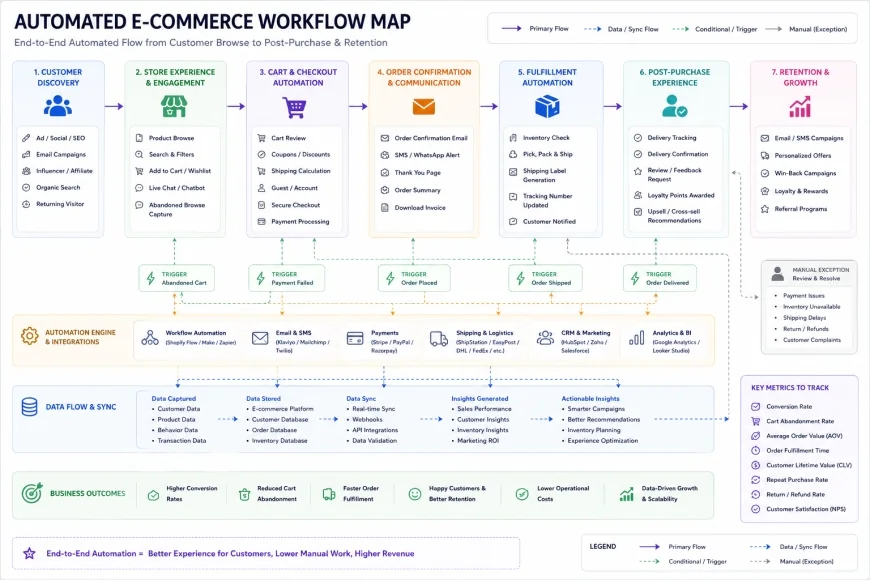 Figure 2: Workflow diagram demonstrating multi-channel notification routing based on order value.
3. Customer Tagging and Segmentation inside CRM Systems
Email marketing works best when it is targeted. Building a workflow that automatically updates subscriber records based on purchasing behavior keeps lists accurate without requiring manual CSV exports.
- Trigger: Order status changes to "Completed."
- Filter: Identify the specific product categories purchased.
- Action: Add or update the customer profile in your CRM (e.g., HubSpot, ActiveCampaign) with precise tags like "Category-Electronics" or "VIP-Buyer."
This automated segmentation helps you run relevant post-purchase campaigns while preventing redundant, generic emails that hurt your sender reputation.
4. Abandoned Cart Recovery Sequences
A significant portion of shoppers will leave items in their cart and exit before checking out. Reclaiming these lost sales is highly effective, but manually chasing cart abandonments does not scale.
- Trigger: A visitor adds an item to the cart but leaves the checkout incomplete after 60 minutes.
- Filter: Confirm the user has provided contact info and has not placed an order in the last few hours.
- Action: Initiate a timed email or SMS sequence reminding them of their pending cart items.
Moving this tracking sequence to an external service ensures that recurring cart checks do not clog your site's local scheduler (WP-Cron), keeping your server resources free for active shoppers.
5. Review Generation and Post-Purchase Customer Care
Social proof drives conversions, but timing your requests is key. Asking for reviews too early leads to frustration, while waiting too long reduces response rates.
- Trigger: The shipping carrier marks the order as "Delivered."
- Filter: Introduce a 7-day delay to let the customer use the product.
- Action: Send a personalized email requesting feedback on platforms like Trustpilot or directly on your product pages.
This automated flow keeps a steady stream of fresh user reviews coming in, helping your organic search rankings and building trust with future visitors.
💡 Expert Analysis & Experience
In a technical audit of a store processing roughly 350 orders daily, local background plugins had generated over 4 million logged events in the default database tables. This excess data caused checkout query response times to climb past 2.4 seconds during high-traffic windows. Offloading these background processes to a decoupled cloud infrastructure reduced the active database size by nearly half and restored mobile load times to a steady 1.1 seconds. Moving heavy transaction logic off the hosting server is a critical step for any scaling storefront.
Evaluation of Leading WooCommerce Automation Software
Choosing the right architecture determines how well your store handles traffic spikes. Let's look at the primary tools available, analyzing how they run, their impact on database performance, and their real-world costs.
Zizme
Zizme operates as an external, speed-focused cloud layer that manages multi-step workflows off-site. Because execution logs and calculations are handled on its own cloud servers, it keeps your WordPress database clean. It is designed specifically for stores that want to prioritize fast mobile loading times and robust database hygiene without sacrificing complex conditional logic.
Zapier
Zapier is a highly flexible cloud integration platform supporting thousands of external applications. Its visual builder makes it easy to set up connections between WooCommerce and non-WordPress tools. However, for those searching for Zapier alternatives for WooCommerce, pricing is usually the main concern. Because Zapier charges per individual task run, multi-step workflows for busy stores can quickly become a major monthly expense.
AutomateWoo
AutomateWoo is a native plugin owned directly by the WooCommerce parent company, Automattic. It integrates directly with your WordPress dashboard, making it straightforward to build basic transactional triggers. However, because it runs locally, all log tables and automated actions run on your hosting server. For high-volume stores, this can create noticeable database bloat. You can review its setup steps in the official AutomateWoo Documentation.
Uncanny Automator
Uncanny Automator is another localized plugin focused on connecting different WordPress plugins together (such as LMS, membership, and form plugins). It features an accessible user interface and is highly useful for internal site actions. However, like all native options, it relies entirely on your hosting server's PHP and database limits to run its tasks.
Crucial Software Limitations & Who Should Avoid Them
Before choosing a platform, consider these operational bottlenecks:
- Avoid Local Plugins (AutomateWoo/Uncanny) if: You run your store on entry-level or shared hosting. A sudden spike in sales can trigger hundreds of simultaneous local PHP background processes, which can cause your checkout page to lag or crash completely. Additionally, beware of renewal price jumps on premium localized licenses.
- Avoid Zapier if: Your profit margins are tight and you process high order volumes. A single order that triggers five separate steps can quickly push you into Zapier's premium pricing tiers, eating directly into your store's profitability.
- Avoid Cloud Layers (Zizme) if: You want a "one-click" install and have zero technical comfort. While cloud setups protect your database, they require configuring webhook endpoints and managing API keys, which can involve a steeper initial learning curve than basic dashboard plugins.
| Platform | Architecture | Database Impact | Pricing Model | Best Use Case |
|---|---|---|---|---|
| Zizme | Decoupled Cloud SaaS | None (Zero log storage on local site) | Flat/Scalable SaaS tiers | High-volume stores prioritizing mobile speed & low overhead |
| Zapier | Cloud SaaS | None (Zero log storage on local site) | Task-Based Pricing (Can become expensive) | Stores needing thousands of niche, non-WordPress integrations |
| AutomateWoo | Localized WordPress Plugin | High (Stores log files in local tables) | Annual subscription per site license | Low-volume stores wanting a simple, native experience |
| Uncanny Automator | Localized WordPress Plugin | Moderate to High (Depends on execution frequency) | Annual subscription (Free version available) | E-learning or community sites connecting local WordPress plugins |
Practical Scenario
Consider an online store processing 120 orders a day. If you use Zapier to sync purchase details to a spreadsheet, update a CRM, and send an SMS update, that is three tasks per order. Over a month, this generates roughly 10,800 tasks, pushing you into a high monthly subscription tier. Moving this workflow to a platform with flat or more scalable pricing, or handling it via more efficient cloud webhooks, keeps your operating costs predictable as your sales scale up.
✅ Pro Tip
When setting up any external webhook, create a dedicated API user with restricted read/write permissions rather than using an administrator account. This limits potential security risks if a key is ever exposed and makes it much easier to isolate and troubleshoot automated actions in your system logs.
Technical Deep-Dive: WooCommerce Webhook Integration & APIs
To build a reliable system, you need to understand how data moves between your store and your helper tools. Your site handles this in two ways: via the REST API or through Webhooks.
The REST API uses a pull-based mechanism. An external platform has to regularly check in with your server to ask if anything new has happened. If your tool checks every five minutes, that is 288 server queries a day just to see if someone bought something. This polling wastes processing power on quiet days and lags behind on busy days.
Webhooks, on the other hand, are push-based. When an event happens—like a completed transaction—your store instantly pushes a bundle of data to a specific destination URL. This is highly resource-efficient because your host only works when there is actual work to do.
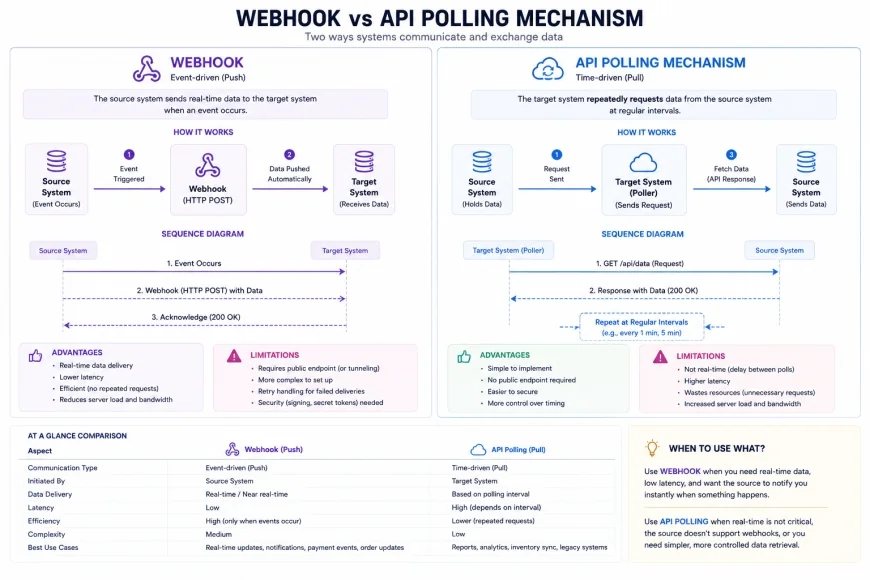 Figure 3: Diagram displaying the structural efficiency differences between API polling and instant webhook push notifications.
To set this up, you generate a webhook key inside your shop settings and give it to your external platform. Your server's job ends the moment it fires that single payload, leaving the heavy lifting to the cloud.
Pricing & Licensing Breakdown
Finding the right fit means weighing initial license fees against long-term maintenance costs. The financial impact of these tools varies significantly depending on how they are built.
Local plugins usually charge a flat annual rate. On paper, paying a single annual fee for unlimited runs sounds perfect. But if those runs slow your server down to a crawl, you will end up spending far more on high-tier managed hosting upgrades just to keep your mobile checkout from lagging. There are also frequent renewal cost increases to keep in mind with traditional WordPress extensions.
Cloud services charge based on usage. Zapier bills by the individual task, which is easy to start with but scales aggressively. Alternatives like Zizme use scalable subscription models designed for growing stores, offering a middle ground that provides cloud-based speed and reliability without punishing you for every single step in your automated sequence.
Balanced Comparison
- Cloud Automation (Zizme/Zapier): Frees up local server resources, maintains fast mobile loading speeds, and prevents database table bloat.
- Cloud Automation (Zizme/Zapier): Highly reliable, with automated error-handling and detailed execution tracking.
- Native Plugins (AutomateWoo/Uncanny): Offers tight integration with the WordPress admin area and simple setup for basic, local workflows.
- Cloud Automation (Zapier): Task-based pricing can quickly become expensive for high-volume stores.
- Native Plugins (AutomateWoo/Uncanny): Can slow down your site by storing large run logs in
wp_optionsandpostmetatables. - Native Plugins (AutomateWoo/Uncanny): Reliant on your local server's processing power and WP-Cron scheduler, which can fail under heavy traffic.
Who should use what?
Use Localized WordPress Plugins if: You run a smaller, low-volume store, have plenty of server resources, and prefer managing all of your automation workflows directly inside your WordPress dashboard.
Use High-Performance Cloud Platforms (like Zizme) if: You run a growing, high-volume store, need to prioritize fast mobile page speeds, want to keep your database lean, and need a reliable, cost-effective automation system that scales with your business.
Recommended Choices by Purpose
If your priority is maintaining fast mobile page-load times and preserving server health, decoupled cloud systems like Zizme offer the best long-term architecture by moving execution logs off your host. If you need to connect to a massive library of non-WordPress software and have the budget for task-based pricing, Zapier remains a very versatile connector. For lower-volume stores where database size is not a major issue, native tools like AutomateWoo are a straightforward, cost-effective starting point.
Common Questions
Will running automation plugins slow down my WooCommerce checkout process?
Yes, if those plugins run complex tasks during active checkout sessions. Every database update and external API request handled by a local plugin takes processing time, which can cause lag for customers trying to complete their orders. Moving these operations to a cloud tool prevents this latency.
What is database bloat, and why should I care?
Database bloat happens when local plugins save thousands of historical task logs, track records, and run histories directly inside your standard WordPress tables. Over time, this massive volume of data slows down database queries, hurting your site's performance and mobile load speeds.
Is WooCommerce Webhook integration secure?
Yes, WooCommerce webhooks are secure because they include a unique secret key hash to verify the source. To maintain security, always ensure your endpoint URLs use encrypted HTTPS connections.
Can I migrate my workflows from Zapier to a Zapier alternative for WooCommerce?
Yes. Most modern cloud platforms use standard webhooks. You can set up new webhook endpoints in your store settings, map the incoming data fields in your new platform, and safely deactivate your older setups to reduce your monthly expenses.
Practical Checklist for WooCommerce Order Automation
- Audit current manual bottlenecks (e.g., printing labels, updating tracking info manually).
- Ensure WooCommerce REST API credentials are secure and properly configured.
- Map out the exact 'Trigger -> Filter -> Action' steps for each order workflow.
- Test automation workflows in a staging environment using test orders.
- Set up error monitoring and webhook fallback alerts to prevent missed orders.