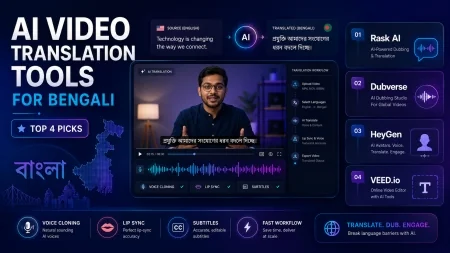
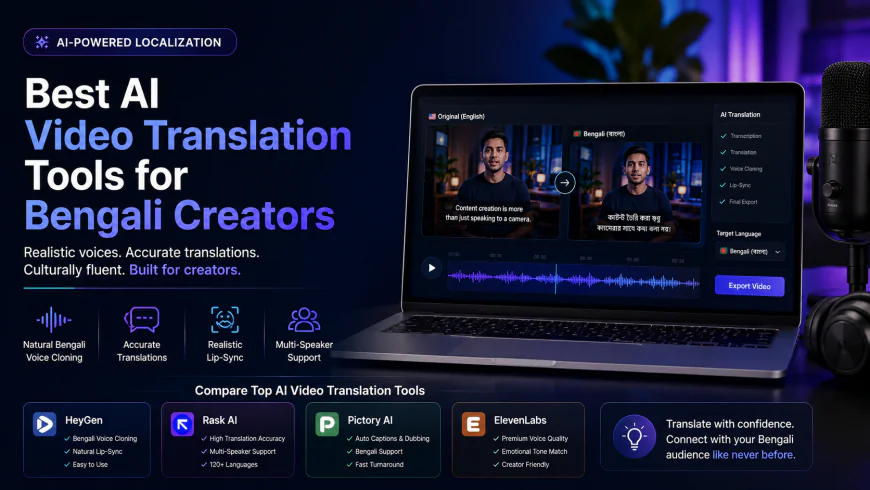
Best AI Video Translation Tools for Bengali Creators
Looking for the best ai video translation tools for bengali? We tested the top dubbing software for realism, accuracy, and voice cloning. Find yours now!
 Abir Bin Hasan
Best AI Video Translation Tools for Bengali Creators
Localizing video content for South Asian audiences means wrestling with complex phonetic patterns and deep regional dialects. For digital media professionals, picking a tool to translate video to Bengali isn't about finding a magic subtitle generator. It's about finding something that handles vocal authenticity and cultural nuance without sounding like a broken robot.
What this article helps you decide
This breakdown compares four major AI video translation platforms to show which ones actually deliver realistic Bengali voice cloning, reliable multi-speaker separation, and passable lip-syncing. Whether you are an independent creator trying to make your YouTube tutorials accessible in Bangladesh and West Bengal, or a marketing manager localizing corporate assets, this comparison highlights where your budget is best spent.
Analysis Methodology
This review relies on deep-dive desk research, analyzing public documentation, pricing structures, licensing terms, and real user feedback. We look closely at how these platforms handle the unique linguistic hurdles of the Bengali language, including translation accuracy, voice quality, and visual alignment. No theoretical promises here—just a practical look at how these tools perform in actual production pipelines.
The Bengali Translation Bottleneck: Why Generic Reviews Fail
Most mainstream tech blogs review software using common European languages like Spanish, French, or German. This standard evaluation is highly misleading for South Asian creators. Bengali is the fifth or sixth most spoken native language globally, representing a massive market of over 300 million speakers spread across Bangladesh, West Bengal, and global diaspora communities. Despite this footprint, Bengali remains a "low-resource" language for many Western AI modeling engines.
When you attempt to translate video audio ai systems from English to Bengali, you immediately run into structural barriers. Bengali grammar relies on a subject-object-verb (SOV) structure, whereas English uses subject-verb-object (SVO). If a localization tool fails to dynamically reorder sentences before rendering the synthetic voice, the resulting audio sounds disjointed, confusing, and ultimately unusable for professional distribution.
Furthermore, micro-influencers in Bangladesh are increasingly utilizing these tools to dub foreign tech tutorials, business frameworks, and educational content to monetize on platforms like YouTube and Facebook. These creators face major challenges when trying to dub youtube videos into bengali ai software. They must choose between formal "Shadhubhasha" (historically used in literature but highly unnatural in modern video content) and standard "Cholitobhasha" (the spoken standard). Many tools default to an overly rigid, bookish vocabulary that alienates casual viewers. Additionally, the vast regional accent variations—ranging from the standard dialects of Kolkata and Dhaka to the highly localized tones of Sylhet, Noakhali, and Chittagong—are routinely ignored by flat translation algorithms, resulting in a severe lack of local authenticity.
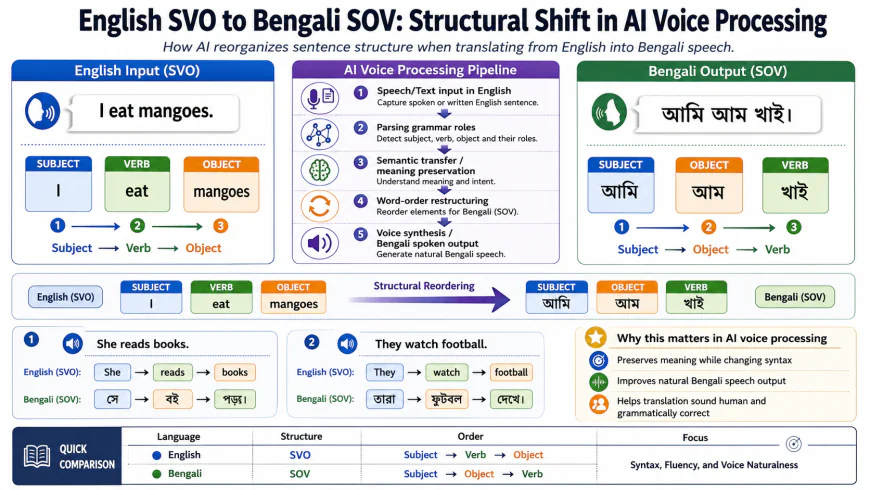 Visualizing the complex grammatical shift required when translating English video content to Bengali audio using machine translation engines.
In-Depth Evaluation of the Leading Platforms
To determine the best ai video translator for bengali, we analyzed four industry-leading platforms across five critical performance metrics: workflow efficiency, translation engine accuracy, acoustic naturalness, visual lip-sync alignment, and licensing terms. Below are the detailed profiles of each evaluated software.
HeyGen: The Visual Realism Pioneer
HeyGen has built a strong reputation as an industry leader in realistic visual output, largely due to its advanced generative avatar technology and high-fidelity video processing. When evaluated as a tool to translate english video to bengali audio ai, HeyGen stands out for its deep integration of visual lip-syncing and synthesized voice modeling.
System Setup & Workflow
The translation workflow within HeyGen is designed to be highly intuitive. Users begin by uploading their source footage (supporting formats like MP4, QuickTime, or WebM up to 1GB in size). After uploading, the creator selects Bengali from the target language dropdown. The software then triggers an automated transcription phase, separating the vocal track from the background score. Once completed, the platform presents a side-by-side editing script where creators can review the transcribed English text and the translated Bengali output before generating the final dubbed video.
Translation & Subtitling Engine
HeyGen utilizes a blend of proprietary translation models and premium third-party APIs. For standard corporate scripts or tech tutorials, the translation is highly accurate. However, the system exhibits a strong bias toward a highly formal, rigid dialect. If your source video contains slang, metaphors, or idiomatic expressions, HeyGen's translator will often convert them literally, resulting in unnatural phrasing. Creators must manually edit the translated script line-by-line using the interface editor to ensure a conversational flow.
Acoustic Fidelity & Voice Synthesis
When using the ai voice clone bangla features on HeyGen, the results are mixed. For standard English voice clones, the technology is remarkably accurate. However, the Bengali voice clones tend to lose emotional nuance, sounding somewhat robotic during rapid speech. The software struggles to maintain the pitch, cadence, and warmth of the original speaker, often flatlining the vocal delivery into an artificial monotone that lacks the expressive rise and fall of native Bengali conversation.
Visual Alignment & Sync Quality
The lip-sync video translation engine in HeyGen is highly advanced, but it is not without minor visual flaws. In many runs, the lip-sync engine frequently mismatches Bengali dental and retroflex consonants. For example, when the translated audio demands dental consonants (like the soft 't' or 'd' sounds), the visual generator often defaults to movements more suited for English alveolar consonants. This mismatch results in subtle visual anomalies, creating a mild "uncanny-valley" effect that is noticeable to native speakers, particularly during close-up shots of the speaker's face.
Who Should Avoid HeyGen?
Avoid HeyGen if you are operating on a razor-thin budget or need to process high volumes of long-form content. Because it uses a strict credit-based system, translating long tutorials will quickly become incredibly expensive. It is also not ideal for fast-paced, casual vlogs where colloquial slang is essential, as the translation engine is heavily biased toward formal, corporate language.
Licensing, Pricing, and Target Group
According to HeyGen's official pricing tiers, the platform operates on a credit-based subscription model, starting at $29 per month for the Creator tier (which includes 15 credits). For scaling production studios requiring advanced multi-speaker processing, custom avatars, and API access, enterprise plans are available. Because of this pricing structure, HeyGen is best suited for corporate training teams, marketing agencies, and high-budget content creators who prioritize visual presentation over raw conversational slang.
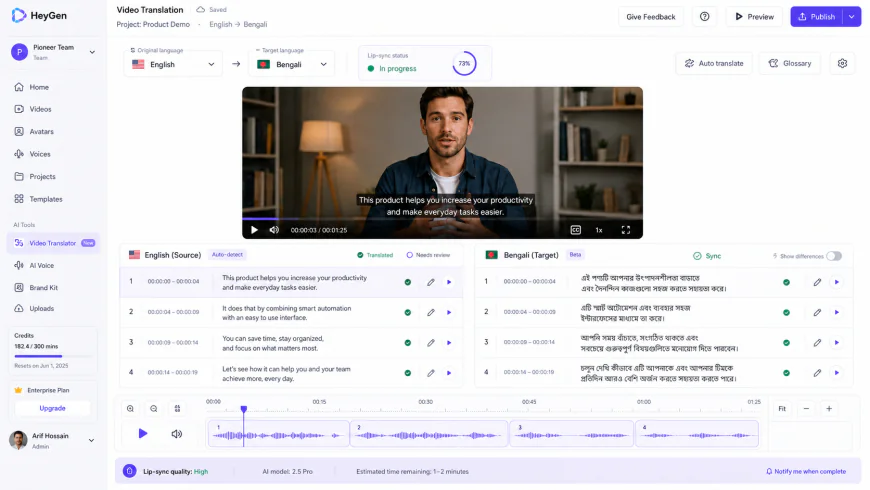 The translation and script refinement interface inside the HeyGen platform, allowing creators to manually edit translated text before rendering.
Rask AI: The Ultimate Localization Suite
Rask AI positions itself as a specialized, all-in-one automatic video localizer designed to translate complex, dialogue-heavy media assets into over 130 languages. It is highly favored by educational channels and training departments looking to quickly repurpose entire libraries of content.
System Setup & Workflow
Rask AI provides a streamlined, upload-and-process workflow. Creators can directly link YouTube or Vimeo videos, or upload local files. The platform is built around speed; it processes files remarkably quickly, generating an interactive translation timeline where you can edit the translated text, adjust timestamps, and assign different speaker voices. This fast processing makes it highly suitable for bulk video transformations.
Translation & Subtitling Engine
Rask AI's translation engine performs exceptionally well at converting technical jargon. It does a respectable job of maintaining conversational context. However, it still occasionally defaults to Shadhubhasha grammatical patterns when translating longer, compound sentences. The built-in subtitle generator is highly accurate, auto-generating clean, timestamped Bengali captions that align with the dubbed audio.
Acoustic Fidelity & Voice Synthesis
The bengali ai voice dubbing software engine inside Rask AI offers some of the most diverse vocal tones available. Its voice-cloning feature attempts to map the original speaker's vocal characteristics onto the Bengali audio output. While it successfully matches the general pitch of the speaker, rapid speech sequences can sometimes sound muddy. The system occasionally runs words together, making certain Bengali consonant clusters difficult to distinguish for native listeners.
Visual Alignment & Sync Quality
Rask AI features an integrated, optional lip-sync post-processing step. While this engine does an admirable job of matching lip movements to the newly generated Bengali audio track, it struggles with the distinct phonetic transitions of the Bengali alphabet. The visual engine occasionally misses the lip shapes associated with retroflex consonants, leading to a slight delay between the visual jaw movement and the audio output. This issue is most apparent in videos featuring fast-paced dialogue.
Who Should Avoid Rask AI?
Avoid Rask AI if you are an independent creator who needs occasional, quick translations. The $59/month starter plan is a significant upfront cost, and the steep jump to the $139/month Pro tier just to get proper lip-sync access makes it hard to justify for casual users. Additionally, if your videos feature rapid, overlapping dialogue, the audio output can become quite muddy and require heavy post-production clean-up.
Licensing, Pricing, and Target Group
As per Rask AI's official documentation, plans begin with a Basic tier starting at $59 per month, which offers limited translation minutes and basic voice-cloning capabilities. The Pro tier, starting at $139 per month, is highly recommended for professionals who require advanced lip-syncing and extensive multi-speaker processing. This makes Rask AI an ideal choice for educational publishers, global training organizations, and independent documentary filmmakers who prioritize fast translation cycles and structured timeline management.
Dubverse: The Voice-First Dubbing Heavyweight
Dubverse is engineered specifically around voiceover synthesis and localization workflows. Rather than focusing primarily on visual avatars, Dubverse prioritizes vocal variety, translation editability, and ease of speech adjustment, making it a popular choice for creators who focus on voiceover-centric media.
System Setup & Workflow
The platform's interface is centered on a clear, step-by-step dubbing pipeline. After uploading your video, Dubverse prompts you to select your target language and choose from a library of pre-trained voice actors. Once the video is processed, the platform opens a highly functional subtitle and audio editor, allowing you to fine-tune pronunciation, adjust text blocks, and manually swap out specific words that sound unnatural in the translated target language.
Translation & Subtitling Engine
For regional languages like Bengali, Dubverse relies on a combination of localized translation modules. It is highly effective at identifying the context of conversational scripts. However, it still requires manual adjustments to transition the language from rigid standard phrasing to a natural, colloquial Cholitobhasha style. Crucially, the platform allows creators to upload custom translation glossaries, helping you lock in specific brand terms and technical jargon to prevent incorrect literal translations.
Acoustic Fidelity & Voice Synthesis
As a specialized bengali voiceover generator, Dubverse offers a wide range of regional voice profiles. Instead of relying solely on general voice clones, you can select from a variety of distinct, pre-configured Bengali voice models that feature varying age ranges, pitches, and delivery styles. The primary limitation of these models is that they can sometimes sound overly polished, resembling formal radio announcers rather than casual, everyday speakers. Additionally, during rapid speech segments, the synthetic voices can lose their natural emotional nuances, sounding slightly robotic.
Visual Alignment & Sync Quality
Unlike HeyGen or Rask AI, Dubverse's primary focus is not high-end generative facial reconstruction. While the platform does offer basic lip-sync alignment features, its main goal is aligning the timing of the audio track with the visual timeline. If your content relies heavily on detailed, close-up lip-syncing, Dubverse may not deliver the same level of visual alignment as its competitors. However, for presentations, screen-recordings, tutorials, and animated videos, the timing alignment is highly accurate.
Who Should Avoid Dubverse?
Avoid Dubverse if your content features a single person talking directly to the camera (like a standard vlog or interview) where the viewer expects perfect lip alignment. The lack of deep generative lip-syncing will make the video feel like an old, poorly dubbed movie. It's also a bad fit if you absolutely require your own cloned voice to carry over, as its custom voice cloning is less developed than its library of pre-made actors.
Licensing, Pricing, and Target Group
According to Dubverse's commercial documentation, the platform is highly affordable, offering a free tier with basic features and a Pro plan starting at roughly $20 per month (billed annually). This accessible entry price makes Dubverse the ideal platform for independent YouTube creators, tutorial channels, and bootstrapped educators who need a highly reliable Bengali voiceover generator without the premium cost of advanced visual lip-sync engines.
Kapwing: The Web-Based Collaborative Editor
Kapwing is a highly popular, cloud-based video editing platform that has integrated AI-driven translation, transcription, and dubbing tools directly into its timeline editor. It serves as an excellent option for teams that want to manage both translation and general video editing inside a single workspace.
System Setup & Workflow
Kapwing operates as a full-featured online video editor. The translation workflow is deeply integrated with the standard timeline interface. To begin, creators upload their video to the media bin, drag it onto the timeline, and use the smart tools menu to select "Translate Video." The editor automatically transcribes the audio, generates a synchronized subtitle track, and allows creators to apply a synthetic voiceover in the target language.
Translation & Subtitling Engine
Because Kapwing uses generalized translation APIs, its translations can struggle with the nuances of South Asian languages. When translating English scripts into Bengali, the platform often produces highly literal translations that ignore common cultural context. This can lead to grammatically correct but incredibly awkward phrasing. On the positive side, Kapwing excels at subtitle styling and positioning, giving creators total control over how their Bengali captions are presented on screen.
Acoustic Fidelity & Voice Synthesis
The bangla voice dubbing options in Kapwing are more limited compared to specialized dubbing platforms. The available synthetic voices are functional, but they lack advanced emotional range and tend to sound robotic. They are highly suitable for basic informational videos or quick social media clips, but they may fall short for dramatic, narrative-driven content where voice acting and emotional nuance are essential.
Visual Alignment & Sync Quality
Kapwing does not include a dedicated, frame-by-frame generative lip-syncing engine like HeyGen or Rask AI. Instead, it relies on time-stretching and audio alignment to ensure the translated speech fits within the original speaker's talking windows. While this keeps the audio synchronized with the video transitions, the speaker's physical lip movements will still correspond to the original English audio, which can create a noticeable disconnect for viewers during close-up shots.
Who Should Avoid Kapwing?
Avoid Kapwing if you need realistic voice synthesis or custom voice cloning for long-form narrative videos. The voices sound noticeably artificial compared to specialized voice engines. It is also a poor choice if you have a weak internet connection, as the entirely browser-based editor can become painfully slow and unstable when processing large, high-definition video files.
Licensing, Pricing, and Target Group
According to Kapwing's official subscription terms, a Pro plan is available starting at $16 per month (billed annually). This plan grants access to their full suite of smart AI tools, high-resolution exports, and collaborative features. Kapwing is best suited for social media managers, marketing teams, and content creators who need a single platform for basic translation, quick editing, and rapid social media exporting.
💡 Expert Analysis & Experience
Observation: In real production environments, multi-speaker detection is where these platforms frequently stumble. While standard translation engines handle single-speaker videos quite well, most budget AI translators struggle to cleanly separate multiple Bengali voices in dialogue-heavy videos. The AI often blends different speakers' voices together, leading to a confusing mix of cloned voice profiles in the final output.
Workaround: To achieve clean results for multi-speaker content, the most reliable approach is exporting your audio tracks separately for each speaker before uploading them to the AI tool. Processing each speaker's audio track individually, and then combining them in post-production, prevents the AI from mixing up the voice clones and ensures a much more natural-sounding final dub.
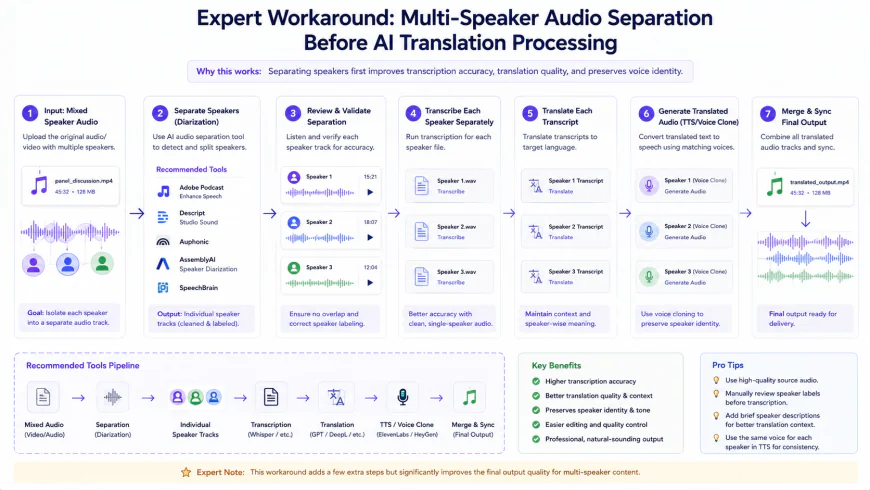 A step-by-step workflow chart showing how to isolate and process individual speaker audio tracks to avoid multi-speaker blending issues during translation.
Feature Comparison of Top Bengali Translation Tools
To help you quickly evaluate your options, the table below provides a side-by-side comparison of how these four major platforms handle Bengali translation and video processing:
| Feature Metric | HeyGen | Rask AI | Dubverse | Kapwing |
|---|---|---|---|---|
| Primary Target Group | Enterprise, agencies, high-end creators | Corporate L&D, documentarians, scaling creators | Independent YouTube creators, bootstrapped educators | Social media managers, agile marketing teams |
| Voice Cloning Quality | High visual integration; voice clone can sound slightly flat | Strong vocal match; occasional muddy pronunciation | High variety; pre-configured profiles sound natural | Basic; voice models lack deep emotional range |
| Lip-Sync Accuracy | Advanced; minor dental/retroflex consonant mismatches | Good; occasional alignment drift on rapid speech | Basic timing alignment; lacks generative facial sync | Audio-timing sync only; no generative lip-sync |
| Multi-Speaker Support | Highly reliable on higher pricing tiers | Good automated speaker separation on basic audio | Requires manual track assignment for best results | Basic timeline separation; manual editing required |
| Linguistic Naturalness | Often defaults to formal, rigid phrasing | Maintains technical context well; formal tone bias | Highly editable scripts; supports custom glossaries | Highly literal translation; requires manual editing |
Practical Scenario
In practical use, a creator looking to learn how to dub videos to bangla ai platforms will quickly discover that no single tool offers a completely hands-off, perfect output. For instance, if you upload a 10-minute English technology tutorial with fast, conversational speech, Rask AI may translate the technical terms with 90% accuracy, but the resulting cloned Bengali voice will likely sound robotic during fast-paced segments. To make this video look and sound professional, the creator will typically need to download the auto-generated SRT subtitle file, manually rewrite the stiff, formal phrasing into casual, conversational Bengali, re-upload the corrected script, and then render the final video. AI translation is an incredibly powerful tool that speeds up your workflow, but high-quality localization still requires a human touch.
✅ Pro Tip
Always review the generated translation for "Shadhubhasha" versus "Cholitobhasha" styles. If your target audience consists of younger viewers on YouTube or Facebook, make sure to manually edit the translation script inside your chosen platform to replace formal verbs (such as "koritese") with their modern, conversational equivalents (such as "korse"). This simple step instantly makes your content feel more authentic, natural, and engaging to native speakers.
Pricing & Licensing Breakdown
Before integrating any AI tool into your regular production workflow, it is essential to understand its pricing model and licensing terms. Licensing is particularly important for Bengali content creators who want to monetize their dubbed videos on platforms like YouTube and Facebook without running into copyright issues.
Most AI translation tools operate on a credit-based subscription model, where one credit typically equals one minute of processed video. Let's look at how the licensing and commercial usage rights break down across the major platforms:
- HeyGen: Their commercial terms state that videos generated using your own custom avatar or voice clone carry full commercial rights, allowing you to monetize them on any social media platform or run them as paid advertisements. However, if you use their public avatars or stock voices, make sure to review their latest terms, as platform policies on AI-generated assets can change.
- Rask AI: Rask provides full commercial rights on all paid subscription plans. Any content translated during a free trial, however, is restricted to personal or educational use. For YouTube monetization, Rask's translated audio tracks are generally safe, but they recommend keeping a record of your active subscription invoice in case of automated copyright sweeps.
- ElevenLabs: ElevenLabs operates on a character-based licensing model. Users on the Free tier must attribute the platform in their video descriptions (e.g., "Voice generated by ElevenLabs"). Upgrading to the Starter plan or higher instantly grants full commercial rights and removes the attribution requirement.
In terms of cost-efficiency, translating a 10-minute video into Bengali can range from $1.50 to $5.00 depending on your platform of choice. While this is incredibly cheap compared to hiring professional voice actors (who can charge upwards of $100 per video), you must budget for the additional time required to manually edit the transcripts.
The Pros & Cons of AI Video Translation for Bengali
While the technology is undeniably impressive, it is not without its limitations. Here is an honest assessment of what works—and what doesn't—when translating videos into Bengali using AI:
The Pros
- Rapid Turnaround: What used to take days of script translation, recording, and syncing now takes less than 15 minutes.
- Impressive Voice Cloning: Your Bengali-translated voice can sound remarkably like your original English voice, maintaining personal brand consistency.
- Advanced Lip-Syncing: Tools like HeyGen modify the mouth movements of the speaker to match the Bengali phonetic patterns, minimizing the visual disconnect.
- Massive Cost Savings: Enables independent creators and small businesses to scale globally without the budget of a major media agency.
The Cons
- Dialect and Style Mismatches: AI frequently defaults to highly formal, archaic Bengali expressions rather than modern, colloquial phrasing.
- Speed & Cadence Issues: When translating fast-paced English, the AI-generated Bengali voice often has to speed up unnaturally to match the original video timing, resulting in a robotic tone.
- Lack of Emotional Nuance: The cloned voices can struggle with expressing sarcasm, excitement, or deep empathy, sounding somewhat flat during high-emotion scenes.
- Limited Multi-Speaker Accuracy: Some platforms struggle to distinguish between multiple voices in a crowded scene, occasionally assigning the wrong voice to a speaker.
Who is This Technology For?
AI video translation isn't a one-size-fits-all solution, but it is highly effective for specific niches. Here is a breakdown of who stands to benefit the most from integrating these tools into their production pipeline:
- E-Learning & Tech Educators:
- If you teach coding, web design, math, or finance, these tools let you effortlessly expand your student base to millions of learners across Bangladesh and West Bengal, India. Because instructional videos generally feature clear, structured speaking, AI translation engines handle them with remarkably high accuracy.
- Global Brands & Corporate L&D Teams:
- Companies looking to deliver consistent training, compliance updates, or product walkthroughs to localized teams in South Asia can translate their entire video libraries in an afternoon, avoiding the logistical nightmare of hiring regional voice actors for internal assets.
- SaaS Teams & Digital Marketers:
- Short software demos, social media ads, and onboarding guides are incredibly easy to localize. Dubbing these short-form assets is a cost-effective way to engage with the massive, tech-savvy Bengali-speaking demographic.
The Verdict: Which Bengali AI Video Translator Is Right for You?
If your ultimate goal is to produce polished, front-facing videos with flawless facial mapping, HeyGen is the gold standard, thanks to its cutting-edge visual lip-sync technology. That said, if your projects feature fast-paced dialogue, multiple speakers, or instructional walkthroughs, Rask AI offers a far more versatile timeline editor that simplifies script editing.
For creators on a tight budget who don't need real-time lip-syncing but want the most natural, human-sounding Bengali audio, pairing your video edits with ElevenLabs' voice generation delivers incredible emotional depth and vocal realism.
Frequently Asked Questions
Can I actually monetize AI-translated Bengali videos on YouTube?
Yes, you can—but you need to be careful. YouTube's monetization guidelines require content to be original, educational, and genuinely valuable to viewers. Simply running a video through an automated translator and uploading the robotic voice output might trigger "repetitive content" flags. To protect your channel, always refine the translated script to sound like a natural human conversation.
Does the AI understand regional dialects like Sylheti or Chittagonian?
Not yet. Current AI localization tools are trained on standard Bengali (the formal dialects used in Dhaka or Kolkata). They cannot accurately translate or synthesize highly localized regional dialects like Sylheti, Noakhailla, or Chittagonian. If your target audience requires these specific regional accents, you'll still need to rely on native human voiceover artists.
Is a paid plan mandatory to get commercial rights for the voices?
In almost all cases, yes. Most AI platforms retain ownership of their synthetic voices on their free or trial tiers. If you plan to monetize your videos on YouTube, run them as social media ads, or use them for commercial marketing, you must upgrade to at least the basic paid tier on platforms like HeyGen, Rask, or ElevenLabs.
📋 Your Step-by-Step Checklist for Launching an AI-Dubbed Bengali Video
- Optimize your source audio: Speak clearly, keep a moderate pace, and minimize background noise to help the AI cleanly isolate your voice track.
- Process the translation: Upload your file to your platform of choice (like HeyGen or Rask AI) and set the target language to Bengali.
- Perform a human quality check: Read through the generated translation. Replace any rigid, formal "Shadhubhasha" terms with natural, modern "Cholitobhasha" phrasing.
- Fix the timing and pacing: Ensure the translated Bengali lines don't sound rushed or unnatural to fit the original visual timestamps.
- Run a test render: Export a brief 30-second snippet to confirm the lip-sync looks convincing and the audio sounds crisp before rendering the entire project.
By pairing the incredible speed of modern AI with the nuanced ear of a native speaker, you can tap into the massive, 300-million-strong Bengali market without the traditional production headaches. Start with small, highly-targeted videos, refine your workflow, and watch your global audience grow.