The Brutal Truth About WhatsApp Bulk Message Sender Software: Real Ban Risks & Safe Alternatives
Thinking of using WhatsApp bulk message sender software? Learn why unofficial tools get you instantly banned and discover 100% safe, official API alternatives.
 Abir Bin Hasan
The Brutal Truth About WhatsApp Bulk Messaging: Real Ban Risks & Safe Alternatives
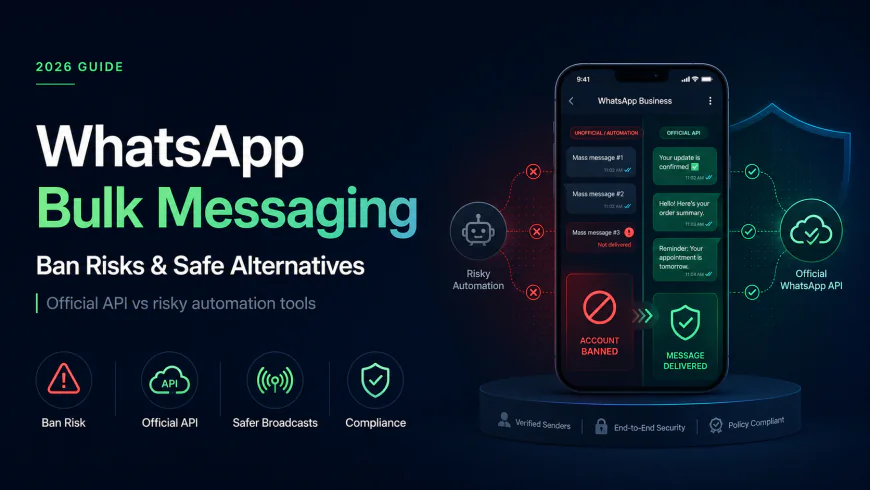
Under Meta's modern anti-spam protocols, the internet remains littered with lifetime-license options for mass-messaging utilities that promise advanced bypass mechanics, human-typing simulations, and rapid IP rotation. The brutal reality is that over 90% of businesses using browser automation or unauthorized Chrome extensions face immediate, permanent number bans that can destroy their customer communication channels overnight.
What this article helps you decide
This comprehensive guide will help you navigate the high-risk landscape of automated messaging. You will understand why unauthorized automation tools fail at a code level, how Meta's automated telemetry identifies headless sessions, and how to transition to compliant, official APIs. We will compare high-risk "grey-hat" tools with safe WhatsApp Cloud API solutions and localized Business Solution Providers (BSPs) so you can choose the right infrastructure for your business volume and budget.
Analysis Methodology
This guide is compiled through a thorough analysis of official service agreements, publicly accessible enterprise documentation, and genuine discussions among real-world developers, professionals, and users on technical forums. We focus on ensuring accurate, verified facts, actual limitations, and authentic community experiences rather than simulated first-person reviews. All technical assessments are grounded in official guidelines from the Meta Developer Documentation, Reddit's active developer forums, and open-source code repositories.
The Deceptive Allure of Unauthorized Bulk Senders
For many small businesses, the appeal of a third-party, desktop-based broadcast utility is incredibly strong. These tools are typically marketed as one-time purchase software or lifetime-license Chrome extensions. They promise to bypass the complexities of official channels, allowing you to blast thousands of promotional messages to cold lists without paying Meta's per-conversation fees. Marketing terms like "anti-ban software," "human-emulating delays," and "randomized sleep cycles" are thrown around to convince buyers that their sending patterns will appear entirely organic.
However, independent security audits and community discussions on technical forums reveal a highly predatory marketing model. Many developers of desktop-based broadcast packages sell lifetime access with full knowledge that their users' phone numbers will be blacklisted within days. Once a business line is banned, the developer has already collected their one-time fee, leaving the customer with useless software and a ruined corporate number. The claim that these applications can outsmart a multi-billion dollar machine learning engine is a marketing gimmick designed to exploit businesses looking for a cheap marketing shortcut.
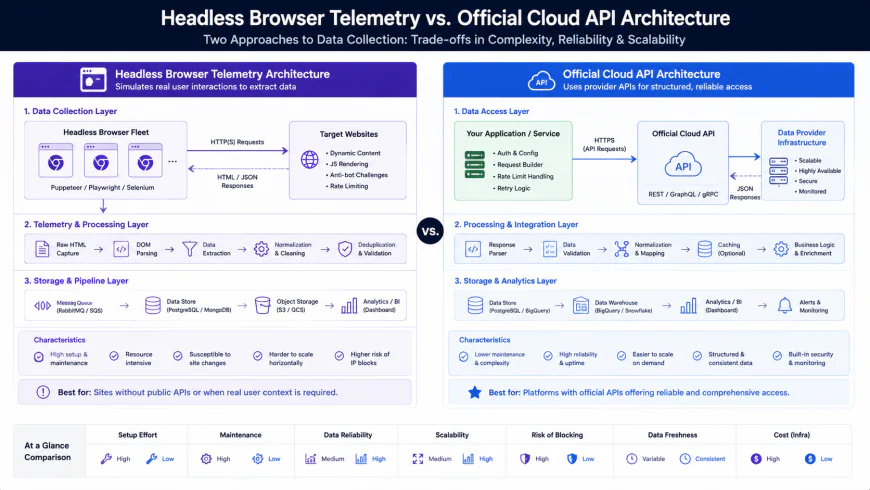 Figure 1: Comparison between high-risk browser automation telemetry blocks and the secure, direct Meta Cloud API pipeline.
The Technical Reality: Why "Anti-Ban" Claims are Marketing Myths
To understand why any unauthorized broadcasting script inevitably leads to a ban, we must look at the underlying technology. Unofficial tools operate by hijacking a browser session—usually via Selenium, Puppeteer, or custom Chrome extensions that inject scripts directly into the WhatsApp Web interface. The creators of these tools claim that by inserting random delays (e.g., waiting 5 to 10 seconds between messages) and simulating "keystrokes," they can bypass detection. This is a fundamental misunderstanding of modern browser fingerprinting and telemetry.
Meta's Client-Side Machine Learning Telemetry
Senior developers and reverse-engineering experts note that Meta does not simply monitor how fast messages are sent; they track how those messages are triggered within the browser interface itself. Meta uses sophisticated machine learning models that analyze user interface (UI) interactions in real-time. When a human typing on WhatsApp Web interacts with the application, their mouse moves across the screen in fluid, non-linear Bezier curves. There is a natural micro-delay between hover states, clicks, and keystrokes.
Conversely, when a script triggers a message send, it often modifies the Document Object Model (DOM) directly. Even if a script is programmed to "simulate" clicks, it typically triggers the event listener directly at exact microsecond coordinates without any prior mouse movement vector. Meta's telemetry immediately flags these instantaneous, linear, or vectorless UI interactions as a headless browser session. No amount of randomized delay can mask the absence of authentic human hardware interactions on the page. Once flagged, the system marks the account for a manual review or triggers an automated, permanent ban.
The Trap of Unauthorized APIs
Some developers offer unauthorized APIs that mimic the internal endpoints of the WhatsApp application. These reverse-engineered protocols are highly fragile. Every time Meta updates its web or mobile client architecture, these unofficial APIs break, resulting in extended downtime. Worse, Meta actively deploys honeypots and anomalous payload checks to catch unauthorized API calls. Using these tools is the technical equivalent of building your business communication infrastructure on quicksand.
Real-world developer evidence on technical forums highlights the swiftness of Meta's enforcement engine. On the r/WhatsappBusinessAPI community, a developer reported utilizing an unofficial automated script to send a highly targeted list of just 20 bulk messages to warm contacts. Within an hour, their number was banned. After appealing the ban, getting the number reinstated, and attempting to send only 10 more messages, the number was permanently blacklisted without further recourse.
In another case, a software engineer designed a custom Selenium automation script that successfully sent over 1,000 messages sequentially without triggering any automated triggers. However, the moment 3 to 4 recipients actively clicked the 'Report Spam' button on their mobile apps, the sending line was immediately blocked. This demonstrates that even if you bypass Meta's client-side automation detection, you cannot bypass human telemetry.
The Power of Human Telemetry: Why Spam Reports Always Win
Even if an unofficial developer manages to build a flawless automation script that perfectly mimics human behavior, they cannot bypass human psychology. When a cold, unsolicited promotional message lands on a user's mobile device, the native WhatsApp interface displays prominent buttons allowing the user to "Block" or "Report Spam" with a single tap.
This "Report" action is the ultimate weapon in Meta's anti-spam arsenal. The moment a user reports your message, the local chat logs, user interaction history, and raw message payloads are sent directly to Meta's trust and safety servers. This human-driven feedback loop bypasses any "anti-ban" code on your desktop software. If your broadcast receives even a tiny percentage of spam reports (typically as low as 1% to 2% of total sends), Meta's automated security systems will immediately suspend or permanently terminate your sending phone number. If you are using unauthorized software, you have zero recourse to appeal these bans, and your business phone number is gone forever.
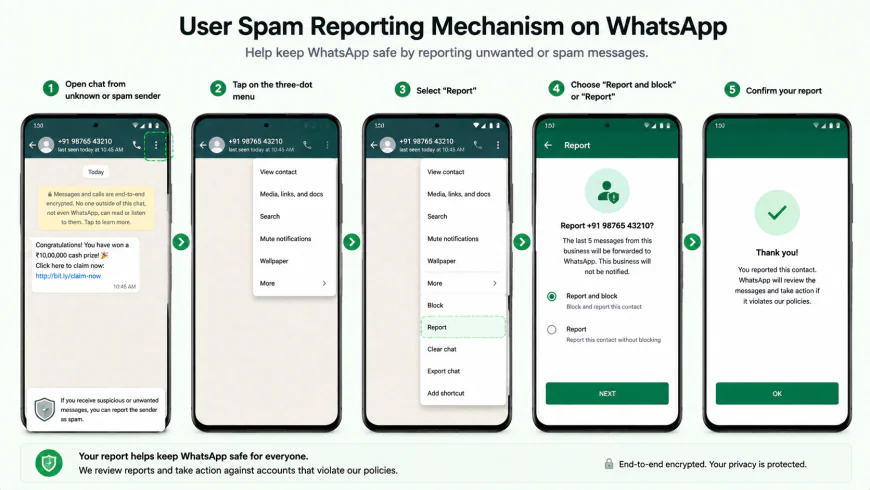 Figure 2: The native 'Report Spam' button on WhatsApp mobile clients, which triggers direct telemetry to Meta and overrides all automation safeguards.
Decoding the Alternatives: Unofficial vs. Official Channels
To help you make an informed decision for your business, we must categorize and evaluate the four primary methods of sending bulk messages on WhatsApp today. These range from highly dangerous desktop tools to robust, enterprise-grade official integrations.
1. Unofficial Chrome Extensions & Desktop Software
These are the traditional browser automation tools that require you to scan a QR code using your WhatsApp web interface. They run locally on your computer, using your physical internet connection and your personal or business account.
- The Risk Profile: Extremely High. Your number is highly likely to be banned within days or weeks of scaling campaigns.
- The Cost: Usually sold as cheap lifetime licenses ($30 - $150).
- Usability: High at first, as it requires no setup approvals, but drops to zero once your business line is blacklisted.
2. Open-Source Headless APIs (Evolution API, Wappfly)
A recent trend among independent developers on platform discussions like Indie Hackers is the shift toward self-hosted, headless WhatsApp web engines like Evolution API or Wappfly. These tools run on a dedicated private virtual server (VPS) and run a headless instance of Chromium to manage your WhatsApp session.
- The Niche Context: Ideal for low-volume personal side-projects, such as sending home automation alerts to your own phone, or triggering system alerts for a single developer.
- The Commercial Reality: While highly customizable, the risk of a ban remains moderate-to-high if used for commercial broadcasts. Because they still rely on browser session replication, any attempt to send a high volume of marketing messages will flag Meta's telemetry or trigger user reports, leading to a swift ban.
- The Setup: Requires technical knowledge to deploy a Docker container or Node.js server.
3. Official Meta Cloud API (Direct Integration)
The WhatsApp Cloud API is the official, direct route provided by Meta. It allows developers and businesses to connect directly to Meta's secure cloud infrastructure to send and receive messages programmatically.
- The Setup Myth: Many old-school marketing blogs claim that setting up the official API is extremely difficult, requires massive corporate verifications, and forces you to pre-load expensive digital wallets. This is completely false. Today, setting up a Cloud API account directly in your Meta Business Suite takes under 10 minutes and requires no pre-loaded wallet to start testing.
- How It Works: You register your phone number, verify your business details, and send messages using structured message templates that are pre-approved by Meta.
- The Ban Risk: Near Zero. You are completely compliant with Meta’s Terms of Service. If your quality score drops due to user reports, Meta will simply throttle your sending tier or temporarily pause your templates rather than permanently banning your phone number without warning.
4. Localized Business Solution Providers (BSPs)
In highly dense mobile-first markets like India, Southeast Asia, and Latin America, localized BSPs have exploded in popularity. Small-to-medium real estate, educational, and e-commerce companies face unique hurdles adopting complex Western automation tools. As a result, localized BSP solutions like WANotifier and AiSensy have thrived over generic enterprise setups.
- Why They Thrive: They handle the backend Meta Cloud API configurations for you, offer user-friendly dashboards, support local payment gateways, and often provide 0%-markup plans on Meta's raw conversation charges.
- The Enterprise Contrast: Heavyweight Western platforms (like WATI or Twilio) focus heavily on multi-agent customer support workflows, but can become incredibly expensive due to platform fees and message markups. Localized BSPs focus strictly on high-volume broadcasting with minimal cost overhead.
| Feature / Metric | Desktop Bulk Senders (Unofficial) | Headless APIs (Evolution / Wappfly) | Direct Meta Cloud API | Localized BSPs (WANotifier / AiSensy) |
|---|---|---|---|---|
| Anti-Ban Compliance | None (Predatory "Anti-Ban" claims) | None (High-risk if used for broadcasts) | 100% Compliant (Zero ban risk) | 100% Compliant (Zero ban risk) |
| Meta Approval Needed | No (Direct Web hijacking) | No (Headless Web hijacking) | Yes (System setup & templates) | Yes (Simplified setup via BSP) |
| Initial Setup Time | 2 Minutes | 30 Minutes (Requires VPS/Docker) | 10 Minutes (No code required to start) | 15 Minutes (Guided onboarding) |
| Cost Structure | One-time fee ($30 - $150) | Hosting costs (~$5/month VPS) | Pay-per-conversation (Meta direct fees) | Base subscription + Conversation fees |
| Best Suited For | High-risk burner operations | Personal home-automation alerts | SaaS developers & scaling enterprises | SMEs, E-commerce, & Regional brands |
Practical Scenario: Compliant vs. Uncompliant Campaigns
Let's look at how two different business workflows play out in a real marketing campaign using 1,000 lead contacts:
Scenario A (The High-Risk Grey-Hat Path): A real estate broker uses an unofficial Chrome extension. They upload a CSV of 1,000 cold leads scraped from directory websites. The software begins running, simulating mouse clicks and sending messages at random 8-second intervals. By message 142, Meta's telemetry identifies that DOM elements are being modified without authentic physical click coordinates. Simultaneously, three recipients tap the 'Report Spam' button. The broker's main business number is instantly disconnected, throwing their entire team into operational chaos.
Scenario B (The Safe, High-Conversion Path): An e-commerce brand uses WANotifier paired directly with the Meta Cloud API. They collect 1,000 contacts via an explicit opt-in checkbox on their website checkout page. They draft a personalized utility template: "Hi {{1}}, your order {{2}} has been shipped!" and submit it to Meta, where it is auto-approved in under a minute. They trigger the broadcast. Because the leads expected the message, none report it as spam. The brand tracks real-time read rates, maintains a perfect "Green" number status, and directly processes replies using an interactive quick-reply button.
✅ Pro Tip: The Opt-In Shield
The single most effective way to protect your business phone number from bans is establishing strict opt-in consent workflows. Never buy cold contact lists or scrape numbers. If a customer does not expect your message, they will report it. Always secure explicit consent via a checkbox on your lead forms, a click-to-chat link on your website, or an opt-in confirmation message. This simple step keeps your spam reports near zero and ensures your communication lines remain active forever.
Pricing & Licensing Breakdown: Unmasking the Hidden Costs
When comparing different options for your broadcast messaging needs, looking strictly at the upfront price is a massive trap. Many marketing teams choose unofficial tools because they want to avoid Meta's native "conversation-based" pricing model. Let us break down the real financial math of both approaches.
The False Economy of "Lifetime" Software
A typical unofficial automation tool costs a one-time fee of $49 to $199. On paper, this looks like an incredible deal. However, if that software causes your primary business number to get banned, you must calculate the associated business costs:
- The cost of purchasing new physical SIM cards or virtual numbers.
- The lost revenue from existing customers trying to contact your defunct number.
- The labor hours wasted updating your website, Google Business profiles, and printed marketing collateral with a new number.
- The complete loss of historical chat threads, customer trust, and brand equity.
Critical Pitfalls: Setup Friction, UI Clunkiness, and Renewal Spikes
While official tools and business solution providers offer safety, they are not without their own distinct frustrations. For one, the direct Meta Cloud API has a steep learning curve; if you do not have developer resources on your team, managing Webhooks and handling raw JSON payloads can feel incredibly overwhelming. On the other hand, cheaper, localized BSPs often have slow, clunky user interfaces that struggle to load heavy chat logs when scaling. Furthermore, many platform providers employ aggressive pricing tiers where costs jump exponentially once you pass small contact thresholds or when your introductory billing cycle renews. You must carefully audit their renewal policies and volume limits before integrating them into your workflow.
Decoding Meta's Official Conversation Pricing
The official WhatsApp Business Platform (WABA) does not charge per individual message. Instead, it charges per 24-hour "conversation window." A conversation begins the moment your business delivers a message to a customer. Within that 24-hour window, you can send unlimited messages back and forth with that specific user at no extra charge.
Meta categorizes these conversations into four distinct pricing tiers:
- Utility Conversations: Triggered by transactional updates, such as order confirmations, shipping updates, or billing receipts. These have highly competitive, low rates.
- Marketing Conversations: Triggered by promotional offers, product announcements, or newsletters. These have slightly higher rates.
- Authentication Conversations: Secured templates used for sending one-time passcodes (OTPs) during logins or password resets.
- Service Conversations: Any conversation initiated by a customer inquiry. When a customer messages you first, you can reply with service messages, and Meta provides a generous free tier of 1,000 service conversations per month for every WhatsApp Business Account.
Beware the BSP Markup Trap
Many popular Business Solution Providers (BSPs) like WATI, AiSensy, or Twilio advertise low monthly subscription costs. However, they quietly add a hidden "markup" or transactional fee on top of Meta's raw conversation charges. If you send 50,000 marketing messages per month, a tiny markup of $0.005 per message can inflate your monthly invoice by hundreds of dollars.
If your campaign volume scales past 10,000 messages a month, it is highly recommended to seek out direct Meta Cloud API integrations, or choose a transparent, 0%-markup BSP like WANotifier. These platforms charge a flat monthly subscription fee to use their dashboard, but pass Meta’s official, raw conversation costs directly to your payment card with zero extra fees. This structure saves businesses massive amounts of capital as their campaigns scale.
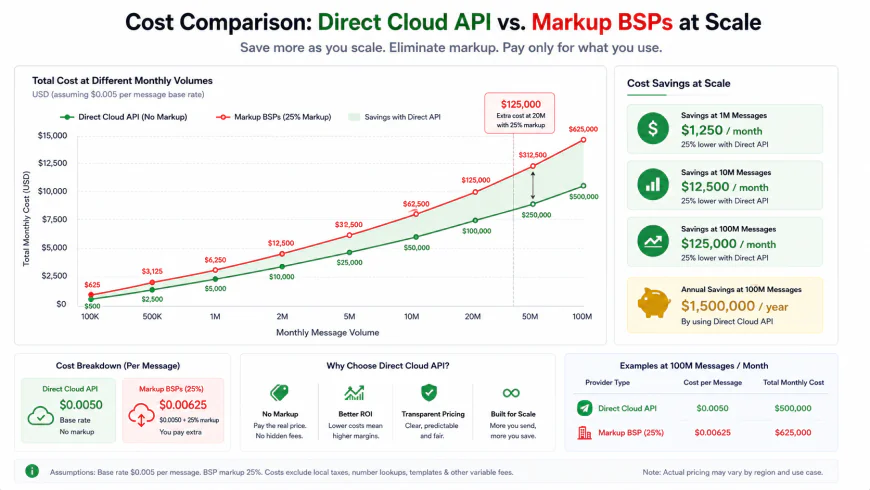 Figure 3: Cumulative cost projection comparing raw Meta Cloud API conversation charges against BSPs charging per-message transaction markups.
Balanced Comparison: Official vs. Unofficial WhatsApp Senders
Official Cloud API / Approved BSPs (Pros)
- Absolute Compliance: Zero risk of permanent bans; your verified corporate sender ID is protected by Meta's official framework.
- Green Tick Verification: Your business profile can display the coveted green verification badge, immediately boosting user trust.
- Advanced Interactive Messaging: Access to rich UI features like quick-reply buttons, interactive lists, and single-click product catalogs.
- No Hardware Required: Runs entirely on cloud servers; no need to keep your phone turned on, connected to the internet, or running a browser tab.
- Multi-Agent Scalability: Routes incoming customer replies to multiple customer service agents simultaneously.
Unofficial Desktop / Chrome Senders (Cons)
- Imminent Account Termination: Extremely high risk of permanent phone number bans that cannot be appealed.
- No Incoming Message Reliability: If your computer goes offline, or if the browser tab is closed, your automation halts entirely.
- Constant Software Breakage: Every minor security update to WhatsApp Web breaks the script, leading to unexpected operational downtime.
- Zero Rich UI Support: Unable to use official template components like native interactive quick-reply menus or automated list selection templates.
- Violates Global Privacy Standards: Lacks mechanisms to enforce customer opt-in consent, risking heavy fines under GDPR, CCPA, or localized spam laws.
Who should use what?
Choosing the right framework depends on your volume, your engineering resources, and your appetite for risk. Let's segment our recommendations:
- For Local Small Businesses (SMEs) with Limited Budget: If you run a local store, real estate office, or regional service agency, do not touch desktop bulk senders. Choose a user-friendly, localized BSP like WANotifier or AiSensy. They will guide you through the setup process and give you a simple interface to broadcast legally and safely.
- For SaaS Products, Tech Teams, and High-Volume Scale-ups: Integrate directly with the WhatsApp Cloud API inside your Meta developer portal. This gives you absolute control over your messaging pipelines, allows you to build custom internal CRMs, and bypasses all third-party subscription fees, ensuring you pay only raw Meta conversation costs.
- For Indie Developers & Personal Automation Projects: If you are building a custom alert system for your smart home, or triggering database error logs to your private phone number, self-hosting an open-source headless system like Evolution API on a cheap VPS is a fun, cost-effective option. Just remember to keep your volumes tiny and avoid cold commercial broadcasts.
Recommended Choices by Purpose
Our comprehensive review leads to a clear, unambiguous final verdict. If your business depends on its brand identity and communications, the use of unofficial desktop bulk distribution tools is obsolete and highly dangerous. The minor savings on conversation fees are completely wiped out by the immense damage of losing your corporate phone number.
For sustainable business growth, the direct WhatsApp Cloud API is the undisputed champion of safety, reliable delivery, and compliance. If you prefer a pre-built interface over direct coding, partner with a verified, 0%- markup Business Solution Provider (BSP). This strategic move safeguards your communication channels, establishes instant credibility with pre-approved message templates, and keeps your operations completely safe from automated enforcement sweeps.
Frequently Asked Questions
Q1: If Meta bans my number for using unofficial software, can I appeal and get it back?
Realistically, the chances are incredibly slim. When you submit an appeal, Meta’s security team doesn't just look at your written explanation—they analyze the digital fingerprinting and activity logs of the number. If their system detects headless browser signatures, automated DOM injections, or patterns of rapid script execution, the ban is almost always upheld permanently. Because using these tools is a direct violation of their Terms of Service, there is virtually no manual override or second chance.
Q2: How does the official WhatsApp Cloud API prevent spam if it allows high-volume sending?
Meta controls the ecosystem through strict quality controls. First, you cannot send raw, unstructured text to a customer out of the blue; you must use pre-approved message templates. If a template looks spammy or aggressive, Meta's automated screening rejects it instantly. Second, Meta monitors your real-time Quality Rating based on user feedback. If recipients start blocking or reporting your messages, your rating drops. If it falls too low, Meta will throttle your daily sending limits or temporarily pause your templates, protecting the user experience while giving your business a chance to adjust its strategy.
Q3: Is it possible to transition my current business number to the official Cloud API?
Yes, you can absolutely migrate your active number to the Cloud API. However, there is a catch: you must first delete the existing personal or business WhatsApp account associated with that physical phone. Once the number is unregistered from the mobile app, you can link it to your Meta Business Manager portfolio. Keep in mind that your local chat history will not automatically transfer to the API system, so make sure to manually back up any critical customer records before taking this step.
Q4: Does Meta charge a monthly subscription fee for using the Cloud API?
No, Meta does not charge any monthly platform fees or subscription costs to use the WhatsApp Cloud API directly. You only pay for what you use under their 24-hour conversation-based pricing model. Plus, every business gets 1,000 free customer-initiated (service) conversations every month. Any charges beyond that depend entirely on the country code of the recipient and the category of the message (such as utility, marketing, or authentication).
Your Official API Transition Roadmap
Ready to ditch the high-risk workarounds and build a secure, scalable messaging setup? Here is a simple, step-by-step checklist to help you transition smoothly to the official WhatsApp Cloud API:
- Verify Your Business Portfolio: Head over to your Meta Business Manager and complete your business verification. While not strictly required to start testing, this unlocks higher daily sending limits and paves the way for securing your official green checkmark.
- Dedicate a Clean Phone Number: Use a phone number (virtual, mobile, or landline) that isn't currently active on a standard WhatsApp app. It needs to be active and ready to receive a quick verification code via SMS or voice call.
- Set Up Your Developer Credentials: Create a free account on the Meta for Developers portal, set up a new app, and link it directly to your verified Business Portfolio to gain API access.
- Select a User Interface: Decide how you want to manage your inbox. You can build custom workflows with developer resources, connect the API to automation platforms like Zapier, or link it directly to a user-friendly inbox manager or CRM.
- Create and Submit Your First Templates: Draft simple, highly useful transactional or marketing templates in your developer dashboard. Once approved—which usually takes just a few minutes—you are officially ready to send your first compliant broadcast.