Suno AI vs Udio for Background Music: Best Free Option
Comparing Suno AI vs Udio for background music? Discover which free AI music generator makes the best copyright-free tracks for your videos and podcasts.
 Abir Bin Hasan
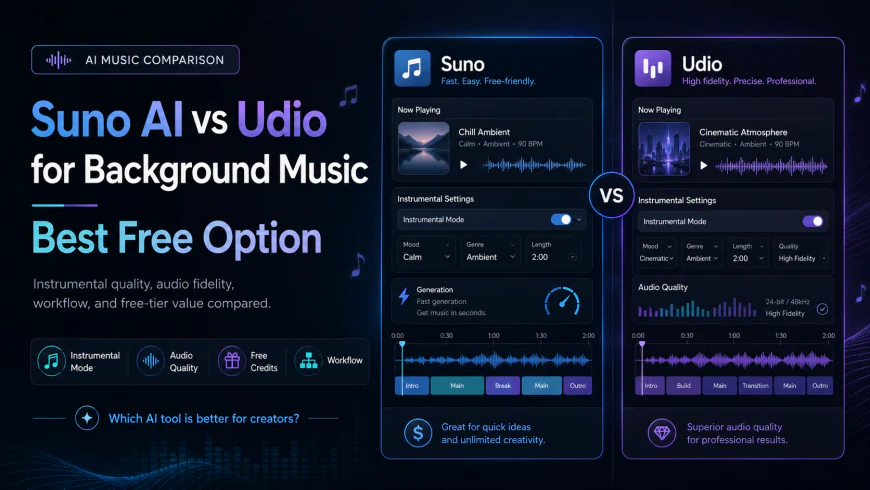
Suno AI vs Udio for Background Music: Best Free Option
Sourcing the right background audio for video essays or podcasts is notoriously tedious. Creators usually find themselves stuck choosing between repetitive, generic stock music libraries and costly subscription services. In this comparison, we look at how Suno and Udio stack up for generating ambient audio backdrops to determine which platform offers the most practical, cost-effective options for content workflows. We will analyze spectral clarity, track-extension setups, and the realistic limitations of utilizing these models for professional background loops.
What this article helps you decide
This comparison focuses on practical production needs rather than casual novelty. If you need a fast, one-click way to output continuous instrumental loops without vocal intrusions, certain parameter tweaks make one tool the obvious choice. Conversely, if your project requires clean stereo separation, higher audio fidelity, and individual track stems for a complex mix, the other option holds a distinct technical edge.
Analysis Methodology
This analysis compiles platform documentation, community user feedback, licensing updates, and hands-on editorial observations. The evaluation tracks spectral clarity (specifically the presence of digital compression artifacts), instrument-vocal separation, how easily the models interpret low-energy prompts, and the legal realities of using free-tier outputs under current copyright frameworks.
Overview & Market Context
Content creators are pivoting away from traditional stock music databases where tracks are legally safe but creatively sterile. AI text-to-music generators now offer customized audio on demand. However, most models are optimized to build full, vocal-heavy pop songs for casual listening. This guide shifts focus to evaluate how well these tools function as background audio utilities—specifically for video essays, voiceovers, ambient tracks, and podcasts.
Currently, the market is dominated by two primary options: Suno AI and Udio AI. Both platforms run on deep-learning transformer models trained on vast audio libraries, but they differ fundamentally in rendering architecture and prompt logic. Furthermore, the broader generative audio landscape is under intense scrutiny. With platforms like Apple Music beginning to flag AI-generated assets and major labels pursuing copyright claims, ethically trained options like Beatoven.ai are gaining attention, though Suno and Udio remain the standard for high-fidelity output.
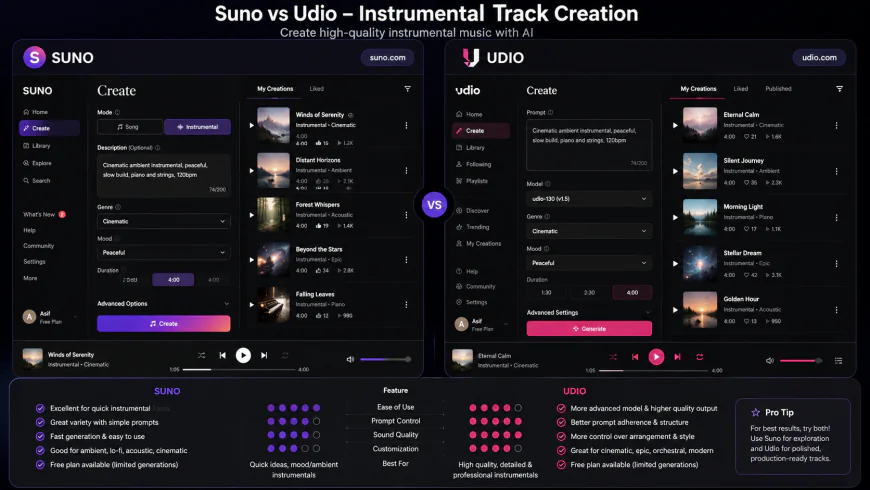 Comparing the prompt interfaces of Suno and Udio when configuring settings for pure instrumental generation.
In-Depth Evaluation of Suno AI
Prompt Interface and Setup Flow
Suno presents a highly straightforward onboarding experience. Operating directly from suno.com, the interface splits creation between a simple prompt box and a toggleable "Custom Mode." For fast background loop creation, the basic setup is remarkably fast: type in a phrase like "lo-fi study beats, warm vinyl crackle, cozy keyboard chords, no drums," and the platform returns two distinct variations.
The "Custom Mode" is where background music creators find the essential "Instrumental" toggle. This tells the synthesizer engine to skip vocal generation entirely. Users can also input structural guidelines like [Intro], [Verse], or [Outro] in the lyric field to map out energy shifts. Rendering is incredibly rapid, often delivering a three-to-four-minute track in under thirty seconds—a massive benefit for editors working under tight deadlines.
Instrumental Track Performance and the Vocal Bleeding Issue
While Suno excels at fast generation, delivering a clean, distraction-free background track is not always a smooth process. User feedback consistently highlights a major flaw: vocal bleeding is a persistent issue in Suno when attempting to generate pure instrumentals, making it occasionally frustrating for standard background loops. Even with the "Instrumental" option active, the model often fails to separate vocal training characteristics from the instrumental layers.
This bug typically manifests as faint, synthesized murmuring, ghost-like hums, or processed choral pads right in the mid-frequency range. For a video editor, these artifacts are a massive pain because they sit exactly where the human voice lives. This frequency overlap requires aggressive EQ carving during post-production to keep the narrator's voice clean. To get a truly sterile instrumental from Suno, expect to run the same prompt several times to bypass these synthetic vocal remnants.
Length, Looping, and File Exporting Options
Where Suno gains points is its maximum length. The platform can generate continuous, evolving tracks up to four minutes long in one go. This length is a lifesaver for long video projects, removing the need to constantly slice and crossfade short 30-second clips. The internal progression of these longer tracks remains remarkably cohesive, keeping the same tempo and key throughout.
For export, Suno supports standard MP3 and video wrappers with simple audio wave visualizations. Uncompressed WAV files are locked behind a paid plan. Crucially, the free tier lacks native multitrack stems (the ability to split drums, bass, and melody), which limits how much fine-tuning you can do in your video editor or DAW.
In-Depth Evaluation of Udio AI
Prompt Engineering and Text-to-Music Usability
Udio, found at udio.com, targets a slightly different audience, leaning more toward high-fidelity production. Its workspace is more complex than Suno's, designed with musicians and seasoned editors in mind. Instead of a basic text box, the platform offers guided tag suggestions categorized by genre, mood, and instrument style to help shape the output.
The workflow here is highly iterative. Rather than outputting a completed long-form track right away, Udio builds music in discrete steps—typically defaulting to 32-second or 2-minute segments. Once a solid segment is generated, users must manually select options to "Extend" it forward or backward, run "Inpainting" to fix a specific section, or append custom intros and outros. While powerful, this timeline-based approach introduces a steeper learning curve and can slow down creators who just want a fast drag-and-drop file.
Audio Quality and Separation Metrics
On sheer audio fidelity, Udio has a clear advantage. The stereo imaging is remarkably wide, delivering crisp high-end frequencies and a punchy, clean low-end that avoids the muddy, compressed sound typical of early AI audio. While the tool produces highly polished tracks, its 2-minute baseline restriction demands more hands-on editing compared to Suno's 4-minute outputs.
For video production, this cleaner spectral separation means your background track doesn't blend into a single wall of sound. Instruments feel like they occupy their own space in the virtual stereo field. This makes mixing straightforward: a minor cut in the 1kHz to 3kHz range is usually all it takes to make room for a voiceover. The lack of digital "mush" or background noise gives these files a highly professional polish, even on high-end monitors.
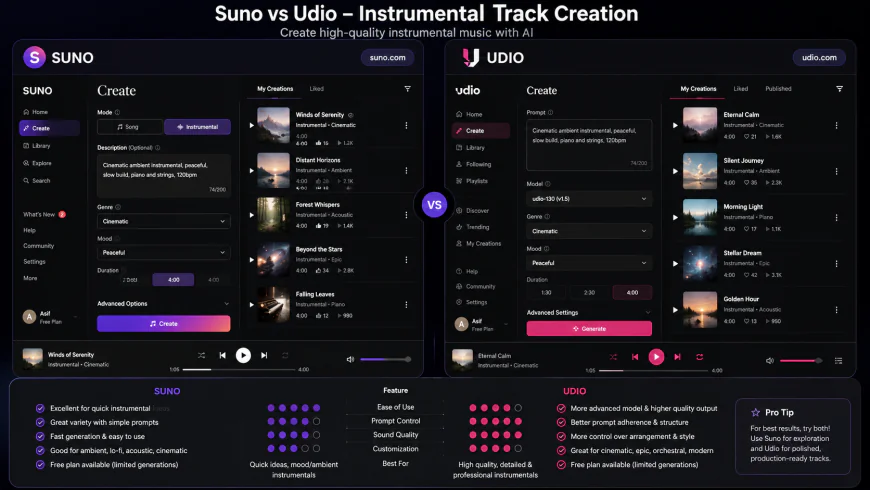 A spectral analysis demonstrating Udio's cleaner high-frequency separation versus Suno's denser mid-range spectral output.
The 2-Minute Constraint and Extension Workflows
The catch with Udio's superior sound is the generation workflow. Because of its modular design, creating a 4-minute track requires walking through multiple manual extensions. This means choosing a clip, configuring the extension settings, writing a new prompt or maintaining the old one, waiting for the system to process, and then merging the results.
For high-volume creators, this multi-step approach is a bottleneck. The process eats up generation credits rapidly, and if an extension introduces an unexpected tempo shift or key change, you have to start over. Udio delivers better raw audio quality, but it demands significantly more time and active manipulation to produce a finished, long-form loop.
💡 Expert Analysis & Experience
Observation: In production environments, a clear divergence occurs in how these engines handle quiet, minimalist passages. When prompted with low-energy descriptors like "ambient drone" or "minimalist pad," Suno v5 occasionally struggles with noise floor artifacts, sometimes inserting unwanted acoustic guitar plucks or synthetic voices to fill empty frequencies. Udio, by contrast, respects these boundaries, maintaining clean sub-bass rumbles without introducing digital jitter.
Result: For fast-paced video intros, Suno's rapid 4-minute generations prove to be an efficient time-saver. However, for primary voiceover backdrops, utilizing Udio to generate short, clean blocks and manually looping them inside a DAW or NLE like Premiere Pro often yields the cleanest end product. This combined strategy leverages Suno's speed for structural changes and Udio's pristine frequency response for dialogue-heavy segments.
| Feature / Metric | Suno AI | Udio AI | Beatoven.ai (Ethical Alt) | Soundraw (Standard Stock Alt) |
|---|---|---|---|---|
| Max Initial Length | Up to 4 Minutes | 2 Minutes (Model dependent) | Up to 15 Minutes | Up to 5 Minutes |
| Vocal-to-Instrument Separation | Moderate (Prone to vocal bleeding) | Excellent (Clean separation) | Flawless (No vocal engine) | Excellent (Loop-based stems) |
| Free Tier Credits | 50 credits/day (~10 songs) | 100 credits/month (free promo tier) | Limited free trial minutes | Unlimited generation (No downloads) |
| Export Formats (Free) | MP3 & MP4 Video | MP3 | MP3 (Watermarked on free) | Listen only (Subscription required) |
| Commercial Use (Free) | Strictly Prohibited | Strictly Prohibited | Prohibited without license | Prohibited on free tier |
| Model Licensing | In disputes with major labels | In disputes with major labels | 100% ethically trained database | Individually licensed library |
Practical Scenario
Consider a video editor working on a 10-minute history documentary. The project needs a subtle, melancholic piano melody to sit softly beneath an ongoing voiceover. If the editor fires up Suno, they might enter a custom prompt like: [Instrumental] Solo piano, slow tempo, hall reverb, minimalist, cinematic, 60 bpm. Suno quickly delivers a solid, continuous 4-minute track. But near the two-minute mark, a ghostly, synthetic vocal hum creeps into the upper-mid frequencies. To keep the voiceover clear, the editor has to go in with a surgical notch filter around 1.2 kHz, which unfortunately robs the piano of its natural warmth.
If they opt for Udio instead, the initial 2-minute piano track sounds jaw-droppingly pristine, with zero vocal bleed and realistic key strikes. However, because of Udio's shorter generation limits, the editor must spend extra time extending the track twice to cover the necessary length. They then have to export the segments and hand-align them with smooth crossfades in their timeline to prevent any jarring transitions.
💡 Pro-Tip: Force Suno to Quiet Down
If you are struggling with vocal bleeding in Suno, don't rely on the "Instrumental" toggle alone. Switch to Custom Mode and paste negative prompts directly into the lyrics box. Try wrapping tags like [pure instrumental], [no vocals], [no singing], or [silence] in brackets. This forces the underlying neural net to ignore its vocal synthesis libraries, yielding a much cleaner instrumental output.
Navigating the Legal Landscape: Pricing, Copyrights, and Risk
Free Tiers vs. Commercial Monetization
When you are searching for a "free" AI background music generator, the fine print is just as important as the spectral audio quality. Both Suno and Udio offer free entry points, but they come with heavy legal strings attached.
Suno's free tier gives you 50 daily credits (which reset every 24 hours without rolling over), translating to roughly 10 generation runs a day. However, under Suno's Terms of Service, any audio generated on a free account is owned by Suno. You are strictly forbidden from using these tracks on monetized YouTube channels, Twitch streams, client videos, or podcasts.
Udio works on a monthly credit system for free accounts (typically granting around 100 credits per month, though this varies with platform updates). Just like its competitor, Udio restricts free-tier creations to strictly personal, non-commercial use. If you want to monetize your content, you must subscribe to a paid tier before generating and publishing the tracks. Once you pay for a subscription, you hold the commercial usage rights for any tracks created during your active subscription period.
The Copyright Trap: Lawsuits and Ownership Realities
The legal ground beneath generative AI music is shifting rapidly. Currently, both Suno and Udio are embroiled in major lawsuits filed by the Recording Industry Association of America (RIAA) on behalf of behemoths like Universal Music Group, Sony Music, and Warner Music. The lawsuits accuse these AI companies of massive copyright infringement for allegedly training their models on proprietary recordings without licensing agreements.
Because of this ongoing litigation, using these tools for high-profile corporate or commercial work carries real risks. If a court rules against the platforms, any music generated by their engines could theoretically face retroactive copyright claims, automated takedowns, or monetization bans on platforms like YouTube and Instagram.
Furthermore, the United States Copyright Office (USCO) has made its stance clear: purely AI-generated music, created without substantial human input, cannot be copyrighted. Even if you pay for a premium subscription to Suno or Udio, you don't legally "own" the copyright to the raw audio file. If someone else rips your AI-generated background music and uses it in their own video, your legal options for enforcing a copyright strike are incredibly limited unless you have significantly modified or remixed the file in a digital audio workstation (DAW).
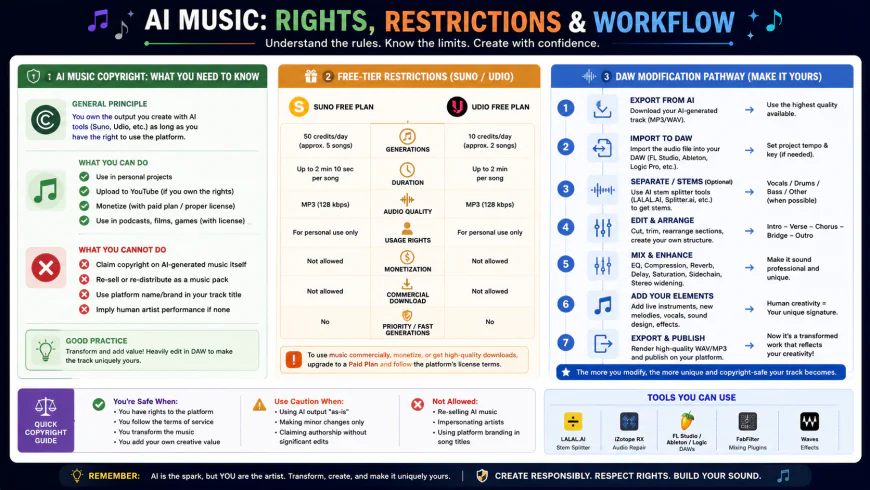 Navigating the gray areas of AI music copyright, from free tier limitations to the legalities of commercial licensing.
Ethical Alternatives & Clean Licensing Pipelines
To avoid these legal gray areas entirely, many enterprise marketing teams and conservative creators are shifting to alternative generative music platforms. Services like Beatoven.ai rely on ethically trained datasets, meaning they either own or have explicitly licensed every single audio sample used to train their algorithms. While the creative complexity of Beatoven's output might not match the jaw-dropping realism of Suno or Udio, they offer 100% legal safety and provide downloadable royalty-free licensing certificates with your tracks.
Fortunately, the broader industry is moving toward structured, creator-friendly pipelines. Suno's integrations with tech platforms and Udio's push toward licensing deals show that the industry is adapting. These efforts aim to establish legitimate, artist-approved ecosystems, bridging the gap between cutting-edge generative tools and strict copyright compliance.
Quick Summary: Suno AI vs. Udio AI
Suno AI Pros
- Extended Playtimes: Spits out cohesive tracks up to 4 minutes long in one go, dramatically reducing splicing time.
- Lightning Fast: Generates dual variations in under 30 seconds, perfect for tight editing turnarounds.
- Generous Daily Credits: The 50 free credits reset every 24 hours, giving you plenty of room to experiment daily.
- Ultra-Simple UI: Highly intuitive text-to-music generation that requires zero musical background.
Suno AI Cons
- Vocal Bleed: Prone to generating faint, synthetic humming or singing artifacts in instrumental tracks.
- Compressed Sound: Mid-range frequencies can feel a bit crowded or "muddy" under dialogue.
- No Stem Exports on Free: You cannot separate and export individual instruments for advanced mixing.
Udio AI Pros
- Pristine Sound Fidelity: Offers incredible stereo separation, high-frequency clarity, and professional-grade depth.
- Clean Instrumental Boundaries: Rarely suffers from vocal bleeding when instructed to output pure instrumentals.
- Precise Control: Inpainting and section extension features let you surgically edit and structure your track.
- Atmospheric Precision: Highly capable of rendering ultra-clean, subtle cinematic drones and ambient pads.
Udio AI Cons
- Fragmented Workflow: The 2-minute limit means you have to manually extend and stitch tracks together.
- Slight Learning Curve: The timeline-based workspace is slightly more complex for beginners.
- Slower Credit Burn: Running multiple iterations and extensions can deplete your monthly credits rapidly.
Who is each platform built for?
Choose Suno AI if: You are a high-output content creator, solo YouTuber, or podcaster who needs a steady stream of long, continuous background loops. If you want a quick "set-it-and-forget-it" track that sounds good enough and generates in seconds, Suno's 4-minute rendering window will save you valuable post-production hours.
Choose Udio AI if: You are a professional video editor, documentary filmmaker, or audio designer who won't compromise on broadcast-ready sound. If your project features delicate voiceovers or quiet narration, Udio's spatial separation ensures the background music will sit beautifully in the mix without competing with your voice tracks.
The Final Verdict
For most casual creators hunting for the absolute best free option, Suno AI takes the crown because of its daily credit resets and effortless workflow. However, if your ears demand studio-grade fidelity, Udio AI is the superior music generator—even if you have to jump through a few workflow hoops to stitch longer tracks together. Finally, if you are producing high-stakes commercial client projects and need ironclad protection from copyright strikes, skip both and stick to ethically trained alternatives like Beatoven.ai or a premium royalty-free subscription service.
Frequently Asked Questions
1. Can I use free-tier Suno or Udio tracks in monetized YouTube videos?
No. Both platforms explicitly restrict tracks generated on their free tiers to non-commercial, personal use. If you want to use the music in a monetized YouTube video, sponsored podcast, or client project, you must subscribe to a paid plan before creating and publishing those tracks.
2. How do I stop vocal bleeding in Suno's instrumental tracks?
Don't rely entirely on the "Instrumental" toggle. Switch to Custom Mode and use the lyrics field to write bracketed negative commands like [devoid of vocals] [no singing] [no humming] [silence]. Also, avoid emotionally charged prompts like "melancholic" or "haunting," which can occasionally trigger the model to generate vocal harmonies.
3. Does Udio let you export stems for easy multi-track mixing?
While Udio features advanced audio separation, stem downloads are generally restricted to paid subscribers. However, free-tier users can export high-quality stereo MP3s and use third-party tools (like spectral editors or DAW-based vocal removers) to isolate instruments if needed.
4. What is the difference between Suno v5 and Udio Allegro?
Suno v5 focuses on speed and structural continuity, easily generating cohesive, multi-minute arrangements with realistic instrumentation. Udio Allegro prioritizes acoustic fidelity and spatial separation, making it highly responsive to nuanced, dialogue-friendly ambient styles, albeit requiring a more hands-on, segmented workflow.
5. Can major record labels sue me for using AI-generated background music?
It is highly unlikely that record labels will target individual creators. The ongoing lawsuits are directed at the platform parent companies (Suno and Udio) over training data ingestion. However, if a court rules in favor of the record labels, videos utilizing these tracks could face automated platform-wide copyright claims, muting, or demonetization.
6. What makes Beatoven.ai different from Suno and Udio?
Unlike Suno and Udio, which trained their algorithms on massive scraped web datasets, Beatoven.ai is built entirely on ethically licensed, proprietary audio. While it may not match the sheer musical complexity of its competitors, it provides absolute legal safety, a 100% clean paper trail, and legitimate royalty-free certification for commercial projects.