7 Best Cheap Cold Email Outreach Tools to Scale on a Budget (Without Burning Your Domain)
Compare the best cheap cold email outreach tools for 2026. Discover flat-fee Lemlist alternatives with unlimited warmups to scale safely without domain burn.
 Abir Bin Hasan
7 Best Budget Cold Email Platforms to Scale Without Burning Your Domain
Cold outreach used to be straightforward: you paid for a single user seat on a legacy platform, hooked up your primary domain, and blasted out messages. That approach is now a quick way to get your company blacklisted. Since Google and Yahoo tightened their sender rules—strictly enforcing spam thresholds and blocking non-compliant senders—the playbook has changed. Success today requires using cost-effective systems that offer flat-fee structures and unlimited inbox connections, allowing you to spread your sending volume across multiple secondary domains.
What this article helps you decide
This guide cuts through the marketing hype to compare the top budget-friendly outbound platforms on the market. By the end of this breakdown, you will know which flat-fee tools are worth your budget, how to avoid the trap of expensive per-seat pricing, and how to set up your sending infrastructure so your messages actually reach the inbox.
Analysis Methodology
This comparison is based on a detailed review of official product documentation, service agreements, and actual user experiences shared in technical communities and developer forums. Instead of relying on superficial feature lists or simulated trials, we focus on verified technical limitations, real-world deliverability, and the practical pros and cons of each platform.
The Paradigm Shift: Why Legacy Outbound Software is Obsolete
The days of uploading a massive list of contacts and mailing them all from a single corporate inbox are over. With Google's strict email guidelines (detailed in the Google Workspace Admin Help), keeping your spam complaint rate under 0.3% is mandatory. Exceed that limit, and your entire domain's deliverability will crater. Because of this, cold outreach has shifted from vertical scaling (high volume from one inbox) to horizontal scaling (low volume distributed across dozens of separate, secondary domains).
While legacy platforms like Lemlist remain popular recommendations, their per-seat pricing models quickly become cost-prohibitive for growing teams. If you need to connect twenty or thirty separate inboxes to distribute your daily volume, those per-user fees add up to hundreds of dollars a month. Modern, budget-friendly outbound software solves this issue by offering flat-rate pricing for unlimited email connections, making inbox rotation affordable.
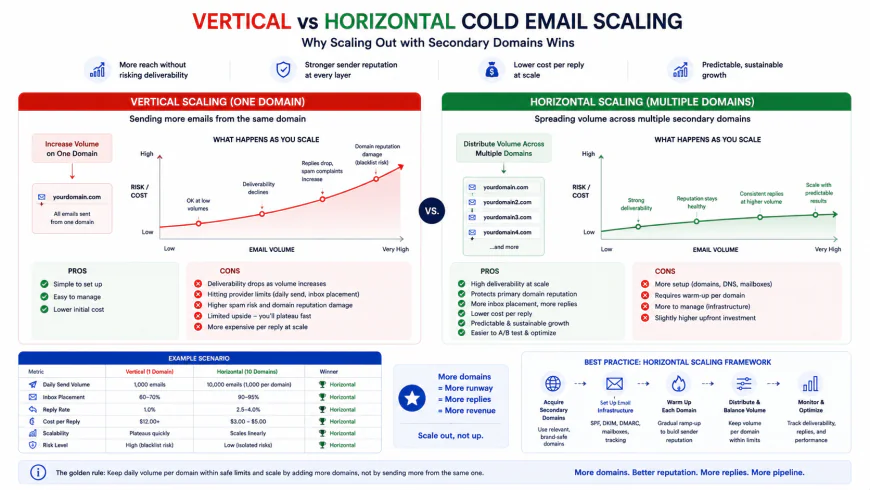 Horizontal scaling distributes low daily sending volumes across multiple isolated secondary domains to avoid spam filters.
A common mistake when trying to keep costs low is relying on shared transactional SMTP relays like SendGrid or Mailgun for cold campaigns. Major email providers easily identify bulk transactional traffic and route it straight to the spam folder. To run a successful campaign, you need to use legitimate business inboxes (such as Google Workspace or Microsoft 365) connected to your sending platform via API or direct IMAP/SMTP.
Key Metrics to Evaluate Affordable Cold Email Software
When comparing lower-cost outbound tools, deliverability features matter far more than just finding the absolute lowest price. Sending an email is easy; the real challenge is protecting your sender reputation over time.
- Inbox Rotation: This feature spreads your daily email volume across multiple connected accounts. Instead of sending 100 emails from one address, the software sends 10 emails from 10 different addresses, keeping individual accounts safely under suspicious activity limits.
- DNS Verification and Setup: Consistent deliverability starts with proper technical alignment. Your chosen software needs to easily verify SPF, DKIM, and DMARC settings. You can monitor your setup using tools like MXToolbox Deliverability Services.
- Email Warmup Dynamics: Following Google's API changes, email warmup features should be viewed as basic activity simulators to prepare new domains, not a way to fix a poor sending reputation. Look for organic, peer-to-peer sending networks that mimic realistic human interaction.
- API and Webhook Support: For teams managing multi-step workflows, your sending platform needs to integrate cleanly with lead sources, verification services, and your CRM. Unreliable webhooks usually mean lost data and broken tracking.
 A foundational breakdown of the necessary DNS TXT records required to pass ESP authentication checks.
In-depth Evaluation of the 7 Best Cheap Cold Email Tools
1. Instantly.ai
Instantly.ai is one of the most popular platforms in the budget outbound space. It gained traction by offering flat-rate plans with unlimited email accounts, removing the cost barriers of scaling and making it a viable alternative to higher-priced services.
Setup Flow & Infrastructure Integration
Adding new domains in Instantly is straightforward. The setup wizard uses OAuth for quick Google Workspace and Microsoft 365 connections. For custom IMAP setups, it offers bulk connection tools and automatically flags any issues with SPF, DKIM, or DMARC records before you launch a campaign.
Usability Metrics & Interface
The platform is known for its clean, beginner-friendly interface. Setting up a campaign is a standard step-by-step process: uploading your list, writing the sequence, selecting your sending accounts, and setting schedule limits. The trade-off is that advanced users may find its native A/B testing and API customizability a bit basic.
Deliverability & Warmup Evaluation
Instantly includes peer-to-peer warmup functionality to simulate natural activity on new secondary domains. Users can customize daily sending increases and set specific warmup ratios. While this helps prepare new domains, it won't protect campaigns sent to unverified or low-quality lead lists.
Pricing & Licensing Tiers
The Growth Plan is priced at $37/month ($30/month billed annually) and supports unlimited email accounts with up to 5,000 active leads. The Hypergrowth Plan at $97/month increases the lead limit to 25,000 and unlocks advanced sequence options and priority support.
Pros & Cons
- Pros: Highly intuitive visual dashboard; unlimited inbox connections on all plans; quick onboarding.
- Cons: Limited native A/B testing options; basic API capabilities for complex external setups.
- Who should avoid: Teams that require highly complex, conditional multi-step branching sequences or deep, custom CRM integrations.
Target Audience
Startups, individual operators, and growing agencies who want a simple, visually clear platform to scale their outreach without per-seat charges.
2. Smartlead.ai
Smartlead.ai is designed for high-volume agencies and developers who prioritize technical control, reliable APIs, and automated systems over a simplified user experience.
Setup Flow & Infrastructure Integration
Smartlead allows users to bulk-upload secondary domains via CSV. You can configure multiple domains, IMAP details, and custom tracking domains simultaneously. Its robust API documentation makes it easy to integrate your campaigns directly into external databases and automated systems.
Usability Metrics & Interface
The main trade-off with Smartlead is its steep learning curve. The interface can feel cluttered, and managing client accounts, analytics, and master inboxes requires some time to learn. However, it is highly reliable for running complex, automated workflows without missing webhooks or dropping data.
Deliverability & Warmup Evaluation
Smartlead features a peer-to-peer warmup network designed to distribute traffic naturally across different email providers. A key deliverability feature is its advanced subsequence automation, which automatically shifts sending accounts based on recipient engagement and domain status.
Pricing & Licensing Tiers
The Basic Plan costs $39/month (up to 2,000 active leads and unlimited email accounts). The Pro Plan at $94/month increases active leads to 30,000 and adds global master inbox access, dynamic tracking, and full webhook integration.
Pros & Cons
- Pros: Reliable API and webhook performance; advanced subsequence automation; white-labeling options for agencies.
- Cons: Complex interface; takes longer to configure and learn for simple campaigns.
- Who should avoid: Solopreneurs or beginners who just want to launch a quick, 20-email-a-day sequence without dealing with API settings or complex routing.
Target Audience
Large-scale lead generation agencies and technical sales teams who need deep CRM integrations and customized white-labeled reporting portals.
3. Saleshandy
Saleshandy is a practical, cost-effective option that includes automated warmup features, making it a reliable choice for teams wanting to run multi-account campaigns on a budget.
Setup Flow & Infrastructure Integration
Connecting accounts in Saleshandy is standard. It supports Google, Microsoft, and custom SMTP/IMAP setups. The platform also checks active domains to ensure your SPF and DKIM records are correctly configured before campaigns go live.
Usability Metrics & Interface
The dashboard is clean and organized, with clear sections for analytics, templates, and connected accounts. While it's easy to track metrics like open and reply rates, the platform lacks the deeper multichannel features (such as automated LinkedIn touchpoints) found in more expensive software suites.
Deliverability & Warmup Evaluation
The tool uses a randomized sending algorithm designed to mimic natural human typing and sending speeds. It also includes an integrated warmup feature to help maintain sender reputation across your secondary domains.
Pricing & Licensing Tiers
The Outreach Starter plan is highly budget-friendly at around $25/month (billed annually), supporting unlimited email accounts and up to 2,000 prospects. The Outreach Pro plan is around $49/month, extending the prospect limit to 25,000 and unlocking more advanced sequence triggers.
Pros & Cons
- Pros: Very low entry-level price; randomized human-like sending intervals; simple navigation.
- Cons: No built-in LinkedIn or multi-channel workflow capabilities; basic CRM integration options.
- Who should avoid: Marketers who want an all-in-one multichannel tool that coordinates email, phone calls, and social media touchpoints.
Target Audience
Freelancers, small business owners, and growing sales teams who need reliable, budget-friendly email outreach without complex enterprise features.
4. SuperSend.io
SuperSend is an affordable multi-channel outbound tool that helps you reach prospects across Email, LinkedIn, and Twitter/X from a single dashboard.
Setup Flow & Infrastructure Integration
The platform connects easily with various SMTP servers and social media APIs, allowing you to link your secondary domains and social accounts into a coordinated outreach sequence.
Usability Metrics & Interface
SuperSend has a smaller user base and a simpler community-driven design compared to larger platforms. While the interface can sometimes feel a bit unpolished, its visual multi-channel builder makes it easy to map out automated steps across different networks.
Deliverability & Warmup Evaluation
A useful feature in SuperSend is its deliverability breakdown by email provider (e.g., Gmail vs. Outlook). This helps you identify if a specific secondary domain is running into issues with a particular provider, so you can pause and rotate it out.
Pricing & Licensing Tiers
SuperSend's pricing is highly competitive for a multi-channel tool, starting at $40/month for unlimited email accounts, multi-channel sequences, and generous daily sending caps.
Pros & Cons
- Pros: Multi-channel sequence options; deliverability metrics broken down by email provider; excellent value for money.
- Cons: Smaller user community; the interface can feel basic; fewer native third-party software integrations.
- Who should avoid: Large agencies that require highly polished, client-facing dashboards and massive white-labeled analytics reporting.
Target Audience
B2B marketers and growth teams looking to combine email outreach with automated LinkedIn or Twitter touchpoints on a budget.
5. Success.ai
Success.ai is a fast-growing platform that combines multi-account email sending, warmup features, and a built-in database of B2B contact leads.
Setup Flow & Infrastructure Integration
Connecting your domains uses standard OAuth for Google and Microsoft accounts alongside manual IMAP/SMTP options. The interface provides clear step-by-step guidance for verifying SPF, DKIM, and DMARC settings.
Usability Metrics & Interface
The platform's clean dashboard makes it easy to find leads and manage your sending campaigns in one place. This is highly convenient for teams that want to source leads directly inside their outreach tool rather than buying expensive external databases.
Deliverability & Warmup Evaluation
Success.ai offers unlimited warmups on its active plans. The warmup tool simulates natural conversations, helping to protect your sender reputation as you scale up your inbox rotation strategy.
Pricing & Licensing Tiers
The Growth Plan starts at $23/month (billed annually), which includes unlimited connected accounts, warmup features, and access to their basic lead database. Higher plans increase your lead export limits while maintaining flat-rate sending limits.
Pros & Cons
- Pros: Large built-in contact database; highly affordable entry price; unlimited accounts and warmups.
- Cons: Search filters can sometimes return outdated lead data; custom webhook options are fairly basic.
- Who should avoid: Enterprise sales teams who require highly accurate, human-verified contact databases with complex CRM syncing.
Target Audience
Bootstrapped startups and solo sales reps who need both a lead source and a sending platform on a tight budget.
6. Mailstand
Mailstand is a specialized tool built specifically for teams that want precise control over email rotation and multi-account configurations without unnecessary feature bloat.
Setup Flow & Infrastructure Integration
Connecting inboxes is Mailstand's core strength. You can connect various mailboxes (Gmail, Office365, custom IMAP) and merge them into coordinated sending pools. The platform focuses heavily on domain isolation, making it easy to swap out individual domains if you notice deliverability drops.
Usability Metrics & Interface
The user interface is basic and direct. Because Mailstand doesn't include extraneous features, it's very easy to navigate. Setting up campaigns takes only a few minutes, focusing purely on list imports, copy variants, and rotation settings.
Deliverability & Warmup Evaluation
Mailstand does not have its own peer-to-peer warmup network. Instead, it focuses on protecting your reputation through highly customizable sending schedules and randomized delay controls that make automated emails look organic.
Pricing & Licensing Tiers
Mailstand uses a simple pricing model starting at $9/month per active mailbox. This is ideal for smaller teams managing a few domains before committing to a larger flat-fee subscription.
Pros & Cons
- Pros: Highly precise control over inbox rotation; inexpensive starting costs for small setups; clean, focused layout.
- Cons: No built-in peer-to-peer warmup network; basic analytics dashboards compared to larger platforms.
- Who should avoid: Users who want a comprehensive, all-in-one suite that includes email warmups, direct lead sourcing, and detailed master inboxes.
Target Audience
Experienced outbound marketers who already use separate domain warmup tools and want a simple, precise system for rotating their sending accounts.
7. QuickMail.io
QuickMail is one of the original platforms in the space, updated to support modern flat-fee plans and multi-inbox rotation. It remains a reliable option focused on high deliverability and stable operations.
Setup Flow & Infrastructure Integration
QuickMail excels at backend technical management. It is built to handle complex email setups, automatically checking and alert you if any connected accounts run into connection issues, authentication drops, or DNS errors.
Usability Metrics & Interface
The interface is practical, though it looks a bit more traditional compared to newer tools. It provides reliable campaign logs, easy scheduling, and highly detailed bounce reports that help you figure out exactly why a message failed to deliver.
Deliverability & Warmup Evaluation
QuickMail includes access to its own warmup network and useful delivery safeguards. For example, its automated rotation feature can automatically pause a sending account if its bounce rate spikes, routing pending messages through your other active, healthy domains.
Pricing & Licensing Tiers
The Basic Plan starts at $49/month, supporting up to 30,000 emails per month and core multi-inbox rotation. The Pro Plan at $69/month unlocks advanced subsequences, deeper automation options, and API integrations.
Pros & Cons
- Pros: Excellent deliverability tracking and alerts; automated bounce protection; reliable, mature infrastructure.
- Cons: The user interface can feel slightly dated; starting price is higher than some newer entry-level options.
- Who should avoid: Complete beginners looking for the cheapest possible entry-level tool with a highly modern, minimal visual layout.
Target Audience
Professional agencies and structured sales teams who need reliable domain health monitoring and automated safeguards to protect their deliverability.
💡 Industry Observations & Realities
Discussions in community forums like r/coldemail and r/Emailmarketing show a clear trend: professionals are moving away from traditional per-seat pricing models. Practitioners frequently point out that managing 15 to 20 separate inboxes to protect client domains is far too expensive on older, seat-based platforms. Moving to flat-rate systems with unlimited accounts has become standard practice for keeping software costs manageable.
Additionally, while Smartlead offers powerful webhook and API capabilities, users often note that it takes longer to master compared to Instantly's simpler dashboard. Delivery experts also consistently warn that warmup features are no longer a magic fix. If you send poorly targeted templates to unverified, low-quality lists, your domains will get flagged regardless of how long you warmed them up.
Direct Comparison Matrix
| Platform | Pricing Model | Primary Strengths | Main Trade-off | Best For |
|---|---|---|---|---|
| Instantly.ai | Flat-fee ($37 - $97/mo) | Clean UI, simple setup, flat-fee scaling | Basic A/B testing and restricted API | Beginners & Growing Agencies |
| Smartlead.ai | Flat-fee ($39 - $94/mo) | Strong webhooks, advanced subsequence automation | Steep learning curve, complex interface | High-Volume Agencies & Devs |
| Saleshandy | Affordable Tier ($25 - $49/mo) | Randomized sending delays, low entry price | No native CRM or LinkedIn workflows | Freelancers & Bootstrappers |
| SuperSend.io | Flat-fee ($40+/mo) | Multi-channel sequence, ESP delivery insights | Smaller community, basic interface | Multi-Channel Marketers |
| Success.ai | Budget Flat-fee ($23 - $49/mo) | Built-in B2B lead database, affordable entry | Lead search filters occasionally return older data | All-in-One Budget Outreach |
 A comparison of the intuitive, visual interface of Instantly vs the detailed, data-heavy dashboard of Smartlead.
Practical Scenarios
Scenario A: Agency Delivery Optimization
An agency sending high-volume client campaigns switched from an expensive seat-based tool (where adding warmup and sender accounts ran up high monthly costs) to a flat-fee model with Instantly. This allowed them to scale their sender setup to 250 inboxes across several client campaigns. By keeping daily sending limits low on each account and rotating domains, they improved overall deliverability and stabilized their monthly software expenses.
Scenario B: Bootstrapped Outbound Setup
A freelance consultant with a small software budget used Success.ai's entry-tier plan to access their built-in B2B lead database. They purchased a few secondary domains, configured SPF/DKIM/DMARC records, and set up a basic multi-inbox rotation. This allowed them to launch a targeted campaign that booked direct calls and brought in new clients without needing to buy expensive external contact databases.
Deep-Dive: Strengths and Weaknesses of Leading Platforms
Choosing the right tool is always a matter of balancing trade-offs. Some platforms prioritize simplicity and speed, while others offer the technical control needed for complex integrations. Here is an honest look at the main options.
Instantly.ai
Pros: Excellent, easy-to-use interface that makes setting up multiple inboxes fast. Their flat-fee plans make horizontal scaling highly cost-effective. The master inbox aggregates replies from all accounts into one clear view.
Cons: Lacks advanced sequence logic (such as branching triggers based on custom external actions). The API can feel limiting for teams wanting to build custom internal database integrations.
Smartlead.ai
Pros: Powerful API and webhook support, perfect for custom workflows. Features like subsequence automation (adjusting campaigns based on specific reply types) are highly developed. Very stable infrastructure for large-scale operations.
Cons: The interface is data-heavy and can be confusing for beginners. Setting up campaigns takes longer due to the depth of the technical settings.
Saleshandy
Pros: Randomized sending delays mimic natural human behavior to help avoid spam filters. Affordable starting plans make it a great option for low-volume users who still need proper deliverability tools.
Cons: Does not offer native multi-channel features like automated LinkedIn touches, meaning you are limited entirely to email outreach.
Which Platform Matches Your Workflow?
To help simplify your choice, match your current business needs with the recommendations below:
- Choose Instantly if: You want a clean, visual interface that requires minimal technical training, allowing you to set up campaigns and scale to multiple domains quickly.
- Choose Smartlead if: You manage a high-volume agency or technical sales team that requires robust APIs, advanced automation triggers, and complete white-label branding options.
- Choose Saleshandy or Success.ai if: You are a freelancer or early-stage startup looking for a low-cost entry point with good ROI, or if you need built-in prospecting tools to find leads.
- Choose SuperSend if: You want to run integrated campaigns across LinkedIn, email, and Twitter (X) without paying for multiple separate automation subscriptions.
Final Summary
For most businesses looking to scale their outbound volume cost-effectively, Instantly.ai offers a great balance of user-friendly design, reliable deliverability features, and flat-rate pricing. However, if your campaigns depend on deep custom API setups, complex webhooks, and advanced lead routing, Smartlead.ai remains the preferred choice for technical power-users.
Frequently Asked Questions (FAQs)
1. Why should I use separate domains for cold outreach?
You should never run cold campaigns from your primary business domain. If you receive too many spam complaints, your primary domain's deliverability will suffer, affecting your everyday business communications. It is much safer to buy similar secondary domains (e.g., using companyhq.com instead of company.com) and redirect them to your main site.
2. What is a safe daily sending limit per inbox?
To protect your deliverability and stay under automated spam filters, it is best to limit sending to 30 to 45 emails per inbox per day (including warmup messages). If you need to send 1,000 emails a day, distribute that volume across 25 to 30 different inboxes rather than increasing the load on a single account.
3. How should I approach email warmup today?
With email providers cracking down on automated API warmup networks, you should focus on a slow, manual-style volume ramp-up when launching new domains. Warmup tools can still help simulate baseline activity, but they must be used in combination with correct technical setups (SPF, DKIM, and DMARC) and highly targeted lists.
4. What are the key steps to avoid spam filters?
Make sure your SPF, DKIM, and DMARC records are correctly set up for every domain. Use custom tracking domains to avoid using shared tracking pixels, always clean your prospect lists using verification tools to keep bounce rates under 2%, and write natural, personalized copy that avoids spam trigger words.
Outbound Setup Checklist
Before launching your next campaign, use this checklist to make sure your infrastructure is configured correctly:
- Domain Selection: Register 3 to 5 separate secondary domains using Namecheap, Cloudflare, or similar registrars.
- Technical Verification: Add correct SPF, DKIM, and DMARC TXT records for every new domain.
- Domain Redirection: Set up permanent 301 redirects from your secondary domains to your main website.
- Warmup Period: Connect your new accounts to a warmup system and let them run for 14 to 21 days before sending.
- List Cleansing: Verify your contact lists using tools like MillionVerifier or NeverBounce to filter out invalid emails.
- Tracking Domains: Configure unique custom tracking domains (CTDs) within your outreach software.
- Email Copy: Keep your messages concise, focused on a clear value proposition, and use a low-friction call-to-action.
Pros & Cons of Multi-Domain Cold Outreach
Weigh the advantages and ongoing responsibilities of setting up a decentralized, multi-domain outreach system:
The Advantages
- Bulletproof Domain Protection: By using alternative domains, your core corporate email address remains completely safe from spam complaints and server blocks.
- Unlimited Scale: Want to send more emails? Just add a few more secondary domains. Your outreach volume is limited only by how many accounts you want to configure.
- Risk Isolation: If one secondary domain takes a hit to its sender reputation, you can pause it for a quick tune-up without halting the rest of your active campaigns.
- Incredible Cost Efficiency: Cold email remains one of the highest-ROI B2B channels, yielding high-quality leads at a fraction of the cost of paid search or social ads.
The Drawbacks
- Friction-Heavy Setup: Configuring DNS records (SPF, DKIM, DMARC) and managing technical tracking setups requires close attention to detail.
- Incremental Subscription Fees: While the sending tools are cheap, buying several domains and Google Workspace seats can slowly increase your monthly baseline costs.
- Demands Regular Maintenance: You cannot set it and forget it. You will need to clean your lists regularly, watch for bounces, and manage responses daily.
Who Stands to Benefit the Most?
Building a multi-domain outbound system requires upfront effort. It is not designed for casual newsletters or broad consumer marketing. Instead, it is a highly specialized engine built for companies chasing high-value business contracts:
- B2B SaaS Platforms: Perfect for landing product demos, scheduling trials, and getting on the radar of enterprise decision-makers.
- Growth, PR, and Creative Agencies: An absolute must-have setup for running scalable client campaigns without putting your primary agency domain in jeopardy.
- High-Ticket Service Firms: Designed for corporate consultants, custom software development shops, and executive search firms looking to open direct dialogues with key stakeholders.
The Bottom Line
With major inbox providers like Google and Yahoo enforcing strict sender guidelines, hitting "send" on bulk cold outreach from your main business domain is a massive risk. It only takes a tiny spike in spam complaints to blocklist your core business emails and disrupt daily company communications.
Embracing a modern, horizontal scaling framework with secondary domains, careful DNS alignment, and automated sender rotation is the only way to run sustainable outbound today. It may require a bit of technical setup upfront, but the reward is a highly predictable, incredibly cost-effective pipeline of high-quality leads.