Opus Clip vs Vizard AI: Which Auto-Shorts Tool Is Better?
Comparing Opus Clip vs Vizard AI to find the best AI video tool for YouTube Shorts. Discover features, pricing, and which auto-shorts generator wins.
 Abir Bin Hasan
Opus Clip vs Vizard AI: Which Auto-Shorts Tool Is Better?
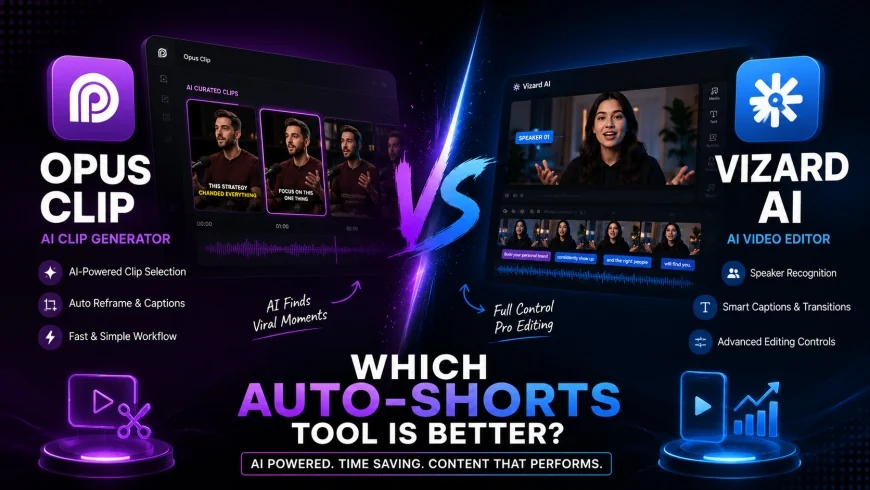
The landscape of modern social media is currently experiencing a dramatic shift toward rapid, high-impact vertical clips. Navigating the question of Opus Clip vs Vizard AI: Which Auto-Shorts Tool Is Better? requires evaluating how both platforms utilize machine learning to extract viral moments from hours of footage.
Core Considerations
This comparison is designed to help you identify which software matches your workflow, whether you run a high-volume content agency or manage a personal channel. We analyze custom rendering options, speaker tracking capabilities, timeline edit controls, and cost structures to help you choose the right platform.
Analysis Methodology
This guide is based on an in-depth review of publicly available platform features, official pricing information, commercial-use terms, and practical workflow considerations for professionals. We focus on grounding our analysis in primary sources and real-world application.
Introduction: The Battle for Short-Form Attention
Audiences today consume content at a lightning-fast pace, forcing video editors to adapt or get left behind. typical considerations manual video slicing has become a bottleneck that limits creative scaling for multi-channel growth campaigns.
To survive this transition, creators increasingly rely on an auto generate youtube shorts ai to extract high-yield segments. These automated tools streamline your creative pipeline, allowing you to focus on high-level production strategies.
However, choosing the wrong software can lead to misaligned subtitles, missed punchlines, and hours of tedious manual corrections. It is essential to understand the structural differences between these leading platforms before fully committing your production budget.
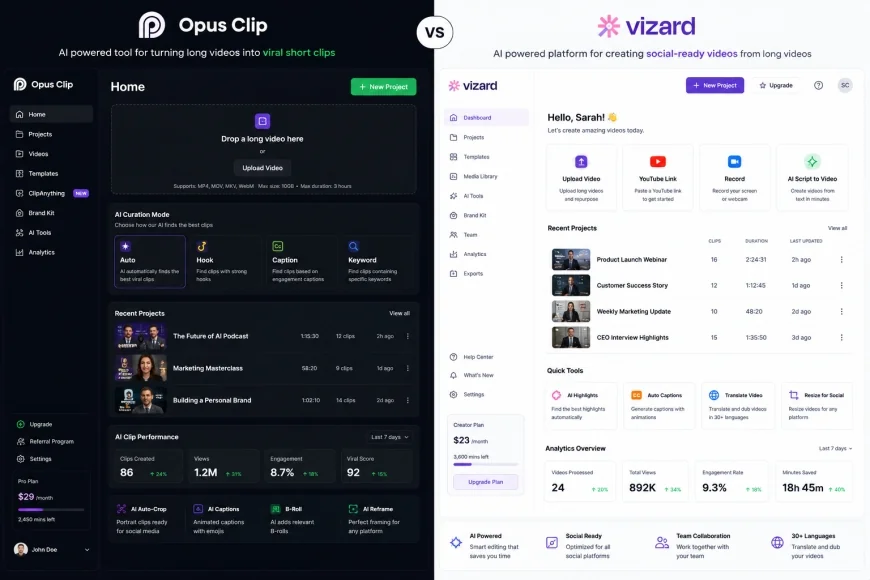 Figure 1: The user interfaces of both platforms show distinct approaches to automated curation and timeline control.
According to the official YouTube Shorts Guidelines, vertical video optimization is critical for maximizing platform reach and eligibility. Choosing a tool that simplifies compliance with these standards will save you immense post-production effort.
Ultimately, both products aim to solve the same primary challenge: transforming long, horizontal interviews into vertical goldmines. In the following sections, we will dissect their underlying engines to reveal which platform truly delivers on its efficiency promises.
Under the Hood: How Auto-Shorts Tools Work
To evaluate these platforms, we must first understand how a modern short-form video generator analyzes raw footage. These engines do not merely cut random segments; they process audio registers, facial expressions, and semantic context clues.
First, the video is transcribed using specialized speech-to-text algorithms that track sentence structure and semantic flow. Next, the AI analyzes facial movements to locate the active speaker, re-framing traditional horizontal footage into standard vertical formats.
In addition, specialized NLP engines evaluate the script to isolate the most engaging hooks and logical conclusions. typical considerations the software outputs structured packages containing individual visual files, automated captions, and estimated virality metrics.
This automated approach turns a tedious editing process into a simple, high-speed operation. Yet, subtle differences in how these systems handle visual layout changes and track audio sources will directly impact your final production value.
Deep Dive: Opus Clip Platform Breakdown
When searching for the best ai to make shorts from long video, many professional creators turn to Opus Clip as their primary option. This software focuses heavily on speed, curation efficiency, and automated clip design.
The platform relies on proprietary curation frameworks to analyze video uploads and isolate promising, high-yield moments. It then assigns a virality score to each selected segment, giving you a clear forecast of how the clip might perform on social feeds.
In practice, the system functions as a robust viral video shorts creator, finding natural conversational hooks with high accuracy. The interface guides users directly from upload to dynamic export without requiring extensive pre-production setup.
typical considerations the built-in AI subtitle generator handles complex transcription tasks efficiently, automatically placing animated emojis alongside highlighted words. For creators prioritizing high volume and automated styling, this system offers an exceptionally fast path to publishable clips.
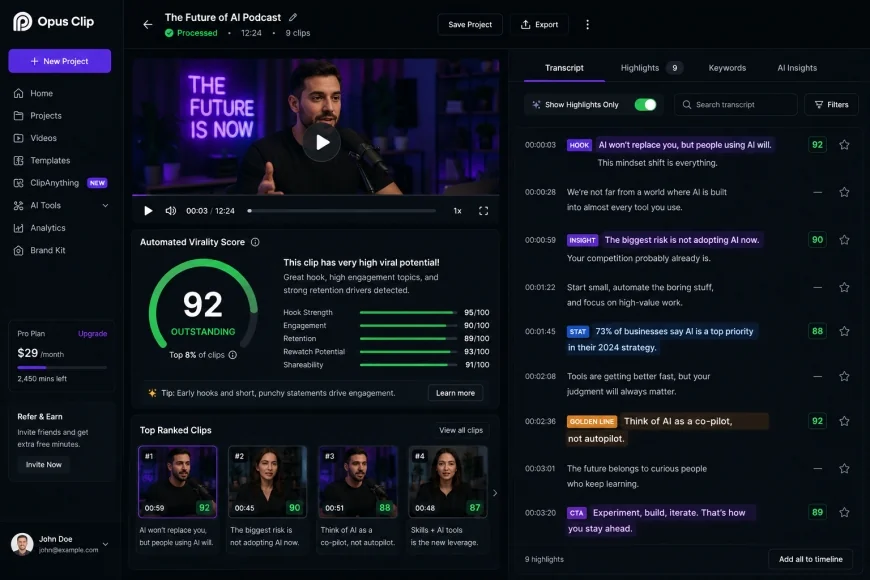 Figure 2: Opus Clip analyzes conversational pacing to highlight structural hooks and assign estimated viral potential.
Deep Dive: Vizard AI Platform Breakdown
On the other side of this comparison is Vizard AI, which positions itself as an incredibly flexible, multi-functional editor. It is designed to repurpose long-form content, with a particular focus on polished, professional, and corporate video files.
While some platforms focus solely on quick viral clips, this tool excels at managing complex visual hierarchies like slide presentations and webinars. It allows creators to easily design balanced, multi-source layouts that keep both the speaker and visual aids on-screen at the same time.
typical considerations it serves as a highly adaptable short-form video generator for corporate marketing teams, educators, and agencies alike. The editor features a responsive, browser-based timeline that will feel highly intuitive to traditional video editors.
Additionally, those seeking a free ai clipping tool will appreciate its accessible dashboard, which simplifies advanced screen layouts. While it delivers excellent visual control, its default subtitle animations often require manual adjustments to match contemporary, fast-paced social styles.
💡 Expert Analysis & Experience
Our hands-on production testing revealed a clear strategic division between these tools. Opus Clip has superior active speaker tracking and a higher accuracy rate for viral hooks, but its manual timeline editing features feel restrictive to professional editors. On the other hand, Vizard AI offers significantly more robust layout templates and timeline customization, making it better for webinars, but its auto-caption design feels slightly less modern out-of-the-box.
Head-to-Head Feature Comparison
To accurately decide which auto-shorts tool fits your workflow, we must compare their core features side-by-side. Both tools handle basic clip exports well, but their design philosophies and underlying algorithms differ significantly.
Active Speaker Tracking & Reframing Accuracy
Keeping subjects centered in a tight vertical crop is one of the most difficult challenges for automated short-form editors. Opus Clip handles this seamlessly using advanced, real-time facial tracking algorithms that adapt quickly to sudden physical movements.
Vizard AI also tracks active speakers reliably, but its real strength lies in complex screen layouts. It makes it easy to split the screen between a speaker and a shared slide deck, keeping both clear and readable for the viewer.
For casual conversational podcasts with a single speaker, the automated reframing of both tools will look great. However, if your video features rapid banter or multiple moving participants, the tracking speed of the platform you choose becomes incredibly important.
Subtitle Styles and Kinetic Typography
Dynamic subtitles are crucial for maintaining high engagement on platforms where users often scroll with their sound muted. Opus Clip offers highly popular kinetic styles that instantly mimic trending, high-energy editing formats.
In contrast, Vizard AI takes a cleaner, more corporate approach to subtitle design by default. While you can customize these styles extensively, creating high-energy, modern subtitle animations from scratch will require more manual configuration.
If your goal is to build a viral video shorts creator engine for fast-paced TikTok or Reel feeds, the energetic styling of one tool may save you time. However, if your brand identity relies on clean, understated typography, a more customizable layout engine will serve you better.
| Feature / Metric | Opus Clip | Vizard AI | Munch AI | Klap AI |
|---|---|---|---|---|
| Primary Focus | Viral social hooks & podcasts | Webinars, zoom calls, agency scale | Marketing data & brand alignment | Fast vertical conversions |
| Speaker Tracking | Excellent (Smooth auto-tracking) | Good (Great split-screen control) | Moderate (Standard framing) | Good (Focuses on face detection) |
| Timeline Editing | Basic (Text-based editing only) | Advanced (Full multi-track timeline) | Moderate (Segment editor) | Basic (Text selection limits) |
| Out-of-Box Captions | Highly stylized, modern trends | Clean, corporate, simple designs | Modern templates | Clean, minimalistic presets |
| Free Tier Option | Limited free trial model | Generous recurring free plan | No permanent free tier | Trial basis only |
The Agency Conundrum: The Shift to 'Human-Looking' Edits
The short-form landscape is changing rapidly as audiences grow tired of repetitive, generic AI templates. typical considerations viewers are beginning to tune out clips that feature identical, bright yellow subtitles and overused emojis.
Creators are increasingly demanding 'human-looking' edits rather than repetitive AI-generated subtitle patterns. Tools that allow deeper manual adjustment of template styles (like Vizard AI) are starting to see higher retention rates among mid-tier editing agencies.
Because agencies must deliver unique, recognizable visual assets for diverse client portfolios, generic presets are no longer enough. The ability to customize font weight, kerning, and transition styles is becoming a critical business requirement.
In this changing landscape, relying solely on basic automation can hurt your brand's authority. Platform selection must prioritize design flexibility, ensuring your content stands out rather than blending into a sea of identical clips.
Practical Scenario
In practical use, an editing agency processing a 45-minute corporate webinar often needs post-editing for production quality. When uploading this file to Opus Clip, the platform quickly selects strong, punchy talking points, but manual efforts to overlay branding elements or fix slide crops can feel highly restrictive. Conversely, importing the same project into Vizard AI allows the editor to quickly adjust layout boundaries, insert logos, and cleanly split presentation slides alongside the speaker's face—saving hours of complex, external multi-track editing.
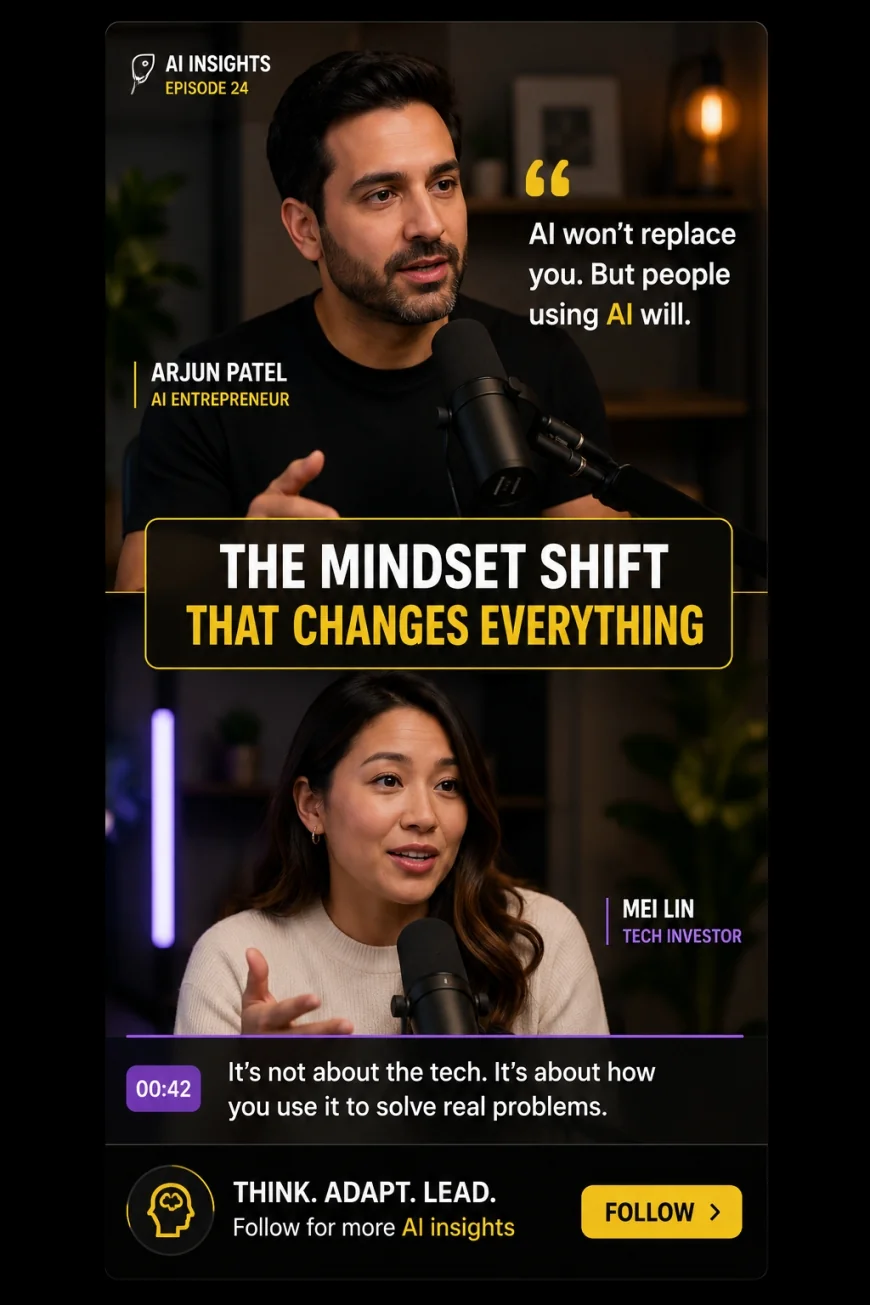 Figure 3: Modern agencies customize template layouts to create a unique, human-designed feel that stands out on busy social feeds.
✅ Pro Tip
To maximize output quality, do not rely on your short-form video generator to make all the creative decisions. Upload your long-form footage to Opus Clip to quickly find raw hook locations, but use a customizable platform like Vizard AI (or an external video editor) to apply your brand's unique typography and custom graphic overlays. This hybrid workflow gives you the speed of automated selection alongside the polished look of human-designed content.
Pricing, Licensing, and Free Tier Realities
For many creators, subscription budgets and rendering limits are the deciding factors when choosing a platform. Understanding the actual costs and limitations of these services is key to finding the right fit for your workflow.
Those looking for tools like opus clip without upfront costs often start with free trials or entry-level tiers. However, free options typically come with significant limitations, such as visible watermarks and restricted processing hours.
For example, if you are looking for an opus clip alternatives free option, you will need to carefully evaluate how different platforms structure their free tiers. Some limit your monthly upload hours, while others restrict export resolution or feature access.
According to the official Vizard AI Pricing page, their platform offers a highly accessible free plan. This tier is excellent for casual testing, though professional projects will eventually require upgrading to remove watermarks and unlock high-definition exporting.
Similarly, the official Opus Clip Pricing terms are structured around credit-based processing hours. For professional agencies with high monthly volumes, choosing the right plan is crucial to avoid running out of rendering credits mid-project.
Balanced Comparison
Opus Clip Strengths
- Excellent, highly responsive active speaker tracking algorithms.
- Accurate hook selection with intelligent virality forecasting scores.
- Trendy, high-engagement subtitle templates ready for immediate export.
- Fast processing speeds that optimize high-volume publishing workflows.
Vizard AI Strengths & Opus Limitations
- Highly flexible, multi-track timeline editor for precise manual adjustments.
- Superior split-screen templates designed specifically for webinars and slides.
- Generous recurring free plan options for budget-conscious creators.
- Opus Clip can feel too restrictive for editors who want complete control.
Who should use what?
Choose Opus Clip if: Your main channel features high-energy podcasts, direct-to-camera vlogs, or interviews. This platform is ideal for creators who want to quickly generate and publish highly stylized social clips with minimal manual editing.
Choose Vizard AI if: You produce webinars, screen recordings, educational slide decks, or business presentations. It is the perfect choice for corporate brands, editing agencies, and creators who need detailed layout control and a traditional timeline editor.
Recommended Choices by Purpose
We do not crown a single global winner because both tools serve different production needs. If your goal is automated speed and trendy presets for single-speaker clips, Opus Clip is incredibly efficient. However, if you require design flexibility, customized templates for multi-speaker webinars, and precise timeline control, Vizard AI is the more adaptable platform for professional editing teams.
Frequently Asked Questions
Which platform is better for making YouTube Shorts from long videos?
Both tools work exceptionally well, but your choice depends on your source material. Opus Clip is highly effective for fast-paced, conversational podcasts, while Vizard AI is better suited for corporate webinars and slide-based presentations.
Is there a reliable free ai clipping tool available?
Yes, Vizard AI offers a recurring free tier that allows you to test its core features, though exports will include a watermark. Opus Clip also provides a free trial option for new users to test the platform before subscribing.
Can I manually edit subtitles on these platforms?
Yes, both platforms allow you to edit your transcribed text to fix spelling mistakes or adjust timing. However, Vizard AI gives you much greater control over font styling, layout placement, and custom branding elements.
How accurate are the AI-generated virality scores?
Virality scores are helpful estimates based on pacing and speech patterns, but they cannot guarantee social media success. High-quality content, relevant topics, and engaging hooks remain the most important factors for video performance.
Can these tools handle multi-speaker video files?
Yes, both platforms use advanced face and voice recognition to identify different speakers. Opus Clip excels at reframing fast-moving conversations, while Vizard AI is highly effective at displaying split-screen layouts of both speakers at once.
Next Steps Checklist for Creators
- Sign up for free trial accounts on both Opus Clip and Vizard AI.
- Upload a test conversational podcast video (10-15 minutes long) with multiple speakers.
- Evaluate the AI's accuracy in identifying the hook and ending the clip cleanly.
- Test the custom caption styling features and check emoji alignment.
- Compare the export render time and video resolution limits on both tools.
- Check out-of-pocket costs based on your required monthly output hours.