Free Online Whiteboard for Remote Teams: Miro vs FigJam (2026)
Looking for the best free online whiteboard for remote teams? Compare Miro vs FigJam's free limitations, hidden costs, and real workflows before you pay.
 Abir Bin Hasan

Miro vs FigJam (2026): Finding a Free Collaborative Canvas That Actually Works
Let’s face it: most remote teams blow their budget on premium digital boards they barely touch. You build a stunning canvas for a kickoff sync, and then it sits there gathering virtual dust. If you’re hunting for a solid free online whiteboard for remote teams, your options usually narrow down to Miro and FigJam. Do you actually need to shell out cash for their paid tiers, or can you survive on their free configurations? Based on user forums and team workflows, let's see how these stack up when the actual work begins.
Quick Summary & Key Takeaways
- Miro dominates for intricate systems mapping and database architecture, but the free plan cuts you off at three active boards.
- FigJam is a dream for teams already living in Figma, providing a fast, playful space for rapid brainstorming.
- Many operations burn cash on enterprise tiers when clever workarounds on the free plans get the job done for zero cost.
What this article helps you decide
We want to help you cut through the marketing noise and match these tools to your actual daily grind. You'll figure out if Miro's heavy database features justify its steeper learning curve, or if FigJam's stripped-back, high-energy sandbox is all you need to keep projects moving.
Analysis Methodology
How we built this comparison: We combed through official terms of service, pricing documentation, and raw discussions on Reddit, Hacker News, and technical forums. There are no simulated tests here—just hard facts, real-world workarounds, and verified community experiences.
Why is Your Team Wasting Cash on the "$10 Whiteboard Habit"?
The Mirage of the 'Infinite Canvas'
Teams easily fall into a common trap: purchasing top-tier enterprise accounts for what amounts to basic post-it note sessions. Industry data points to Figma crossing millions of active users while Miro serves a massive user base, but a vast chunk of these workers just need a simple collaborative canvas. They don't need heavy industrial features to align.
Then there is the chaos of infinite space. While an open canvas sounds incredibly liberating, it regularly turns into visual white noise. User feedback shows teams frequently waste ten minutes of every sync just scrolling, panning, and trying to locate where their colleague is typing. Instead of keeping everyone aligned, the endless borderless setup breeds confusion, turning structured check-ins into tedious hide-and-seek games.
Cutting Through the Feature Bloat and Subscription Overlap
Let's be real—paying for overlapping tools is a quiet budget killer. Miro has evolved into an all-in-one workspace, piling on features that can overwhelm casual users who just want to drop a sticky note. Communities note that setting up client-facing boards often requires heavy hand-holding, with project managers spending way too much time disabling complex panels and customizing views to avoid confusing stakeholders.
Can FigJam's Minimalist Canvas Beat Miro's Feature-Stuffed Sandbox?
The Visual Flow: Connecting Ideas vs. Structured System Mapping
For detailed architecture diagrams, Miro is tough to match. It features a highly praised auto-sorting engine for digital cards, which UX teams love for grouping massive user interview datasets. When your daily operations require precise flow diagrams or database relationships, Miro's lines and nodes behave with predictable precision.
Performance under pressure tells a different story. Developers running large-scale sessions note that Miro can experience noticeable latency when hundreds of grouped items load at once, spiking local RAM usage. FigJam operates on a lighter rendering canvas, keeping things remarkably snappy even when team members are dropping stamps, reactions, and quick sketches simultaneously during high-energy brainstorming sessions.
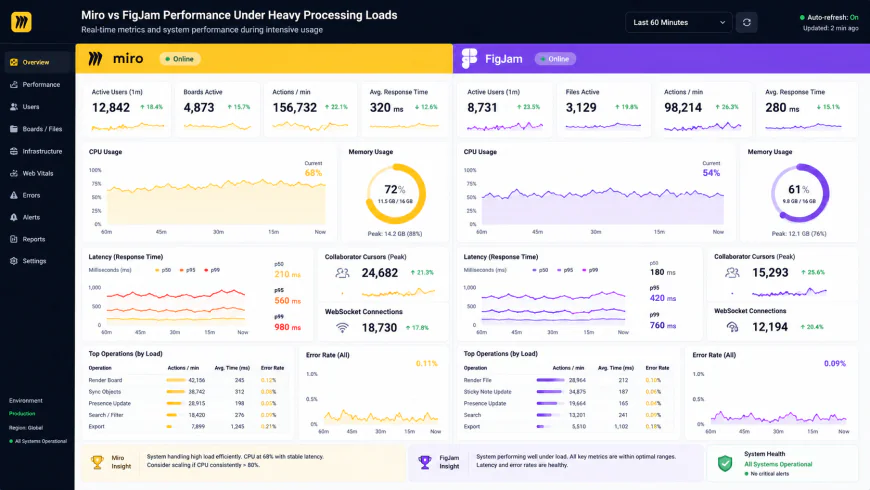 Technical benchmarks show comparative performance metrics under heavy user loads.
Templates and Ecosystem: Miroverse vs. Figma Community
Miro's template library, known as the Miroverse, is exceptionally deep. It spans highly specific sprint frameworks, product maps, and strategy layouts. FigJam, however, relies heavily on its integration with the core Figma platform. This is a massive selling point, but it's also a clever ecosystem trap.
Industry observers call this the funnel effect. FigJam is built to feed users directly into premium design tiers. For non-design departments who don't need complex interface tools, deploying it can feel like a high-friction setup that eventually demands paid Figma seats.
The Sneaky Limits of the 'Free' Tier: Where Miro and FigJam Break under Pressure
Miro's 3-Board Dead End and the Read-Only Trap
Attempting to scale on Miro's free plan brings you face-to-face with its hard limits (outlined clearly in their Miro Free Plan guide). You get exactly three active boards. The moment you generate a fourth, your oldest asset locks down into read-only mode.
Worse still, any collaborator added to your team gets editing access to all three boards. If you want to draft something in private or plan a project solo, you can't—unless you pay up. Sharing a single board with a contractor means they instantly get a window into your entire workspace.
FigJam's Team-Space Constraints and the Drafts Loophole
FigJam similarly caps teams to three active files within shared workspaces (as explained in the official Guide to FigJam). But it offers a clever escape route: the personal Drafts folder. You can build unlimited personal files for solo brainstorming and testing. When it's time to collaborate, you simply drag them into the shared space—though you will still hit that three-file ceiling unless you archive older boards.
The External Collaborator Barrier: Who Let the Guests In?
How do these packages handle external clients? This is where FigJam takes a clear lead. It offers 'open sessions' where anyone can jump in and edit a board for 24 hours without registering an account. It makes running external workshops incredibly fast and painless.
Miro's free tier makes this process far more painful. To let an external partner edit, you have to add them as a full team member. This immediately risks exposing your other active boards and counts against your basic seat limits. For teams looking for a simple visual canvas for client check-ins, Miro's free setup introduces a massive operational bottleneck.
The Cold Hard Truth About the "Whiteboard Tax"
Let's be honest: paying up to $16 a seat each month for basic visual note-taking feels like a massive tax. Teams often buy into these premium structures when their actual work is simple sticky notes and arrows. As organizations scale, this minor expense quietly balloons into thousands of dollars of wasted budget.
Figma’s automated upselling can be notoriously aggressive. When non-design stakeholders interact with a board, they can easily trigger automated warnings or accidental upgrades that catch workspace admins completely off guard. A client or project manager clicks a button to edit a shape, and suddenly your billing team is dealing with an unapproved pro-tier subscription charge.
At the same time, Miro is facing its own identity crisis. By trying to position itself as a Swiss Army knife replacement for Jira, Confluence, and PowerPoint, it's starting to alienate the people who loved it most. A tool that once felt like a lightweight, breezy sketching canvas is now bogged down by clunky sidebars, overwhelming database options, and endless corporate slideshow tools. It's a classic case of feature bloat, transforming a fast-loading digital scratchpad into a heavy, intimidating enterprise system.
💡 Inside Perspective: Watch the Billing Loop
Product leads frequently warn about FigJam’s stealthy billing traps. When you share an edit link with a client or teammate, Figma’s system can automatically upgrade them to a paid "editor" seat if they happen to be logged into their own company account. To keep your monthly invoice from skyrocketing, make it a habit to set default project permissions to "Viewer-Only" and manually approve editors one by one.
Putting Both Ecosystems to the Test
How do these design choices and restrictions hold up during actual workdays? Let’s look at how clever product teams bend the rules of these platforms to keep their workflows smooth and costs low.
Real-World Tactics: Workarounds That Actually Work
To understand how these platforms perform under pressure, we looked at how three different teams use them on a daily basis:
- The Bootstrapping Startup: An early-stage SaaS team uses FigJam’s free tier for their weekly sprint retros. Because their designers are already working in Figma, they simply keep the brainstorming files in their existing team space, dodging extra software subscriptions entirely.
- The UX Researcher’s Shortcut: A researcher imports qualitative feedback from 50 customer interviews into Miro. Rather than shelling out for expensive user-testing analysis software, they use Miro’s auto-grouping and metadata tags to sort client pain points instantly, organizing hundreds of visual sticky notes on a free board.
- The Low-Friction Agency: A creative agency needs to present wireframes to an enterprise client. Instead of making the client sign up for an account, they drop the live Figma design assets directly into a FigJam board. The client can view and edit the canvas using a temporary 24-hour guest link, providing feedback without hitting a registration wall.
Picking the right tool is all about knowing where the limits hide before your team crashes into a paywall. Here is a realistic look at how the top players stack up across everyday team tasks.
| Feature | Miro (Free Tier) | FigJam | Mural | Excalidraw |
|---|---|---|---|---|
| Free Version Limits | Capped at 3 active boards; older ones lock down as read-only | 3 collaborative team files; unlimited private drafts | 3 active boards per workspace | Unlimited local browser files |
| Surprise Billing Prompts | Moderate (usually occurs when inviting full collaborators) | High (viewer-to-editor transitions can auto-trigger charges) | Moderate (scales with workspace seat invites) | None (completely open-source) |
| Integration Strengths | Standalone powerhouse with massive third-party app store | Seamlessly linked to existing Figma design files | Excellent integration with Microsoft Teams and enterprise tools | Barebones, developer-focused API options |
| Best For... | Complex database schemas, systems mapping & sorting data | Fast, energetic brainstorming for product and design teams | Corporate roadmapping and high-security enterprise workshops | Frictionless, hand-drawn technical sketching |
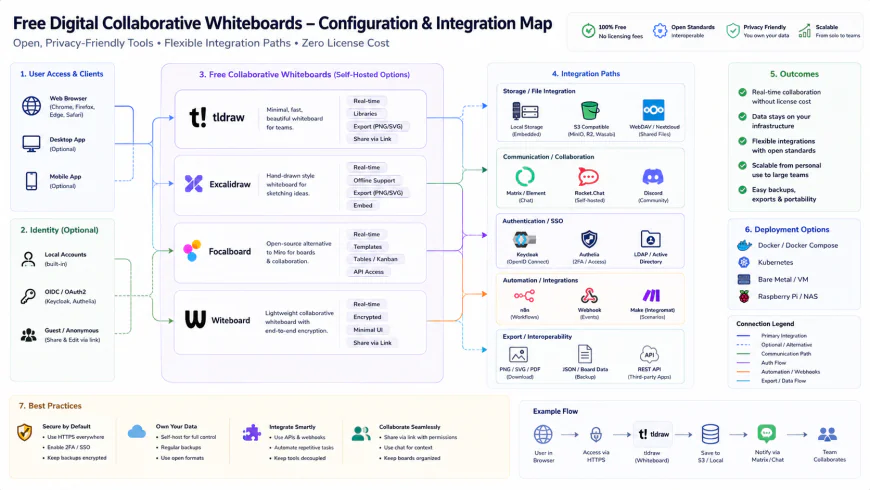 A clean configuration setup is crucial for avoiding automatic billing triggers during team-wide deployments.
💡 Pro-Tip: The "Mega-Board" Hack
If you want to keep using Miro's free tier without ever hitting that annoying three-board limit, build one massive "Mega-Board" for your entire team. Use Miro’s frame tool to partition different sections of the canvas for separate brainstorming sessions, weekly planning, and retros. Once a project or meeting is done, export that specific frame as a PDF for your records, clear out the content, and reuse the space. You'll keep your active board count at exactly one indefinitely.
Ultimately, dodging the whiteboard tax comes down to setting firm rules for your team. If your company already works inside Figma, FigJam’s unlimited drafts and quick-start guest passes make it an absolute no-brainer. But if you are building complex architecture diagrams or running massive data-heavy workshops, Miro’s engineering is still worth the effort—as long as you use smart hacks to stay under the three-board ceiling.
The Real Cost: Subscriptions, Licensing, and Admin Headaches
When you are weighing free options, you also need to think about what happens when you eventually outgrow them. How much administrative friction will you hit when you have to upgrade? Miro’s Starter plan starts at $8 per user per month (billed annually), while FigJam is much friendlier at $3 per user per month. But the actual price tag doesn't tell the whole story; the real pain is in the license management.
Figma’s administrative backend can be notoriously tricky. If your design team is already on a paid Figma tier, adding FigJam is simple. But for marketing, sales, or operations departments, managing dual subscription tiers within the same billing environment often turns into a messy game of Whack-A-Mole. Miro has its own hurdles: the moment you upgrade a workspace, it wants to transition everyone in that directory to a paid seat, making it incredibly difficult to mix free and paid users without careful, manual isolation.
The Breakdown: Miro vs. FigJam
- Miro Advantage: Industry-standard diagramming engine with custom shapes, structured connections, and robust Jira integration.
- Miro Advantage: The Miroverse—a massive community library with templates for almost any workflow, retrospective, or workshop imaginable.
- FigJam Advantage: Highly affordable $3/seat premium tier that integrates flawlessly with your design department’s live Figma files.
- FigJam Advantage: Incredibly convenient 24-hour "Open Sessions" that let external partners jump in and edit without signing up.
- Miro Drawback: Interface bloat. The UI can feel cluttered and intimidating for non-technical team members who just want to write on a sticky note.
- Miro Drawback: Strict free-tier boundaries. Creating that fourth board immediately locks your oldest board into read-only mode.
- FigJam Drawback: Lacks deep technical diagramming tools and complex database organizational systems.
- FigJam Drawback: Sneaky billing triggers. One accidental click can turn a free "viewer" into a paid "editor" seat.
The Verdict: Which Whiteboard Deserves Your Screen?
Choosing the right whiteboard is less about finding the "better" tool and more about matching your daily workspace reality.
For engineering teams, systems architects, and technical product managers who live in Jira, Miro is still the heavyweight champ. It handles complex logic, database structures, and scale planning like an interactive database, not just a sketching pad. If your work is highly structured, the extra functionality is worth the learning curve and the cost.
On the other hand, if you are running a creative agency, a product team already integrated with design, or a fast-paced marketing department, FigJam is the clear winner. It's fast, highly engaging, and keeps meeting energy high without burying users in menus. It provides a simple, fun workspace to sketch, vote, and align without paying an administrative premium.
Making Your Decision
Rather than looking for a perfect tool, look at how your team actually works. If your goal is to save cash, collaborate quickly with external clients, and keep things simple, leverage FigJam’s generous drafts and lightweight canvas. If you need to build permanent, highly detailed technical documentation with deep project management integrations, budget for Miro’s robust engine and set up your boards strategically.
Frequently Asked Questions
Technically, yes, but you will have to manage your files carefully. Miro's three-board limit forces older boards to become read-only, while FigJam caps team-space files to three. To make this work without paying, you'll need to regularly export finished boards as PDFs or image files and clear the workspace for new sessions.
You can toggle on an "Open Session" on any FigJam file, which generates a unique share link. Anyone with this link can jump on the board and collaborate with full editing privileges for 24 hours. They don't need to sign up for an account, which makes running client workshops completely seamless.
Yes, Miro has a much broader ecosystem of third-party integrations. It connects deeply with enterprise systems like Jira, Confluence, Azure DevOps, and Microsoft Teams. FigJam is unmatched if you are working with Figma design files, but its catalog of external business integrations is smaller.
Your Next Steps: A Quick Whiteboard Audit
- Check your existing stack: If more than half of your team is already using Figma for UI/UX design or development handoffs, default to FigJam to avoid adding another subscription to your budget.
- Assess your external workflow: If your team regularly runs brainstorming sessions with external clients, partners, or vendors who hate signing up for new accounts, use FigJam’s 24-hour open guest passes.
- Measure project complexity: Choose Miro if your projects involve deep database mapping, visual architecture charts, or direct, live syncing with Jira tickets.
- Plan your board life cycles: Remember that Miro’s three-board limit means you’ll need to constantly export and archive older retrospectives to keep your workspace under the free ceiling without losing your history.
- Lock down sharing permissions: Default all invite links to "Viewer-Only" on both platforms. This simple safeguard prevents external clients or casual collaborators from accidentally triggering automated, costly seat upgrades.