InVideo AI Review: Is Script to Video Actually Usable?
Read our honest InVideo AI review focusing on the script to video feature. Is it actually usable for YouTube, or is Pictory better? Find out now!
 Abir Bin Hasan
InVideo AI Review: Is Script to Video Actually Usable?
Imagine typing a short text prompt and watching a fully voiced, edited, and captioned video draft appear on your screen in a few minutes. It sounds incredibly efficient, but it also raises a major question for creators: is automated video generation a genuinely useful production shortcut, or is it just a novelty? This breakdown looks closely at what the tool can actually deliver and where it falls short in a real-world production workflow.
Core Considerations
Evaluating this tool comes down to balancing creative control against production speed and cost. This analysis breaks down the accuracy of its script-to-video pipeline, the quality of its synthetic voiceovers, and the licensing realities of its stock media. By looking past the marketing promises, creators can decide whether to integrate this platform into their daily setup or stick with traditional timeline-based editing suites.
Analysis Methodology
This evaluation is compiled from technical documentation, pricing structures, commercial licensing terms, and user feedback from professional editors. The goal is to provide a grounded look at how this platform functions in real-world application, skipping the promotional hype.
The Evolution of Automated Video Creation
For years, producing video was a specialized, bottlenecked process. It demanded fast hardware, complex software, and dozens of hours of painstaking assembly. For writers, bloggers, and educators, transitioning text into a video format meant tackling a massive learning curve. As a result, many excellent ideas simply stayed on the page.
The emergence of prompt-driven video generators changed the equation. Suddenly, software could parse a text prompt, pull corresponding clips from stock libraries, and assemble them on a timeline. The concept promised to streamline the production pipeline for independent creators and marketing teams alike.
However, early attempts at this technology often missed the mark. Creators were frequently left with robotic voiceovers, mismatched visuals, and highly repetitive templates that looked obviously automated. To be actually useful, these platforms needed to evolve beyond simple clip-compilers.
The current iteration of the platform attempts to bridge this gap. Instead of just matching keywords to clips, it uses natural language processing to interpret the tone and context of a script. This transition from a rigid automation tool to an interactive assistant represents a much more practical approach for modern creators.
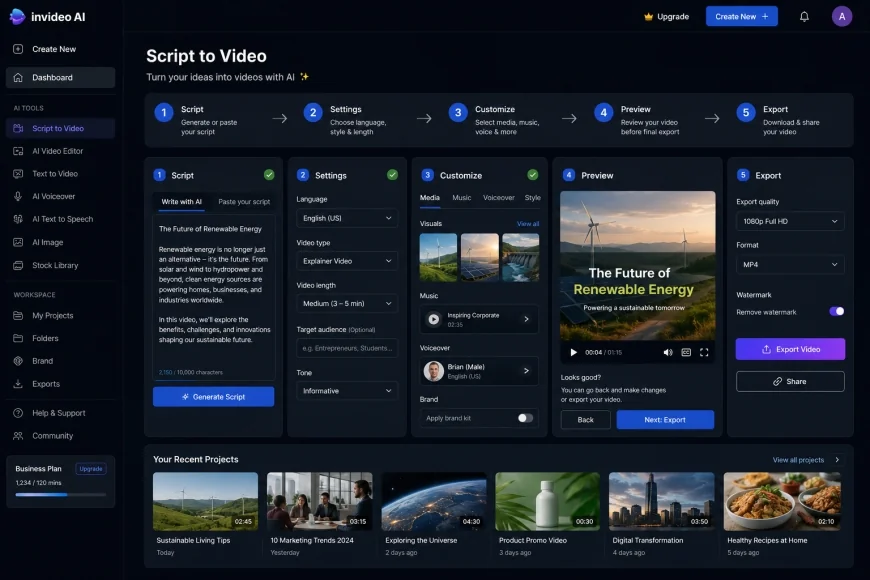 The main user interface of InVideo AI, showcasing the prompt input field and initial script processing settings.
Understanding the Core Technology of InVideo AI
Under the hood, the generator processes inputs through several connected systems. When a user submits a prompt, the engine first drafts a structured script, outlining scene descriptions, voiceover lines, and visual cues. This script then dictates how the audio and visual engines assemble the final file.
Rather than forcing content into a pre-designed template, this text-to-video engine constructs a custom sequence for each run. It queries stock databases, generates subtitle overlays, and applies transitions based on the requested pace. The goal is to produce an output that feels tailored rather than generic.
The primary workspace is hosted online at https://invideo.io, which serves as the control center for generating projects. Because the heavy processing happens in the cloud, creators don't need expensive local hardware to run it; drafts can be configured on standard laptops or portable devices.
Much of the output's quality relies on its integration with premium libraries like Storyblocks and iStock. These connections help avoid the low-resolution, amateur footage often found in free tools. However, as any editor knows, automated media selection comes with its own set of creative challenges.
An Honest InVideo AI Review: Is the Script to Video Feature Actually Usable?
To determine if this workflow holds up in practice, we have to look at the amount of manual correction required. If an editor has to spend hours rebuilding a generated video from scratch, the time-saving promise of the software quickly disappears.
The major advantage here is the sheer speed of the initial draft. Within minutes, the platform can output an eight-minute video featuring a voiceover, background track, relevant footage, and synchronized subtitles. For content creators managing tight schedules or testing new concepts, this rapid prototyping is highly efficient.
But professional standards require looking closer. While AI voices have improved, the default pacing can still feel rushed, leaving little room for natural pauses between complex thoughts. Without manual adjustments, the raw export can feel cluttered and exhausting to watch.
Visual selection is another area where the software can stumble. The automated media search often takes words literally rather than understanding the broader metaphor. For example, a script mentioning "breaking the ice" during a presentation might trigger a clip of an actual glacier, creating an awkward visual disconnect.
Even with these quirks, the script-to-video workflow is highly viable—provided it is treated as a starting point. The platform includes a direct text-command box that allows users to type revision requests like "replace scene three" or "slow down the narration." This conversational approach to editing makes fixing errors relatively straightforward.
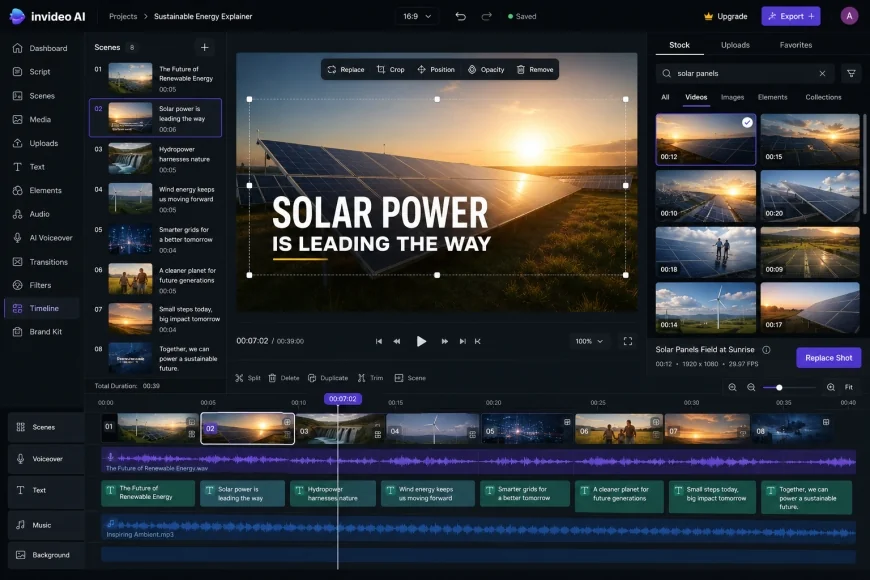 The interactive editing interface allows users to swap stock clips and adjust script pacing through natural language commands.
The Visual Matching Dilemma: Literal vs. Conceptual Context
The tension between literal definitions and conceptual context is a persistent challenge for any automated video generator. When the software analyzes a sentence, it isolates key nouns and verbs to query its database. If the script uses creative idioms, industry slang, or figurative speech, the resulting video choices often miss the mark.
Consider a script discussing "scaling a startup." A human editor looks for clips of a collaborative team or a growing graph. A literal algorithm, however, might pull a clip of a mountain climber ascending a cliff. These odd visual choices can instantly break the viewer's immersion.
To work around this, creators must adapt how they write their initial instructions. Clear, descriptive prompts that specify the visual setting and style yield far better results than brief, vague sentences. Specifying "modern office setting, professional aesthetic" prevents the engine from guessing.
When the automation inevitably falters, the manual replacement tools become essential. The interface includes an integrated search panel directly next to the timeline, allowing users to swap out mismatched stock clips with a single click. This prevents visual errors from derailing the entire project.
Evaluating the Audio Pipeline: Voice Synthesis and Music
A video's visual appeal matters little if the audio sounds robotic. Monotonous, flat voices trigger immediate viewer fatigue, driving down watch time on platforms like YouTube. Audiences naturally respond to realistic pauses, emphasis, and emotional cadence.
The tool addresses this by using advanced neural text-to-speech models. Users can choose from a variety of accents, age groups, and tones to fit their brand. Furthermore, the platform offers voice cloning features on its paid tiers, allowing creators to generate narration using a digital model of their own voice.
Even so, synthetic voices still struggle with technical terms, non-English names, or subtle emotional shifts. A line meant to be delivered with high energy can sound identical to a dry, instructional statement. Correcting these issues often requires editing the script manually with phonetic spelling or custom punctuation.
The background music is also automated, with the system matching a track to the perceived mood of the prompt. While the royalty-free library is quite broad, the default audio mixing can sometimes bury the narration. Editors will need to manually adjust the volume levels to ensure the voiceover remains clear and easy to understand.
💡 Expert Analysis & Workflow Realities
Evaluating this script-to-video tool reveals that relying solely on the first-run generation rarely produces a polished final product. However, treating the platform as a "60% complete draft generator" can dramatically improve overall production speed. By manually swapping out 20% to 30% of the selected stock clips, customizing the subtitle fonts, and adjusting the background audio levels, creators can produce highly professional videos in a fraction of the time required by traditional software.
InVideo AI vs. Pictory: The Script to Video Battle
When researching automated video options, creators frequently compare this tool with Pictory. While both platforms lead the automated video market, they are designed for slightly different content strategies and user workflows.
The core difference lies in their input strengths. Pictory is highly efficient at taking existing long-form content—like a published blog post or a webinar recording—and cutting it down into shorter social clips. Its script-to-video engine is structured and highly reliable for text-heavy, informational slides.
In contrast, the tool discussed here shines when starting from scratch with a conceptual prompt. Its generative engine is built to draft scripts, select voices, and arrange layouts directly from a basic text prompt. For creators who want the software to handle the initial writing and conceptualization, it offers a more flexible starting point.
The media libraries also differ slightly. While both provide deep stock integration, the inclusion of premium iStock assets on higher-tier plans here often results in a more modern, cinematic look compared to Pictory's standard library. This makes it highly appealing for commercial promos and polished YouTube content.
| Feature / Metric | InVideo AI | Pictory.ai | Synthesia.io | Runway Gen-2 |
|---|---|---|---|---|
| Primary Use Case | Prompt-to-video, faceless channels | Blog to video, content repurposing | Corporate training, avatar-led video | Generative art, cinematic VFX |
| Input Method | Conversational prompts, text scripts | Blog URLs, script uploads | Scripts, multi-slide templates | Text prompts, image-to-video seeds |
| Voice Synthesis | Natural neural voices, voice cloning | Good standard TTS, auto-syncing | Realistic digital avatars | Basic voice generation tools |
| Media Sourcing | iStock, Storyblocks, generative clips | Storyblocks, Getty Images | Custom studio backdrops, user uploads | 100% AI-generated custom video |
| Pricing Model | Free tier, paid subscriptions from $20/mo | Paid tiers only, starting at $19/mo | Enterprise & starter tiers from $22/mo | Credits-based, free trial available |
Who Should Avoid This Tool? (Key Limitations)
Despite its efficiency, this system is not a one-size-fits-all solution, and several drawbacks deserve careful attention. First, the browser-based interface can become sluggish when rendering complex timelines or processing heavy revisions, leading to frustrating delays. Second, while the initial entry-level pricing seems accessible, users often face significant pricing jumps upon plan renewal, making it a costly long-term commitment for casual creators.
Additionally, those requiring precise creative control over visual assets should avoid this software. If your brand relies on custom-shot footage, highly specific branding guidelines, or complex animation, the automated stock-matching process will feel more like a hindrance than a help. The learning curve for getting the AI to select the exact visual style you want can be steep, often requiring more time in prompt-tweaking than it would take to edit manually.
Tactical Strategy: Building a Successful Faceless YouTube Channel
The rise of faceless channels has been heavily supported by automated editing tools. This format works well for history, science, or motivational channels where an on-camera presenter isn't required. For solo creators, it offers a way to manage multiple projects without massive production budgets.
However, viewers are quickly becoming sensitive to generic AI-generated content. Channels that upload unedited, raw exports with identical voiceovers and poorly matched stock clips often see poor viewer retention. Platforms like YouTube are also increasingly strict about monetizing low-effort, repetitive uploads.
Success in this space requires moving past the default settings. Creators must take the generated draft and manually refine it to add authentic value. This means swapping out generic stock clips, editing the subtitle formatting to match a specific brand, and varying the visual transitions.
Using a custom voice clone instead of the default public voice library is another key strategy. A recognizable, unique voice helps build brand equity and keeps your content from sounding identical to thousands of other channels. Combining rapid automated drafting with human curation remains the most sustainable path forward.
Practical Scenario: Launching a Geography Channel
In a typical workspace, a creator launching a channel about historical geography might ask the generator to build a video about ancient Rome. A raw, unedited export might mistakenly show modern cityscapes or feature a voiceover that mispronounces historical locations. By taking that initial draft, manually correcting the phonetic spelling of tricky names, and swapping out modern stock clips for classical art or historical maps, the creator elevates the video to a standard that easily satisfies platform quality guidelines and keeps viewers watching.
Maintaining visual consistency is also vital for building an audience. Establishing a signature color palette, subtitle font, and transition style across all uploads helps establish a recognizable brand. Adjusting the platform's default template settings to lock in these brand elements ensures that future drafts automatically align with a channel's look.
Ultimately, the strength of the concept determines the success of the video. While the software handles visual assembly and pacing, the core research, structure, and emotional hook must still connect with human viewers. Spending time refining the written script before initiating the rendering process is almost always the best way to ensure the final product delivers value.
✅ Pro Tip
To reduce mismatched visual choices, try structuring generation prompts with a specific formula: [Topic] + [Target Audience] + [Visual Style] + [Tone] + [Negative Constraints]. For instance: "Create a five-minute guide on budgeting for college students. Use minimal flat-lay graphics and cozy study desk footage. Avoid generic corporate offices or bank buildings. Keep the voice warm, encouraging, and highly conversational." Setting clear boundaries upfront helps the media engine choose relevant conceptual clips from the very first run.