Best AI Video Generator for Faceless YouTube: The Brutal Truth
Want to start a faceless YouTube channel? Here is the brutal truth about the best AI video generator tools to automate your content creation successfully.
 Abir Bin Hasan
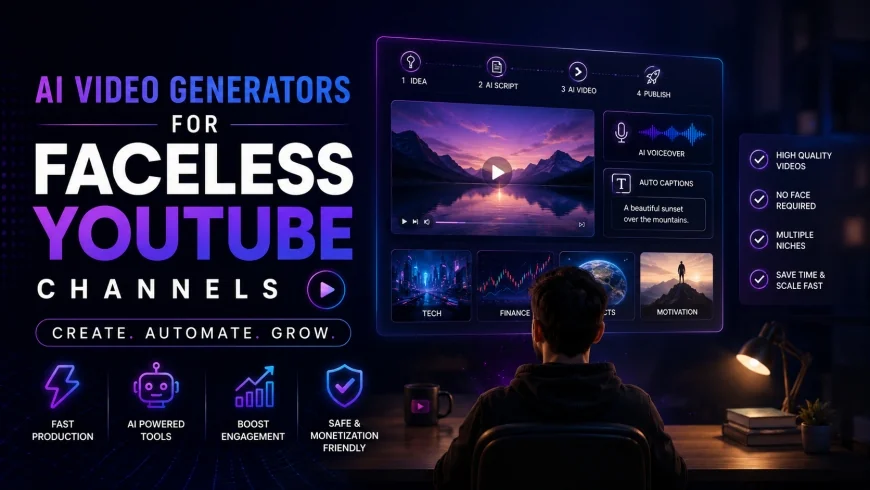
The Realistic Guide to AI Video Generators for Faceless YouTube Channels
The promise of building a successful, automated YouTube channel has driven a massive wave of interest in high-speed content tools. But if you have spent any time exploring the market, you already know it is saturated with platforms promising instant, hands-off riches. In reality, finding the right production tool is not about discovering a magic shortcut—it is about establishing a workflow that protects your channel from demonetization while keeping real human viewers engaged.
What this article helps you decide
This guide skips the marketing promises to look at how these tools actually function in a daily production pipeline. You will learn which platforms generate content that complies with current monetization rules, where the technical bottlenecks lie, and how to allocate your software budget to maximize viewer retention.
Analysis Methodology
This analysis is compiled from public documentation, creator workflows, licensing agreements, and community feedback from active channel operators. We focus strictly on the practical realities of using these tools in a professional production environment, ignoring promotional hype to focus on output quality and licensing terms.
The Harsh Reality of YouTube Automation
The automated channel space has changed dramatically over the last few years. In the early days of online video automation, creators could upload simple, low-effort slideshows paired with robotic voiceovers and still build a modest ad-share revenue stream. Today, both platform algorithms and audience expectations are far more demanding.
As a result, creators who rely purely on hands-off generation frequently find their applications rejected by the YouTube Partner Program. Under YouTube’s official monetization policies regarding "Repetitive and Reused Content," channels must show clear evidence of original, human-driven creative decisions. Simply inputting a single prompt, exporting the raw output, and uploading it directly is an easy way to get flagged and demonetized.
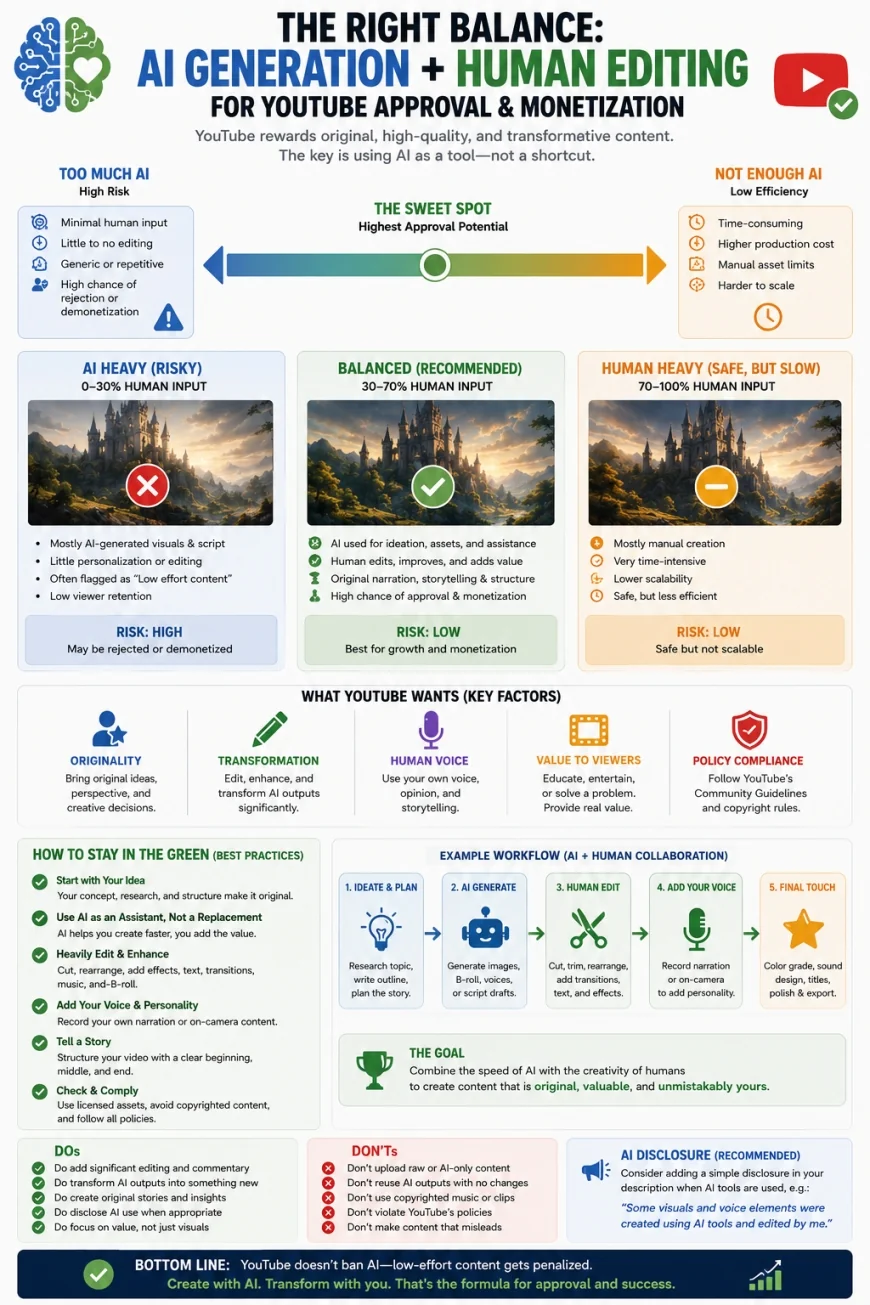 Figure 1: The monetization safety spectrum, highlighting how manual editing reduces the risk of policy flags.
Google’s guidance on search and discovery quality also reinforces this, prioritizing original, value-first content over programmatic search manipulation. If a video fails to offer a distinct editorial perspective, clean audio, and purposeful visuals, it will struggles to gain traction in the recommendation algorithm.
This is why successful niche channels are moving away from basic, fully-automated slideshows. Instead, they are adopting highly-stylized, documentary-style formats. This approach pairs specialized asset generators (like Midjourney or Runway) with manual, high-quality audio and post-production editing to build genuinely compelling narratives.
Evaluating the Leading Production Tools
When searching for the right video builder, you must evaluate tools based on their asset-matching accuracy, timeline control, and the realism of their speech synthesis. Below is an objective look at how the leading options perform in a real production environment.
1. InVideo AI: The Direct-to-Draft Standard
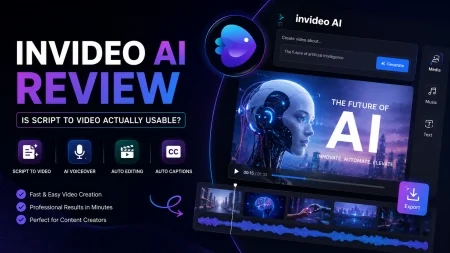
InVideo AI is a widely used option for rapid video draft generation. Operating primarily on text prompts, it allows creators to input a basic concept or script outline and receive a fully assembled video timeline in a matter of minutes.
The engine automatically selects stock footage, applies text captions, and layers a synthetic voiceover to read the script. For creators prioritizing production speed, it offers a fast track from a blank page to a structured rough draft. It performs best for listicle channels, trending news summaries, and straightforward educational scripts.
However, publishing the default output with no manual changes carries real risk. The stock B-roll selected by the algorithm can often feel literal, generic, or mismatched to the nuances of the script. This requires creators to spend significant time manually swapping out media to avoid a cheap, robotic feel.
✅ Pro Tip
Avoid exporting default drafts immediately. Plan to manually replace at least 40% of the automated B-roll selections. Use the platform's advanced search filters to find abstract or highly specific footage that matches the actual mood of your channel, rather than relying on the first-pass automated selections.
2. Runway (Gen-2 & Gen-3 Alpha): The Cinematic Visual Powerhouse
For channels focusing on high-end, cinematic niches like alternative history, science fiction, or true crime, Runway represents the cutting edge of custom visual generation. Rather than pulling from a shared library of stock footage, it generates entirely unique video assets from text or image prompts.
This visual control is highly valuable. By pairing custom imagery from tools like Midjourney with Runway’s motion generation, creators can produce cohesive, highly stylized scenes that resemble professional television documentaries. This custom approach generally yields much higher audience retention than standard stock-heavy channels.
The trade-off is that Runway is not an all-in-one automated pipeline. It does not write scripts, generate full audio tracks, or edit a finished timeline for you. It is purely an asset generator, meaning you will still need to compile and edit the final video inside a traditional editing suite.
3. Fliki: The Speed-Focused Text-to-Video Engine
Fliki is a dedicated text-to-video tool designed for rapid-fire asset creation. It is built to convert articles, scripts, and short text blurbs into video formats optimized for both widescreen uploads and vertical micro-content like YouTube Shorts.
The platform stands out for its clean, straightforward dashboard and an exceptionally broad library of synthetic voices. This makes it highly popular for creators managing multiple niche channels where quick turnaround times are essential. Its entry-level pricing plans are also relatively accessible for those experimenting with automated workflows.
However, the primary limitation of Fliki is its visual simplicity. The default outputs lean heavily on basic layouts—essentially advanced slideshows with clean text overlays. Without significant manual intervention to customize fonts, transitions, and framing layers, the final product can look clinical and struggle to hold viewer interest over longer runtimes.
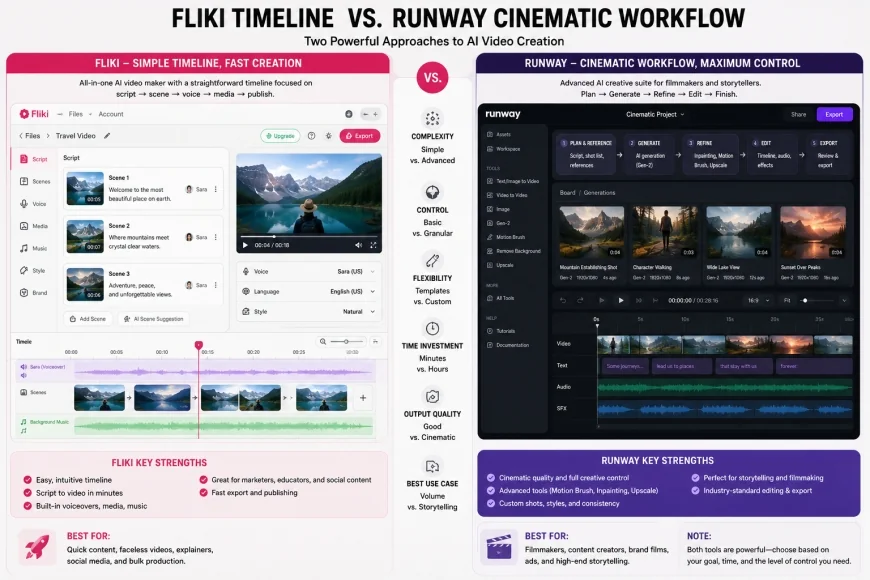 Figure 2: A visual comparison of rapid text-to-video interfaces versus advanced custom visual generators.
4. HeyGen: The Digital Avatar Leader
HeyGen is the current industry leader for channels that require a consistent, human-looking presenter without the need for on-camera talent. The platform relies on highly realistic digital avatars with precise, natural-looking lip-syncing capabilities.
This works well for educational, personal finance, and corporate niches where authority and direct communication build viewer trust. Instead of hiring actors, creators can generate clean, professional presentation segments simply by pasting scripts. The multilingual voice cloning features also make it easy to translate content for global audiences.
On the downside, HeyGen is a significant investment. Credit consumption is rapid, and generating high-definition video can quickly become costly. Additionally, if your script lacks natural pauses and pacing variations, the avatar can drift into an "uncanny valley" effect, which can alienate skeptical viewers.
💡 Workflow Analysis
Analysis of high-performing avatar channels reveals a common pattern: while the visual rendering is highly realistic, the default audio pacing remains too uniform. Audiences drop off quickly when they detect an unvarying speech rate. Successful workflows generally involve exporting the script to a dedicated audio processor to insert organic micro-pauses before rendering the video.
Platform Comparison Matrix
To help you compare your options, this table evaluates the leading platforms across key production metrics based on practical workflows and community feedback.
| Platform | Primary Strength | Learning Curve | Monetization Risk | Best Suited For |
|---|---|---|---|---|
| InVideo AI | Fast, script-to-video drafts | Very Low | Medium-High (if unedited) | Listicle and News Channels |
| Runway (Gen-3) | Cinematic visual generation | High | Very Low | Documentary and Sci-Fi |
| Fliki | Voice library and layout speed | Low | Medium-High | Shorts and Simple Explaners |
| HeyGen | Photorealistic digital avatars | Medium | Low | Finance, Education, Corporate |
Critical Pitfalls: Why Most Automated Channels Fail
Despite access to incredibly powerful software, the vast majority of automated channels fail to build sustainable audiences. To succeed, creators must understand the common technical and creative bottlenecks that hold these channels back.
The Stock-Heavy Slideshow Trap
Many automated suites tend to output generic, stock-heavy slideshows that suffer from poor audience retention. Modern viewers quickly notice when B-roll has been automatically pulled from standard keyword libraries. If the screen shows a generic businessman smiling at a camera while the voiceover discusses deep geopolitical instability, the visual disconnect is jarring.
To keep viewers watching, visuals must have a clear metaphorical or literal connection to the narration. If the imagery looks like a standard corporate training video, viewers will leave early, signaling to the YouTube algorithm that the content is unengaging.
The Template Detection Problem
Using fully automated pipelines with no manual editing can flag YouTube's quality filters. The platform's automated systems are highly effective at identifying repetitive visual layouts. If hundreds of channels use the exact same templates, stock libraries, background music, and synthetic voice models, the algorithm often categorizes the content as low-value or repetitive.
This does not mean AI-assisted video is banned; it means that unedited, low-effort assets are systematically deprioritized. Successful creators treat these tools as rough-draft assistants rather than complete, end-to-end publishing engines. You must add unique editing touches, custom pacing, and varied visual styles to distinguish your content.
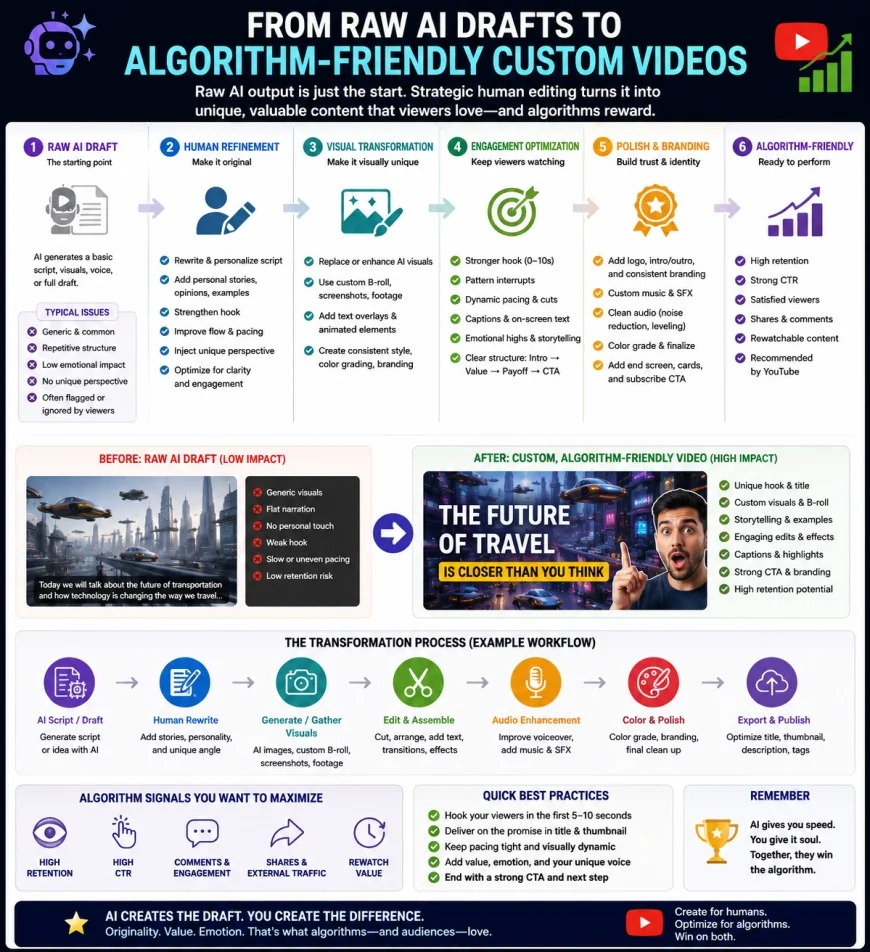 Figure 3: The human-in-the-loop editing pipeline that preserves monetization status.
The Coldness of Flat Audio
Relying solely on default synthetic voices often limits the emotional connection of your videos. Humans are incredibly sensitive to cadence, emphasis, and tone. If a voice remains flat, robotic, or overly cheerful during a serious historical narrative, it creates a sense of unnatural detachment that drives viewers away.
Even when using high-quality synthetic voices, creators often need to manually adjust pronunciation, add realistic pauses, and modify the pitch to match the scene. Alternatively, cloning a custom voice and manually pacing the recording often yields much better retention than raw, direct-from-text exports.
Practical Scenario
In a typical production case, an educational history channel using automated video tools found its audience retention stuck at 12%. By exporting the script to a dedicated audio editor, slowing down the narration during key dramatic reveals, and manually adding custom sound effects (like wind, rain, and distant echoes), the creator managed to lift retention to 45% without changing a single visual clip.
Pricing & Licensing Realities
Before committing to a subscription, it is critical to understand pricing structures and commercial licensing terms. Using assets without proper clearance can lead to copyright claims, loss of monetization, or channel strikes.
Most asset generation platforms offer tiered subscription models. Free tiers are generally unsuitable for commercial channels because they include watermarks and restrict commercial use. This means you will need to budget for a paid plan from the start.
Additionally, you must verify that the stock libraries integrated into your chosen tool (such as Storyblocks or Shutterstock) grant perpetual commercial licenses for YouTube broadcasting. This ensures your existing uploads remain protected even if you eventually cancel your subscription. Always check the platform's terms of service to confirm this coverage.
Balanced Pros & Cons
Workflow Advantages
- Reduces visual asset assembly times from days to hours.
- Eliminates the need for expensive cameras, lighting, and recording spaces.
- Allows creators to easily test and validate multiple niche ideas.
- Provides immediate access to vast libraries of pre-cleared stock media.
Workflow Limitations
- Default outputs are often generic and require heavy manual replacement.
- Premium rendering credits and high-quality exports can be expensive.
- Higher risk of demonetization if the final edit lacks original human input.
- Steep learning curves are required to generate truly custom, high-quality visuals.
Who Should Avoid These Tools?
These platforms are not for everyone. You should avoid these tools if you are on a tight budget, as high-quality video generation and premium voice cloning require expensive ongoing monthly subscriptions. If you expect a "one-click" passive income stream with zero editing effort, you will likely end up frustrated by low viewer retention and potential monetization rejection. Finally, if your niche requires highly specific, real-world demonstrations or hands-on tutorials, standard asset generators will struggle to produce the precise visual steps you need.
The Modern Niche Strategy: Building for Longevity
To build a profitable faceless channel in the current market, creators must adopt a hybrid, documentary-style approach. This model combines the speed of automated assets with the craftsmanship of classic storytelling.
Focus on Deep-Dive Niches
Avoid highly saturated, generic niches like "Motivational Quotes" or basic compilation videos. These spaces are incredibly crowded, offer low ad rates (RPM), and are frequently flagged by automated content filters. Instead, focus on specific topics that reward research and clear storytelling.
Strong niches include industrial history, micro-geopolitics, financial case studies, architectural history, and detailed scientific mysteries. These topics naturally keep viewers watching longer, which helps secure higher ad rates and brand sponsorship opportunities.
The Hybrid Production Workflow
To balance speed with quality, use a structured, multi-step pipeline. Avoid expecting a single platform to handle everything. Instead, use specialized tools for each phase of production:
- Scripting: Use language models to brainstorm and structure your content, but rewrite the actual draft to ensure a natural human voice, strong pacing, and clear hooks.
- Voiceover: Use advanced speech engines like ElevenLabs, taking the time to manually adjust speed, pronunciation, and emotional tone for key lines.
- Visuals: Blend high-quality stock video with custom-generated scenes (via Midjourney or Runway) to build a visually engaging, high-retention timeline.
- Post-Production: Assemble your final assets in a dedicated editor like Premiere Pro, DaVinci Resolve, or CapCut. Add custom sound design, smooth transitions, and dynamic text overlays to keep the video moving.
Choosing the Right Tool for Your Goals
If you are a solo creator looking to build simple informational channels quickly, InVideo AI is a practical starting point, provided you commit to editing the B-roll. If your goal is to build an educational or corporate brand using a virtual host, invest in HeyGen. If you want to create cinematic, high-retention documentaries that stand out in search feeds, your best approach is a custom workflow combining Midjourney, Runway, and a traditional editing suite.
The Verdict
There is no single "best" tool for every creator. Your choice should depend on your budget, technical skills, and niche. For fast, news-driven channels, a draft assistant like InVideo or Fliki works well. For high-end, narrative-driven channels, a custom workflow using Runway’s visual generation is the most reliable path to building a long-term audience and securing monetization.
Common Questions
Will YouTube monetize channels that use synthetic voices and video generators?
Yes, but only if the final edit displays significant human creative effort and unique value. If you simply upload raw, unedited exports with default voices, your channel is highly likely to be rejected under the "Reused or Repetitive Content" policy.
Am I required to disclose the use of AI tools in my videos?
Under YouTube's guidelines, creators must disclose when they use synthetic media that looks realistic (such as photorealistic digital avatars or deepfakes). However, standard stock compilations, basic text transitions, and stylized animations do not require this label.
Are the music tracks provided by these tools safe from copyright claims?
Only if the platform's commercial license explicitly covers YouTube broadcasting. It is important to check if you need to link your YouTube channel to your software account to whitelist your videos and prevent automated copyright claims.
What is a healthy target for audience retention?
To get consistent traction from the recommendation algorithm, aim for a minimum retention rate of 40% on videos longer than eight minutes. Achieving this requires moving away from basic, static slideshows in favor of purposeful editing and layered sound design.
Your Step-by-Step Action Plan
To launch your channel on solid ground and ensure long-term monetization, use this checklist for every video you produce:
- Select a high-CPM niche that relies on strong storytelling over complex visual action.
- Draft your video script using highly customized AI prompts to avoid generic, robotic text.
- Generate or edit voiceovers using realistic AI voices, adjusting pitch and speed to sound human.
- Edit AI-generated visual drafts manually to add text overlays, transitions, and zoom effects to maintain high retention.
- Add personal editorial input (e.g., custom intro/outro or unique structural twists) to secure channel monetization.