Beyond AIPRM: The 7 Best AIPRM Alternatives for ChatGPT Power Users (2026 Guide)
Tired of AIPRM paywalls and UI clutter? Compare the best AIPRM alternatives and free ChatGPT prompt extensions to supercharge your multi-LLM workflow.
 Abir Bin Hasan
Beyond AIPRM: The 7 Best AIPRM Alternatives for ChatGPT Power Users (2026 Guide)
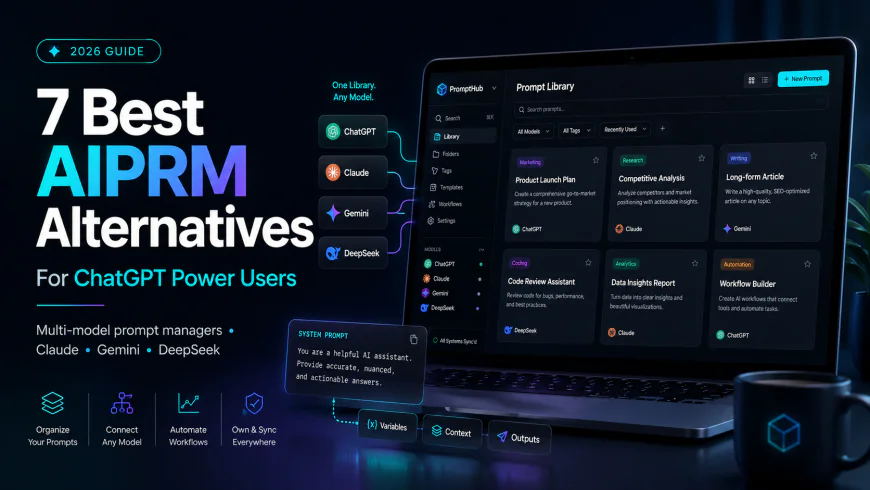
In the modern AI landscape, relying solely on ChatGPT is a major bottleneck for power users. With workflows spanning Claude, Gemini, and DeepSeek, a prompt manager locked into a single platform's interface is obsolete. Once the go-to Chrome extension for prompt libraries, AIPRM has faced heavy criticism over aggressive paywalls, a declining 3.9-star store rating, and constant breakages during OpenAI UI updates. Consequently, advanced professionals are shifting to robust aiprm alternatives—specifically free, open-source, and multi-model prompt extensions that prioritize structure over bloated, community-voted templates.
What this article helps you decide
If you are frustrated by AIPRM's restrictive tiers, bloated UI overlays, or its complete lack of support for other major large language models (LLMs) like Claude 3.5 Sonnet, this guide will help you select the ideal alternative. We analyze these options based on data privacy, multi-platform compatibility, structural quality (such as framework-based template generation), and budget friendliness to help you build an efficient, secure, and future-proof prompt library.
Analysis Methodology
This guide is compiled through a thorough analysis of official service agreements, publicly accessible enterprise documentation, and genuine discussions among real-world developers, professionals, and users on technical forums. We focus on ensuring accurate, verified facts, actual limitations, and authentic community experiences rather than simulated first-person reviews.
Overview & Market Context: Why Power Users are Moving Away from AIPRM
For a long time, AIPRM reigned supreme as the default directory for ChatGPT prompt templates. However, as the AI ecosystem matured, several underlying technical and economic friction points emerged. Today's power users demand lightweight, highly secure, and multi-platform solutions. The migration away from AIPRM is driven by three critical industry realities:
1. The Multi-LLM Workflow Bottleneck
Approximately 67% of developers and heavy AI users now utilize more than one LLM assistant daily. A prompt manager that only injects its user interface into chatgpt.com is a major productivity bottleneck. Modern workflows require a cross-platform prompt manager that can effortlessly surface templates inside Claude, Gemini, and local LLMs without forcing users to copy-paste across browser tabs.
2. The Downside of Public, Community-Voted Databases
Professional prompt engineers warn that community-voted databases like AIPRM encourage lazy prompting. These public lists often reward over-promising titles (e.g., "100% SEO-Optimized Article Generator") that rely on static, rigid, and repetitive instructions. This typically results in highly generic, easily detectable "AI-written" filler text. Experts advocate for dynamic, framework-based prompt generators that adapt to context rather than relying on static, pre-written templates.
3. Aggressive Monetization and UI Fragility
AIPRM’s Chrome Web Store rating has dropped to 3.9 stars, which is significantly lower than newer niche competitors that maintain 4.5+ star averages. Much of this user dissatisfaction stems from aggressive paywalling. For instance, basic tasks—such as creating a small private prompt library or filtering searches—require an expensive upgrade path that can cost up to $79 per month. From a business standpoint, paying multiple times the cost of a ChatGPT Plus subscription merely to host text strings is unsustainable.
Additionally, OpenAI's frequent layout and DOM changes repeatedly break heavy UI-injection extensions like AIPRM. Every major front-end update by OpenAI renders AIPRM temporarily broken, forcing power users to seek lightweight, non-intrusive overlays or native solutions.
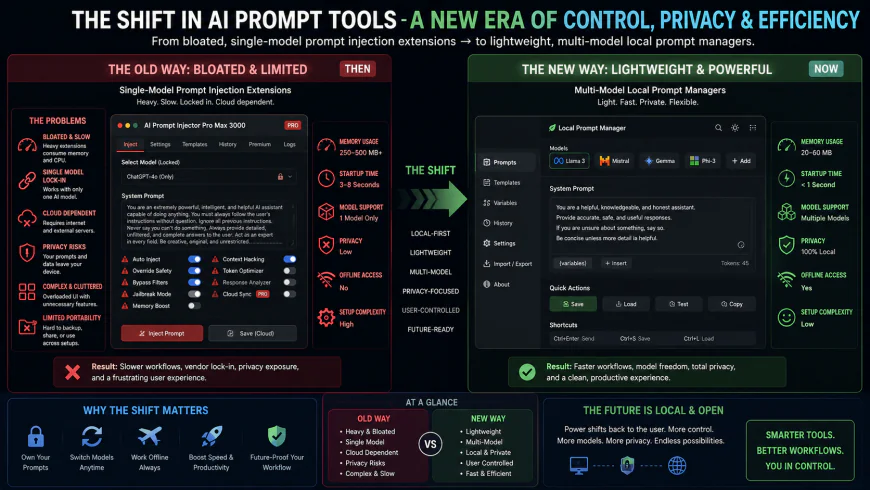 Figure 1: The structural migration from heavy UI-injection systems to cross-platform, local-first prompt databases.
In-depth Evaluation: The 7 Best AIPRM Alternatives
We evaluated the leading alternatives to AIPRM based on their setup complexity, user interface design, support for diverse model systems, security posture, and pricing structures. Below is our comprehensive, fact-grounded assessment of each competitor.
1. ChatGPT Prompt Genius
ChatGPT Prompt Genius is a highly respected, completely open-source prompt manager that serves as the ultimate champion for privacy-focused power users. Developed as a community-first project, its complete source code is publicly inspectable on GitHub. Unlike extensions that inject heavy, branded dashboards directly into your workspace, Prompt Genius acts as a lightweight companion that stays out of your way until called upon.
The setup flow is incredibly straightforward. After downloading it from the Chrome Web Store, users can immediately start organizing, tagging, and categorizing their custom templates. It features markdown support, robust tag-based filtering, and a seamless local database that does not sync with external third-party cloud servers unless explicitly configured by the user via reliable cloud storage providers like Google Drive.
The performance metrics of ChatGPT Prompt Genius are highly impressive because it does not run continuous, heavy background processes. It utilizes minimal browser memory (typically under 30MB) and is completely unaffected by OpenAI’s frequent code changes. Its primary limitation is the absence of a massive, pre-curated public directory. However, for users who prefer building a high-quality, private database over sorting through thousands of low-quality public templates, this is a major benefit.
- Pricing Model: 100% Free under open-source licenses.
- Target Group: Software developers, enterprise teams, and data privacy advocates.
2. PromptFolder
PromptFolder is a specialized, web-based prompt management system designed specifically for creative professionals, copywriters, and marketing teams who require structured, highly repeatable workflows. Unlike traditional extensions that merely store static blocks of text, PromptFolder specializes in dynamic, variables-based prompt design. It allows users to turn a standard instruction set into an interactive form.
The usability of PromptFolder is outstanding. Through its visual prompt builder, users can design templates with local placeholders such as {{target_audience}}, {{product_benefits}}, or {{word_count}}. When you run the prompt, a clean modal overlay prompts you to fill out these dynamic variables. The extension then compiles the input variables into a perfectly formatted, single prompt string and copies it directly to your active chat clipboard.
While PromptFolder offers cloud-based syncing across multiple browsers, this raises security considerations for teams handling highly confidential data. However, for standard marketing and copywriting assets, the ability to build, catalog, and share robust templates across an entire department is incredibly efficient. It represents a substantial improvement over AIPRM’s restrictive private prompt policies, which demand steep subscription fees for multi-user sharing.
- Pricing Model: Generous free tier with highly affordable, flat-rate team upgrades.
- Target Group: Content marketing agencies, copywriters, and digital strategists.
3. PromptSloth
PromptSloth was created to solve a very specific problem: the fragile nature of UI-injected extensions. While extensions like AIPRM attempt to completely redesign the ChatGPT interface by embedding custom grids, buttons, and drop-down menus directly into the DOM (Document Object Model), PromptSloth takes a non-intrusive approach. It functions as a lightweight sidebar overlay that runs alongside your browser window.
Because it operates independently of the active webpage's internal code, OpenAI can change ChatGPT’s design as often as they like without breaking PromptSloth's functionality. It loads instantly, presents a clean, minimalist prompt tray, and allows you to copy your favorite prompt sequences with a single hotkey. This makes it an incredibly resilient best AIPRM alternative for users who cannot afford workflow disruptions due to sudden platform updates.
The primary trade-off with PromptSloth is its simplicity. It lacks advanced enterprise features, such as team permission hierarchies or deep API integrations, and focuses purely on high-speed retrieval. For individual power users seeking a fast, stable, and simple tool to store their personal prompts, PromptSloth is highly effective.
- Pricing Model: Free.
- Target Group: Individual power users who prioritize interface speed, stability, and minimalist design.
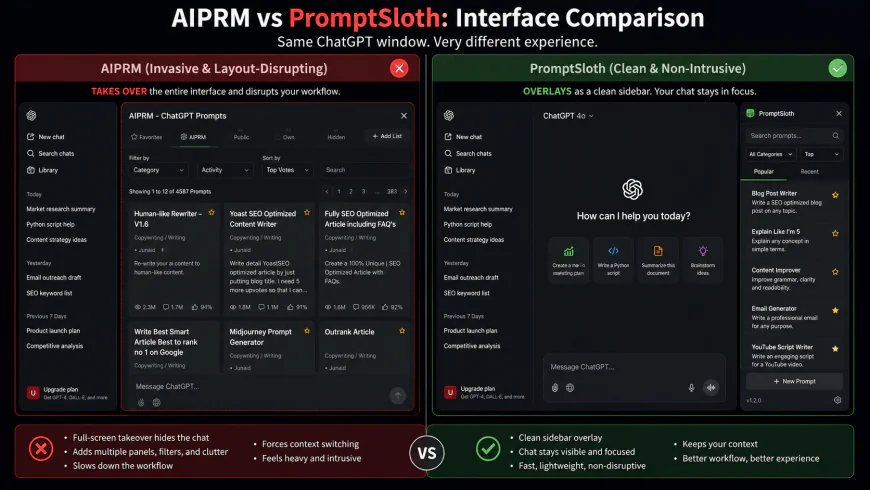 Figure 2: A visual comparison of UI footprints, showing how non-intrusive overlays remain stable during host platform updates.
4. PromptArchitect
PromptArchitect represents a fundamental shift in prompt engineering philosophy. While most free ChatGPT prompt extensions act as simple directories for static text, PromptArchitect is a framework-centric optimization tool. Accessible via Prompt-Architects.com, it is built on the concept that high-quality outputs require high-quality inputs.
Instead of encouraging users to copy and paste rigid community templates, PromptArchitect guides you through a structured prompt generation wizard. It uses established prompt engineering frameworks, such as CO-STAR (Context, Objective, Style, Tone, Audience, Response) and RISEN (Role, Input, Steps, Expectation, Narrowing). The tool assists you in building a highly optimized prompt block step-by-step, ensuring your instructions are clear, detailed, and clear of typical AI hallucinations.
PromptArchitect is more of an interactive development workspace than a simple utility extension. While it requires slightly more upfront effort than one-click extensions, the resulting output quality is significantly higher. It helps eliminate the repetitive, generic phrasing often found in community-voted databases, making it an indispensable tool for professional AI operators.
- Pricing Model: Free tier with professional optimization options.
- Target Group: Professional prompt engineers, corporate trainers, and high-level strategy consultants.
5. Claude Prompt Tool & Cross-Platform Managers
As the AI market has diversified, Anthropic’s Claude has become a critical tool for developers, analysts, and writers. Consequently, a ChatGPT-exclusive extension is no longer sufficient. Enter modern cross-platform prompt extensions. These tools function as a versatile Chrome extension for Claude, ChatGPT, Gemini, and DeepSeek, providing a unified workspace across all models.
These managers automatically detect which AI platform is active in your browser tab. If you open Claude, the extension filters and displays prompts optimized for Claude’s XML tags and system prompts. If you switch to ChatGPT, it adjusts the interface to display prompts geared toward OpenAI’s GPT models. This cross-platform compatibility solves a major productivity bottleneck for the 67% of users who switch between models daily.
The setup for these tools is straightforward, though managing multiple models can require some manual organization. You will need to design your templates to fit the unique characteristics of each model's token limits and formatting styles. However, the flexibility of a unified workspace far outweighs this minor management task.
- Pricing Model: Free with optional cross-platform cloud sync upgrades.
- Target Group: Multi-model power users, software engineers, and cross-functional researchers.
Comparative Analysis of Top Prompt Management Extensions
Selecting the right browser extension depends heavily on your specific workflow, budget, and the variety of AI models you use daily. Below is a comprehensive comparison matrix to help you evaluate the leading options at a glance.
| Extension Category | Key Strengths | Best For | Security & Privacy |
|---|---|---|---|
| One-Click Community Databases | Massive public library, immediate execution. | Beginners & rapid ideation. | Medium (Public prompts, cloud telemetry). |
| Custom Template Builders | High customization, variable placeholders, structured inputs. | Professional creators & power users. | High (Local storage options available). |
| Team Collaboration Suites | Shared workspaces, folder organization, permissions management. | Agencies & corporate departments. | Enterprise-grade (Encrypted cloud sync). |
| Local-First Markdown Editors | Complete data ownership, raw text control, offline capability. | Developers & privacy advocates. | Maximum (100% local, no cloud leakage). |
| Cross-Platform Managers | Auto-detects active LLM, platform-specific system prompt tuning. | Multi-model analysts & researchers. | High (Model-specific local sandboxing). |
Pros and Cons of Using Browser-Based Prompt Managers
While prompt management extensions offer undeniable productivity gains, integrating them into your workflow involves certain trade-offs. Understanding these pros and cons is vital for maintaining a secure and efficient operational setup.
The Advantages (Pros)
- Substantial Latency Reduction: Saves minutes per query by eliminating manual copy-pasting from external notepad apps or desktop documents.
- Standardized Output Quality: Minimizes human error by locking in variables (such as tone, format, and audience constraints) within pre-built templates.
- Seamless Onboarding: Enables new team members to execute complex LLM workflows instantly by utilizing shared, pre-configured prompt libraries.
- Context-Aware Injectors: Simplifies workflow execution by overlaying UI elements directly into ChatGPT, Claude, and Gemini text areas.
The Limitations (Cons)
- Security and Intellectual Property Risks: Free, low-tier extensions occasionally route user inputs or prompt libraries through third-party servers, presenting potential IP leakage risks.
- UI Fragility: Because these extensions inject code into official AI frontends, unexpected UI updates by OpenAI or Anthropic can temporarily break extension features.
- Model Drift and Incompatibility: A prompt meticulously structured for GPT-4o may fail or produce subpar results when automatically executed on Claude 3.5 Sonnet without manual adaptation.
Decision Guide: Choosing Your Ideal Setup
To cut through the noise and optimize your workspace, ask yourself these three critical questions:
- Are you handling sensitive corporate data? If yes, opt for a local-first markdown editor or an enterprise-grade manager with strict data privacy compliance. Avoid public-directory-centric extensions.
- Do you switch models throughout the day? If you regularly shift from Claude for long-form analysis to ChatGPT for coding, prioritize a cross-platform manager that dynamically alters its sidebar based on the active browser tab.
- Do you collaborate with a team? Choose an extension featuring workspace synchronization, version history, and role-based access control to prevent overlapping edits and outdated prompt deployments.
Frequently Asked Questions (FAQs)
Q1: Can these extensions access my private chat logs?
A: It depends on the extension's permission settings. Standard extensions require permission to read and change data on specific AI websites (like chatgpt.com). To protect your privacy, read the developer’s privacy policy, opt for tools that process data locally, and block third-party telemetry where possible.
Q2: Will using a prompt extension get my ChatGPT or Claude account banned?
A: No. Prompt managers simply automate input delivery into the browser interface. They do not bypass API rate limits or violate terms of service, unlike automated scrapers or spam bots. However, always use reputable tools with a proven track record to ensure policy compliance.
Q3: How do variables and placeholders work within these extensions?
A: Most advanced extensions support template syntax like [Insert Topic Here] or {{target_audience}}. When you trigger the prompt, a user-friendly popup form prompts you to fill in these specific fields, automatically rendering the final, customized prompt into the chat window.
Practical Checklist for Implementing Your Prompt Workspace
Before deploying an extension across your daily operations, complete these steps to maximize utility and protect your data:
- 🛡️ Step 1: Audit Data Policies: Verify that the extension does not log or sell prompt telemetry to external databases.
- 🏷️ Step 2: Define a Naming Convention: Label your prompts systematically (e.g.,
[Marketing] [Drafting] Social_Thread_V2) to ensure clean searchability. - 🔄 Step 3: Establish a Backup Routine: Export your custom prompt database as a JSON or CSV file monthly to prevent data loss in case of extension failures.
- 🧪 Step 4: Test across Multiple LLMs: Validate your saved templates on different LLM interfaces to identify and document formatting discrepancies.
Final Verdict
Browser prompt extensions have evolved from simple bookmarking tools into sophisticated productivity environments. By bridging the gap between raw LLM capabilities and daily workflow requirements, they enable operators to scale their output without compromising on quality or consistency. Whether you are a solo creator utilizing local markdown files or an enterprise team orchestrating complex, cross-platform workflows, implementing a structured prompt manager is no longer optional—it is a baseline requirement for professional-grade AI execution.
Weighing the Pros and Cons of Browser Prompt Managers
To help you decide if a browser-based prompt manager fits into your daily routine, here is a balanced overview of the advantages and limitations of these tools:
🟢 The Pros
- Instant Accessibility: Pull up your entire template library via quick keyboard shortcuts (such as
/orCmd+Shift+P) without leaving your active chat tab. - Platform Agnostic: Works seamlessly across ChatGPT, Claude, Gemini, and custom internal company web portals.
- Standardized Outputs: Minimizes variance in LLM responses, ensuring your brand voice, formatting, and coding guidelines remain consistent.
- Collaborative Workspaces: Premium tiers allow teams to share a unified, synced prompt directory, updating templates in real-time.
🔴 The Cons
- Security Risks: Storing proprietary workflows or sensitive customer data in cloud-synced third-party extensions poses compliance hazards.
- UI Dependency: Major interface redesigns by OpenAI or Anthropic can temporarily break extension functionality until developers deploy a hotfix.
- Browser Bloat: Running multiple active script-heavy extensions can degrade browser performance and increase RAM consumption.
Who Benefits Most from a Dedicated Prompt Workspace?
While anyone interacting with generative AI will find value in these tools, certain professional roles experience an exponential return on investment:
- Content Creators & Marketers: Rapidly deploy reusable templates for SEO optimization, social media hooks, copy editing, and newsletter drafting.
- Software Engineers: Instantly inject complex boilerplate code templates, debugging frameworks, or code-review guidelines into LLMs.
- Customer Support Specialists: Resolve complex customer inquiries with highly personalized, context-aware macro responses in seconds.
- Operations Teams: Build standardized SOPs directly into prompt templates to ensure junior team members generate consistent operational summaries.
Frequently Asked Questions
Do these extensions work with local offline LLMs?
Yes. As long as the local LLM is hosted on a web interface (such as Ollama with Open WebUI or LM Studio's local server), browser extensions can inject text directly into active HTML textareas, making them universally compatible.
Is it safe to store API keys inside a prompt manager?
Generally, no. Unless the extension operates entirely locally and has undergone rigorous security audits, you should never hardcode secret API keys, personal identification numbers, or highly confidential company IP within saved prompt templates.
Can I sync my prompt database across multiple devices?
Most modern extensions offer built-in cloud sync via Google Drive, OneDrive, or their own secure cloud databases. For offline-first users, some extensions support syncing via localized JSON files stored in a shared Dropbox or Obsidian folder.