How to Use Automated Sales Follow Up Software Natural Workflows: Step-by-Step Guide
Discover how to configure automated sales follow up software natural sequences that increase conversions. Ditch robotic templates for real, human results.
 Abir Bin Hasan
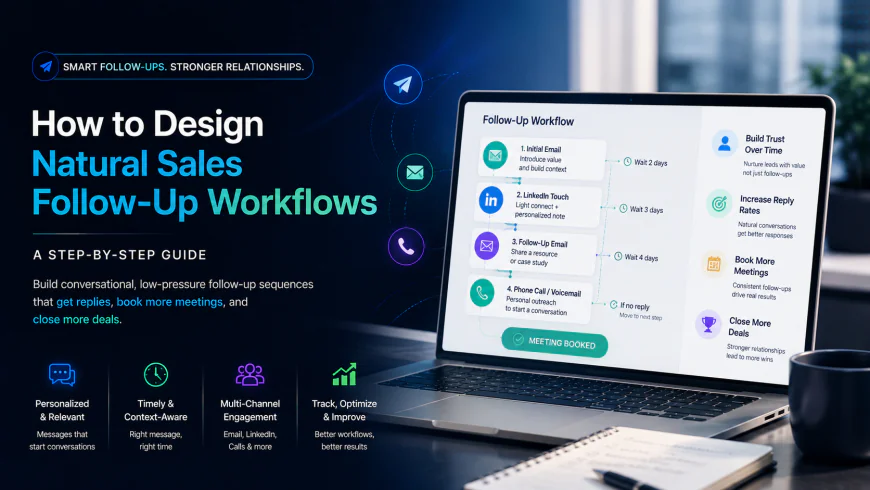
How to Design Natural Sales Follow-Up Workflows: A Step-by-Step Guide
B2B sales data suggests that using automated systems for fast lead routing and qualification can improve meeting booking rates by up to 50%. Yet, roughly 45% of sales professionals cite inaccurate database records and stiff, robotic messaging as major barriers to success. When setting up these systems, designing conversational, low-pressure cadences must take priority over raw outbound volume, shifting the focus from hands-off broadcasting to strategic, relationship-driven engagement.
What this article helps you decide
This guide is designed to help you determine how to build automated outreach systems without hurting your sender reputation or alienating prospects. By reading further, you will decide:
- How to balance standardized workflows with custom manual steps to protect your response rates.
- Which platforms offer deep, native CRM integrations instead of isolated data silos.
- How to set up behavioral triggers and safety delays to bypass spam filters while maintaining consistent delivery.
Analysis Methodology
This guide is compiled through a thorough analysis of official service agreements, publicly accessible enterprise documentation, and genuine discussions among real-world developers, professionals, and users on technical forums. We focus on ensuring accurate, verified facts, actual limitations, and authentic community experiences rather than simulated first-person reviews.
Overview & Market Context: Moving Beyond Mass Outreach
For several years, the standard playbook in outbound sales was built on a simple premise: outreach is strictly a numbers game. Software providers competed on how many thousands of automated emails they could route through a domain each day. Today, that brute-force approach has largely broken down. Major email providers have implemented strict security filters, and modern buyers have developed a sharp eye for generic, automated templates. Success no longer depends on the sheer volume of emails a tool can push out, but on using conditional logic to deliver relevant, well-timed messages that invite real dialogue.
The rise of conversational tools and smart follow-up platforms has reshaped the market. Buyers are highly skeptical of automated text bots pretending to be human reps. Instead, they expect authentic communication. According to industry analysis on platforms like G2 and HubSpot, successful teams use automation primarily to handle background administrative tasks—such as logging calls, updating deal stages, and staging personalized drafts—while keeping the actual copywriting heavily human.
This guide outlines how to transition from rigid, KPI-driven sequences that push prospects away to flexible, behavior-based workflows. By leveraging modern sales execution tools, a team can maintain a consistent pipeline without losing the personal touch required to close deals.
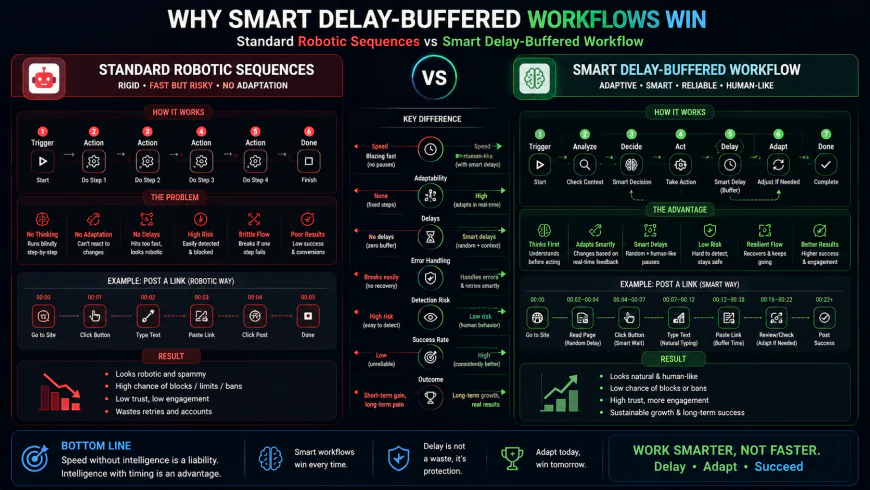 Figure 1: Comparison between standard, rigid sequence structures and dynamic, behavioral sales workflows.
In-Depth Evaluation of Modern Outreach Frameworks
To successfully deploy a natural-feeling automation system, you need to understand the core structural pillars that separate strategic workflows from basic bulk-email tools.
1. Behavioral Triggers and Conditional Paths
Traditional email sequences rely on rigid, calendar-based intervals (e.g., Day 1: Email 1, Day 3: Email 2, Day 7: Email 3). This linear structure ignores what the prospect is actually doing. Modern setups rely on behavioral triggers. If a prospect downloads a technical resource, visits a pricing page, or clicks a specific link, the workflow adjusts its path immediately.
Implementing these dynamic pathways requires a clean connection between your marketing systems and your sales execution tools. Instead of triggering an immediate auto-reply the second a form is submitted, experienced operations teams introduce randomized delays of 15 to 45 minutes. This small buffer mimics human action, making it appear as though a representative reviewed their information and typed out a personal response.
2. CRM Syncing and Contextual Relationship Logging
A common failure point for lightweight sequence tools is their isolation from core customer data. Without real-time CRM updates, a rep might have a highly productive phone conversation with a prospect, only for the automated system to send a cold, generic follow-up email an hour later. This instantly breaks trust and reveals the machine behind the process.
To avoid this, teams use deep CRM integrations, such as Salesforce, to maintain a single source of truth. When a rep logs call notes or updates a deal stage, the prospect is immediately shifted or removed from active sequences. Some platforms also allow reps to write brief, customized 'relationship notes' that automatically merge into subsequent email drafts, ensuring every touchpoint references actual conversational history.
3. Deliverability Safeguards and Technical Domain Health
Even the most beautifully written copy is useless if it lands in the promotions tab or the spam folder. Maintaining solid deliverability requires configuring three primary authentication protocols at the DNS level: SPF (Sender Policy Framework), DKIM (DomainKeys Identified Mail), and DMARC (Domain-based Message Authentication, Reporting, and Conformance).
Furthermore, relying on fully automated AI systems to generate and send high volumes of unique emails is a quick way to damage domain health. Modern spam filters are highly trained to recognize patterns in AI-generated text. To keep your domain safe, a hybrid model is often best: let the software draft the message based on structured templates, but require a human representative to review and hit send.
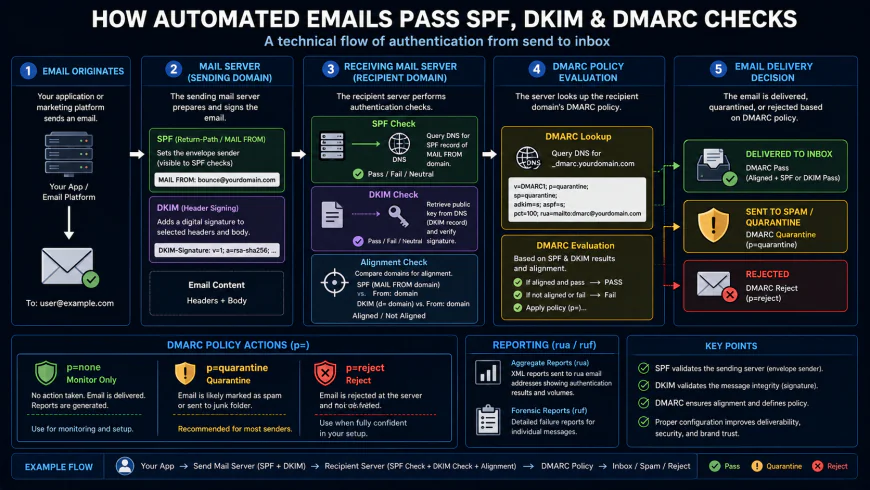 Figure 2: The pipeline of secure email delivery, showing how authentication protocols prevent automated messages from hitting spam folders.
4. Custom Variables and Dynamic Fields
A conversational email needs to go beyond simple mail-merge tags like {{First Name}} and {{Company Name}}. Advanced tools allow users to insert conditional sentences based on industry vertical, geographic territory, or recent company news.
These tailored fields prevent your outreach from looking like a standard mass broadcast. They also give sales development reps (SDRs) a clean template framework where they can inject localized context, making the message read like a direct email from one professional to another.
💡 Expert Analysis & Experience
A review of user discussions on specialized communities like r/salesforce and r/CRM highlights several real-world limitations of cold automation:
- The Limits of Conversational AI: Experienced users note that prospects generally dislike interacting with conversational AI bots when trying to schedule a call. Most prefer a direct, frictionless scheduling link, which consistently yields better conversion rates.
- The Value of the Quick Note: Logging a specific detail right after a live conversation (such as an upcoming team restructuring or a shared personal interest) and syncing it to your templates ensures the next email feels genuinely personal.
- The Short-Bump Strategy: Outreach professionals in B2B spaces have found that a brief, low-pressure follow-up (such as a simple "thoughts?" message) often generates higher reply rates than long, corporate-heavy product pitches, which are generally ignored.
Step-by-Step Guide: How to Automate Follow-Ups Authentically
Here is a practical, step-by-step process to configure your automated sequences while keeping your communication natural and deliverable.
Step 1: Set Up Domain Authentication and Warm-up Protocols
Before launching any campaigns, ensure your sending domain is fully authenticated. Configure your SPF, DKIM, and DMARC records through your domain registrar. Once verified, use a specialized domain warm-up service to gradually establish your sender reputation. Keep your starting daily volume low and scale up slowly over several weeks to avoid triggering bulk-sending flags with ISPs.
Step 2: Establish a Clean, Bi-Directional CRM Sync
Connect your sales engagement platform directly to your CRM. Ensure that contact records, opportunity stages, and lead statuses update in real time. Set up clear exclusion rules: if a lead's status changes to "Contacted," "Working," or "Meeting Scheduled," they must be automatically removed from active prospecting sequences to prevent awkward, duplicate messages.
Step 3: Build Sequences Around User Behavior
Move away from simple calendar delays and design workflows based on prospect behavior. For example, set up a trigger for when a prospect opens an attachment or clicks a case study link. Program the system to wait for a randomized delay (e.g., 35 minutes) before queuing a short, relevant follow-up that offers additional context or invites them to a brief call.
Step 4: Draft Brief, Direct Templates
Write email copy that mirrors how professionals actually communicate. Keep paragraphs short, avoid marketing buzzwords, and use a direct, casual tone. Your primary goal is to start a conversation, not pitch your entire feature set in one message. Integrate custom variable tags to pull relevant, role-specific details from your CRM.
Step 5: Use "Human-in-the-Loop" Review Tasks
For high-value accounts, avoid fully automatic sending. Set your sequence steps to generate 'draft tasks' instead of sending emails automatically. This places the drafted message into the rep's work queue, allowing them to spend 30 seconds personalizing the copy before manually hitting send. This approach combines the speed of automation with the accuracy of a human touch.
| Tool Name & Provider | Primary Focus | Smart Automation Features | Deliverability Safeguards | G2 Sentiment & Rating |
|---|---|---|---|---|
| HubSpot Sequences | CRM-centric Sales Enablement | Deep behavioral triggers, task automation, dynamic token personalization. | In-app health monitoring, bounce limits, automated sending caps. | 4.4/5 - Renowned for ease of use and native integration. |
| Salesforce Sales Engagement | Enterprise Cadence Management | Automated step routing, Einstein AI suggestions, unified workspace. | Enterprise-grade domain routing, built-in sender policy checks. | 4.2/5 - Highly powerful but requires dedicated admin setup. |
| Outreach.io | High-Volume Outbound Orchestration | Advanced sequence branching, multi-channel pathways (phone, email, social). | Domain health dashboards, safety buffers, warm-up pacing. | 4.3/5 - Highly valued by enterprise outbound sales teams. |
| Salesloft | Sales Execution & Workflow | Dynamic template customization, phone dialer integration, AI draft prep. | Advanced spam prevention triggers, domain tracking options. | 4.5/5 - Praised for user interface and pipeline transparency. |
Practical Scenario: Robotic Outbound vs. Natural Flow
To understand the difference in real-world application, observe these two distinct follow-up templates configured inside a CRM database:
❌ THE ROBOTIC APPROACH (Built for Metrics, Low Response Rates):
"Dear {{First Name}},
I hope you are having a productive week. I am following up on my previous email. I see you are the {{Job Title}} at {{Company Name}}. We offer robust automated enterprise software systems. Do you have 15 minutes to hop on a call on Tuesday at 10 AM EST to discuss our integration workflows?
Best Regards,
{{Sender Name}}"
✅ THE NATURAL APPROACH (Built for Dialogue, High Response Rates):
"Hi {{First Name}},
Quick bump on this. I saw that {{Company Name}} recently expanded its team in Chicago, so I wanted to make sure my previous message didn't get buried. Do you have five minutes to chat about your scaling bottlenecks sometime next week?
Thanks,
{{Sender Name}}"
Notice how the natural approach feels personal, concise, and context-aware, whereas the robotic template immediately signals a generic, mass-mail blast.
✅ Pro Tip: The Randomized Delay Strategy
Avoid triggering automated follow-ups immediately after a prospect downloads a resource. Doing so feels highly automated and intrusive. Instead, configure your sequences to include a randomized buffer delay between 15 and 45 minutes. This creates a more natural pacing, suggesting that a real person took the time to notice their interest and follow up directly.
Pricing & Licensing Considerations
When selecting a sales execution platform, it is important to factor in the total cost of ownership, as hidden fees and structural requirements can quickly impact your sales enablement budget. Most established platforms use a SaaS licensing model with annual, per-user commitments.
For mid-sized operations, tools like HubSpot Sequences are bundled into Sales Hub Professional, which generally starts around $90 to $100 per seat per month (often with a minimum user count). Salesforce Sales Engagement is highly scalable but requires an Enterprise Salesforce license, plus an additional add-on fee of roughly $50 to $75 per seat per month. Dedicated sales engagement suites like Outreach.io and Salesloft typically operate on custom quotes, often running between $100 and $150 per seat per month, paid annually.
In addition to software licenses, remember to budget for secondary tools, including email validation credits, domain monitoring systems, and data-cleaning tools. Investing in these foundational utilities is critical to keeping your data clean and protecting your sending domains from blacklists.
System Limitations: Who Should Avoid These Tools?
While outreach automation can streamline a busy team's workflow, it is not a quick fix for broken processes. You should avoid these platforms if you do not have a dedicated CRM administrator or clean customer data; messy databases will cause personalization tags to misfire, resulting in embarrassing, public errors (such as emailing "Dear [Null]").
Additionally, small teams or solo founders with low lead volumes should steer clear of heavy enterprise suites like Salesforce Sales Engagement or Outreach.io. These platforms have a steep learning curve, complex setup requirements, and require significant administrative time to maintain. Finally, be prepared for steep pricing increases upon renewal, as many providers push aggressive tier upgrades once your database or team size grows.
Balanced Pros & Cons of Follow-Up Automation
A Realistic Look at the Trade-offs
- Relief from repetitive admin chores: Handing off backend administrative tasks (such as logging CRM activities or drafting call summaries using tools like Sybill or Coffee AI) frees up your reps. They can spend their energy actually talking to human beings, which is where deals actually close.
- Steady, predictable pipelines: Life gets busy, and manual follow-ups are usually the first thing to slip when reps focus on closing active deals. Automation keeps a steady, polite baseline of outreach going in the background.
- Smarter, action-based tracking: Instead of guessing who is interested, you can automatically spot hot prospects when they actively engage with your case studies, decks, or pricing sheets.
- Deliverability risks and "inbox fatigue": Letting AI run wild and send thousands of robotic emails will quickly ruin your domain's reputation. Major email providers are cracking down hard on synthetic, high-volume spam.
- Diminishing returns on long sequences: Real-world feedback from sales reps on Reddit highlights a harsh truth: those massive, corporate-mandated 12-to-15-step outreach plans are built to satisfy internal metric goals, not to get replies. Conversion rates usually drop to zero after step four or five.
- Embarrassing database mistakes: If your CRM data is messy, dusty, or incomplete, your automated merge tags will misfire. Sending an email that says "Hi [First Name]" or references a mismatching company name instantly kills your credibility.
Who is This Actually For? (Choosing Your Path)
There is no one-size-fits-all tool. The right solution for your business depends entirely on your team size, budget, and how much administrative support you have available. Here is how to map your needs:
Enterprise Sales Teams
If you have dozens of reps, a complex sales cycle, and run your entire business on Salesforce, you need a heavy-duty engine like Salesforce Sales Engagement or Outreach.io. These platforms are designed to process massive amounts of data, support complex branching workflows, and provide the deep administrative controls necessary to protect your enterprise brand. Just be prepared to hire a dedicated administrator to manage them.
Mid-Market Growth Teams
For mid-sized, growing companies that need a user-friendly CRM paired with powerful outbound capabilities, tools like HubSpot Sequences or Salesloft strike the perfect balance. They offer highly intuitive, drag-and-drop workflow builders, reliable behavioral tracking, and seamless synchronization. This allows your team to get up and running quickly without a multi-month setup process.
Startups & Solo Founders
If you are a lean startup or a solo founder, stay away from massive enterprise platforms. You do not need complex, expensive software to build relationships. Instead, pair a clean, simple cold email tool with an automated scheduling link (like Calendly). At this stage, prioritizing hyper-targeted, deeply personalized manual outreach over raw volume will yield far better response rates and protect your domain's health.
The Verdict: Which Tool Wins?
Because every sales environment is unique, your choice should match your immediate priorities:
- If you want seamless CRM alignment: Go with HubSpot Sequences or Salesforce Sales Engagement. Keeping everything in one native system eliminates data silos and prevents reps from sending tone-deaf emails to active buyers.
- If you need multi-channel outreach: Go with Salesloft or Outreach.io. They are unmatched when it comes to organizing phone calls, emails, and LinkedIn tasks into a smooth, unified workflow for your reps.
- If you are on a tight budget: Stick to lightweight email tools, clean up your lists manually, and rely on personalized post-call drafts to keep your costs low while keeping your quality exceptionally high.
Frequently Asked Questions
Will automated follow-ups ruin my sender reputation?
Only if you run them like a spam machine. If you blast thousands of identical, unpersonalized templates, spam filters will catch on quickly. However, you can keep your domain safe by verifying your technical records (SPF, DKIM, and DMARC), using randomized delay buffers to mimic human behavior, and capping your daily send volume. Focus on quality, relevant messages; when recipients open and reply to your emails, it actually tells ISPs that your domain is trustworthy, which boosts your long-term deliverability.
What is the best timing delay to use between follow-up emails?
A good rule of thumb is to give your prospect space to breathe. Wait 2 to 3 business days before your first follow-up, 3 to 4 business days for the next one, and then wait 5 to 7 days for any messages after that. This keeps you on their radar without crowding their inbox or making your brand look desperate.
Is it possible to automate follow-ups across channels other than email?
Absolutely—and highly recommended. The most successful modern sales playbooks do not rely on email alone. They combine automatic emails with scheduled manual tasks, like connecting on LinkedIn, dropping a comment on a post, or picking up the phone. This multi-channel approach increases your chances of getting a reply without exhausting a single channel.
Quick Checklist: Before You Hit "Go"
Before launching your automated sequences, run through this final pre-flight checklist to ensure your brand's reputation stays protected:
- Verify your email authentication: Double-check that your SPF, DKIM, and DMARC records are correctly active on your sending domain.
- Scrub your lists regularly: Keep your bounce rate under 2% by running your contacts through a validation tool to weed out invalid or dead email addresses.
- Write like a human: Read your templates out loud. If they sound too formal or read like a marketing broadcast, simplify the language to make them sound like a direct email to a colleague.
- Stick to one simple call to action: Avoid confusing prospects with multiple links. Keep your request low-effort, like asking for a quick piece of feedback or a brief 5-minute chat.
- Monitor, test, and adapt: Review your open, reply, and unsubscribe rates weekly. If a sequence is underperforming, adjust your subject lines or make your copy more direct.
The Bottom Line
At the end of the day, smart sales automation is not about sending more spam; it is about scaling your ability to build real, timely business relationships. By choosing a platform that fits your operational needs, setting up proper technical safeguards, and focusing on highly personalized, helpful communication, you can stop chasing cold leads and start holding meaningful, revenue-generating conversations.