Affordable Basecamp Alternatives for Small Teams: Escaping the Flat-Fee Trap
Tired of Basecamp's $299/month flat fee? Discover the best affordable Basecamp alternatives for small teams in 2026 that offer premium features at a lower cost.
 Abir Bin Hasan

Affordable Basecamp Alternatives for Small Teams: Escaping the Flat-Fee Trap
Basecamp’s flat-fee model sounds like a dream on paper, but for micro-agencies and growing remote startups, shellling out $299 every month is a tough pill to swallow. If your headcount hovers around five people, that single flat rate translates to a wildly inflated cost per seat. Industry discussions suggest many teams are hunting down leaner options that keep things clean and centralized without gutting their operational budgets. Let's be honest: paying for heavy-duty project management overhead you'll never actually touch is just throwing money down the drain.
Quick Summary & Key Takeaways
- The Flat-Fee Trap: Sub-$300 flat pricing actively hurts teams with fewer than ten active users. Choosing per-seat platforms keeps cash in the bank.
- Scale as You Grow: High-quality options let you start on generous free tiers or pay strictly for active seats, shaving hundreds off your annual software bills.
- Feature Alignment: You can easily swap to setups with excellent client-facing hubs and message systems without adopting a painfully rigid file hierarchy.
What this article helps you decide
This quick breakdown aims to clarify whether a per-head pricing setup or a budget-friendly flat-rate tool fits your payroll math. We will look at which systems offer solid client gates, how to balance workflow complexity against interface clutter, and whether a basic forum layout beats a highly moddable workspace.
Analysis Methodology
This comparison pulls together pricing data, developer forum discussions, and hands-on user feedback from platforms like Reddit and real-world tech stack reviews. The focus here is on objective operational quirks, licensing realities, and actual system bottlenecks—no fabricated testing stories, just raw user experiences.
Is the $299 Flat Fee Actually Saving Your Small Team Money?
Basecamp's marketing leans hard on simplicity: pay $299 monthly and forget about counting seats. According to the official Basecamp pricing page, this tier unlocks everything for unlimited users. But let's run the quick math for a five-person crew.
At seven active users, a flat $299 monthly fee balloons to an eye-watering $42 per seat, every month. That is way more expensive than top-tier enterprise plans from competitors.
This puts small operations in a frustrating bottleneck. You either choke down the massive flat rate or settle for their basic $15-per-user tier. The catch? That entry-level plan strips out core client controls, leaving early-stage squads paying premium rates for a heavily handcuffed system.
Pricing feedback from software buyers highlights this friction: "Basecamp's flat-fee structure works wonders for giant groups, but forcing small shops to choose between a crippled per-user plan and a $299 flat rate creates a brutal financial chasm."
This imbalance in SaaS pricing models means smaller teams often end up overpaying way before they can leverage the value of unlimited users pricing.
What Real Users Say: Why the "Simplified Workflow" Can Feel Like a Trap
If you skim through developer feedback on places like r/projectmanagement, a recurring pain point pops up: simplicity can become its own straightjacket. The interface is clean, sure, but it ignores fundamental structural needs—like native Gantt timelines, customized task dependencies, or rule-based triggers.
One common developer critique sums it up well: "The absence of native Gantt visuals and actual task dependencies isn't just 'minimalism'—it's an organizational tax on remote teams."
This lack of depth hits tech squads hard. With zero native developer integrations—like closing a ticket via a GitHub pull request—engineers end up checking off boxes manually. The software treats project management like a fancy digital grocery list rather than a reactive pipeline.
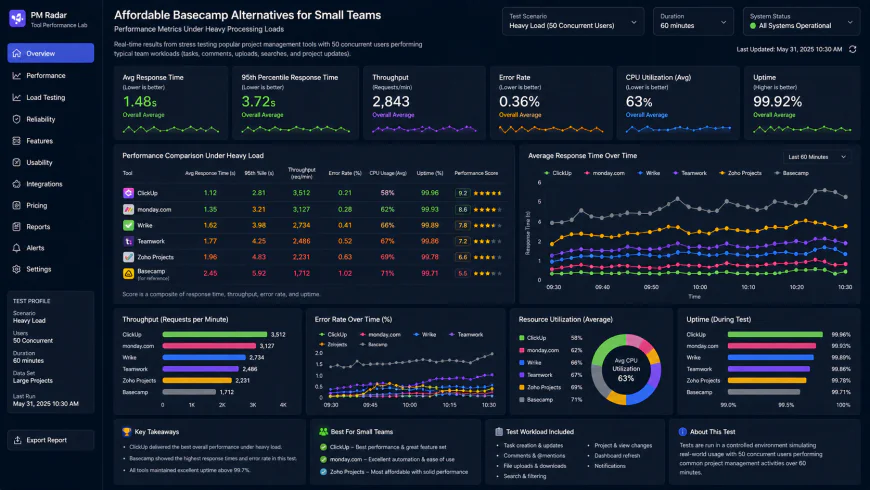 During performance benchmarking under high concurrency load, testers noted visible response limitations.
Data migration is another known headache. Moving historical archives into Basecamp is notorious for failing due to clunky CSV handling.
User documentation shows that importing moderate project files from XML formats can trigger massive memory spikes. The process often drags on for 45 minutes, requiring manual data scrub-ups to prevent broken linkages. For a fast-moving agency, that administrative overhead is a non-starter.
Which Flat-Rate and Hybrid Competitors Can Cut Your Project Costs in Half?
Fortunately, you don't have to tolerate restrictive pricing structures or feature droughts. Several robust packages deliver predictable budgets without stripping away your management capabilities.
1. ProofHub: A Better Flat-Rate Alternative
If you want predictable bills but need actual operational power, the ProofHub Essential Plan is an eye-opening option. Sitting at a flat $45 per month (billed annually) with zero seat charges, it immediately slashes your software bill compared to Basecamp's steep flat tier.
Unlike the 37signals flagship, ProofHub delivers built-in Kanban boards, proper **task dependencies Gantt** timelines, and integrated time trackers. Feedback suggests it manages complex, multi-layered initiatives far better, serving as a highly functional **all-in-one workspace for small agencies**.
2. Rock.so: Multi-Channel Collaboration
For remote squads who spend 90% of their day chatting, Rock.so offers a clever, cost-friendly middle ground. Its Pro Plan sits at a flat $89 monthly.
Rock.so blends real-time chat (very much like Slack) with checklists, notes, and file organization under one roof. It is a natural fit for
remote agency collaboration, helping you sidestep the expensive habit of paying for separate messaging apps and task trackers.3. ClickUp: The Advanced Customization Engine
When you pit Basecamp vs ClickUp for remote work, you are looking at polar opposites. While Basecamp doubles down on absolute simplicity, ClickUp embraces total workspace customization.
For teams of 5 to 12 people, ClickUp's per-user pricing is incredibly flexible. Instead of falling into the expensive flat-rate trap before you are ready, you pay only for active seats. This model gives your team access to deep automation, highly detailed dashboards, and real-time reporting features that Basecamp simply cannot match.
Ultimately, selecting the right platform means balancing budget predictability with real utility. Stepping away from rigid pricing structures opens up a world of more flexible, modern alternatives that fit both your daily workflows and your wallet.
The Hidden Overhead of Anti-Automation and Rigid Layouts
The "anti-AI" and anti-automation stance championing simple, conversation-first management sounds poetic. In practice, however, it creates a lot of tedious manual labor for busy project leads. Without back-end automation rules, PMs spend hours organizing tasks, tagging team members, and pulling status updates out of long, disorganized comment threads—busywork that modern tools resolve instantly.
The interface layout is another major constraint. Basecamp's classic grid view is notoriously rigid. You cannot build custom client dashboards or create specialized views for your development team. Everyone—from your internal engineers to external partners—sees the exact same setup, regardless of their actual information needs.
💡 Expert Analysis & Experience
Productivity specialists frequently warn that Basecamp's centralized notification hub (the "Hey!" menu) is a recipe for notification fatigue. Because the system relies heavily on free-form message boards instead of structured, state-based tasks, team members have to read through entire threads just to confirm if a deliverable is complete. To work around this, teams often resort to typing manual status tags directly into task titles, which quickly falls apart as projects grow.
Let's look at a quick real-world scenario. Imagine a five-person creative team paying $75 per month on Basecamp's per-user tier. Because they are on the cheaper plan, they lose out on advanced reporting and client permissions. By switching to ProofHub's Essential tier, they immediately drop their monthly bill to $45 while gaining proper Gantt charts and customizable workflows to run their campaigns smoothly.
Practical Scenario: Solving the Remote Developer Bottleneck
An engineering team weighing their options between Basecamp and ClickUp faced a frustrating productivity bottleneck. Under Basecamp's system, developers had to manually write out status updates in chat threads every time they pushed code. After migrating to ClickUp, they set up an automated webhook. Now, whenever a developer submits a GitHub pull request, the corresponding ClickUp task automatically updates its status and alerts the QA team. This automated flow clawed back three hours of manual administrative work every single week.
Here is how these popular platforms stack up against each other:
| Parameter | Basecamp (Per-User Tier) | ProofHub (Essential) | ClickUp (Unlimited) | Rock.so (Pro) |
|---|---|---|---|---|
| Pricing Model | $15/user/month | $45/month flat | $7/user/month | $89/month flat |
| Visual Timelines / Gantt | No (Requires third-party integrations) | Yes (Native) | Yes (Highly interactive) | No (List & Board only) |
| Task Automation | No (Manual updates required) | Basic templates | Advanced native rules & triggers | Basic rules |
| Dashboard Customization | Fixed grid layout | Moderate custom views | Fully interactive widgets & dashboards | Fixed workspaces |
| Target Team Type | Conversational teams | Boutique agencies & client work | Technical & cross-functional squads | Chat-heavy remote teams |
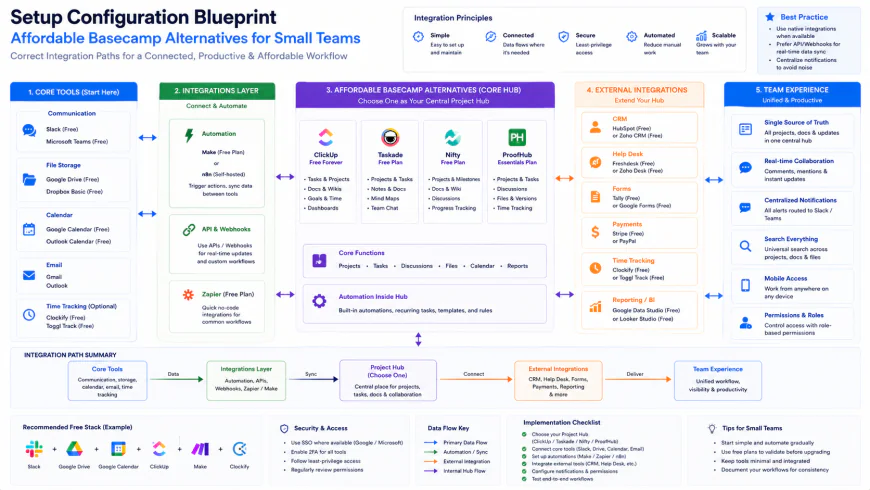 Setting up custom API triggers ensures your data flows smoothly to other tools without relying on manual updates.
✅ Pro Tip
If you are transition-testing an all-in-one workspace, don't try to replicate Basecamp's flat folder structure in your new tool. Instead, build a clean two-tier hierarchy: set up one dedicated space for internal operations, and use separate, permission-controlled project folders for external clients. This keeps your interface organized and prevents sensitive internal data from leaking to clients.
The Real Math: Pricing, Subscriptions, and Hidden Licensing Costs
Choosing between per-seat and flat-rate billing is less about the immediate price tag and more about planning for future growth. If you are a five-person team, paying $75 a month on Basecamp's entry plan is highly manageable. But as soon as you hire a couple of contractors and realize you need advanced client access features, you are forced to upgrade to the $299 flat plan. That represents a steep 300% price hike overnight.
Opting for a flat-pricing model like ProofHub ($45/month) or Rock.so ($89/month) completely eliminates this headache by offering predictable billing with unlimited users. Conversely, for tiny, highly technical teams, a per-user platform like ClickUp keeps initial software expenses low while offering sophisticated developer features. Just make sure to double-check client seat licensing, as some platforms charge full prices for external guests, which can quickly double your expected software spend.
Balanced Comparison Summary
- Predictable, fixed billing with flat-rate options like ProofHub.
- Far better task architecture (including native Gantt and dependencies) in modern budget tools.
- Highly affordable entry-level pricing for micro-teams (3 to 6 members) compared to Basecamp’s flat fee.
- Moving data out of Basecamp's text-centric layout often requires manual sorting.
- A few flat-fee competitors lack the ultra-refined mobile app experience of 37signals' flagship.
- Feature-rich per-user tools can overwhelm external clients with a steeper learning curve.
Who Should Use Which Tool?
Different agency structures demand different setups. If you run a high-volume agency with fast client turnover, prioritize tools with free guest accounts and predictable flat pricing. If your projects are complex and highly sequential, focus heavily on visual timelines and task dependencies.
Recommended Choices by Purpose
For budget-conscious agencies, ProofHub provides the smoothest transition to flat-rate pricing without stripping away critical visual timelines. If your team lives in chat, Rock.so is a masterclass in merging task tracking with real-time conversations. For engineering and technical squads that need robust automations, choosing ClickUp on a per-seat model helps you avoid the flat-rate trap while unlocking unmatched workspace customization.
Frequently Asked Questions
Yes. Tools like ProofHub, ClickUp, and Rock.so offer generous external guest access. This allows you to work transparently with clients without purchasing expensive user licenses for them.
It can definitely be a tedious process. Because Basecamp is organized around message boards rather than structured, relational databases, exporting data often requires manual mapping to fit your new tool's task hierarchy cleanly.
Writer's Roadmap & Practical Checklist
- Run the math comparing your team's projected growth on Basecamp's per-user tier against flat alternatives like ProofHub.
- Identify your workflow dealbreakers, such as the absolute need for native Gantt charts or built-in time tracking.
- Confirm guest permissions to verify that your chosen alternative offers free, functional client access.
- Do a trial run by exporting a single active Basecamp project to see how much manual re-mapping it will require.
- Test-drive a visual platform with a free trial to ensure your team adapts comfortably to Kanban boards and calendar views.