Affordable CRM Setup for Small Business: The No-Nonsense Blueprint
Stop wasting money on enterprise systems. Read our realistic guide to an affordable CRM setup for small business with step-by-step implementation tips.
 Abir Bin Hasan
Affordable CRM Setup for Small Business: The No-Nonsense Blueprint
Navigating the landscape of customer relationship management systems is a notorious headache, with over 800 products competing for your attention. Industry data indicates that teams using a central database save roughly 10 hours a week by automating routine administration. Yet, chasing these efficiency gains often lands small companies in expensive subscription traps. Building a sensible, affordable crm setup for small business isn't about hunting down completely free accounts. Instead, it requires choosing a lightweight paid tier—typically between $7 and $20 per user each month—that connects with your daily email and calendar tools without hitting you with surprise upgrade paywalls.
What this article helps you decide
This guide cuts through the polished sales pitches to help you identify the exact utility tier your company needs. You will find out how to link your current daily applications to a budget-friendly platform, organize a clear sales pipeline, and avoid the integration headaches that turn cheap software into a manual data-entry nightmare. Whether you run a solo service business or a growing B2B consultancy, this framework maps out practical choices so you never pay for features that sit idle.
Analysis Methodology
The underlying research for this guide relies on a meticulous analysis of official service agreements, API documentation, and real-world implementation logs. It synthesizes pricing structures, feature matrices, and user experiences sourced from authoritative technology panels, including PCMag's small business CRM evaluations and candid deployment discussions on communities like r/CRMSoftware. The focus remains strictly on objective data points: actual contact limits, native integration behaviors, API responsiveness, and user adoption rates among non-technical staff.
The Dangerous Myth of the "Free" CRM
For most entrepreneurs, the search for a budget-friendly contact manager begins with a simple online query for free software. On paper, the prominent industry giants look incredibly welcoming. They promise zero-dollar tiers with clean dashboards, basic contact cards, and multi-user access. But in the modern software landscape, these free offers are rarely acts of charity. They function as carefully designed entry points to get your company's records locked behind an artificial paywall.
Consider how this play out for a growing service team. At first, importing your existing client spreadsheets is simple, and the interface feels fresh. But within a month or two, the system hits a hard contact threshold. Suddenly, adding new leads is blocked unless you upgrade your plan. In other cases, you might realize that basic requirements—like direct two-way email syncing, custom deal stages, or shared team permissions—are locked behind a gray padlock icon.
Unlocking those features often requires jumping from the free plan directly to mid-tier corporate packages that cost $50 to $100 per user each month. For a five-person company, that unexpected bump strains the monthly budget. Starting out on an intentional, low-cost paid tier ($7 to $15 monthly) is much smarter than spending weeks building a workflow around a free tool, only to face a complex data migration when the limitations finally stall your daily work.
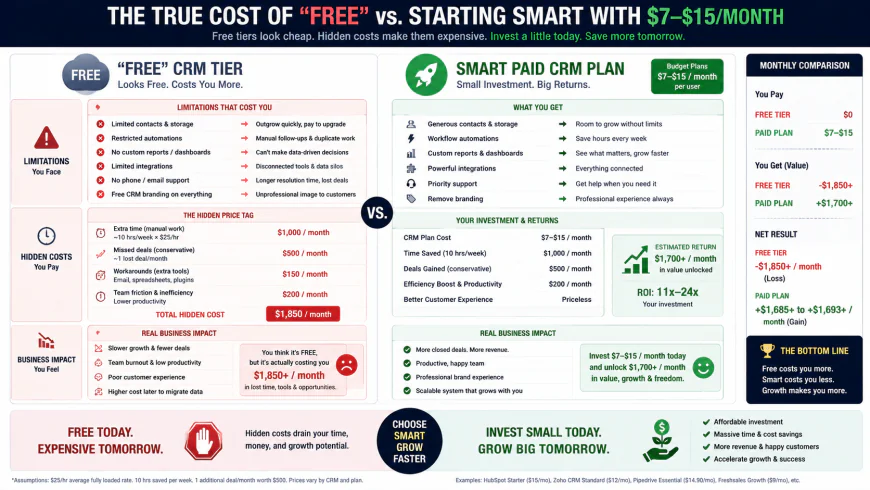 Figure 1: The hidden financial trajectory of "free" CRM plans versus starting on an intentional, low-cost paid tier.
Why Most Small Business CRM Implementations Fail
Understanding where these deployments go wrong will save you a lot of frustration. Over half of all client database installations fail to deliver their expected value, and the issues are almost always structural rather than financial.
The Salesforce Overkill Trap
For operations generating under $1 million in yearly revenue, adopting a massive corporate system like Salesforce is often a major mistake. These enterprise platforms are incredibly powerful, but they require dedicated administrators to write code, configure complex rules, and maintain data cleanliness. Without a full-time specialist on your payroll, setting up these systems takes weeks of exhausting labor. The end result is usually a frustrated team that abandons the complex software and goes back to tracking deals on personal spreadsheets.
The Cost of Siloed Software
Another common mistake is choosing a budget platform based solely on the lowest sticker price without checking how it talks to your existing tools. If a cheap contact manager lacks direct, native connections to your primary workspace—like Google Workspace, Microsoft 365, or QuickBooks—it silently eats away your profits through lost time.
When your staff has to manually copy billing details, copy-paste email threads, or update client payment statuses because the sync is broken, the savings on the software license disappear. A central database should streamline your operations, not create a secondary list of data-entry chores.
In-Depth Evaluation of Leading Budget CRM Software
To establish a low-cost database setup that actually performs, you must evaluate choices based on daily usability, integration limits, and true operating costs. Let us look closely at four reliable, wallet-friendly tools.
1. Bigin by Zoho: The Micro-CRM with Enterprise-Grade Roots
Positioned as a pipeline-focused tool for small operations, Bigin by Zoho simplifies contact management by stripping away the dense, multi-layered dashboards of Zoho's larger corporate suites. What remains is a clean, visual card layout built specifically for tracking active deals.
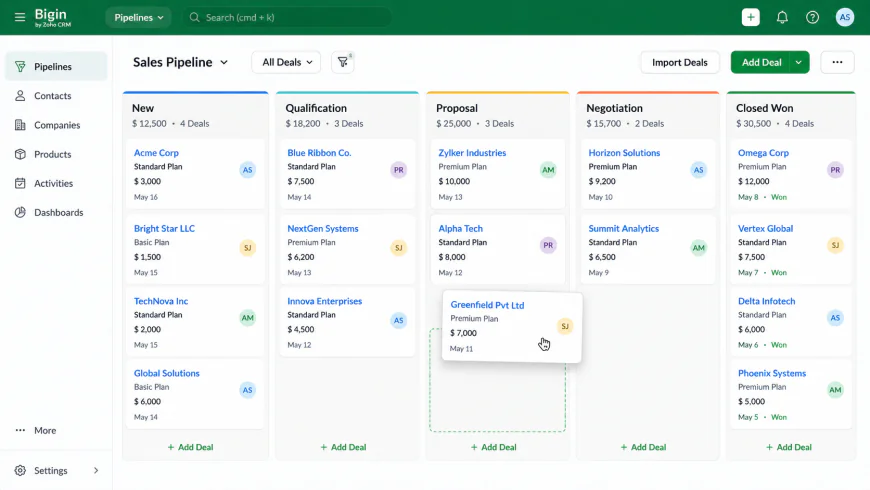 Figure 2: Bigin's visual card-based pipeline, designed to keep non-technical users focused on moving active deals forward.
Setup Flow & Usability
Importing data and setting up Bigin generally takes less than an hour. The onboarding assistant guides you through uploading CSV files, mapping headers to contact fields automatically. Because it runs on Zoho's established infrastructure, the interface is snappy and stable. The drag-and-drop Kanban style makes it easy for non-technical employees to learn without long training sessions.
Integration Capabilities
Bigin stands out for its straightforward compatibility with Google Workspace and Microsoft 365. It handles two-way email syncing, meaning your customer messages stay visible inside the contact timeline. It also links with Zoho Books and standard payment gateways, helping keep your sales and billing information aligned.
Pricing & Limits
While Zoho offers a highly limited free version, the paid "Express" plan is incredibly cheap at $7 per user per month when billed annually. Moving to the paid tier removes key data caps, lifting your contact capacity to 50,000 records and unlocking multiple pipeline views and automatic email alerts that are blocked on the free version.
Who should avoid Bigin?
Avoid Bigin if your sales process involves long, complex B2B negotiations with multiple decision-makers, or if you require deep marketing automation features like automated email sequences. The UI also becomes cluttered and hard to navigate if you attempt to use it for post-sale project management or complex ticket tracking.
2. Pipedrive: The Unrivaled King of Visual Sales Pipelines
Pipedrive was built by sales professionals who wanted to spend less time typing and more time closing deals. It remains a highly respected choice for teams that want a visual, action-first layout to manage their daily pipeline.
Setup Flow & Usability
The system is built around activity-based selling. Instead of just archiving contact details, the design constantly nudges you to schedule the next action—like a call, an email, or an in-person meeting—for every open deal. This straightforward workflow helps prevent leads from falling through the cracks and keeps adoption high.
Integration Capabilities
The platform features a mature app marketplace with hundreds of native connections. It links cleanly with QuickBooks, Xero, Slack, and major email servers. Its automatic BCC email archiving and two-way inbox sync ensure client communications are captured automatically without manual copying.
Pricing & Limits
The entry-level "Essential" tier sits around $15 per user per month on an annual plan. While it costs more than Bigin, it provides better deal customization, visual reporting dashboards, and activity scheduling tools. For businesses managing multi-step sales cycles, the administrative hours saved easily offset the slightly higher monthly fee.
Who should avoid Pipedrive?
Pipedrive is not ideal for solo service providers who need an all-in-one tool that handles direct invoicing and contract signing natively, as these require paying for separate add-ons. Additionally, pricing jumps significantly upon renewal if you upgrade tiers to get advanced reporting or automated email campaigns.
3. Monday CRM: The Highly Flexible Visual Workspace
For operations that need to track post-sale delivery alongside their sales pipeline, Monday CRM offers a highly visual, adaptable layout. Built on Monday's popular task-management framework, it adjusts well to varied business styles.
Setup Flow & Usability
Unlike rigid database structures, Monday CRM works like an advanced, colorful spreadsheet. You can customize fields, update progress tags, and set up timelines easily. This layout is especially useful for service businesses, like agencies or contractors, where winning a deal needs to trigger an active client project board immediately.
Integration Capabilities
The software offers built-in connections with Google Calendar, Outlook, Slack, and common marketing tools. Its visual automation builder uses simple "if/then" logic, allowing you to configure automatic task assignments and client notifications without writing code.
Pricing & Limits
The "Basic CRM" tier begins at $12 per user per month, billed annually, but requires a strict three-user minimum. To get automated email tracking and direct integrations, you will need the "Standard CRM" tier at $17 per user per month. It represents good value, provided your team is large enough to meet the seat requirements.
Who should avoid Monday CRM?
Solo entrepreneurs and two-person partnerships should look elsewhere. The rigid three-user minimum means you will pay for empty seats. Additionally, because the platform is highly customizable, it has a steeper learning curve and can feel overwhelming to set up from scratch compared to dedicated, out-of-the-box pipeline tools.
4. Axonaut: The Administrative Powerhouse for Solo Operators
Axonaut is designed for micro-businesses and solo operators who want to run their entire office—including contact histories, quotes, invoicing, and basic expense tracking—from a single dashboard.
Setup Flow & Usability
Axonaut combines several separate back-office functions into one linear path. The layout is designed to guide you from receiving an initial inquiry to sending a professional estimate, and finally issuing the tax invoice. Because it includes native billing tools, you don't need to purchase secondary invoicing software.
Integration Capabilities
The software connects with major business calendars and standard business email accounts. It also offers direct links to local banking feeds, helping you track outgoing expenses and reconcile incoming client payments without manual ledger entries.
Pricing & Limits
Pricing starts at roughly $15 per month for a single user, with discounts available for longer commitments. By bundling visual pipelines, document drafting, and payment tracking, it helps solo professionals avoid paying for multiple software subscriptions.
Who should avoid Axonaut?
Avoid Axonaut if you run a fast-paced outbound sales team with multiple reps. Its interface is designed for stable back-office billing rather than high-velocity pipeline manipulation, and the pipeline visualization features are far less advanced than those of Pipedrive or Bigin.
💡 Expert Analysis & Experience
Analyzing discussions across community forums like r/CRMSoftware reveals clear patterns in how small businesses interact with these applications. For example, a common complaint centers on the hidden costs of starting with HubSpot's free plan. In one case, a six-person consulting firm found that while the free tier worked initially, the hard limits on visual pipelines and custom fields eventually made daily operations impossible. Rather than upgrading to HubSpot's expensive premium suites, they transitioned to Pipedrive's $15 tier, which immediately cut down their administrative friction.
In another scenario, a solo coach running a tutoring business found that managing separate marketing, invoicing, and CRM subscriptions was becoming too expensive. By migrating to Axonaut, they consolidated contact records, visual quotes, and billing under one affordable account, reducing their software overhead significantly.
Even ultra-cheap options have real boundaries. A small local services team started with Bigin's free tier but hit a wall when they needed automatic email logs and shared calendar views. Moving immediately to Bigin's paid $7 Express plan resolved the bottleneck, proving that paying a small fee upfront is far more efficient than building complex workarounds to keep a free plan alive.
Direct Feature & Pricing Comparison
The following table compares pricing, contact limits, and key features across our recommended budget tools, alongside a standard corporate option for context.
| CRM Platform | Starting Price (Per User/Mo) | Contact Limit Caps (Base Paid Tier) | Email Sync & Tracking | Primary Integrations | Best Suited For |
|---|---|---|---|---|---|
| Bigin by Zoho | $7 (Billed Annually) | 50,000 Records | Full Two-Way Sync (Paid) | Zoho Suite, Google Workspace, MS 365 | Micro-teams looking for an ultra-budget, stable CRM setup. |
| Pipedrive | $15 (Billed Annually) | Unlimited (Fair Use Applies) | Advanced Two-Way Sync & Templates | QuickBooks, Xero, Slack, Gmail, Outlook | B2B teams focused on active, visual sales pipelines. |
| Monday CRM | $12 (3-User Min, Billed Annually) | Unlimited | Integrated via Standard Tier ($17) | Google Drive, Slack, Zoom, MS Teams | Teams combining sales pipelines with post-sale operations. |
| Axonaut | ~$15 (Scales by User Volume) | Unlimited | Basic Email Logging | Stripe, PayPal, QuickBooks, Bank Feeds | Solo service providers needing CRM + native invoicing. |
| Salesforce Starter | $25 (Paid Annually Only) | Unlimited | Complex Setup Required | AppExchange (Often requires paid plugins) | Not recommended for teams without a dedicated administrator. |
Practical Scenario
Let us look at how a real-world, six-person B2B consulting agency avoids expensive software suites by pairing budget-friendly tools with specialized, low-cost utilities.
Instead of paying for HubSpot's premium tiers, this agency uses Bigin by Zoho ($7/user) as their core database to track active negotiations. They handle cold outreach using dedicated, low-cost cold email platforms, and use affordable data tools like Prospeo or Apollo to gather verified prospect emails. This entire tech stack costs the company less than $60 per month, yet it delivers the same lead qualification pipeline and sales velocity as a corporate setup costing upwards of $600 per month.
In another scenario, a local equipment rental company needed to onboard non-technical seasonal workers. By utilizing Monday CRM's visually clean templates, the owner was able to train new team members in under 30 minutes, completely bypassing the user adoption issues common with more complicated database systems.
✅ Pro Tip
Before entering credit card details for any new software, sketch out your workflow on a piece of paper. Trace how a lead travels from a website form, to a sales call, to an estimate, and finally to your accounting books. If your chosen database doesn't connect directly with at least two of these steps, you will spend your week manually moving data. Choose a system based on how well it links your current tools, not on flashy dashboard graphics.
The Step-by-Step Affordable CRM Setup for Small Business
You do not need to hire expensive consultants to set up a clean, functional workspace. This step-by-step guide will help you configure your new pipeline in an afternoon.
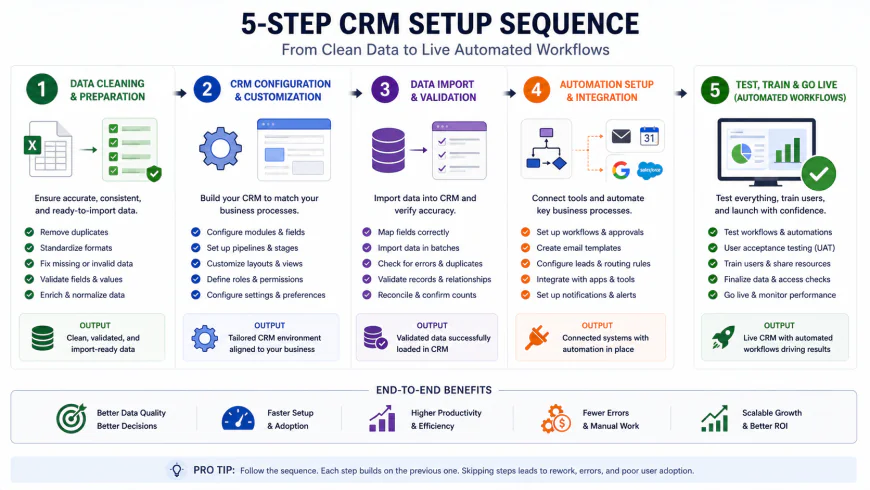 Figure 3: The logical sequence for establishing a clean, automated CRM database without losing data or stalling sales momentum.
Step 1: Prep and Clean Your Data
Do not import disorganized lists into a new system. Take an hour to clean up your current spreadsheets. Delete old, inactive contacts, merge duplicate records, and check that columns are clearly labeled (First Name, Last Name, Company, Email, Phone, and Deal Value). Export this polished list as a standard CSV file to give your new workspace a clean start.
Step 2: Map Your Visual Pipeline
Keep your sales pipeline simple. A common mistake is building ten different deal stages, which only confuses your team and leads to neglected records. Stick to a simple, action-oriented five-step pipeline:
- Lead In: New inquiries that require a response.
- Contact Made: Initial call or email exchange completed.
- Proposal Sent: Direct price estimate or contract details delivered.
- Negotiation: Active follow-ups or modifications in progress.
- Won/Lost: The final status of the business deal.
Step 3: Connect Your Email and Calendar Services
Set up your workspace integration immediately by linking your Google Workspace or Microsoft 365 inbox. Turning on two-way email sync ensures every exchange with a prospect is automatically recorded on their contact card. Syncing your team calendar keeps your upcoming meetings, client calls, and reminders visible directly on the dashboard.
Step 4: Set Up One Core Automation
Do not overcomplicate things with complex, multi-stage automation paths early on. Choose a single, high-value transition to save daily manual effort. For example, set a rule: "When a customer fills out our website's contact form, automatically create a new deal card in the 'Lead In' stage and send them a link to book a meeting." This single rule keeps your response times fast without adding to your workload.
Step 5: Train Your Team and Track Adoption
Spend half an hour walking your team through the new system. Make it clear that if an email, call, or meeting isn't logged in the database, it practically didn't happen. Hide any unused entry fields to keep the screens clean. Monitor how often the team logs in during the first month to make sure the software is helping them, not slowing them down.
Balanced Pros & Cons of Budget CRM Software
Selecting a low-cost database platform involves clear trade-offs. It is helpful to look at the practical benefits alongside the real limitations of budget-friendly platforms.
Balanced Comparison
The Advantages
- Low Financial Risk: Monthly costs of $7 to $15 per user keep your operational overhead low, letting you grow your sales stack at a steady pace.
- Fast User Adoption: Clean, simple layouts (like Monday CRM and Pipedrive) are easy to learn, which minimizes employee pushback and training time.
- No IT Overhead: These programs are designed for standard business owners to configure, eliminating the need to hire specialized technical administrators.
- Reduced Software Bloat: By focusing strictly on active deal tracking, you avoid paying for heavy enterprise features your team won't use.
The Limitations
- Artificial Contact Caps: Cheaper plans often limit how many contacts you can store, which can trigger unexpected upgrades as your list grows.
- Fewer Native Advanced Features: You won't find native landing page builders, automated marketing sequences, or advanced multi-currency financial reporting on base tiers.
- Limited Customer Support: Entry-level plans generally rely on email help desks or self-serve documentation rather than 24/7 telephone access.
- Integration Guardrails: Some budget platforms restrict API access on their cheapest plans, making it more difficult to connect custom systems down the line.
Who should use what?
For micro-teams and budget-conscious startups transitioning off manual spreadsheets, Bigin by Zoho offers a stable, low-cost starting point. If your company relies on active, outbound B2B sales cycles and requires a visual, step-by-step pipeline, Pipedrive is highly efficient. For agencies and service providers who want to manage active client tasks right alongside their sales pipeline, Monday CRM provides excellent flexibility, provided you can meet their seat minimum. Finally, solo professionals and freelancers who want a single tool to track contacts, generate visual estimates, and send invoices will find great value in Axonaut.
Recommended Choices by Purpose
There is no single "perfect" platform for every small business. The right choice depends on your daily operational habits and team size. If your primary goal is keeping your software budget as low as possible with a clean, uncomplicated contact manager, look at Bigin by Zoho. If you want a visual system built around daily outbound sales actions, Pipedrive is worth the investment. For teams that want to customize their workspace to handle both sales pipelines and project delivery, Monday CRM is a solid fit. Compare your options, test the platforms using their free trials, and choose the tool that integrates naturally into your daily routine.
Frequently Asked Questions
1. Can I build a highly effective CRM setup using only free tools?
You can certainly get by on a free plan for a little while, but you'll likely hit a wall faster than you think. Most free versions trap your data behind tight contact limits, block automatic email syncing, or lock out everyone but a single user. Spending $7 to $15 a month on a budget-friendly tier right from the start is much more cost-effective than wasting hours on manual workarounds and dealing with a stressful data migration when your "free" tool suddenly stops working.
2. Will these budget-friendly CRM platforms integrate with QuickBooks?
Yes, though the connection depth depends on the tool you choose. Pipedrive and Monday CRM have solid, built-in integrations with QuickBooks to sync customer profiles and invoice updates automatically. Bigin pairs naturally with Zoho Books, while Axonaut actually includes its own billing and quoting tools, which means you might not even need separate accounting software if you want an all-in-one setup.
3. How long does it take to set up a budget CRM?
For straightforward platforms like Bigin or Pipedrive, you can import your contacts and have a working pipeline ready in under an hour. Monday CRM takes a bit more time—usually a few hours or an afternoon—because of how customizable it is, but starting with one of their templates makes it a lot faster.
4. Can I easily migrate my data if my business outgrows these platforms?
Absolutely. Every platform we discussed lets you export your contacts, deals, and history into standard CSV or Excel files. If you start with Bigin, upgrading down the line is even easier because it sits on the Zoho ecosystem, allowing you to transition directly to Zoho's enterprise-level CRM as your team grows.
Your CRM Action Checklist
To make your transition as smooth as possible and ensure you actually get your money's worth, use this quick launch checklist:
- Clean your data first: Don't import a mess. Take 30 minutes to clear out duplicate contacts, fix typos, and remove old leads from your spreadsheets before uploading anything.
- Map out your sales steps: Sketch your sales process on paper (e.g., New Lead, Discovery Call, Proposal Sent, Negotiation, Closed) before you touch any settings in your new CRM.
- Connect your main tools: Link your business email and calendar right away. This automates the tedious task of logging emails and scheduling follow-ups.
- Set a "golden rule" for the team: Get everyone on the same page. Establish the habit that if an interaction, deal, or note isn't logged in the CRM, it didn't happen.
- Review your pipeline weekly: Block out 15 minutes every Friday to look over your active deals, update any stale contacts, and set your priorities for the coming week.