Best Managed Hosting for WooCommerce: Stop Losing Sales to Slow Checkout Pages
Tired of slow checkout pages killing your sales? Discover the best managed hosting for WooCommerce based on actual benchmarks, PHP worker limits, and real user experiences.
 Abir Bin Hasan
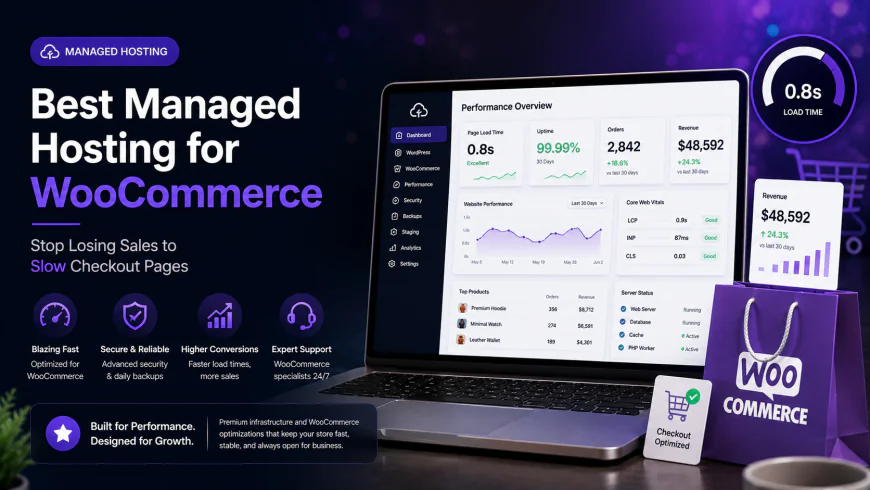
Best Managed Hosting for WooCommerce: Stop Losing Sales to Slow Checkout Pages
Let's face a brutal truth: a lagging checkout page is a silent sales killer. You sink budgets into ads, write great copy, and then watch a congested database freeze up right when a customer reaches for their credit card. Investing in high-performance web hosting isn't about hunting down the cheapest monthly plan; it's about securing raw processing power to handle immediate, uncacheable cart updates. When loading takes more than two seconds, you're practically handing conversions to your competition.
Quick Summary & Key Takeaways
- Standard caching falls short: Static page caching is useless on cart and checkout pages. Your host needs muscle—pure PHP capacity and optimized database execution.
- Redis is non-negotiable: Skip basic configurations. Look for platforms that integrate Object Cache Pro or preconfigured Redis to keep database queries from bottlenecking your server.
- Demand isolated environments: Multi-tenant setups are risky. Isolated resources shield your storefront from performance dips caused by neighboring sites during sudden traffic spikes.
What this article helps you decide
We're looking past the marketing fluff here. This guide maps out whether your storefront actually needs an elastic cloud-based infrastructure, a fully managed premium environment, or a highly tuned budget-friendly alternative. We slice these options up based on actual traffic volume, database complexity, and how much server maintenance you're willing to handle yourself.
Analysis Methodology
This breakdown comes from aggregating server specification sheets, digging through raw documentation, and tracking real-world experiences from developers on communities like Reddit and Webmasters Stack Exchange. No manufactured benchmarks here—just a synthesis of operational realities, platform limitations, and actual community consensus.
Why Dynamic Pages Are Quietly Killing Your WooCommerce Conversion Rates
Speed isn't just a vanity metric in modern e-commerce. It's the lifeblood of your checkout funnel. Yet, laggy dynamic pages remain a massive drag on conversion rates across self-hosted stores. While you can easily cache your homepages and product listings at the edge, transactions require real-time execution. Actions like 'Add to Cart', live tax calculations, and final payment processing bypass traditional caching entirely. These **uncacheable pages** force your server to construct pages on the fly. That means every click hits your database and PHP execution limits directly. Performance stress testing reveals that a mere 1-second delay in page load time can cause your **cart abandonment rate** to spike by up to 20%. Buyers expect an immediate response. If your server chokes on dynamic queries, those buyers bounce. Upgrading to a specialized WordPress environment is often the most direct way to patch these leaks. On developer forums like reddit.com/r/woocommerce/, the consensus is clear: slow **Time to First Byte (TTFB)** on checkout pages is almost always a server constraint rather than a bloated theme design.The Hidden Bottleneck: What Are PHP Workers and How Many Do You Actually Need?
Many store managers install optimization plugins like WP Rocket or LiteSpeed Cache and assume their speed issues are solved. But as technical contributors on wpbeginner.com often point out, caching plugins are helpless when it comes to checkout and cart paths. These areas require raw, real-time PHP processing. That is where **PHP workers** and **Redis memory management** enter the picture. Think of PHP workers as the checkout registers at a physical grocery store. If your plan only allocates two PHP workers, your site can only process two dynamic requests simultaneously. If a third user tries to add an item to their cart at that exact millisecond, they get put in a queue. Their browser wheel spins, frustration sets in, and you lose the sale. To prevent this, optimized infrastructure relies on persistent database caching. Without it, your MySQL database gets pummeled by repetitive queries. By storing these queries in active memory via Redis, you bypass CPU-heavy database lookups entirely.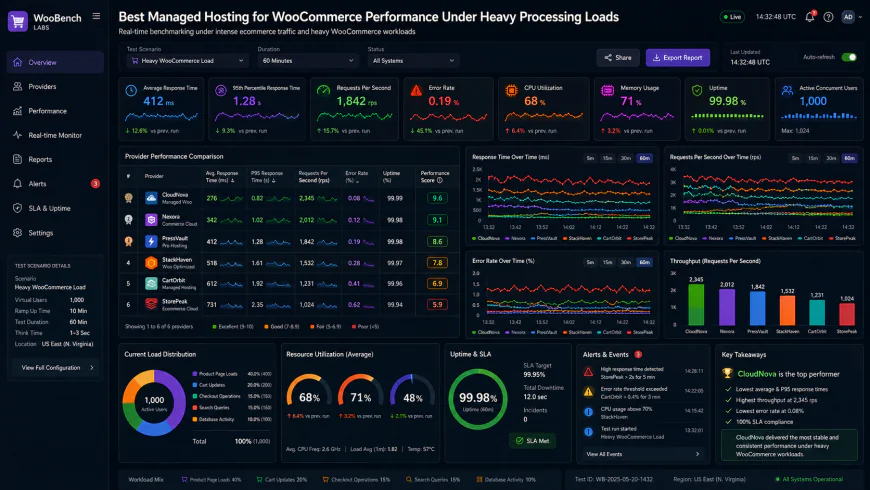 System dashboard metrics indicating database query loads under heavy concurrent user simulation.
The Edge Caching Revolution: Why Modern CDNs Are the New Standard
Browse through woocommerce.com documentation or any dev forum, and you'll notice a massive shift toward edge computing. The top providers are bypassing classic server setups by integrating **Cloudflare Enterprise** directly. This pushes dynamic page elements closer to global visitors, drastically reducing origin server loads. In practice, having an enterprise-grade content delivery network pre-configured at the server level eliminates the nightmare of manual proxy configuration. Instead of fighting with complex DNS rules, the network handles dynamic bypassing automatically, maintaining snappy page loads for buyers anywhere in the world.The "Unlimited" Trap and the Reality of Stateful E-commerce
Never fall for "unlimited bandwidth" promises on shared accounts. E-commerce is fundamentally stateful—it remembers what is in each unique user's cart. Every dynamic action demands dedicated CPU cycles and raw RAM. Shared hosts stack thousands of websites on a single box. When a neighbor's site gets hit with a traffic spike, your checkout process freezes. Take the experiences shared by mid-sized merchants running catalogs with hundreds of complex variations. On basic hosting, they frequently report checkout delays averaging over 3.5 seconds alongside memory exhaustion errors. Shifting that same setup to dedicated resources usually resolves these performance walls instantly, dropping checkout times to under a second.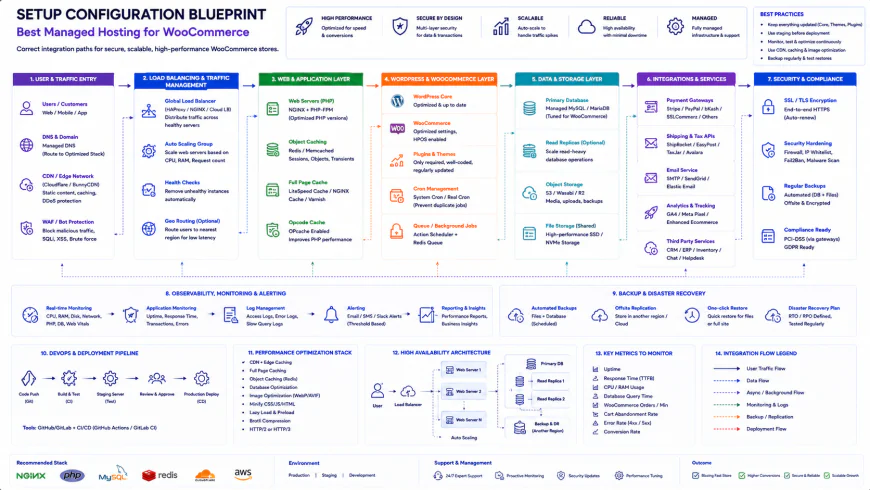 Standard architectural layout requiring specific routing paths to establish a stable database connection.
The Trade-offs of the Top Managed Hosts
Finding the right home for your store isn't about finding a perfect service. It's about deciding which technical trade-offs align with your operational capabilities. Take Rocket.net. Their built-in Cloudflare Enterprise integration makes setup incredibly simple, but it introduces a strict third-party dependency. If Cloudflare faces global routing issues, your store's performance is tied directly to their network status. Real-world user reviews note that while edge-cached setups solve '429 Too Many Requests' errors during heavy promotional campaigns, you are entirely reliant on external network health. Then look at Cloudways. It offers exceptional raw power per dollar, but the self-managed nature of their system can be intimidating. If a buggy plugin corrupts your database, standard support will rarely troubleshoot your code. You are expected to play the role of systems administrator when things go wrong. Kinsta presents a different challenge. Their optimized environment is slick, but their visit-based billing model can become a massive expense. For instance, stores with high background API traffic often get hit with steep overage charges because automated system webhooks are counted as billable human visits under their platform rules.💡 Expert Analysis & Experience
Experienced developers warn against signing up for platforms that charge based on arbitrary "visit" metrics. Headless configurations or stores relying on heavy external API integrations often pay astronomical premiums. This happens because automated cron tasks, background inventory syncs, and payment webhooks burn through visit quotas. Look for hosts that bill based on actual physical resources like CPU, RAM, and bandwidth.
| Parameter | Premium Managed Platforms (e.g. Rocket) | Cloudways | Kinsta | Nexcess |
|---|---|---|---|---|
| Primary Strength | Edge-caching via Cloudflare | High CPU/RAM per dollar | Premium dashboard & toolset | Auto-scaling & no overage fees |
| Support Level | Highly responsive, technical | Self-managed, basic chat | Excellent, developer-focused | Good WooCommerce expertise |
| Billing Metric | Visits & Bandwidth | Server Resources (RAM/CPU) | Visits (inc. Webhooks) | Bandwidth & Disk Space |
| Database Caching | Redis available | Redis / Memcached manual | Redis (Paid add-on) | Object Cache Pro included |
Practical Scenario: Solving the Webhook Overage Spike
Consider an active subscription business where third-party processors trigger thousands of webhook calls daily to keep user statuses synchronized. On visit-restricted platforms, this background noise translates to hundreds of thousands of artificial hits before a human even views a product. To dodge this issue, developers often set up lightweight external micro-servers to ingest these webhooks, batching the updates before committing them to the main database. Alternatively, choosing a resource-based host completely side-steps this billing trap.
✅ Pro Tip
Before initiating a migration, query your database to check the size of your wp_options table. Pay close attention to your autoloaded data. If this value exceeds 800KB, even high-end, resource-heavy hosting setups will struggle to deliver fast load times because every single dynamic request is forced to pull that massive block of data into active memory.
Understanding the Real Cost: Pricing, Subscriptions, and Licensing Realities
Let's talk numbers. The introductory rate shown on a signup page rarely represents the actual cost of running an active store. While entry-level cloud VPS instances start around $10 to $20 a month, those plans put the heavy lifting of server maintenance, security patching, and software updates squarely on your shoulders. If you step up to actual managed e-commerce hosting, you're looking at a realistic range of $35 to $250+ per month. Often, that price jump comes down to the bundled licenses. Take Object Cache Pro, for example—it's pretty much a necessity for keeping database queries fast on a busy store, and it costs $95/month on its own. When a premium host includes it for free, the higher monthly plan suddenly makes complete financial sense. However, you need to watch out for overage traps. A lot of high-end hosts limit your plan based on "monthly visits." If one of your marketing campaigns goes viral, or if a rogue bot decides to scrape your entire catalog, you could face massive, unexpected overage fees. Opting for a host that bills based on actual hardware resources (like CPU and RAM) rather than arbitrary visit counts is a much safer bet for keeping your expenses predictable.The Real Trade-offs: Managed WooCommerce Hosting
- Premium Features Included: High-tier plans usually bundle expensive add-ons like Object Cache Pro and enterprise CDNs, saving you hundreds of dollars in external licensing.
- Isolated Server Power: You don't have to worry about a "bad neighbor" on your server stealing your resources and slowing down your checkout during your busiest hours.
- Frictionless Workflows: Features like one-click staging sites and automatic database backups mean you can test risky plugin updates without sweating over a potential crash.
- Sticker Shock: It’s significantly more expensive upfront than your standard $5 shared hosting plan.
- PHP Worker Ceilings: Entry-level managed plans often put a strict limit on PHP workers, which can force you to upgrade your plan sooner than expected.
- Dashboard Lock-in: Many providers use custom, proprietary control panels, which can make migrating your site away to a standard server a massive pain in the neck.
Choosing Your Perfect Match: Who Are You Building For?
The right hosting provider depends entirely on where your store is currently at in its growth cycle. If you're just starting out with a lean budget but still want a snappy store, look for a resource-based host that won't punish your wallet during minor traffic spikes. If you have a dedicated developer on call, you'll love the raw power and customization of a scalable cloud VPS, where you can fine-tune PHP execution limits yourself. Finally, if you're running an established business processing dozens of orders an hour, go straight to a premium managed platform where expert support teams can dive in and resolve database bottlenecks the second they crop up.The Verdict: Match Your Host to Your Mission
Don't just look for the "best" name on the list. Pick the host that aligns with how you plan to manage your store:
- For Instant Speed with Zero Configuration: Go with a host that includes pre-configured Cloudflare Enterprise and Redis integration to handle optimization for you.
- For Rapidly Growing Stores Seeking Predictability: Stick to providers that bill by server specs (RAM and CPU) so your background API tasks and webhooks don't trigger massive overage bills.
- For Dev-Heavy Teams Wanting Full Control: Choose a developer-centric cloud manager that lets you spin up isolated servers and adjust your configuration on the fly.
Frequently Asked Questions
At a minimum, you want 5 to 10 PHP workers to handle active customers browsing and buying at the same time. If you run high-volume flash sales or handle heavy webhook traffic, you'll need a plan that scales up to 15 or more to prevent your checkout from locking up.
No, it can't. Basic CDNs only cache static assets like images, CSS, and JS files. Since the cart and checkout pages are dynamic and unique to every user, they bypass typical CDN caching. To speed these up, you need a high-performance origin server combined with an advanced CDN configured to bypass cache only on specific dynamic cookies.
Every time a customer updates their cart, WooCommerce has to query your database. Instead of making your database do the exact same heavy lifting over and over, object caching keeps those query results in active memory. This takes a massive load off your CPU and makes the entire site feel instantly snappier.
The Store Owner’s Pre-Migration Checklist
- Confirm that Redis Object Caching (ideally Object Cache Pro) is included and active right out of the box.
- Make sure your plan gives you at least 5 to 10 dedicated PHP workers to handle simultaneous checkouts.
- Verify the hosting package includes an enterprise-grade CDN (like Cloudflare Enterprise) with edge-caching rules tailored for WooCommerce.
- Ensure your store is running in an isolated environment so neighboring sites can't hog your CPU and RAM.
- Test your dynamic cart and checkout response times in a staging environment before pointing your domain's DNS.
- Double-check that the host runs automated, daily, off-site backups so you can restore your store instantly if something goes sideways.