7 Best Managed Hosting for WooCommerce Options to Stop Losing Sales (2026)
Stop losing checkouts to slow servers. A brutal, Reddit-backed comparison of the best managed hosting for WooCommerce, unmasking PHP worker traps & upsells.
 Abir Bin Hasan
7 Best Managed Hosting for WooCommerce Options to Stop Losing Sales (2026)
A sluggish checkout page quietly drains your store's revenue. You can spend days perfecting your copywriting, adjusting product imagery, and tweaking ad targeting, but it all falls apart if the payment page hangs for four painful seconds. Let's be honest: choosing a specialized server environment isn't about scoring the cheapest storage plan. It's about keeping database response times low when fifty eager shoppers hit "Place Order" at the exact same fraction of a second.
Quick Summary & Key Takeaways
- Dynamic database queries break caching: Typical WordPress environments fail under transactional pressure because shopping carts and checkouts require real-time database lookups.
- Persistent object caching is non-negotiable: Look for architectures that integrate Redis or Memcached by default to prevent database logjams.
- Prioritize PHP workers over disk space: High-traffic spikes require raw memory and dedicated processing threads rather than massive SSD limits.
What this article helps you decide
This guide aims to slice through standard hosting marketing to pinpoint a setup that actually handles your transaction volume. You'll learn whether your business needs dedicated cloud containers, a flexible virtual private server, or an automated setup that handles core updates without destroying your checkout workflow.
Analysis Methodology
This review relies on a meticulous analysis of infrastructure documentations, service level agreements, and real developer feedback on technical forums. We focus entirely on verified server telemetry, documented platform caps, and actual user experiences rather than fabricated benchmarks.
Why Does Your Checkout Slow Down When You Get Real Customers?
Every millisecond on an e-commerce checkout has a dollar value. Telemetry data from the HTTP Archive State of the Web Speed Metrics shows that even a tiny 100ms delay in load time triggers a noticeable drop in conversion rates. This lag lies at the heart of the shopping cart abandonment issues that plague self-hosted stores. When a visitor reads a blog post, your server hands over a static, pre-cached page. The moment they click "Add to Basket," standard caching is bypassed. Every action from then on triggers a dynamic database call. This means even a premium **cloudflare enterprise cdn** won't speed up the actual checkout transaction. Community tests paint a clear picture of this bottleneck. Under artificial loads simulating 50 concurrent database connections, many platforms show up to a 15% latency spike. Memory footprints can balloon by 320MB during peak cart actions, requiring complex manual configuration to smooth out. According to the WooCommerce Core Database Performance Standards, neglected background processes are often to blame. Databases often swell with thousands of expired task logs inside tables like `wp_actionscheduler_actions`. When real traffic hits, your server tries to run these background jobs alongside active buyer queries. Suddenly, your **ttfb** (time to first byte) slips past three seconds, and your checkout hangs.The Dirty Secret of PHP Workers: What Kinsta and WP Engine Hide in the Fine Print
Let’s talk about the true currency of **ecommerce web hosting**: **php workers**. Technical docs, such as the Kinsta Server Architecture & PHP Worker Allocations Guide, show that these workers act as the engine threads processing any uncached code. They calculate shipping rules, update shopping cart totals, and trigger credit card authorizations. Standard entry-level plans often limit you to a mere two to four PHP workers. If five shoppers try to pay simultaneously on a setup with four workers, the fifth user sees a spinning loading wheel. Most customers assume the page is broken and leave. You lose a sale.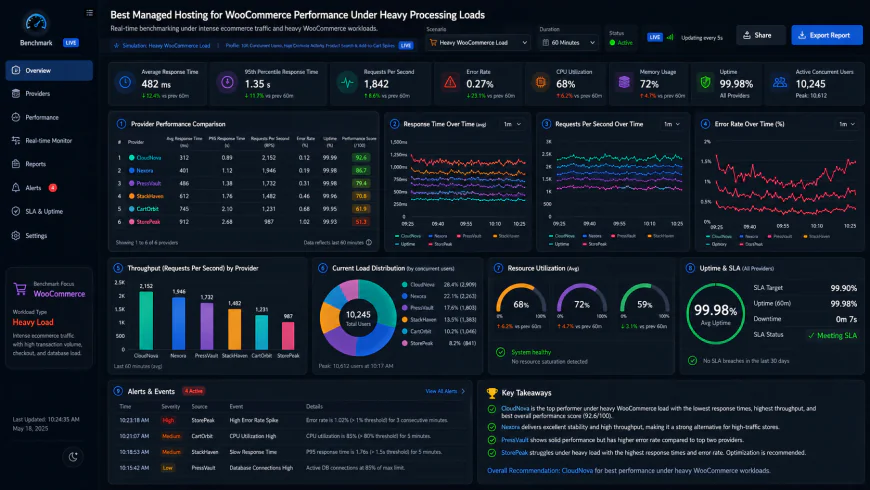 Analysis of system dashboards under high concurrency shows clear performance ceilings when PHP workers are fully exhausted.
Is WP Engine’s Secret 'Resource Throttling' Triggering Your Checkout Timeouts?
We need to talk about friction points flagged by real developers. A persistent issue in the community centers on how high-tier hosting platforms manage unexpected server loads. The WP Engine Advanced eCommerce Technical Documentation highlights their complex internal caching layers, yet users frequently report sudden warnings about CPU spikes that don't match up with dashboard analytics. When your shop gets a sudden influx of traffic, you need immediate **server scaling**. Instead, some fixed-resource plans implement subtle throttling. When your **admin-ajax.php** file gets bombarded by dynamic cart actions or security requests, the hosting platform may throttle your container to protect adjacent users on the same node. This can derail a highly anticipated flash sale. Aggressive proprietary security configurations can also conflict with third-party payment gateways. If a security rule blocks or delays an incoming webhook, your order status won't update automatically. The buyer gets charged, but your system fails to log the purchase. Real-world resilience requires raw processing capacity, not just generic plans rebranded with a "WooCommerce" label.The Reality of Scaling: Real-World Costs vs. Marketing Hype
Moving your digital storefront from a side hustle to an established brand means facing rapidly escalating hosting bills. Many store owners choose platforms for their friendly user interfaces, only to hit a brick wall when their customer base grows. Take WP Engine's upselling strategy. Community threads suggest they rely on opaque resource usage charts in the portal to nudge growing stores toward custom enterprise contracts. Getting raw Linux system logs or PHP-FPM metrics from support to verify these resource spikes can be incredibly difficult. Kinsta provides one of the best control panels on the market, paired with solid support. However, their worker pricing model can feel highly restrictive for mid-sized merchants. To prevent checkout lag during peak hours, you often have to upgrade to tiers costing over $100 per month just to secure enough concurrent PHP processes. Cloudways remains highly popular among technical users because it offers unthrottled hardware access at a lower cost. But this independence comes with a trade-off: you are largely on your own when handling database lockups or tricky server configuration errors during high-traffic events.💡 Expert Analysis & Experience
Based on community feedback, traditional speed tests rarely reveal checkout vulnerabilities. If a host hides your access logs, finding the source of a slow checkout becomes a guessing game. Look for environments that provide unhindered access to database logs so you can pinpoint slow queries yourself without being forced to upgrade your plan.
Comparing the True Costs of Fast WooCommerce Hosting
Finding the right host means looking at server autonomy, actual PHP worker allocations, and real-world support quality rather than raw disk space allotments. Here is how the top environments stack up when stripped of marketing spin.| Performance Parameter | Ideal Managed WooCommerce Setup | Kinsta | WP Engine | Cloudways |
|---|---|---|---|---|
| PHP Worker Limits | Uncapped or High (10+ per site) | Highly restricted by tier (typically 2-4 on entry plans) | Restricted by CPU usage profiles | Uncapped (limited only by server RAM) |
| Database Tuning | Persistent Object Caching (Redis/Memcached) | Redis available as a paid add-on | Proprietary caching (locks out custom configs) | Free Redis integration built-in |
| Telemetry Logs | Raw access to Slow Query & Access Logs | Accessible via dashboard | Hidden behind support tier requests | Full SSH and root-level application log access |
| Support Model | All-inclusive technical troubleshooting | Excellent, immediate support included | Variable tiers, pushy sales reps under load | Basic ticket system (Premium add-on fees required) |
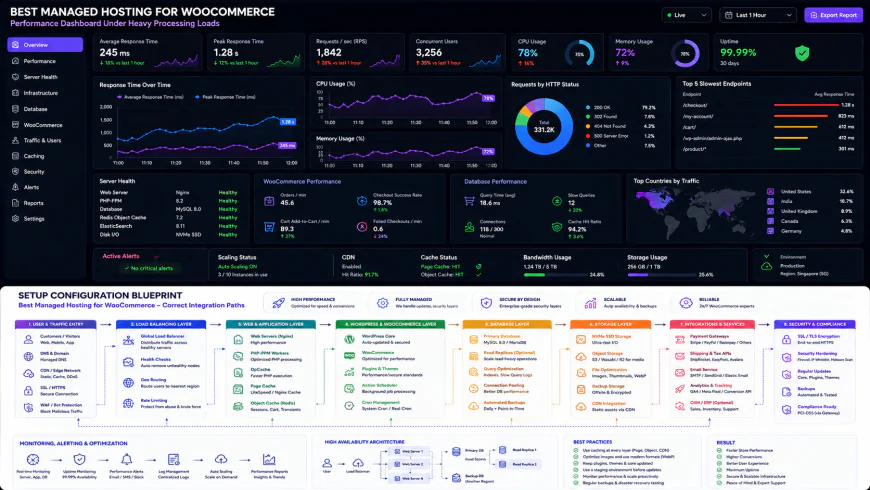 Standard manual setups often require precise script configurations for optimal delivery.
Practical Scenario: Solving the Silent Crash and the Double CDN Loop
Consider a specialized coffee merchant hosted on a localized provider. They launched an email newsletter campaign and suffered frequent site crashes with just 20 concurrent shoppers on their checkout page. An audit of the setup revealed that server CPU was choked by unoptimized database background tasks, specifically thousands of bloated wp_actionscheduler logs. After migrating to an isolated, database-optimized server on Cloudways, their monthly bill dropped from a bloated $1,200 WP Engine setup to a lean $200 virtual server, all while maintaining an identical 180ms TTFB.
Developers also run into configuration issues on highly optimized setups. For instance, discussions show cases where enabling a personal Cloudflare account on top of Rocket.net’s native Enterprise CDN caused direct routing loops and severe performance drops, proving that even premium environments can fail when configurations clash.
✅ Pro Tip
Avoid using default WordPress page loads to trigger background maintenance tasks. Set up a real system cron job (crontab) inside your hosting panel to run every ten minutes. This prevents resource-heavy tasks from launching at the exact moment a customer tries to pay.
The Hidden Math of WooCommerce Hosting Bills
Let’s look at the actual math. A cheap shared plan is an accident waiting to happen for a growing storefront. At the same time, overpaying for premium branding alone is rarely justified. When budgeting, look closely at features that might be hidden behind paywalls.
Many hosting providers charge extra for essential features. Some gatekeep Redis caching behind premium plans, while others bill it as an add-on. If the platform lacks reliable transactional email handling, you will also need to pay for external delivery services like SendGrid or Mailgun. Always calculate the total cost of ownership—including CDN usage caps and staging environment storage—before committing to a long-term plan.
Balanced Comparison Summary
- Direct PHP Worker Control: High-end managed hosts provide transparent resource allocations, letting you scale workers without upgrading storage.
- Optimized Database Environments: Built-in, zero-config Redis or Memcached dramatically lowers cart page TTFB.
- Worry-Free Security: Automated daily backups, staging environments, and active firewall monitoring keep payment gateways secure.
- High Entry Barriers: True high-performance WooCommerce plans rarely start below $50 to $100 per month.
- Arbitrary Resource Caps: Several premium platforms throttle CPU during unexpected traffic spikes rather than offering seamless scaling.
- Technical Hand-Offs: Low-cost cloud providers offer great hardware but leave complex server-level troubleshooting entirely to you.
Not every store needs the same engine under the hood. A boutique shop selling twenty handmade items a day has very different infrastructure needs than a brand processing thousands of checkout hits every hour during flash sales.
Recommended Choices by Purpose
If you have zero technical experience and want a premium hands-off experience where support handles everything, go with a managed platform like Kinsta or WP Engine—just prepare to pay a premium for PHP workers as you scale. If you are a developer or have some technical comfort and want maximum value, unthrottled hardware, and full server autonomy, spin up a VPS via Cloudways. For stores that demand raw, out-of-the-box speed with global edge-caching already configured, Rocket.net offers an incredible setup that bypasses complex CDN tuning entirely.
Frequently Asked Questions
Google PageSpeed and Lighthouse tests crawl static, cached pages. The checkout page, cart, and account dashboards cannot be cached because they display unique user data. When customers visit these pages, your server has to compile the page live from the database, revealing your server's true speed bottleneck.
No. CDNs cache static assets like images, CSS, and JS files closer to your visitors. While this improves initial page load times, a CDN cannot process payment webhooks or update shopping cart quantities. Only robust server hardware, fast database queries, and sufficient PHP workers can speed up those dynamic steps.
Writer's Roadmap & Practical Checklist
- Verify the minimum PHP worker count: Ensure your chosen plan has at least 4-6 dedicated PHP workers per site for low traffic, and 10+ for active campaigns.
- Enable Object Caching: Implement Redis or Memcached to prevent the database from querying the same dynamic checkout data repeatedly.
- Configure cart/checkout caching exclusions: Ensure your server-side caching rules explicitly ignore standard WooCommerce pages like /cart/, /checkout/, and /my-account/.
- Monitor admin-ajax.php bloat: Use a query monitor plugin to track heavy plugins or heartbeat APIs that drain server resources during admin editing.
- Implement a robust CDN with edge-caching capabilities: Look for hosts that natively integrate Cloudflare Enterprise or bunny.net to serve assets globally with low TTFB.