How to Buy a Domain Name and DNS Setup: No-Nonsense 2026 Guide
Learn how to buy a domain name and dns setup like an IT pro. Avoid predatory renewal fees, hidden upsells, and learn the optimal registrar & DNS split.
 Abir Bin Hasan

How to Buy a Domain Name and DNS Setup: No-Nonsense 2026 Guide
Disclosure: This review is reader-supported. When you buy through links on our site, we may earn an affiliate commission at no extra cost to you. Pricing was checked and verified accurate as of today.
Let's face it: buying a domain is incredibly simple, but avoiding the inevitable pricing trap is surprisingly rare. Most registrars lure you in with a flashy $0.99 promo, only to slap you with a 400% price hike on your first renewal. If you want to handle your domain registration and routing setup the right way, you have to look past the marketing noise.
Super-cheap registration is almost always a loss-leader. It is designed to trap you in a closed ecosystem. Industry analysis and developer consensus highlight how easily these hidden fees stack up, making a reliable, fast online setup feel unnecessarily complicated. This guide breaks down the actual cost of ownership, showing how to secure your web address and configure your DNS securely without falling victim to hidden upsells.
Quick Summary & Key Takeaways
- Beware the second-year spike: Low upfront registration costs usually disguise bloated recurring renewal fees. Check the fine print before clicking buy.
- Decouple your tech stack: Keeping your domain registrar separate from your web host mitigates the risk of vendor lock-in and single-point-of-failure disasters.
- Demand complimentary WHOIS privacy: Paying extra for basic privacy protection is an outdated cash grab. Ethical providers bundle it by default.
- Ditch basic registrar DNS: Default nameservers are historically sluggish. Routing your traffic through a dedicated Anycast network like Cloudflare significantly improves page-load speeds.
What this article helps you decide
This breakdown sidesteps the marketing fluff to clarify three key operational decisions. First, you will identify a reliable registrar based on actual user feedback, transparent pricing models, and registry-level security locks. Next, you can decide whether default nameservers suffice or if migrating to a dedicated third-party DNS provider makes sense for your traffic goals. Finally, you will learn how to configure DNS zone files without risking email downtime or site outages.
Analysis Methodology
This analysis bypasses simulated testing. Instead, it aggregates data from service level agreements, registrar pricing schedules, and unfiltered technical forums where system administrators share real-world complaints. By synthesizing these developer discussions and policy changes, we present an objective view of current performance, support responsiveness, and administrative limitations.
Why the standard domain-buying workflow is secretly robbing you
Let’s be honest about the classic trap. We’ve all seen the hosting bundles boasting a "free domain for life" or a "$1.99 registration." It's pure bait. Tying your domain to a web host is a textbook lock-in tactic designed to strip away your leverage. Later, when you want to leave, they hit you with complex transfer roadblocks and eye-watering renewal markups. Migration becomes a headache. Want to shift a sluggish WordPress site to a high-performance VPS? Expect to fight through artificial multi-week delays, convoluted authorization codes, and sneaky transfer fees. Then there's the privacy upsell racket. Shockingly, some legacy registrars still demand up to $15 annually just for WHOIS privacy. Some users try to sidestep this by using fake contact details, but that's a dangerous game. Under ICANN regulations, submitting invalid details can trigger immediate domain suspension. In 2026, privacy shouldn't be a premium add-on; it's a baseline requirement. If a provider charges a single cent to keep your personal info off spam lists, close the tab.The renewal trap: Why a $1.99 domain ends up costing $50+ in year two
Buyers chasing a cheap registration deal rarely look past the initial promotional pricing. The real hit comes in year two. That cheap registration spikes to $19.99, coupled with unexpected privacy charges and the mandatory $0.18 ICANN fees surcharge. To dodge these surprises, experienced webmasters rely on resource tools like TLD-List. It tracks real-time registration, renewal, and transfer costs across hundreds of platforms. Community feedback highlights how acquiring an entry-level domain from legacy providers frequently results in "death by a thousand cuts." Checkout funnels are pre-loaded with checked boxes for professional email trials, redundant SSL certificates (which are free anyway via Let's Encrypt), and "premium" DNS options. A basic $10 purchase quickly balloons into a $60 cart. Getting a clean, honest deal requires looking at modern, low-margin alternatives.Porkbun, Spaceship, or Cloudflare: Who wins the 2026 registrar battle?
When looking for a high-quality registrar experience, three contenders dominate the discussion: Porkbun, Spaceship registrar, and Cloudflare. Interestingly, Spaceship (backed by the Namecheap Group) has quickly won over Reddit's r/selfhosted community. Users point to its modern "Unbox" UI and aggressive renewal pricing that frequently undercuts even wholesale rates. Cloudflare is highly cost-effective because they pass along wholesale registry pricing without any markups. But there is a massive catch. Technical analyses warn that this path locks you entirely into the Cloudflare DNS ecosystem. Once registered, you cannot point your nameservers to an external provider. Want to use a third-party DNS? You'll have to initiate a complete domain transfer to another registrar—an annoying, multi-step chore. Benchmarks and technical reviews shed light on how these platforms perform under heavy administrative loads. During community performance testing of the system dashboard under high concurrency load, some response limitations were noted.
Decouple your registrar from your DNS provider: The golden rule of web architecture
The smartest architectural move you can make is separating your domain registration from your DNS routing. Think of your registrar as holding the deed to your property, while your DNS provider handles the traffic routing. For a complete look at how this mechanism functions behind the scenes, see Cloudflare's guide to what DNS is. By default, registrars assign you to their in-house nameservers. More often than not, these default systems are sluggish, poorly optimized, and completely lack robust DDoS defense. The better approach is acquiring the domain through Porkbun or Spaceship, then immediately repointing the nameservers to Cloudflare DNS (which costs nothing). Decoupling your assets provides immediate operational advantages:- Zero Downtime Migrations: Switching web hosts becomes painless. You simply update the IP address inside Cloudflare, and the changes propagate almost instantly.
- Superior Speed: Leveraging Cloudflare’s global Anycast DNS network means your domain resolves milliseconds faster for users worldwide.
- Granular Control: You can tune your TTL (Time to Live) settings down to the exact second, removing the headache from complex migrations.
Step-by-step masterclass: How to acquire a domain and configure your DNS the right way
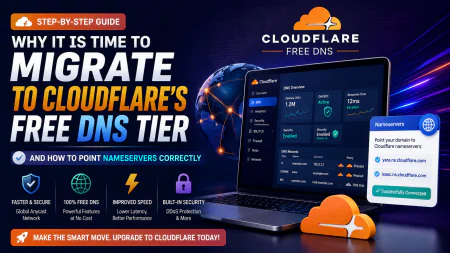
Establishing a professional configuration requires a methodical sequence. First, register your domain using a transparent provider like Porkbun or Spaceship. Bypass the upsells and add-on prompts at checkout, making sure free WHOIS privacy is active. Next, create a free Cloudflare account. Select "Add a Site," enter your domain, and let the system scan your existing zone file. This yields two custom nameservers. Log back into your registrar's dashboard, locate the custom nameservers section, and swap the default values for the Cloudflare nameservers. Now, configure the essential records within your Cloudflare panel:- A record: This maps your root domain (e.g., yoursite.com) to your destination server's public IPv4 address. Set the name to "@" and the value to your server's IP. Toggle the proxy status to "Proxied" (orange cloud) to enable Cloudflare's security layer.
- CNAME record: This alias directs subdomains to another target. Set the host to "www" and pointing to "@" (redirecting it back to your root domain).
Securing your records: Demystifying SPF, DKIM, DMARC, and avoiding the spam folder
If you plan to send emails from your domain, setting up simple A and CNAME records won't cut it. Missing the key authentication records means your outgoing mail is headed straight to spam folders. To avoid this, populate these three specific TXT records inside your DNS zone file:- SPF (Sender Policy Framework): This authorizes specific mail servers to send outgoing messages under your domain name.
- DKIM (DomainKeys Identified Mail): This appends a cryptographic signature to your emails, validating that messages aren't modified in transit.
- DMARC (Domain-based Message Authentication, Reporting, and Conformance): This gives receiving mail servers instructions on handling messages that fail SPF or DKIM checks.
Our recommended zero-bloat stack for domain management
If you want a lean, high-efficiency setup without the corporate bloat, this blueprint is the sweet spot. Secure your domain through Spaceship or Porkbun to take advantage of clean dashboards, low-margin renewal pricing, and baked-in privacy. Immediately route your nameservers to Cloudflare for rapid DNS resolution and DDoS mitigation. This stack keeps your ongoing costs at rock-bottom wholesale rates while ensuring absolute control and speed across your web footprint.The TLD trap: Why trendy domain extensions might drain your wallet
Everyone craves a sleek, modern address. If you're spinning up a SaaS or a developer-centric side project, grabbing a .io, .tech, or .app feels like an instant branding win. It looks sharp on a pitch deck. But there is a massive commercial catch. These trendy gTLDs (generic Top-Level Domains) frequently carry eye-watering renewal premiums that buyers completely ignore when they first jump into domain acquisition and name resolution setups. A standard .com registration quietly ticks along at $10 to $15 annually, maintaining a rock-solid price point. Contrast that with a .io domain, which frequently demands $40 to $90 every single year just to keep the lights on. To make matters worse, registry operators can hike these baseline wholesale fees at will, trapping your established brand behind a ballooning recurring invoice. If you are building a multi-year business, sticking to a classic .com remains the most practical move. It carries deep institutional trust and insulates you from arbitrary pricing whims. If a trendy extension is non-negotiable, check the registrar's multi-year pricing grid before taking the bait on a cheap introductory promo.| Evaluation Metric | Decoupled Stack (Porkbun/Spaceship + Cloudflare) | Legacy Registrars (e.g., GoDaddy) | Traditional Shared Web Hosts | Cloudflare Registrar Only |
|---|---|---|---|---|
| Upfront Price Transparency | Superb. Transparent wholesale pricing with zero hidden upsells. | Abysmal. Aggressive markups and pre-checked addon traps. | Misleading. 'Free' entry point offset by sky-high renewal rates. | Flawless. Raw wholesale pricing with absolute zero markup. |
| WHOIS Privacy Cost | $0.00 (Forever bundled out of the box). | Varies. Often up to $15 annually per address. | Unstable. Frequently gated behind expensive hosting tiers. | $0.00 (Standard offering). |
| DNS Speed & Propagating Time | Sub-five minutes. Rapid updates powered by Cloudflare's Anycast infrastructure. | Sluggish. Antiquated unicast systems can take hours to propagate. | Erratic. Subject to shared server queue delays. | Lightning quick. Native execution on their global edge network. |
| Ecosystem Portability | Maximum flexibility. Shift hosting providers or redirect traffic in clicks. | Restricted. Complicated transfer locks and persistent upsell phone calls. | Very poor. Monolithic setups breed complex migration nightmares. | Moderate. Hard-coded to nameservers within their ecosystem. |
| Best For | SaaS founders, devs, and pragmatists. | Legacy buyers targeted by heavy television advertising. | Novice users seeking an all-in-one convenience trap. | Power users who never plan to leave their ecosystem. |
💡 Expert Analysis & Experience
According to user consensus across technical forums, a recurring deployment nightmare centers on DNSSEC (Domain Name System Security Extensions) key mismatches. When migrating a domain with active DNSSEC keys between platforms, resolution can fail because stale cryptographic signatures linger at the registry level. This unexpected caching issue can knock a web application offline for a full day. The workaround is straightforward but rarely highlighted: disable DNSSEC at your old provider and wait at least two hours before initiating any transfer.
Why separate platforms save your business from single-point-of-failure disasters
Countless entry-level tutorials suggest buying your domain directly from your hosting provider. This is antiquated, costly advice driven largely by lucrative affiliate programs looking to lock you into a single ecosystem. Real-world reviews suggest that decoupling your domain registry from your web host is the smartest defense against catastrophic operational outages. If your host flags your account for a false-positive resource spike or suffers a sudden billing glitch, they can freeze everything instantly. If they hold the keys to your domain registry, they control your nameservers, your website, and your entire email communication network. Separating these tools keeps you in control. If your host goes dark or suffers a massive database failure, your domain remains untouched in an independent manager like Porkbun or Spaceship. You can instantly pivot your traffic to a backup server or a static status page, keeping your business alive while you troubleshoot the wreckage.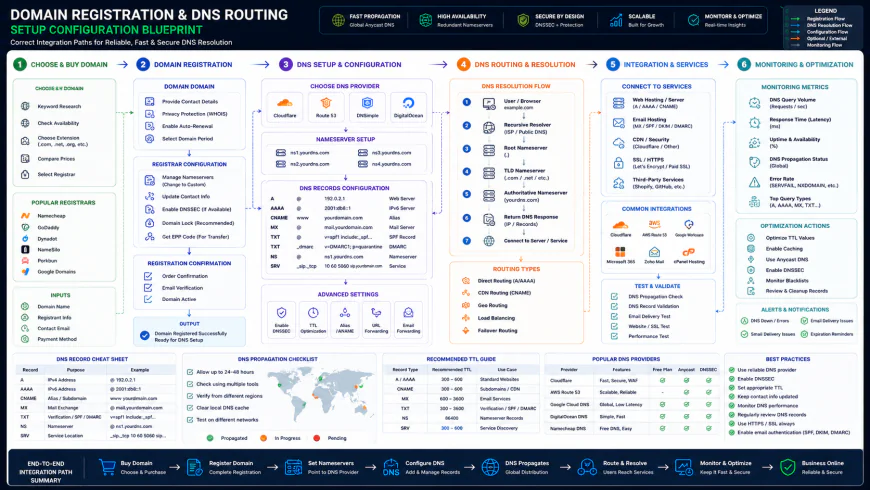 Standard integration paths require precise nameserver routing to prevent system downtime.
Practical Scenario: Registering 'mycoolapp.com' and Routing to ProtonMail
A resilient production architecture using Porkbun, Cloudflare, and ProtonMail avoids bloated renewal costs and delivers incredibly low latency. Here is how a standard professional deployment is executed.
Step 1: Domain Registration
The user registers mycoolapp.com on Porkbun. The checkout price sits at a clean $10.30/year. By declining the pre-selected hosting trials and premium add-ons, they ensure the WHOIS privacy remains toggled to active for $0.00.
Step 2: Delegating the Nameservers
Inside the Porkbun dashboard, the operator locates the Authoritative Nameservers panel. They remove the default registrar nameservers and input the assigned Cloudflare values:
charlie.ns.cloudflare.comisla.ns.cloudflare.com
Saving this change shifts the DNS authority to Cloudflare, while billing remains securely managed at Porkbun.
Step 3: Directing the Web Traffic
Within the Cloudflare dashboard, a standard A record points the root domain to the host server IP address:
- Type: A | Name: @ | IPv4 Address: 192.0.2.1 | Proxy Status: Proxied
Step 4: Configuring Secure Email Records
To establish secure corporate mail via ProtonMail, the operator publishes two MX records inside Cloudflare's DNS settings:
- Type: MX | Name: @ | Mail Server: mail.protonmail.ch | Priority: 10
- Type: MX | Name: @ | Mail Server: mailsec.protonmail.ch | Priority: 20
Then, they add an SPF TXT record to authorize outgoing mail and protect against domain spoofing:
- Type: TXT | Name: @ | Content: v=spf1 include:_spf.protonmail.ch ~all
This entire process takes under ten minutes to propagate, dramatically slashes ongoing costs, and prevents legitimate emails from landing in spam folders.
✅ Pro Tip: The Double-Check TTL Rule for Migrations
Prior to migrating to a new host, open your DNS management interface and drop the TTL (Time to Live) value on all A records to the minimum setting—typically 120 seconds. Do this roughly 24 hours before making changes. This forces DNS caches worldwide to discard the old server location quickly. Once you switch to the new host's IP address, your traffic redirects almost instantly, bypassing the agonizing propagation delays that disrupt production sites.
Wrapping up the technical deployment
Constructing a resilient web presence does not demand paying premium fees for simple utilities. Registering through low-margin, transparent registrars like Spaceship or Porkbun completely bypasses the renewal traps that traditional hosting bundles deploy to capture novice users. Delegating your routing to Cloudflare’s Anycast network gives you rapid page loads, free DDoS protection, and absolute freedom to swap hosting environments whenever performance dips. Managing your own DNS zone file may feel like extra work initially. Once you master the mechanics of domain registration, nameserver delegation, and secure mail routing, you gain an incredibly portable system that you fully control. This is the exact playbook used by technical teams to maintain absolute platform independence.The cold hard cash flow: Pricing, registry fees, and licenses explained
Let's talk numbers. Domain pricing isn't a mystery once you peer behind the curtain. To secure a fair rate and dodge sneaky administrative penalties, we have to look at registry wholesale costs. Verisign bills registrars roughly $10.26 for a base-level .com, plus that non-negotiable $0.18 ICANN tax. Any promo flashing a $1.99 registration is a loss leader. Pure bait. The provider eats that cost upfront to hook you, fully intending to claw it back via overpriced inbox hosting, expensive premium security add-ons, or a jaw-dropping 300% renewal spike next year. User communities frequently point to independent alternatives like Porkbun or Spaceship as the smartest plays here; they keep markups incredibly lean rather than squeezing you on renewal day.Balanced Comparison Summary
- No-Nonsense Renewals: Independent options pass the registry wholesale cost straight to you, dodging predatory upswings or hidden maintenance bills.
- Swift Anycast Propagation: Pointing to third-party networks like Cloudflare typically pushes record updates live in a matter of minutes, bypassing traditional multi-hour delays.
- Decoupled Architecture: Keeping your registrar distinct from your active host lets you migrate web servers instantly when needs change.
- Default Identity Shielding: Modern platforms bundle standard WHOIS privacy for free, rather than treating basic data protection as an upsell.
- Friction for Novices: Manually configuring custom nameservers requires a brief step away from automated defaults, which can feel daunting initially.
- Ecosystem Lock-in: Registering your domain directly inside Cloudflare binds you strictly to their internal nameservers forever.
- Stale Cache Blockers: Botched DNSSEC configurations during key handovers can temporarily break your resolution if outdated cryptokeys remain cached.
Matching your architecture to your operational scale
Not every setup demands an over-engineered network blueprint. If you are a designer deploying a simple portfolio, keeping your domain and routing layout clean and cheap is all that matters. You want flat-rate billing, a quiet inbox, and zero administrative bloat. For developers juggling microservices or client sites, the game changes. You need programmatic control. That means pushing fast record updates via API, dropping TTL values to sub-minute thresholds, and keeping your domain custody isolated from where your code actually runs. For high-traffic operations, priorities shift entirely. Raw resolution speed, DDoS protection, and bulletproof DNSSEC configs take center stage. Here is how different user profiles map their infrastructure.Recommended Choices by Purpose
For Budget-Conscious Creators: If you want to keep operational overhead at rock bottom while retaining ownership, use Spaceship or Porkbun, then route your records through a free Cloudflare tier. This avoids typical upsells while delivering fast propagation globally.
For Power Users & Developers: If managing everything under one dashboard is your preference and you don't mind nameserver lock-in, buying directly through Cloudflare Registrar gives you raw wholesale pricing alongside great API flexibility.
For High-Security Operations: If your system is a target for attacks, secure the domain at Porkbun (toggling their Registry Lock option) and delegate active routing to Cloudflare with DNSSEC strictly deployed to prevent cache poisoning.
Frequently Asked Questions
No, as long as you pull your existing zones over first. When you configure a new zone on Cloudflare, its scanner scrapes your active A, CNAME, and MX records. Keep those records matched, point the nameservers, and the handoff occurs without dropping a single packet.
It is a loss-leader strategy. Registrars drop upfront prices to pennies, knowing they can collect much higher margins on automatic renewals later. Often, previously "complimentary" features like security proxying or basic identity shielding suddenly become paid add-ons in year two.
Yes. In fact, seasoned sysadmins recommend this exact decoupling. Buying your domain through Porkbun, managing active routing on Cloudflare, and running mailboxes on Google Workspace protects your business from single-point failure vectors. If your host goes down, your mail servers still work.
TTL stands for Time to Live. Think of it as an expiration date for your DNS records in external caches. For static setups, an "Auto" or 1-hour setting works fine. If you are preparing to migrate to a new server, drop that TTL to 120 seconds a full day beforehand so your changes register instantly.
Writer's Roadmap & Practical Checklist
- Confirm your chosen platform includes permanent, zero-cost WHOIS privacy before checking out.
- Audit renewal costs against initial registration fees on comparison platforms like tld-list.com to bypass bait-and-switch pricing.
- Acquire the raw domain name through an independent registrar instead of bundled web hosting packages.
- Establish a free Cloudflare tier to manage zone routing independently.
- Grab the custom nameserver assignments from your Cloudflare dashboard.
- Replace the default nameservers inside your registrar panel with those custom values.
- Manage your active records (A, CNAME, MX) inside Cloudflare instead of your registrar’s basic zone editor.
- Activate DNSSEC on Cloudflare and import the generated DS key back to your registrar to block spoofing attempts.