Ditch Spreadsheets: Simple Sales Tracking Tools for Freelancers (2026)
Stop losing leads in messy cells. Discover simple sales tracking tools for freelancers that automate pipeline management and stop administrative bloat.
 Abir Bin Hasan
Ditch Spreadsheets: Lightweight Pipeline Software for Independent Operators (2026)
The modern freelance stack is leaning heavily into simplification. Independent operators are pushing back against bloated corporate software and abandoning over-engineered, DIY Notion databases that demand constant manual updating. With legacy platforms eliminating affordable solo pricing tiers and hiding basic automations behind steep paywalls, running a lean business now requires focused, low-maintenance pipeline management that keeps revenue flowing without creating extra administrative work.
What this article helps you decide
This guide cuts through the polished marketing copy to help you pin down a low-friction pipeline tool that fits your day-to-day workflow. We will bypass heavy, enterprise-grade CRMs, map out the real-world trade-offs of the leading lightweight platforms, and look at how to set up an automated pipeline that prompts client follow-ups and secures deposits without eating into your billable hours.
Analysis Methodology
This breakdown is compiled through an objective analysis of official service agreements, platform documentation, and real-world feedback from independent developers and creative professionals on technical forums. We focus on verified capabilities, concrete API constraints, and documented user struggles rather than marketing claims, drawing heavily on community consensus from professional networks like Reddit’s freelance and CRM spaces.
Overview & Market Context: The Shift to Zero-Friction Sales Tracking
For years, the standard advice for independent professionals was to sign up for enterprise-grade CRMs or spend weekends building complex spreadsheet systems. But in practice, these approaches rarely hold up. A solo business owner isn't a full-scale sales department; they are simultaneously the practitioner, project manager, accountant, and debt collector. If a pipeline tool takes more than a few minutes a day to update, it's going to be abandoned. When that friction builds up, freelancers lose all visibility into their upcoming income.
We focus entirely on lightweight, low-friction tracking options that require minimal daily upkeep, because independent workers do not have time for tedious data entry. A solopreneur doesn't need high-level predictive analytics or complex sales velocity dashboards. What they actually need is utility that keeps cognitive load low: straightforward visual prompts that stop deals from going cold, integrated contracts, and deposit invoices that generate automatically the moment an agreement is signed.
Furthermore, shifts across the software-as-a-service (SaaS) landscape have left solo operators in a tough spot. Several legacy platforms that built their initial user bases on affordable solo plans have shifted their focus to enterprise teams, raising prices or eliminating individual tiers entirely. At the same time, many free-tier offers act as funnel traps, designed to force quick upgrades to premium subscriptions. Because of this, we're seeing a steady migration toward dedicated client-lifecycle tools that handle payments, contracting, and pipeline tracking under a single, unified interface.
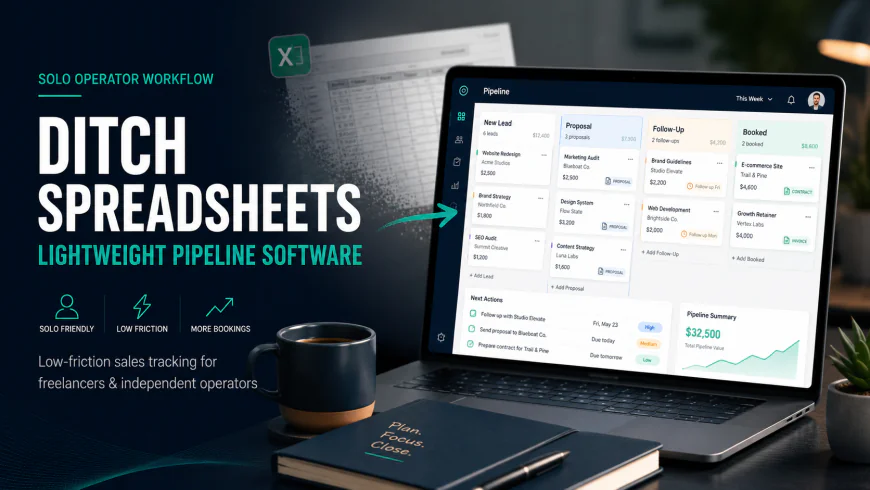
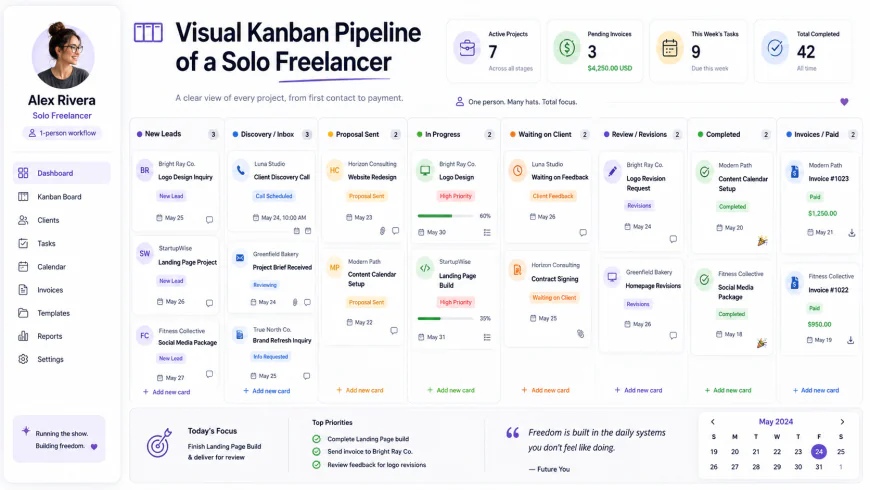 A clean visual kanban board minimizes cognitive load by displaying active deals and automated follow-up dates in a single view.
In-Depth Evaluation: Finding the Right Pipeline Fit
1. Moxie CRM: The Ultimate Client Lifecycle Hub
Moxie CRM has built a strong reputation among solo operators looking for a central hub to manage their client pipeline. Designed specifically for freelancers and micro-businesses, it attempts to solve the headaches of bouncing between separate apps for pitches, proposals, and billing. The core of the platform is a visual drag-and-drop kanban pipeline that lets you track prospects through custom deal stages, with prompts for next actions at each step.
Getting started is relatively simple. Users can embed a native contact form on their portfolio site to route inquiries straight into the pipeline as fresh leads. From there, you can pull from a built-in template library to generate proposals, send out digital contracts, and automatically trigger an invoice once a document is signed. According to official documentation at WithMoxie.com, the software connects directly with payment processors like Stripe, which helps maintain momentum between closing a deal and getting paid.
However, Moxie isn't a flawless solution. Community discussions on r/freelance suggest that while their customer support is highly responsive, the actual project management features can feel crowded and clunky when handling multi-phase client deliverables. Furthermore, their built-in rich-text email editor can be frustratingly stubborn, occasionally breaking custom HTML layouts if you rely on highly customized, branded cold-outreach templates. Who should avoid it: If you already use robust standalone project management software (like Asana or ClickUp) and only want a clean, isolated sales tracker, Moxie's broad feature set will likely feel like unnecessary bloat.
2. Hello Bonsai: Aesthetic, Integrated Business Management
Hello Bonsai (often just called Bonsai) is a polished, comprehensive business suite that appeals heavily to creative professionals and design studios who place a premium on clean aesthetics. As a lightweight pipeline tracker, Bonsai focuses on guiding clients from initial inquiry forms to final payouts, aiming to reduce manual administrative tasks along the way.
Bonsai’s primary asset is the tight integration between its contract, proposal, and invoicing features. Rather than stitching together a workflow across DocuSign, an invoicing tool, and a separate tracker, Bonsai handles these transitions automatically. When a lead accepts a proposal, the platform immediately drafts the deposit invoice and schedules automated payment follow-ups. You can read more about their customizable templates and automated billing infrastructure at HelloBonsai.com.
The major catch with Bonsai is its premium pricing structure, which has steadily increased over the years. For a starting freelancer, the monthly overhead can be a tough pill to swallow. Additionally, because the software tries to be everything from a time tracker to a tax accountant, users who only need basic pipeline visibility may find the interface overly complex. Who should avoid it: If you already have dedicated bookkeeping software like QuickBooks or Xero, Bonsai's extensive financial tools will create expensive, redundant overlaps in your tech stack. Some users also report that their customer service can be slow to resolve billing and platform glitches during high-volume periods.
3. Plutio: The Highly Customizable Solopreneur Workspace
Plutio sits on the highly customizable end of the spectrum, built for freelancers who want granular control over their workspace layout. Unlike opinionated platforms that lock you into a rigid pipeline layout, Plutio is more of a blank canvas where you can build tailored kanban boards, design custom-branded client portals, and track unique industry-specific data fields.
Its standout feature is the white-labeled client portal. This allows clients and prospects to log into a secure dashboard customized with your branding, where they can review proposals, check project progress, sign agreements, and settle invoices. For independent consultants looking to project the polish of a larger agency, this is incredibly valuable. You can check out their layout options and workspace settings at Plutio.com.
The clear downside of Plutio is the steep learning curve that comes with its heavy customizability. Because you can configure almost everything, setting up the platform requires a serious commitment of time. For a busy operator who wants a system they can use immediately, customizing Plutio can easily become an accidental procrastination rabbit hole. Who should avoid it: Avoid this tool if you want an "out-of-the-box" pipeline that works on day one. If you aren't prepared to spend several hours configuring custom fields, styling dashboards, and setting up workflows from scratch, Plutio will likely sit half-finished.
4. Teamopipe & Folk: Lightweight Gmail-Native Alternatives
For independent operators who live in their inbox, jumping back and forth to a heavy browser-based platform can feel like a chore. This has driven the rise of lightweight, inbox-native pipeline utilities like Teamopipe and Folk. These tools act as streamlined alternatives to heavy CRM systems, attaching directly to your email client to turn message threads into visual cards without leaving your inbox.
Teamopipe, for example, is a browser extension that builds a visual kanban board directly inside Gmail. You can move an active email thread from "Outreach" to "Negotiation" with a single drag-and-drop. Folk takes a similar approach, focusing on quick contact importing and personalized email outreach with merge tags. This approach minimizes data entry, since your client history and email exchanges stay automatically synced.
The trade-off here is the complete lack of post-sale features. While excellent for initial pipeline tracking, these inbox utilities do not handle contract signing, professional client portals, or invoicing. Who should avoid them: If your primary operational bottleneck is managing client onboarding, sending complex contracts, or collecting payments, these lightweight email add-ons won't solve your problems. You will still need to buy and maintain separate tools to handle your billing and project execution, leaving your sales pipeline completely isolated from your financial workflow.
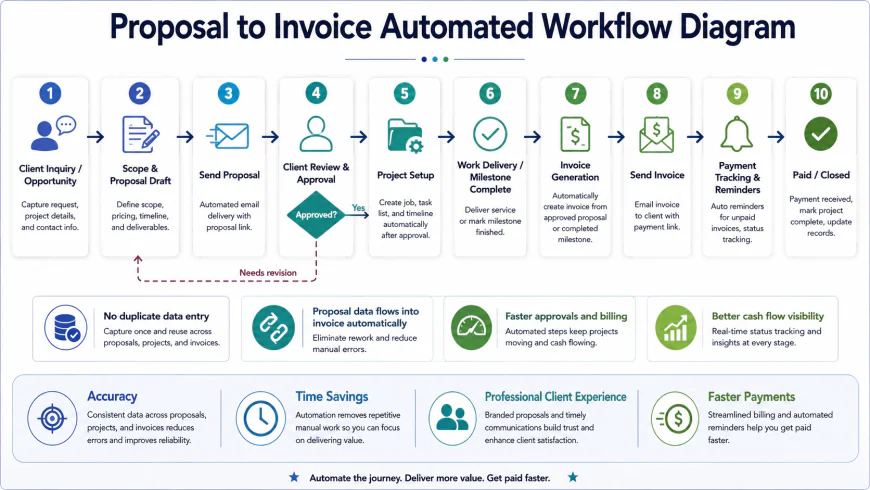
💡 Real-World Insights: What the Marketing Pages Don't Tell You
Digging past the polished marketing copy and into developer subreddits and freelance forums reveals several hard truths about what actually works (and what fails) when solo operators try to track sales:
- The Great Streak Migration: Over on r/CRM, users like caitlinobauer highlighted how Streak's decision to eliminate its affordable solo plans essentially forced independent users onto a $49/month plan. This sudden pricing cliff triggered a major exodus of freelancers toward nimbler, budget-friendly inbox extensions like Teamopipe and Folk.
- The HoneyBook Profitability Trap: Creative service providers on Reddit often point out a major blind spot in HoneyBook: despite its gorgeous user interface, it lacks a native timer for tracking hourly projects. If your business relies on a mix of flat-rate and hourly billing, it is incredibly difficult to calculate your true project profitability inside the same dashboard you use to track your pipeline.
- The Custom Notion "Maintenance Wall": It is incredibly easy to get sucked into aesthetic Notion CRM builds on YouTube. However, freelancers on Reddit consistently report hitting a productivity wall. In practice, keeping up with manual relational databases, copying email exchanges, and updating next-action dates becomes an exhausting chore. When client work gets busy, manual Notion CRMs are almost always the first tool to be abandoned.
Why Traditional CRM Recommendations Fail Freelancers
If you search Google for "best CRM tools," you will be bombarded with articles pointing you toward massive enterprise platforms. Let's break down why these standard corporate recommendations are a terrible fit for a business of one.
The HubSpot "Free Tier" Trap
HubSpot is a powerhouse for mid-market companies with dedicated sales teams, but for a solo creator, it is massive overkill. While they offer a free basic contact database, it is ultimately designed as a high-friction upsell engine. The moment you want to do something simple—like automate a follow-up email, build custom deal stages, or create personalized sequences—you run into an incredibly steep paywall that jumps to hundreds of dollars a month. You end up spending more time navigating enterprise menus than actually closing deals.
The Legacy Email Extension Pricing Cliff
For years, Streak was the gold standard for inbox pipeline tracking. But when they structured their plans to push solo users out of their affordable tiers and into a $49/month subscription, they alienated the freelance community. Paying nearly $600 a year just to overlay a visual kanban board onto your Gmail is a hard sell for most independent operators—especially when modern alternatives offer similar core functionality for a fraction of the price.
The Illusion of the "Perfect" Notion Template
Notion is spectacular for documentation, but it makes for a highly fragile CRM. Building a functional sales tracking system in Notion requires you to become a database administrator. You have to manually log your emails, build custom formulas to calculate follow-up dates, and constantly link databases together. The minute your client workload picks up, this manual administrative overhead becomes a chore. A sales pipeline is only useful if it runs in the background; if it requires you to manually copy-paste every interaction, it is bound to fail.
| Platform | Core Strengths | Key Drawbacks | Best Suited For | Estimated Pricing |
|---|---|---|---|---|
| Moxie CRM | Complete client lifecycle, superb support, instant deposit invoicing | Project management UI has a slight learning curve; rich text styling can be finicky | Freelancers who want a single, zero-friction administrative hub | $16 - $20 / month |
| Hello Bonsai | Stunning visual proposals, automated recurring billing, clean UI | No native hourly tracker; premium tiers can feel pricey for beginners | Creative designers and agency owners who prioritize client-facing aesthetics | Starts at $25 / month |
| Plutio | Incredible customization, white-labeled client portals, custom fields | Requires a significant initial time investment to set up and configure | Consultants and developers who want to project an agency-scale presence | Starts at $19 / month |
| Teamopipe | Built directly into Gmail, virtually zero data entry, highly intuitive | No invoicing, contract signing, proposal creation, or client portals | Inbox-centric solo workers who only need basic pipeline tracking | Starts at $9 / month |
Real-World Execution: Two Highly Efficient Workflows
To see how these streamlined tools function in the wild, let's look at how two different solopreneurs handle their sales pipelines without wasting time:
- The Copywriter's Auto-Pilot Pitch (Moxie CRM): A freelance copywriter embeds a clean Moxie intake form on their portfolio website. When a hot lead submits an inquiry, their details instantly populate the Moxie dashboard under "New Leads." The writer quickly selects a polished, pre-saved proposal template, tweaks the scope of work, and sends it off. As soon as the client signs the contract, Moxie automatically generates and emails a Stripe deposit invoice. The project state won't change to "Active" until that deposit clears, protecting the freelancer's time and boundaries automatically.
- The Web Developer's Low-Touch Pipeline (Inbox Kanban): An independent developer uses a visual email extension to monitor high-value custom builds. They establish a simple rule: if a client card sits in the "Proposal Sent" stage for more than 72 hours, the system triggers a quick, pre-drafted follow-up nudge. The developer doesn't have to jump into a heavy project management platform or write an email from scratch; the reminder lives right inside their inbox, ensuring no valuable deals go cold while they are heads-down writing code.
✅ Pro Tip: Optimize for Daily Momentum, Not Complex Analytics
As a solopreneur, your most valuable asset is your focus. When choosing a sales tool, ignore flashy promises of "predictive pipeline velocity," "win-loss ratios," or complex sales forecasting charts. You don't have a corporate sales team to analyze. Instead, prioritize tools that lower your cognitive load. A simple, timely notification that says, "You sent a proposal to Sarah 3 days ago and haven't heard back—send a quick nudge?" is worth infinitely more to your bottom line than a dozen complex charts you will never look at.
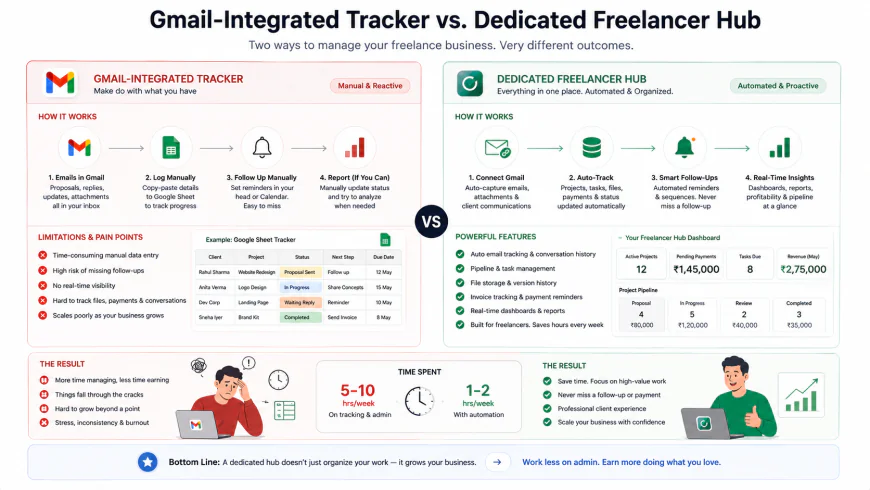 Comparing the minimal footprint of an inbox-native extension against the deeper functionality of a unified client workspace.
A Clear Look at Pricing, Hidden Tiers, and Software Sprawl
When calculating the true cost of your sales tracking tech stack, you have to look closely at feature gating. Many platforms try to lure you in with low starting rates, only to lock vital freelancer features—like custom electronic signatures, automated payment reminders, or branded proposal portals—behind their most expensive plans.
Moxie CRM stands out here by offering a refreshingly simple flat-rate plan that unlocks every single feature from day one. Hello Bonsai uses a tiered system where premium features, like white-labeled client interactions and bookkeeping exports, require stepping up to their higher-priced tiers. Plutio offers a flexible structure based on your user seat count, keeping it highly cost-effective for true solo operations but scaling up naturally if you ever transition into a boutique agency model.
If you choose a lightweight tracker like Teamopipe, the monthly subscription is incredibly low, but you must account for the indirect cost of software sprawl. Because a lightweight inbox tracker won't handle billing, proposals, or digital contracts, you will need to pay for separate tools like DocuSign, HelloSign, or invoicing software. Often, bundling these features into a single workspace like Moxie or Bonsai is actually cheaper than maintaining a fragmented tech stack.
Is an Integrated Freelancer CRM Right for You?
- Consolidated Workspace: Keeping your pipeline, contracts, proposals, and billing in one ecosystem stops tool fatigue and cuts down on redundant monthly subscriptions.
- Guaranteed Deposits: Automatically sending deposit invoices the second a client signs a contract prevents you from starting work without getting paid first.
- Passive Deal Nurturing: Simple, automated reminders ensure you follow up on outstanding proposals without having to mentally track them.
- Elevated Client Experience: Sending branded client portals and clean, interactive agreements builds trust and positions you as a premium professional.
- Redundant Features: An all-in-one system might duplicate software you already use and love, like a dedicated time tracker or bookkeeping tool.
- Migration Friction: Moving your historical data (signed agreements, client communications, and past invoices) out of an all-in-one platform later can be a tedious manual task.
- Upfront Setup Time: Getting the most out of customizable workspaces requires spending some initial hours building out templates and tuning your workflows.
How to Choose Your Ideal Sales Tracking Match
Your choice should match how you naturally work day-to-day. Here is where each tool shines best:
- The Integrated Generalist: If you want one affordable, flat-rate tool that handles your lead pipeline, contracts, customized proposals, and Stripe invoices, choose Moxie CRM.
- The Premium Creative: If you are a designer, illustrator, or creative director who wants stunning client-facing document aesthetics, ready-to-use contracts, and a highly polished UI, go with Hello Bonsai.
- The Boutique Operator: If you need deep customization, highly specific tracking fields, and branded, white-labeled client portals to look like a larger agency, choose Plutio.
- The Inbox Minimalist: If you run your entire business from email and absolutely do not want to log into another external dashboard, choose Teamopipe or Folk.
The Final Verdict
There is no single "best" sales tracking tool—only the one that actually fits your workflow. If your goal is to eliminate administrative headache, centralize your billing, and get the absolute most value for your money, Moxie CRM is the clear leader for solo business owners. If you are willing to pay a premium for beautiful, highly stylized client documents, Bonsai is a fantastic investment. And if you already have your contracts and billing running smoothly elsewhere and simply want a visual way to keep your email threads organized, an inbox extension like Teamopipe is the easiest, lowest-friction solution available.
Frequently Asked Questions
Why should I avoid enterprise tools like HubSpot or Salesforce?
These platforms are built for large corporate sales teams with dedicated administrators. For a freelancer, they add immense friction. They require endless data entry, have crowded interfaces full of features you will never use, and lock essential solo automations (like simple follow-up sequences) behind incredibly expensive enterprise pricing tiers.
Can I get by using a completely free sales tracker?
While many tools offer free tiers, they almost always come with restrictive limits on how many clients you can track, or they block essential integrations like payment processing and electronic contract signatures. For a professional freelance business, paying a small monthly fee for a dedicated tool is a smart investment that prevents artificial limits on your growth.
How does linking my sales pipeline to payments protect my cash flow?
A classic freelance mistake is marking a deal as "won" based on a verbal agreement, starting the work, and then waiting weeks for the deposit. Integrated platforms like Moxie or Bonsai solve this by linking proposal signatures directly to an automated invoice. The project doesn't start until the deposit is paid, keeping your cash flow secure and setting clear professional boundaries from day one.
Is it hard to move my data if I decide to switch platforms later?
You can easily export your contact details and basic deal lists as CSV files from almost any CRM. However, moving active client portals, invoice histories, and signed contracts is usually a manual process. It is best to select a tool that you can see yourself happily using for at least two to three years to avoid the headache of a complex migration.
Your Step-by-Step Action Plan to Ditch the Spreadsheets
Ready to move past administrative chaos and manual data entry? Let's get your new, frictionless setup running in under an hour. Use this action plan to build a system that works for you, rather than the other way around:
- Step 1: Pick your minimalist weapon of choice. Choose a tool that aligns with your daily habits—whether that is an inbox-native tool like Teamopipe or a complete lifecycle hub like Moxie. If a platform looks like it will take more than 15 minutes of weekly maintenance, skip it.
- Step 2: Keep your pipeline stages lean. Avoid the temptation to build a complex 10-stage funnel. Stick to 4 or 5 highly actionable stages (such as New Lead, Discovery, Proposal Sent, Deposit Pending, and Active) to minimize cognitive drag.
- Step 3: Standardize your core templates. Draft your standard proposals, contracts, and outreach messages directly inside your tool. Having these templates ready to go means you can respond to hot leads in minutes rather than hours.
- Step 4: Bridge the gap between contracts and cash. Connect your system directly to Stripe or your preferred payment gateway. Configure it so that a signed proposal automatically triggers the deposit invoice. This simple connection protects your time and secures your cash flow upfront.
- Step 5: Define a "Next Action" for every deal. Never let a card sit in your pipeline without a clear next step. Set up automated, gentle follow-up reminders that trigger if a prospect goes quiet for more than three days.
- Step 6: Run a dry test. Submit a fake inquiry through your site, sign the test contract, and verify that the automated invoice triggers smoothly. Once you experience how seamless the client journey feels, you will never want to look at a manual sales spreadsheet again.