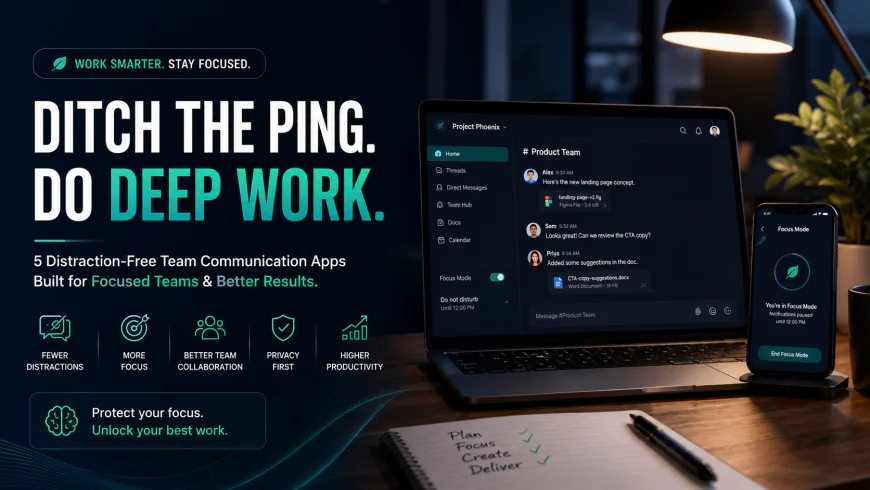
Ditch the Ping: 5 Distraction Free Team Communication Apps for Deep Work
Discover 5 calm, async-first distraction free team communication apps built to eliminate Slack notification fatigue, context switching, and protect deep work.
 Abir Bin Hasan
Ditch the Ping: 5 Distraction Free Team Communication Apps for Deep Work
The digital workplace is undergoing a severe attention recession. While Slack promised to kill email and streamline collaboration, studies reveal that over 45% of workers find real-time digital communication tools actually make them less productive. What was marketed as a seamless virtual headquarters has evolved into a "synchronous firehose"—an always-on, notification-heavy distraction machine that drains focus. For knowledge workers, recovering from a single Slack ping takes an average of 23 minutes. As deep work becomes a rare competitive advantage, teams are actively shifting away from chat-based real-time noise toward structured, distraction free team communication apps designed to protect focus first.
What this article helps you decide
If you are tired of watching your team lose hours of productive cognitive output to the green status indicator and endless GIF threads, this guide is designed for you. We will help you analyze whether your organization needs an asynchronous-first communication platform, a highly organized thread-based developer portal, or a self-hosted, highly secure private workspace. By the end of this deep-dive evaluation, you will be able to pinpoint the exact platform that matches your team’s operational tempo, technical stack, and cognitive workflow requirements.
Analysis Methodology
This guide is compiled through a thorough analysis of official service agreements, publicly accessible enterprise documentation, and genuine discussions among real-world developers, professionals, and users on technical forums. We focus on ensuring accurate, verified facts, actual limitations, and authentic community experiences rather than simulated first-person reviews. Our engineering evaluations focus heavily on client application performance, memory overhead, thread data models, and long-term search indexability.
Overview & Market Context: The Death of Deep Work in Slack's Walled Garden
Most technical sites and business blogs treat Slack as the undisputed king of office communication. However, we aggressively challenge the synchronous chat model. We believe it is time to thoroughly review async team chat software that prioritizes focus over rapid response rates. The traditional "always-on" chat paradigm relies heavily on real-time presence indicators. These indicators create a toxic social contract where team members feel compelled to stay online, constantly monitoring channels to prove they are working. This hyper-responsiveness comes at a massive cost to intellectual output.
As remote work and distributed offices have grown globally, the limitations of real-time chat have become impossible to ignore. The constant interruption of notifications triggers continuous cognitive load and forces endless context switching. This leaves developers, writers, and designers struggling to find even 90 minutes of uninterrupted time for deep work.
Furthermore, structural shifts in Slack's product model have alienated small businesses and open-source communities alike. A silent driver for small businesses leaving Slack is the 90-day message history limit on the free tier. This shift turns what was once a highly valuable database of team knowledge into an ephemeral void, unless organizations agree to pay the premium rate of $7.25+ per user per month.
Simultaneously, open-source communities are realizing that locking their valuable technical troubleshooting guides inside Slack's private walls prevents search engines from indexing solutions. Consequently, indexable alternative services are rising in popularity. This shift allows Google to index technical discussions, making knowledge accessible to the wider web. Moving to dedicated slack alternatives for deep work is no longer just a trend—it is a functional necessity for preserving organizational memory and human attention.
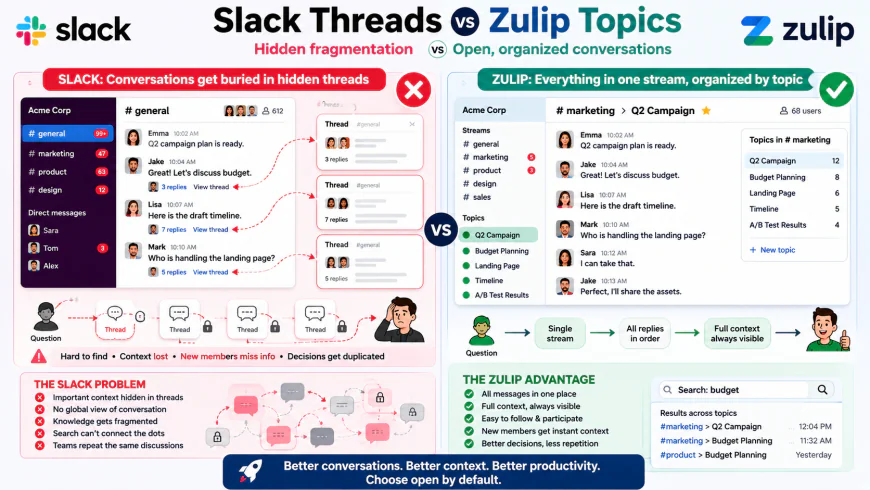 Figure 1: Visualizing thread fragmentation and observer burden in real-time chat frameworks.
In-Depth Evaluation of the Top 5 Distraction Free Team Communication Apps
1. Twist: The Philosophy of Calm, Asynchronous-First Communication
Created by Doist (the team behind the popular productivity tool Todoist), Twist is built on a complete, philosophical rejection of real-time chat. Twist fundamentally believes that work does not happen in real-time. By design, the app completely eliminates the green "active" presence indicator. This structural choice instantly removes the subconscious pressure to stay constantly online and reply immediately to incoming messages. Twist forces an asynchronous-first collaboration style by organizing all communication into highly structured, clear threads that resemble beautifully formatted email chains rather than chaotic chat streams.
In Twist, you do not enter a general channel to find a firehose of unorganized messages. Instead, conversations must start with a descriptive subject line. This architecture ensures that team members can drop in, read the full context of a specific discussion, contribute their thoughts, and leave without getting pulled into five other parallel conversations. This makes Twist an exceptional example of calm team collaboration tools designed specifically for distributed, multi-time-zone workforces.
However, this absolute focus on asynchronous collaboration does introduce some trade-offs. For teams that regularly handle fast-moving emergencies, live operations, or rapid triage, Twist can feel frustratingly slow. The lack of instant notification pathways and live chat channels means that high-velocity operational tasks can become bottlenecked. Twist's interface is designed for deliberate reflection, which works beautifully for product design and strategy, but can feel like wading through molasses during a critical system outage.
Pricing Plans & Constraints: Twist offers a highly competitive Free plan with access to one month of message history. Its Premium plan, priced at $6 per user per month (billed annually), grants unlimited history, unlimited integrations, and unlimited file storage, making it a highly cost-effective option compared to enterprise chat giants.
2. Zulip: Developer-Grade, Topic-Based Threading
If Twist is the calmest option for general business teams, Zulip is the ultimate power tool for engineering and technical organizations. Zulip is an open-source, highly customizable application that solves the problem of stream-of-consciousness chat through a unique "topic-based threading" model. In Zulip, channels are split into distinct, mandatory topics. Every single message sent must belong to a specific topic. This design choice allows dozens of complex, parallel conversations to run simultaneously in a single stream without any crosstalk.
From an engineering perspective, Zulip's architectural design is highly efficient. Unlike memory-heavy alternatives, Zulip relies on a highly optimized Django and Python backend with lightweight clients that consume a fraction of the desktop resources required by Electron-based platforms. Zulip allows team members to scan through a channel, instantly identify the three topics that apply to their work, and completely ignore the twenty other active threads. This dramatically reduces notification overload and prevents the constant cognitive load of reading unrelated messages.
The core challenge with Zulip lies in its user experience. Its interface is clinical, highly functional, and utilitarian. It lacks the gamified, highly polished, meme-friendly aesthetic of Slack. For non-technical departments—such as marketing, HR, or sales—onboarding onto Zulip can introduce significant friction. The rigorous discipline required to categorize every message under a strict topic header can feel overly complex for teams used to casual, unstructured group chats.
Pricing Plans & Constraints: Zulip Cloud Free provides search history limits of up to 10,000 messages. The Cloud Standard plan is priced at $6.67 per user per month (billed annually). For self-hosted teams, Zulip offers a fully-featured, community-supported open-source version that is completely free to run on your own infrastructure.
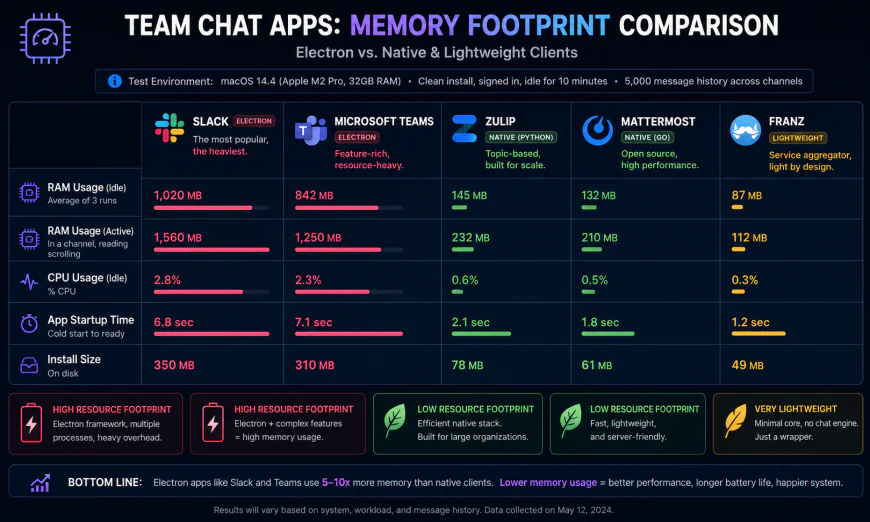 Figure 2: Memory footprint analysis showing Slack's heavy Electron client RAM usage compared to lightweight alternatives.
3. Threads.com: Structured Visual Decision Making
Not to be confused with Meta's social network, Threads.com is a highly polished, sophisticated asynchronous workplace chat application designed to turn casual, unstructured conversations into clearly documented decisions. The core philosophy of Threads.com is that chat should naturally evolve into structured knowledge management. The user interface looks and feels like a hybrid between a modern chat client and a collaborative document editor like Notion. It allows teams to easily open a thread, draft comprehensive proposals, collect targeted feedback, and mark a final, official decision that is pinned at the very top of the discussion.
Historically, Threads.com experienced a hilarious yet chaotic phenomenon when Meta launched their social media app of the exact same name. The platform saw massive, unprecedented traffic spikes from confused users looking for the social app. Despite this "Name Confusion" distraction, Threads.com remains a highly respected tool for professional teams seeking to escape chat noise. It is particularly effective for remote-first teams that want to document their reasoning processes and preserve their long-term institutional knowledge.
The primary drawbacks of Threads.com are its closed ecosystem and strict pricing structure. While it excels at document-style discussions, it does not support the massive library of third-party integrations (such as niche developer webhooks or custom bots) that teams rely on within Slack's ecosystem of 2,400+ apps. If your workflow relies heavily on automated chat alerts from external tools, you may find the integration experience here somewhat limited.
Pricing Plans & Constraints: Threads.com offers a basic free tier for small teams. Their paid tiers scale upward based on advanced administration features, and their pricing models are generally optimized for venture-backed startups and modern enterprises looking to invest in high-quality documentation tools.
4. Mattermost: The Secure, Self-Hosted Enterprise Hub
For organizations operating in highly regulated industries—such as healthcare, finance, or government defense—public cloud-hosted chat platforms can introduce serious legal and security concerns. Mattermost is a powerful, open-source, enterprise-grade collaboration platform designed to be self-hosted behind private firewalls or within secure private clouds. By self-hosting Mattermost, organizations retain absolute, complete control over their database schemas, communication logs, and internal file assets, avoiding any third-party cloud data dependencies.
From a technical standpoint, performance engineers highly praise Mattermost. Because it is built on a highly optimized Go backend and React frontend, it avoids the egregious RAM consumption issues that plague Slack’s Electron-based desktop client. Mattermost provides a familiar, channel-based interface, but couples it with advanced compliance tools, automated data retention policies, and robust custom access controls. This makes it an incredibly powerful developer-first platform that supports structured, distraction-free coordination without exposing sensitive business intelligence.
The primary barrier to adopting Mattermost is the operational overhead. Managing, patching, and scaling a self-hosted communication server requires dedicated DevOps resources. If your IT team is small or lacks self-hosting experience, maintaining Mattermost can quickly become a complex chore, making a fully managed SaaS alternative far more practical.
Pricing Plans & Constraints: Mattermost offers a free self-hosted "Playbooks & Boards" tier. Their Professional cloud-hosted and self-hosted editions start at $10 per user per month, scaling up to customized Enterprise plans for complex deployments requiring strict compliance standards.
5. Linen: The Indexable, Search-Friendly Alternative
Linen is a unique player in the communication space, designed specifically to solve the "walled garden" problem of modern chat software. For open-source projects, developer tools, and community-driven startups, Slack is a black hole for knowledge. When a community member solves a complex technical issue inside a private Slack channel, that valuable solution is hidden from search engines forever. If another developer runs into the same bug tomorrow, they cannot find the answer on Google. Instead, they are forced to join the community and ask the exact same question again.
Linen elegantly solves this problem by creating a bridge between real-time team communication and the public web. It functions as a lightweight, lightning-fast chat application that allows you to easily sync your channels and publish them as fully indexable, public-facing web pages. When search engine crawlers index your Linen workspace, your team's conversations and bug-fixing guides begin ranking on Google search results. This drives organic traffic to your product while dramatically reducing the customer support burden on your engineering team.
However, Linen is still a relatively young product compared to mature giants like Mattermost or Twist. It lacks advanced enterprise features, has a smaller integration library, and does not provide the highly polished UI styling found in older, more mature platforms. If your team requires highly sensitive, private corporate collaboration with complex permission structures, Linen's public-facing indexing model may not align with your internal security policies.
Pricing Plans & Constraints: Linen offers a generous free tier for open-source communities. Paid plans scale based on private workspace hosting requirements and advanced SEO customization features, making it a highly accessible choice for developer-advocacy teams.
💡 Expert Analysis & Experience
Our analysis of online discussion boards, sysadmin channels, and product management forums reveals a clear consensus: the "ping" is actively harming deep knowledge work. On Reddit, sysadmins frequently complain that "messages come in and you respond in the order received, with no prioritization, leading to constant context-switching to whatever message comes most recently." This highlights a structural flaw in real-time chat—the loudest, newest ping always wins, regardless of actual business importance.
Furthermore, industry opinions diverge sharply depending on your team's operational goals. A software team user on r/selfhosted noted: "We moved to Zulip and its topic-based threading is fantastic compared to Slack because you can easily follow only the conversations you need, keeping discussions neat over time." This technical perspective contrasts sharply with the operational reality faced by fast-moving service organizations. As an agency manager on r/todoist shared, "Twist is great for focused work, but it takes the product to an extreme. By eliminating real-time notifications, it wasn't a fit for our active customer support agents who need rapid triage." These real-world observations demonstrate that choosing the right tool requires balancing your need for deep work with your team's operational response requirements.
Feature Comparison: Slack vs. Distraction-Free Contenders
| App Platform | Core Threading Style | Presence Indicator | Search & Indexing | Client Performance |
|---|---|---|---|---|
| Slack | Linear / "Hidden" Threads | Active (Green Dot) | Locked Walled Garden | Bloated (Electron RAM-Hog) |
| Twist | Thread-First (Asynchronous) | None (No Active Status) | Internal Search Only | Lightweight & Fast |
| Zulip | Mandatory Topic-Based | Optional / Unobtrusive | Internal Search Only | Extremely Efficient Backend |
| Threads.com | Document & Decision Threads | Minimalist | Internal Search Only | Highly Polished UI |
| Mattermost | Channel & Thread Hybrid | Standard State Control | Private Enterprise Search | Fast Native / Go Backend |
| Linen | Lightweight Hybrid | Minimalist | Fully Indexable by Google | Ultra-Fast Page Loads |
Practical Scenario: Synchronous Chaos vs. Asynchronous Clarity
Scenario A (The Real-Time Chaos): An engineering team is attempting to debug a critical production server crash. On Slack, the conversation is interspersed with off-topic GIPHYs, general status updates, and direct messages, forcing developers to scroll frantically through a single channel to piecemeal information together. While they try to trace the database error, three unrelated pings interrupt their focus, resetting their cognitive attention span and prolonging the server outage.
Scenario B (The Organized Topic Stream): On Zulip, the entire incident is localized under one precise topic: #production-outage-may-26. There is zero crosstalk. Only the engineers actively debugging the system subscribe to that topic. Other team members continue working on their features completely uninterrupted. The debugging steps, logs, and resolution are documented sequentially under a single header, preserving a clean post-mortem record for future engineering reviews.
Scenario C (The Multi-Time-Zone Wakeup): A remote product manager goes to sleep in Europe. While they are asleep, their US-based colleagues hold a critical design debate. In Slack, the discussion gets buried under 150 general chat messages, requiring the PM to piece together scattered, hidden threads. In Twist, the PM wakes up to a single, beautifully organized thread that reads like an email chain, summarizing the entire debate in chronological order and allowing them to provide clear, focused feedback in minutes.
✅ Pro Tip
If your organization is not ready for a full platform migration, you can drastically reduce notification overload in Slack today by establishing a company-wide "async-first SLA." Instruct your team that immediate replies are never expected, and encourage them to set their status to "Away" by default. By explicitly separating presence from productivity, you can minimize constant context switching and reclaim hours of valuable deep work without changing a single line of your software stack.
Pricing & Licensing Deep-Dive
When selecting a platform, understanding the long-term cost of your choice is critical. Slack's pricing structure has steadily climbed, with its Pro tier starting at $7.25 per user per month when billed annually. For a team of 100 employees, this translates to $8,700 annually—a significant line-item for growing organizations. When scaled further, or when upgraded to the Business+ tier at $12.50 per user per month to secure single sign-on (SSO) and compliance exports, those costs quickly escalate to $15,000 or more per year.
In contrast, Zulip offers an aggressive, budget-friendly pricing model. Its Cloud Standard plan costs $6.67 per user per month when billed annually. However, Zulip's most powerful financial advantage is its fully open-source self-hosted edition. Organizations with the technical capability to host their own servers can deploy Zulip’s Community Edition completely free of charge, bypassing per-user licensing fees entirely while maintaining absolute control over their data residency.
Twist by Doist takes a similarly simplified approach, positioning itself as a highly cost-effective alternative for lean teams. The Twist Unlimited tier is priced at $6 per user per month billed annually ($8 billed monthly). For teams looking to test the waters, Twist’s free plan allows unlimited users and integration access, limiting only the history search to one month, rather than locking out advanced functionality or restricting overall user seats.
Feature Comparison & Trade-Offs
To help you visualize how these tools stack up across critical collaboration vectors, here is a breakdown of their primary strengths and architectural limitations:
| Feature / Attribute | Slack | Zulip | Twist |
|---|---|---|---|
| Primary Paradigms | Real-time, chat-first, ad-hoc threading | Asynchronous, topic-centric streams | Async-first, structured email-like threads |
| Context Retention | Poor (conversations quickly bury in main channels) | Excellent (every single message belongs to a topic) | Excellent (threads are isolated, clear, and persistent) |
| App Ecosystem | Unmatched (2,600+ integrations) | Moderate (focus on developer/technical tools) | Moderate (deep integrations with productivity apps) |
| Self-Hosting Option | No (Cloud-only) | Yes (Fully open-source) | No (Cloud-only) |
| Learning Curve | Very Low (Intuitive for most users) | Moderate (Topic-first concept takes practice) | Low (Reads like a modern forum or inbox) |
Target Audience: Which Platform Wins?
Who is Slack best for?
Slack remains the undisputed champion for fast-moving, co-located, or hybrid teams where real-time coordination is essential. Sales departments, customer success centers, and operations teams that rely on immediate feedback loops, instant triage, and automated app-trigger alerts will find Slack's extensive integration catalog indispensable. If your business depends on bots to push live updates from Salesforce, Jira, or Zendesk directly into a central stream for immediate action, Slack is the ideal operational cockpit.
Who is Zulip best for?
Zulip is the definitive choice for engineering organizations, technical project groups, and open-source communities. Its unique ability to divide single streams into hyper-specific, searchable topics matches the logical, structured mental models of developers. If your team manages complex software deployments, high-volume issue trackers, or multi-faceted product architectures where missing a single log message or architectural design decision could cost thousands of dollars, Zulip's precise topic-based threading is unparalleled.
Who is Twist best for?
Twist is custom-built for remote-first, highly distributed organizations, creative agencies, and companies that value deep work over instant availability. If your workforce spans multiple global time zones, and you want to foster an inclusive culture where a decision made at 2:00 PM in Tokyo can be thoughtfully reviewed and answered at 9:00 AM in Munich, Twist provides the necessary structure. It is the perfect antidote to the "always-on" culture, restoring peace of mind to creative and strategic thinkers.
Final Verdict
The choice between Slack, Zulip, and Twist is not merely a feature comparison; it is a fundamental choice about your company's operational philosophy. Slack prioritizes the present moment—it is built for the immediate "now." Zulip and Twist prioritize context, deep focus, and chronological preservation—they are built for the long term.
If your team is suffering from notification fatigue, fractured attention spans, and missing decisions in a sea of endless scrolling, continuing to use Slack is an active bottleneck. Transitioning to Zulip (for highly technical, detail-oriented teams) or Twist (for creative, operational, and distributed teams) will permanently change how your organization communicates, turning chaotic real-time noise into a calm, structured, and permanent knowledge base.
Frequently Asked Questions
Is Zulip difficult for non-technical employees to learn?
There is a brief adjustment period. Because Zulip mandates that every message must be assigned a "Topic," users accustomed to Slack's stream-of-consciousness chat might initially forget to categorize their replies. However, once users experience how easy it is to search, filter, and ignore topics that do not apply to them, the conceptual hurdles quickly disappear.
Can we migrate our existing Slack history to Zulip or Twist?
Yes. Both Zulip and Twist offer dedicated, automated import tools. You can export your Slack workspace data (including channels, users, public messages, and files) and upload them directly into your new platform, preserving years of institutional knowledge without starting from scratch.
How does Twist handle emergency, real-time communication?
While Twist is designed to discourage continuous pinging, it does feature a dedicated "Messages" tab for direct, real-time 1:1 or small group chats. For true operational emergencies, teams typically pair Twist with a lightweight calling tool or an on-call alerting service like PagerDuty.
Your Migration Checklist
Ready to reclaim your team's focus? Use this simple checklist to kickstart your transition to an async-first workspace:
- Audit your integrations: List the Slack apps your team uses daily and verify if they are natively supported by Zulip or Twist, or if they can be routed through Zapier.
- Export your data: Run a full workspace export from your Slack admin dashboard to secure your team’s chat archives.
- Draft your communication manifesto: Establish a clear set of guidelines defining expected response times (e.g., "all internal threads should be answered within 12 hours, not 12 minutes").
- Run a pilot: Move a single cross-functional team or project group to Zulip or Twist for two weeks to gather initial feedback and refine your threading habits.
Choosing Your Path: Zulip vs. Twist at a Glance
To help you decide which platform aligns best with your team's workflow, here is a side-by-side comparison of how Zulip and Twist handle the core pillars of asynchronous collaboration.
| Feature | Zulip | Twist |
|---|---|---|
| Threading Model | Topic-based stream (every message must have a micro-topic). | Forum-style threads (structured posts with dedicated reply sections). |
| Hosting Options | Cloud-hosted or self-hosted on your own servers (Open Source). | Cloud-hosted SaaS (Proprietary). |
| Real-Time Utility | High. Handles fast-paced, live chatting remarkably well within topics. | Low. Deliberately structured to slow down communication speed. |
| Search & Archiving | Extremely powerful, offering granular search operators and filters. | Clean and simple search, optimized for finding historical thread topics. |
Zulip: Pros & Cons
Pros:
- Unmatched organization: The topic-based threading ensures that no two distinct conversations ever get tangled up in the same stream.
- Open-source freedom: Ideal for security-conscious organizations that require complete control over their data hosting.
- Fast-and-slow hybrid: Successfully supports both high-velocity, real-time developer chatter and thoughtful, asynchronous status updates.
Cons:
- Steep learning curve: The multi-pane user interface can feel visually dense and overwhelming to non-technical users at first glance.
- Topic discipline required: If users fail to categorize messages properly, threads can become fractured.
Twist: Pros & Cons
Pros:
- Distraction-free UI: The interface is beautifully minimalist, looking more like an organized email inbox than a chaotic chatroom.
- Clarity by design: By putting threads front and center, it completely eliminates the psychological pressure to respond immediately.
- Deep integrations: Built by Doist, it pairs flawlessly with Todoist and other popular task-management suites.
Cons:
- No self-hosting: Companies requiring on-premise deployments or strict data residency compliance cannot host Twist locally.
- Too slow for emergencies: The deliberate exclusion of presence indicators ("active" green dots) makes live, high-speed incident response difficult.
The Target Audience: Which Tool is Best for Your Team?
While both tools represent a major leap forward from the unstructured chaos of Slack, they serve slightly different operational profiles:
Choose Zulip if your team is highly technical, manages complex, multi-layered engineering projects, or values open-source software. Software development teams, DevOps groups, and research laboratories thrive in Zulip because it allows them to maintain hundreds of simultaneous, hyper-specific technical discussions without losing their minds.
Choose Twist if you run a creative agency, a marketing firm, or a product team that prioritizes uninterrupted "deep work" above all else. Twist is the ultimate sanctuary for writers, designers, and strategists who need long blocks of focused time to produce their best work, free from the constant pinging of real-time alerts.
The Final Verdict: Reclaiming the Modern Workspace
The "always-on" anxiety generated by traditional chat applications is not an inevitable byproduct of remote work; it is a design flaw. By treating every message with the same level of urgency, legacy tools have turned knowledge workers into reactive switchboard operators.
Transitioning to an async-first workspace using Zulip or Twist is more than just a software migration—it is a cultural declaration. It signals to your team that their focus is valued, their time is respected, and their output is measured by quality rather than presence. By breaking the cycle of instant gratification, you lay the groundwork for a calmer, more productive, and ultimately more sustainable way to work.