Simple Project Management Tools for Startups: Trello vs Asana vs ClickUp
Looking for simple project management tools for startups? Compare Trello, Asana, and ClickUp to find an easy task tracker for teams without SaaS bloat.
 Abir Bin Hasan

Simple Project Management Tools for Startups: Trello vs Asana vs ClickUp
Startups are aggressively fighting back against SaaS bloat. Industry data and community discussions indicate that up to 70% of feature sets in comprehensive platforms go completely unused by lean teams. When seeking simple project management tools for startups, the ultimate goal isn't finding the most robust software, but rather mitigating the administrative burden—the productivity-killing phenomenon where keeping a project tracker updated takes more physical and mental energy than executing the actual tasks. This guide analyzes how Trello, Asana, and ClickUp stack up when operational simplicity is your competitive advantage.
What this article helps you decide
This deep-dive comparative guide is designed to help startup founders, product managers, and operations leaders strip away marketing hype and identify the exact project management tool that matches their team's specific working style. You will discover whether you need the rapid, visual simplicity of Trello, the structured dependency management of Asana, or the all-in-one database flexibility of ClickUp. Ultimately, we help you choose a platform that your team will actually adopt and use daily without falling into the "tool administration trap."
Analysis Methodology
This guide is compiled through a thorough analysis of official service agreements, publicly accessible enterprise documentation, and genuine discussions among real-world developers, founders, and professionals on technical forums. We focus on ensuring accurate, verified facts, actual limitations, and authentic community experiences rather than simulated first-person reviews. By looking at real user struggles on platforms like Reddit and comparing them against API limits and core database architectures, we present an objective, zero-fluff comparison.
Overview & Market Context: The Fight Against SaaS Bloat
For years, project management software vendors have engaged in an aggressive feature arms race. Every quarter, new features, AI assistants, database views, and automated triggers are packed into these platforms. However, for a fast-moving, early-stage company, this feature density often introduces significant onboarding friction. While enterprise buyers love complex permission matrices and heavy audit logs, lean teams require speed, clarity, and minimal distraction. Competitors compare useless feature counts; we compare actual time-to-onboard and call out bloated tools that secretly hurt team productivity.
When software gets too complicated, a phenomenon known as the "tool administration trap" emerges. This is the primary reason startups abandon robust platforms. Instead of executing software development or marketing campaigns, employees spend up to 15% of their working hours simply updating task statuses, formatting description fields, linking subtasks, and organizing complex workspace hierarchies. This micro-management overhead acts as a drag on momentum. Fast-growing teams need lightweight project management tool solutions that keep them focused on execution, not administrative maintenance.
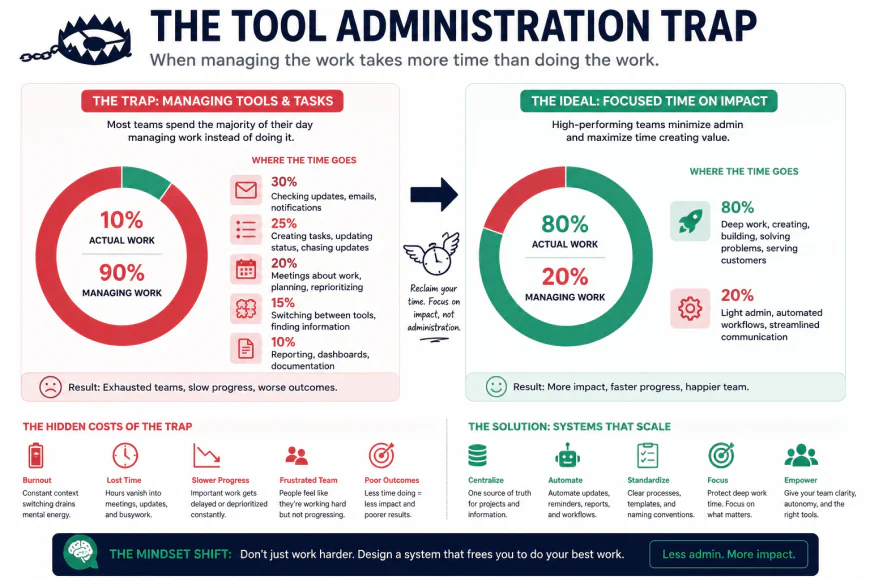 The Tool Administration Trap: Highly complex project management setups often divert team focus from actual execution to administrative formatting.
typical considerations selecting the wrong platform can introduce unexpected financial penalties. Many bootstrapped startups resort to alternative platforms like Notion or Linear because larger systems like Asana use pricing models that actively penalize micro-teams by forcing a minimum number of paid seats during plan upgrades. If you have a three-person team but must pay for a five-seat minimum, your cost per user spikes dramatically. Therefore, choosing a startup task management software requires balancing functional simplicity, team scaling speed, and licensing flexibility.
In-Depth Evaluation of the Contenders
Trello: The Ultimate Lightweight Kanban Board
Trello pioneered the digital Kanban board, and its core architecture remains built around visual progression. For teams under ten people, its simplicity remains unmatched, provided they leverage third-party integrations, commonly known as "Power-Ups," for basic reporting. Trello's setup flow is incredibly direct: a user registers, creates a board, defines columns (usually some variation of "To Do," "In Progress," and "Done"), and instantly starts dragging and dropping cards. This visual simplicity significantly reduces the cognitive load of onboarding freelance or part-time contractors, making it highly effective for startups with flat organizational structures.
Under the hood, Trello operates as a lightweight database where cards act as rows and lists represent columns. While this is exceptionally intuitive, it exposes major limitations when teams attempt to scale. The primary technical criticism of Trello lies in its security architecture. Specifically, Trello's lack of fine-grained user permissions allows any board member to archive or delete critical lists, creating severe operational risks for collaborative teams. If a single contractor accidentally clicks "Archive List" on your master product roadmap, restoring that data can be a frustrating exercise, as the platform lacks granular role-based access controls on standard tiers.
To turn Trello into a robust, minimal project management software, teams must rely on Power-Ups. While these add-ons allow for customized fields, calendar views, and simple Gantt chart visualizations, they also introduce complexity. Every Power-Up added increases the load time of the board and relies on third-party security compliance. However, if your team only needs a basic, functional layout without complex workflow automation or deep analytical dashboards, Trello remains an outstanding, friction-free option that developers and non-technical staff can adopt in minutes.
Asana: The Structured Engine for Growing Teams
Asana is designed to bring order to cross-functional chaos. It positions itself as a robust yet clean solution for companies that have outgrown simple list views but are not ready for the sheer complexity of enterprise-tier software. Asana's database structure is built on a relational system that allows tasks to exist in multiple views. However, this rigid database model also means tasks are tied tightly to lists, making complex cross-project linking unintuitive unless teams master "multi-homing" features—a process where a single task is mapped to multiple distinct projects simultaneously without creating duplicates.
For startups that manage physical assets or multi-step manufacturing pipelines, Asana's timeline structures provide an exceptional Gantt chart interface. It allows teams to establish task dependencies clearly, ensuring that team members are notified immediately when a blocking task is completed. The workflow automation engine in Asana is highly polished and remarkably bug-free, allowing users to build rules like "When status changes to 'Approved,' assign to the designer and move to the 'Asset Production' project."
 Visualizing data linking: Asana's relational database model allows tasks to live across multiple projects simultaneously, though it requires a steeper learning curve to set up.
However, Asana is not without its operational friction. Many founders complain that Asana's UI has shifted over time toward an enterprise-focused design, raising the barrier to entry for rapid, chaotic seed-stage planning. The platform can feel intimidating to new hires who are presented with multiple sidebars, nested portfolios, and aggressive goal-tracking modules. Additionally, for bootstrapped startups that only require a basic, functional layout, Asana's steep pricing tier acts as a significant entry barrier. The jump from their free plan to their paid tiers is one of the most expensive in the collaboration software market, particularly because of their mandatory minimum seat requirements during upgrades.
ClickUp: The Feature-Rich Everything App
ClickUp was built to solve the fragmentation of modern SaaS environments by uniting docs, wikis, goals, whiteboards, spreadsheets, and task tracking into a single, highly customizable workspace. It is highly cost-effective, offering an incredibly generous free tier and feature-packed paid plans. For a technical SaaS development team that wants to keep all wikis, sprints, roadmaps, and client feedback boards in one central hub, ClickUp provides an unmatched return on investment (ROI). It allows you to toggle between a Kanban board, a list view, a Gantt chart, and a mind map with a single click.
The core trade-off of ClickUp is its massive customization rabbit hole. Because you can customize almost everything—from custom fields and statuses to automations and nested folder hierarchies—lean startups can easily get distracted from executing their actual business goals. It is incredibly easy to lose days configuring the perfect dashboard rather than talking to customers or writing code. This hyper-configurability frequently triggers the "tool administration trap," turning project tracking into a full-time job for team members.
typical considerations ClickUp is built on an aggressive feature-shipping culture, which often results in recurring minor performance bugs and complex workspace hierarchies that overwhelm non-technical users. Because ClickUp attempts to do everything, its interface can feel cluttered and slow. Users on technical forums frequently point out that loading a large board in ClickUp on a standard web browser can cause noticeable DOM rendering lag, leading to a frustrating experience. The notification engine is also notoriously verbose out of the box; without careful, manual calibration, employees can experience severe notification fatigue, leading them to mute or ignore the platform entirely.
💡 Expert Analysis & Experience: Insights from the Field
Real-world implementation of these tools reveals a stark contrast between marketing promises and actual day-to-day operations. When evaluating community discussions on platforms like Reddit, several consistent patterns emerge regarding how startups interact with these platforms:
- ClickUp Overkill: Many small business owners on Reddit's r/smallbusiness forum note that ClickUp felt like complete "overkill" and led to intense notification overload. This excess of alerts often results in employees muting or completely ignoring the platform, rendering the tool useless. For more context on these user challenges, see this community discussion on Trello, Asana, and ClickUp.
- The Dopamine Deficit: Product managers migrating from Trello to Asana or ClickUp report that while their project tracking feels more structured on paper, their teams actively miss the instant visual dopamine hit and friction-free setup of Trello's drag-and-drop boards. They find themselves fighting to get teams to open the new, highly structured databases.
- Enterprise UI Drift: In subreddits like r/SaaS and r/productivity, founders routinely express frustration that Asana's UI has shifted heavily toward enterprise-focused metrics. This focus on corporate portfolio management makes the barrier to entry much higher for rapid, chaotic, seed-stage planning where priorities change daily. You can read more about these platform trade-offs in the r/SaaS discussion on ClickUp vs. Trello, and the r/productivity comparison of project management tools.
Direct Comparison Matrix
To help you visualize how these simple project management tools for startups compare across critical operating metrics, we have compiled a direct architectural comparison. Notice how each tool's strength directly corresponds to an operational trade-off.
| Operational Metric | Trello | Asana | ClickUp |
|---|---|---|---|
| Ideal Team Size | 1 to 10 members | 5 to 100+ members | 10 to 250+ members |
| Primary Layout | Visual Kanban Board | List, Board, Timeline (Gantt) | Multi-View (Board, List, Docs, Mindmap) |
| Onboarding Friction | Extremely Low (Minutes) | Moderate (Requires training) | High (Steep learning curve) |
| Workspace Structure | Flat (Boards & Cards) | Relational (Projects & Tasks) | Hierarchical (Space > Folder > List > Task) |
| Hidden Risk | No fine-grained permissions | Steep, rigid pricing upgrade tiers | Customization bloat & performance lag |
| Workflow Automation | Basic (Butler rules) | Highly polished, bug-free rules | Extremely customizable but complex |
Practical Scenario: How Three Different Startups Choose
To ground this in reality, let us look at three actual, concrete business use cases where different team dynamics dictate the correct software choice:
- Scenario A: A 3-person content marketing agency tracking an editorial pipeline from "Idea" to "Drafting" to "Client Review" to "Published." For this team, Trello is the ideal match, as they do not require deep hierarchical structures or complex dependencies; they simply need a shared virtual board where cards can be dragged across columns.
- Scenario B: A 40-person product development team operating in fast-paced sprint cycles that require cross-departmental collaboration between design, QA, and engineering. They choose Asana because they need to map out task dependencies on Gantt charts, balance individual workloads, and ensure clean handoffs without manual follow-ups.
- Scenario C: A rapidly scaling 150-person agency managing client onboarding, custom software builds, and creative production simultaneously. They select ClickUp because they require a highly structured, relational database that can adapt to wildly different workflows, keeping everything from client portal links to code repositories organized under one hierarchical roof.
The Ultimate Pros & Cons Breakdown
Every tool has its shining strengths and frustrating limitations. Let us look at the raw advantages and disadvantages of each platform to help you make an objective choice.
1. Trello: The Lightweight Visual Pioneer
Pros
- Incredibly easy to learn; zero learning curve for non-technical users.
- Highly visual Kanban interface keeps work stages clear at a glance.
- "Butler" automation is powerful and easy to set up for basic card movements.
- Excellent, generous free tier for small teams and personal projects.
Cons
- Becomes cluttered and unmanageable when managing hundreds of active tasks.
- Lacks native task dependencies and robust subtask management.
- No native portfolio view to monitor multiple distinct projects at once.
2. Asana: The Polished Cross-Functional Standard
Pros
- Extremely polished, fast, and bug-free user interface.
- Industry-leading Timeline (Gantt) and workload management views.
- Exceptional task dependency engine for complex team workflows.
- Clean, clear distinction between personal tasks and team goals.
Cons
- Pricing is significantly higher than competitors and scales steeply.
- Rigid upgrade tiers can force small teams into expensive enterprise-level plans.
- Limited customization compared to multi-view database solutions.
3. ClickUp: The Feature-Rich Productivity Powerhouse
Pros
- All-in-one replacement for docs, mindmaps, whiteboards, and chats.
- Highly customizable hierarchy allows you to scale up indefinitely.
- Extremely cost-effective, offering massive feature parity at lower price points.
- Rich list of native integrations and automated triggers.
Cons
- Steep learning curve; can feel overwhelming and bloated for new users.
- Frequent feature deployments can occasionally introduce performance lags.
- Requires dedicated administrative upkeep to prevent organizational chaos.
Who is Each Platform Actually For?
To cut through the marketing noise, here is the exact user profile that matches each tool:
- Choose Trello if: You are a freelancer, a small agency, or a single-department team that values speed and visual clarity over complex reporting. You want your board running in ten minutes without reading a single manual.
- Choose Asana if: You are a mid-market to enterprise-level organization with cross-departmental dependencies. You need high-level portfolio oversight, predictable workflow automation, and a clean interface that employees won't resist using.
- Choose ClickUp if: You are a tech-savvy, fast-growing startup, an operations-heavy agency, or a power user who wants a single source of truth for documents, task tracking, and resource management, and you don't mind spending a few days configuring it.
The Final Verdict: Making the Switch
There is no single "best" project management software—only the one that aligns with your operational complexity. If your team is struggling with adoption, Trello provides an easy entry point. If your projects are falling apart due to broken handoffs and missed deadlines, Asana offers the structured discipline your managers need. If you are tired of paying for five different SaaS subscriptions (Slack, Notion, Monday, Asana, Miro) and want to consolidate, ClickUp is your ultimate workspace utility knife.
Frequently Asked Questions
Can I migrate my data between these platforms easily?
Yes, all three tools offer native import/export tools. ClickUp, in particular, has dedicated import wizards designed to pull your boards directly from Trello or your project lists from Asana in just a few clicks.
Is ClickUp really a viable alternative to Notion?
Yes. While ClickUp is fundamentally task-driven and Notion is document-driven, ClickUp's Docs and Wiki features have improved to the point where they can successfully replace Notion for internal company knowledge bases and standard operating procedures (SOPs).
Which tool is best for external client collaboration?
Trello is the easiest for sharing simple visual boards with external clients. However, ClickUp offers highly customizable guest permissions and public views on its lower-tier plans, making it more cost-effective for sharing detailed tracking lists with clients without paying for extra seat licenses.
Your 60-Second Decision Checklist
Before pulling out your credit card, ask your team these four rapid-fire questions to finalize your choice:
| Question | If Yes... | Recommended Choice |
|---|---|---|
| Will our team resist using complex new software? | Keep it as simple as possible. | Trello |
| Do our tasks rely heavily on sequential order and milestones? | Prioritize dependency mapping. | Asana |
| Are we trying to consolidate multiple software tools into one? | Prioritize native documentation & features. | ClickUp |
| Do we have a dedicated PM to set up and manage our workspace? | Leverage high customization potential. | ClickUp / Asana |