Cheap Email Automation Tools That Avoid the Spam Folder
Find cheap email automation tools that keep campaigns out of spam. Discover high-deliverability, affordable email marketing automation for your startup.
 Abir Bin Hasan
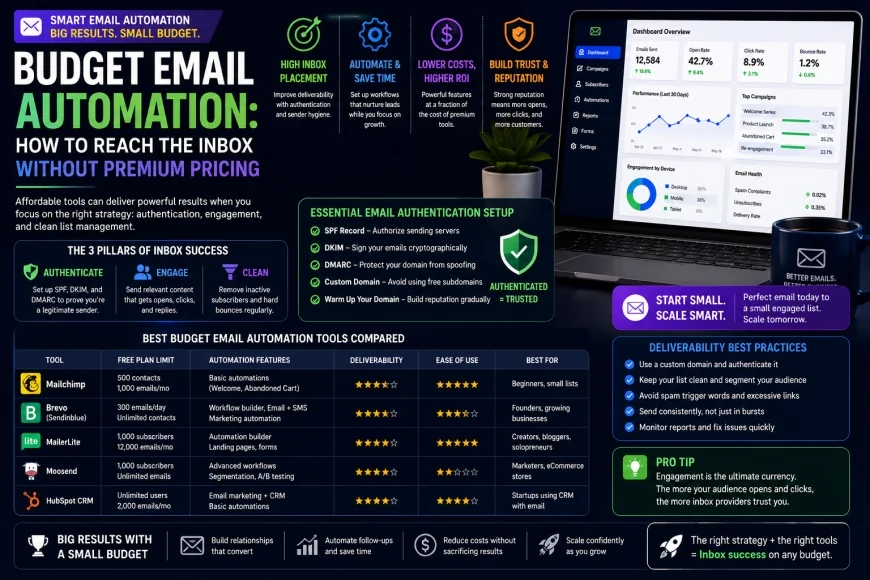
Budget Email Automation: How to Reach the Inbox Without Premium Pricing
Many early-stage companies assume that expensive platforms are the only way to guarantee reliable delivery. In reality, choosing cost-effective email software can yield excellent placement rates if you understand the fundamentals of sender reputation and domain authentication. This guide explores how to scale your outreach affordably without risking the spam folder.
Core Considerations
This guide is designed to help you determine which budget-friendly email platform aligns with your technical comfort level and list size. You will learn how to balance monthly software costs against deliverability performance, decide between volume-based and subscriber-based pricing models, and identify when it makes sense to step up to a hybrid SMTP setup.
Analysis Methodology
This comparison is based on an in-depth review of publicly available platform specifications, documentation, user feedback, and pricing structures. The analysis focuses on practical workflows, technical constraints, and long-term deliverability considerations for professional senders.
The Science of Email Deliverability on a Budget
To understand why some inexpensive systems fail while others succeed, we must look at the technical infrastructure governing modern email delivery. The journey of an automated email from your sending server to the recipient's primary inbox is governed by rules established by global oversight groups. Organizations like the Messaging, Malware and Mobile Anti-Abuse Working Group (M3AAWG) compile best practices that serve as blueprints for modern spam filters. If your software does not adhere strictly to these rules, even an expensive enterprise service will fail to deliver your messages.
Many low-cost services suffer from poor deliverability because of how they manage their shared IP pools. When sending through an entry-level service, your messages often share an IP address with hundreds of other accounts. According to documentation from The Spamhaus Project, a single bad actor on a shared IP address can land the entire server on a blocklist. Consequently, legitimate, opt-in newsletters can get caught in spam filters simply because an unrelated user on the same server sent unsolicited bulk mail. High-quality, affordable platforms actively manage this risk by grouping users into distinct reputation tiers based on sending history and bounce rates.
Furthermore, compliance with Internet Engineering Task Force standards is non-negotiable. Every automated email must conform to RFC 5322 guidelines, which define the structure and headers of internet messages. Affordable email software must construct these headers correctly, including accurate Date, From, and Message-ID fields. If a platform cuts corners on these standards to save on processing power, receiving mail servers (such as Gmail and Yahoo) will flag the incoming mail as suspicious. Your choice of platform directly affects whether your headers pass basic syntax validations.
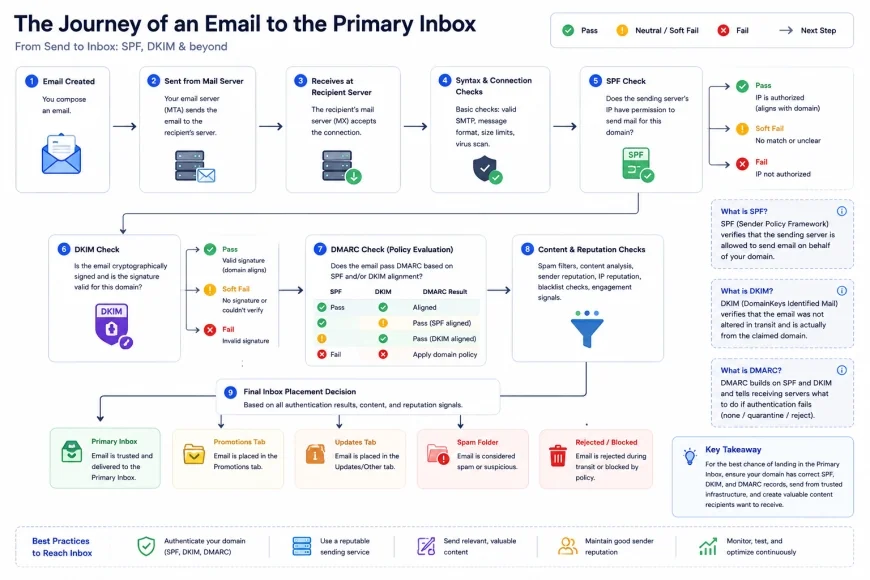 Figure 1: How technical authentication protocols determine whether an email is routed to the inbox or the spam folder.
To protect your domain's sending health, you must implement essential DNS authentication standards. The three pillars of email validation are:
- SPF (Sender Policy Framework): A DNS record listing the authorized IP addresses allowed to send mail on behalf of your domain.
- DKIM (DomainKeys Identified Mail): A cryptographic signature added to your email headers, verifying that the email was not altered in transit.
- DMARC (Domain-based Message Authentication, Reporting, and Conformance): A policy that tells receiving servers what to do if an email fails SPF or DKIM checks.
Evaluating the Top Cheap Email Automation Tools
Selecting the best budget platform requires balancing upfront pricing with technical performance. Below, we analyze several cost-effective options that maintain high delivery standards without charging premium rates.
1. Brevo (Formerly Sendinblue)
Brevo has become a popular choice for startups because of its billing model. Instead of charging you based on the total number of contacts in your database, Brevo charges strictly based on the volume of emails sent per month. This makes it an exceptionally cost-effective option for companies with large contact lists that only send occasional updates or targeted automated flows.
From a deliverability standpoint, Brevo maintains strict control over its shared IP pools. New accounts must undergo a validation process, and sending domains must be authenticated via DKIM and SPF before campaigns can be sent. This diligent vetting keeps their shared IP addresses off major blacklists. It ensures that businesses on basic tiers still receive reliable inbox placement. Additionally, Brevo offers dedicated IP options for growing senders who want complete control over their IP reputation.
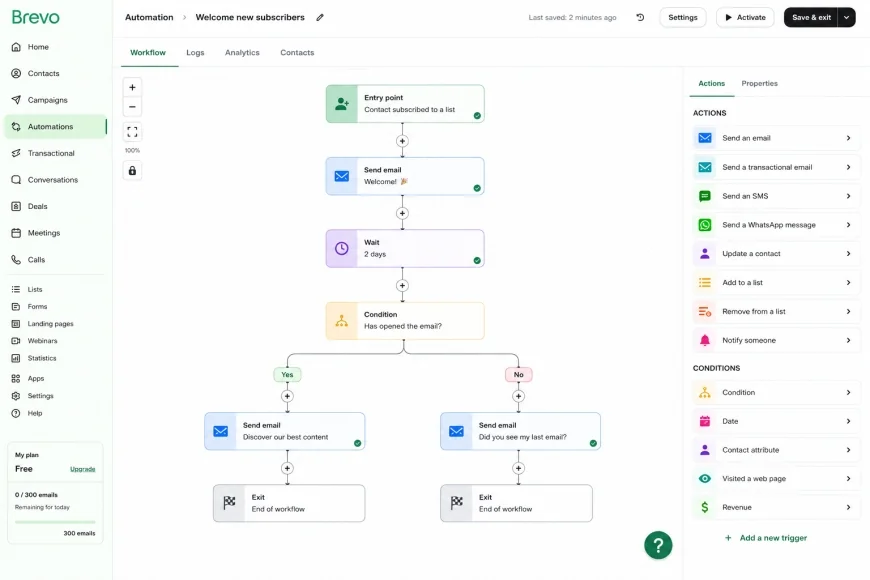 Figure 2: Brevo's visual automation builder, allowing startups to design multi-stage email flows based on user behavior.
2. EmailOctopus (Paired with Amazon SES)
For organizations looking for the absolute lowest cost per email without sacrificing reliability, a hybrid setup is highly effective. Using a service like EmailOctopus paired with Amazon Simple Email Service (SES) offers strong deliverability at a fraction of the cost of traditional email marketing suites. In this architecture, EmailOctopus acts as the user interface and automation engine, while Amazon SES serves as the transactional SMTP delivery engine.
This approach delivers excellent results because Amazon Web Services (AWS) maintains clean IP ranges and enforces strict rules. By leveraging Amazon's robust infrastructure, your inbox placement benefits from their strict anti-spam enforcement. However, this setup requires moderate technical proficiency. You must manually request production access from Amazon SES and configure your SPF and DKIM records inside your DNS provider. For startups willing to manage this initial configuration, this combination stands out as a highly efficient solution.
3. MailerLite
MailerLite is widely recognized as an accessible platform for growing businesses. It features an intuitive drag-and-drop editor, robust visual automation builders, and competitive tier-based pricing. MailerLite’s free tier is generous, and its paid plans scale gently as your subscriber count grows.
MailerLite achieves solid deliverability rates by enforcing rigorous account reviews during onboarding. They require clear proof of subscriber consent, which keeps their shared IP pools clean of spam complaints. Additionally, they provide clear, step-by-step documentation for setting up custom SPF and DKIM keys, making technical domain alignment accessible to non-technical users. This proactive approach to list quality ensures that all senders benefit from a high-quality neighborhood on their servers.
4. Sender.net
Sender.net focuses on providing budget-friendly delivery specifically optimized for e-commerce stores and small content publishers. Their platform includes advanced features like automated abandoned cart sequences, purchase follow-ups, and customer segmentation at a fraction of the cost of legacy competitors.
To preserve sender reputation, Sender.net runs real-time checks on list quality and monitors spam complaint rates closely. Their infrastructure automatically handles feedback loops with major ISPs. This ensures that any recipient who marks an email as spam is instantly unsubscribed, preventing recurring complaints that could damage the system's shared sending scores.
💡 Deliverability Strategy
Experienced email managers consistently point out a recurring pattern: many low-cost delivery platforms run on poor-quality shared IP pools where a single spammer can tank delivery rates for all users on that pool. To mitigate this risk, never choose a platform that does not require domain verification. Platforms that let users send bulk emails from generic free webmail addresses (like @gmail.com) inevitably suffer from degraded IP pools. Prioritize platforms that require custom DKIM alignment from day one.
Platform Comparison Matrix
The following table compares these budget-friendly tools across critical operational and technical parameters. This matrix helps you evaluate key trade-offs before committing your subscriber data to a specific provider.
| Platform | Pricing Model | Key Deliverability Feature | Technical Support Level | Best Suited For |
|---|---|---|---|---|
| Brevo | Volume-based (Pay per email sent) | Strict shared IP vetting & dedicated IP options | Email support (Paid tiers add phone support) | Businesses with large databases but low sending frequency |
| EmailOctopus + Amazon SES | Hybrid (Flat UI fee + raw SMTP usage) | Enterprise-grade AWS IP infrastructure | Community forum & basic email ticket support | Technical startups and developers seeking raw cost efficiency |
| MailerLite | Subscriber-based (Grows with contacts) | Rigorous manual onboarding checks | 24/7 Live Chat (Premium) & email support | Creators and small businesses wanting ease of use |
| Sender.net | Subscriber-based & prepaid credits | Automated feedback loop processing | Email and live chat support | E-commerce stores needing fast transactional triggers |
Practical Scenario
In practical use, a growing content platform often needs post-editing and system optimization to control costs. Consider a startup with 30,000 subscribers that sends a weekly newsletter. On a traditional subscriber-based model, this company would pay over $150 per month. By migrating to a hybrid setup of EmailOctopus and Amazon SES, they pay approximately $15 per month to EmailOctopus and $3 per month to Amazon for transactional sending. This yields a 90% cost reduction while matching the inbox placement rates of expensive alternatives.
✅ Pro Tip
When using budget-friendly email software, protect your core company domain by using a separate domain for outreach or high-volume newsletters. For example, if your primary site is company.com, register company-news.com or getcompany.com for your marketing activities. This protects your main operational emails from deliverability issues if your marketing campaigns face unexpected spam complaints or blocklists.
The Hidden Traps of Budget Email Marketing
While inexpensive marketing platforms can save money, you must be aware of the compromises made by budget-friendly providers. Knowing these limitations beforehand allows you to plan around them effectively.
First, low-cost platforms frequently cut corners on live technical support, leaving startups stranded when delivery issues or blacklists strike. If your sending domain is accidentally blocked by a major ISP, premium services provide immediate deliverability consulting to resolve the issue. In contrast, budget tools may rely on automated ticketing systems with response times of 48 to 72 hours. During an active campaign, a multi-day delay in resolving a blocklist issue can stall your lead generation pipelines and hurt revenue.
Second, some budget tools hide crucial features, like automated list cleaning or spam testing, behind premium tiers, neutralizing their initial cost-saving appeal. A clean database is essential for maintaining a strong sender reputation. Without native, automated cleaning tools to scrub invalid or abandoned mailboxes, your bounce rates will rise. According to industry databases like Validity's Sender Score Directory, a bounce rate exceeding 2% can cause ISPs to route your incoming messages to the spam folder. If your cheap email tool does not offer basic automated list hygiene on its entry-level tier, you may have to buy expensive third-party cleaning tools, erasing your initial savings.
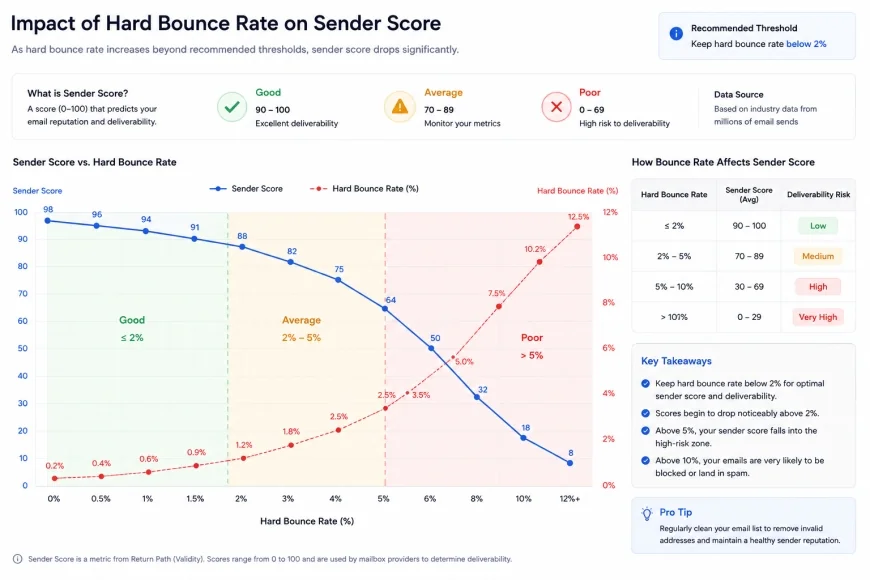 Figure 3: How elevated hard bounce rates damage your domain's Sender Score and impact deliverability.
Finally, keep an eye on shared IP reputation decay. Because budget platforms attract users looking for low entry costs, they are frequent targets for low-quality senders. Even if a provider claims to vet signups, some poor sending practices can slip through and send high volumes of poor-quality mail on your shared IP pool. To protect yourself, regularly monitor your IP’s reputation using tools like Validity's Sender Score Directory. If you notice a steady drop in performance, prepare to migrate to a dedicated IP or transition to a hybrid platform with tighter access controls.
Who Should Avoid Budget Email Tools?
While saving money is ideal, these platforms are not a universal fit. You should avoid these low-cost options if:
- You have zero technical patience: Setup processes—particularly hybrid models—require configuring DNS records, interpreting bounce codes, and navigating AWS or API documentation. If that sounds overwhelming, a fully managed premium service is a safer choice.
- Your business relies on real-time support: When an outreach campaign stalls or a domain gets blacklisted, budget tools often leave you waiting 48 hours for an email response. If every hour of downtime translates directly to lost revenue, the premium price of high-end platforms is essentially an insurance policy.
- You need highly complex behavioral branching: While basic autoresponders work well on these platforms, complex setups involving multi-source data syncing, custom CRM webhooks, and advanced predictive analytics are often too taxing for budget visual builders.
Deep Dive: Configuring Your Domain for Maximum Delivery
To successfully use affordable email software, you must handle the technical setup of your sending domain yourself. High-end tools sometimes automate this process, but budget platforms require manual configuration. Follow this step-by-step implementation guide to configure your DNS settings correctly.
Step 1: Setting Up Your SPF Record
Your SPF record is a TXT record added to your DNS registrar (such as Cloudflare, Namecheap, or GoDaddy). It specifies which servers can send emails on your behalf. If you send mail through both Google Workspace and Brevo, your SPF record must include both. An example of an optimized SPF record looks like this:
v=spf1 include:_spf.google.com include:spf.brevo.com ~all
Avoid having multiple SPF records on a single domain. Having more than one SPF record violates RFC standards and can cause mail servers to fail your authentication checks instantly. Instead, combine all sending services into a single TXT record statement.
Step 2: Configuring DKIM Signatures
Your email provider will generate a unique DKIM key (usually as a TXT record with a selector name, like mailo._domainkey). You must add this key to your DNS registrar. Once added, your email service signs every message header with a private key. The receiving mail server uses the public key in your DNS settings to verify the signature. This verification confirms that your message was not altered in transit. This setup prevents malicious actors from spoofing your sender identity.
Step 3: Implementing DMARC Policies
DMARC ties your SPF and DKIM records together. It tells receiving ISPs how to handle messages that fail validation. If you are starting out, use a "monitoring" policy to collect data without blocking any legitimate emails. Add this TXT record to your DNS under the host name _dmarc.yourdomain.com:
v=DMARC1; p=none; rua=mailto:dmarc-reports@yourdomain.com
As you confirm that all legitimate sources are authenticating correctly, you can tighten this policy to p=quarantine (which sends failing emails to spam) and eventually to p=reject (which blocks failing emails completely). This progression offers the highest level of protection against domain spoofing.
Balanced Comparison
Platform Advantages
- Highly competitive pricing that lowers the barrier to entry for early-stage companies.
- Volume-based pricing plans prevent you from paying for unengaged or inactive subscribers.
- Hybrid setups grant granular control over your sending infrastructure and SMTP options.
- Modern visual workflow builders match the automation features of premium marketing tools.
Platform Drawbacks
- Basic tiers often lack comprehensive phone or real-time chat support when critical issues arise.
- Shared IP pools are vulnerable to reputation drops from bad actors on the same network.
- Advanced domain setup and manual DNS configuration are required to achieve solid inbox placement.
- Essential features like built-in email validation may require higher-tier subscriptions.
Who should use what?
Determining the right budget-friendly email tool depends on your team's technical expertise and business model:
- The Solopreneur or Content Creator: Choose MailerLite. Its easy-to-use interface and robust free tier let you design newsletters and basic autoresponders without requiring technical help.
- The Growing Bootstrap Startup: Choose Brevo. The volume-based pricing model ensures you do not overpay for inactive users. This helps you build automation sequences affordably as your list grows.
- The Technical Founder or Developer: Choose EmailOctopus paired with Amazon SES. This setup delivers excellent cost-efficiency and enterprise-grade infrastructure, provided you are comfortable managing DNS settings and AWS permissions.
- The E-Commerce Shop Owner: Choose Sender.net. Its ready-to-use transactional automation features and deep shopping platform integrations let you trigger abandoned cart emails affordably.
Recommended Choices by Purpose
There is no single "best" cheap email automation tool for every situation. If your priority is ease of use and visual workflow builders, MailerLite provides the most polished experience for the price. If your goal is to minimize costs while maintaining a massive subscriber base, the EmailOctopus and Amazon SES hybrid setup is highly effective. For those who want simple volume-based billing without subscriber-count penalties, Brevo is the logical choice. Evaluate your in-house technical resources and choose the platform that aligns with your operational strengths.
Common Questions
Will using a cheap email automation tool make my emails go to spam?
No, the price of the software does not dictate your inbox placement rate. Deliverability is determined by your domain reputation, SPF/DKIM/DMARC authentication, list hygiene, and recipient engagement. Inexpensive tools can achieve the same inbox rates as premium tools if you set up your technical authentication correctly.
What is IP warmup, and do I need to do it on a cheap platform?
IP warmup is the practice of gradually increasing your email volume over several weeks to build a positive sending history with ISPs. If you are on a shared IP pool, the platform manages this for you. However, if you use a hybrid SMTP service like Amazon SES with a new dedicated IP, you must perform a gradual warmup to avoid triggering spam filters.
How can I check if my budget email platform has clean IP addresses?
You can use free tools like Sender Score or MxToolbox to check the reputation of your sending IP addresses. If your platform’s IP address appears on major blacklists run by organizations like Spamhaus, contact your provider's support team to request a move to a cleaner shared pool.
Why do budget platforms charge so much less for email automation?
Inexpensive tools lower their costs by automating customer support, limiting pre-sales consulting, and utilizing shared hosting networks. Many also use a hybrid delivery approach, offloading the outbound mail server work to specialized SMTP providers like Amazon SES.
Can I run double opt-in setups using cheap email marketing software?
Yes, almost all reputable low-cost email platforms support and encourage double opt-in configurations. Double opt-in requires new subscribers to click a confirmation link in an email before being added to your active list. This process is highly recommended because it filters out invalid email addresses and bot signups, helping protect your sender reputation.
Practical Checklist for Stellar Deliverability
Use this technical checklist before launching your next automated email campaign to ensure your messages bypass the spam filter and land directly in your recipient's primary inbox:
- Authenticate SPF, DKIM, and DMARC records on your DNS hosting provider.
- Warm up your new sender domain gradually over 2-4 weeks to establish positive reputation.
- Clean your email list using verification tools before importing contacts to a new platform.
- Avoid spam-trigger words (e.g., "100% Free", "Make Money Fast") in your subject lines and body copy.
- Implement double opt-in to ensure a highly engaged, permission-based recipient list.