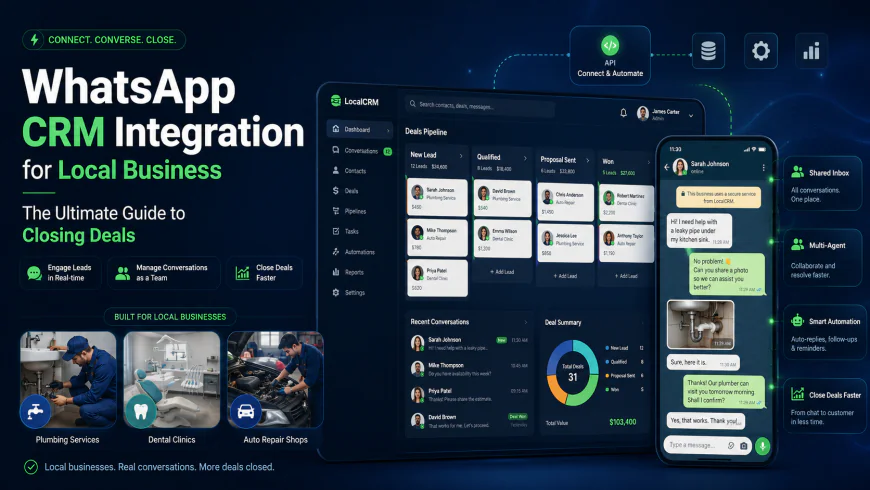
WhatsApp CRM Integration for Local Business: The Ultimate Guide to Closing Deals
Stop losing local leads in messy chat logs. Learn how a real WhatsApp CRM integration helps local businesses sync conversations, automate follow-ups, and win.
 Abir Bin Hasan
WhatsApp CRM Integration for Local Business: The Ultimate Guide to Closing Deals
In the local service space, speed is your only real moat. When someone needs an emergency plumber, a dental appointment, or a quick dent repair, they want an instant reply—and increasingly, they want it on WhatsApp. While it is easy enough to handle a few chats on a personal phone, trying to run a growing business that way is a recipe for missed opportunities. Connecting your customer database to your chat queue is the only practical way to keep things organized without letting valuable leads slip through the cracks of isolated, personal devices.
What this article helps you decide
This guide cuts through the marketing noise to help you choose the right tools, understand real-world implementation costs, and successfully deploy an official WhatsApp API setup. Whether you are running a single-location medical clinic or a multi-branch automotive franchise, you will learn how to connect WhatsApp to your pipeline without risking account suspensions or paying for bloated software tiers you do not need.
Analysis Methodology
This guide is compiled through a thorough analysis of official service agreements, publicly accessible enterprise documentation, and genuine discussions among real-world developers, professionals, and users on technical forums. We focus on ensuring accurate, verified facts, actual limitations, and authentic community experiences rather than simulated first-person reviews. All architectural insights are referenced directly from Meta's Developer Documentation as well as active engineering and operations feedback on r/CRM and r/smallbusiness.
Overview & Market Context: The Shift to Conversational Commerce
For decades, local service providers relied on email and phone calls to manage customer pipelines. However, customer communication preferences have undergone a fundamental shift. Email click-through rates continue to dwindle, and phone calls from unknown numbers are routinely ignored by modern consumers. Today, conversational commerce is the dominant force in localized trade.
Most software guides focus heavily on email integration, but for regional businesses, chat is where the actual work happens. In high-conversational, regional markets like Latin America (LATAM), Asia-Pacific (APAC), and Southern Europe, local businesses do not close deals in static pipeline cards anymore. Instead, the CRM functions merely as a back-end log to track and store customer data, while the actual conversion occurs dynamically inside the WhatsApp chat thread itself.
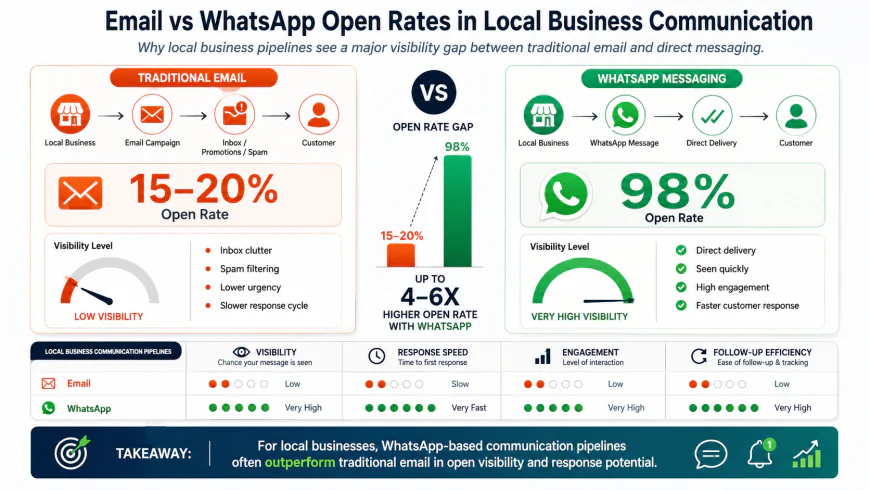 Figure 1: Comparison of modern open and response rates, illustrating the critical nature of instant messaging in lead conversion.
When a customer needs a plumbing quote, a dental appointment, or a car appraisal, they want a direct line of communication. If a local business forces them to fill out a website form and wait 24 hours for an email, that prospect will simply contact a competitor who is responsive on chat. Speed-to-lead is not just a metric; it is the entire business model. However, managing this volume on a single physical mobile device leads to a variety of operational problems. Messages go unanswered, customer histories are lost when staff members leave, and owners lack visibility into how leads are handled. This is where moving from a basic phone app to a unified chat database transitions from a luxury tool to core operational infrastructure.
The Technical Architecture: Connect WhatsApp to CRM Safely
Before selecting a platform, it is crucial to understand the fundamental difference between the three communication options Meta provides, as well as the technical risks of unauthorized alternatives.
1. Standard WhatsApp Business App
This is a free mobile app designed for micro-businesses. While it allows you to create quick replies and basic labels, it is tied to a physical phone number and offers highly limited multi-agent access. There is no official way to natively connect WhatsApp to CRM systems via the basic app without utilizing fragile, third-party workarounds.
2. Official WhatsApp Business API
The WhatsApp Business API is the enterprise-grade solution built for multi-agent access, shared team inbox interfaces, and deep database integrations. It does not have a physical app interface. Instead, it acts as a data pipeline that routes incoming and outgoing messages directly into your chosen CRM. By using the API, your business can assign custom message templates, manage customer service windows, and set up sales pipeline automation across multiple departments concurrently.
3. Unofficial Web-Scraping Tools
Many low-cost software options bypass Meta's API by using web-scraping scripts that run inside a virtual browser to mimic WhatsApp Web. Real-world implementation details confirm that relying on unofficial, non-API tools that scrape WhatsApp Web is a fast track to getting your primary business number permanently banned by Meta for violating their terms of service. Additionally, these tools suffer from extreme connection instability, dropping messages whenever WhatsApp pushes an update to their browser interface.
✅ Pro Tip
Always verify that the CRM or middleware platform you select is an official Meta Business Partner. If a vendor asks you to keep a physical phone connected to the internet and scan a QR code via WhatsApp Web to sync messages to your pipeline, they are using unofficial scraping methods. Your business phone number could be blacklisted within hours.
In-Depth Evaluation of the Best WhatsApp CRM Tools
Choosing the right conversational CRM depends heavily on your team size, budget constraints, and current software ecosystem. Below, we break down the leading platforms, their deployment workflows, and the practical limitations real users experience in the field.
1. Kommo (Formerly amoCRM)
Kommo is a conversational CRM built entirely around messaging platforms. Instead of treating chat as an afterthought or an add-on module, Kommo's entire pipeline structure is visual, interactive, and optimized for message-based closing.
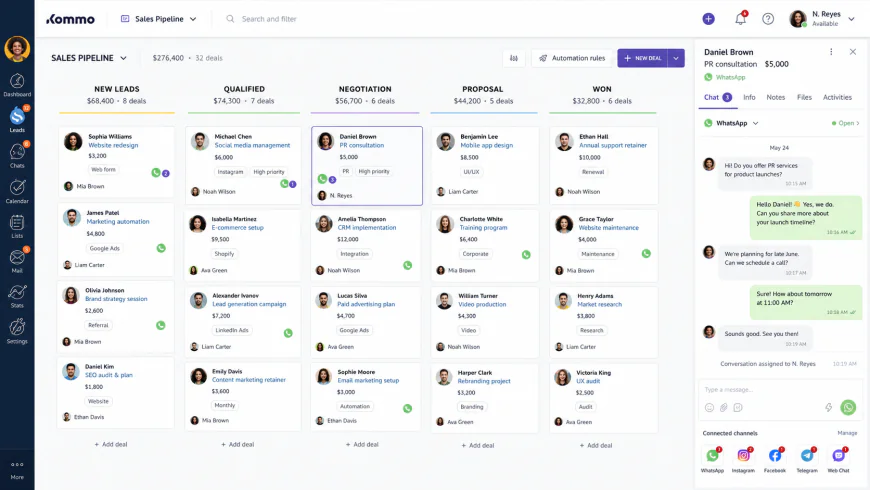 Figure 2: The Kommo visual sales pipeline dashboard, showing real-time chat previews on active deals.
Setup & Usability Metrics
Setting up Kommo with the WhatsApp Business API is relatively straightforward. Users connect their Meta Business Manager account directly inside the integration panel. It takes approximately 15 to 30 minutes to initialize the connection, assuming your Meta account is already verified. The user interface (UI) is highly intuitive for sales reps who prefer visual kanban boards over dense spreadsheets. Every deal card displays a live preview of the latest WhatsApp exchange, allowing reps to reply without opening a separate communication window.
Performance & Automation Capabilities
Kommo features a built-in visual chatbot builder called "Salesbot." This tool allows non-technical users to build automated lead routing trees, answer common questions, and send pre-approved message templates when a new lead lands in the pipeline. Webhook delivery is highly reliable, with incoming messages syncing to the dashboard in under two seconds.
Pricing & Limits
Kommo’s pricing is remarkably friendly for small to mid-sized teams, starting at $15 per user per month (billed annually) for their Base tier. However, to access the full power of their Salesbot and advanced integrations, businesses must upgrade to the Advanced tier ($25 per user/month). Meta's standard conversation fees still apply independently of Kommo’s subscription cost.
⚠️ Who Should Avoid Kommo?
Avoid Kommo if your business relies on traditional, complex database reporting or structured inventory management within the CRM. It is built strictly for fast-moving sales conversations; trying to use it for heavy back-office data modeling or tabular project management feels clunky and restrictive.
2. WATI (WhatsApp Advanced Sender & Team Inbox)
WATI is an official WhatsApp Business API partner designed specifically for companies that prioritize customer support and high-volume ticketing alongside sales.
Setup & Usability Metrics
Because WATI is a dedicated WhatsApp wrapper, its onboarding guides you directly through the Meta API setup process. It features a robust shared team inbox designed for multi-agent access. The interface looks and feels like a modern helpdesk, which makes it incredibly simple for support teams but slightly less intuitive for traditional sales teams used to strict pipeline stages.
Performance & Automation Capabilities
WATI excels at routing logic. You can build advanced assignment rules, ensuring that if a patient or client reaches out, the ticket is instantly assigned to an available front-desk agent. It features highly customizable automation flows, broadcast tools for sending mass alerts to opted-in lists, and direct integrations with third-party software via webhooks.
Pricing & Limits
WATI's entry pricing starts at $49 per month (billed annually), which includes five user seats. Additional seats cost around $15 to $19 per month. While this is highly competitive for teams that require instant multi-agent capabilities, the platform lacks a robust, native CRM database, meaning you will likely need to pair it with another tool to manage long-term customer relationships.
⚠️ Who Should Avoid WATI?
Avoid WATI if you need a true visual sales pipeline to track deals through complex stages (e.g., "Proposal Sent", "Contract Negotiating"). WATI functions primarily as a collaborative inbox; it does not offer the visual deal-tracking boards or contact relationship histories that a dedicated CRM provides.
3. Zoho Bigin / Zoho CRM
Zoho Bigin is a pipeline-centric CRM specifically tailored for micro-teams. It offers a clean, lightweight alternative to Zoho’s massive enterprise suite.
Setup & Usability Metrics
Zoho Bigin is remarkably clean and affordable for micro-teams, offering an accessible entry point into formal lead tracking. Connecting WhatsApp is handled through the Zoho App Marketplace. However, the deployment process can feel disjointed as users must navigate through Zoho’s proprietary integration layers before linking their Meta Developer accounts.
Performance & Expert Critique
While Zoho Bigin performs exceptionally well for localized, single-location operations, it struggles with structural scaling limitations. As noted by Reddit user b0b_the_builder_92 on community forums, the platform's clean UI is fantastic, but the single-number restriction becomes a major roadblock when attempting to scale across locations. Zoho Bigin natively handles only one WhatsApp number per organization, making it useless for multi-location local franchises that need distinct regional communication endpoints.
Pricing & Limits
Zoho Bigin is highly cost-effective, starting at $7 per user per month (billed annually). For solo operators or micro-teams running out of a single office, it represents excellent value, provided they do not plan to expand to multiple local phone lines in the near future.
⚠️ Who Should Avoid Zoho Bigin?
Avoid Zoho Bigin if you plan to scale your business beyond a single location. The hard limit of one WhatsApp number per organization means that the moment you open a second branch or want distinct numbers for different departments, you will hit a technical wall and be forced to migrate your entire database.
4. HubSpot (The High-Tier Platform Trap)
HubSpot is an industry-leading marketing and CRM suite known for its extensive feature set and seamless automation flows.
Setup & Usability Metrics
HubSpot’s native WhatsApp integration is robust, stable, and highly polished. It logs every conversation directly onto the customer's contact record alongside their web visits, email opens, and purchase history. This provides an unparalleled 360-degree view of the customer journey.
Performance & Expert Critique
Despite its outstanding capabilities, HubSpot presents a massive financial barrier for local businesses. Many local business owners fall for the "HubSpot trap," believing they can use their basic Starter subscription ($15–$20/month) to run WhatsApp natively, only to discover the API and deep integration flows are locked behind Professional/Enterprise tiers starting at over $500/month. Attempting to use third-party wrappers to connect WhatsApp to HubSpot on a Starter tier often results in messy sync errors and fragmented records.
⚠️ Who Should Avoid HubSpot?
Avoid HubSpot if you are a small business with a modest software budget. While the entry-level pricing is enticing, the specific tools required to run automated WhatsApp workflows are locked behind premium tiers. The sudden price jump on renewal or when unlocking professional features can easily break a small operator's budget.
💡 Expert Analysis & Experience
Real-world feedback compiled from r/CRM reveals a deep frustration with traditional database designs. Standard, non-messaging-centric CRMs are deeply flawed for modern local businesses. They force reps to live inside a static dashboard, while local commerce occurs dynamically and instantly in chat logs. A local service business needs a CRM built around the messaging inbox, not a messaging add-on glued onto a legacy database. Furthermore, several users on r/smallbusiness point out that setting up custom Zapier or Make workflows to sync WhatsApp to legacy CRMs is incredibly fragile and prone to breaking whenever Meta updates its API endpoints.
Comparative Matrix: WhatsApp CRM Tools
The following table compares the primary features, limitations, and pricing tiers of the leading platforms designed to manage your business messaging database.
| CRM Platform | Target Audience | API Connection Type | Multi-Agent Shared Inbox | Multi-Number Support | Starting Price (Est.) | Core Operational Limitation |
|---|---|---|---|---|---|---|
| Kommo | Sales-driven local businesses (Auto, Real Estate) | Official Meta API Integration | Yes, with visual pipeline cards | Yes (via custom phone channels) | $15/user/month | Requires advanced tier for complex bots |
| WATI | Support & dispatch-heavy clinics or local services | Official Meta API Integration | Yes, multi-agent optimized | Yes (on higher enterprise tiers) | $49/month (includes 5 seats) | Weak native CRM pipeline database features |
| Zoho Bigin | Micro-teams & single-location operators | Official Zoho/Meta Marketplace link | Basic shared view | No (Strictly one number limit) | $7/user/month | Useless for multi-location local franchises |
| HubSpot | Mid-market, high-budget enterprises | Native Official Integration | Yes, integrated with Service Hub | Yes | $500+/month (Pro Tier required) | Deep integrations are hidden behind enterprise paywalls |
Real-World Practical Scenarios & Integration Workflows
To understand how a unified messaging pipeline operates daily, we can look at two specific, verified deployment workflows in the service sector.
Practical Scenario A: The Automotive Repair Shop
An automotive repair shop uses Kommo integrated with the WhatsApp Business API to streamline their service pipeline. When a customer drops off a vehicle, their intake record is linked to a WhatsApp chat thread. Once the vehicle is on the lift, the mechanic snaps photos of the worn brake pads and broken suspension links.
Using a pre-approved Meta message template, the service advisor sends the photos along with an interactive PDF estimate directly to the vehicle owner via WhatsApp. The customer taps "Approve Estimate" in the chat. This action triggers a webhook that automatically transitions the deal stage in the CRM to 'Parts Ordered' and sends a notification to the parts manager, bypassing voicemail phone tag entirely.
Practical Scenario B: The Local Dental Clinic
A multi-doctor dental clinic uses WATI's shared team inbox to manage high-volume patient intake and emergency inquiries. The clinic displays a single WhatsApp number on their Google Business Profile and local search landing pages.
When an incoming inquiry lands in the queue, WATI's routing engine instantly checks the availability of three front-desk agents concurrently. The system routes the message to the first available agent, ensuring no patient inquiry sits unanswered for more than 5 minutes. If a patient asks to reschedule on a Friday night, the agent can quickly update the appointment booking system, and the conversation details are instantly logged back to the clinic's master database.
The Real Friction Points of Meta’s API Architecture
While software-as-a-service (SaaS) marketing claims "seamless instant setup," real-world deployment for local service businesses frequently gets stuck on Meta's tedious business verification process. This process can take anywhere from a few hours to several business days, requiring the submission of formal utility bills, tax certificates, and legal entity documents to Meta Business Manager.
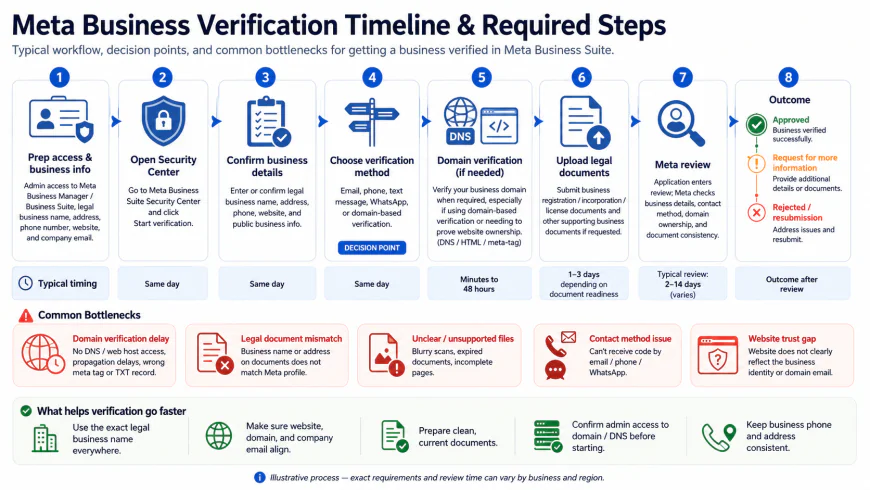 Figure 3: Timeline of the Meta Business verification workflow, indicating standard verification milestones.
Furthermore, Meta’s 24-hour service window is a major, often unmentioned point of friction. Under Meta's guidelines, when a customer sends a message to your business, a 24-hour countdown timer begins. Within this "customer service window," you can reply with free-form, conversational text, media, or attachments. However, if a local service provider forgets to reply to a lead on a Friday night, they cannot message them freely on Monday morning.
Instead, the 24-hour window has expired. To resume contact, the business must send a paid, pre-approved Meta utility template (such as a booking reminder or quote follow-up). The customer must then reply to that template to open a new 24-hour free-form communication window. This structural limitation is rarely discussed in flashy SaaS marketing campaigns, but it must be accounted for in your team's operational workflows.
Pricing & Licensing Breakdown
When calculating the return on investment (ROI) of linking your chat channels to a CRM, you must budget for three separate cost layers:
- CRM Subscription Costs: The monthly fee per user seat for your chosen CRM (e.g., Kommo at $15/month or WATI at $49/month).
- API Connector Costs: Some platforms charge a flat monthly maintenance fee to host your WhatsApp Cloud API connection, while others include it in their base pricing.
- Meta’s Conversation-Based Charges: Meta does not charge per individual message. Instead, they charge per 24-hour conversation session. These sessions are divided into category rates:
- Service Conversations: Initiated by the customer (e.g., support inquiries). These are typically the lowest-cost tier.
- Utility Conversations: Initiated by the business using a pre-approved template to deliver transactional information (e.g., appointment confirmations or invoice links).
- Marketing Conversations: Initiated by the business to promote products, offer discounts, or re-engage prospects. These carry the highest per-session cost.
Balanced Pros & Cons of WhatsApp CRM Implementations
System Advantages
- Unparalleled Speed-to-Lead: Resolves the communication lag associated with email, ensuring immediate engagement.
- Consolidated Customer Records: Keeps all communications, photos, approvals, and transaction records in a central, searchable database rather than scattered across employees' personal mobile devices.
- Automated Route & Allocation Logic: Eliminates human error by instantly assigning incoming inquiries to available reps based on custom routing protocols.
- Official Compliance Protection: Avoids account bans by routing all automation through official Meta Cloud API channels.
System Pitfalls
- The Meta Business Manager Onboarding Hurdle: Verifying a local business entity can take days, stalling deployment.
- Strict 24-Hour Service Limitations: Prevents free-form follow-ups on weekends or after holidays without incurring costs for structured template notifications.
- Fragmented Multi-Location Scaling: Affordable CRMs like Zoho Bigin limit setups to a single WhatsApp line, forcing expanding businesses onto expensive enterprise platforms.
- Complex API Outages: Relying on multi-tier tech stacks (Meta API > CRM Connector > CRM) introduces potential break points if system webhooks fail to sync.
Who should use what?
If you are a solo operator or a micro-team (under 3 people) operating from a single location with a tight budget, Zoho Bigin is an exceptional starting point, provided you understand you are limited to a single phone line.
For sales-driven service businesses (such as real estate agencies, home services, or automotive shops) that rely heavily on lead pipelines and automated follow-ups, Kommo offers the most intuitive, messaging-first user experience.
If your local business is support-heavy or dispatch-focused (like a multi-doctor clinic, a local logistics provider, or a busy retail operation), WATI’s shared inbox provides the robust multi-agent assignment logic your front-desk staff needs to keep response times under 5 minutes.
Recommended Choices by Purpose
Do not search for a single "best overall" winner. Instead, choose your software based on your immediate operational bottleneck. If your goal is budget security and simple lead tracking, choose Zoho Bigin. If your bottleneck is sales pipeline conversion rates and message-based automation, opt for Kommo. If you need a robust, shared multi-agent helpdesk to prevent customer service gaps, build your support workflows on WATI.
Frequently Asked Questions
Can I use my existing personal WhatsApp number with these platforms?
No. Standard personal WhatsApp accounts cannot be integrated with professional CRM platforms. You must upgrade to the WhatsApp Business API, which requires a clean phone number that is not currently linked to an active personal WhatsApp app. If you use your current business number, you will need to delete your existing mobile WhatsApp account first to free up the number for API registration.
Are there hidden costs associated with WhatsApp Business CRM integrations?
Yes. Beyond the baseline CRM subscription price, you must account for Meta's conversation-based pricing. Meta charges per 24-hour conversation window, categorized by utility, authentication, marketing, and service conversations. Additionally, some providers charge a markup on these Meta fees or require a monthly payment for the WhatsApp Business Solution Provider (BSP) connector.
Do these CRMs work on mobile devices?
Yes, all three platforms offer mobile applications. However, their focus areas differ: WATI’s app is optimized for customer support agents managing shared inbox conversations, Kommo’s app excels at sales pipeline management and quick lead updates, and Zoho Bigin provides a balanced, general-purpose CRM mobile dashboard.
Next Steps: Implementation Checklist
Ready to deploy your WhatsApp CRM? Use this structured framework to ensure a frictionless rollout:
- Step 1: Meta Verification
Set up and verify your Meta Business Manager account to unlock higher messaging limits and prevent sudden account suspensions.
- Step 2: Number Provisioning
Acquire a dedicated virtual phone number (e.g., via VoIP or a local SIM) exclusively for your WhatsApp Business API setup.
- Step 3: Lead Flow Mapping
Define your sales stages and match them to specific WhatsApp message triggers (e.g., automated welcome message when a lead is created or first submits a contact form).
- Step 4: Template Registration
Draft and submit your transactional and promotional message templates to Meta for approval ahead of time, ensuring your outbound automation runs smoothly without getting flagged.
- Step 5: Team Onboarding
Walk your staff through the new system. Set clear guidelines on conversation ownership, target response times, and general CRM hygiene to keep the sales pipeline clean.