The Cheap CRM Trap: Best Cheap CRM for Small Teams with No Hidden Fees
Are budget CRMs a scam? Discover the best cheap crm for small teams that actually works, avoids the infamous 'contact tax,' and keeps your pricing transparent.
 Abir Bin Hasan

The Cheap CRM Trap: Finding a Budget Pipeline Tool with No Hidden Fees
Signing up for a cheap sales platform is a rite of passage for growing businesses—and so is the sticker shock that follows a few months later. Many teams log onto highly rated platforms expecting a simple $15-per-seat setup, only to get hit by "the Contact Tax" (where storing inactive leads costs thousands) or finding that basic automated sequences are locked behind a massive price jump to premium tiers. Before committing your team's hard-earned lead data to a system designed to trap you, it is critical to look past the marketing pages and find an honest budget CRM that actually delivers transparent, predictable pricing.
What this article helps you decide
This guide is written to help small business owners, sales operations managers, and solo founders navigate the predatory landscape of entry-level software pricing. By reading this analysis, you will be able to determine whether your team should adopt an ultra-simple, flat-rate platform like Less Annoying CRM, a streamlined pipeline tool like Zoho Bigin, or opt for a modern "hybrid database" stack that bypasses standard industry limits entirely.
Analysis Methodology
This guide was compiled through a detailed analysis of official service agreements, public pricing history, and genuine discussions among real-world developers and sales operations professionals on technical forums like Reddit (specifically r/CRM and r/CRMSoftware). The focus here is on verified facts, actual usage limitations, and authentic community experiences rather than simulated hands-on reviews. All pricing details, feature gates, and contract terms have been cross-checked against the official documentation of HubSpot, Pipedrive, Zoho, and Less Annoying CRM.
Overview & Market Context: The Illusion of Cheap CRM Software
The modern pipeline management market is crowded, with hundreds of platforms competing for your subscription dollars. In their marketing campaigns, software providers frequently advertise rock-bottom prices—often starting at free or $12 per user, per month. However, industry insiders recognize that these entry-level tiers are usually designed as psychological anchors. Their main goal is to capture your raw sales data early, locking your operations into an ecosystem that becomes exponentially more expensive as your business scales.
While industry influencers constantly hype up free tiers, we want to look at the exact moment these tools force you to upgrade and suggest alternative strategies with transparent flat pricing. For small teams, the true cost of software is rarely found on the public pricing page. Instead, it is buried within complex usage limits, restricted automation capabilities, and strict database caps. As a business grows, it naturally collects more records. At this point, many find themselves paying what industry experts call the "contact tax"—a pricing model where storing additional lead records causes subscription rates to skyrocket, even if your actual user count remains identical.
Furthermore, the architecture of entry-level packages is often deliberately restricted. Platform developers use a strategy called feature gating, where essential tools such as basic email tracking, multi-stage pipelines, and automated lead routing are hidden behind premium tiers. Consequently, a small team that starts on a budget-friendly starter plan is soon forced to choose between experiencing painful operational bottlenecks or upgrading to an enterprise plan that costs ten times more. To protect your business from this pricing trap, you must understand how these systems are structured and learn how to identify genuine, transparently priced alternatives.
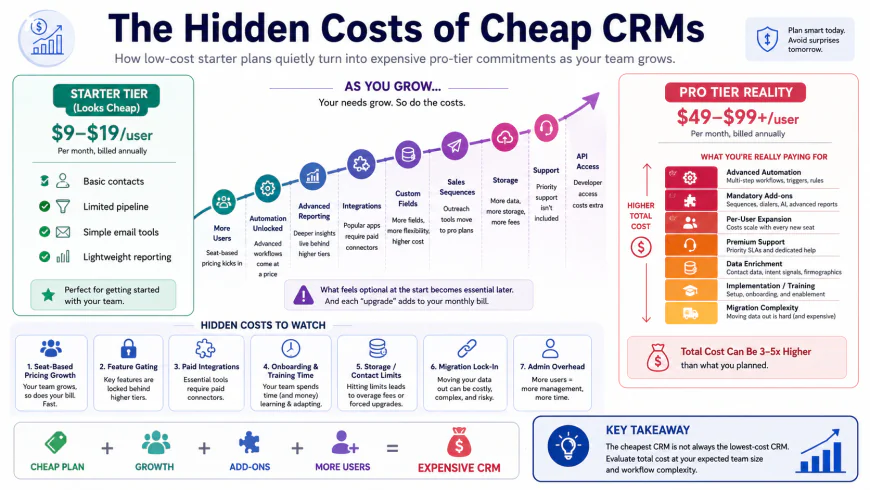 Visualizing the "Starter-to-Pro Jump" where cheap initial tiers quickly escalate in price as your business scales.
The Anatomy of the Cheap CRM Trap: Five Hidden Costs Exposed
To choose the best cheap crm for small teams, you must first understand the specific mechanics of how low-cost database tools trap growing operations. When evaluating budget options, small teams must look beyond the initial user seat pricing and analyze the core limitations of the software architecture. Five distinct mechanisms define this trap:
1. The Contact Tax (Database Volume Limits)
The contact tax is the most common way low-cost customer software generates massive, unexpected bills. A provider may offer a plan for an affordable rate of $15 per user, but limit your database to 1,000 or 2,500 contacts. Once your marketing campaigns succeed and your list grows past this arbitrary ceiling, the platform automatically forces you into a higher tier. Because business development naturally involves accumulating historical leads, this design makes future price hikes inevitable. For example, a business can easily go from paying $30 per month to hundreds of dollars simply because they gathered more email addresses, regardless of whether their sales team actually grew.
2. Feature Gating & The "Glorified Rolodex"
Many inexpensive database tools are designed as crippled products. Under the guise of simplicity, providers strip out critical functionalities like automatic email tracking, pipeline visibility, and lead management workflows. What you are left with is a glorified, manual spreadsheets-style list that requires constant human input to remain updated. If your sales representatives have to manually copy and paste every single email interaction into a contact record, the administrative overhead increases significantly. To unlock basic automated workflows, the system forces a non-linear price jump that completely undermines the initial budget calculations.
3. Global vs. Per-User Usage Caps
A highly deceptive tactic used by major software providers is the implementation of global usage caps across user accounts. Instead of assigning limits to each individual seat, some platforms pool resources globally across the entire company. If your business has a small team, a pooled limit (such as a shared outbound calling minute cap or a restricted number of shared document templates) can be exhausted rapidly by a single active user. When this happens, the entire team is blocked from using the tool unless the company purchases expensive, flat-rate add-ons or upgrades the entire team's licensing tier.
4. Freemium Lock-in and Hidden Migration Costs
The concept of freemium lock-in relies on a simple psychological reality: once you enter your valuable business data into a system, the friction of leaving is incredibly high. Moving records, custom fields, notes, and activity histories out of a platform often incurs hidden migration costs. These costs can include paid consultant hours, custom API development, or weeks of manual data entry. Because of this high friction, businesses often tolerate massive, unexpected price increases rather than undergo the painful process of migrating their database to a competitor.
5. Rigid Billing Terms and Cancellation Policies
Many low-cost CRM providers offset their low monthly fees by locking small teams into rigid annual contracts with zero refund flexibility. If your team size fluctuates, or if you discover the software is a poor fit after two months, you are still legally bound to pay out the remainder of the annual contract. This financial rigidity can be highly damaging to small businesses that need to maintain strict control over their operational cash flow.
💡 Expert Analysis & Experience
The modern SaaS landscape is rife with pricing models designed to capture and hold small business data hostage. Reddit discussions (specifically in r/CRM and r/CRMSoftware) contain countless warnings from users who learned this the hard way. For instance, a small real estate team discovered that HubSpot Starter's 500-minute calling limit was shared globally across all users with no option to purchase extra minutes, rendering the built-in calling feature virtually useless for active outbound sales. Similarly, a marketing manager documented paying $32,000 per year to HubSpot primarily to host 55,000 contacts for basic newsletter updates—demonstrating how quickly a growing list triggers enterprise-level billing. Meanwhile, on G2 and Capterra, users frequently note that while Pipedrive is highly visual and easy to adopt, basic sequence automations require flat-rate company add-ons that inflate the expected monthly invoice well past the baseline seat pricing.
In-depth Evaluation of the Top Low Cost CRM Software Options
To help you find an affordable, reliable platform that actually works, we have analyzed the four most popular options on the market. Our evaluation focuses on usability, feature depth, and—most importantly—the hidden limits of their pricing structures.
1. Less Annoying CRM (LACRM)
Less Annoying CRM is built specifically for small teams that prioritize ease of use and price predictability over complex enterprise features. It is one of the few platforms on the market that offers a truly no-hidden-fee database experience, charging a flat $15 per user per month with no contact limits, no tiered upgrades, and no long-term contracts.
 Less Annoying CRM prioritizes a clean, clutter-free user interface designed for small teams that do not need complex enterprise features.
The onboarding flow of Less Annoying CRM is incredibly straightforward. Within fifteen minutes, a team can import their existing contacts from a CSV file, set up their custom pipeline stages, and begin managing deals. The interface is clean, fast, and lacks the confusing, multi-layered menus that plague larger platforms. Its main focus is on high pipeline visibility and intuitive lead management, allowing every team member to see exactly where deals stand without extensive administrative overhead.
Who should avoid it & Limitations: Teams needing robust, modern design or advanced workflow logic should steer clear of LACRM. The UI looks severely dated, reminiscent of web apps from 2010. The email tracking capabilities are also basic, relying on a personalized BCC email address rather than deep, native email syncs, meaning automatic two-way email tracking is not natively supported. Furthermore, those looking for advanced workflow automation, deep reporting dashboards, or complex API integrations without paying for a third-party tool like Zapier will find the system incredibly frustrating.
2. Zoho Bigin
Zoho Bigin is a streamlined, pipeline-centric system designed specifically for small businesses. It represents Zoho's attempt to strip out the overwhelming, developer-first bloat of their flagship product, Zoho CRM, in order to deliver a highly focused, visual sales tool.
From a usability perspective, Zoho Bigin excels. It features a modern, drag-and-drop Kanban board interface that rivals Pipedrive in its simplicity. For less than $10 per user per month (billed annually), it provides small teams with multiple pipelines, built-in telephony integrations, simple email tracking, and custom fields. According to G2 and Capterra verified user comparisons, Bigin serves as an excellent entry point for teams that need visual deal tracking without a steep learning curve.
Who should avoid it & Limitations: Avoid Bigin if you dislike clunky, multi-layered settings menus or if you require rapid, reliable customer support—Zoho’s lower-tier customer service is notoriously slow and difficult to deal with. While the platform is highly functional, its native automation features are heavily capped on the lower tiers. Furthermore, Bigin is tied to Zoho's broader corporate pricing policies. Although the monthly seat pricing is low, the platform enforces strict annual billing structures if you want to lock in the lowest rates, and their cancellation refund policies are notoriously rigid.
3. HubSpot Starter
HubSpot is the giant of the CRM industry, and its Starter tier is heavily marketed as the ultimate budget-friendly tool for growing teams. On the surface, the pricing seems highly competitive, starting at roughly $15 to $20 per seat per month. However, HubSpot Starter is the industry's primary example of a psychological pricing anchor.
The platform provides a highly polished, user-friendly interface. It offers world-class lead management, sleek forms, and clean visual deal pipelines. For a small team, the immediate user experience is unmatched, and the system integrates with a vast array of third-party marketing and sales tools. It makes complex data structures look simple, which often leads to high adoption rates among team members.
Who should avoid it & Limitations: Bootstrapped companies should avoid HubSpot Starter unless they have the venture funding to support its eventual upgrade costs. The "Starter-to-Pro" price jump is a massive financial shock, often jumping from $20/month per user to hundreds of dollars per user just to unlock basic features like automated email sequences, advanced reporting, or custom lead assignment rules. The learning curve of the broader HubSpot ecosystem can also be steep for non-technical users, and if your sales team grows and your database hits the "contact tax" thresholds, your bill can escalate into thousands of dollars per month before you know it.
4. Pipedrive
Pipedrive was designed by sales professionals, and its core focus is helping teams visualize and manage their sales funnels. It is widely praised for its outstanding pipeline visibility, intuitive interface, and ease of use, making it a very popular choice for teams that live and die by their outbound sales numbers.
The platform makes tracking deals, setting up follow-up activities, and visualizing conversion rates incredibly simple. Its lead management features are robust, and it offers solid two-way email tracking, allowing representatives to send and receive sales emails directly within the platform. The onboarding process is visual and fast, reducing the administrative resistance that typically causes small teams to abandon new software.
Who should avoid it & Limitations: Avoid Pipedrive if you want an all-in-one marketing and sales tool without paying extra for add-ons. While the base subscription plans are relatively affordable, many features that small teams consider essential—such as automated email sequences, advanced smart contact data, and marketing campaign tools—are structured as flat-rate company add-ons. If you require automated sales flows, you will find yourself forced to purchase these add-ons, which can quickly double or triple your expected monthly invoice, even for a small team of three to five users.
| CRM Platform | Base Price (Per User/Mo) | Hidden Limits & Caps | Contact Ceilings | Best Suited For |
|---|---|---|---|---|
| Less Annoying CRM | $15 (Flat Rate) | No advanced automation or native 2-way email sync; dated UI | Unlimited contacts | Teams wanting absolute simplicity & budget predictability |
| Zoho Bigin | $7 - $12 (Billed Annually) | Rigid cancellation policies, limited automation triggers, slow support | 50,000 record cap | Budget-conscious teams needing simple visual pipelines |
| HubSpot Starter | $15 - $20 | Huge "Starter-to-Pro" pricing jump, shared calling limits | Strict tiers; expensive "Contact Tax" on growth | Teams planning to scale rapidly with venture funding |
| Pipedrive | $14 - $24 | Flat-rate add-ons required for automated email sequences | Limit on open deals based on tier | Sales-focused teams needing high-visibility pipelines |
Real-World Workflows: How Small Teams Outsmart the Trap
Faced with aggressive upsells and hidden platform fees, many micro-businesses (less than 5 people) are bypassing traditional sales software entirely. Instead, they are adopting hybrid databases—combining cheap, highly visual Kanban tools with robust email automation platforms via webhooks. This strategy allows them to build highly customized sales engines without paying a high contact tax or dealing with restrictive user seat pricing.
 Architectural diagrams of modern hybrid workflows that bypass traditional CRM limits using lightweight webhooks and specialized tools.
By connecting specialized, lower-cost tools, small teams can maintain complete control over their business data while keeping their software costs low and predictable. Let's look at two specific, real-world setups used by small teams to avoid the cheap CRM trap:
Practical Scenario: Two Custom Workflow Setups
Setup A: The Flat-Rate Hybrid Stack (Less Annoying CRM + MailerLite)
A small B2B consulting agency consisting of three people needed a reliable system to track high-value sales deals while simultaneously nurturing a cold audience list of 15,000 contacts. If they used a standard platform like HubSpot or Pipedrive, hosting those 15,000 cold contacts would have cost them hundreds of dollars per month in contact taxes, despite their actual sales team staying very small.
Instead, the agency implemented Setup A: They utilized Less Annoying CRM at a flat rate of $15/month per user to manage their active sales pipeline, deal tracking, and calendar follow-ups. Since LACRM does not charge a contact tax, they hosted their active prospects there without any penalty. For their large, volume-based marketing emails and newsletters, they set up an account with MailerLite. They used Make.com (or simple webhooks) to automatically push closed-won deals from LACRM to MailerLite. This hybrid approach kept their monthly software costs under $75/month, while giving them a clean, scalable sales and marketing engine with zero hidden fees.
Setup B: The Custom JS Integration (JobTread + HubSpot Starter)
A regional real estate remodeling team used JobTread for project estimating and job management. To capture inbound website leads from organic search campaigns, they needed a system that could parse custom UTM marketing parameters directly into their CRM so they could track lead sources accurately. Standard forms in Pipedrive and HubSpot Starter do not allow you to capture hidden UTM variables unless you upgrade to their expensive premium plans.
Instead of paying for a massive premium upgrade, the remodeling team kept their basic HubSpot Starter tier. They wrote a lightweight, custom JavaScript script to run on their WordPress website. When a visitor landed on their site, the script captured the UTM parameters from the URL and stored them in the visitor's browser. When the visitor submitted their custom contact form, the JS script dynamically inserted those tracking parameters into hidden fields before sending the data directly to HubSpot's API. This simple workaround saved them over $400/month in software licensing costs, giving them advanced tracking capabilities on a starter budget.
✅ Pro Tip
Before you commit to any low-cost CRM, export your current contact list as a CSV file and test the platform's migration tool during the free trial. Pay close attention to how the platform handles custom fields and historical notes. If a provider makes it difficult to export your raw data in a clean, structured CSV format, they are likely using freemium lock-in tactics. Choose platforms that allow you to import and export all of your customer history with a single click, ensuring you can walk away if their prices rise unexpectedly.
Pricing & Licensing Breakdown: The True Cost of Scaling
To truly understand the cost differences between these options, you have to look at how their licensing scales as your business grows. The chart below illustrates the compounding costs of seat licensing and contact storage over a multi-year period for a typical growing team.
When a small business starts out with three users and 1,000 contacts, almost every platform seems affordable. But as you add users and scale your marketing efforts, the hidden costs begin to compound. For example, if your team grows to five users and your contact database reaches 10,000 leads, the cost differences between transparent, low-cost CRM software and standard market offerings become stark:
- Less Annoying CRM: 5 users x $15/month = $75/month total. No contact tax is applied, meaning you can store 10,000, 50,000, or 100,000 contacts without paying a single extra penny.
- Zoho Bigin (Express Plan): 5 users x $9/month (billed annually) = $45/month total. However, you must monitor your record limits carefully, as crossing their 50,000 record cap will require a forced migration to the more expensive Zoho CRM tiers.
- Pipedrive (Advanced Plan with Email Sequences): 5 users x $27.90/month = $139.50/month. If you want to run marketing campaigns or advanced tracking, you will need to pay for flat-rate company add-ons, easily pushing your real cost past $200/month.
- HubSpot (Starter to Professional Migration): If your five-user team needs basic automated email sequences, native UTM forms, and advanced reporting, you will be forced to upgrade to HubSpot Professional. This transition will immediately raise your monthly subscription from an affordable $100/month to over $500/month, demonstrating the power of the Starter-to-Pro jump.
Balanced Comparison: Cheap CRM Strategies
Advantages of Transparent Budget CRMs
- Predictable Software Costs: Flat-rate pricing models ensure you never receive a surprise bill when your sales database grows.
- Reduced Administrative Overhead: Simple systems are easier for sales teams to adopt, reducing training time and administrative pushback.
- No Long-Term Contracts: Monthly, contract-free plans allow you to adjust your seat counts dynamically as your business scales.
- Clean Data Exporting: Highly transparent tools make it simple to export your contact history, giving you complete data ownership.
Limitations of Budget CRM Strategies
- Restricted Automation Options: Most cheap tools require you to set up third-party webhooks to handle advanced automated tasks.
- Basic Email Tracking: Affordable options often rely on manual BCC email forwarding rather than deep, automated email logging.
- Minimal Built-In Reports: Generating complex forecasting charts or custom sales reports often requires manual data extraction.
- Fewer Native Integrations: You may need to invest extra time configuring tools like Zapier or Make.com to connect your software stack.
Target Audience: Who Should Use What?
No single tool is the perfect solution for every small business. The best choice depends on your specific business model, your database size, and your in-house technical capabilities. Identifying your exact operational needs will save you from adopting a platform that you will outgrow in six months.
Micro-Businesses and Solopreneurs: If you are a team of one to three people running a consulting agency, service business, or boutique professional practice, your primary goal should be operational simplicity and predictable costs. For this group, Less Annoying CRM is the outstanding choice. It provides a simple, stress-free database with zero hidden fees and no contact tax, ensuring you can focus on building relationships rather than managing software.
Transactional Sales Teams: If your business relies on high-volume outbound calling, active pipeline tracking, and rapid deal progression (such as local services, real estate remodeling, or SaaS startups), you need a highly visual tool. Zoho Bigin offers an incredibly affordable, visual pipeline experience that keeps your costs low, provided you are comfortable with their annual billing terms.
Venture-Backed Startups: If your company has secured funding and expects to scale your sales team from five to fifty people within twelve months, you may actually want to start with HubSpot or Pipedrive. While their premium tiers are expensive, your need for advanced reporting, native marketing features, and complex API integrations justifies the high cost, making the Starter-to-Pro jump a calculated business expense rather than a costly surprise.
Recommended Choices by Purpose
To help you make your final software decision, here is our definitive breakdown of recommended choices based on your primary business priority:
- For Maximum Budget Predictability: Choose Less Annoying CRM. Its flat $15/user/month pricing structure makes it the most transparent, honest, and reliable option on the market for small teams.
- For Sleek Pipeline Tracking on a Budget: Choose Zoho Bigin. It provides a modern, visual pipeline interface at a very low entry price, making it perfect for teams that want clear visual deal tracking.
- For Advanced Sales Operations: If you have the budget to support future upgrades and need deep, native automated workflows, start with Pipedrive or HubSpot, but make sure to budget for their premium tiers from day one.
Frequently Asked Questions
Should I choose a CRM based on monthly or annual pricing?
While annual pricing offers a discount (often 15% to 20%), it locks you into a contract. For volatile or fast-growing startups, monthly pricing is safer because you can add or remove licenses as your team sizes change without eating the cost of unused seats.
How hard is it to migrate data if we outgrow a simple CRM?
Data migration is relatively straightforward if you maintain clean records. Most modern systems allow you to export your contacts, companies, and deals into CSV files, which can then be mapped and imported into more robust platforms like HubSpot or Salesforce when your operational needs scale.
Are free CRMs actually free, or is there a catch?
Free tiers are designed as acquisition funnels. They usually impose strict limits on the number of contacts, custom fields, pipeline stages, or users. Once you hit those ceilings, you are forced to upgrade to premium tiers, which often cost significantly more than a flat-rate budget option would have from day one.
A Step-by-Step CRM Implementation Checklist
Before you commit your team to a new platform, use this quick checklist to ensure a smooth transition and protect your bottom line:
- Identify Must-Have vs. Nice-to-Have Features: Do not pay for advanced marketing automation or complex AI forecasting if your team only needs basic contact logging and pipeline tracking.
- Calculate the True 12-Month Cost: Factor in annual vs. monthly billing differences, potential user tier upgrades, onboarding support fees, and integration costs.
- Test the Interface with Your Sales Team: A tool is only useful if your reps actually use it. Set up a free trial and have your active sellers log a few test deals to see if the system actually feels natural, fast, and helpful.
- Verify Data Portability: Make sure you can export your entire database in a clean, structured CSV format with a single click. You never want to get locked in by a vendor who makes it difficult or expensive to walk away with your own customer records.