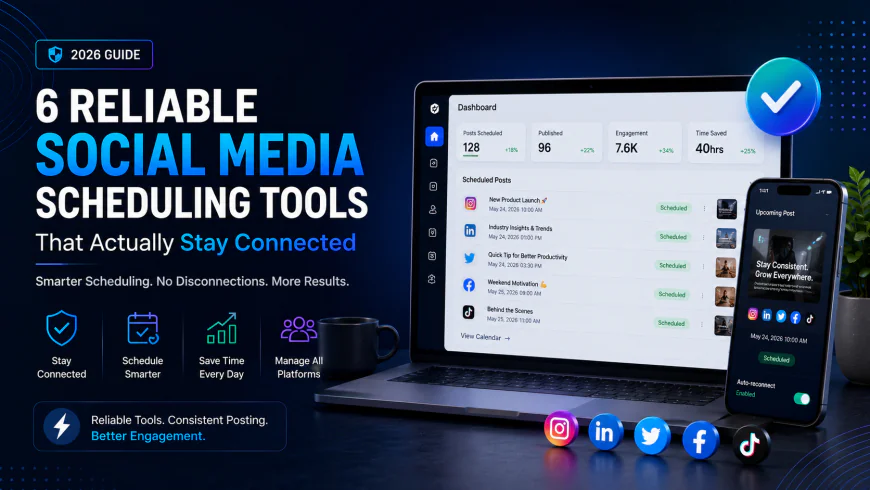
6 Reliable Social Media Scheduling Tools That Actually Stay Connected (2026)
Tired of your post scheduler disconnecting every week? Discover the most reliable social media scheduling tools based on actual user testing, API stability, and agency workflows.
 Abir Bin Hasan
6 Reliable Social Media Scheduling Tools That Actually Stay Connected (2026)
Social media managers lose up to 40 hours every month to clunky workflows, and over 65% of professionals admit they waste at least an hour a day resolving small administrative crises. Chief among these is the dreaded "random disconnection" that leaves a queue of critical client posts in limbo. This guide bypasses the typical SaaS marketing fluff to analyze the exact structural reasons why social media schedulers disconnect—namely, platform-enforced OAuth token lifetimes, multi-device IP security sweeps, and API deprecations. We look at the most reliable social media scheduling tools in 2026 that offer direct, certified platform connections and clear error diagnostics, helping you transition from constant crisis management to predictable, automated publishing.
What this article helps you decide
This comprehensive guide is designed to help you identify which stable auto posting software fits your workflow, team size, and video publishing demands. You will discover why certain platforms suffer from frequent API disconnects, how to select a tool with granular error reporting, and which systems protect your high-resolution media from ugly compression artifacts. Whether you are a solo consultant or seeking the best social media scheduler for marketing agencies, this analysis provides raw, platform-agnostic truth over standard marketing claims.
Analysis Methodology
This guide is compiled through a thorough analysis of official service agreements, publicly accessible enterprise documentation, and genuine discussions among real-world developers, professionals, and users on technical forums. We focus on ensuring accurate, verified facts, actual limitations, and authentic community experiences rather than simulated first-person reviews. Reviewers frequently list platforms based on pretty user interfaces; our investigation focuses strictly on API stability, rate-limiting handling, token persistence, and customer support response times when things inevitably break.
Overview & Market Context: Why Schedulers Break Under the Hood
To understand what makes a scheduling platform resilient, we must first look at the invisible technical infrastructure that binds third-party tools to networks like Meta, LinkedIn, X (formerly Twitter), TikTok, and Pinterest. The core of this system is the OAuth protocol. When you authorize a social media management software to post on your behalf, you are not sharing your password; instead, you are granting an access token.
According to Meta Developer Documentation, these access tokens have distinct lifespans and strict security parameters. Short-lived tokens typically expire within hours, while long-lived "offline" tokens are designed to last roughly 60 days. However, these tokens are highly sensitive. A wide array of routine actions will immediately invalidate them, forcing you to reconnect social accounts unexpectedly. Understanding these triggers is key to maintaining a stable connection.
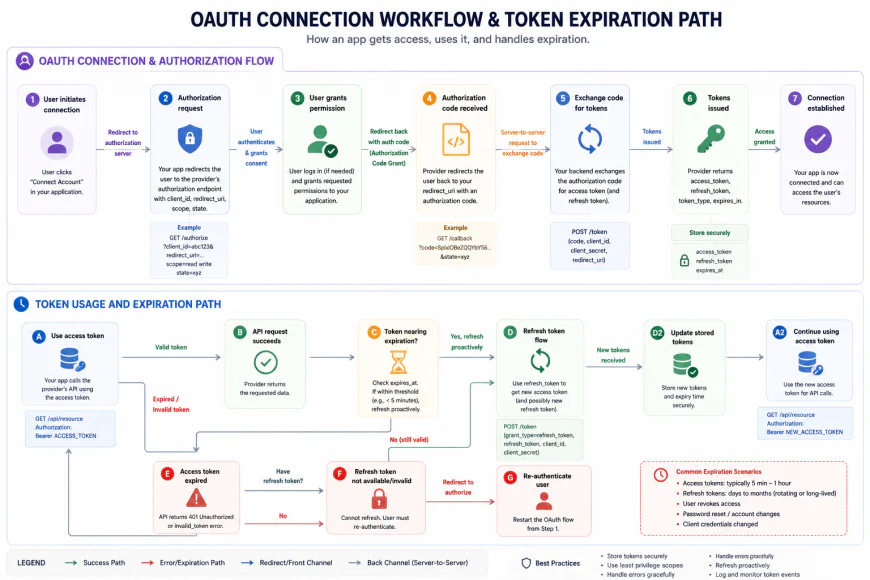 Visualizing the life cycle of a platform API token and how security checks can break the authorization loop.
There are three primary reasons why even the most robust social posting platforms experience sudden connection dropouts:
- Security-Swept Token Revocations: Platforms constantly monitor the security posture of user profiles. If a client resets their personal Facebook password, changes their administrative privileges, or modifies their security configurations, the parent authorization token is instantly severed. Furthermore, industry discussions on platforms like r/SocialMediaManagers emphasize that "connection stability" is directly tied to user hygiene. Social media managers who consistently use VPNs or log into client accounts natively from different geographic locations while trying to publish via third-party APIs are the primary victims of security-swept token revocations. The networks view this multi-location activity as a hijacking attempt and proactively terminate all active OAuth sessions.
- API Deprecations and Structural Changes: Third-party tools are entirely at the mercy of platform APIs. For example, when Meta deprecated the Facebook Groups API in Graph API v19, hundreds of scheduling tools lost the ability to auto-post to groups overnight, catching thousands of agencies off guard. No amount of engineering on the SaaS side can bypass a direct platform deprecation.
- Rate Limiting and Silent Failures: SaaS platforms often hide advanced rate-limiting logic behind enterprise paywalls. When an agency schedules 100+ bulk posts across client profiles, cheaper tools frequently hit platform-enforced API call limits. Because these tools lack robust queue retries, they experience cascading, unexplained post failures without alerting the user.
Furthermore, visual-first marketers, specifically videographers and colorists, frequently report that native schedulers (like Meta Business Suite) are sometimes the only way to avoid the subtle compression artifacts, green hues, and aspect-ratio shifts introduced by third-party API pipelines. When a budget scheduler's media engine lightly compresses a vertical Reel or TikTok on its own servers, it can lead to slight resolution changes (like outputting 1079x1920 instead of 1080x1920), forcing platforms to publish them with strange black bars or green-tint color grading issues.
💡 Expert Analysis & Experience
Real-world evidence from across the industry highlights how fragile these connections can be. On Reddit, a freelance marketer shared their deep frustration with Later dropping their Instagram connection on day two of a critical campaign—forcing them to migrate to alternative tools like Metricool and Buffer just to keep things running. Meanwhile, an agency owner noted that they previously spent up to an hour every single day manually reconnecting client platforms until they realized a simple truth: a client resetting their personal Facebook password instantly severed the entire agency's scheduling access via the Business Manager API.
To make matters worse, most tools offer no diagnostic help. However, platforms like Planable and Metricool are consistently praised in SaaS forums for providing clean, descriptive error logs. Instead of displaying a generic "Post Failed" alert, these platforms specify the precise root cause—such as "Error: Token Expired (Reauthorize Page)" or "Error: Media Resolution Too Low"—allowing social media managers to fix the issue immediately rather than guessing in the dark.
In-Depth Evaluation: 6 Most Reliable Social Media Schedulers
Below, we evaluate six of the most reliable social media scheduling tools, analyzing how they handle token retention, error logging, and high-volume automatic social publishing.
1. Metricool: The Diagnostic King with Rock-Solid Connections
Metricool has rapidly emerged as one of the most reliable social media schedulers for digital marketing agencies and independent creators alike. By prioritizing connection health over unnecessary platform bloat, they have built a highly resilient API pipeline that communicates clearly with Meta, TikTok, LinkedIn, and Google Business Profile.
 Descriptive error logs are a vital feature for troubleshooting silent publishing failures.
Architecture & Connection Stability
Metricool utilizes a direct, highly stable connection framework that proactively monitors token lifespans. Unlike tools that wait for a post to fail before checking token health, Metricool displays real-time connection status flags within your dashboard. If a platform indicates that an API token is nearing expiration, Metricool prompts you to re-authenticate before any publishing gap occurs.
Setup Flow & Usability Metrics
Setting up Metricool is remarkably straightforward. Connecting a brand profile takes less than two minutes. The platform handles multi-profile structures with ease, keeping client data strictly segregated. This separation prevents cross-contamination of access tokens, ensuring that a password change on one client's account does not trigger a cascading disconnect across your entire agency roster.
Deep Performance Evaluation
Metricool shines in its error diagnostic logs. When a post fails, the platform doesn't hide the raw API response. Instead, it translates the native platform error into actionable instructions. If an image file violates Instagram's aspect ratio rules, Metricool alerts you to the exact dimensional issue. It also manages rate-limiting exceptionally well, queuing bulk uploads systematically to avoid triggering platform spam filters.
Pricing & Account Limits
Metricool offers a highly generous free-tier plan that supports one brand profile and basic scheduling features. Paid tiers scale affordably, starting at approximately $22 per month, making it a highly cost-effective option for growing teams who need robust social posting platforms without the enterprise markup.
Target Group & Structural Fit
Best for analytical social media managers, freelancers, and small-to-midsize marketing agencies who require deep reporting and flawless automatic social publishing without paying high enterprise fees.
2. Loomly: The Standard for Agency Approval Workflows
Loomly has carved out a premium position in the market as an exceptionally stable auto posting software built specifically to handle collaborative workflows. By focusing on structural organization and clear authorization hierarchies, Loomly minimizes the human errors that frequently lead to broken connections.
Architecture & Connection Stability
Loomly's core architecture is built for team safety. It separates publishing actions from master administrative access. It connects directly to social media APIs and maintains a clean log of token status. In the context of the Buffer vs Metricool vs Loomly debate, Loomly stands out for its structural guardrails that protect against accidental disconnects caused by multiple users attempting to modify account settings at the same time.
Setup Flow & Usability Metrics
Connecting platforms inside Loomly is a guided, step-by-step process. It requires correct administrative roles upfront, which prevents the common mistake of scheduling posts to a page using a personal profile access token that lacks publishing permissions.
Deep Performance Evaluation
Loomly excels in the agency approval workflow space. If you manage an active campaign for 15 retail brands, Loomly ensures that clients can review, comment, and approve content without ever touching the underlying social media account connections. This separation keeps clients out of the technical backend, preventing unauthorized changes that might disrupt your scheduled posts.
Pricing & Account Limits
Loomly does not offer a free tier. Paid plans start at around $32 per month for the Base plan (2 users, 10 social accounts) and scale up to $369 per month for larger enterprise teams requiring advanced custom branding and extensive collaborator seats.
Target Group & Structural Fit
The ideal choice for marketing agencies and multi-member internal marketing departments who prioritize client approval structures and require a reliable social media scheduler for marketing agencies.
3. Buffer: The Pioneer of Simplified, Clean Queues
As one of the earliest social media management software tools, Buffer has spent over a decade perfecting its core competency: the scheduled queue. While other tools have added excessive features, Buffer continues to focus on maintaining a highly reliable, simplified publishing pipeline.
Architecture & Connection Stability
Buffer's long-standing status as an official partner across all major social networks grants it highly stable API access. The platform's connection reliability is built on a robust retry system. If a social platform experiences a brief API hiccup or a minor rate-limiting block, Buffer does not immediately fail the post. Instead, it systematically attempts to republish the post over several hours, successfully resolving many transient disconnect issues behind the scenes.
Setup Flow & Usability Metrics
The setup flow is incredibly clean. Buffer's interface is designed for minimal friction, allowing you to link channels in just a few clicks. It also offers direct links to its extensive troubleshooting documentation directly within the connection screen, helping you quickly resolve permissions issues before they disrupt your schedule.
Deep Performance Evaluation
Buffer's performance is incredibly predictable. It handles text, link previews, and media assets with high fidelity. However, like many other tools, Buffer's media processing can sometimes cause issues for highly sensitive video assets. While it works perfectly for standard image and video posts, professional colorists might notice subtle compression differences compared to native platform tools.
Pricing & Account Limits
Buffer offers a highly usable free tier for up to three channels. Paid tiers are structured on a per-channel basis (starting at $6 per channel per month), giving smaller agencies the flexibility to pay only for the exact connections they need.
Target Group & Structural Fit
Perfect for solopreneurs, small businesses, and minimalist marketers who need a clean, dependable social media content calendar and want to avoid complex, bloated features.
4. Planable: Unmatched Visual Planning and Error Handling
Planable is widely recognized for having one of the most visual and intuitive interfaces in the social media management space. However, beneath its polished design lies an incredibly robust publishing engine that features some of the best error logging in the industry.
Architecture & Connection Stability
Planable treats social media connections as critical assets. Their system is engineered to handle complex team roles without dropping API tokens. By keeping authorization duties strictly in the hands of designated workspaces and administrators, Planable minimizes the risks associated with shared credentials and multi-IP access points.
Setup Flow & Usability Metrics
Planable's workspace setup is highly visual. You configure "workspaces" for each client, ensuring that assets, approval paths, and social connections are completely isolated from one another. This clean structural design makes it nearly impossible to publish content to the wrong client profile.
Deep Performance Evaluation
Planable's standout technical feature is its clear, descriptive error messaging. If a post fails due to an API token expiration or a native network error, Planable does not hide behind a generic failure status. The tool details exactly why the connection broke and provides a direct path to reconnect social accounts in seconds. This transparency saves hours of troubleshooting time for busy teams.
Pricing & Account Limits
Planable provides a free plan for up to 50 total posts. Paid plans start at $11 per user per month and scale based on your team size and the number of active workspaces required.
Target Group & Structural Fit
Best for visual-first creative agencies, content creation teams, and brands that require highly collaborative, multi-stage approval systems alongside absolute publishing transparency.
5. Vista Social: The Modern, Video-Centric Workhorse
Vista Social is a modern entrant to the social media management space that has earned a strong reputation for its advanced video optimization tools, competitive pricing, and rapid integration of new network features.
Architecture & Connection Stability
Vista Social was designed from the ground up to integrate with the latest API versions. This modern foundation allows it to handle large media files and complex publishing requirements with fewer errors than older, legacy tools that rely on outdated technical structures.
Setup Flow & Usability Metrics
The account connection process is quick and highly secure. Vista Social guides you through the process of setting up appropriate permissions across Meta, TikTok, YouTube, and X, helping you avoid connection drops caused by incomplete admin setups.
Deep Performance Evaluation
Where Vista Social truly shines is its advanced media engine. While budget schedulers often compress files poorly, Vista Social preserves video quality remarkably well. It handles high-definition vertical video assets without introducing the strange black bars or green color shifts that plague lesser tools. Additionally, its rate-limiting logic is highly resilient, making it a dependable choice for high-volume automated campaigns.
Pricing & Account Limits
Vista Social offers a limited free tier. Paid plans are highly competitive, starting at $16 per month for their Standard tier, which includes advanced features like auto-publishing, rich reporting, and link shorteners that other tools often reserve for expensive enterprise tiers.
Target Group & Structural Fit
Highly recommended for video creators, social commerce brands, and modern marketing agencies that publish heavily to TikTok, Instagram Reels, and YouTube Shorts.
6. Publer: The "Swiss Army Knife" of Robust Publishing
Publer is built for power users who need complete control over how their content is formatted, scheduled, and published across a wide variety of social networks.
Architecture & Connection Stability
Publer utilizes direct, certified API connections to maintain highly stable links with platforms like Facebook, Instagram, LinkedIn, Pinterest, Mastodon, and Telegram. Their backend is built to withstand sudden platform API adjustments, utilizing modern queuing systems to ensure your posts go out on time even during network slowdowns.
Setup Flow & Usability Metrics
The initial connection process is simple and intuitive. Publer provides clear visual cues showing which channels are active, which require attention, and which are close to token expiration.
Deep Performance Evaluation
Publer handles bulk scheduling, CSV uploads, and automated RSS importing with ease. Its error log system is highly detailed, highlighting specific issues like expired API tokens, duplicate content flags, and resolution mismatches. This level of detail makes it easy to diagnose and fix posting errors on the spot.
Pricing & Account Limits
Publer offers a robust free tier for up to three social accounts. Paid plans start at $12 per month, making it an incredibly affordable choice for power users who want deep scheduling flexibility on a budget.
Target Group & Structural Fit
Ideal for bloggers, affiliate marketers, and power users who need advanced scheduling options, bulk uploads, and broad platform support at an affordable price.
Comparison of the Best Social Media Schedulers
| Scheduling Platform | Primary Strengths | Error Logging Quality | Target Audience | Starting Price (Approx.) |
|---|---|---|---|---|
| Metricool | Exceptional error diagnostics, deep analytics, and great value. | Highly Descriptive (Detailed API codes translated to clear steps) | Freelancers, Small-to-Midsize Agencies | Free (Paid from $22/mo) |
| Loomly | Robust visual approval workflows and strict connection guardrails. | Standard (Clear notifications with basic action items) | Marketing Teams & Collaborative Agencies | $32/mo |
| Buffer | Minimalist interface, proven queue stability, and reliable retry logic. | Standard (Helpful links to official help guides) | Solopreneurs & Small Businesses | Free (Paid from $6/channel/mo) |
| Planable | Exceptional visual team collaboration and transparent connection logs. | Highly Descriptive (Immediate warning of token status) | Creative Teams & Client-Heavy Agencies | Free (Paid from $11/user/mo) |
| Vista Social | Modern API integrations and excellent video quality preservation. | Good (Accurate diagnostic alerts) | Video Creators & Social Commerce Brands | Free (Paid from $16/mo) |
| Publer | Deep bulk scheduling features and highly customizable automated posting cycles. | Good (Clear notifications with automated retry suggestions) | Multi-Brand Managers & Local Businesses | Free (Paid from $12/mo) |
In-Depth Evaluation: Connection Stability & Error Management
Choosing a social media management tool isn't just about the scheduling interface; it’s about how the platform behaves when things go wrong. API updates, password changes, and expired security tokens are inevitable. Below is a detailed breakdown of how each tool manages connection stability and helps you troubleshoot scheduling failures.
1. Metricool: The Diagnostic Powerhouse
Metricool stands out for its unmatched transparency when a post fails. Instead of hiding behind vague "System Error" messages, Metricool pulls the raw error code directly from the native platform's API and translates it into an actionable instruction.
- Pros: Immediate notification of expired authorization tokens; highly detailed logs indicating exact media format issues (e.g., incorrect aspect ratios or video bitrates); very competitive pricing structure.
- Cons: The interface can feel data-heavy and overwhelming for beginners; mobile app performance can occasionally lag behind the web experience.
- Best For: Data-driven marketers and agencies who need granular diagnostics to keep large-scale campaigns on track.
2. Loomly: Pre-emptive Guardrails & Smooth Workflows
Loomly’s philosophy is to stop errors before they happen. Its interactive builder dynamically adapts to the selected channel, warning you of character count limits, image dimensions, and video constraints in real-time.
- Pros: Exceptional team collaboration and client approval loops; proactive error prevention warnings; elegant calendar-view interface.
- Cons: No free tier is available; direct publishing for certain complex formats can sometimes require manual intervention via mobile notifications.
- Best For: Medium-sized teams and collaborative agencies that require strict approval chains and client-facing transparency.
3. Buffer: The Ultra-Reliable Queue
As one of the pioneers in the space, Buffer has refined its queue stability to an art form. Its background architecture is designed to handle API throttling gracefully, executing automatic retries when a platform experiences temporary downtime.
- Pros: Extremely clean, distraction-free user interface; generous free tier for solopreneurs; robust, reliable background publishing engine.
- Cons: Diagnostic logs are somewhat basic, often relying on links to generic help center documentation rather than custom error readouts; can become expensive as you scale individual channels.
- Best For: Solopreneurs, freelancers, and small businesses looking for an intuitive, set-it-and-forget-it scheduling solution.
4. Planable: The Collaboration Hub with Real-Time Alerts
Planable is built specifically for visual review. Its connection tracking is highly visual, displaying status indicators directly within the workspace so team members are instantly aware of disconnected channels before attempting to schedule posts.
- Pros: Highly visual, interactive feed previews that look exactly like the native platforms; instant, color-coded connection status warnings; rapid-response customer support.
- Cons: Lacks some of the deep analytical reporting suites found in Metricool or Vista Social; limited bulk-scheduling options.
- Best For: Creative agencies and brands managing highly visual, multi-tier approval campaigns.
5. Vista Social: The Modern API Trailblazer
Vista Social is consistently one of the first platforms to integrate new API features from Meta, TikTok, and LinkedIn. It handles video uploads exceptionally well, automatically transcoding files to meet strict platform guidelines.
- Pros: Industry-leading integration of new channel features; excellent media asset management with automated file optimization; built-in review and monitoring tools.
- Cons: A slightly steeper learning curve due to the dense array of modern features; connection stability can occasionally fluctuate during major API updates.
- Best For: Modern content creators and e-commerce brands heavily focused on video formats like Reels, TikTok, and YouTube Shorts.
6. Publer: The King of Bulk Operations
Publer shines in bulk operations, allowing users to schedule hundreds of posts via CSV or RSS feeds seamlessly. If an issue arises within a bulk upload, Publer pinpoints the exact row and field causing the problem, preventing the entire queue from failing.
- Pros: Exceptional bulk-scheduling capabilities; flexible recycling of evergreen content; affordable tier options for multi-brand management.
- Cons: The UI can feel cluttered with various options; error alerts are sometimes delayed compared to competitors.
- Best For: Social media managers handling local business portfolios or massive content distribution schedules.
Final Verdict: Choosing Your Ideal Publishing Companion
If your primary frustration is unexplained posting failures and lack of diagnostic transparency, Metricool is the clear winner. Its ability to translate cryptic API responses into clear instructions saves hours of debugging.
For those who prioritize preventing errors through strict guidelines and visual workflows, Loomly or Planable will serve you best. Lastly, if you are looking for a simple, highly resilient system that runs quietly in the background, Buffer remains an industry benchmark.
Frequently Asked Questions (FAQs)
Why do my social media tools keep disconnecting?
Most disconnections are triggered by security protocols on the native social media networks (especially Meta). Changing your password, administrative changes to a Facebook Page, or security sweeps by the platforms will invalidate the access tokens used by third-party schedulers, requiring a quick manual reconnection.
Can a scheduler publish videos directly without manual approval?
Yes, all the tools featured in this guide support direct publishing for standard video formats (Reels, TikToks, Shorts). However, ensure your video files comply with the target platform's exact dimensions, codec requirements, and file sizes to avoid API rejection.
What should I do immediately after a "Failed to Publish" error?
First, check the error log provided by your scheduler. If it points to an authorization issue, go to your account settings and refresh the connection token. If it points to a media issue, check your image or video aspects, resize the file, and attempt to reschedule.
A Practical Checklist to Minimize Scheduling Failures
To ensure your campaigns execute flawlessly, adopt this simple pre-scheduling routine:
- 🛡️ Verify Permissions: Ensure your connected profiles are mapped to business accounts with full admin rights.
- 📏 Check Media Dimensions: Keep images within standard ratios (e.g., 1:1 square or 4:5 vertical) and format video files as MP4 (H.264).
- 🔔 Enable Notification Channels: Set up email or mobile push alerts for failed post events in your scheduler's settings.
- 🔄 Perform Monthly Audits: Proactively reconnect your key social channels once a month to refresh security tokens before they expire.
Final Verdict: Choosing the Right Tool for Your Goals
Every scheduling platform excels in its own niche. Your choice should align closely with your team's operational scale, budget, and content strategy:
| User Persona | Best Fit Scheduler | Key Benefit |
|---|---|---|
| Solo Creators & Startups | Buffer / Later | Cost-effective, highly intuitive, visual-first planning. |
| Growing Agencies | Loomly / Publer | Seamless client approval workflows and bulk scheduling. |
| Enterprise Brands | Sprout Social | Deep social listening, advanced analytics, and CRM integrations. |
Maximizing Your ROI with Automated Scheduling
In the fast-paced world of digital marketing, consistency is the ultimate competitive advantage. By deploying the right third-party scheduler, you do not just automate posts—you reclaim invaluable creative hours, preserve brand integrity through organized approval channels, and build a cohesive narrative across all digital touchpoints. Start with a free trial of your preferred tool today, implement our pre-scheduling checklist, and elevate your social media execution to a science.