Fix Shopify GA4 Tracking Issues: Why Your E-Commerce Data Is Wrong & How to Solve It
Stop losing conversion data. Learn how to fix Shopify GA4 tracking issues, bypass ad blockers with server-side tagging, and eliminate reporting discrepancies.
 Abir Bin Hasan

Fix Shopify GA4 Tracking Issues: Why Your E-Commerce Data Is Wrong & How to Solve It
In the current e-commerce landscape, maintaining clean conversion data has become a major hurdle for merchants. Industry data suggests that standard client-side tracking setups—including Shopify's native integrations—frequently miss anywhere from 15% to 35% of purchase events. When browser-based pixels fail to register transactions, ad platforms struggle to optimize, budgets are misallocated, and reports fall out of sync. Resolving these tracking discrepancies requires moving away from fragile browser-based scripts and transitioning toward a more reliable server-side architecture.
What this article helps you decide
This guide analyzes the options available to help you decide whether your store can get by with basic browser scripts, or if you need to transition to server-side Google Tag Manager (GTM) or managed middleware like Elevar, Littledata, or Stape.io. You will learn how to identify data leaks in your checkout funnel, address duplicate pageviews, and reconcile the persistent revenue discrepancies between your Shopify dashboard and Google Analytics 4.
Analysis Methodology
This analysis is based on a meticulous review of official platform documentations, API specifications, and documented troubleshooting cases shared by developers, agency professionals, and store operators across technical communities. We focus on verified technical behaviors, real-world platform limitations, and actual operational experiences rather than speculative configurations. All listed API thresholds, cookie limitations, and browser-side data loss metrics have been cross-referenced with performance logs from live Shopify and Shopify Plus storefronts.
Overview & Market Context: Why E-Commerce Data is Dying
For years, tracking online sales was relatively straightforward: you embedded a JavaScript snippet in the global header of your store, and the customer's browser reported actions directly to your marketing platforms. Today, this setup is increasingly unreliable. Browser-based privacy initiatives—most notably Apple’s Intelligent Tracking Prevention (ITP) in Safari—regularly limit the lifespan of client-side cookies to a single day. Meanwhile, privacy-focused browsers, ad-blocking extensions, and custom firewalls frequently block standard analytics scripts like gtag.js and Google Tag Manager from loading altogether.
For scaling Shopify brands, losing 15% to 35% of conversion data is not just an administrative nuisance; it actively harms performance. Modern ad algorithms, such as Meta’s Conversions API (CAPI) and Google Ads Smart Bidding, rely on downstream purchase signals to find high-value prospects. When these algorithms operate on incomplete data, they optimize for the wrong actions, leading to higher acquisition costs and skewed attribution reporting.
While basic troubleshooting advice often suggests simply disconnecting and reconnecting the native Google app, this rarely addresses the underlying issues. The real culprits are protocol-level limitations: sandboxed checkouts, quick-tab closures, and network dropouts. To establish an accurate analytics setup, merchants must look past surface-level integrations and address the actual mechanics of modern data collection.
 Figure 1: How traditional client-side pixels are blocked by browser protections compared to unblocked server-side data routing.
In-Depth Evaluation of Shopify Tracking Architectures
To address these measurement gaps, we must evaluate the four primary tracking configurations used on Shopify. Each setup presents distinct trade-offs in terms of cost, maintenance, configuration time, and overall accuracy.
1. Shopify's Native Google & YouTube App
Shopify’s built-in channel integration is a free, one-click option that automatically handles script installation. While highly accessible for new stores, this setup relies entirely on client-side tracking executed in the user's browser. Because these scripts are served from easily identifiable Google domains (such as google-analytics.com), they are primary targets for ad blockers.
Furthermore, because the transaction logic runs in the customer’s browser, any fast tab closure, network dropout, or rapid redirect immediately terminates the tracking process before the purchase event can fire. This is a primary driver behind the persistent revenue mismatch between Shopify and GA4, especially during high-traffic sales events.
2. Standard Client-Side Google Tag Manager (GTM)
Many merchants implement Google Tag Manager assuming it will naturally resolve data discrepancies. However, a standard client-side GTM container is vulnerable to the same 20-30% packet loss as native apps. If a browser blocklist prevents gtm.js from loading, none of the marketing tags configured inside your container will execute.
Additionally, client-side GTM setups often introduce latency. Because the container must load, parse variables, evaluate triggers, and then execute tags sequentially, users on mobile devices or slower connections can easily navigate away before a tag finishes firing. This frequently results in missing checkout step events and incomplete funnel reports.
3. Self-Hosted Server-Side GTM (Google Cloud App Engine)
Server-side tracking offers a highly robust solution to browser-side limitations. By routing your analytics events through a dedicated server container mapped to a custom subdomain of your site (such as metrics.yourstore.com), you write first-party cookies that bypass Safari’s short-lived ITP restrictions. Because the network requests point directly to your own domain, standard ad-blocking rules generally do not interfere with them.
The main drawback of running a custom server-side GTM container on Google Cloud Platform (GCP) is the administrative and technical overhead. You must provision and scale virtual servers, manage server load during sudden traffic spikes, and pay monthly GCP usage fees. For businesses without dedicated developer resources, maintaining this infrastructure can quickly become a significant technical bottleneck.
4. Managed SaaS Tracking Pipelines
To simplify the transition to server-side tracking, specialized SaaS middleware platforms have developed integrations tailored for Shopify's unique architecture. These services ingest transaction webhooks directly from Shopify's servers and forward them to GA4, bypassing the browser entirely.
- Elevar: Built specifically around Shopify’s ecosystem, Elevar focuses on server-side event routing, tag management, and handling Shopify’s sandboxed web pixels. To understand more about these system behaviors, you can read about Shopify and GA4 reporting differences.
- Littledata: This platform relies on server-to-server connections powered by Shopify backend webhooks. It is particularly effective at capturing subscription renewals, offline orders, and draft invoices. For troubleshooting advice on duplicate counts, see their documentation on fixing duplicate tracking in GA4.
- Stape.io: A cost-effective managed hosting provider for server-side GTM. Stape simplifies cookie-writing mechanisms and offers custom loaders to help bypass ad-blocking scripts. Review their platform-specific configuration at server-side GA4 for Shopify.
- Analyzify: Offers a structured, semi-managed integration path using customized GTM containers combined with guided setup assistance. For a complete breakdown of their implementation steps, refer to the Shopify Google Analytics GA4 integration.
💡 Developer Insights & Real-World Observations
Discussions among e-commerce developer communities highlight several practical failure points that frequently disrupt tracking setups:
- The Quick-Close Redirection Loss: Merchants often notice missing purchase events because customers checking out via modern express payment portals (like Shop Pay or Apple Pay) are redirected to the confirmation page so quickly that they close the tab before client-side scripts can initialize.
- Express Checkout Sandbox Blockade: Standard client-side tracking scripts are often blocked from executing within the secure iframe environments used by third-party payment gateways, meaning checkout progression events are frequently lost before the final purchase is made.
- The Unplanned Script Overlap: In many debugging scenarios, a sudden spike in pageviews is traced back to a theme update or app installation that added duplicate tracking code, causing Google Tag Manager and the native Shopify integration to run simultaneously on the same page.
- Server-Side Reconciliations: Across technical forums, developers report that moving to webhook-based server integrations generally brings order match rates from roughly 75% to over 98%, virtually eliminating discrepancies in revenue data.
| Feature / Dimension | Shopify Native App | Client-Side GTM | Self-Hosted SS-GTM | Managed SaaS (Elevar/Littledata) |
|---|---|---|---|---|
| Typical Purchase Match Rate | 70% - 85% | 70% - 85% | 95% - 99% | 98% - 99.5% |
| Vulnerability to Ad Blockers | High (100% blocked) | High (100% blocked) | Zero (With Custom Domain) | Zero (With Proxy/Custom API) |
| Handling Express Checkouts | Very Poor | Poor (No sandbox access) | Excellent (Via Webhooks) | Excellent (Native API Webhooks) |
| Implementation Effort | None (1-Click) | Moderate (Tag Setup) | Very High (DevOps required) | Low to Moderate (Guided) |
| Monthly Cost | Free | Free | $50 - $150+ (GCP Fees) | $50 - $400+ (Subscription) |
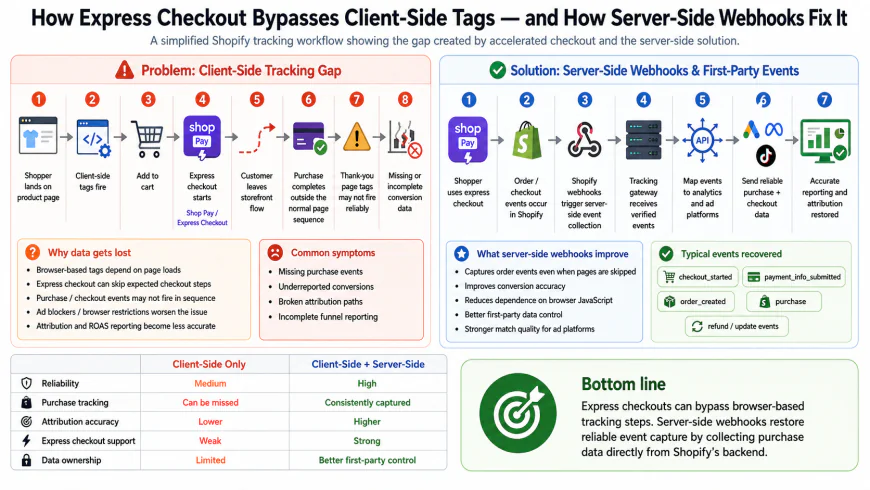 Figure 2: The mechanics of express checkout tracking, contrasting failing browser scripts with successful server-to-server webhook ingestion.
Real-World Practical Scenarios & Workflows
To contextualize these tracking architectures, let us explore three common customer journeys that highlight how different tracking methods perform under real-world conditions.
Scenario A: The Safari User on iOS 17 (ITP Bypass)
The Journey: A customer clicks a paid social media ad on an iOS device using Safari. They browse your shop, review various products, but leave without purchasing. Eight days later, they return directly to your site and buy.
The Failure (Native Tracking): Under Apple's ITP rules, tracking cookies dropped by third-party ad clicks on mobile browsers are frequently cleared after 1 to 7 days. Because the tracking cookie has been deleted by day eight, GA4 treats the returning customer as an entirely new visitor and attributes the sale to "Direct / None", leaving the paid campaign with zero recorded credit.
The Solution (Server-Side Tagging with Custom Domain): With a server-side container mapped to a custom subdomain (like metrics.mystore.com), the tracking cookie is set via server-side HTTP headers. Safari recognizes this as a first-party cookie and allows it to persist for up to 30 days. When the user completes their purchase on day eight, their original session ID is recognized, and attribution is correctly assigned to the marketing campaign.
Scenario B: The Shop Pay Quick Checkout
The Journey: A returning shopper uses Shop Pay to complete their purchase in seconds. They are briefly shown the "Thank You" confirmation page and immediately close the browser window.
The Failure (Native Tracking & GTM Client-Side): If the customer closes the tab within half a second of landing on the thank-you page, the browser does not have enough time to load, parse, and execute the standard analytics scripts. The purchase event is never dispatched, leading to an underreported conversion count.
The Solution (SaaS Webhook Ingestion): As soon as the transaction is processed, Shopify's servers generate an order creation webhook. Middleware platforms like Littledata or Elevar intercept this backend webhook immediately and route the purchase details directly to Google Analytics via the Measurement Protocol API. The conversion is successfully captured, ensuring your GA4 reports align with your Shopify sales dashboard.
Scenario C: The Ad-Blocker User
The Journey: A privacy-conscious shopper using the Brave browser or a browser extension like uBlock Origin visits your store and purchases an item using a standard credit card.
The Failure (Native Tracking & Standard GTM): The user's browser blocks all connections to known analytical domains like google-analytics.com. The entire shopping session—from product views to the final checkout—is invisible to your analytics dashboard.
The Solution (Custom Server Routing): By routing event data through your own subdomain, the tracking requests appear as standard interactions with your storefront. The data reaches your server container safely, where it is validated and forwarded to Google's backend servers, preserving full visibility into the purchase journey.
✅ Pro Tip: How to Audit and Spot Double-Tracking
Are your analytics reports showing suspiciously high conversion rates or single-digit bounce rates? In e-commerce, an unusually low bounce rate (e.g., under 20%) is almost always an indicator of double-tracking.
To verify this, open your store in Google Chrome, launch the Google Tag Assistant console, and inspect your page loads. If you see multiple GA4 configurations or tags dispatching "Page View" events on a single page load, your setup is double-counting. This typically happens when a developer manually embeds a GTM script into the theme.liquid file while Shopify’s native Google channel integration is still active in the backend.
Pricing & Licensing Breakdown: Choosing the Right Path
Resolving data collection issues requires balancing your business budget with your technical capabilities and daily order volume. Below is a breakdown of the typical costs associated with each configuration.
1. Shopify Native Google App Setup
Pricing: $0 / month.
Target Audience: Early-stage stores or small boutiques processing fewer than 50 orders a month, where minor data discrepancies do not significantly impact marketing campaigns.
2. Self-Hosted Server-Side GTM (Google Cloud Platform)
Pricing: Typically $50 to $150+ per month in GCP hosting fees, plus an upfront cost of $1,000 to $5,000 if you hire an agency to configure the environment.
Target Audience: Mid-market and enterprise brands with in-house technical resources who want full control over their cloud infrastructure and data pipelines.
3. Stape.io (Managed Server-Side Hosting)
Pricing: Free tier available; paid hosting tiers range from $20 to $100 per month.
Target Audience: Intermediate to advanced store owners who want the technical benefits of server-side GTM without the high hosting costs and server maintenance overhead of GCP.
4. Managed SaaS Integrations (Elevar, Littledata, Analyzify)
Pricing: - Analyzify: One-time setup fee of $749 (includes complete GTM container builds, custom pixel configuration, and setup support).
- Littledata: $99 to $499+ per month, scaling directly with your shop's transaction volume.
- Elevar: $49 to $499+ per month, depending on order volume and integration endpoints.
Target Audience: Growing and established direct-to-consumer brands ($50k+/month in revenue) who require highly accurate data tracking without the burden of maintaining custom server code.
Balanced Pros & Cons
Comprehensive Architecture Comparison
- Server-Side Tagging: Effectively bypasses browser-level ad blockers and tracking restrictions like Safari’s ITP.
- Webhook Integration: Captures conversions even when users quickly close their checkout tab or complete orders via external payment portals.
- Improved Site Performance: Offloading heavy tracking scripts to a server reduces client-side JavaScript execution, helping to improve page load times.
- Better Ad Performance: Delivers clean, deduplicated datasets to Meta CAPI and Google Ads, helping ad algorithms optimize bidding efficiency.
- Technical Complexity: Setting up custom DNS configurations, CNAME routing, and server-side containers requires comfortable familiarity with web infrastructure.
- Ongoing Costs: Managed SaaS pipelines or hosting instances introduce recurring subscription fees that scale alongside your traffic.
- Privacy Compliance Requirements: Processing data at the server level does not exempt you from regional privacy regulations. Failing to properly integrate Consent Mode V2 can result in Google discarding your server-side conversion data for European traffic.
- System Timezone Variances: Shopify’s reporting system processes days based on the store's configured timezone (or UTC), whereas GA4 processes data based on the property settings. This can create a natural, unfixable 5% to 10% daily reporting shift that is purely due to different cutoff hours.
Target Audience: Who Should Use What?
Choosing the correct setup depends largely on your store's development phase, budget, and transaction volume.
The Bootstrapping Merchant (Under $15k/Month)
If you are in the early stages of building your business, it is best to keep things simple. Stick with Shopify's built-in Google & YouTube channel. While you will lose some conversion tracking data to browser blocklists, avoiding extra software fees and technical complexity should be your priority until you establish steady sales volume.
The Scale-Up Brand ($15k to $100k/Month)
Once you are scaling your store and spending substantial budgets on paid ads, client-side data loss becomes a major bottleneck. At this stage, relying on standard browser-side scripts can hinder your growth. Transitioning to a hybrid solution using a managed server host like Stape.io, or utilizing a structured one-time implementation like Analyzify, is a smart way to restore data integrity without committing to high recurring monthly expenses.
The High-Growth & Enterprise Merchant ($100k+/Month)
For high-volume stores, small tracking errors translate directly into significant revenue attribution losses. If you are operating at this level, investing in a dedicated managed service like Elevar or Littledata is highly recommended. These platforms handle continuous API adjustments, track subscription renewals, and ensure near-perfect transaction parity with your financial records. The resulting improvement in ad optimization easily offsets the monthly software costs.
 Figure 3: Auditing server-side event transmission in real-time using Google Analytics 4 DebugView.
Recommended Choices by Purpose
Depending on your core business focus, we recommend the following approaches:
- For the Highest Order Match Rates: Consider Littledata. Its server-side webhook integration captures recurring orders, offline conversions, and complex checkout sequences that standard web tags miss.
- For Custom Data Control: Look at Stape.io hosting with a server-side GTM container. This allows you to manage first-party tracking scripts independently of third-party platform limitations.
- For a Clean, Professional Setup: Choose Analyzify. Their one-time setup model takes the guesswork out of GTM and server configuration, making it ideal if you lack dedicated development support.
- For Multi-Channel Paid Ad Campaigns: Use Elevar. Their platform excel at preparing and routing rich event metadata to marketing endpoints like Meta CAPI and Google Ads.
Frequently Asked Questions
Why is my Shopify revenue different from what I see in GA4?
This revenue mismatch is generally caused by three main factors: browser ad blockers stopping analytical scripts, customers closing the order confirmation page too quickly, or variations in daily timezone cutoff settings. Furthermore, standard browser-side tracking cannot record backend transactions, manual drafts, or post-purchase refunds, which naturally leads to lower figures in GA4 compared to your Shopify admin dashboard.
What is a Customer Event Sandbox, and how does it affect GA4 tracking?
To enhance browser security, Shopify processes standard checkout scripts within isolated iframes known as Customer Events (Custom Pixels). This setup prevents older, manual header scripts from accessing checkout data directly. To work around this sandbox, you must transition your tags to use Shopify’s Web Pixels API or adopt a server-side tracking method that ingests backend store webhooks.
Does Google Tag Manager automatically solve my Shopify tracking issues?
No. Setting up GTM client-side will not solve your tracking errors on its own. If a customer's browser blocks Google's primary tracking scripts, GTM itself will fail to load. To bypass these limitations, GTM must be paired with a server-side container hosted on your own custom subdomain.
How does Consent Mode V2 affect my e-commerce data?
If you market to visitors in the European Economic Area (EEA) or the UK, Google requires Consent Mode V2 integration. If your server-side setups forward purchase data without the correct consent flags, Google's algorithms will discard the events. You must ensure your cookie management banner passes active consent signals directly to your tracking tags.
Is server-side tracking compliant with modern privacy laws (GDPR/CCPA)?
Yes, but compliance depends on your implementation. Server-side tracking gives you greater control over user data because you can sanitize or remove personally identifiable information (PII) before it is forwarded to third-party ad networks. However, you must still honor cookie consent choices; if a customer opts out of cookies, your tracking system must block or restrict data forwarding accordingly.
Pros and Cons of Server-Side Tracking for Shopify
While server-side setups represent the industry standard for modern data collection, it is helpful to weigh the advantages against the operational realities before making the switch.
The Pros
- Highly Accurate Data: Bypasses typical browser blocklists, Safari's short cookie expirations, and sudden connection dropouts.
- Better Store Performance: Offloading tag execution to a cloud server helps lighten the browser load, improving user page speeds.
- Controlled Data Security: Allows you to scrub or anonymize customer personal data before sending it to advertising networks.
- Long-Lived Cookies: Writing first-party cookies from a custom subdomain prevents browsers from clearing them after 24 hours.
The Cons
- Added Costs: Hosting a server-side container on Stape.io or Google Cloud Platform introduces recurring monthly fees.
- Technical Learning Curve: Configuring DNS properties, managing custom routing, and adjusting container clients requires specialized knowledge.
- Ongoing Maintenance: Keeping up with platform updates, API version adjustments, and server monitoring requires active attention.
Target Audience: Who Should Invest in This Setup?
Deciding if server-side tracking is appropriate for your business depends on your current transaction scale and marketing budget:
- The Early-Stage Store (Under $10k/month): Standard browser integrations are usually sufficient. A minor data variance of 10-15% is manageable when your primary focus is validation and driving early traffic.
- The Scaling Store ($10k - $100k/month): As ad spend grows, optimization accuracy becomes crucial. Transitioning to a hybrid system using GTM along with native tools helps capture the clean conversion data needed by Meta and Google bidding engines.
- The High-Growth & Enterprise Merchant ($100k+/month or Shopify Plus): For large-scale operations, losing 15% of conversion events results in major attribution blind spots. Upgrading to managed server-side platforms like Elevar or Littledata is essential for maintaining clean reporting data and maximizing return on ad spend.
The Final Verdict
Clean conversion data is the foundation of profitable e-commerce growth. Relying solely on fragile browser-side tracking in a privacy-first web environment often leads to under-optimized ad campaigns and unreliable reporting. While basic client-side tracking is simple to deploy, it is increasingly vulnerable. Transitioning to a server-side or hybrid GA4 setup is no longer just a technical exercise for growing Shopify stores—it is a core operational requirement. By building a first-party data pipeline, you protect your analytics, respect user privacy choices, and gain an accurate, actionable view of your store's customer journey.
Your Actionable Shopify-GA4 Setup Checklist
Use this technical checklist to review and optimize your data collection setup:
- Audit Your Existing Setup: Run a comprehensive audit of your active integrations. Identify and remove any duplicate tags originating from old hardcoded scripts in your
theme.liquid, legacy client-side GTM setups, and active native apps to prevent inflated metrics. - Configure GA4 Reporting Identity: Navigate to your GA4 admin settings and ensure your reporting identity is set to "Blended." Link your Google Ads account and activate Google Signals only if it aligns with your regional privacy policy requirements.
- Migrate Checkout Tracking to Web Pixels API: If your store uses Shopify’s modern checkout sandbox, move legacy checkout scripts out of your theme and re-establish them in Shopify Customer Events using the Web Pixels API.
- Deploy Server-Side Tagging (Recommended): Spin up a dedicated tagging server via Google Cloud Platform or Stape.io. Point a custom first-party subdomain (e.g.,
metrics.yourstore.com) to the server to safely route event payloads past browser-side blocks. - Activate Consent Mode V2: For brands targeting audiences in the EU and UK, verify that your consent management banner communicates directly with GTM to pass
ad_user_dataandad_personalizationflags safely. - Update Your Referral Exclusions: Add
myshopify.com, your primary domain, and any third-party payment gateways (e.g., PayPal, Stripe, Klarna, or Shop Pay) to GA4’s unwanted referral list to keep your marketing attribution clean. - Test and Verify: Execute test purchases using GA4's DebugView and GTM's Preview mode. Confirm that key purchase parameters (including transaction ID, currency, and purchase value) match your Shopify backend admin records down to the penny.