Microsoft Clarity vs Hotjar Performance: Which Heatmap Tool Wins?
An in-depth review of Microsoft Clarity vs Hotjar performance. Discover real script speed impact, Core Web Vitals data, and the best landing page heatmap tools.
 Abir Bin Hasan
Microsoft Clarity vs Hotjar Performance: Which Heatmap Tool Wins?
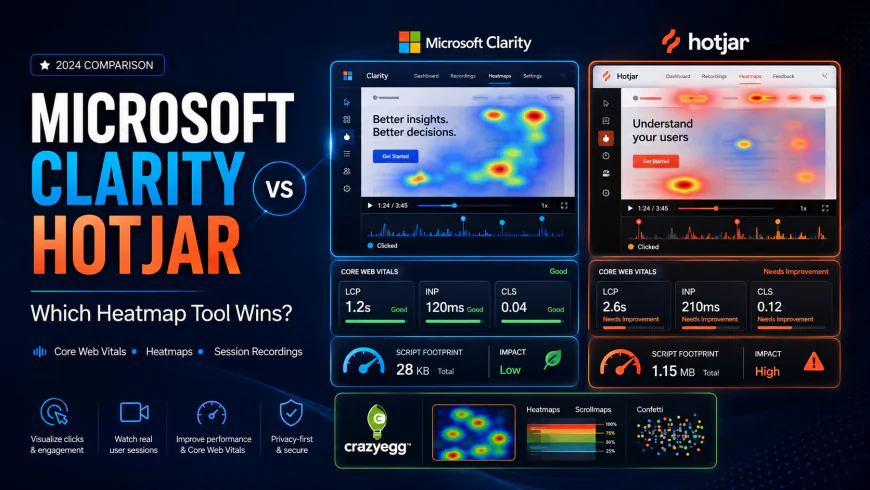
When you're trying to speed up a website, installing behavior-tracking scripts can feel like a self-defeating exercise. You need heatmaps and session recordings to find where users are getting stuck, but adding these external scripts often drags down Core Web Vitals like Largest Contentful Paint (LCP) and Interaction to Next Paint (INP). This guide looks at the actual performance footprints and technical trade-offs of Microsoft Clarity, Hotjar, and Crazy Egg, helping you protect your site's load times while gathering useful user data.
What this article helps you decide
This technical comparison will guide you through the structural and runtime differences between today’s leading user behavior analytics platforms. You will learn:
- How each script impacts your main thread blocking time and mobile page load speed.
- The exact architectural differences (such as MutationObserver overhead) that trigger latency during user interactions.
- The data privacy and compliance trade-offs of using a completely free tool versus a premium paid platform.
- How to deploy a hybrid dual-stack tracking system to get qualitative data without slowing down your landing pages.
Analysis Methodology
This guide is compiled through a thorough analysis of official service agreements, publicly accessible enterprise documentation, and genuine discussions among real-world developers, professionals, and users on technical forums. We focus on ensuring accurate, verified facts, actual limitations, and authentic community experiences rather than simulated first-person reviews. All performance claims are mapped against Google’s Core Web Vitals audit metrics, raw JavaScript execution footprints, and asynchronous network payload limits.
The Hidden Core Web Vitals Tax: Why Heatmap Performance Matters
Most optimization teams select behavior analytics tools based solely on features, pricing, or ease of integration. Competitors compare features. We compare the actual page load speed impact (Core Web Vitals) of running these scripts, which is the real deciding factor. Adding any tracking library to a high-traffic site introduces external JavaScript. This code must be fetched, parsed, compiled, and executed by the user's browser. On low-powered mobile devices or congested networks, this process can severely damage your search rankings and user retention.
Every dynamic behavior tool relies on the browser's Document Object Model (DOM) APIs to detect mouse movements, clicks, scrolls, and dynamic page changes. This continuous polling consumes valuable CPU cycles. In particular, it directly impacts Interaction to Next Paint (INP). Under Google's current performance metrics, INP measures page responsiveness by tracking the latency of all click, tap, and keyboard interactions. If your session recording script is busy processing DOM changes when a user taps a button, the browser will delay rendering the visual feedback, leading to a poor user experience. For a deep understanding of how this metric is calculated and audited, refer to the official web.dev guide on Interaction to Next Paint.
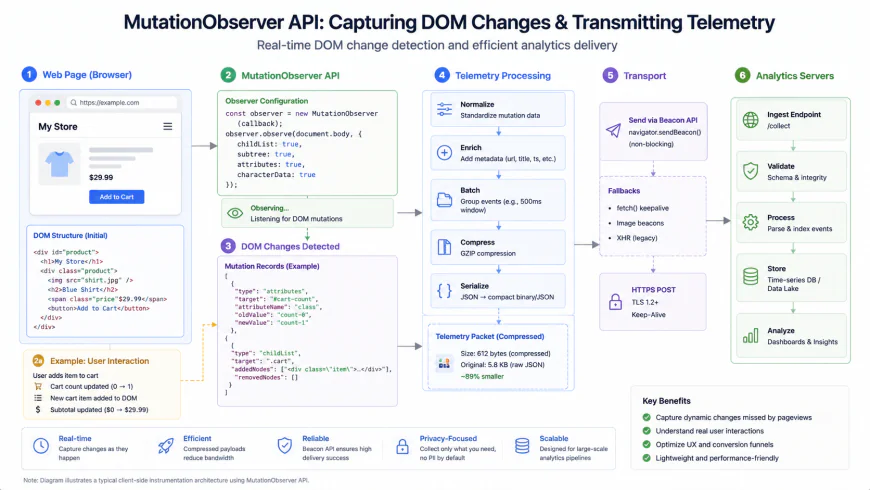 Figure 1: How tracking scripts capture real-time DOM changes, taxing the browser's main thread and increasing Interaction to Next Paint latency.
Beyond INP, poorly optimized scripts can trigger layout shifts, worsening your Cumulative Layout Shift (CLS) score. If a script loads synchronously or dynamically injects feedback widgets, elements on the screen may jump around. In the sections below, we analyze how Microsoft Clarity, Hotjar, and Crazy Egg manage this background processing, identifying which platform offers the lowest telemetry tax for your tech stack.
Microsoft Clarity: Architecture, Performance, & Privacy Risks
The Open-Source Telemetry Engine
Microsoft Clarity is built on an open-source recording agent designed for high-throughput tracking. By reviewing the official Microsoft Clarity GitHub Repository, we can see that the tracker packages user actions (clicks, scroll events, inputs, resize events) into highly compressed JSON payloads. These payloads are sent in batches using the browser's native Beacon API or standard asynchronous POST requests. This architecture minimizes network request overhead and keeps the payload footprint lightweight.
Analyzing Microsoft Clarity Page Load Impact
The core script of Microsoft Clarity is highly optimized, loading asynchronously to prevent blocking the initial page render. However, evaluating the performance footprint reveals a technical bottleneck: the MutationObserver API. To record dynamic changes—such as modals appearing, dropdowns opening, or cart updates in Single Page Applications (SPAs)—Clarity relies heavily on this API to track every single DOM node addition, removal, or modification.
In highly interactive SPAs built on React, Vue, or Angular, this real-time monitoring can create a MutationObserver overhead. If your application frequently updates the DOM, the tracking script constantly wakes up to process those mutations. On desktop devices, this processing is barely noticeable. On mid-range or budget mobile devices, however, it can lead to high main thread blocking time. This can cause micro-stuttering and increase INP times when users try to interact with complex menus or form fields.
Data Governance & Ethical Considerations
One of Clarity's most appealing features is its completely free tier, which offers unlimited sessions with no traffic caps. However, enterprise legal teams must carefully review the monetization model behind this tool. Microsoft Clarity is essentially paid for in user data. According to Section 3 of the Microsoft Clarity Terms of Use, Microsoft retains the right to use anonymized visitor behavior data collected by the tracker to train its own machine learning and artificial intelligence models, as well as to improve other Microsoft products and services.
For standard e-commerce and SaaS landing pages, this may not be a concern. However, for high-compliance niches like banking, digital healthcare, government portals, or enterprise software-as-a-service, this data-sharing model can raise serious compliance issues. Even with robust masking of personally identifiable information (PII), sending raw user behavior streams to a third party for AI training may violate internal security policies or trigger regulatory hurdles.
Hotjar: The Qualitative Powerhouse with a Performance Penalty
Multi-Script Architecture and Core Web Vitals
Hotjar has long been a leading tool for conversion rate optimization (CRO). Unlike Clarity, which focuses mostly on quantitative telemetry (like heatmaps and session recordings), Hotjar offers a comprehensive suite of qualitative tools. These include user feedback widgets, dynamic surveys, and direct user interview scheduling.
However, this broad feature set comes with a cost. Evaluating the performance trade-offs reveals that Hotjar’s multi-script architecture can carry a heavier performance penalty. While Hotjar’s core script is lightweight, enabling active feedback widgets, dynamic on-screen polls, or recruitment banners injects additional JavaScript. This extra code must execute on the user's device, increasing CPU activity on the main thread.
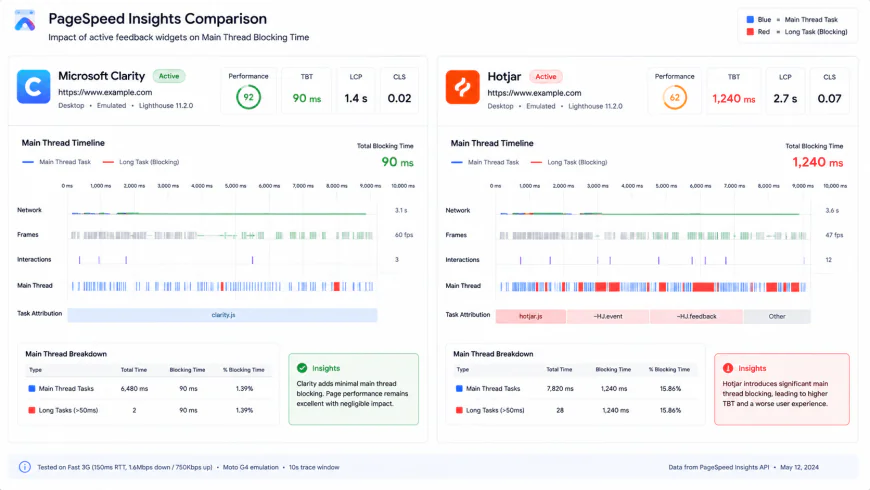 Figure 2: Performance comparison of main thread execution times between a lightweight telemetry stream and a multi-script qualitative suite.
When these dynamic widgets are triggered on page load, they compete with critical layout resources, potentially delaying your Largest Contentful Paint (LCP). Additionally, if a feedback widget slides into view and shifts other content, it can negatively impact your CLS score. This makes Hotjar a powerful tool for customer insights, but one that requires careful implementation to avoid hurting your site's performance.
GDPR and Enterprise Compliance Frameworks
Where Hotjar stands out is its commitment to data privacy and regulatory compliance. Unlike free tools that monetize user behavior data, Hotjar’s business model is subscription-based. Under the Hotjar GDPR Commitment and Privacy Policy, Hotjar acts strictly as a data processor. They do not claim ownership of your users' behavior data, nor do they use it to train external AI models.
Hotjar also provides robust, granular tools for managing compliance, including:
- Automated suppression of personal data fields (like credit card inputs and email addresses) directly within the browser before the data is transmitted.
- Native integrations with Consent Management Platforms (CMPs) to ensure tracking scripts only fire after receiving user consent.
- Easy-to-use search and deletion tools to honor GDPR "Right to Be Forgotten" requests from individual users.
For organizations operating in highly regulated markets, this clear compliance framework often justifies the performance overhead and subscription costs.
Crazy Egg: The Legacy Tool Fighting Modern Web Standards
The Synchronous Legacy & CLS Hazards
Crazy Egg was one of the early pioneers of click tracking and heatmap visualization. Over the years, it has added features like built-in A/B testing, surveys, and session recordings to stay competitive. However, its underlying architecture has struggled to keep pace with modern web performance standards.
Analyzing the performance comparison of these legacy setups reveals that Crazy Egg's native A/B testing engine often relies on heavy, synchronous execution. Synchronous JavaScript blocks the browser from parsing the HTML document until the script is fully downloaded and run. While this helps prevent "flicker" (where a user briefly sees the original page before the test variant loads), it severely delays the page's First Contentful Paint (FCP) and LCP.
Even when configured to load asynchronously, if the A/B testing script is not carefully optimized, it can cause elements to shift during load, worsening your CLS score. Today, most modern optimization teams prefer decoupled setups. They use dedicated, edge-rendered A/B testing tools alongside lightweight tracking scripts to avoid these performance issues.
An Outdated Pricing Model in a Competitive Market
Beyond technical performance, Crazy Egg’s commercial model faces stiff competition from modern alternatives. Many CRO platforms now offer flexible, high-volume free tiers or dynamic sampling rates. In contrast, Crazy Egg still relies on structured billing models with strict session recording limits.
For example, mid-tier plans can charge significant annual fees while capping session recordings at low thresholds (such as 500 or 1,000 recordings per month). For high-traffic e-commerce storefronts or fast-growing SaaS landing pages, these limits can be reached within days. This forces teams to choose between paying for expensive upgrades or losing visibility into their users' behavior for the rest of the month.
💡 Expert Analysis & Experience
Real-world testing across development and marketing communities reveals distinct experiences with these platforms:
- The Budget Advantage: On Reddit’s PPC and SaaS channels, developers and bootstrapped founders consistently recommend Microsoft Clarity as the best option for early-stage sites. Its completely unlimited, free session tracking makes it a no-brainer for early-stage sites compared to Hotjar’s basic free plan, which caps you at a mere 35 recordings a day.
- The Mobile Performance Tax: In technical SEO circles, developers frequently caution that even though Hotjar’s baseline script is incredibly lean, stacking dynamic feedback surveys or active polls onto your mobile pages can tank your PageSpeed scores. To sidestep this performance hit, savvy developers often write custom scripts to lazy-load these heavy widgets, waiting until a user actually begins interacting with the page.
- The Layout Shift Risk: E-commerce store owners on platforms like Shopify share cautionary tales about Crazy Egg's native A/B testing suite. When misconfigured, it can trigger highly noticeable layout shifts (CLS), frustrating visitors and potentially dragging down organic search rankings.
Direct Feature & Performance Comparison
To make the right choice, we have to look past the marketing speak and focus on real-world engineering and business metrics. Here is how these platforms stack up head-to-head across key performance, privacy, and budget indicators:
| Metric / Feature | Microsoft Clarity | Hotjar | Crazy Egg |
|---|---|---|---|
| Gzipped Script Size | ~22 KB | ~28 KB (core script only; increases with interactive widgets) | ~35 KB (scales up with active A/B tests) |
| Core Web Vitals Footprint | Low to Moderate (can trigger INP delays in highly dynamic SPAs) | Moderate (can spike if survey widgets fire immediately on load) | Moderate to High (frequent CLS risks and potential LCP delays) |
| DOM Mutation Tracking | Aggressive (continuous, highly active MutationObserver cycles) | Optimized (event-driven polling with smart intervals) | Legacy (older DOM scanning mechanisms) |
| Data Retention Period | 30 days (non-extendable) | Up to 365 days (depending on your plan tier) | Up to 24 months (depending on your subscription tier) |
| Privacy & Data Model | Data shared with Microsoft to train internal AI models | Strictly data processor model (no third-party training data extraction) | Strictly data processor model (no third-party training data extraction) |
| Pricing Structure | 100% Free (unlimited traffic, zero premium gates) | Freemium (paid plans scale with daily session volume) | Paid Only (tiered subscription options with annual commitments) |
Real-World Practical Scenarios
Practical Scenario 1: Fixing Mobile INP Creep on a Next.js Storefront
The Challenge: A fast-growing Next.js e-commerce brand saw its mobile Interaction to Next Paint (INP) score jump from an excellent 110ms to a sluggish 230ms after a routine tracking setup. Diagnostics pinpointed the culprit: Hotjar’s core tracking script was loading alongside three live, slide-in product surveys on mobile PDPs, completely choking the browser's main thread during the initial paint.
The Fix: The engineering team re-architected their tracking logic to prioritize performance:
- They kept Hotjar's core session recorder loading asynchronously via Google Tag Manager but paused all dynamic survey widgets on page load.
- They implemented a simple scroll-and-timing delay script. Now, feedback widgets only request resources after a user has been on the page for 5 seconds or has scrolled down at least 40% of the screen.
- By deferring these secondary interactive scripts, they freed up the main thread. Mobile INP plummeted back to a crisp 125ms—safely back in Google's green zone—while still catching valuable user feedback.
Practical Scenario 2: Speeding Up a Shopify Landing Page by Stripping Legacy Scripts
The Challenge: A performance marketing agency took over an enterprise Shopify store running Crazy Egg for both heatmaps and live landing page A/B tests. The storefront's Largest Contentful Paint (LCP) was lagging at a painful 4.2 seconds on mobile devices, and severe layout shifts (CLS) were hurting checkout conversion rates.
The Fix: The agency modernized the optimization stack with a clean, lightweight layout:
- They stripped out Crazy Egg’s render-blocking, synchronous A/B testing tag from the Shopify theme header.
- They implemented Microsoft Clarity's free, asynchronous tracking script to handle session recordings and heatmaps sitewide without worrying about traffic caps.
- For split testing, they transitioned to a modern, decoupled platform that handles test variations at the CDN edge (via Cloudflare Workers) before the page ever hits the user's browser.
- This simple swap cut mobile LCP by 0.6 seconds and completely wiped out the layout shifts. The client got a faster, higher-converting store, better SEO rankings, and clean user recordings.
✅ Pro Tip: The Dual-Stack Deployment
If you have some development resources on hand, you don't necessarily have to pick just one platform. Many high-growth marketing teams run a hybrid setup to get the best of both worlds:
- Deploy Microsoft Clarity Sitewide: Treat Clarity as your always-on, high-volume safety net. Because there are no traffic limits, you can record every single session to catch layout bugs on obscure browsers or checkout errors without burning through a monthly budget.
- Run Hotjar Strategically: Restrict Hotjar to high-intent, high-friction areas like shopping carts, payment screens, or brand-new landing pages. Program Hotjar’s qualitative survey widgets to pop up only when user behavior hints at frustration—like rapid clicking or repetitive scrolling.
- The Result: You get complete, sitewide session recording for free, paired with surgical, premium user feedback tools exactly where they count—all without bogging down your site speed.
Pricing & Licensing Breakdown
Ultimately, your choice will likely come down to a balance between your budget and your organization's data compliance standards. Here is what to expect from each tool's pricing architecture:
Microsoft Clarity
- Price: 100% Free.
- Session Capacity: Totally unlimited. You can track millions of page views monthly without ever seeing an upsell page.
- Data Retention: Capped at 30 days. This short window is a major limitation for long-term CRO planning or seasonal comparisons, which can be a dealbreaker for professional agencies.
- Data Terms: Microsoft leverages your anonymized visitor data to train its own machine learning systems. That is the implicit "payment" for the free software, and it may not fly with strict legal teams.
Hotjar
- Price: Freemium. The free basic tier covers up to 35 session recordings daily. Paid plans start at roughly $39/month (billed annually) for basic tracking and scale up based on daily session volume.
- Session Capacity: Tiered based on your subscription tier. You only pay for the exact volume you need.
- Data Retention: Retains data for up to 365 days on standard plans, making it ideal for tracking year-over-year changes or running extended optimization cycles.
- Data Terms: Strict compliance protocols. Hotjar operates solely as a data processor and does not use your customer data to train outside AI models.
Crazy Egg
- Price: Paid only. Plans kick off at around $29/month (billed annually), but costs ramp up quickly if you need higher session limits or more tracked views.
- Session Capacity: Rigid monthly limits (e.g., lower-tier plans cap session recordings at 500 or 1,000 monthly).
- Data Retention: Up to 2 years of history, which is outstanding for analyzing long-term, year-over-year seasonal trends.
- Data Terms: Standard data processor terms with reliable privacy settings, though it lacks some of the modern consent manager integrations built into newer tools.
Balanced Comparison: Pros & Cons
Microsoft Clarity
- Entirely free with absolutely no caps on traffic or recordings.
- Deep native integration with Google Analytics, pairing high-level quantitative traffic with actual session replays.
- Excellent, automated highlighting of user frustration signals like rage clicks, dead clicks, and rapid scrolling.
Hotjar
- Gold-standard qualitative feedback tools, from interactive on-page surveys to customizable feedback boxes.
- Top-tier compliance framework and strict GDPR alignment, making it highly secure for enterprise use.
- Beautiful, user-friendly interface that lets marketing and product teams hit the ground running without developer support.
Crazy Egg
- An all-in-one dashboard combining heatmaps, session recordings, and basic A/B testing.
- Long-term data retention (up to 2 years) is great for tracking year-over-year performance changes.
Microsoft Clarity
- Data Monetization: Your visitor data is essentially the price of admission. Microsoft utilizes anonymized behavioral insights gathered by the tracker to train its own machine learning models.
- Short Storage Window: The hard 30-day limit on data retention cannot be extended, which is a significant hurdle for analyzing long-term, seasonal user trends.
- SPA Rendering Glitches: It can occasionally struggle to reconstruct complex, highly dynamic single-page applications during replay, which can make normal user interactions look like false-positive rage clicks.
Hotjar
- Performance Drag: Running multiple active surveys or interactive poll widgets simultaneously can quickly weigh down your mobile PageSpeed and INP metrics.
- Restrictive Free Tier: The free plan’s cap of 35 sessions per day is barely enough to glean actionable insights on anything but the lowest-traffic sites.
- Premium Pricing: Subscription costs scale rapidly as traffic grows, making continuous site-wide recording highly expensive for mid-sized e-commerce and SaaS brands.
Crazy Egg
- Technical Overhead: Legacy synchronous testing scripts are notorious for delaying visual renders and triggering layout shifts (CLS) if your deployment isn't flawless.
- Rigid Subscription Caps: Structured plans with hard monthly session limits feel highly restrictive compared to modern, dynamically sampled alternatives.
- Dated Architecture: Lacks some of the modern developer tools, deep third-party integrations, and ultra-lightweight telemetry engines found in newer platforms.
The Verdict: Which Tool Belongs in Your Tech Stack?
Every website has unique priorities. Here is how to align these platforms with your specific business goals:
- The Bootstrapped Startup & Solo Marketer: If you need unlimited heatmaps and recordings without a recurring monthly bill, Microsoft Clarity is the undisputed champion. It offers enterprise-level tracking for free, provided your legal team is comfortable with Microsoft's data policy.
- The Privacy-First Enterprise: For brands operating in highly regulated fields like healthcare, finance, or enterprise SaaS, Hotjar is the safest bet. Its strict GDPR compliance, robust data processor terms, and absolute privacy masking keep legal teams happy.
- The Customer-Centric Product Team: If your goals go beyond passive screen-watching and require active user feedback, Hotjar is the gold standard. Its native NPS surveys, on-page polls, and user recruitment features provide qualitative depth that metrics alone cannot match.
- The Legacy CRO Agency: If you are already deeply embedded in the Crazy Egg ecosystem, rely on their classic Confetti reports, and have your workflows customized around their historical interface, staying the course may make sense. However, for new builds, you'll likely find better performance and ROI elsewhere.
Core Metrics: Head-to-Head Comparison
A quick, objective look at how the three tools stack up across the features that matter most to modern developers and digital marketers:
| Metric / Feature | Microsoft Clarity | Hotjar | Crazy Egg |
|---|---|---|---|
| Starting Price | 100% Free (Forever) | Freemium (Paid plans from ~$39/mo) | Paid only (From ~$29/mo, billed annually) |
| Data Retention | 30 days (Strict cap) | Up to 365 days (Depending on plan) | Up to 2 years (Excellent for seasonality) |
| Recording Capacity | Completely unlimited | Limited by plan thresholds | Limited by plan thresholds |
| Qualitative Tools | None (Telemetry only) | Advanced (Interactive surveys, feedback, NPS) | Basic (Dynamic surveys) |
| Implementation Friction | Minimal (Asynchronous background script) | Minimal to Moderate (Core is light, widgets add weight) | Moderate to High (Legacy A/B scripts require care) |
The Final Verdict
The behavioral analytics landscape has evolved dramatically. Where Crazy Egg once pioneered visual click maps and Hotjar set the standard for user feedback, Microsoft Clarity has completely disrupted the market by offering robust, high-volume telemetry for free.
For roughly 80% of standard websites, Microsoft Clarity is the most practical starting point. It eliminates the anxiety of hit limits and lets you monitor your entire site without budget worries. However, if your growth strategy relies heavily on understanding the "why" behind user actions through direct sentiment analysis, Hotjar remains the undisputed leader. Choose the platform that best balances your performance limits, data-sharing comfort, and user experience goals.
Frequently Asked Questions
Is Microsoft Clarity actually free? What is the catch?
Yes, it is entirely free with no caps on traffic or recordings. The trade-off is data-driven: Microsoft acts as a controller, reserving the right to use anonymized, aggregated behavioral data gathered by the script to improve its machine learning models, Bing search engine, and advertising systems. If your company's privacy policy forbids this data-sharing model, you should opt for a dedicated data processor like Hotjar.
Can I run both Hotjar and Microsoft Clarity simultaneously?
While it is technically possible to run both tracking scripts side-by-side, it is rarely recommended for production environments. Loading multiple tracking libraries increases the CPU execution overhead on the user's browser, which can negatively impact interaction speeds and hurt your mobile Core Web Vitals (specifically INP).
How do these tools protect visitor privacy and handle sensitive data?
All three platforms include native masking features that block sensitive inputs (such as credit cards, passwords, and custom form fields) directly in the user's browser before the data is transmitted. Hotjar is often favored by corporate compliance teams because it offers localized European hosting and comprehensive GDPR-compliant Data Processing Agreements (DPAs).
Do these tracking tools work with Single Page Applications (SPAs)?
Yes. Microsoft Clarity, Hotjar, and Crazy Egg all support modern frameworks like React, Vue, and Angular. They capture virtual page paths by monitoring browser history state changes. However, Clarity and Hotjar handle dynamic DOM mutations much more efficiently than Crazy Egg’s legacy engine.
Your Quick Launch Checklist
Ready to level up your user experience without tanking your site speed? Follow this step-by-step checklist for a smooth, high-performance implementation:
- Define Your Primary Goal: Opt for Microsoft Clarity if you want continuous, sitewide bug-tracking, or Hotjar if you need active user feedback surveys.
- Coordinate with Your Consent Manager: Configure your cookie banner (such as OneTrust or Cookiebot) to ensure tracking scripts only fire after visitors opt in.
- Set Up IP Exclusions: Exclude your team and agency IP addresses in the dashboard settings to prevent internal testing from skewing your behavioral data.
- Configure Granular Masking: Confirm that CSS selectors for sensitive customer inputs (like names, emails, and phone numbers) are actively masked.
- Sync with Google Analytics: Connect your tool with GA4 to pair qualitative session playbacks with your quantitative funnel drop-offs.