5 Simple GA4 Alternatives for Bloggers (Privacy-Friendly & Fast)
Frustrated with GA4's complexity? Discover 5 simple GA4 alternatives for bloggers that are lightweight, privacy-first, and require zero cookie consent banners.
 Abir Bin Hasan

5 Simple GA4 Alternatives for Bloggers (Privacy-Friendly & Fast)
When Google forced the move to Google Analytics 4 (GA4), it felt like a collective breaking point for the blogging community. Universal Analytics was far from perfect, but it offered a straightforward, pageview-focused dashboard. GA4 replaced that simplicity with a convoluted, event-based interface, irritating data delays, and complex compliance hurdles. For many publishers, the response has been straightforward: ditch the heavy Google scripts, drop the annoying cookie consent banners, and move to lightweight, privacy-first tracking platforms.
What this article helps you decide
This guide is designed to help you sort through the clutter of moving away from Google Analytics 4. We compare several approaches: completely hands-off hosted services that keep your site fast, budget-friendly open-source tools you can self-host on a basic virtual private server, and local WordPress plugins that run entirely on your own database. The goal is to help you find a tracking workflow that actually matches your site's technical setup and privacy requirements.
Analysis Methodology
This analysis is built entirely on desk research, evaluating official platform documentation, public technical specifications, and real-world performance feedback from community forums like Reddit and GitHub. Instead of running short-term, simulated trials, we focus on long-term operational realities, scaling limits, and the actual engineering tradeoffs reported by developers and independent publishers.
Overview & Market Context: Why GA4 Failed Content Creators
Google Analytics 4 isn't really built for independent publishers. It’s an enterprise-grade ad-tech engine designed to feed Google's machine-learning advertising products. Forcing a standard content site into a complex, event-based data model with data-sampling thresholds is unnecessary overhead. If you run a blog, you primarily need to know your traffic volume, where your readers are coming from, and which articles they are reading. Stepping away from Google's ecosystem to a dedicated, streamlined platform is often one of the most immediate workflow upgrades a publisher can make.
For more than a decade, Universal Analytics served as the default standard for web tracking. The model was easy to grasp: you dropped a basic tracking code into your header, opened the dashboard, and instantly saw your active readers. With GA4, Google shifted the entire paradigm from pageviews to "events." While this event-based model is highly useful for product managers tracking complex user journeys in a SaaS application, it is incredibly frustrating for content creators who just want a clean, real-time look at their editorial performance.
Additionally, GA4 introduces real performance and regulatory liabilities. The standard tracking tag adds significant script weight to your pages, which can degrade mobile load times and impact your Core Web Vitals. At the same time, strict privacy regulations like GDPR and CCPA mean that running Google's tracking cookies legally requires a prominent consent banner. These banners disrupt the user experience and lead to massive data gaps, as a large percentage of visitors naturally choose to opt out of tracking entirely. By shifting to more straightforward, privacy-focused analytics tools, you can run a clean, lightweight script that collects essential data without relying on invasive tracking cookies.
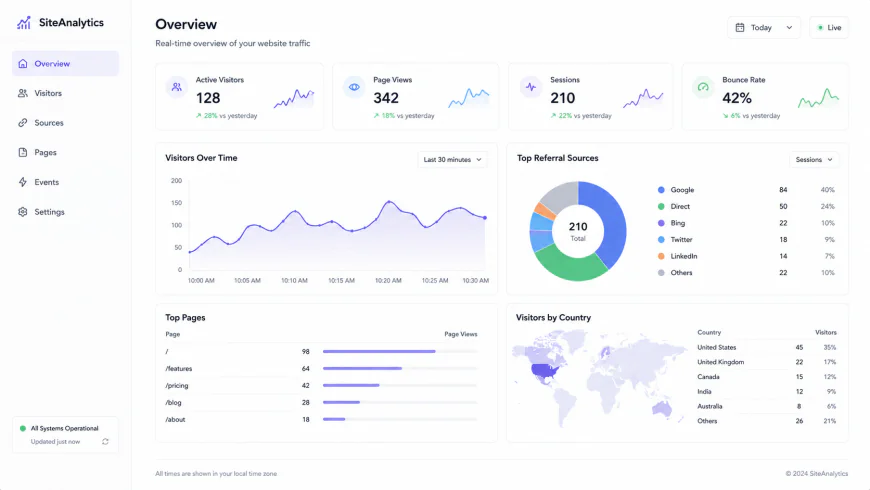 Modern, privacy-friendly dashboards aggregate key publishing metrics on a single screen, eliminating the nested menus of Google Analytics 4.
The Core Problem with Modern Analytics: The "Rewritten Copy" Myth
Many roundups on web analytics simply rehash the marketing copy of these platforms. In practice, changing your analytics setup involves real technical compromises that affect database load, search engine optimization (SEO), and data ownership. While cloud providers often market a "one-click installation," the reality of switching your analytics stack involves technical trade-offs. For example, moving to a completely cookieless model means sacrificing certain deep tracking capabilities, while hosting your own analytics database can introduce performance bottlenecks that slow down your server.
Before selecting a platform, it is crucial to understand these technical trade-offs. Many modern platforms achieve their lightweight footprint by utilizing cookieless tracking. While this keeps your site legally compliant and fast, it limits certain metrics. Without cookies or advanced cross-session tracking, calculated metrics like "session duration" and "bounce rate" are less precise. For instance, without active heartbeats (regular pings sent back to the server), single-page visits often register as zero-second sessions. Understanding these architectural realities ensures you choose a tool that fits your actual reporting needs.
In-Depth Evaluation of the 5 Best GA4 Alternatives
1. Plausible Analytics: The Modern Standard for Lightweight Tracking
Plausible Analytics has become one of the go-to choices for publishers looking for a clean break from Google. Built specifically to counter GA4's complexity, Plausible’s main draw is an ultra-lightweight script that measures under 1 KB. Compared to Google's heavier tracking setup, Plausible loads significantly faster, helping bloggers preserve their search ranking signals and keep mobile page speeds high.
According to the Plausible Analytics Documentation (plausible.io), the platform operates entirely without cookies and does not collect any personally identifiable information (PII). This out-of-the-box compliance with GDPR, CCPA, and PECR means you can legally remove intrusive cookie banners if you aren't running other tracking scripts. The dashboard itself is a single, fast-loading page that aggregates your visitors, top referrers, geographic locations, device types, and custom goal conversions without nested menus.
However, the platform has distinct limitations. Because it relies on a cookieless model, tracking unique returning visitors over long periods is highly limited. For standard content sites, this is rarely a dealbreaker, but for high-volume affiliate marketers who need to track complex reader journeys across multiple weeks, Plausible's data can feel a bit too simplified. For those who want absolute control over their infrastructure, Plausible offers a self-hosted version, though setting it up requires managing a modern server environment running ClickHouse and Docker.
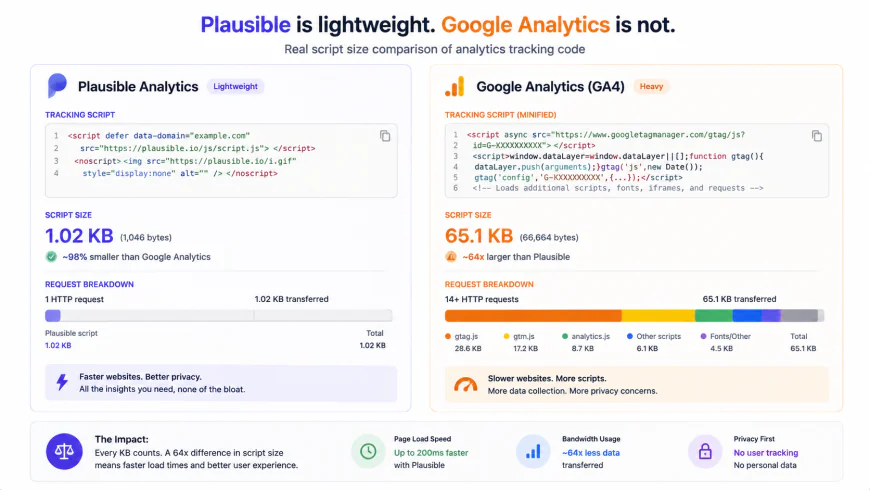 The massive difference in script payload sizes between lightweight trackers and Google Analytics directly impacts your website's mobile rendering speed.
2. Fathom Analytics: Premium Privacy Tracking with Built-in Ad-Blocker Bypass
Fathom Analytics was one of the early pioneers in the minimalist web analytics space, introducing the simplified dashboard concept that inspired much of the modern privacy-focused movement. Fathom is geared toward publishers who treat their sites as serious businesses and want enterprise-grade uptime and advanced compliance architecture.
One of Fathom’s key features is its ability to bypass ad-blockers legally and ethically. As detailed in the Fathom Analytics Privacy and Features Guide (usefathom.com), the platform allows users to route tracking through custom domains (e.g., analytics.yourdomain.com). This ensures that the lightweight script is served directly from your own subdomain, preventing common privacy extensions from blocking the connection. For publishers with tech-savvy audiences who block scripts at high rates, Fathom can recover a significant portion of "lost" traffic data that Google Analytics misses entirely.
Fathom runs on a custom cloud infrastructure designed to handle large traffic spikes smoothly. However, this premium infrastructure comes with a higher entry cost. Unlike competitors with lower-tier introductory plans, Fathom’s pricing starts at a flat monthly rate that might feel steep for brand-new sites with low traffic. Additionally, advanced marketers note that Fathom is relatively "revenue-blind" unless you manually configure custom event goals, making it less ideal for complex e-commerce setups without developer assistance.
3. Matomo Analytics: The Ultimate Feature-Rich Open-Source Powerhouse
For publishers who miss the deep reports, custom variables, and granular tracking of Universal Analytics, Matomo Analytics (formerly Piwik) is the closest direct replacement. Matomo is designed for those who want comprehensive data ownership alongside the advanced analytics features that simpler platforms omit.
According to the Matomo Analytics Open-Source Resource Center (matomo.org), the platform offers two main deployment paths: a fully managed cloud hosting service and a free, self-hosted on-premise version. If you choose to self-host, you install Matomo directly on your own server, keeping your analytics data entirely in your possession. Unlike basic cookieless platforms, Matomo includes advanced tools like heatmaps, session recordings, A/B testing, and detailed multi-channel attribution models.
The trade-off for this deep feature set is technical complexity and high resource consumption. Self-hosted Matomo is known for its heavy database footprint. On high-traffic blogs, Matomo's traditional PHP/MySQL setup can bloat database tables quickly compared to modern columnar databases like ClickHouse. If run on cheap shared hosting, a sudden traffic spike can overload your database and slow down your main site. Furthermore, utilizing Matomo's most advanced tracking features requires configuring cookie consent settings, meaning you may still need to display a cookie banner to remain strictly compliant.
4. Umami Analytics: The Developer's Choice for Modern Self-Hosting
Umami Analytics is an open-source web analytics tool built for developers and technically inclined bloggers who prefer a Node.js stack over traditional PHP setups. It is fast, highly customizable, and features an interface that matches the clean aesthetics of premium SaaS platforms.
As documented in the Umami Analytics GitHub Repository and Docs (umami.is), Umami is designed to deploy easily on modern cloud hosting platforms like Vercel, Netlify, or railway, connecting to a PostgreSQL or MySQL database. The tracking script is tiny and highly optimized, capturing pageviews, referrers, devices, and browser languages without cookies. It easily handles multiple websites on a single dashboard, making it highly efficient for publishers running portfolio networks.
The primary appeal of Umami is how easy it is to self-host if you have basic command-line knowledge. You can spin up Umami on a cheap virtual private server (VPS) and track millions of pageviews for just the baseline cost of your server. However, for non-technical bloggers who don't want to manage Docker containers, databases, or deployment pipelines, the self-hosted route has a steep learning curve. While Umami now offers a managed cloud service to compete with Plausible and Fathom, its self-hosted codebase remains its main draw.
5. Independent Analytics: The Zero-Configuration Local WordPress Plugin
If you run a WordPress blog and want an analytics solution that requires absolutely no coding, external accounts, or third-party scripts, Independent Analytics is an incredibly practical choice. Unlike plugins that simply embed your Google Analytics tracking code, Independent Analytics is a self-contained, local analytics engine.
The plugin runs entirely within your WordPress dashboard and saves all visitor data directly in your local WordPress database. Because it is completely self-contained, it makes no external API requests to third-party servers. This prevents any external script loading delays from impacting your site speed. It is fully compliant with GDPR by default because no data ever leaves your web server, and it doesn't use cookies to track user behavior.
Despite the convenience, running a local database plugin comes with a clear warning. Storing analytics data directly in your main WordPress database can cause rapid database growth. On high-traffic sites, this can eventually impact database performance, slow down server response times, and balloon your website backup sizes. While Independent Analytics is highly optimized to minimize this impact, tracking hundreds of thousands of monthly pageviews inside a standard MySQL database on cheap shared hosting can eventually cause resource strains.
💡 Expert Analysis & Experience
Discussions among developers on communities like /r/webdev and /r/Wordpress highlight Plausible's user experience as a major selling point, with many users noting they opted for the paid service simply because the clean UI saved them hours of reporting frustration compared to GA4. Conversely, Fathom users frequently praise the custom domain setup for bypass capabilities, though they point out that the $15/month starting price is harder to justify for low-traffic personal projects compared to Plausible's lower tier or free self-hosted options. Meanwhile, Umami is highly favored by self-hosting enthusiasts who point out that running it via Docker Compose on a cheap VPS offers complete data control and minimal overhead for multi-site portfolios.
Plausible vs Fathom vs Matomo: The Ultimate Head-to-Head Comparison
Choosing the right tracking tool often comes down to comparing technical specifications. The table below breaks down the key performance, pricing, and database differences of the leading tools to help you match them with your technical budget and hosting resources.
| Feature / Metric | Plausible Analytics | Fathom Analytics | Matomo Analytics | Umami Analytics |
|---|---|---|---|---|
| Script Size | < 1 KB | < 2 KB | ~22 KB (varies) | < 2 KB |
| Cookie-Free? | Yes (100% cookie-free) | Yes (100% cookie-free) | Optional (configurable) | Yes (100% cookie-free) |
| GDPR Compliance | Out-of-the-box (EU servers) | Out-of-the-box (EU isolation) | Requires configuration | Out-of-the-box |
| Data Ownership | 100% User Owned | 100% User Owned | 100% User Owned | 100% User Owned |
| Primary Database | ClickHouse (highly scalable) | DynamoDB / Postgres | MySQL (can bloat easily) | PostgreSQL / MySQL |
| Starting SaaS Price | $9 / month (10k PVs) | $15 / month (100k PVs) | $25 / month (Cloud) | Free tier / $9 Cloud |
| Self-Hosted Option | Yes (Docker / ClickHouse) | No (SaaS Only) | Yes (Free, PHP/MySQL) | Yes (Free, Docker/Node) |
Practical Scenario
In production environments, publishers often see immediate benefits when stripping out heavy analytics tags. For instance, when managing multi-site portfolios, switching to a lightweight platform like Plausible can drastically reduce nested menu navigation, allowing publishers to check traffic trends across several properties in a fraction of the time. Similarly, self-hosting developers often use Docker Compose to run Umami on a $5/month DigitalOcean droplet, tracking multiple niche blogs under a single dashboard while avoiding monthly SaaS subscriptions entirely.
✅ Pro Tip
If you choose Plausible or Fathom, make sure to configure a custom domain proxy (such as tracking.yourdomain.com) during setup. This simple technical step ensures your tracking script bypasses ad-blockers legally and ethically. By serving the script from your own subdomain rather than a known third-party tracker, you can capture more accurate traffic data from audiences who routinely block default analytics scripts.
Pricing & Licensing Breakdown
When migrating away from GA4, you must weigh the financial cost against your technical capabilities. While Google Analytics is "free" monetarily, you pay with your users' privacy and your own time spent navigating a complex interface. The alternatives generally fall into two distinct buckets: paid managed SaaS or open-source self-hosting.
Plausible and Fathom run as fully managed, privacy-first SaaS platforms. Plausible offers a sliding-scale model starting at $9 per month (billed annually) for up to 10,000 pageviews, making it highly accessible for growing blogs. Fathom charges a flat $15 per month starting rate, which covers up to 100,000 pageviews across unlimited sites. This flat-rate structure makes Fathom economical for publishers running multiple medium-traffic blogs, as you aren't penalized for adding additional domains.
On the other side, Matomo and Umami offer open-source codebases. If you choose to self-host, there are no software licensing fees, and you can track unlimited pageviews for the baseline cost of your server. However, you must account for the "hidden cost" of system maintenance, database optimization, and backups. As your database grows, server costs can rise, and you may find yourself spending valuable hours optimization-indexing database tables instead of writing content.
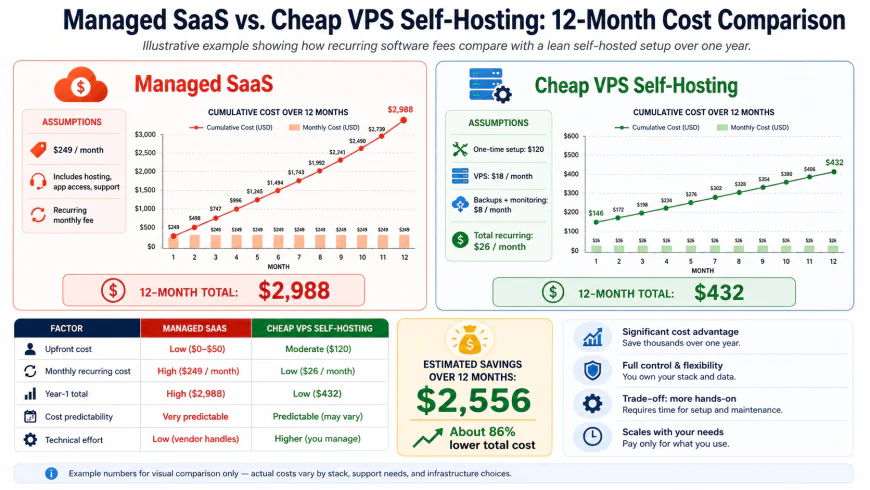 Choosing between a managed SaaS subscription and self-hosting involves balancing predictable monthly financial costs against technical maintenance hours.
Balanced Comparison
- Page Speed Optimization: Lightweight scripts (typically under 2 KB) ensure your website renders quickly, preserving mobile Core Web Vitals.
- Simplified Compliance: Cookieless tracking options let you legally remove annoying, high-bounce cookie consent banners.
- Clutter-Free Reporting: View key traffic trends, referral sources, and top pages on a single screen without confusing menus.
- Complete Data Ownership: Protect your analytics data from third-party advertising networks, keeping your readers' browsing habits secure.
- Single-Page Session Metrics: Without active server heartbeats, single-page reader sessions can register as zero-second visits, lowering average session duration metrics.
- Affiliate/E-commerce Limits: Simplified platforms are generally "revenue-blind" out of the box, requiring manual setup of custom events for conversion tracking.
- Database Storage Footprints: Free self-hosted platforms (like Matomo on PHP/MySQL) can bloat databases quickly, demanding regular server maintenance.
Target Audience: Who Should Use What?
There is no single platform that works for every content site. Your ideal tracking tool depends on your technical comfort level, monthly traffic volume, and monetization strategy.
- The Solo Blogger & Content Creator: If you want a hands-off, beautiful dashboard that just works, Plausible Analytics is an exceptional choice. It speeds up your site, keeps your compliance clean, and remains affordable for growing blogs.
- The Multi-Site Publisher: If you run a network of niche blogs and want to bypass ad-blockers to see your true traffic volume, Fathom Analytics is highly recommended. Its flat-rate tier and custom domain proxy are designed specifically for professional digital publishers.
- The Developer & Tech Enthusiast: If you enjoy server administration, know your way around Docker, and want to avoid monthly SaaS fees, Umami Analytics is a brilliant, lightweight tool that runs beautifully on a cheap VPS.
- The Advanced Marketer & SEO Professional: If your workflow requires heatmaps, A/B testing, and deep funnel tracking, but you still want to own your data, Matomo Analytics offers the feature depth needed to fully replace Google's enterprise tracking.
- The Non-Technical WordPress User: If you want to view your analytics directly within WordPress without pasting code, managing API keys, or creating third-party accounts, Independent Analytics offers a local, zero-configuration dashboard.
Recommended Choices by Purpose
For most bloggers looking to escape GA4, Plausible Analytics offers the best balance of page speed, intuitive design, and reasonable pricing. If you are on a tight budget and comfortable with basic server administration, self-hosting Umami via Docker on PostgreSQL provides a highly cost-effective, robust alternative. For professional publishers who need clean data collection from ad-blocking audiences, Fathom Analytics is a premium, reliable service that easily pays for itself in recovered traffic insights.
Common Questions
Can I import my historical Google Analytics data into these alternatives?
Yes. Both Plausible and Fathom include direct Google Analytics importers. These tools allow you to connect your Google account securely and import your historical Universal Analytics or GA4 data, ensuring you preserve your multi-year traffic history when making the switch.
Will switching to a cookieless analytics tool hurt my search engine rankings?
No. On the contrary, replacing heavy tracking scripts with lightweight alternatives can improve your SEO. Removing heavy tracking code improves page load times and mobile rendering speeds, both of which are direct ranking factors in Google's Core Web Vitals.
Do I still need a cookie consent banner if I use these simple alternatives?
If you use a completely cookieless tool like Plausible, Fathom, or Umami, you do not place tracking cookies or collect personal data. Under GDPR, CCPA, and PECR guidelines, you can typically remove your cookie consent banner, provided your site isn't running other tracking scripts like the Meta Pixel or Google Ads tags.
How do cookieless tools calculate unique visitors without tracking cookies?
Cookieless analytics platforms generate a secure, daily-rotating cryptographic hash using the visitor’s IP address and browser user agent. This allows the system to identify unique visitors within a 24-hour window without storing permanent tracking cookies or saving raw personal data on the server.
Will self-hosting my analytics slow down my primary WordPress site?
It depends entirely on your setup. If you run a resource-heavy PHP/MySQL tracking tool like Matomo on a low-end shared hosting plan alongside your main site, a sudden traffic spike can strain your database and slow down WordPress. If you choose to self-host, it is highly recommended to run the analytics on a separate, dedicated VPS or choose a hosted SaaS option.
Practical Checklist for Transitioning Away from GA4
- Verify that your new tracking script size is under 2 KB to prevent mobile page speed issues.
- Export your historical Universal Analytics and GA4 data to a CSV or external database before disconnecting your Google tag.
- Configure IP exclusion filters or developer environment settings in your new dashboard to avoid tracking your own admin visits.
- Recreate your core micro-conversions (like newsletter sign-ups or PDF downloads) as custom events in your new analytics platform.
- Update your website's privacy policy to reflect your migration to a privacy-first, cookieless tracking solution.
- Confirm that no other third-party marketing tags (like Meta Pixels or Hotjar) are active on your site before removing your cookie consent banner.
Pros and Cons: GA4 vs. Lightweight Cookieless Alternatives
While moving away from Google's ecosystem offers clear benefits, it is essential to weigh the trade-offs before making a permanent transition. Here is a balanced look at how these platforms compare:
The Pros of Switching
- Unmatched Site Performance: Replacing a heavy 50KB+ Google tag manager script with a sub-2KB tracking script instantly boosts your mobile performance metrics and Core Web Vitals.
- Frictionless User Experience: Removing intrusive cookie consent banners improves first-impression metrics, decreases immediate bounces, and respects user choice by default.
- Better Data Accuracy: Because privacy-centric scripts do not track users across the web, they are blocked far less often by modern browsers (like Brave or Safari) and privacy-focused ad-blockers, often capturing 10% to 20% more actual traffic than GA4.
- No Learning Curve: Instead of spending hours in training courses to build custom reports in GA4, you can see your top pages, referrers, and conversion goals in a single, intuitive interface.
The Cons of Switching
- Subscription Costs: Unlike GA4, which is free to use regardless of scale, most privacy-first SaaS platforms charge a monthly fee based on your monthly pageview volume.
- No Advanced Attribution: If your marketing strategy relies heavily on complex multi-touch attribution models, cohort retention analysis, or cross-device user mapping, lightweight tools will feel too limited.
- Reduced Ad Network Integration: Google Analytics integrates natively with Google Ads for seamless remarketing campaigns. Cookieless alternatives do not share user data back to ad networks, making conversion syncing for automated bidding more manual.
Which Tool is Right for You?
To help you decide which direction to take, here is a breakdown of the target audiences for these modern platforms:
- Choose Plausible or Fathom if: You run a business website, SaaS platform, blog, or digital agency and want a clean, zero-maintenance hosted solution that complies perfectly with global privacy laws.
- Choose Umami or Ackee if: You are a developer, technical founder, or self-hosting enthusiast who wants complete control over your tracking databases without paying recurring software fees.
- Choose Matomo if: You run a highly regulated enterprise, government portal, or large-scale e-commerce store that requires deep-dive user pathing analytics, heatmaps, and complete data ownership.
The Final Verdict
Google Analytics 4 was built to serve the interests of enterprise-level advertisers and Google's own advertising network, resulting in a tool that is needlessly complex and highly invasive for the average website owner. If you do not run highly complex programmatic ad campaigns, there is very little reason to keep slowing down your website and subjecting your users to intrusive cookie banners.
Transitioning to a modern, cookieless alternative is one of the easiest ways to improve your website's performance, simplify your weekly reporting, and build trust with your audience. The performance boost to your SEO and the peace of mind regarding compliance make switching a highly rewarding investment for your digital strategy.